Author Archives: Robins

[Solved] Android DataBinding Error: java.lang.ArrayIndexOutOfBoundsException: length=2; index=2 fragment Changes to Fragm

Android databinding error: Java. Lang. ArrayIndexOutOfBoundsException: length = 2; Index = 2 replace fragment with fragmentcontainerview

Preface bug replacing fragmentcontainerview

preface

When fixing the bug today, I upgraded the library associated with the project. After upgrading, an error appears in the databinding. Unexpectedly, it is still java.lang.arrayindexoutofboundsexception: length = 2; Index = 2, it’s still a list position error,???Full of question marks

BUG

E/AndroidRuntime: FATAL EXCEPTION: main
    Process: com.xxx, PID: 27182
    java.lang.RuntimeException: Unable to start activity ComponentInfo{com.xxx/com.xxx.activity.main.MainActivity}: java.lang.ArrayIndexOutOfBoundsException: length=2; index=2
        at android.app.ActivityThread.performLaunchActivity(ActivityThread.java:3898)
        at android.app.ActivityThread.handleLaunchActivity(ActivityThread.java:4081)
        at android.app.servertransaction.LaunchActivityItem.execute(LaunchActivityItem.java:91)
        at android.app.servertransaction.TransactionExecutor.executeCallbacks(TransactionExecutor.java:149)
        at android.app.servertransaction.TransactionExecutor.execute(TransactionExecutor.java:103)
        at android.app.ActivityThread$H.handleMessage(ActivityThread.java:2462)
        at android.os.Handler.dispatchMessage(Handler.java:110)
        at android.os.Looper.loop(Looper.java:219)
        at android.app.ActivityThread.main(ActivityThread.java:8393)
        at java.lang.reflect.Method.invoke(Native Method)
        at com.android.internal.os.RuntimeInit$MethodAndArgsCaller.run(RuntimeInit.java:513)
        at com.android.internal.os.ZygoteInit.main(ZygoteInit.java:1055)
     Caused by: java.lang.ArrayIndexOutOfBoundsException: length=2; index=2
        at androidx.databinding.ViewDataBinding.mapBindings(ViewDataBinding.java:1211)
        at androidx.databinding.ViewDataBinding.mapBindings(ViewDataBinding.java:1268)
        at androidx.databinding.ViewDataBinding.mapBindings(ViewDataBinding.java:1268)
        at androidx.databinding.ViewDataBinding.mapBindings(ViewDataBinding.java:1268)
        at androidx.databinding.ViewDataBinding.mapBindings(ViewDataBinding.java:1268)
        at androidx.databinding.ViewDataBinding.mapBindings(ViewDataBinding.java:719)
        at com.xxx.databinding.ActivityMainBindingImpl.<init>(ActivityMainBindingImpl.java:28)
        at com.xxx.DataBinderMapperImpl.internalGetViewDataBinding0(DataBinderMapperImpl.java:378)
        at com.xxx.DataBinderMapperImpl.getDataBinder(DataBinderMapperImpl.java:663)
        at androidx.databinding.MergedDataBinderMapper.getDataBinder(MergedDataBinderMapper.java:74)
        at androidx.databinding.DataBindingUtil.bind(DataBindingUtil.java:199)
        at androidx.databinding.DataBindingUtil.bindToAddedViews(DataBindingUtil.java:327)
        at androidx.databinding.DataBindingUtil.setContentView(DataBindingUtil.java:306)
        at androidx.databinding.DataBindingUtil.setContentView(DataBindingUtil.java:284)
        at com.xxx.activity.main.MainActivity.onCreate(MainActivity.kt:72)
        at android.app.Activity.performCreate(Activity.java:8121)
        at android.app.Activity.performCreate(Activity.java:8109)
        at android.app.Instrumentation.callActivityOnCreate(Instrumentation.java:1320)
        at android.app.ActivityThread.performLaunchActivity(ActivityThread.java:3871)
        at android.app.ActivityThread.handleLaunchActivity(ActivityThread.java:4081) 
        at android.app.servertransaction.LaunchActivityItem.execute(LaunchActivityItem.java:91) 
        at android.app.servertransaction.TransactionExecutor.executeCallbacks(TransactionExecutor.java:149) 
        at android.app.servertransaction.TransactionExecutor.execute(TransactionExecutor.java:103) 
        at android.app.ActivityThread$H.handleMessage(ActivityThread.java:2462) 
        at android.os.Handler.dispatchMessage(Handler.java:110) 
        at android.os.Looper.loop(Looper.java:219) 
        at android.app.ActivityThread.main(ActivityThread.java:8393) 
        at java.lang.reflect.Method.invoke(Native Method) 
        at com.android.internal.os.RuntimeInit$MethodAndArgsCaller.run(RuntimeInit.java:513) 
        at com.android.internal.os.ZygoteInit.main(ZygoteInit.java:1055) 

After troubleshooting, I suspect that the fragment is used in the page, because the problem will not occur when starting other pages without this data binding;

Click the page layout XML to see the prompt:

replace the & lt; fragment > tag with FragmentContainerView.

Replace fragmentcontainerview

Replace the fragment with fragmentcontainerview according to the prompt, run it again, and no longer report “Java. Lang. ArrayIndexOutOfBoundsException: length = 2; “Index = 2” is wrong, but a new error is reported:

E/AndroidRuntime: FATAL EXCEPTION: main
    Process: com.xxx, PID: 27863
    java.lang.RuntimeException: Unable to start activity ComponentInfo{com.xxx/com.xxx.activity.main.MainActivity}: java.lang.IllegalStateException: Activity com.xxx.activity.main.MainActivity@1f5b1e does not have a NavController set on 2131296506
        at android.app.ActivityThread.performLaunchActivity(ActivityThread.java:3898)
        at android.app.ActivityThread.handleLaunchActivity(ActivityThread.java:4081)
        at android.app.servertransaction.LaunchActivityItem.execute(LaunchActivityItem.java:91)
        at android.app.servertransaction.TransactionExecutor.executeCallbacks(TransactionExecutor.java:149)
        at android.app.servertransaction.TransactionExecutor.execute(TransactionExecutor.java:103)
        at android.app.ActivityThread$H.handleMessage(ActivityThread.java:2462)
        at android.os.Handler.dispatchMessage(Handler.java:110)
        at android.os.Looper.loop(Looper.java:219)
        at android.app.ActivityThread.main(ActivityThread.java:8393)
        at java.lang.reflect.Method.invoke(Native Method)
        at com.android.internal.os.RuntimeInit$MethodAndArgsCaller.run(RuntimeInit.java:513)
        at com.android.internal.os.ZygoteInit.main(ZygoteInit.java:1055)
     Caused by: java.lang.IllegalStateException: Activity com.xxx.activity.main.MainActivity@1f5b1e does not have a NavController set on 2131296506
        at androidx.navigation.Navigation.findNavController(Navigation.java:61)
        at com.xxx.activity.main.MainActivity.onCreate(MainActivity.kt:75)
        at android.app.Activity.performCreate(Activity.java:8121)
        at android.app.Activity.performCreate(Activity.java:8109)
        at android.app.Instrumentation.callActivityOnCreate(Instrumentation.java:1320)
        at android.app.ActivityThread.performLaunchActivity(ActivityThread.java:3871)
        at android.app.ActivityThread.handleLaunchActivity(ActivityThread.java:4081) 
        at android.app.servertransaction.LaunchActivityItem.execute(LaunchActivityItem.java:91) 
        at android.app.servertransaction.TransactionExecutor.executeCallbacks(TransactionExecutor.java:149) 
        at android.app.servertransaction.TransactionExecutor.execute(TransactionExecutor.java:103) 
        at android.app.ActivityThread$H.handleMessage(ActivityThread.java:2462) 
        at android.os.Handler.dispatchMessage(Handler.java:110) 
        at android.os.Looper.loop(Looper.java:219) 
        at android.app.ActivityThread.main(ActivityThread.java:8393) 
        at java.lang.reflect.Method.invoke(Native Method) 
        at com.android.internal.os.RuntimeInit$MethodAndArgsCaller.run(RuntimeInit.java:513) 
        at com.android.internal.os.ZygoteInit.main(ZygoteInit.java:1055) 

This problem is reported in obtaining the navcontroller. After searching the StackOverflow, we found the new method of fragmentcontainerview to obtain the navcontroller

reference resources: https://stackoverflow.com/questions/64170603/replace-the-fragment-tag-with-fragmentcontainerview


// FragmentContainerView
val navHostFragment = supportFragmentManager.findFragmentById(R.id.fragment) as NavHostFragment
navController = navHostFragment.navController
// Fragment
//navController = Navigation.findNavController(this, R.id.fragment)

// Set the tab bar to bind to the fragment
NavigationUI.setupWithNavController(binding.bottomNavigationView, navController)

confusion

-keepnames class androidx.navigation.fragment.NavHostFragment
-keepnames class com.google.android.gms.maps.SupportMapFragment

Finish

Re-run and solve the problem.
Using java to call Jython, the error URI is not hierarchical

IllegalArgumentException: URI is not hierarchical] with root cause
java.lang.IllegalArgumentException: URI is not hierarchical
	at java.io.File.<init>(File.java:418)
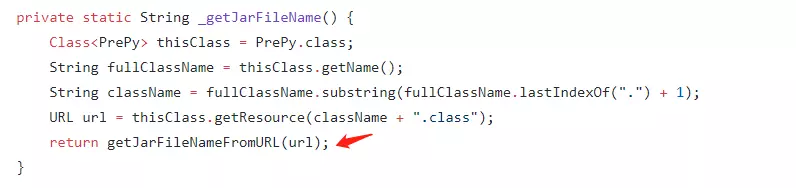
	at org.python.core.PrePy.getJarFileNameFromURL(PrePy.java:427)
	at org.python.core.PrePy._getJarFileName(PrePy.java:362)
	at org.python.core.PrePy.getJarFileName(PrePy.java:345)
	at org.python.core.PySystemState.doInitialize(PySystemState.java:1195)
	at org.python.core.PySystemState.initialize(PySystemState.java:1130)
	at org.python.core.PySystemState.initialize(PySystemState.java:1085)
	at org.python.core.PySystemState.initialize(PySystemState.java:1080)
	at org.python.core.PySystemState.initialize(PySystemState.java:1075)
	at org.python.core.PySystemState.initialize(PySystemState.java:1070)
	at org.python.core.ThreadStateMapping.getThreadState(ThreadStateMapping.java:56)
	at org.python.core.Py.getThreadState(Py.java:1741)
	at org.python.core.Py.getThreadState(Py.java:1737)
	at org.python.core.Py.getSystemState(Py.java:1757)
	at org.python.util.PythonInterpreter.<init>(PythonInterpreter.java:100)
	at org.python.util.PythonInterpreter.<init>(PythonInterpreter.java:93)
	at org.python.util.PythonInterpreter.<init>(PythonInterpreter.java:70)
	at com.example.kimnara.controller.KafkaProducer.invokPy(KafkaProducer.java:138)
	at sun.reflect.NativeMethodAccessorImpl.invoke0(Native Method)
	at sun.reflect.NativeMethodAccessorImpl.invoke(NativeMethodAccessorImpl.java:62)
	at sun.reflect.DelegatingMethodAccessorImpl.invoke(DelegatingMethodAccessorImpl.java:43)
	at java.lang.reflect.Method.invoke(Method.java:498)
	at org.springframework.web.method.support.InvocableHandlerMethod.doInvoke(InvocableHandlerMethod.java:190)
	at org.springframework.web.method.support.InvocableHandlerMethod.invokeForRequest(InvocableHandlerMethod.java:138)
	at org.springframework.web.servlet.mvc.method.annotation.ServletInvocableHandlerMethod.invokeAndHandle(ServletInvocableHandlerMethod.java:105)
	at org.springframework.web.servlet.mvc.method.annotation.RequestMappingHandlerAdapter.invokeHandlerMethod(RequestMappingHandlerAdapter.java:878)
	at org.springframework.web.servlet.mvc.method.annotation.RequestMappingHandlerAdapter.handleInternal(RequestMappingHandlerAdapter.java:792)

Remote breakpoint discovery through idea
the URL found is as follows: jar: File:/D:/Maven/apache-maven-3.3.9/repository/org/python/jython/2.7.2/jython-2.7.2.jar/ Org/Python/core/prep.class
nesting cannot be used
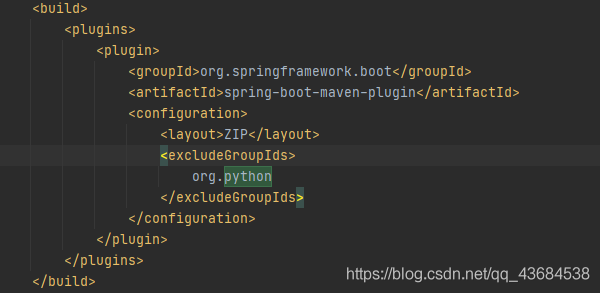
solution: Jython will be eliminated when Maven is packaged; Just load the external jar package at runtime.

    <build>
        <plugins>
            <plugin>
                <groupId>org.springframework.boot</groupId>
                <artifactId>spring-boot-maven-plugin</artifactId>
                <configuration>
                    <layout>ZIP</layout>
                    <excludeGroupIds>
                        org.python
                    </excludeGroupIds>
                </configuration>
            </plugin>
        </plugins>
    </build>


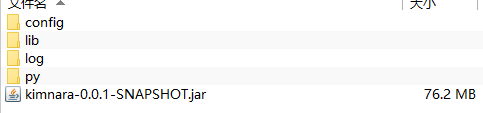
java -Dloader.path=“lib/” -jar kimnara-0.0.1-SNAPSHOT.jar
The jar package placed inside the lib

How to Solve Msys2/mingw64 Run cmake GUI Error

August 24, 2021
It has been updated to the latest version.

MINGW64 ~
$ cmake-gui –version
cmake version 3.21.1
CMake suite maintained and supported by Kitware (kitware.com/cmake).

But still error as below:

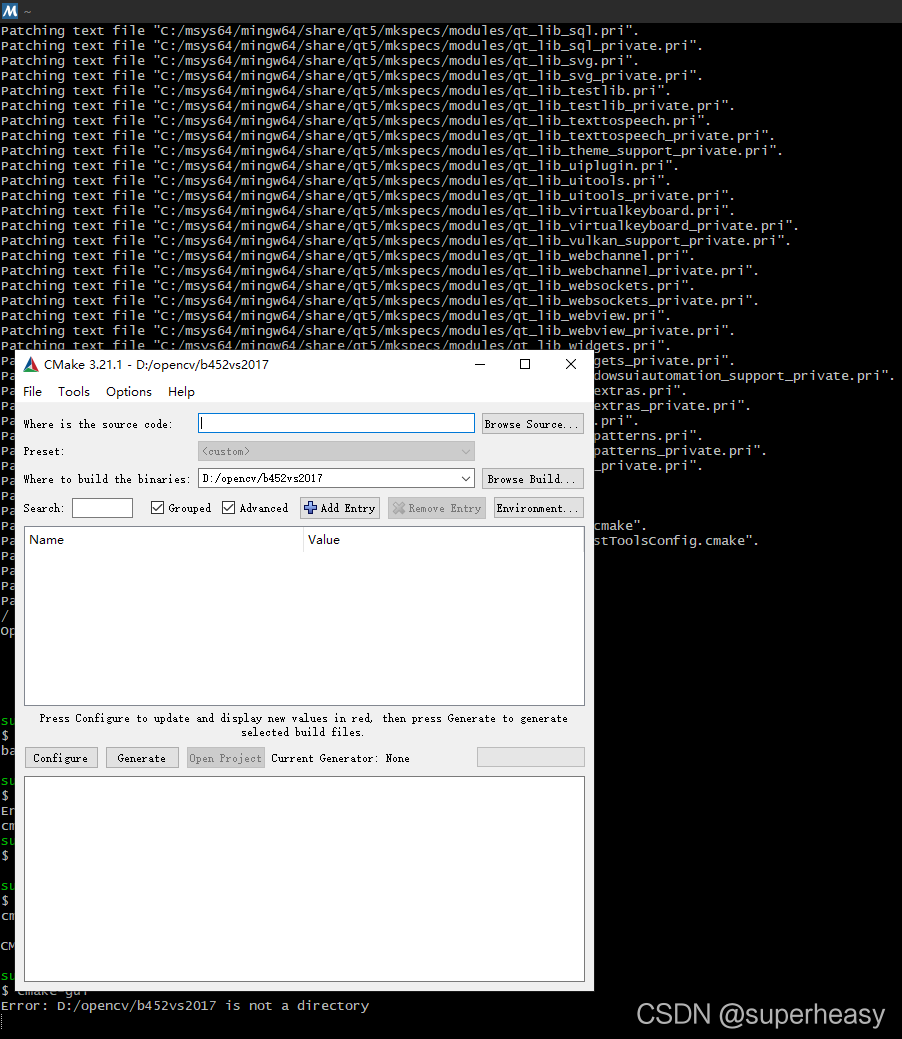
$ cmake-gui
C:/msys64/mingw64/bin/cmake-gui.exe: error while loading shared libraries: zlib1.dll: cannot open shared object file: No such file or directory

Finally found that the installation of qt5 can be solved

pacman -S mingw-w64-x86_64-qt5
resolving dependencies…
looking for conflicting packages…
Packages (16) mingw-w64-x86_64-assimp-5.0.1-11  mingw-w64-x86_64-dbus-1.12.20-3  mingw-w64-x86_64-double-conversion-3.1.5-1  mingw-w64-x86_64-icu-debug-libs-68.2-3  mingw-w64-x86_64-libgcrypt-1.9.2-2
mingw-w64-x86_64-libgpg-error-1.42-1  mingw-w64-x86_64-libmng-2.0.3-4  mingw-w64-x86_64-libmysofa-1.2-1  mingw-w64-x86_64-libxslt-1.1.34-4  mingw-w64-x86_64-minizip-git-1.2.445.e67b996-2  mingw-w64-x86_64-openal-1.21.1-2
mingw-w64-x86_64-pcre2-10.36-1  mingw-w64-x86_64-qtbinpatcher-2.2.0-4  mingw-w64-x86_64-xpm-nox-4.2.0-6  mingw-w64-x86_64-z3-4.8.9-2  mingw-w64-x86_64-qt5-5.15.2-10
Total Download Size:   223.16 MiB
Total Installed Size:  873.75 MiB
…………………………

then re-run:

cmake-gui

You will be able to value the dialog box of the gui pop-up!

Huawei kafka Authentication error: Server not found in Kerberos database (7) – LOOKING_UP_SERVER

Error reporting original text

principal is [email protected]
Will use keytab
Commit Succeeded 

21/08/23 10:20:14 INFO NewConsumer: subscribe:bc_test
Exception in thread "main" java.lang.reflect.InvocationTargetException
	at sun.reflect.NativeMethodAccessorImpl.invoke0(Native Method)
	at sun.reflect.NativeMethodAccessorImpl.invoke(NativeMethodAccessorImpl.java:62)
	at sun.reflect.DelegatingMethodAccessorImpl.invoke(DelegatingMethodAccessorImpl.java:43)
	at java.lang.reflect.Method.invoke(Method.java:498)
	at org.springframework.boot.loader.MainMethodRunner.run(MainMethodRunner.java:49)
	at org.springframework.boot.loader.Launcher.launch(Launcher.java:108)
	at org.springframework.boot.loader.Launcher.launch(Launcher.java:58)
	at org.springframework.boot.loader.JarLauncher.main(JarLauncher.java:88)
Caused by: org.apache.kafka.common.errors.SaslAuthenticationException: An error: (java.security.PrivilegedActionException: javax.security.sasl.SaslException: GSS initiate failed [Caused by GSSException: No valid credentials provided (Mechanism level: Server not found in Kerberos database (7) - LOOKING_UP_SERVER)]) occurred when evaluating SASL token received from the Kafka Broker. Kafka Client will go to AUTHENTICATION_FAILED state.
Caused by: javax.security.sasl.SaslException: GSS initiate failed [Caused by GSSException: No valid credentials provided (Mechanism level: Server not found in Kerberos database (7) - LOOKING_UP_SERVER)]
	at com.sun.security.sasl.gsskerb.GssKrb5Client.evaluateChallenge(GssKrb5Client.java:211)
	at org.apache.kafka.common.security.authenticator.SaslClientAuthenticator$2.run(SaslClientAuthenticator.java:361)
	at org.apache.kafka.common.security.authenticator.SaslClientAuthenticator$2.run(SaslClientAuthenticator.java:359)
	at java.security.AccessController.doPrivileged(Native Method)
	at javax.security.auth.Subject.doAs(Subject.java:422)
	at org.apache.kafka.common.security.authenticator.SaslClientAuthenticator.createSaslToken(SaslClientAuthenticator.java:359)
	at org.apache.kafka.common.security.authenticator.SaslClientAuthenticator.sendSaslClientToken(SaslClientAuthenticator.java:269)
	at org.apache.kafka.common.security.authenticator.SaslClientAuthenticator.authenticate(SaslClientAuthenticator.java:206)
	at org.apache.kafka.common.network.KafkaChannel.prepare(KafkaChannel.java:81)
	at org.apache.kafka.common.network.Selector.pollSelectionKeys(Selector.java:486)
	at org.apache.kafka.common.network.Selector.poll(Selector.java:424)
	at org.apache.kafka.clients.NetworkClient.poll(NetworkClient.java:460)
	at org.apache.kafka.clients.consumer.internals.ConsumerNetworkClient.poll(ConsumerNetworkClient.java:261)
	at org.apache.kafka.clients.consumer.internals.ConsumerNetworkClient.poll(ConsumerNetworkClient.java:233)
	at org.apache.kafka.clients.consumer.internals.ConsumerNetworkClient.poll(ConsumerNetworkClient.java:209)
	at org.apache.kafka.clients.consumer.internals.AbstractCoordinator.ensureCoordinatorReady(AbstractCoordinator.java:219)
	at org.apache.kafka.clients.consumer.internals.AbstractCoordinator.ensureCoordinatorReady(AbstractCoordinator.java:205)
	at org.apache.kafka.clients.consumer.internals.ConsumerCoordinator.poll(ConsumerCoordinator.java:279)
	at org.apache.kafka.clients.consumer.KafkaConsumer.pollOnce(KafkaConsumer.java:1149)
	at org.apache.kafka.clients.consumer.KafkaConsumer.poll(KafkaConsumer.java:1115)
	at receive.NewConsumer.doWork(NewConsumer.java:102)
	at receive.NewConsumer.main(NewConsumer.java:127)
	at sun.reflect.NativeMethodAccessorImpl.invoke0(Native Method)
	at sun.reflect.NativeMethodAccessorImpl.invoke(NativeMethodAccessorImpl.java:62)
	at sun.reflect.DelegatingMethodAccessorImpl.invoke(DelegatingMethodAccessorImpl.java:43)
	at java.lang.reflect.Method.invoke(Method.java:498)
	at org.springframework.boot.loader.MainMethodRunner.run(MainMethodRunner.java:49)
	at org.springframework.boot.loader.Launcher.launch(Launcher.java:108)
	at org.springframework.boot.loader.Launcher.launch(Launcher.java:58)
	at org.springframework.boot.loader.JarLauncher.main(JarLauncher.java:88)
Caused by: GSSException: No valid credentials provided (Mechanism level: Server not found in Kerberos database (7) - LOOKING_UP_SERVER)
	at sun.security.jgss.krb5.Krb5Context.initSecContext(Krb5Context.java:770)
	at sun.security.jgss.GSSContextImpl.initSecContext(GSSContextImpl.java:248)
	at sun.security.jgss.GSSContextImpl.initSecContext(GSSContextImpl.java:179)
	at com.sun.security.sasl.gsskerb.GssKrb5Client.evaluateChallenge(GssKrb5Client.java:192)
	... 29 more
Caused by: KrbException: Server not found in Kerberos database (7) - LOOKING_UP_SERVER
	at sun.security.krb5.KrbTgsRep.<init>(KrbTgsRep.java:73)
	at sun.security.krb5.KrbTgsReq.getReply(KrbTgsReq.java:251)
	at sun.security.krb5.KrbTgsReq.sendAndGetCreds(KrbTgsReq.java:262)
	at sun.security.krb5.internal.CredentialsUtil.serviceCreds(CredentialsUtil.java:308)
	at sun.security.krb5.internal.CredentialsUtil.acquireServiceCreds(CredentialsUtil.java:126)
	at sun.security.krb5.Credentials.acquireServiceCreds(Credentials.java:458)
	at sun.security.jgss.krb5.Krb5Context.initSecContext(Krb5Context.java:693)
	... 32 more
Caused by: KrbException: Identifier doesn't match expected value (906)
	at sun.security.krb5.internal.KDCRep.init(KDCRep.java:140)
	at sun.security.krb5.internal.TGSRep.init(TGSRep.java:65)
	at sun.security.krb5.internal.TGSRep.<init>(TGSRep.java:60)
	at sun.security.krb5.KrbTgsRep.<init>(KrbTgsRep.java:55)
	... 38 more


Solution:

After troubleshooting the error reported by connecting to Huawei big data platform, it was found that the Kerberos authentication passed, because the words will use KeyTab commit succeeded appeared, and there was an exception message when creating a consumer. The methods on the Internet have been tried, such as configuring hosts, checking the generated jaas.conf file, comparing krb5 files, etc
finally, replace Kafka’s dependent package with Huawei’s three packages (Kafka)_ 2.11-1.1.0.jar, kafka-clients-1.1.0.jar, zookeeper-3.5.1. Jar) passed!

Maven local package

Maven’s command to install jar package is:
MVN install: install file
– dfile = jar package location
– dgroupid = groupid in POM file
– dartifactid = artifactid in POM file
– dversion = version in POM file
– dpacking = jar

mvn install:install-file -Dfile=./kafka_2.11-1.1.0.jar -DgroupId=org.apache.kafka -DartifactId=kafka_2.11 -Dversion=1.1.0-hw -Dpackaging=jar

Maven introduction

       <dependency>
            <groupId>org.apache.kafka</groupId>
            <artifactId>kafka_2.11</artifactId>
            <version>1.1.0-hw</version>
        </dependency>

Httprunner Run Error: while parsing a block mapping

When I first came into contact with httprunner, I was not familiar with the YML format. After running the use case, I reported an error while parsing a block mapping
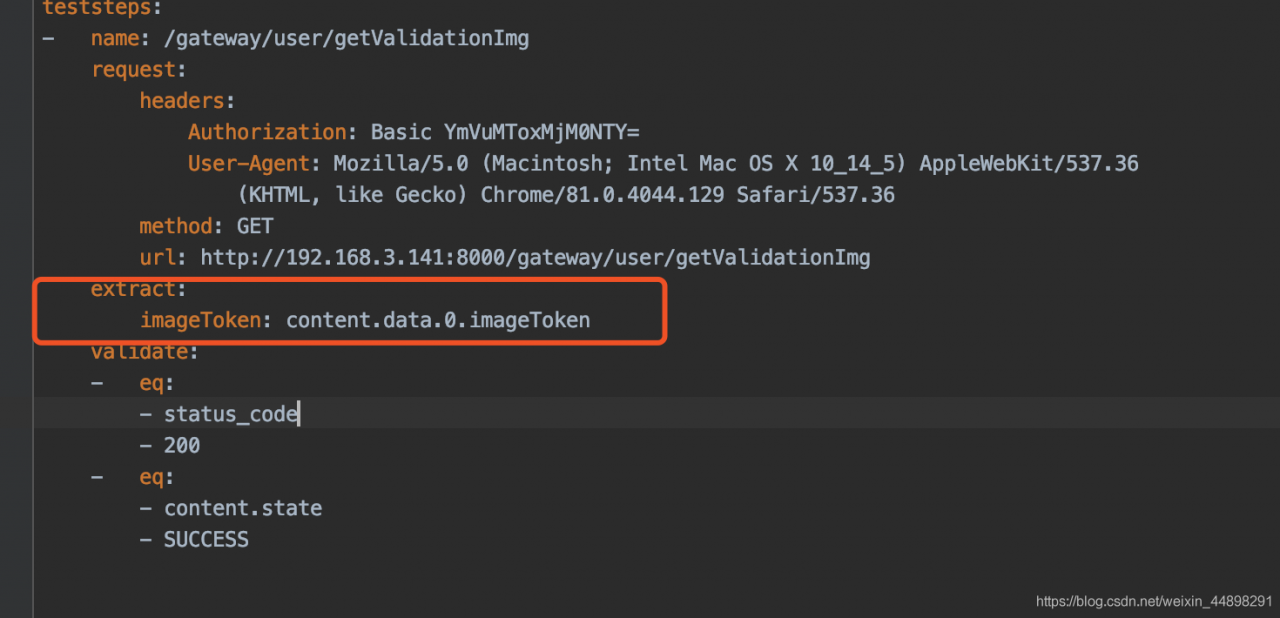
an error is reported as shown in the figure:

after checking the data, it is said that there is no alignment. It is recommended to use space alignment. Then find my 9 lines, find that the number of spaces is different from the others, and then use spaces to keep consistent with the others.

For example, in my extract, I counted the four spaces before the request, counted the first four spaces before the extract, and found that they were not four. After changing them, I succeeded. PS: because the number of extracted spaces in the front is wrong, and the spaces of imagetoken below are also wrong. They will succeed after they are changed together

Laravel model save if the table has no ID field Error [How to Solve]

$model = Test::first();
$model->status = 2;
$model->save();

If the Test model does not have an ID field in the corresponding table, an error will be reported

Illuminate\Database\QueryException: SQLSTATE[42S22]: Column not found: 1054 Unknown column ‘id’ in ‘where clause’ (SQL: update test set status = 2, test.updated_at = 2020-09-04 15:03:06 where id is null) in file D:\www\wb-mg\vendor\laravel\framework\src\Illuminate\Database\Connection.php on line 671

As you can see above, save() is to match the updated data through the id field, so don’t use save() if the table doesn’t have an ID field.

[Solved] Vue3 Error: Cannot use ‘in‘ operator to search for ‘path‘ in undefined

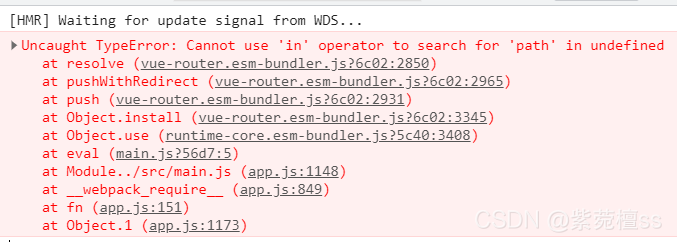
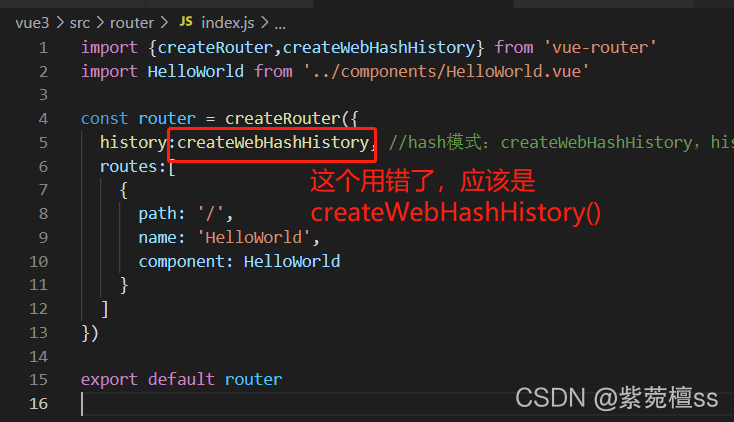
when creating the route of vue3, an error is reported: cannot use 'in' operator to search for 'path' in undefined . After many troubleshooting, it is found that I used the createwebhashhistory() method incorrectly in the route file and used it as a variable.

1. Error reporting

2. Causes and solutions of error reporting

this error is reported because I mistakenly used the createwebhashhistory() method in the routing file and used it as a variable. I just need to write it as a method to solve the problem.

hope to help you!!!

An error occurred when starting Tomcat in Eclipse: the sub container failed to start

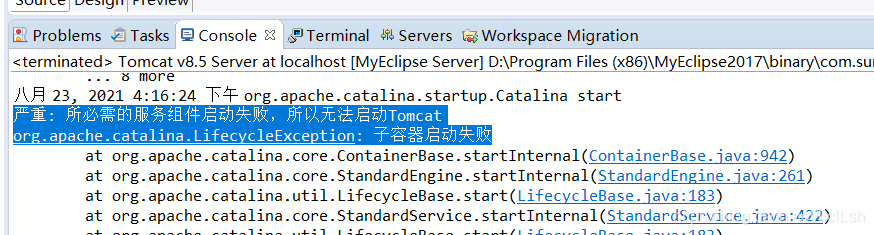
Recently, I used Tomcat in learning java web. Several projects have been created in the early stage, and Tomcat runs normally. Recently, I felt that there were too many projects, which was a hindrance, so I deleted them from the current workspace. Re create a new project. It is found that Tomcat startup fails with an error:

         Critical: the required service components failed to start, so Tomcat cannot be started
         Org.apache.catalina.lifecycleexception: sub container startup failed

  There is a conf configuration folder under the Tomcat installation directory. Open server.xml and there will be & lt; context …….>

  Each time a new project is added to tomcat, an & lt; context ……>, Just delete all the previous ones.

Only delete the context tag, don’t delete & lt/ Host>

View – neditor – empty packaging style

Using Vue neditor wrap

When we use a rich text editor in a project, a style of null error may occur

solve

1. Let’s check the version of Vue in package.lock.json file first. The version of Vue neditor wrap must be above vue2, and 1. Several versions cannot use

2. Use NPM instead of yarn when downloading dependencies

Free(): invalid pointer error when libtorch runs under Linux

[questions]

Libtorch GPU 1.2.0 and GCC version 5.4.0 are compiled under linux environment. The compilation is normal, but the following errors occur during operation:

*** Error in `./xxx/xxx/xxx': free(): invalid pointer: 0x00007f52a2101c50 ***
======= Backtrace: =========
/lib64/libc.so.6(+0x81329)[0x7f520ec08329]
/xxx/build/lib/libobject_detector.so(_ZN8nvinfer115PluginRegistrarINS_17YoloPluginCreatorEED2Ev+0x48)[0x7f52a1eeeb68]
/lib64/libc.so.6(__cxa_finalize+0x9a)[0x7f520ebc105a]
/data/hxy/git/6s_factory_analysis_ddb/code/build/lib/libobject_detector.so(+0x17123)[0x7f52a1ec8123]
======= Memory map: ========
00400000-00484000 r-xp 00000000 08:01 144443223
00684000-00687000 r--p 00084000 08:01 144443223
00687000-00688000 rw-p 00087000 08:01 144443223
00688000-00689000 rw-p 00000000 00:00 0 
00919000-107cb9000 rw-p 00000000 00:00 0                                 [heap]
200000000-200200000 ---p 00000000 00:00 0 
200200000-200400000 rw-s 00000000 00:05 40161                            /dev/nvidiactl

Query similar problems in the official issue of pytoch, which are related to C + + abi

C + + ABI related issues

When you upgrade GCC Version (above 5.1), if you recompile the whole code, you will basically not encounter ABI problems. However, if you also rely on dynamic libraries compiled by other third parties, which are compiled with the old version of GCC (such as GCC 4.8), you may encounter ABI problems. At this time, add a definition - D during compilation_ GLIBCXX_ USE_ CXX11_ ABI = 0 , then there should be no problem.

The GCC version of the libtorch GPU (1.2.0) tripartite library that the project relies on should be a running problem caused by still using the old abi

[solution]

Cmakelist.txt

add_definitions(-D_GLIBCXX_USE_CXX11_ABI=0)

After compiling and running, the problem is solved!

[note]

After configuring cmake, pay attention to GCC and cxx versions to ensure the consistency of versions

cmake -DCMAKE_CXX_COMPILER=$(which g++) -DCMAKE_C_COMPILER=$(which gcc) ..

Confirm that the version is 5.4.0

-- The C compiler identification is GNU 5.4.0
-- The CXX compiler identification is GNU 5.4.0
-- Check for working C compiler: /usr/local/bin/gcc
-- Check for working C compiler: /usr/local/bin/gcc -- works
-- Detecting C compiler ABI info
-- Detecting C compiler ABI info - done
-- Detecting C compile features
-- Detecting C compile features - done
-- Check for working CXX compiler: /usr/local/bin/g++
-- Check for working CXX compiler: /usr/local/bin/g++ -- works
-- Detecting CXX compiler ABI info
-- Detecting CXX compiler ABI info - done
-- Detecting CXX compile features
-- Detecting CXX compile features - done

(SINGING)

https://zhuanlan.zhihu.com/p/125197727

https://github.com/pytorch/pytorch/issues/30507