Author Archives: Robins

Tomcat: “localhost:8080” Error 401: Unauthorized

To sum up the unauthorized: 401 error encountered for the first time, in fact, a very simple error:

When running tomcat, when I enter localhost: 8080, a prompt box pops up:
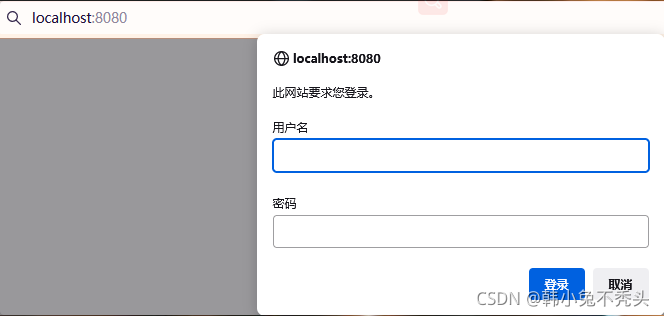
requires a user name and password to log in, that is, I do not have access rights. When clicking cancel:
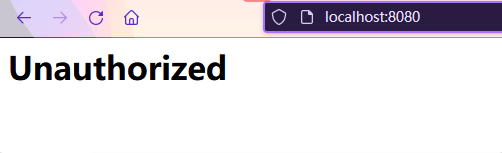
error 401: unauthorized

analysis

Any client (such as your browser) needs to pass the following cycle: obtain an IP address from the IP name of the site (i.e. your site URL, without the initial ‘http://’). This correspondence (i.e. the correspondence from IP name to IP address translation) is provided by domain name servers (dnss).

Open an IP socket to connect to the IP address. Write HTTP data stream through this socket. The HTTP data stream that receives the response from the web server. The data stream includes a status code whose value depends on the HTTP protocol. Parse the data stream to get state code and other useful information.

The error is generated in the last step described above, that is, when the client receives the HTTP status code and identifies it as 401. After the browser receives the 401 error message, it explains it and provides a dialog box for entering user name/password. Send to the server after completion. After the server verifies, it sends the requested resources to the browser when the verification passes, otherwise it may send 401 error messages.

Solution:

My error at that time was that the port number was occupied: so release the port or redefine the new port number
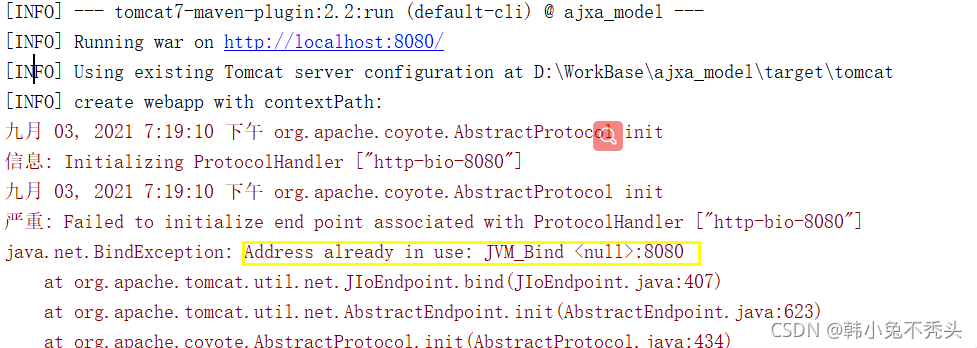
extension
HTTP 400 – the request is invalid;

Http 401.1 – unauthorized: login failed;

Http 401.2 – unauthorized: login failed due to server configuration problems;

Http 401.3 – ACL prohibits access to resources;

Http 401.4 – unauthorized: authorization is rejected by the filter;

Http 401.5 – unauthorized: ISAPI or CGI authorization failed

Error: the version of ZABBIX database does not match the current requirements

Error: the ZABBIX database version does not match current requirements. Your database version: 5000000. Required version: 4000000. Please contact your system administrator

Cause of problem:
the current database version is inconsistent with the required database version
solution:
log in to the database and modify the mandatory value of the database version to 4000000

MariaDB [(none)]> use zabbix;
Reading table information for completion of table and column names
You can turn off this feature to get a quicker startup with -A

Database changed
MariaDB [zabbix]> select version();
+----------------+
| version()      |
+----------------+
| 5.5.68-MariaDB |
+----------------+
1 row in set (0.00 sec)

MariaDB [zabbix]> update dbversion set mandatory=4000000;
Query OK, 1 row affected (0.00 sec)
Rows matched: 1  Changed: 1  Warnings: 0

MariaDB [zabbix]> flush privileges;
Query OK, 0 rows affected (0.00 sec)

MariaDB [zabbix]> select version();

Restart ZABBIX server

Solve the problem of reporting errors when tsfresh downloads UCI har dataset

Problem description

Run this code`

from tsfresh.examples.har_dataset import download_har_dataset, load_har_dataset, load_har_classes

# fetch dataset from uci
download_har_dataset()

Then an error is reported
connectionerror: httpsconnectionpool (host = ‘GitHub. Com’, port = 443): Max retries exceeded with URL:/maxbenchrist/human activity dataset/blob/Master/UCI% 20har% 20dataset. Zip?Raw = true (caused by newconnectionerror (‘lt; urllib3.connection.HTTPSConnection object at 0x0000023C7EDBDEE0>: Failed to establish a new connection: [winerror 10060] the connection attempt failed because the connecting party did not reply correctly after a period of time or the connected host did not respond. ‘)

resolvent

    open link
    [ https://github.com/MaxBenChrist/human-activity-dataset.git ]
    manually download the dataset, manually copy the human activity dataset master to ~/anaconda3/lib/site packages/tsfresh/examples/data/UCI har dataset, and rename it to UCI har dataset

    be careful:

    The location of the folder must be correct, otherwise an error will be reported
    location: ~/anaconda3/lib/site packages/tsfresh/examples/data/UCI har dataset/UCI har dataset

    Then you can load the data correctly!!!!!!

Solution to error reporting in opencv4.0 compilation of logo-logo

Problem Description:

Recently, when learning integrated navigation, Ubuntu 20 + opencv4.0 was used. When compiling logo-beam, the following error messages were encountered:

10: fatal error: opencv/CV. H: no such file or directory
13 |#include & lt; opencv/cv.h>

Solution:

This is caused by the version change of OpenCV library. Put #include & lt; opencv/cv.h> Replace with #include & lt; opencv2/opencv.hpp> Just.

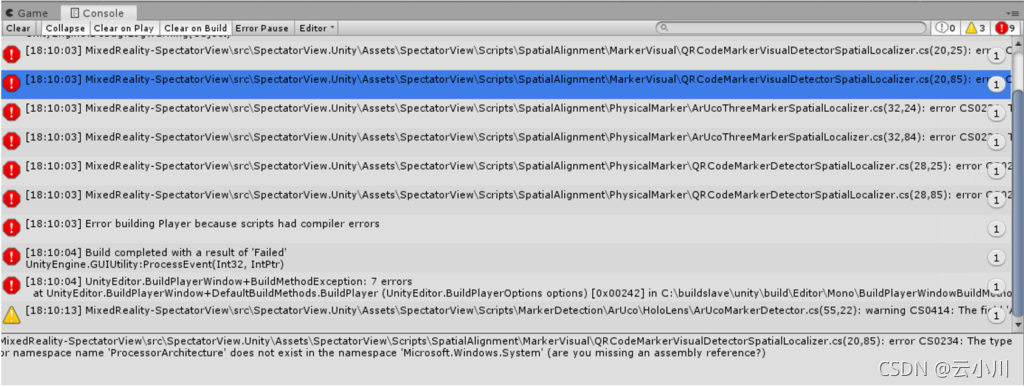
Hololens2 reported an error. Microsoft.windows.system is missing

Assets\Microsoft.MixedReality.WebRTC.Unity\Scripts\Media\LocalVideoSource.cs(234,89): error CS0234: The type or namespace name ‘ProcessorArchitecture’ does not exist in the namespace ‘Microsoft.Windows.System’ (are you missing an assembly reference?)

Click the error reporting line to enter the code:

Method 1: modify the official code pre instruction   UNITY_ Wsa changed to   UNITY_ UWP

Method 2: directly delete the official judgment, and the code judges whether it is hololens1    , Return according to your judgment   True or false

  I use   Method two!

VirtualBox reports an error supr3hardenedwinrespawn what 5 when opening the virtual machine

Phenomenon:

After installing virtuabox for the first time, you can open the software normally and successfully install the Ubuntu virtual machine. However, once you restart the computer (win10 enterprise 1607), open the VirtualBox software again and click start the virtual machine, an error will appear: “VirtualBox sur3hardenedwinrespawn what 5 Verr_ invalid_ name (-104)”

resolvent:

Open registry as administrator: regedit

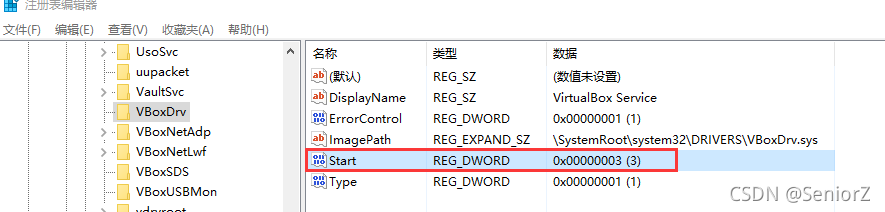
Find HKEY_ LOCAL_ MACHINE\SYSTEM\CurrentControlSet\services\VBoxDrv

Change the start attribute value from 1 to 3

Create a script file, start_ VBoxDrv .bat


Script content:

@echo off

sc start vboxdrv

pause

Run start as Administrator_ Vboxdrv. Bat, and then restart the computer. After starting, run start again as an administrator_ Vboxdrv. Bat, and then you can use the VirtualBox virtual machine normally

Conclusion:

be careful:

Run start every time you restart the system_ Vboxdrv.bat, and then open the virtual machine to solve this problem

reference material:

https://forums.virtualbox.org/viewtopic.php?f=6&amp ; t=82277

Unity Android solves the problem of information flow advertisement closing and error reporting

This error often occurs when unity connects to some native andorid SDKs:

W/system. Err: Android. View. Viewrootimpl $calledfromwrongthreadexception: only the original thread that created a view hierarchy can touch its views.
the solution is to use runonuithread() in the java file written by the Android layer

The reason is that the UI update of Android needs to be in the main UI thread, and some callbacks of the advertising SDK are not in this thread

reference material:

https://www.jianshu.com/p/866743c0356b

https://blog.csdn.net/cf8833/article/details/90297775

HDFS and local file transfer and error reporting

  Exception during HDFS and local file transfer in Maven project:
  org.apache.hadoop.io.nativeio.NativeIO$Windows.createFileWithMode0(Ljava/lang/String; JJJI)Ljava/io/FileDescriptor;
  org.apache.hadoop.util.NativeCrc32.nativeComputeChunkedSumsByteArray(II[BI[BIILjava/lang/String; JZ)V

  Solution: add hadoop.dll and winutils files in the windows/system32 directory of the local C disk (in the bin directory of Hadoop) and
in the system environment variable   Configure Hadoop_ Home path and% Hadoop_ HOME%\bin

After openstack neutron is installed, the Linux bridge starts and the error is resolved

After openstack neutron is installed, the Linux bridge starts and the error is resolved

After the Linux bridge service is started, check the operation log and report errors. For possible solutions, refer to the blog

After the Linux bridge service is started, check the operation log and report an error

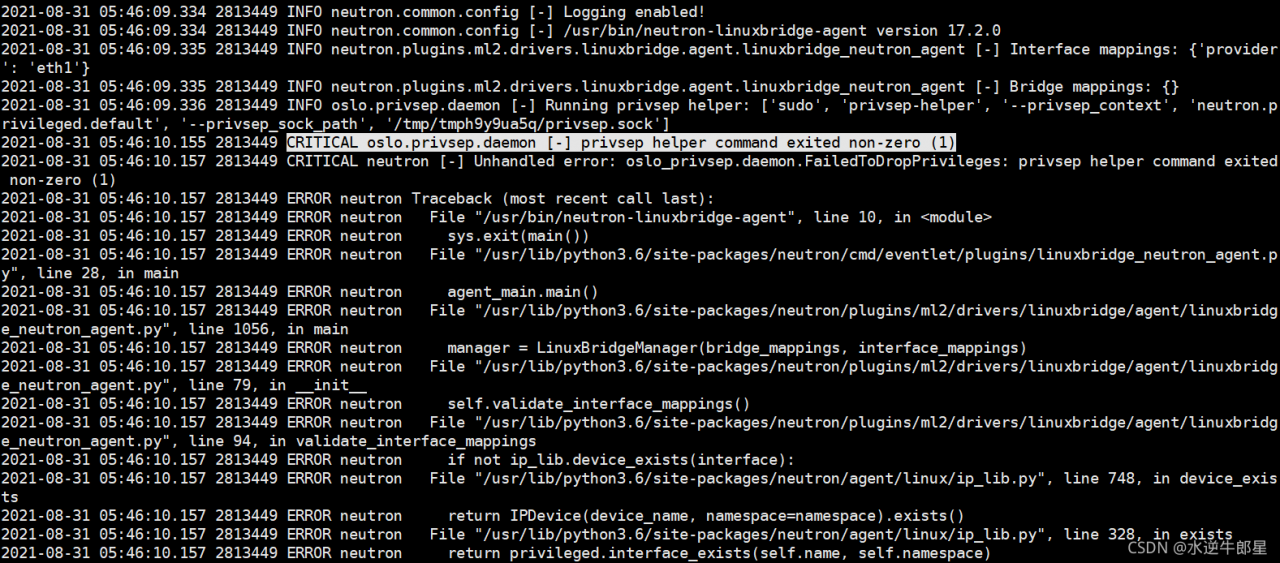
    after installing and configuring the neutron computing node component, start the linuxbridge service, which can be started, but check the operation log and find an error. The main error contents are:
Oslo_ Privsep.daemon.failedtodropprivileges: privsep helper command exited non zero (1)

    at this time, check dhcp-agent.log and find the same error. After reading several blogs on Baidu, the positioning problem is the permission problem.

Possible solutions

1. First, close SELinux. It is possible that SELinux has access control over privsep helper programs. Modify/ etc/SELinux/config file:
change SELinux = enforcing to SELinux = disabled
restart the system: reboot
check whether the problem is solved

2. If the above methods cannot be solved, it may also be that neutron privsep needs sudo permission, but the default environment is not configured after installation. Therefore, add sudoer permission
modify the VIM/etc/neutron/neutron.conf file, and modify the following contents:

[privsep]
user = neutron
helper_command = sudo privsep-helper

Modify the VIM/etc/sudoers. D/neutron file, add the following contents, and then force save and exit

neutron ALL = (root) NOPASSWD: ALL

customer service

[1] https://www.cnblogs.com/dyd168/p/14466744.html