Author Archives: Robins

[Solved] D2lzh_Pytorch Import error: importerror: DLL load failed while importing

Import d2lzh_Pytorch reports an error, importerror: DLL load failed while importing_ Torchtext: the specified program cannot be found.!! OMG

Guide Package

import torch
import torch.nn as nn
import numpy as np
import pandas as pd
import sys
sys.path.append("..") 
import d2lzh_pytorch as d2l

The error is as follows:

ImportError: DLL load failed while importing _torchtext: The specified program could not be found.

The solution is as follows:

#check torch version
import torch
print(torch.__version__) #1.7.0

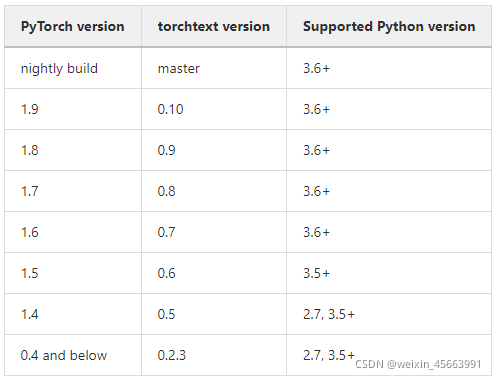
#Download the torchtext that corresponds to your own torch version
pip install torchtext==0.6

Perfect solution to the problem

[Solved] SpringBoot Startup Error: Unable to start LiveReload server

WARN 12000 — [ restartedMain] o.s.b.d.a.OptionalLiveReloadServer : Unable to start LiveReload server

Article catalog

Cause of problem: solution:

problem

0000-00-00 00:00:55.497  WARN 12000 --- [  restartedMain] o.s.b.d.a.OptionalLiveReloadServer       : Unable to start LiveReload server

reason:

When you use the springboot hot deployment plug-in devtools , and start multiple applications at the same time, the console will report this warning;

The problem is that a port is configured in devtoolsproperties. The default is 35729

       public static class Livereload {
                private boolean enabled = true;

                private int port = 35729;

        ... }

Multiple ports are in conflict, causing the hot deployment plug-in behind to not take effect.


Solution:

Add the following configuration to the application.properties file:

spring. Devtools. Livereload. Port = 35731 (specified port does not duplicate port)

[kubernetes] the pod instance of calico node always reports an error and restarts

[background]

Today, we tested the node node capacity expansion of k8s cluster. The whole process of capacity expansion was very smooth. However, it was later found that on the newly expanded node (k8s-node04), there has always been an error reported and restarted pod instance of calico node.

[phenomenon]

From the running status query results of the following pod instances, it can be found that a pod instance (calico-node-xl9bc) is constantly restarting.

[root@k8s-master01 ~]# kubectl get pods -A| grep calico
kube-system            calico-kube-controllers-78d6f96c7b-tv2g6               1/1     Running     0          75m
kube-system            calico-node-6dk7g                                      1/1     Running     0          75m
kube-system            calico-node-dlf26                                      1/1     Running     0          75m
kube-system            calico-node-s5phd                                      1/1     Running     0          75m
kube-system            calico-node-xl9bc                                      0/1     Running     30          3m28s

[troubleshooting]

Query the log of pod

[root@k8s-master01 ~]# kubectl logs calico-node-xl9bc -n kube-system -f

2021-09-04 12:32:45.011 [ERROR][69] felix/health.go 246: Health endpoint failed, trying to restart it... error=listen tcp: lookup localhost on 114.114.114.114:53: no such host
2021-09-04 12:32:46.025 [ERROR][69] felix/health.go 246: Health endpoint failed, trying to restart it... error=listen tcp: lookup localhost on 114.114.114.114:53: no such host
2021-09-04 12:32:47.038 [ERROR][69] felix/health.go 246: Health endpoint failed, trying to restart it... error=listen tcp: lookup localhost on 114.114.114.114:53: no such host
2021-09-04 12:32:48.050 [ERROR][69] felix/health.go 246: Health endpoint failed, trying to restart it... error=listen tcp: lookup localhost on 114.114.114.114:53: no such host
2021-09-04 12:32:49.061 [ERROR][69] felix/health.go 246: Health endpoint failed, trying to restart it... error=listen tcp: lookup localhost on 114.114.114.114:53: no such host
2021-09-04 12:32:50.072 [ERROR][69] felix/health.go 246: Health endpoint failed, trying to restart it... error=listen tcp: lookup localhost on 114.114.114.114:53: no such host
2021-09-04 12:32:51.079 [ERROR][69] felix/health.go 246: Health endpoint failed, trying to restart it... error=listen tcp: lookup localhost on 114.114.114.114:53: no such host
2021-09-04 12:32:52.093 [ERROR][69] felix/health.go 246: Health endpoint failed, trying to restart it... error=listen tcp: lookup localhost on 114.114.114.114:53: no such host
2021-09-04 12:32:53.104 [ERROR][69] felix/health.go 246: Health endpoint failed, trying to restart it... error=listen tcp: lookup localhost on 114.114.114.114:53: no such host
2021-09-04 12:32:54.114 [ERROR][69] felix/health.go 246: Health endpoint failed, trying to restart it... error=listen tcp: lookup localhost on 114.114.114.114:53: no such host
2021-09-04 12:32:55.127 [ERROR][69] felix/health.go 246: Health endpoint failed, trying to restart it... error=listen tcp: lookup localhost on 114.114.114.114:53: no such host
2021-09-04 12:32:56.138 [ERROR][69] felix/health.go 246: Health endpoint failed, trying to restart it... error=listen tcp: lookup localhost on 114.114.114.114:53: no such host
2021-09-04 12:32:57.148 [ERROR][69] felix/health.go 246: Health endpoint failed, trying to restart it... error=listen tcp: lookup localhost on 114.114.114.114:53: no such host
2021-09-04 12:32:58.162 [ERROR][69] felix/health.go 246: Health endpoint failed, trying to restart it... error=listen tcp: lookup localhost on 114.114.114.114:53: no such host
2021-09-04 12:32:59.176 [ERROR][69] felix/health.go 246: Health endpoint failed, trying to restart it... error=listen tcp: lookup localhost on 114.114.114.114:53: no such host
2021-09-04 12:33:00.186 [ERROR][69] felix/health.go 246: Health endpoint failed, trying to restart it... error=listen tcp: lookup localhost on 114.114.114.114:53: no such host
2021-09-04 12:33:01.199 [ERROR][69] felix/health.go 246: Health endpoint failed, trying to restart it... error=listen tcp: lookup localhost on 114.114.114.114:53: no such host
2021-09-04 12:33:02.211 [ERROR][69] felix/health.go 246: Health endpoint failed, trying to restart it... error=listen tcp: lookup localhost on 114.114.114.114:53: no such host
2021-09-04 12:33:03.225 [ERROR][69] felix/health.go 246: Health endpoint failed, trying to restart it... error=listen tcp: lookup localhost on 114.114.114.114:53: no such host
2021-09-04 12:33:04.238 [ERROR][69] felix/health.go 246: Health endpoint failed, trying to restart it... error=listen tcp: lookup localhost on 114.114.114.114:53: no such host

This error report has been searched on the Internet for a long time, and no targeted solution has been found.

As like as two peas of IPv4 and IPv6, the /etc/hosts file was found to be missing from the two files of the node file. It turned out to be a little bit wrong with the /etc/hosts file of my local node node. I didn’t know that when I installed the virtual machine last night, I did not know that the last time I installed it on my own. What strange operation did you do.

### /etc/hosts
127.0.0.1   localhost localhost.localdomain localhost4 localhost4.localdomain4
::1         localhost localhost.localdomain localhost6 localhost6.localdomain6

After adding these two lines of configuration in the/etc/hosts file of k8s-node04, restart the network and find that crashloopbackoff occurs in the pod instance.

[root@k8s-master01 ~]# kubectl get pods -A| grep calico
kube-system            calico-kube-controllers-78d6f96c7b-tv2g6               1/1     Running            0          80m
kube-system            calico-node-6dk7g                                      1/1     Running            0          80m
kube-system            calico-node-dlf26                                      1/1     Running            0          80m
kube-system            calico-node-s5phd                                      1/1     Running            0          80m
kube-system            calico-node-xl9bc                                      0/1     CrashLoopBackOff   7          8m24s

After deleting this pod instance, it is found that the running state of the recreated pod instance finally returns to normal.

[root@k8s-master01 ~]# kubectl delete pod calico-node-xl9bc -n kube-system
pod "calico-node-xl9bc" deleted
[root@k8s-master01 ~]# kubectl get pods -A| grep calico
kube-system            calico-kube-controllers-78d6f96c7b-tv2g6               1/1     Running     0          81m
kube-system            calico-node-6dk7g                                      1/1     Running     0          81m
kube-system            calico-node-dlf26                                      1/1     Running     0          81m
kube-system            calico-node-mz58r                                      0/1     Running     0          5s
kube-system            calico-node-s5phd                                      1/1     Running     0          81m
[root@k8s-master01 ~]# kubectl get pods -A| grep calico
kube-system            calico-kube-controllers-78d6f96c7b-tv2g6               1/1     Running     0          81m
kube-system            calico-node-6dk7g                                      1/1     Running     0          81m
kube-system            calico-node-dlf26                                      1/1     Running     0          81m
kube-system            calico-node-mz58r                                      0/1     Running     0          7s
kube-system            calico-node-s5phd                                      1/1     Running     0          81m
[root@k8s-master01 ~]# kubectl get pods -A| grep calico
kube-system            calico-kube-controllers-78d6f96c7b-tv2g6               1/1     Running     0          81m
kube-system            calico-node-6dk7g                                      1/1     Running     0          81m
kube-system            calico-node-dlf26                                      1/1     Running     0          81m
kube-system            calico-node-mz58r                                      0/1     Running     0          8s
kube-system            calico-node-s5phd                                      1/1     Running     0          81m
[root@k8s-master01 ~]# kubectl get pods -A| grep calico
kube-system            calico-kube-controllers-78d6f96c7b-tv2g6               1/1     Running     0          81m
kube-system            calico-node-6dk7g                                      1/1     Running     0          81m
kube-system            calico-node-dlf26                                      1/1     Running     0          81m
kube-system            calico-node-mz58r                                      1/1     Running     0          11s
kube-system            calico-node-s5phd                                      1/1     Running     0          81m

Dubbo Error: getPropertyValue: inconsistent stack height -1

dubbo error:  getPropertyValue (Ljava/lang/Object;Ljava/lang/String;)Ljava/lang/Object; in com.alibaba.dubbo.common.bytecode.Wrapper8: inconsistent stack height -1
Error Message:

java.lang.RuntimeException: [source error] getPropertyValue (Ljava/lang/Object;Ljava/lang/String;)Ljava/lang/Object; in com.alibaba.dubbo.common.bytecode.Wrapper8: inconsistent stack height -1
	at com.alibaba.dubbo.common.bytecode.ClassGenerator.toClass(ClassGenerator.java:301)
	at com.alibaba.dubbo.common.bytecode.ClassGenerator.toClass(ClassGenerator.java:255)
	at com.alibaba.dubbo.common.bytecode.Wrapper.makeWrapper(Wrapper.java:245)
	at com.alibaba.dubbo.common.bytecode.Wrapper.getWrapper(Wrapper.java:107)
	at com.alibaba.dubbo.config.ServiceConfig.doExportUrlsFor1Protocol(ServiceConfig.java:445)
	at com.alibaba.dubbo.config.ServiceConfig.doExportUrls(ServiceConfig.java:358)
	at com.alibaba.dubbo.config.ServiceConfig.doExport(ServiceConfig.java:317)
	at com.alibaba.dubbo.config.ServiceConfig.export(ServiceConfig.java:216)
	at com.alibaba.dubbo.config.spring.ServiceBean.onApplicationEvent(ServiceBean.java:123)
	at com.alibaba.dubbo.config.spring.ServiceBean.onApplicationEvent(ServiceBean.java:49)
	at org.springframework.context.event.SimpleApplicationEventMulticaster.invokeListener(SimpleApplicationEventMulticaster.java:167)
	at org.springframework.context.event.SimpleApplicationEventMulticaster.multicastEvent(SimpleApplicationEventMulticaster.java:139)
	at org.springframework.context.support.AbstractApplicationContext.publishEvent(AbstractApplicationContext.java:383)
	at org.springframework.context.support.AbstractApplicationContext.publishEvent(AbstractApplicationContext.java:337)
	at org.springframework.context.support.AbstractApplicationContext.finishRefresh(AbstractApplicationContext.java:882)
	at org.springframework.context.support.AbstractApplicationContext.refresh(AbstractApplicationContext.java:545)
	at org.springframework.web.context.ContextLoader.configureAndRefreshWebApplicationContext(ContextLoader.java:443)
	at org.springframework.web.context.ContextLoader.initWebApplicationContext(ContextLoader.java:325)
	at org.springframework.web.context.ContextLoaderListener.contextInitialized(ContextLoaderListener.java:107)
	at org.apache.catalina.core.StandardContext.listenerStart(StandardContext.java:4685)
	at org.apache.catalina.core.StandardContext.startInternal(StandardContext.java:5146)
	at org.apache.catalina.util.LifecycleBase.start(LifecycleBase.java:183)
	at org.apache.catalina.core.ContainerBase$StartChild.call(ContainerBase.java:1384)
	at org.apache.catalina.core.ContainerBase$StartChild.call(ContainerBase.java:1374)
	at java.util.concurrent.FutureTask.run(FutureTask.java:266)
	at org.apache.tomcat.util.threads.InlineExecutorService.execute(InlineExecutorService.java:75)
	at java.util.concurrent.AbstractExecutorService.submit(AbstractExecutorService.java:134)
	at org.apache.catalina.core.ContainerBase.startInternal(ContainerBase.java:909)
	at org.apache.catalina.core.StandardHost.startInternal(StandardHost.java:841)
	at org.apache.catalina.util.LifecycleBase.start(LifecycleBase.java:183)
	at org.apache.catalina.core.ContainerBase$StartChild.call(ContainerBase.java:1384)
	at org.apache.catalina.core.ContainerBase$StartChild.call(ContainerBase.java:1374)
	at java.util.concurrent.FutureTask.run(FutureTask.java:266)
	at org.apache.tomcat.util.threads.InlineExecutorService.execute(InlineExecutorService.java:75)
	at java.util.concurrent.AbstractExecutorService.submit(AbstractExecutorService.java:134)
	at org.apache.catalina.core.ContainerBase.startInternal(ContainerBase.java:909)
	at org.apache.catalina.core.StandardEngine.startInternal(StandardEngine.java:262)
	at org.apache.catalina.util.LifecycleBase.start(LifecycleBase.java:183)
	at org.apache.catalina.core.StandardService.startInternal(StandardService.java:421)
	at org.apache.catalina.util.LifecycleBase.start(LifecycleBase.java:183)
	at org.apache.catalina.core.StandardServer.startInternal(StandardServer.java:932)
	at org.apache.catalina.util.LifecycleBase.start(LifecycleBase.java:183)
	at org.apache.catalina.startup.Catalina.start(Catalina.java:633)
	at sun.reflect.NativeMethodAccessorImpl.invoke0(Native Method)
	at sun.reflect.NativeMethodAccessorImpl.invoke(NativeMethodAccessorImpl.java:62)
	at sun.reflect.DelegatingMethodAccessorImpl.invoke(DelegatingMethodAccessorImpl.java:43)
	at java.lang.reflect.Method.invoke(Method.java:498)
	at org.apache.catalina.startup.Bootstrap.start(Bootstrap.java:344)
	at org.apache.catalina.startup.Bootstrap.main(Bootstrap.java:475)
Caused by: javassist.CannotCompileException: [source error] getPropertyValue (Ljava/lang/Object;Ljava/lang/String;)Ljava/lang/Object; in com.alibaba.dubbo.common.bytecode.Wrapper8: inconsistent stack height -1
	at javassist.CtNewMethod.make(CtNewMethod.java:79)
	at javassist.CtNewMethod.make(CtNewMethod.java:45)
	at com.alibaba.dubbo.common.bytecode.ClassGenerator.toClass(ClassGenerator.java:280)
	... 48 more
Caused by: compile error: getPropertyValue (Ljava/lang/Object;Ljava/lang/String;)Ljava/lang/Object; in com.alibaba.dubbo.common.bytecode.Wrapper8: inconsistent stack height -1
	at javassist.compiler.Javac.compile(Javac.java:104)
	at javassist.CtNewMethod.make(CtNewMethod.java:74)
	... 50 more

Dubbo stipulates that the interface name with empty return value in the service interface cannot start with get!

Change the name of the method starting with get or add the return value type.


[Solved] Redis Error: org.springframework.data.redis.RedisConnectionFailureExceptionjava.net.SocketTimeoutException

Error Message:
ERROR 760004 — [http-nio-443-exec-463]o.s.boot.web.support.ErrorPageFilter : Forwarding to error page from request [/***/***] due to exception [java.net.SocketTimeoutException: Read timed out; nested exception is redis.clients.jedis.exceptions.JedisConnectionException: java.net.SocketTimeoutException: Read timed out]

org.springframework.data.redis.RedisConnectionFailureException: java.net.SocketTimeoutException: Read timed out; nested exception is redis.clients.jedis.exceptions.JedisConnectionException: java.net.SocketTimeoutException: Read timed out
	at org.springframework.data.redis.connection.jedis.JedisExceptionConverter.convert(JedisExceptionConverter.java:67) ~[spring-data-redis-1.8.9.RELEASE.jar:na]
	at org.springframework.data.redis.connection.jedis.JedisExceptionConverter.convert(JedisExceptionConverter.java:41) ~[spring-data-redis-1.8.9.RELEASE.jar:na]
	at org.springframework.data.redis.PassThroughExceptionTranslationStrategy.translate(PassThroughExceptionTranslationStrategy.java:37) ~[spring-data-redis-1.8.9.RELEASE.jar:na]
	at org.springframework.data.redis.FallbackExceptionTranslationStrategy.translate(FallbackExceptionTranslationStrategy.java:37) ~[spring-data-redis-1.8.9.RELEASE.jar:na]
	at org.springframework.data.redis.connection.jedis.JedisConnection.convertJedisAccessException(JedisConnection.java:241) ~[spring-data-redis-1.8.9.RELEASE.jar:na]
	at org.springframework.data.redis.connection.jedis.JedisConnection.hGet(JedisConnection.java:2985) ~[spring-data-redis-1.8.9.RELEASE.jar:na]
	at org.springframework.data.redis.connection.DefaultStringRedisConnection.hGet(DefaultStringRedisConnection.java:364) ~[spring-data-redis-1.8.9.RELEASE.jar:na]
	at org.springframework.data.redis.core.DefaultHashOperations$1.doInRedis(DefaultHashOperations.java:52) ~[spring-data-redis-1.8.9.RELEASE.jar:na]
	at org.springframework.data.redis.core.DefaultHashOperations$1.doInRedis(DefaultHashOperations.java:49) ~[spring-data-redis-1.8.9.RELEASE.jar:na]
	at org.springframework.data.redis.core.RedisTemplate.execute(RedisTemplate.java:207) ~[spring-data-redis-1.8.9.RELEASE.jar:na]
	at org.springframework.data.redis.core.RedisTemplate.execute(RedisTemplate.java:169) ~[spring-data-redis-1.8.9.RELEASE.jar:na]
	at org.springframework.data.redis.core.AbstractOperations.execute(AbstractOperations.java:91) ~[spring-data-redis-1.8.9.RELEASE.jar:na]
	at org.springframework.data.redis.core.DefaultHashOperations.get(DefaultHashOperations.java:49) ~[spring-data-redis-1.8.9.RELEASE.jar:na]
	at com.easyserp.service.TokenUtilImpl.getInfoByToken(TokenUtilImpl.java:62) ~[classes/:na]
	at com.easyserp.controller.logincontroller.LogincontrollerResp.wxShare(LogincontrollerResp.java:245) ~[classes/:na]
	at sun.reflect.GeneratedMethodAccessor379.invoke(Unknown Source) ~[na:na]
	at sun.reflect.DelegatingMethodAccessorImpl.invoke(DelegatingMethodAccessorImpl.java:43) ~[na:1.8.0_221]
	at java.lang.reflect.Method.invoke(Method.java:498) ~[na:1.8.0_221]
	at org.springframework.web.method.support.InvocableHandlerMethod.doInvoke(InvocableHandlerMethod.java:205) ~[spring-web-4.3.13.RELEASE.jar:4.3.13.RELEASE]
	at org.springframework.web.method.support.InvocableHandlerMethod.invokeForRequest(InvocableHandlerMethod.java:133) ~[spring-web-4.3.13.RELEASE.jar:4.3.13.RELEASE]
	at org.springframework.web.servlet.mvc.method.annotation.ServletInvocableHandlerMethod.invokeAndHandle(ServletInvocableHandlerMethod.java:97) ~[spring-webmvc-4.3.13.RELEASE.jar:4.3.13.RELEASE]
	at org.springframework.web.servlet.mvc.method.annotation.RequestMappingHandlerAdapter.invokeHandlerMethod(RequestMappingHandlerAdapter.java:827) ~[spring-webmvc-4.3.13.RELEASE.jar:4.3.13.RELEASE]
	at org.springframework.web.servlet.mvc.method.annotation.RequestMappingHandlerAdapter.handleInternal(RequestMappingHandlerAdapter.java:738) ~[spring-webmvc-4.3.13.RELEASE.jar:4.3.13.RELEASE]
	at org.springframework.web.servlet.mvc.method.AbstractHandlerMethodAdapter.handle(AbstractHandlerMethodAdapter.java:85) ~[spring-webmvc-4.3.13.RELEASE.jar:4.3.13.RELEASE]
	at org.springframework.web.servlet.DispatcherServlet.doDispatch(DispatcherServlet.java:967) ~[spring-webmvc-4.3.13.RELEASE.jar:4.3.13.RELEASE]
	at org.springframework.web.servlet.DispatcherServlet.doService(DispatcherServlet.java:901) ~[spring-webmvc-4.3.13.RELEASE.jar:4.3.13.RELEASE]
	at org.springframework.web.servlet.FrameworkServlet.processRequest(FrameworkServlet.java:970) ~[spring-webmvc-4.3.13.RELEASE.jar:4.3.13.RELEASE]
	at org.springframework.web.servlet.FrameworkServlet.doGet(FrameworkServlet.java:861) ~[spring-webmvc-4.3.13.RELEASE.jar:4.3.13.RELEASE]
	at javax.servlet.http.HttpServlet.service(HttpServlet.java:624) ~[servlet-api.jar:na]
	at org.springframework.web.servlet.FrameworkServlet.service(FrameworkServlet.java:846) ~[spring-webmvc-4.3.13.RELEASE.jar:4.3.13.RELEASE]
	at javax.servlet.http.HttpServlet.service(HttpServlet.java:731) ~[servlet-api.jar:na]
	at org.apache.catalina.core.ApplicationFilterChain.internalDoFilter(ApplicationFilterChain.java:303) [catalina.jar:7.0.88]
	at org.apache.catalina.core.ApplicationFilterChain.doFilter(ApplicationFilterChain.java:208) [catalina.jar:7.0.88]
	at org.apache.tomcat.websocket.server.WsFilter.doFilter(WsFilter.java:52) ~[tomcat7-websocket.jar:7.0.88]
	at org.apache.catalina.core.ApplicationFilterChain.internalDoFilter(ApplicationFilterChain.java:241) [catalina.jar:7.0.88]
	at org.apache.catalina.core.ApplicationFilterChain.doFilter(ApplicationFilterChain.java:208) [catalina.jar:7.0.88]
	at org.springframework.boot.web.filter.ApplicationContextHeaderFilter.doFilterInternal(ApplicationContextHeaderFilter.java:55) ~[spring-boot-1.5.9.RELEASE.jar:1.5.9.RELEASE]
	at org.springframework.web.filter.OncePerRequestFilter.doFilter(OncePerRequestFilter.java:107) [spring-web-4.3.13.RELEASE.jar:4.3.13.RELEASE]
	at org.apache.catalina.core.ApplicationFilterChain.internalDoFilter(ApplicationFilterChain.java:241) [catalina.jar:7.0.88]
	at org.apache.catalina.core.ApplicationFilterChain.doFilter(ApplicationFilterChain.java:208) [catalina.jar:7.0.88]
	at org.springframework.boot.actuate.trace.WebRequestTraceFilter.doFilterInternal(WebRequestTraceFilter.java:110) ~[spring-boot-actuator-1.5.9.RELEASE.jar:1.5.9.RELEASE]
	at org.springframework.web.filter.OncePerRequestFilter.doFilter(OncePerRequestFilter.java:107) [spring-web-4.3.13.RELEASE.jar:4.3.13.RELEASE]
	at org.apache.catalina.core.ApplicationFilterChain.internalDoFilter(ApplicationFilterChain.java:241) [catalina.jar:7.0.88]
	at org.apache.catalina.core.ApplicationFilterChain.doFilter(ApplicationFilterChain.java:208) [catalina.jar:7.0.88]
	at org.springframework.web.filter.CharacterEncodingFilter.doFilterInternal(CharacterEncodingFilter.java:197) ~[spring-web-4.3.13.RELEASE.jar:4.3.13.RELEASE]
	at org.springframework.web.filter.OncePerRequestFilter.doFilter(OncePerRequestFilter.java:107) [spring-web-4.3.13.RELEASE.jar:4.3.13.RELEASE]
	at org.apache.catalina.core.ApplicationFilterChain.internalDoFilter(ApplicationFilterChain.java:241) [catalina.jar:7.0.88]
	at org.apache.catalina.core.ApplicationFilterChain.doFilter(ApplicationFilterChain.java:208) [catalina.jar:7.0.88]
	at org.springframework.boot.actuate.autoconfigure.MetricsFilter.doFilterInternal(MetricsFilter.java:106) ~[spring-boot-actuator-1.5.9.RELEASE.jar:1.5.9.RELEASE]
	at org.springframework.web.filter.OncePerRequestFilter.doFilter(OncePerRequestFilter.java:107) [spring-web-4.3.13.RELEASE.jar:4.3.13.RELEASE]
	at org.apache.catalina.core.ApplicationFilterChain.internalDoFilter(ApplicationFilterChain.java:241) [catalina.jar:7.0.88]
	at org.apache.catalina.core.ApplicationFilterChain.doFilter(ApplicationFilterChain.java:208) [catalina.jar:7.0.88]
	at org.springframework.boot.web.support.ErrorPageFilter.doFilter(ErrorPageFilter.java:115) [spring-boot-1.5.9.RELEASE.jar:1.5.9.RELEASE]
	at org.springframework.boot.web.support.ErrorPageFilter.access$000(ErrorPageFilter.java:59) [spring-boot-1.5.9.RELEASE.jar:1.5.9.RELEASE]
	at org.springframework.boot.web.support.ErrorPageFilter$1.doFilterInternal(ErrorPageFilter.java:90) [spring-boot-1.5.9.RELEASE.jar:1.5.9.RELEASE]
	at org.springframework.web.filter.OncePerRequestFilter.doFilter(OncePerRequestFilter.java:107) [spring-web-4.3.13.RELEASE.jar:4.3.13.RELEASE]
	at org.springframework.boot.web.support.ErrorPageFilter.doFilter(ErrorPageFilter.java:108) [spring-boot-1.5.9.RELEASE.jar:1.5.9.RELEASE]
	at org.apache.catalina.core.ApplicationFilterChain.internalDoFilter(ApplicationFilterChain.java:241) [catalina.jar:7.0.88]
	at org.apache.catalina.core.ApplicationFilterChain.doFilter(ApplicationFilterChain.java:208) [catalina.jar:7.0.88]
	at org.apache.catalina.core.StandardWrapperValve.invoke(StandardWrapperValve.java:219) [catalina.jar:7.0.88]
	at org.apache.catalina.core.StandardContextValve.invoke(StandardContextValve.java:110) [catalina.jar:7.0.88]
	at org.apache.catalina.authenticator.AuthenticatorBase.invoke(AuthenticatorBase.java:498) [catalina.jar:7.0.88]
	at org.apache.catalina.core.StandardHostValve.invoke(StandardHostValve.java:169) [catalina.jar:7.0.88]
	at org.apache.catalina.valves.ErrorReportValve.invoke(ErrorReportValve.java:103) [catalina.jar:7.0.88]
	at org.apache.catalina.valves.AccessLogValve.invoke(AccessLogValve.java:1025) [catalina.jar:7.0.88]
	at org.apache.catalina.core.StandardEngineValve.invoke(StandardEngineValve.java:116) [catalina.jar:7.0.88]
	at org.apache.catalina.connector.CoyoteAdapter.service(CoyoteAdapter.java:445) [catalina.jar:7.0.88]
	at org.apache.coyote.http11.AbstractHttp11Processor.process(AbstractHttp11Processor.java:1139) [tomcat-coyote.jar:7.0.88]
	at org.apache.coyote.AbstractProtocol$AbstractConnectionHandler.process(AbstractProtocol.java:637) [tomcat-coyote.jar:7.0.88]
	at org.apache.tomcat.util.net.NioEndpoint$SocketProcessor.doRun(NioEndpoint.java:1775) [tomcat-coyote.jar:7.0.88]
	at org.apache.tomcat.util.net.NioEndpoint$SocketProcessor.run(NioEndpoint.java:1734) [tomcat-coyote.jar:7.0.88]
	at java.util.concurrent.ThreadPoolExecutor.runWorker(ThreadPoolExecutor.java:1149) [na:1.8.0_221]
	at java.util.concurrent.ThreadPoolExecutor$Worker.run(ThreadPoolExecutor.java:624) [na:1.8.0_221]
	at org.apache.tomcat.util.threads.TaskThread$WrappingRunnable.run(TaskThread.java:61) [tomcat-coyote.jar:7.0.88]
	at java.lang.Thread.run(Thread.java:748) [na:1.8.0_221]
Caused by: redis.clients.jedis.exceptions.JedisConnectionException: java.net.SocketTimeoutException: Read timed out
	at redis.clients.util.RedisInputStream.ensureFill(RedisInputStream.java:202) ~[jedis-2.9.0.jar:na]
	at redis.clients.util.RedisInputStream.readByte(RedisInputStream.java:40) ~[jedis-2.9.0.jar:na]
	at redis.clients.jedis.Protocol.process(Protocol.java:151) ~[jedis-2.9.0.jar:na]
	at redis.clients.jedis.Protocol.read(Protocol.java:215) ~[jedis-2.9.0.jar:na]
	at redis.clients.jedis.Connection.readProtocolWithCheckingBroken(Connection.java:340) ~[jedis-2.9.0.jar:na]
	at redis.clients.jedis.Connection.getBinaryBulkReply(Connection.java:259) ~[jedis-2.9.0.jar:na]
	at redis.clients.jedis.BinaryJedis.hget(BinaryJedis.java:855) ~[jedis-2.9.0.jar:na]
	at org.springframework.data.redis.connection.jedis.JedisConnection.hGet(JedisConnection.java:2983) ~[spring-data-redis-1.8.9.RELEASE.jar:na]
	... 69 common frames omitted
Caused by: java.net.SocketTimeoutException: Read timed out
	at java.net.SocketInputStream.socketRead0(Native Method) ~[na:1.8.0_221]
	at java.net.SocketInputStream.socketRead(SocketInputStream.java:116) ~[na:1.8.0_221]
	at java.net.SocketInputStream.read(SocketInputStream.java:171) ~[na:1.8.0_221]
	at java.net.SocketInputStream.read(SocketInputStream.java:141) ~[na:1.8.0_221]
	at java.net.SocketInputStream.read(SocketInputStream.java:127) ~[na:1.8.0_221]
	at redis.clients.util.RedisInputStream.ensureFill(RedisInputStream.java:196) ~[jedis-2.9.0.jar:na]
	... 76 common frames omitted

Solution:
change the redis configuration parameter and path in the project

# REDIS (RedisProperties)
# Redis database index (default is 0)
spring.redis.database=0
# Redis server address
spring.redis.host=localhost
# Redis server connection port
spring.redis.port=6379
# Redis server connection password (default is empty)
spring.redis.password=
# Maximum number of connections to the connection pool (use negative values to indicate no limit)
spring.redis.pool.max-active=1000
# Maximum connection pool blocking wait time (use negative values to indicate no limit)
spring.redis.pool.max-wait=-1
# The maximum idle connections in the connection pool
spring.redis.pool.max-idle=300
# The minimum idle connections in the connection pool
spring.redis.pool.min-idle=100
# Connection timeout (milliseconds)
spring.redis.timeout=60000

Check whether the configuration bind 127.0.0.1 in redis.windows-service.conf file is the local IP address
the maximum number of connections in the redis connection pool can only alleviate the concurrency to a certain extent. In stand-alone applications, redis is a single thread. Even if the configuration is large, it can not fundamentally solve the problem. It is recommended to build a redis cluster.

Pytorch directly creates a tensor on the GPU error [How to Solve]

Pytoch directly creates tensors on the GPU and reports an error: Legacy constructor expectations device type: cpubut device type: CUDA was passed

General tensor creation method:

torch.Tensor(x)	

However, by default, the tensor is placed in the CPU (memory). If we want to use the GPU to train the model, we must also copy the tensor to the GPU, which will obviously save time
I’ve seen other articles before saying that tensors can be created directly on the GPU, so I’ve also made a try:

MyDevice=torch.device('cuda:0')
x = torch.LongTensor(x, device=MyDevice)

An error is reported when running the program:

legacy constructor expects device type: cpu but device type: cuda was passed

According to the error report analysis, the problem is that the device parameter cannot be passed ‘CUDA’?After checking, I found that the official answer given by pytorch is that tensor class is a subclass of tensor and cannot pass parameters to its device. There is no problem using the tensor class to build
⭐ Therefore, the code is changed as follows:

MyDevice = torch.device('cuda:0')
x = torch.tensor(x, device=MyDevice)
x = x.long()

Now, there will be no more errors.

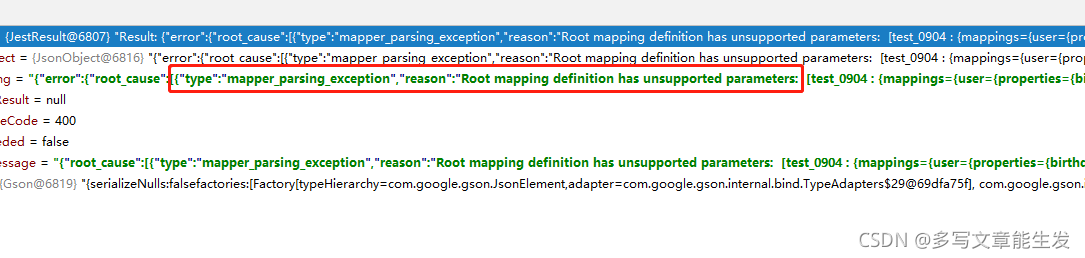
ElasticSearch Create Index Error: mapper_parsing_exception Root mapping definition has unsupported parameters

elasticsearch version number: 5.6.14. This error has something to do with the ES version. You’d better explain the version number first so that some readers will not be invalid after operating according to my method

error mapping statement 1:

{
    "test_0904": {
        "mappings": {
            "user": {
                "properties": {
                    "birthday": {
                        "type": "date",
                        "store": true
                    },
                    "hobby": {
                        "type": "text",
                        "store": true
                    },
                    "id": {
                        "type": "long",
                        "store": true
                    },
                    "name": {
                        "type": "text",
                        "store": true
                    }
                }
            }
        }
    }
}

error mapping statement 2:

{
    "mappings": {
        "user": {
            "properties": {
                "birthday": {
                    "type": "date",
                    "store": true
                },
                "hobby": {
                    "type": "text",
                    "store": true
                },
                "id": {
                    "type": "long",
                    "store": true
                },
                "name": {
                    "type": "text",
                    "store": true
                }
            }
        }
    }
}

modified mapping statement:

{
    "properties": {
        "birthday": {
            "type": "date",
            "store": true
        },
        "hobby": {
            "type": "text",
            "store": true
        },
        "id": {
            "type": "long",
            "store": true
        },
        "name": {
            "type": "text",
            "store": true
        }
    }
}

To sum up, there are some differences in the structure of mapping statements supported by various versions of ES. Different versions have different statement writing methods. Some versions of parameters support and some versions do not support.

Unable to start embedded Tomcat [How to Solve]

Unable to start embedded Tomcat error reporting solution:

Such an error occurred when starting Eureka service. Finally, I found many methods on the Internet. After a brief understanding, it is due to the problem of JDK version. There are several dependencies after jdk9, but I use jdk13, so I will report an error. In this case, there are two solutions:

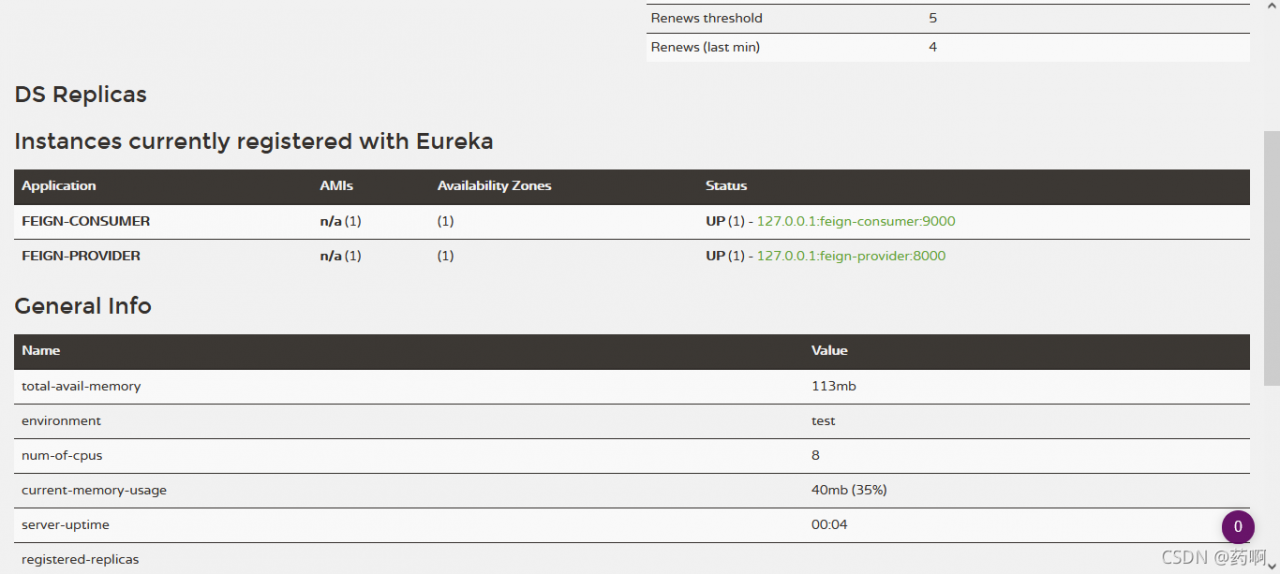
org.springframework.context.ApplicationContextException: Unable to start web server; nested exception is org.springframework.boot.web.server.WebServerException: Unable to start embedded Tomcat

1、 Reduce JDK to version 1.8

2、 The following dependencies are introduced into pom.xml:

 <dependency>
     <groupId>javax.xml.bind</groupId>
     <artifactId>jaxb-api</artifactId>
     <version>2.3.1</version>
 </dependency>
 <dependency>
     <groupId>com.sun.xml.bind</groupId>
     <artifactId>jaxb-impl</artifactId>
     <version>2.3.1</version>
 </dependency>
 <dependency>
     <groupId>org.glassfish.jaxb</groupId>
     <artifactId>jaxb-runtime</artifactId>
     <version>2.3.1</version>
 </dependency>

Next, you can see the familiar interface

Grafana Error: 414 Request-URI Too Large [How to Solve]

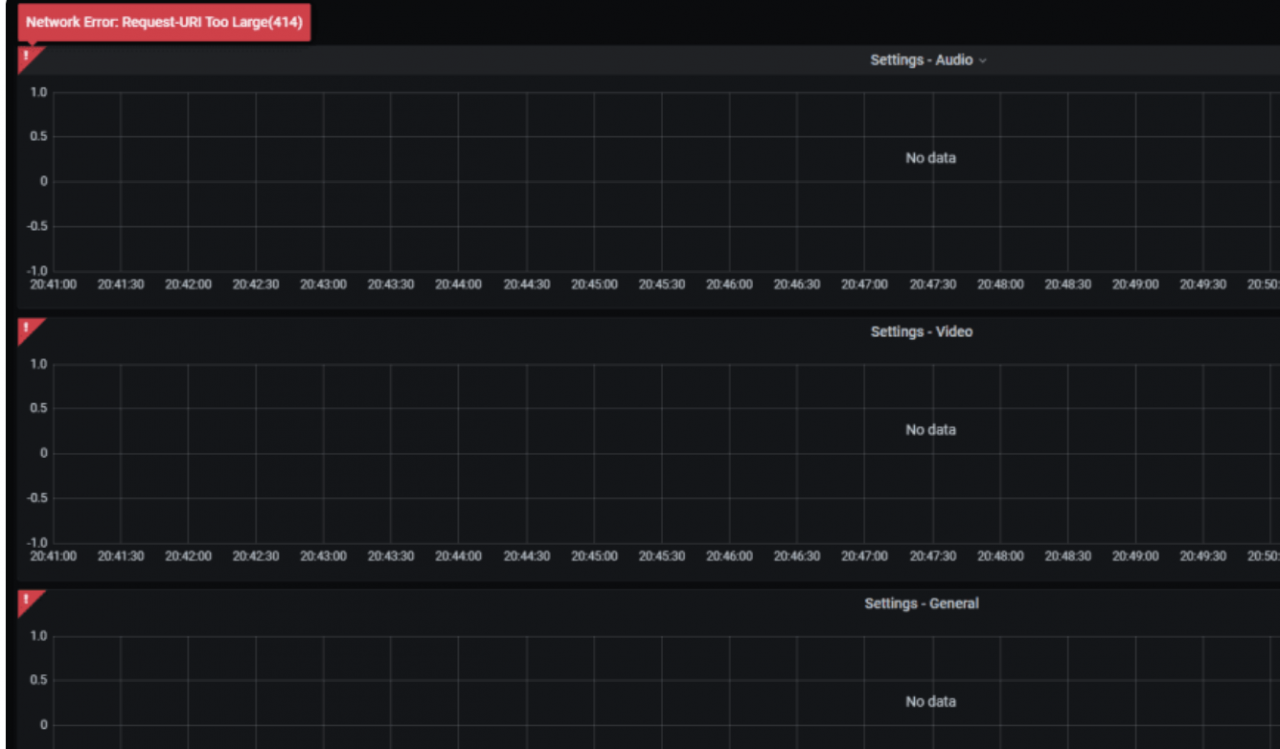
Grafana error 414
Network error request URI too large

 INFO[09-03|06:26:09] Request Completed                        logger=context userId=1 orgId=1 uname=admin method=GET path=/api/datasources/proxy/61/api/v1/query_range status=414 remote_addr=ip time_ms=8 size=169 referer="http://ip:3000/d/qu-QZdfZz/kafka-jmx-overview?orgId=1&refresh=1m&var-env=prod&var-broker_id=All&var-percentile=All&var-topic=All&from=now-15m&to=now"

Solution:

Or add the domain name nginx configuration
client_header_buffer_size 512k;
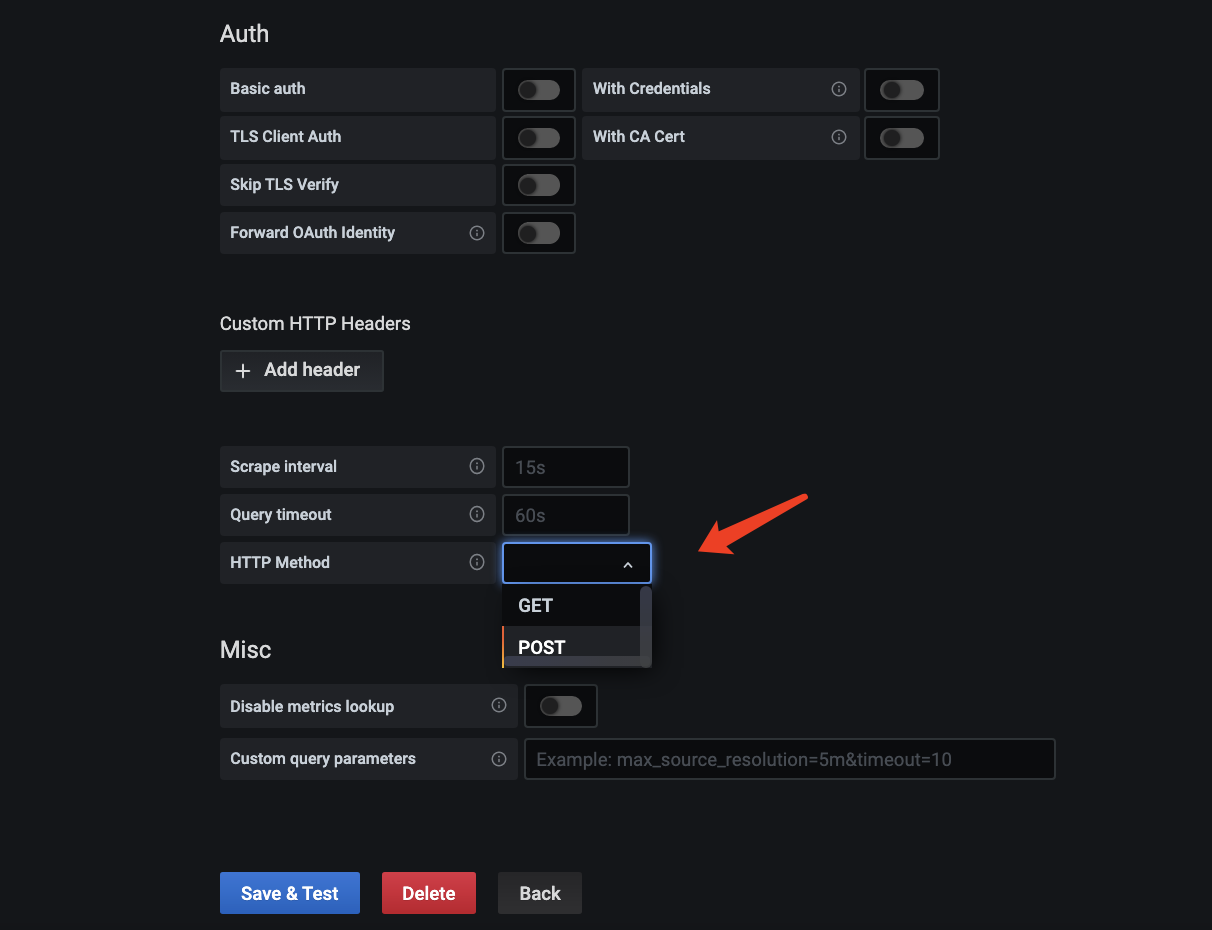
large_client_header_buffers 4 512k; Or change the configuration of the data source to post request. The default is get

Because the error report is a background error report, you need to modify the data source request type

SSL error of urllib3 when Python uploads files using Minio

Problems arise

Minio’s server always uses HTTP for access, but recently, due to business requirements, all requests have been replaced with HTTPS requests. After changing to HTTPS, this error will be reported when uploading the file: urlib3. Exceptions. Maxretryerror: httpsconnectionpool (host = ‘10.10.30.241’, port = 9000): Max retries exceeded with URL:/Facebook?Location = (caused by sslerror (sslcertverificationerror (1, ‘[SSL: Certificate_ VERIFY_ FAILED] certificate verify failed: self signed certificate (_ ssl.c:1124)’)))

Solution 1

Because I saw that the error was reported by urlib, I directly searched the urlib source code and directly modified the urlib 3 source code to solve the problem.
the modified file is: connectionpool.py

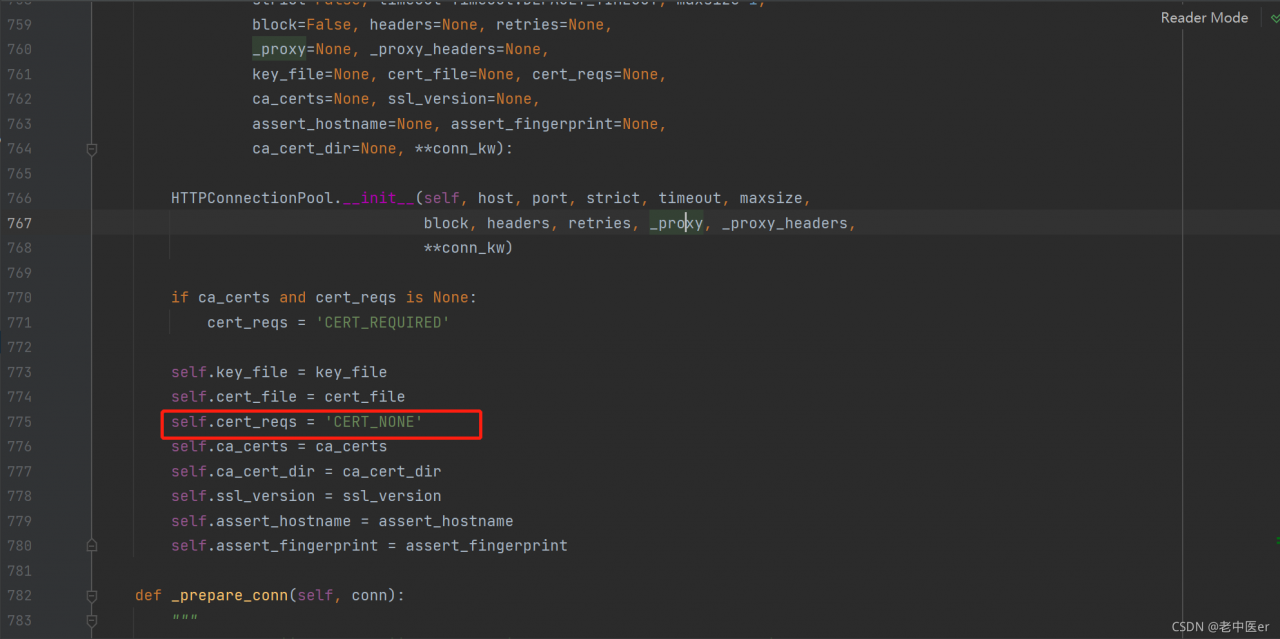
modify line 775 of connectionpool.py file:

self.cert_reqs = 'CERT_NONE'

Solution 2

The first method is solved, but it is extremely inconvenient
because you need to modify the source code every time you need to change the deployment script or reinstall it
then I went through the Minio source code and found the problem

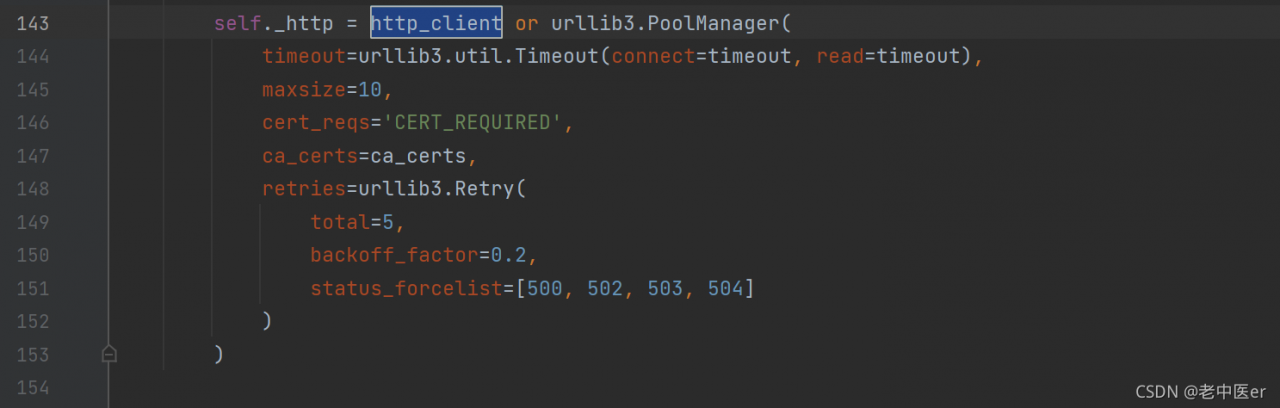
the urliib in Minio did not turn off SSL verification. I wanted to change it here, but I thought of changing the source code here. I looked carefully and found the next parameter: http_ client

We only need to customize this parameter when creating Minio objects

    minioClient = Minio(
        '1.1.1.1:9000',
        access_key='mxxxxxxx',
        secret_key='mxxxxxxx',
        http_client=urllib3.PoolManager(
            timeout=urllib3.util.Timeout(connect=10, read=10),
            maxsize=10,
            cert_reqs='CERT_NONE',
            ca_certs= os.environ.get('SSL_CERT_FILE') or certifi.where(),
            retries=urllib3.Retry(
                total=5,
                backoff_factor=0.2,
                status_forcelist=[500, 502, 503, 504]
            )
        )
        # secure=False
    )

So far, the problem is solved

Attach Minio file to upload all codes

import logging
from minio import Minio
from minio.error import S3Error
import urllib3
import certifi
import os
urllib3.disable_warnings(urllib3.exceptions.InsecureRequestWarning)
logging.basicConfig(
    level=logging.INFO,
    filename='../mysqlbackup_up.log',
    filemode='a',
    format='%(asctime)s %(name)s %(levelname)s--%(message)s'
)


def upload_file(file_name, file_path):

    minioClient = Minio(
        '1.1.3.1:9000',
        access_key='mxxxxx',
        secret_key='mxxxxxx',
        http_client=urllib3.PoolManager(
            timeout=urllib3.util.Timeout(connect=10, read=10),
            maxsize=10,
            cert_reqs='CERT_NONE',
            ca_certs= os.environ.get('SSL_CERT_FILE') or certifi.where(),
            retries=urllib3.Retry(
                total=5,
                backoff_factor=0.2,
                status_forcelist=[500, 502, 503, 504]
            )
        )
        # secure=False
    )

    check_bucket = minioClient.bucket_exists("test")

    if not check_bucket:
        minioClient.make_bucket("test")
    try:
        logging.info("start upload file")
        minioClient.fput_object(bucket_name="test", object_name=file_name, file_path=file_path)
        logging.info("file {0} is successfully uploaded".format(file_name))
        print('success')
    except FileNotFoundError as err:
        print(err)
        logging.error('upload_failed: ' + str(err))
    except S3Error as err:
        print(err)
        logging.error("upload_failed:", err)

Interface request error 504 gateway time out [How to Solve]

This article mainly introduces the solution of page 504 gateway time-out

1. 504 gateway time out reason?

Because of the browser access interface request, the default timeout event is 1 minute. When the 504 interface timeout is encountered, first we need to see whether the Ajax interface request is set   Timeout. Next, check whether nginx has set the agent timeout.

2. Inspection procedure

1. Front end Ajax settings

$.ajax({
  url: '',
  type: 'post',
  data: postData,
  timeout: 1000*60*10,
  success: function(data){
    console.log(data)
  },
  complete:function(XHR,TextStatus){
    if(TextStatus=='timeout'){ 
      console.log("Timeout");
    }
  }
})

2. Nginx agent timeout setting

proxy_connect_timeout    600;
proxy_read_timeout       600;
proxy_send_timeout       600;
proxy_buffering    off;
proxy_buffer_size  128k;
proxy_buffers 100  128k;

3、 Problem extension (native JS encapsulates Ajax requests)

At that time, the Ajax request of jQuery was used, and the datatype: JSON was uniformly defined by the interface. Due to the file flow returned by the interface, the successful callback was not triggered and did not want to modify the datatype. Therefore, the Ajax request was encapsulated with native JS.

getAjax(url,callback){
    var timeoutFlag=null;
    var xhr=new XMLHttpRequest();
    var url=""//request path, get request can spell the parameters into the address
    xhr.open(type,url,async);//type request type url address async whether asynchronous request 
    xhr.responseType='blob';//If the return data is a file stream, you can set it to blob type
    xhr.timeout=1000*60*60;//timeout time This is set to one hour
    xhr.setRequestHeader('token',token);//set header token
    xhr.onreadystatechange=function(){
        if(xhr.readyState==4){
            window.clearTimeout(timeoutFlag);
            if(xhr.status==200 || xhr.status==304){
                callback(xhr.response);
            }
        }
    }
    xhr.send(data);
    timeoutFlag=window.setTimeout(function(){
        window.clearTimeout(timeoutFlag);
        xhr.abort();
    },xhr.timeout);
}
getAjax('URL',function(res){
})