Author Archives: Robins

feign.codec.EncodeException: Type definition error: [simple type, class java.util.Collections$3]

Premise:
the feign call of the docking company recently involves the mutual call between two business systems, and I encountered the following errors in the process of processing, so I’ll take them out and record them

Error prompt

feign.codec.EncodeException: Type definition error: [simple type, class java.util.Collections$3]; nested exception is com.fasterxml.jackson.databind.exc.InvalidDefinitionException: No serializer found for… request

reflection

When I see the request, I think of the problem of request parameters. I don’t know what the problem is

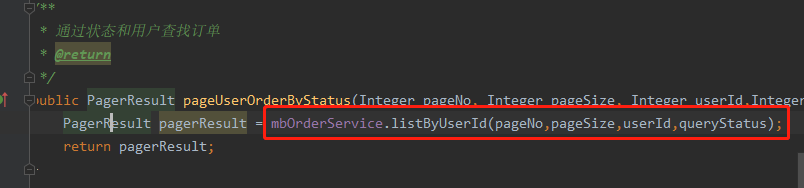
I took a closer look at the exposed fegin client interface. The request object was passed in the interface. In order to be lazy, I didn’t write multiple method parameters
mborderservice service class

when I changed the code into multiple parameters and passed them directly, the problem was solved

client calling code, so there was no problem

Kubernetes Error: Error in configuration: unable to read client-cert* unable to read client-key*

System environment:

Ubuntu 20.04 LTSDocker 20.10.8Kubernetes 1.22.1Node: node

Execute command:

$ kubectl version

Errors are reported as follows:

Error in configuration: 
* unable to read client-cert /var/lib/kubelet/pki/kubelet-client-current.pem for default-auth due to open /var/lib/kubelet/pki/kubelet-client-current.pem: no such file or directory
* unable to read client-key /var/lib/kubelet/pki/kubelet-client-current.pem for default-auth due to open /var/lib/kubelet/pki/kubelet-client-current.pem: no such file or directory

Error reporting Description:

The token on the node has expired.

Solution:

$ kubeadm token create --print-join-command

kubeadm join 192.168.50.51:6443 --token rt43m1.b9py8ba6uxbfv7sr --discovery-token-ca-cert-hash sha256:f57a09633cf0e18cd905d41159a790704502410fd841acd63cffc8e493ad3cb2 

Regenerate the token on the Master node.

$ kubeadm join 192.168.50.51:6443 --token rt43m1.b9py8ba6uxbfv7sr --discovery-token-ca-cert-hash sha256:f57a09633cf0e18cd905d41159a790704502410fd841acd63cffc8e493ad3cb2 
$ kubectl version

Re execute on the node node.

[Solved] Docker Startup Error: panic: runtime error: invalid memory address or nil pointer dereference

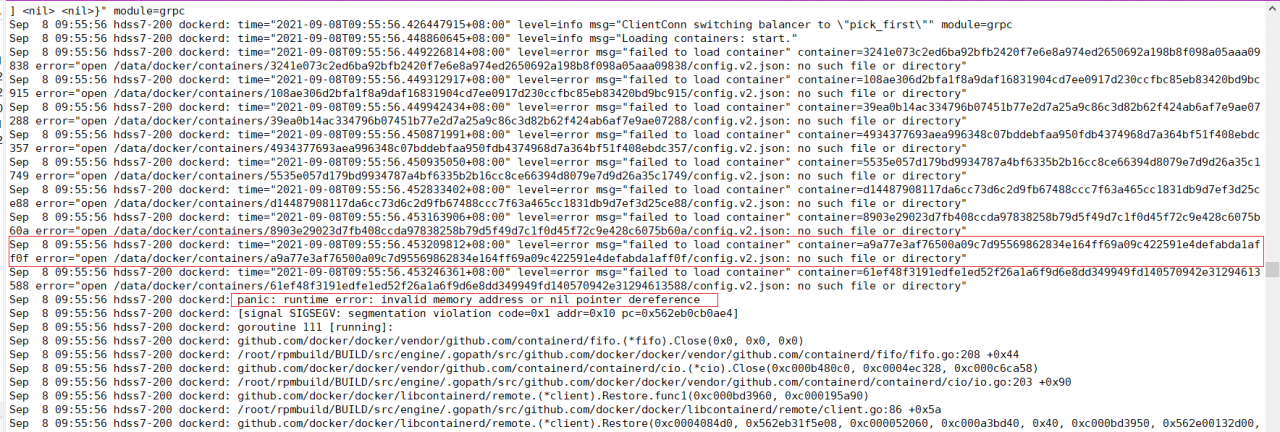
docker Startup error:

Log/var/log/messages
tail -n 200 /var/log/messages
docker.service: main process exited, code=exited, status=2/INVALIDARGUMENT
Sep 8 10:12:11 hdss7-200 systemd: Failed to start Docker Application Container Engine.
Sep 8 10:12:11 hdss7-200 systemd: Unit docker.service entered failed state.
Sep 8 10:12:11 hdss7-200 systemd: docker.service failed.
Sep 8 10:12:13 hdss7-200 systemd: docker.service holdoff time over, scheduling restart.
Sep 8 10:12:13 hdss7-200 systemd: Stopped Docker Application Container Engine.
Sep 8 10:12:13 hdss7-200 systemd: Starting Docker Application Container Engine…
Sep 8 10:12:13 hdss7-200 dockerd: time=“2021-09-08T10:12:13.165283953+08:00” level=warning msg=“The “graph” config file option is deprecated. Please use “data-root” instead.”
Sep 8 10:12:13 hdss7-200 dockerd: time=“2021-09-08T10:12:13.165505567+08:00” level=info msg=“Starting up”
Sep 8 10:12:13 hdss7-200 dockerd: time=“2021-09-08T10:12:13.168553899+08:00” level=info msg=“parsed scheme: “unix”” module=grpc
Sep 8 10:12:13 hdss7-200 dockerd: time=“2021-09-08T10:12:13.168617586+08:00” level=info msg=“scheme “unix” not registered, fallback to default scheme” module=grpc
Sep 8 10:12:13 hdss7-200 dockerd: time=“2021-09-08T10:12:13.168660657+08:00” level=info msg=“ccResolverWrapper: sending update to cc: {[{unix:///run/containerd/containerd.sock 0 }] }” module=grpc
Sep 8 10:12:13 hdss7-200 dockerd: time=“2021-09-08T10:12:13.168686536+08:00” level=info msg=“ClientConn switching balancer to “pick_first”” module=grpc
Sep 8 10:12:13 hdss7-200 dockerd: time=“2021-09-08T10:12:13.171021101+08:00” level=info msg=“parsed scheme: “unix”” module=grpc
Sep 8 10:12:13 hdss7-200 dockerd: time=“2021-09-08T10:12:13.171075188+08:00” level=info msg=“scheme “unix” not registered, fallback to default scheme” module=grpc
Sep 8 10:12:13 hdss7-200 dockerd: time=“2021-09-08T10:12:13.171115224+08:00” level=info msg=“ccResolverWrapper: sending update to cc: {[{unix:///run/containerd/containerd.sock 0 }] }” module=grpc
Sep 8 10:12:13 hdss7-200 dockerd: time=“2021-09-08T10:12:13.171129951+08:00” level=info msg=“ClientConn switching balancer to “pick_first”” module=grpc
Sep 8 10:12:13 hdss7-200 dockerd: time=“2021-09-08T10:12:13.198222339+08:00” level=info msg=“Loading containers: start.”
Sep 8 10:12:13 hdss7-200 dockerd: time=“2021-09-08T10:12:13.199003165+08:00” level=error msg=“failed to load container” container=5535e057d179bd9934787a4bf6335b2b16cc8ce66394d8079e7d9d26a35c1749 error=“open /data/docker/containers/5535e057d179bd9934787a4bf6335b2b16cc8ce66394d8079e7d9d26a35c1749/config.v2.json: no such file or directory”
Sep 8 10:12:13 hdss7-200 dockerd: time=“2021-09-08T10:12:13.199224462+08:00” level=error msg=“failed to load container” container=108ae306d2bfa1f8a9daf16831904cd7ee0917d230ccfbc85eb83420bd9bc915 error=“open /data/docker/containers/108ae306d2bfa1f8a9daf16831904cd7ee0917d230ccfbc85eb83420bd9bc915/config.v2.json: no such file or directory”
Sep 8 10:12:13 hdss7-200 dockerd: time=“2021-09-08T10:12:13.200071533+08:00” level=error msg=“failed to load container” container=3241e073c2ed6ba92bfb2420f7e6e8a974ed2650692a198b8f098a05aaa09838 error=“open /data/docker/containers/3241e073c2ed6ba92bfb2420f7e6e8a974ed2650692a198b8f098a05aaa09838/config.v2.json: no such file or directory”
Sep 8 10:12:13 hdss7-200 dockerd: time=“2021-09-08T10:12:13.200144451+08:00” level=error msg=“failed to load container” container=39ea0b14ac334796b07451b77e2d7a25a9c86c3d82b62f424ab6af7e9ae07288 error=“open /data/docker/containers/39ea0b14ac334796b07451b77e2d7a25a9c86c3d82b62f424ab6af7e9ae07288/config.v2.json: no such file or directory”
Sep 8 10:12:13 hdss7-200 dockerd: time=“2021-09-08T10:12:13.200210292+08:00” level=error msg=“failed to load container” container=61ef48f3191edfe1ed52f26a1a6f9d6e8dd349949fd140570942e31294613588 error=“open /data/docker/containers/61ef48f3191edfe1ed52f26a1a6f9d6e8dd349949fd140570942e31294613588/config.v2.json: no such file or directory”
Sep 8 10:12:13 hdss7-200 dockerd: time=“2021-09-08T10:12:13.200551515+08:00” level=error msg=“failed to load container” container=8903e29023d7fb408ccda97838258b79d5f49d7c1f0d45f72c9e428c6075b60a error=“open /data/docker/containers/8903e29023d7fb408ccda97838258b79d5f49d7c1f0d45f72c9e428c6075b60a/config.v2.json: no such file or directory”
Sep 8 10:12:13 hdss7-200 dockerd: time=“2021-09-08T10:12:13.200601149+08:00” level=error msg=“failed to load container” container=a9a77e3af76500a09c7d95569862834e164ff69a09c422591e4defabda1aff0f error=“open /data/docker/containers/a9a77e3af76500a09c7d95569862834e164ff69a09c422591e4defabda1aff0f/config.v2.json: no such file or directory”
Sep 8 10:12:13 hdss7-200 dockerd: time=“2021-09-08T10:12:13.200675372+08:00” level=error msg=“failed to load container” container=4934377693aea996348c07bddebfaa950fdb4374968d7a364bf51f408ebdc357 error=“open /data/docker/containers/4934377693aea996348c07bddebfaa950fdb4374968d7a364bf51f408ebdc357/config.v2.json: no such file or directory”
Sep 8 10:12:13 hdss7-200 dockerd: time=“2021-09-08T10:12:13.201257339+08:00” level=error msg=“failed to load container” container=d14487908117da6cc73d6c2d9fb67488ccc7f63a465cc1831db9d7ef3d25ce88 error=“open /data/docker/containers/d14487908117da6cc73d6c2d9fb67488ccc7f63a465cc1831db9d7ef3d25ce88/config.v2.json: no such file or directory”
Sep 8 10:12:13 hdss7-200 dockerd: panic: runtime error: invalid memory address or nil pointer dereference
Sep 8 10:12:13 hdss7-200 dockerd: [signal SIGSEGV: segmentation violation code=0x1 addr=0x10 pc=0x557a613cfae4]
Sep 8 10:12:13 hdss7-200 dockerd: goroutine 103 [running]:
Sep 8 10:12:13 hdss7-200 dockerd: github.com/docker/docker/vendor/github.com/containerd/fifo.(*fifo).Close(0x0, 0x0, 0x0)
Sep 8 10:12:13 hdss7-200 dockerd: /root/rpmbuild/BUILD/src/engine/.gopath/src/github.com/docker/docker/vendor/github.com/containerd/fifo/fifo.go:208 +0x44
Sep 8 10:12:13 hdss7-200 dockerd: github.com/docker/docker/vendor/github.com/containerd/containerd/cio.(*cio).Close(0xc000b19740, 0xc000acd3a8, 0xc000702a58)
Sep 8 10:12:13 hdss7-200 dockerd: /root/rpmbuild/BUILD/src/engine/.gopath/src/github.com/docker/docker/vendor/github.com/containerd/containerd/cio/io.go:203 +0x90
Sep 8 10:12:13 hdss7-200 dockerd: github.com/docker/docker/libcontainerd/remote.(*client).Restore.func1(0xc000bdd040, 0xc000011e88)
Sep 8 10:12:13 hdss7-200 dockerd: /root/rpmbuild/BUILD/src/engine/.gopath/src/github.com/docker/docker/libcontainerd/remote/client.go:86 +0x5a
Sep 8 10:12:13 hdss7-200 dockerd: github.com/docker/docker/libcontainerd/remote.(*client).Restore(0xc0003fae00, 0x557a63914e08, 0xc000132020, 0xc000b1c200, 0x40, 0xc000bdd030, 0x557a00132d00, 0xffffffffffffffff, 0x0, 0x0, …)
Sep 8 10:12:13 hdss7-200 dockerd: /root/rpmbuild/BUILD/src/engine/.gopath/src/github.com/docker/docker/libcontainerd/remote/client.go:107 +0xa07
Sep 8 10:12:13 hdss7-200 dockerd: github.com/docker/docker/daemon.(*Daemon).restore.func3(0xc0007ea210, 0xc000051bd0, 0xc00000c1e0, 0xc0007ea200, 0xc0000e9080, 0xc0000e9050, 0xc0000e9020, 0xc000333180)
Sep 8 10:12:13 hdss7-200 dockerd: /root/rpmbuild/BUILD/src/engine/.gopath/src/github.com/docker/docker/daemon/daemon.go:351 +0x46d
Sep 8 10:12:13 hdss7-200 dockerd: created by github.com/docker/docker/daemon.(*Daemon).restore
Sep 8 10:12:13 hdss7-200 dockerd: /root/rpmbuild/BUILD/src/engine/.gopath/src/github.com/docker/docker/daemon/daemon.go:319 +0x4cf
Sep 8 10:12:13 hdss7-200 systemd: docker.service: main process exited, code=exited, status=2/INVALIDARGUMENT
Sep 8 10:12:13 hdss7-200 systemd: Failed to start Docker Application Container Engine.
Sep 8 10:12:13 hdss7-200 systemd: Unit docker.service entered failed state.
Sep 8 10:12:13 hdss7-200 systemd: docker.service failed.


Error Message:
docker panic: runtime error: invalid memory address or nil pointer dereference

Delete the file in the path of ./data/docker will solve this error

[Solved] RuntimeError: CUDA error: invalid device ordinal

Error Message:
RuntimeError: CUDA error: invalid device ordinal

Solution:

args.device = torch.device('cuda:' + str(args.gpu_id))

Used the gpu_id exceeds that of the GPU card

My code is written in the above way. Different codes are written in different ways. In the final analysis, just change the number after CUDA: to be appropriate

Error received: error: xhr’get’to URL cross domain [How to Solve]

1. Problems encountered

There was a problem when the browser made a request to access another path:

Error received: Error: XHR 'GET' to URL 'https://widevine.eurofins-digitaltesting.com/cert-required/api/Ik0wR1ZCRUNDTkYi.YRMy4w.kgjp1ExZh2r1lcQezAm5HAfZq3J8vXQTBW-Bhdq-K5Y/cert-details'returned status HTTP 0

Knowledge points: for communication between different domains, when encountering complex requests, the client will not send the real request header first, but send the view request to check whether the two sides can communicate. If the verification is successful, send the real request, and the two sides shake hands three times to establish a connection before communication. Therefore, the server and the client have two connections. The first connection is authentication, and the second connection is to send a request to start communication.

Analysis 1: the return value 0 does not exist in the HTTP status code. The reason for the occurrence of HTTP 0 may indicate that the response is empty (or even there is no return header). Means that the connection has been accepted and then closed normally (TCP fin)

Preliminary conclusion: when sending the view request for the first time, the verification fails and returns 0.

① The reason for the verification failure may be that the client does not have a certificate, resulting in no permission to communicate;

② Possibly CORS, unable to communicate between different domains.

Verification ① 1: report bug #3724 in a3sa defect management system and obtain the certificate required for the test. Convert the certificate into the format required by the TV through OpenSSL and build it into the corresponding directory. The test still fails and the verification fails

Verification ① II: the certificate may be used incorrectly. You may need a built-in certificate to enable the browser to parse the request and conduct two-way verification of the certificate. Certificate two-way verification. If anyone is interested, you can comment and sort it out in my post blog

Verification ②: after compiling the built-in certificate, the test still fails. Viewing the log is indeed a CORS problem.

2. Solution

Add a header to the server-side configuration file:

"Access-Control-Allow-Origin"=>"xxxxx Your Link",

"Access-Control-Allow-Credentials"=>"true"

[Solved] ERROR: error loading sources list: The read operation timed out

During the installation of ROS platform under Ubuntu 20.04 system, an error is reported during the initialization of rosdep

rosdep update

Super times error

reading in sources list data from /etc/ros/rosdep/sources.list.d
ERROR: error loading sources list:
	The read operation timed out

When you execute rosdep update according to the method in this article, there is still a timeout error, and you think of adding it directly in sources. List. D https://ghproxy.com/ Prefix, as follows:

Connect the mobile phone hotspot and open the terminal for execution

sudo vim /etc/ros/rosdep/sources.list.d/20-default.list

Modify list content

# os-specific listings first
yaml https://ghproxy.com/https://raw.githubusercontent.com/ros/rosdistro/master/rosdep/osx-homebrew.yaml osx

# generic
yaml https://ghproxy.com/https://raw.githubusercontent.com/ros/rosdistro/master/rosdep/base.yaml
yaml https://ghproxy.com/https://raw.githubusercontent.com/ros/rosdistro/master/rosdep/python.yaml
yaml https://ghproxy.com/https://raw.githubusercontent.com/ros/rosdistro/master/rosdep/ruby.yaml
gbpdistro https://ghproxy.com/https://raw.githubusercontent.com/ros/rosdistro/master/releases/fuerte.yaml fuerte

# newer distributions (Groovy, Hydro, ...) must not be listed anymore, they are being fetched from the rosdistro index.yaml instead

Then run rosdep update to solve the problem.

ubuntu@ubuntu:~$ rosdep update
reading in sources list data from /etc/ros/rosdep/sources.list.d
Hit https://ghproxy.com/https://raw.githubusercontent.com/ros/rosdistro/master/rosdep/osx-homebrew.yaml
Hit https://ghproxy.com/https://raw.githubusercontent.com/ros/rosdistro/master/rosdep/base.yaml
Hit https://ghproxy.com/https://raw.githubusercontent.com/ros/rosdistro/master/rosdep/python.yaml
Hit https://ghproxy.com/https://raw.githubusercontent.com/ros/rosdistro/master/rosdep/ruby.yaml
Hit https://ghproxy.com/https://raw.githubusercontent.com/ros/rosdistro/master/releases/fuerte.yaml
Query rosdistro index https://ghproxy.com/https://raw.githubusercontent.com/ros/rosdistro/master/index-v4.yaml
Skip end-of-life distro "ardent"
Skip end-of-life distro "bouncy"
Skip end-of-life distro "crystal"
Skip end-of-life distro "dashing"
Skip end-of-life distro "eloquent"
Add distro "foxy"
Add distro "galactic"
Skip end-of-life distro "groovy"
Skip end-of-life distro "hydro"
Skip end-of-life distro "indigo"
Skip end-of-life distro "jade"
Skip end-of-life distro "kinetic"
Skip end-of-life distro "lunar"
Add distro "melodic"
Add distro "noetic"
Add distro "rolling"
updated cache in /home/ubuntu/.ros/rosdep/sources.cache

[Solved] Android7 8 Jack server SSL error: Jack server failed to (re)start, try ‘jack-diagnose’ or see Jack server log

The following error message appears when compiling Android 7 8 code
Jack server failed to (re)start, try ‘jack-diagnose’ or see Jack server log
SSL error when connecting to the Jack server. Try ‘jack-diagnose’
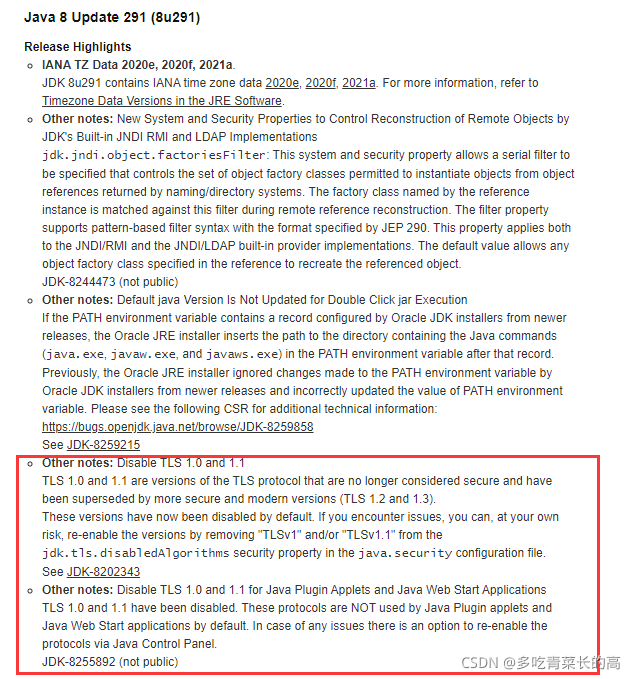
It is due to the updated version of JDK
https://java.com/en/download/help/release_changes.html
According to the JDK Release Highlights, we can find that this update disables TLSv1.0 and TLSv1.1 in jdk.tls.disabledAlgorithms

Solution:
sudo vim /usr/lib/jvm/java-8-openjdk-amd64/jre/lib/security/java.security

Change to:

Restart the server or restart jack server to compile after the modification

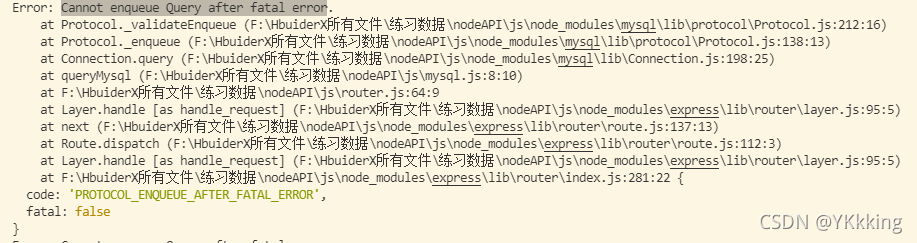
[Solved] Error: read ECONNRESET at TCP.onStreamRead Cannot enqueue Query after fatal error

Error analysis

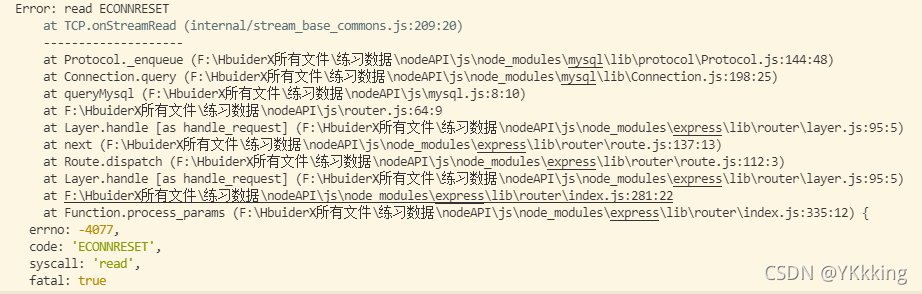
This error often occurs when I use node to connect to MySQL. I wonder if it is because I do not close the connection every time I query the database after creating a MySQL connection, so the database is always connected and does not respond for a long time, resulting in the following error
error1:

error2:


Solution:

error1:

const mysql = require('mysql');
const connInfo = require('./config');

function queryMysql(sql, callback){
    const conn = mysql.createConnection(connInfo)
    conn.query(sql, (err, result)=>{
        if(err){
            console.log(err);
        }else {
            callback(result)
        }
        conn.end(err => {
            if(err){
                console.log(err)
            }
        })
    })
}

module.exports = queryMysql;

Error2:
We only need to configure useConnectionPooling true when instantiating SessionStore for example:

var sessionStore = new SessionStore({
    host: 'localhost' ,
    port: 3306 ,
    user: 'root' ,
    password: 'root' ,
    database: 'session' ,
    useConnectionPooling: true 
});

React error boundary (What You Should Know & How to Solve)

  1. What is the error boundary?

Error boundary is a kind of react component. This component can capture JavaScript errors anywhere in its sub component tree, print these errors, and display the degraded UI , without rendering those sub-component trees that crash. Error boundaries catch errors during rendering, in the lifecycle method, and in the constructor of the entire component tree.

Note: the error boundary cannot capture the errors generated in the following scenarios

    event handling asynchronous code (such as setTimeout or requestanimationframe callback function) the server renders the errors thrown by itself (not its sub components)

If anyone (or both) of the two lifecycle methods static getderivedstatefromerror() or componentdidcatch() is defined in a class component, it becomes an error boundary. When an error is thrown, please use static getderivedstatefromerror() to render the alternate UI and componentdidcatch() to print the error message.

class ErrorBoundary extends React.Component {
  constructor(props) {
    super(props);
    this.state = { hasError: false };
  }

  static getDerivedStateFromError(error) {
    return { hasError: true };
  }

  componentDidCatch(error, errorInfo) {
    logErrorToMyService(error, errorInfo);
  }

  render() {
    if (this.state.hasError) {
      return <h1>Something went wrong.</h1>;
    }

    return this.props.children; 
  }
}

You can then use it as a regular component:

<ErrorBoundary>
  <MyWidget />
</ErrorBoundary>

The working mode of the error boundary is similar to the catch {} of JavaScript, except that the error boundary is only for the react component. Only the class component can be an error boundary component. In most cases, you only need to declare the error boundary component once and use it throughout the application.

Note that the error boundary can only catch the errors of its subcomponents, it cannot catch its own errors. If an error boundary cannot render the error message, the error will bubble to the nearest upper error boundary, which is also similar to the working mechanism of catch {} in JavaScript.

2. React error boundary

https://github.com/bvaughn/react-error-boundary
https://www.npmjs.com/package/react-error-boundary
The above address is the error boundary wheel encapsulated by the boss, which can be used directly. Please check the relevant documents for details

Error: please renew the default configrations [How to Solve]

Please revert to the default configuration

When you are prompted to revert to the default configuration when configuring the switch, you need to delete the original configuration step by step and reconfigure the switch.
Reconfigure the switch, if you configure it directly, it will report an error

Example

Original configuration

port link-type access
port default vlan 500

The configuration that needs to be changed

interface GigabitEthernet0/0/28
undo port link-type  
undo port default vlan 500 
port link-type trunk 
 port trunk allow-pass vlan 2 to 4094