After reinstalling pycham, I found that the console window could not be opened in pycham
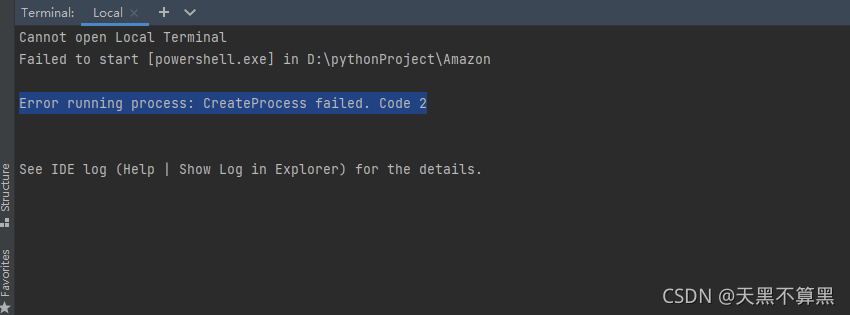
Solution:
In file –> setting –> Tools –> Terminal
Shell path: change powershell.exe to cmd.exeAfter reinstalling pycham, I found that the console window could not be opened in pycham
Solution:
In file –> setting –> Tools –> Terminal
Shell path: change powershell.exe to cmd.exeWhen adding fields to a table, I suddenly find that the default value of a field of date type is wrong, which is depressing~
After troubleshooting, it turns out that there is a problem with MySQL configuration. Under Wamp, SQL is not set in MySQL 5.7_ Mode.
1. Find [mysqld] in my.ini file
2. If there is no SQL_Mode, add it and modify it if necessary
sql_mode="STRICT_TRANS_TABLES,NO_ENGINE_SUBSTITUTION"
or
sql_mode=ONLY_FULL_GROUP_BY,STRICT_TRANS_TABLES,ERROR_FOR_DIVISION_BY_ZERO,NO_AUTO_CREATE_USER,NO_ENGINE_SUBSTITUTION
3.Restart MySQL;
use the following commands to operate mysql:
systemctl restart mysqld.service
systemctl start mysqld.service
systemctl stop mysqld.service
The front end uses httpclient in the angular library to upload files and set
headers: { ‘Content-Type’: ‘multipart/form-data’ }
When the backend uses featurejs to receive, an error is reported
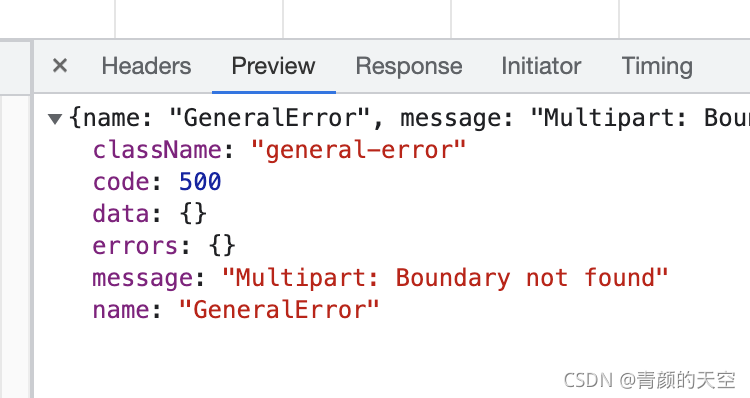
error: multipart: boundary not found
error reason: multipart does not find the boundary
The uploaded file is a form in multipart/form data format of post request
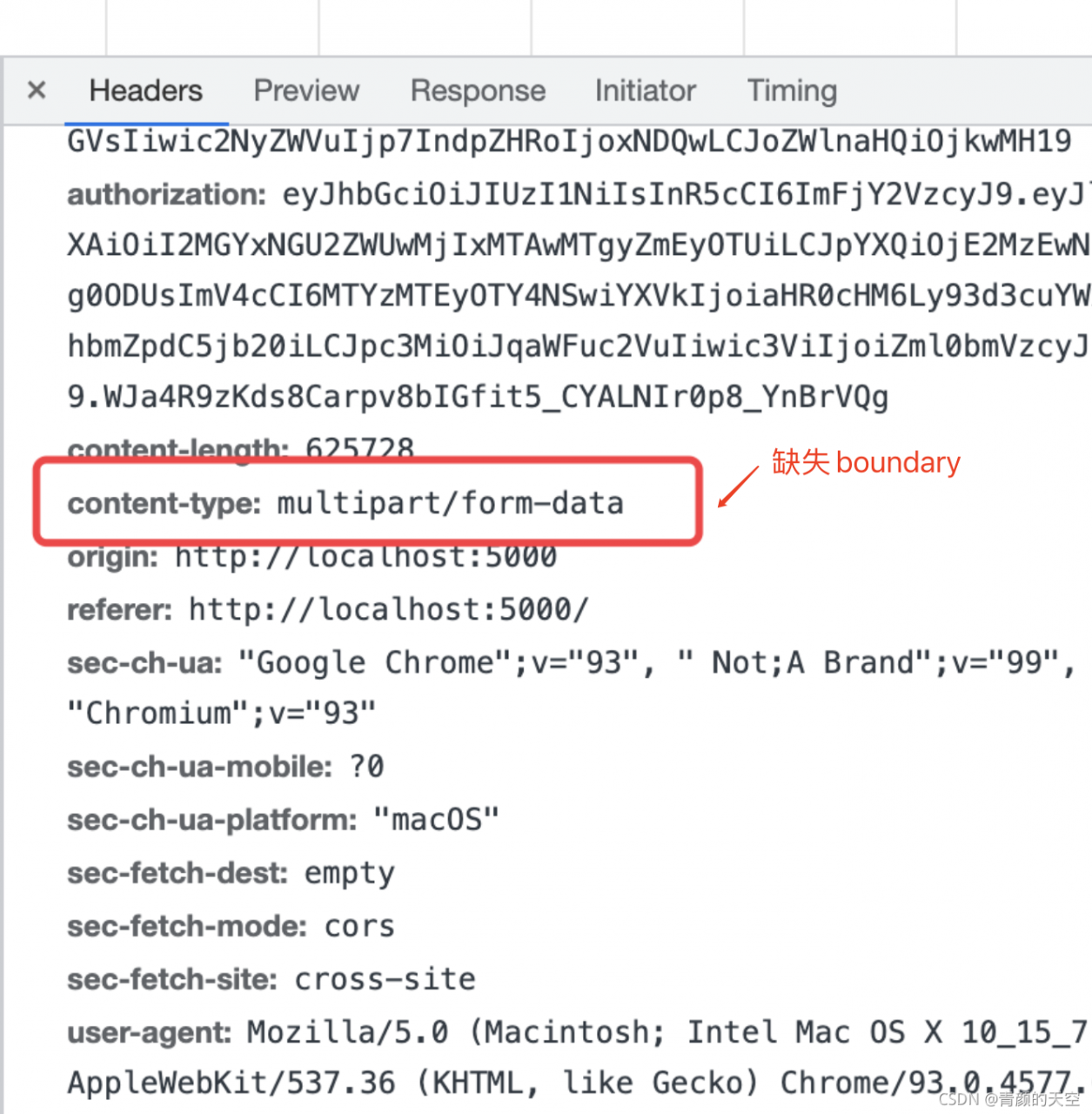
content-type: multipart/form-data is not followed by the boundary
To sum up, the request header was set many times, overwriting the original form enctype = “multipart/form data”
Conclusion: it is not necessary to set content type: Music/form data repeatedly, otherwise the original may be overwritten and unexpected errors may be caused.
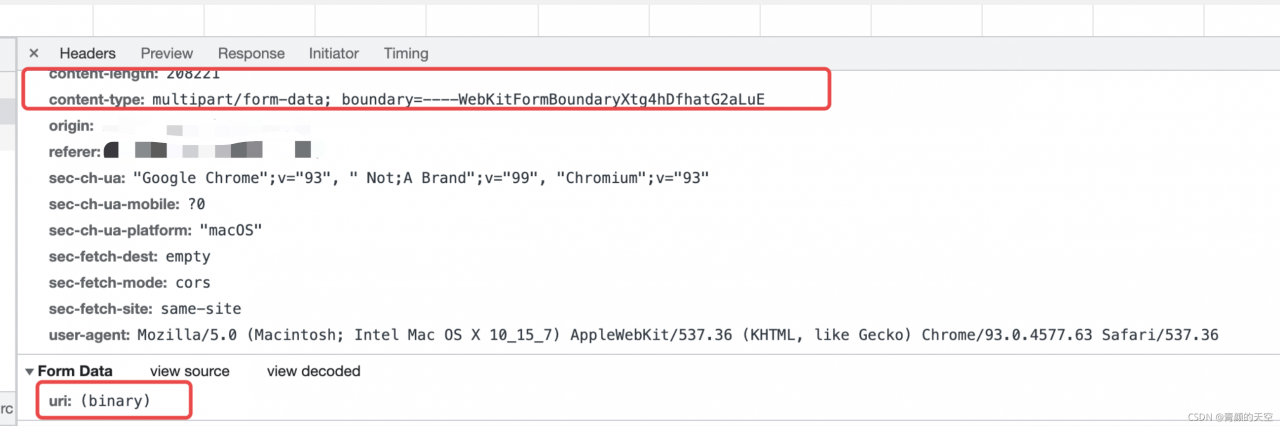
Correct way to get headers:
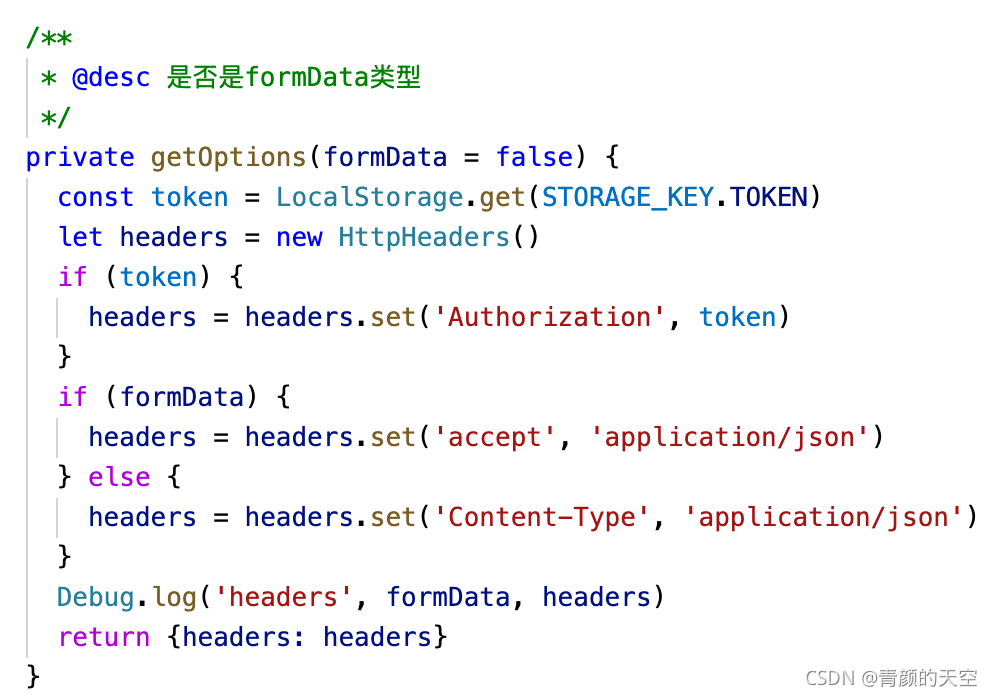
When uploading formdata type data, you do not need to manually set content typebrowser performance:
it’s done!
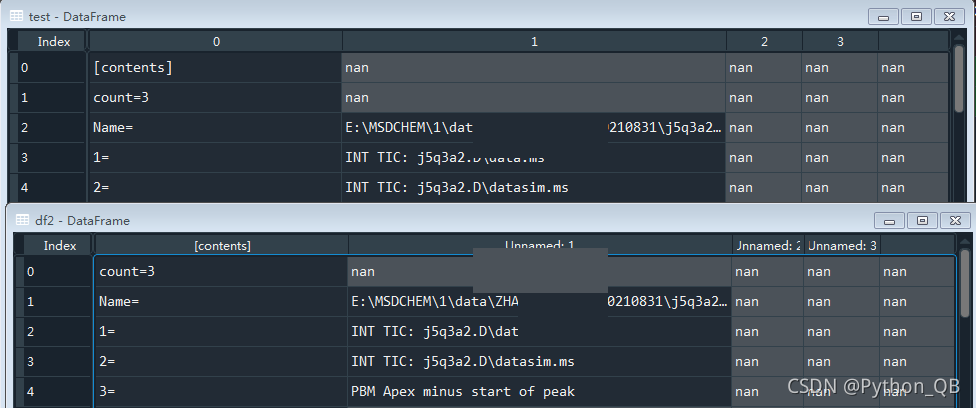
1. There is a CSV file that I read directly with the pandas library, and an error is reported: error tokenizing data. C error: expected 1 fields in line 3, saw 2. There should be a problem with the format. It can only be opened after it is opened and saved again. However, because there are many files, I wonder if I can read the CSV file by other methods;
2. Read through the CSV library, traverse, and merge:
import pandas as pd
import csv


path = 'the location of file'

test = pd.DataFrame()
data = csv.reader(open(path, 'r'))
for d in data:
    # print(d)
    result = pd.DataFrame(d).T
    test = pd.concat([test,result])
test = test.reset_index(drop = True)
3. Finally, you will get the dataframe of test, which is the same as the file read by pandas after saving
Background description
1. Ng server can start normally (no problem with compilation)
2. Ng build error
Error content (forgot the screenshot, * * * has indicated the intermediate content)
throw er; // Unhandled ‘error’ event
***
Emitted ‘error’ event on ChildProcess instance at:
***
errno: -4058,
code: ‘ENOENT’,
****
spawnargs: [ ‘–service=0.12.9’, ‘–ping’ ]
Solution:
Execute node_ Modules/esbuild/install.js file
node PATH/node_modules/esbuild/install.js
Build again
Problem description
Some time ago, I started a small smart home project to practice my hand. I encountered this problem when compiling
Compilation error:
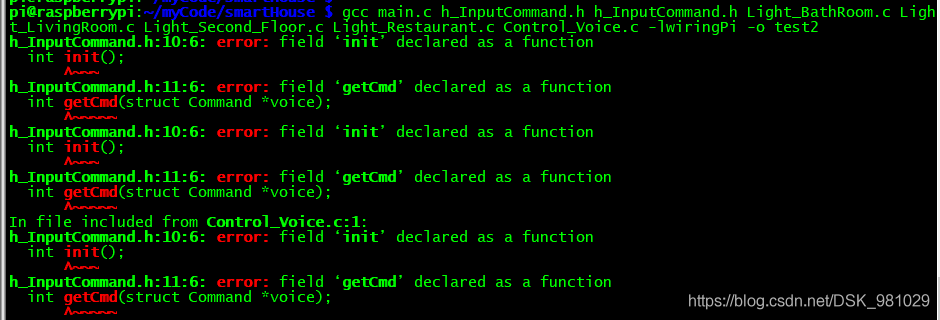
reason:
The function pointer in the structure element is incorrectly defined
#include <stdlib.h>
#include <stdio.h>
#include <unistd.h>
#include <wiringSerial.h>

struct Command{
        char cmdName[128];
        char cmd[32];
        int (*init)();		//int init();
        int (*getCmd)(struct Command *voice);	//int getCmd(struct Command *voice);
        char log[1024];
        int fd;
        struct Command *next;
};
Error reason.
Because the PHP version is too high, 2.x minimum requirement PHP7.2 The official original words are as follows:
https://github.com/Seldaek/monolog
Requirements
Monolog ^2.0 works with PHP 7.2 or above, use Monolog ^1.25 for PHP 5.3+ support.
Solution:
composer downgrade monolog/monolog version
"require": {
    "monolog/monolog": "^1.25",
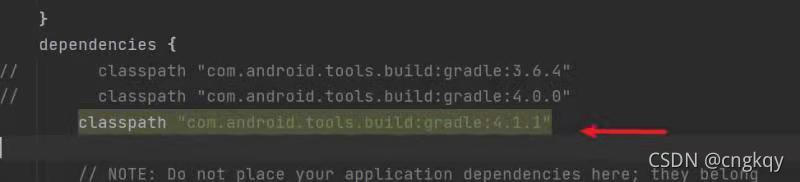
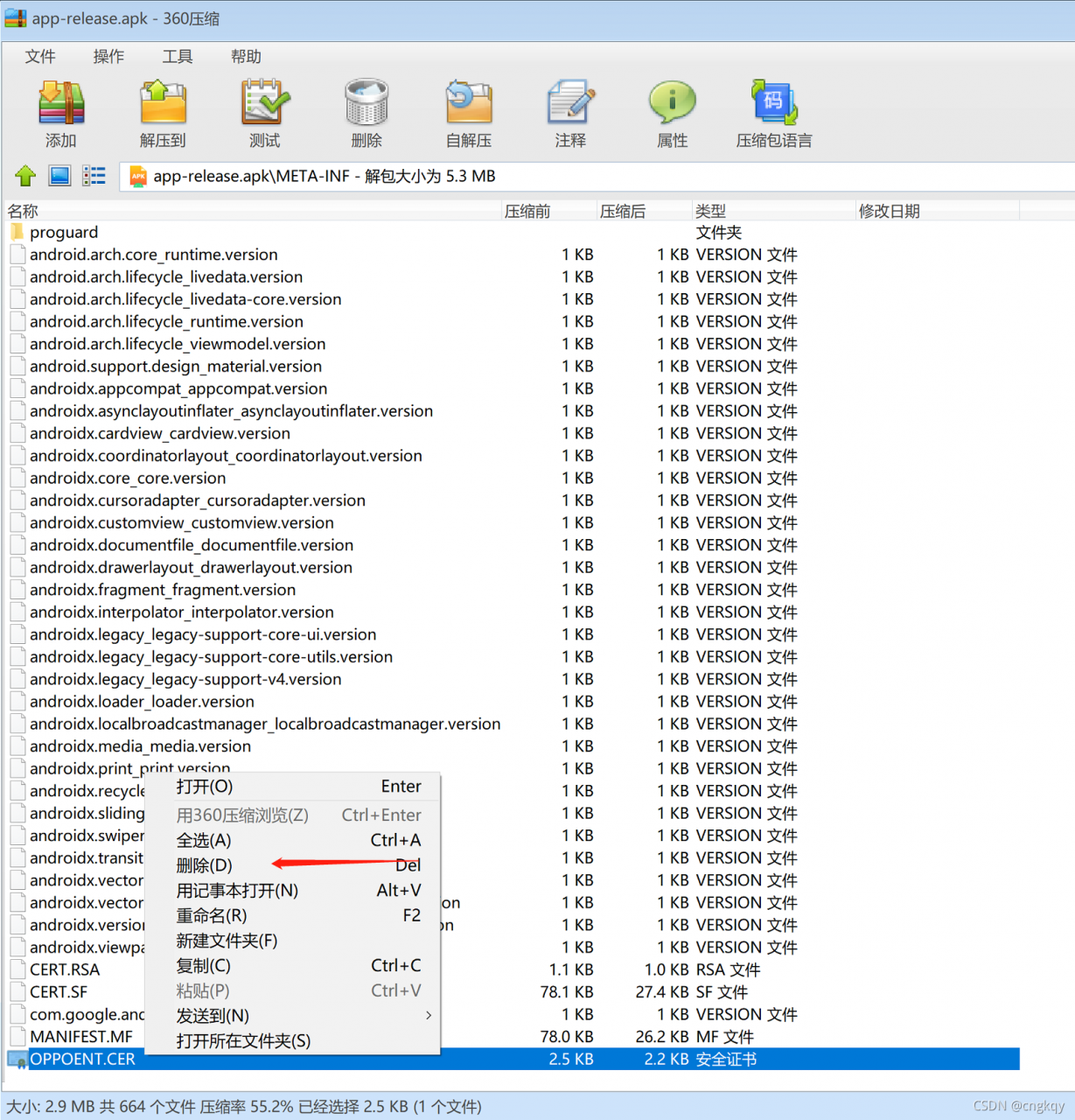
}To package APK these days, you need to use the AAPT command to remove the old certificate file in APK, add a new certificate file again, and then sign and repackage again. It is found that when using the AAPT remove command, the error during crash – archive is toast is always reported. After a day’s comparison, it is found that it is related to the referenced com.android.tools.build: gradle: 4.1.1 and gradle-6.5-bin versions. As long as it is equal to or greater than this version, this error will be reported, which should be a bug of AAPT.
Solution:
1. The gradle plug-in is lower than these two versions. It’s unrealistic. It’s impossible not to upgrade it all the time.

2. Since APK is essentially a zip file, simply when deleting the file, open the APK package directly with the zip decompression software, manually delete the ball, and complete the remaining AAPT add command and re signature operation with the command line.
Flash management command-line tool. I use flash cli
Then, using any command related to flash DB will cause the problem of keyerror “migrate”
No solution was found on the Internet
Therefore, I started to think step by step and finally determined that the biggest problem without the migrate command was that when I executed the flash DB XX command, I didn’t find the corresponding app. The command line didn’t know which app I wanted to run, so I didn’t find the app associated with DB, that is, I didn’t find it
Migrate = migrate (APP = app, DB = dB), so an error is reported
Therefore, to use the flash command, you first need to declare flash_ APP
That is, enter in terminal
export FLASK_APP=The name of the app you want to run
=Do not leave a space before or after, otherwise bad assignment will be reported
Then enter flash DB migrate again and it will be normal
1. Error description
Uncaught SyntaxError: Cannot use import statement outside a module
2. Error reason
Defines a JavaScript file, declares several variables, and uses modularity to export the variables
Let name = “Zhang Hua”
let age = 23
let sex = “female”
Export {name, age, sex}
then, import directly in the page file; Open the browser to access the page, and an error appears on the console
3. Solution
Need to add the attribute type="module" to the script tag
Problem
Error when saving image:RuntimeError: In set_size: Could not set the fontsize
Traceback (most recent call last):
  File "/Users/robin/MLcode/Pycharm_Project/tensorflow/2021/0823_face_recognition_environment/0827_img_quality_analysis_v4.py", line 1556, in <module>
    image_cluster_analysis()
  File "/Users/robin/MLcode/Pycharm_Project/tensorflow/2021/0823_face_recognition_environment/0827_img_quality_analysis_v4.py", line 1549, in image_cluster_analysis
    image_showing(img_compressed)
  File "/Users/robin/MLcode/Pycharm_Project/tensorflow/2021/0823_face_recognition_environment/0827_img_quality_analysis_v4.py", line 1408, in image_showing
    plt.savefig(img_name)
  File "/Users/robin/software/anaconda3/envs/tensorflow/lib/python3.6/site-packages/matplotlib/pyplot.py", line 722, in savefig
    res = fig.savefig(*args, **kwargs)
  File "/Users/robin/software/anaconda3/envs/tensorflow/lib/python3.6/site-packages/matplotlib/figure.py", line 2180, in savefig
    self.canvas.print_figure(fname, **kwargs)
  File "/Users/robin/software/anaconda3/envs/tensorflow/lib/python3.6/site-packages/matplotlib/backend_bases.py", line 2082, in print_figure
    **kwargs)
  File "/Users/robin/software/anaconda3/envs/tensorflow/lib/python3.6/site-packages/matplotlib/backends/backend_agg.py", line 579, in print_jpg
    buf, size = self.print_to_buffer()
  File "/Users/robin/software/anaconda3/envs/tensorflow/lib/python3.6/site-packages/matplotlib/backends/backend_agg.py", line 535, in print_to_buffer
    FigureCanvasAgg.draw(self)
  File "/Users/robin/software/anaconda3/envs/tensorflow/lib/python3.6/site-packages/matplotlib/backends/backend_agg.py", line 388, in draw
    self.figure.draw(self.renderer)
  File "/Users/robin/software/anaconda3/envs/tensorflow/lib/python3.6/site-packages/matplotlib/artist.py", line 38, in draw_wrapper
    return draw(artist, renderer, *args, **kwargs)
  File "/Users/robin/software/anaconda3/envs/tensorflow/lib/python3.6/site-packages/matplotlib/figure.py", line 1709, in draw
    renderer, self, artists, self.suppressComposite)
  File "/Users/robin/software/anaconda3/envs/tensorflow/lib/python3.6/site-packages/matplotlib/image.py", line 135, in _draw_list_compositing_images
    a.draw(renderer)
  File "/Users/robin/software/anaconda3/envs/tensorflow/lib/python3.6/site-packages/matplotlib/artist.py", line 38, in draw_wrapper
    return draw(artist, renderer, *args, **kwargs)
  File "/Users/robin/software/anaconda3/envs/tensorflow/lib/python3.6/site-packages/matplotlib/axes/_base.py", line 2607, in draw
    self._update_title_position(renderer)
  File "/Users/robin/software/anaconda3/envs/tensorflow/lib/python3.6/site-packages/matplotlib/axes/_base.py", line 2556, in _update_title_position
    if title.get_window_extent(renderer).ymin < top:
  File "/Users/robin/software/anaconda3/envs/tensorflow/lib/python3.6/site-packages/matplotlib/text.py", line 890, in get_window_extent
    bbox, info, descent = self._get_layout(self._renderer)
  File "/Users/robin/software/anaconda3/envs/tensorflow/lib/python3.6/site-packages/matplotlib/text.py", line 291, in _get_layout
    ismath="TeX" if self.get_usetex() else False)
  File "/Users/robin/software/anaconda3/envs/tensorflow/lib/python3.6/site-packages/matplotlib/backends/backend_agg.py", line 210, in get_text_width_height_descent
    font = self._get_agg_font(prop)
  File "/Users/robin/software/anaconda3/envs/tensorflow/lib/python3.6/site-packages/matplotlib/backends/backend_agg.py", line 250, in _get_agg_font
    font.set_size(size, self.dpi)
RuntimeError: In set_size: Could not set the fontsize
Solution:
The source of the problem is figure_Size and DPI :
The following two codes are different:
figure_size = (6.40, 4.80)
plt.figure(figsize=figure_size, dpi=100)
And:
figure_size = (640, 480)
plt.figure(figsize=figure_size, dpi=1)
Note:
figsize : width, height in inches, default: (6.4, 4.8) , that is, the picture size in inches. The default value in Matplotlib is (6.4, 40.8) DPI : dots (or pixels) per inch, default: 100.0 , that is, the number of pixels per inch. The default value is 100
Although the above two representations seem to be the same, an error is reported by using DPI = 1. (I won’t delve into it for the time being)