When installing brew install graphviz, there was a problem with:
tar: Error opening archive: Failed to open ‘/Users/xxx/Library/Caches/Homebrew/downloads/348a16e5fedb24cb14fe4fd5c72caa96074c7b4e21ce4d2f7a89eb4b638c830f–gd-2.3.2.arm64_big_sur.bottle.tar.gz’
Error: Failure while executing; tar --extract --no-same-owner --file /Users/xxx/Library/Caches/Homebrew/downloads/348a16e5fedb24cb14fe4fd5c72caa96074c7b4e21ce4d2f7a89eb4b638c830f--gd-2.3.2.arm64_big_sur.bottle.tar.gz --directory /private/tmp/d20210927-26485-nzi2qo exited with 1. Here’s the output:
tar: Error opening archive: Failed to open ‘/Users/xxx/Library/Caches/Homebrew/downloads/348a16e5fedb24cb14fe4fd5c72caa96074c7b4e21ce4d2f7a89eb4b638c830f–gd-2.3.2.arm64_big_sur.bottle.tar.gz

A closer look reveals that there was a problem installing the dependency at this step: the

So, the solution: install the dependency brew install gd separately

Once done, just install graphviz again, and if the same type of error occurs again during this process, continue installing the dependency where the error occurred.
Author Archives: Robins
[Solved] os.py“, line 725, in __getitem__ raise KeyError(key) from None KeyError: ‘PATH‘
os.py”, line 725, in getitem raise KeyError(key) from None KeyError: ‘PATH’
scenario: when I was working on the project, I encountered a problem. Everything was running normally on the Linux server, but there was a problem when I was running in the remote finalshell (the code behind the process actually ran), but it seemed that there was a problem with the environment.
Solution process:
when I instantiated a class, I was a little puzzled by this problem. When I began to find out about os.environ [“path”], I knew that Python did not load the environment (here I used the virtual environment instead of the system default Python). So I went into the virtual environment to execute this:
import os
print(os.environ["PATH"])
It is found that there is a value here, but the bug reported is none. Therefore, at the beginning of the code, I add the value printed out just now to the code, and then I can continue to execute Python code in the virtual environment of the server on the remote shell
import os
os.environ["PATH"] = "This string copies the value printed from the above code"
So far, everything can run normally
[error][/usr/share/perl5/vendor_perl/MHA/SSHCheck.pm, ln63] Permission denied (publickey,gssapi-ke
When building mha, the following error was reported when using the masterha_check_ssh script to do ssh communication between the three nodes.
Master: 192.168.0.60 master
backup1: 192.168.0.61 slave1
Backup 2: 192.168.0.62 slave2, while the management node of mha is placed on the second slave
[root@manager mha_master]# masterha_check_ssh –global_conf=/etc/mha_master/mha.cnf –conf=/etc/mha_master/mha.cnf
Sun Sep 26 14:30:23 2021 – [info] Reading default configuration from /etc/mha_master/mha.cnf…
Sun Sep 26 14:30:23 2021 – [info] Reading application default configuration from /etc/mha_master/mha.cnf…
Sun Sep 26 14:30:23 2021 – [info] Reading server configuration from /etc/mha_master/mha.cnf…
Sun Sep 26 14:30:23 2021 – [info] Starting SSH connection tests…
Sun Sep 26 14:30:24 2021 – [error][/usr/share/perl5/vendor_perl/MHA/SSHCheck.pm, ln63]
Sun Sep 26 14:30:23 2021 – [debug] Connecting via SSH from [email protected](192.168.0.60:22) to [email protected](192.168.0.61:22)…
Permission denied (publickey,gssapi-keyex,gssapi-with-mic,password).
Sun Sep 26 14:30:24 2021 – [error][/usr/share/perl5/vendor_perl/MHA/SSHCheck.pm, ln111] SSH connection from [email protected](192.168.0.60:22) to [email protected](192.168.0.61:22) failed!
Sun Sep 26 14:30:24 2021 – [error][/usr/share/perl5/vendor_perl/MHA/SSHCheck.pm, ln63]
Sun Sep 26 14:30:24 2021 – [debug] Connecting via SSH from [email protected](192.168.0.61:22) to [email protected](192.168.0.60:22)…
Permission denied (publickey,gssapi-keyex,gssapi-with-mic,password).
Sun Sep 26 14:30:24 2021 – [error][/usr/share/perl5/vendor_perl/MHA/SSHCheck.pm, ln111] SSH connection from [email protected](192.168.0.61:22) to [email protected](192.168.0.60:22) failed!
Sun Sep 26 14:30:25 2021 – [error][/usr/share/perl5/vendor_perl/MHA/SSHCheck.pm, ln63]
Sun Sep 26 14:30:24 2021 – [debug] Connecting via SSH from [email protected](192.168.0.62:22) to [email protected](192.168.0.60:22)…
Permission denied (publickey,gssapi-keyex,gssapi-with-mic,password).
Sun Sep 26 14:30:25 2021 – [error][/usr/share/perl5/vendor_perl/MHA/SSHCheck.pm, ln111] SSH connection from [email protected](192.168.0.62:22) to [email protected](192.168.0.60:22) failed!
SSH Configuration Check Failed!
at /bin/masterha_check_ssh line 44.
The solution is as follows.
-
- Manually check if the ssh communication between the three nodes is normal , use the format ssh node1 date, each node is executed three times, pay attention to the user who does the ssh communication, for example: I use mysql to do the mutual trust between the three nodes, then we have to switch to mysql to do the check, not the root user
-
- [mysql@slave1 .ssh]$ ssh master date
-
- Sun Sep 26 14:48:30 CST 2021
-
- [mysql@slave1 .ssh]$ ssh slave1 date
-
- Sun Sep 26 14:48:34 CST 2021
-
- [mysql@slave1 .ssh]$ ssh manager date
-
- Sun Sep 26 14:48:38 CST 2021 Use mysql user to execute mutual trust script check, check all ok
-
- Check script.
-
- masterha_check_ssh –global_conf=/etc/mha_master/mha.cnf –conf=/etc/mha_master/mha.cnf
-
-
- or
-
- masterha_check_ssh –conf=/etc/mha_master/mha.cnf
[mysql@manager .ssh]$ masterha_check_ssh –global_conf=/etc/mha_master/mha.cnf –conf=/etc/mha_master/mha.cnf
Sun Sep 26 14:29:30 2021 – [info] Reading default configuration from /etc/mha_master/mha.cnf…
Sun Sep 26 14:29:30 2021 – [info] Reading application default configuration from /etc/mha_master/mha.cnf…
Sun Sep 26 14:29:30 2021 – [info] Reading server configuration from /etc/mha_master/mha.cnf…
Sun Sep 26 14:29:30 2021 – [info] Starting SSH connection tests…
Sun Sep 26 14:29:31 2021 – [debug]
Sun Sep 26 14:29:30 2021 – [debug] Connecting via SSH from [email protected](192.168.0.60:22) to [email protected](192.168.0.61:22)…
Sun Sep 26 14:29:31 2021 – [debug] ok.
Sun Sep 26 14:29:31 2021 – [debug] Connecting via SSH from [email protected](192.168.0.60:22) to [email protected](192.168.0.62:22)…
Sun Sep 26 14:29:31 2021 – [debug] ok.
Sun Sep 26 14:29:32 2021 – [debug]
Sun Sep 26 14:29:31 2021 – [debug] Connecting via SSH from [email protected](192.168.0.61:22) to [email protected](192.168.0.60:22)…
Sun Sep 26 14:29:31 2021 – [debug] ok.
Sun Sep 26 14:29:31 2021 – [debug] Connecting via SSH from [email protected](192.168.0.61:22) to [email protected](192.168.0.62:22)…
Sun Sep 26 14:29:31 2021 – [debug] ok.
Sun Sep 26 14:29:33 2021 – [debug]
Sun Sep 26 14:29:31 2021 – [debug] Connecting via SSH from [email protected](192.168.0.62:22) to [email protected](192.168.0.60:22)…
Sun Sep 26 14:29:32 2021 – [debug] ok.
Sun Sep 26 14:29:32 2021 – [debug] Connecting via SSH from [email protected](192.168.0.62:22) to [email protected](192.168.0.61:22)…
Sun Sep 26 14:29:32 2021 – [debug] ok.
Sun Sep 26 14:29:33 2021 – [info] All SSH connection tests passed successfully.
3. If you use root to execute the script, it will report the theme error, remember to switch the user.
Using postman Test Django Interface error: RuntimeError:You called this URL via POST,but the URL doesn‘t end in a slash
1. Access interface
Using the postman provider
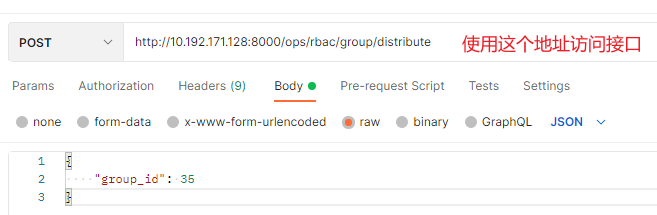
2. Error reporting:
RuntimeError:You called this URL via POST,but the URL doesn’t end in a slash and you have APPEND_ SLASH set. Django can’t redirect to the slash URL while maintaining POST data.
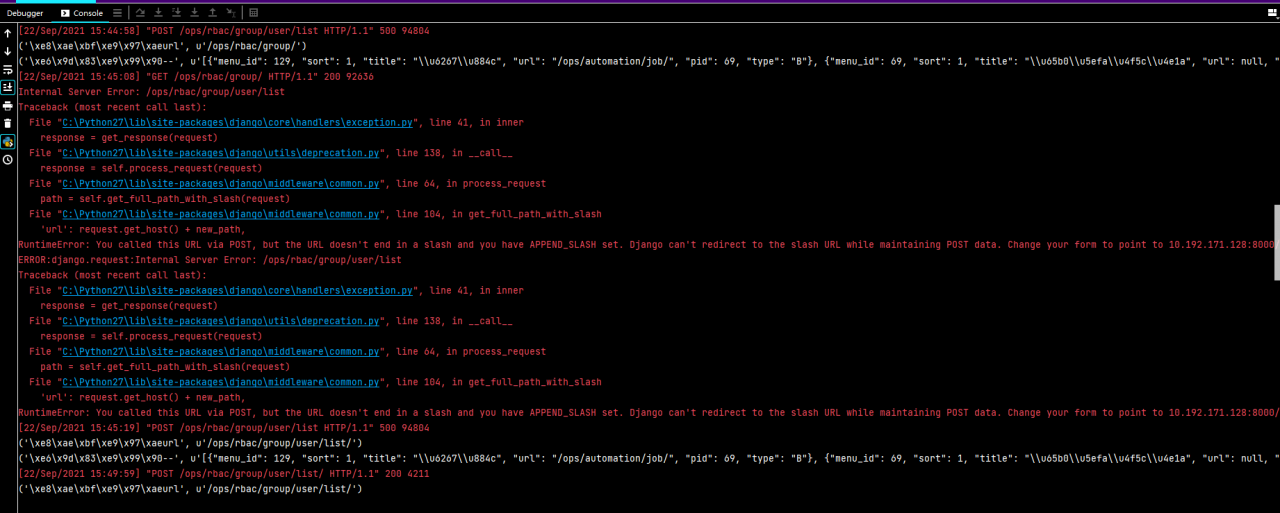
3. Solution:
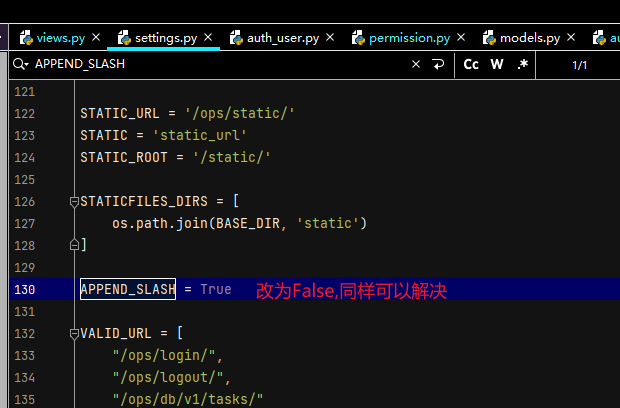
In fact, two methods have been suggested in the error report

Method 1: add a at the end of the URL/
http:10.192.171.128:8000/ops/rbac/group/distribute
Method 2: set append in settings_ SLASH=False
org.springframework.beans.factory.BeanCreationException: Error creating bean with name ‘globalTransa
Errors are reported as follows:
org.springframework.beans.factory.BeanCreationException: Error creating bean with name ‘globalTransactionScanner’ defined in class path resource
Error creating bean named “globaltransactionscanner”, which is in classpath resource [COM/Alibaba/cloud/Seata/globaltransactionautoconfiguration. Class]: bean instance via factory method failed; nested exception is org.springframework.beans.BeanInstantiationException: Failed to instantiate [io.seata.spring.annotation.GlobalTransactionScanner]: Factory method ‘globalTransactionScanner’ threw exception; nested exception is io.seata.common.exception.NotSupportYetException: config type can not be null
Failed to instantiate bean through factory method; The nested exception is o.seata.common.exception.notsupportyetexception: the configuration type cannot be null
Three modules: order module + account module + inventory storage module realize the TCC mode of Seata TCC distributed transaction.
Start order to test
Start services in order:
- EurekaSeata ServerEasy Id GeneratorOrder
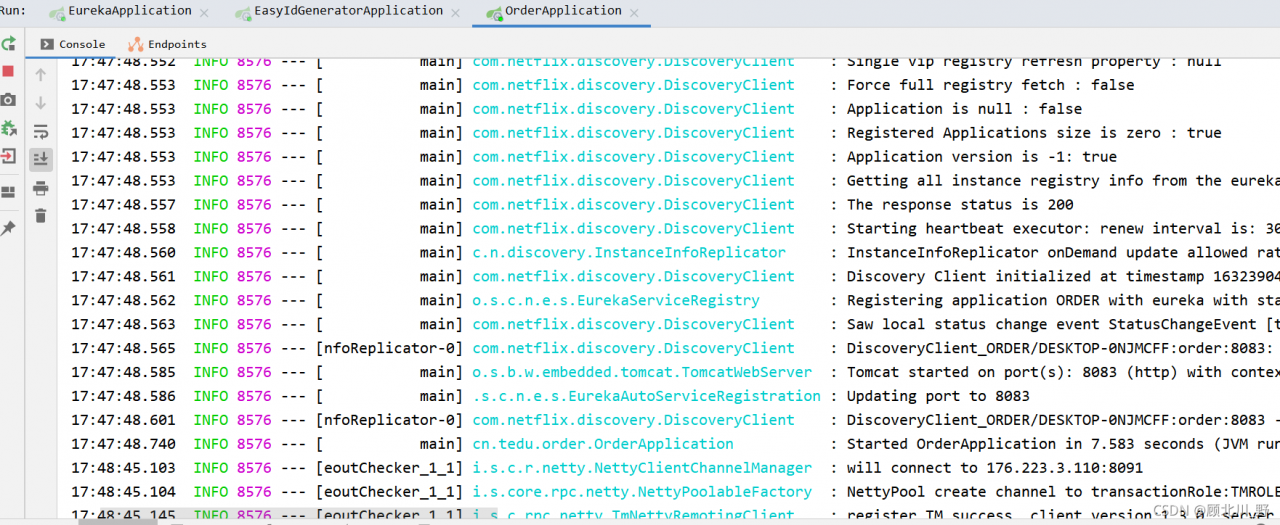
Failed to start the order project.
Presentation:
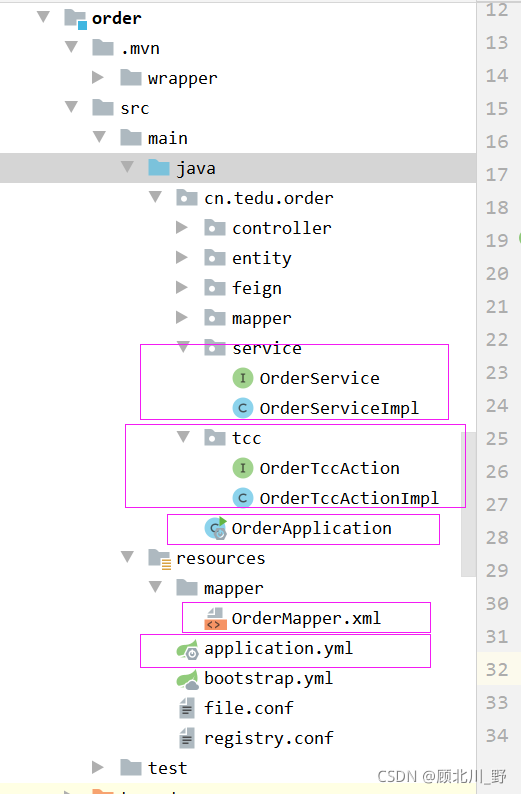
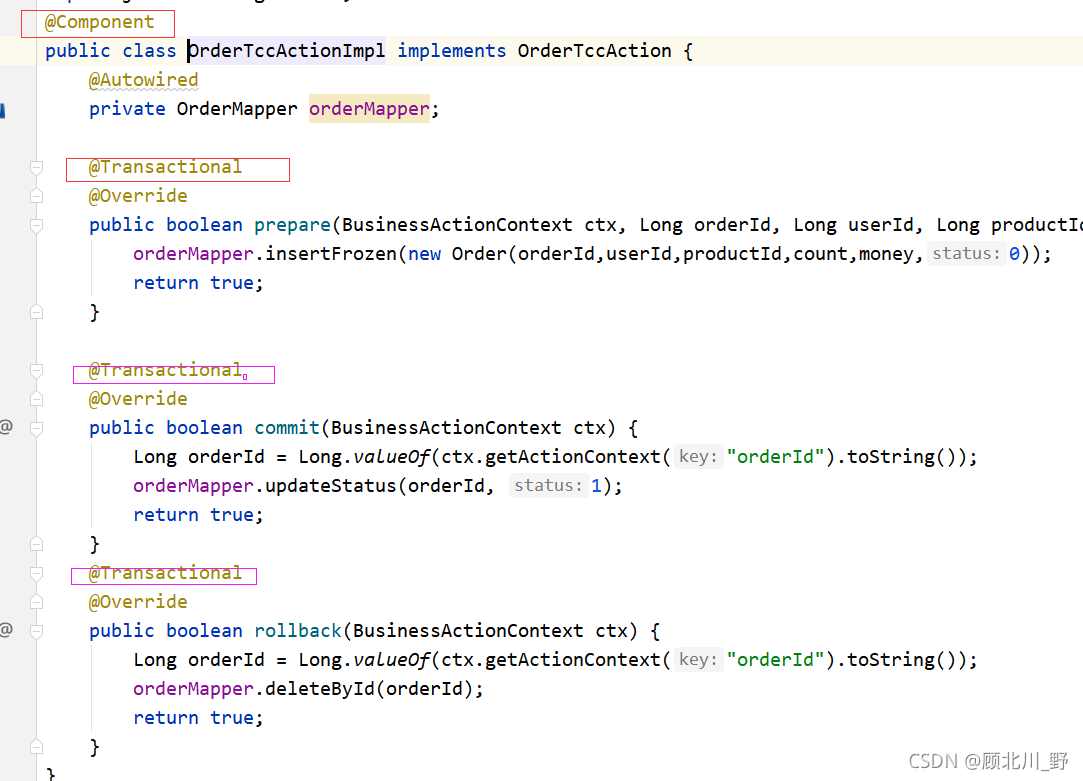
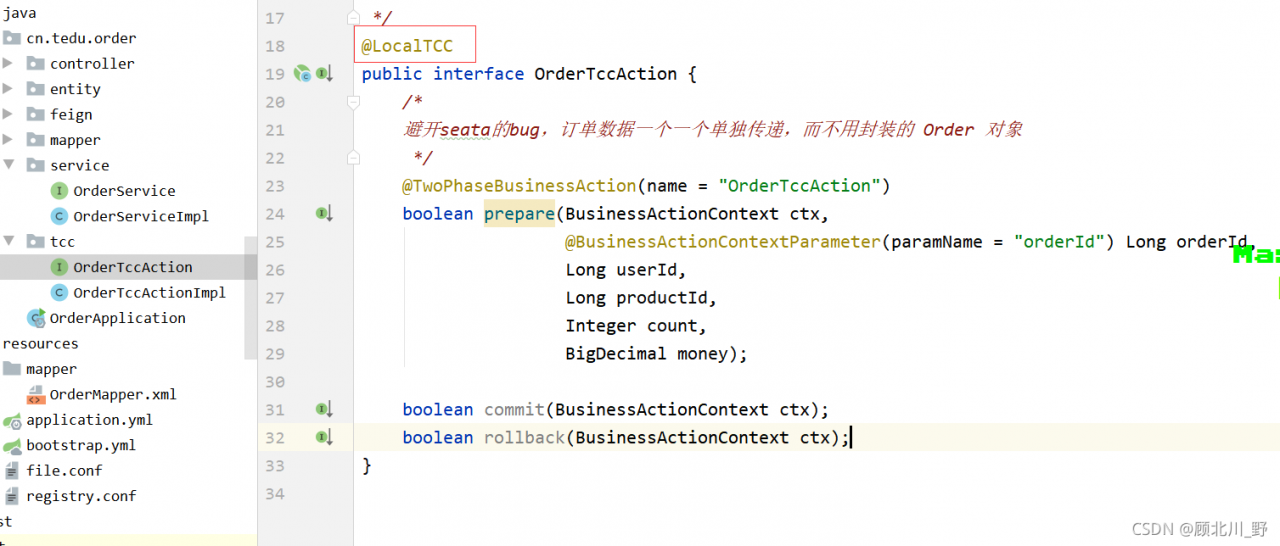
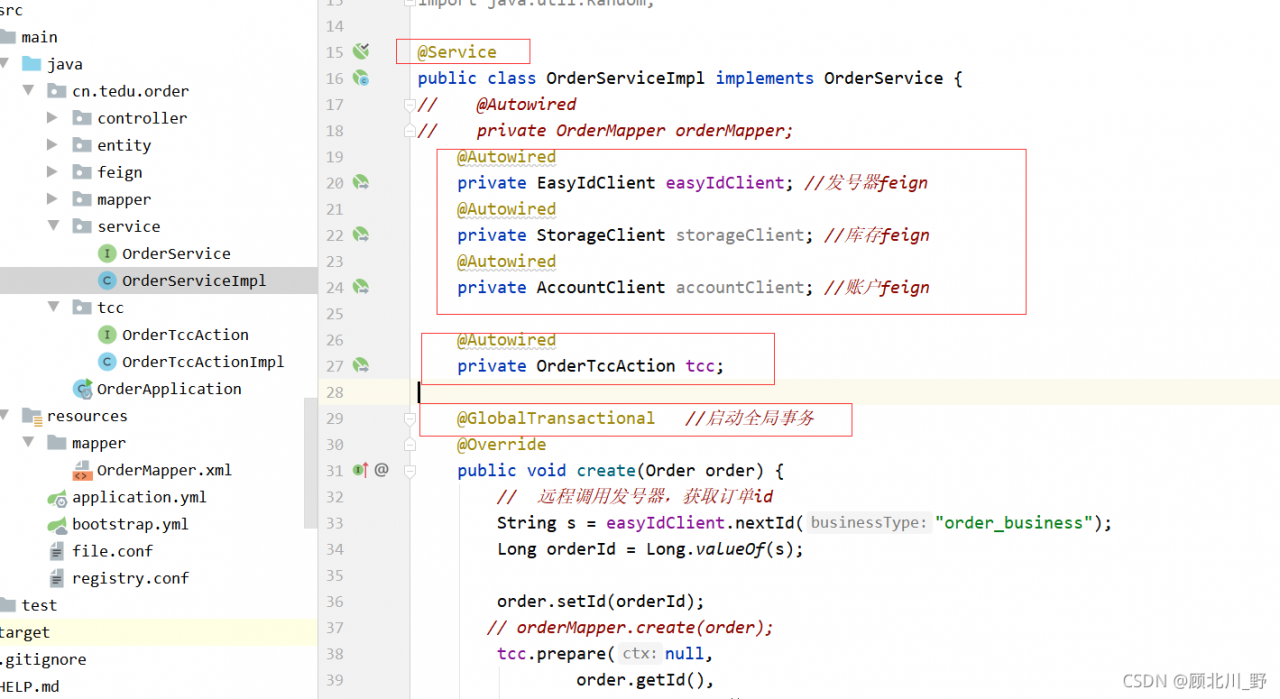
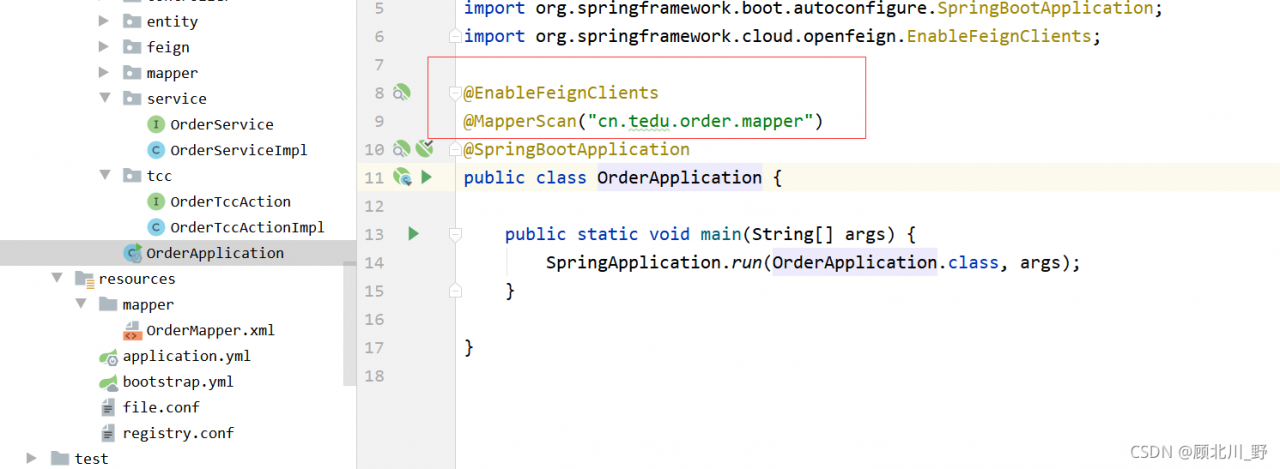
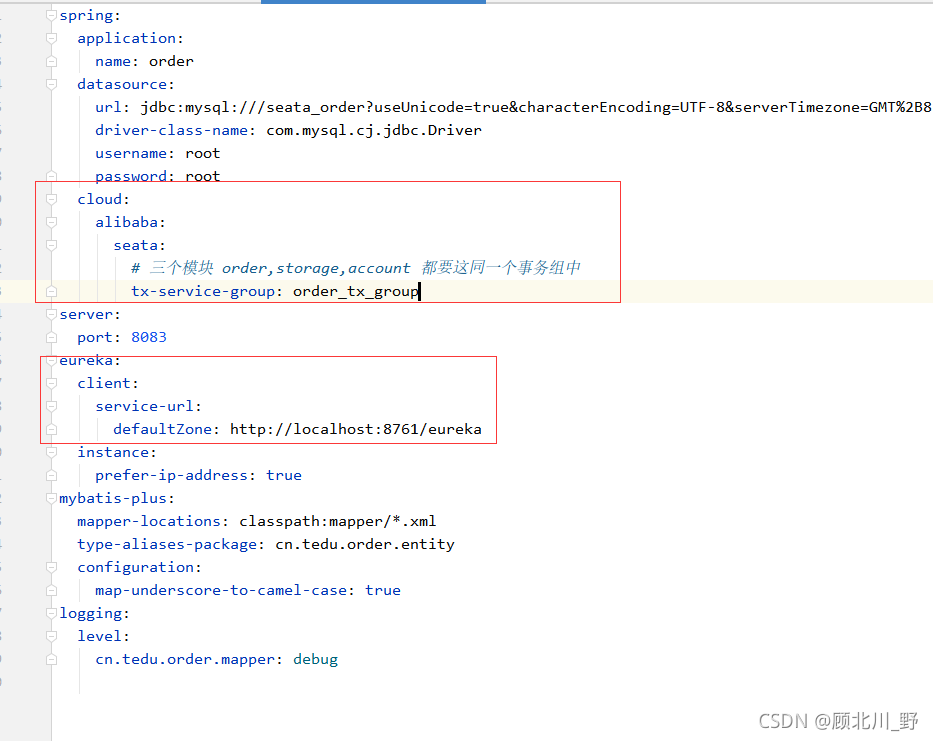
Solution:
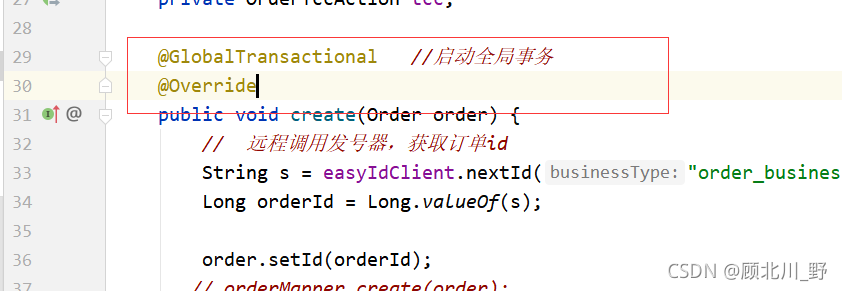
1. Add global transaction annotation
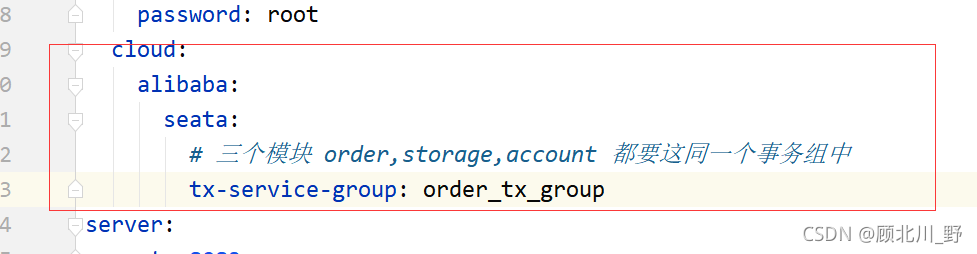
2. Add transaction group
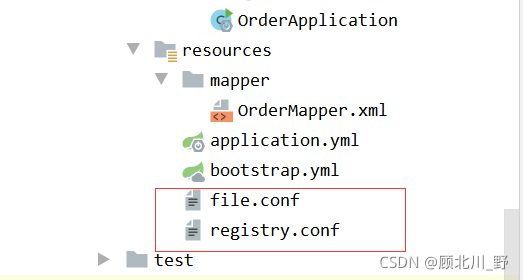
3. Add two important conf files [key step]
The file.conf file is as follows:
transport {
  # tcp udt unix-domain-socket
  type = "TCP"
  #NIO NATIVE
  server = "NIO"
  #enable heartbeat
  heartbeat = true
  # the client batch send request enable
  enableClientBatchSendRequest = true
  #thread factory for netty
  threadFactory {
    bossThreadPrefix = "NettyBoss"
    workerThreadPrefix = "NettyServerNIOWorker"
    serverExecutorThread-prefix = "NettyServerBizHandler"
    shareBossWorker = false
    clientSelectorThreadPrefix = "NettyClientSelector"
    clientSelectorThreadSize = 1
    clientWorkerThreadPrefix = "NettyClientWorkerThread"
    # netty boss thread size,will not be used for UDT
    bossThreadSize = 1
    #auto default pin or 8
    workerThreadSize = "default"
  }
  shutdown {
    # when destroy server, wait seconds
    wait = 3
  }
  serialization = "seata"
  compressor = "none"
}
service {
  #transaction service group mapping
  # order_tx_group & yml  “tx-service-group: order_tx_group” shoud be the same
  # “seata-server” and  the register name of TC Service should be the same
  # get the url of seata-server in eureka, and register seata-server, set group
  vgroupMapping.order_tx_group = "seata-server"
  #only support when registry.type=file, please don't set multiple addresses
  order_tx_group.grouplist = "127.0.0.1:8091"
  #degrade, current not support
  enableDegrade = false
  #disable seata
  disableGlobalTransaction = false
}

client {
  rm {
    asyncCommitBufferLimit = 10000
    lock {
      retryInterval = 10
      retryTimes = 30
      retryPolicyBranchRollbackOnConflict = true
    }
    reportRetryCount = 5
    tableMetaCheckEnable = false
    reportSuccessEnable = false
  }
  tm {
    commitRetryCount = 5
    rollbackRetryCount = 5
  }
  undo {
    dataValidation = true
    logSerialization = "jackson"
    logTable = "undo_log"
  }
  log {
    exceptionRate = 100
  }
}
Registry.conf file:
registry {
  # file 、nacos 、eureka、redis、zk、consul、etcd3、sofa
  type = "eureka"

  nacos {
    serverAddr = "localhost"
    namespace = ""
    cluster = "default"
  }
  eureka {
    serviceUrl = "http://localhost:8761/eureka"
    # application = "default"
    # weight = "1"
  }
  redis {
    serverAddr = "localhost:6379"
    db = "0"
    password = ""
    cluster = "default"
    timeout = "0"
  }
  zk {
    cluster = "default"
    serverAddr = "127.0.0.1:2181"
    session.timeout = 6000
    connect.timeout = 2000
    username = ""
    password = ""
  }
  consul {
    cluster = "default"
    serverAddr = "127.0.0.1:8500"
  }
  etcd3 {
    cluster = "default"
    serverAddr = "http://localhost:2379"
  }
  sofa {
    serverAddr = "127.0.0.1:9603"
    application = "default"
    region = "DEFAULT_ZONE"
    datacenter = "DefaultDataCenter"
    cluster = "default"
    group = "SEATA_GROUP"
    addressWaitTime = "3000"
  }
  file {
    name = "file.conf"
  }
}

config {
  # file、nacos 、apollo、zk、consul、etcd3、springCloudConfig
  type = "file"

  nacos {
    serverAddr = "localhost"
    namespace = ""
    group = "SEATA_GROUP"
  }
  consul {
    serverAddr = "127.0.0.1:8500"
  }
  apollo {
    app.id = "seata-server"
    apollo.meta = "http://192.168.1.204:8801"
    namespace = "application"
  }
  zk {
    serverAddr = "127.0.0.1:2181"
    session.timeout = 6000
    connect.timeout = 2000
    username = ""
    password = ""
  }
  etcd3 {
    serverAddr = "http://localhost:2379"
  }
  file {
    name = "file.conf"
  }
}
Finally, start successfully!!
[Solved] Git Clone Error: “error: RPC failed; curl 56 GnuTLS recv error (-9): A TLS packet with unexpected length …
1. When git pull is used for several large projects recently, the following errors always appear: </ font>
error: RPC failed; curl 56 GnuTLS recv error (-9): A TLS packet with unexpected length was received.
fatal: The remote end hung up unexpectedly
fatal: early EOF
fatal: index-pack failed
2. According to the online method, there are still problems</ font>
// set proxy
git config --global http.proxy socks5://127.0.0.1:1081
git config --global https.proxy socks5://127.0.0.1:1081
// add cache
git config --global http.postBuffer 1048576000
3. Finally, add the following operations to solve the problem
//Change this value to a larger value, the perfect solution, the default is 1500.
ifconfig eth0 mtu 14000How to Solve Unzip Error: tar: Error is not recoverable: exiting now
Tar: error is not recoverable: exiting now
[ root@node04 soft]# tar -zxvf apache-tomcat-8.0.53-x64.tar.gz
Error message:
gzip: stdin has more than one entry–rest ignored tar: Child returned status 2 tar: Error is not recoverable: exiting now
Solution 1: remove the Z parameter and use tar – xvf to decompress
Find or report an error.
Solution 2: use the unzip command.
Problem solving.
If you cannot use the unzip command, first follow:
yum install -y unzip zip
Error occurred when finalizing generatordataset iterator [How to Solve]
tensorflow.python.framework.errors_impl.UnknownError: Failed to get convolution algorithm. This is probably because cuDNN failed to initialize, so try looking to see if a warning log message was printed above. [Op:Conv2D]
2021-09-24 15:31:45.989272: W tensorflow/core/kernels/data/generator_dataset_op.cc:103] Error occurred when finalizing GeneratorDataset iterator: Failed precondition: Python interpreter state is not initialized. The process may be terminated.
Googled the blog and said that the batchsize was set too large, resulting in insufficient memory. So I changed the batchsize from 16 to 4, and then to 1, and I still got this error.
I don’t think the model I’m running is very big, so why is there this problem?
Solution!
It is not set properly when calling the GPU
Just add these two lines of code at the top of the code
config = tf.compat.v1.ConfigProto(gpu_options=tf.compat.v1.GPUOptions(allow_growth=True))
sess = tf.compat.v1.Session(config=config)
[Solved] Error calling ICU Library: libicudata.so.51: internal error
I recently ported a front-end that depends on the icu library, and after successful compilation I got the following error
error while loading shared libraries: /usr/lib/libicudata.so.51: internal error
I thought it was a problem with icu version, and tried various versions without success.
I finally found the problem after a long day of searching, the config should add –with-data-packaging=files
The original config configurationICU_CONF_OPT = –with-cross-build=$(HOST_ICU_DIR)/source –disable-samples \
–disable-tests
New Configuration:
ICU_CONF_OPT = –host=arm-linux-gnueabihf \
–with-cross-build=$(HOST_ICU_DIR)/source \
–prefix=$(STAGING_DIR)/usr \
–with-data-packaging=files \
–disable-samples \
–disable-tests
[Solved] Upstream connect error or disconnect occurs after the k8s istio virtual machine is restarted
Error (common problem after virtual machine reboot):
upstream connect error or disconnect/reset before headers. reset reason: connection failure, transport failure reason: TLS error: 268436501:SSL routines:OPENSSL_internal:SSLV3_ALERT_CERTIFICATE_EXPIRED
Solution:
The pods under istio-system are out of order, you need kubectl delete pods xxx -n istio-system to restart
Flask Database Migration Error: ERROR [flask_migrate] Error: Can‘t locate revision identified by ‘a1c25fe0fc0e‘
Problem Description:
In flash web development, we will use the flash migrate library to migrate the database, so as to submit the changed database model we wrote in the program script to the database without deleting and rebuilding the database model
if we use Python manage.py DB init to create a migration warehouse, and then use the migrate or upgrade in flash migrate, the following two instructions:
python manage.py db migrate
python manage.py db upgrade
Error [flag_migrate] error: can’t locate revision identified by ‘a1c25fe0fc0e’ may appear. The identification number of ‘a1c25fe0fc0e’ corresponds to different database models! As shown in the figure:

resolvent:
The reason for the above error is that flash migrate cannot find the revision of “a1c25fe0fc0e” logo. We just need to indicate the missing logo number in the command
we can use the following commands in order in the shell command line window:
python app.py db revision --rev-id <Fill the prompt's identification number into this location, such as a1c25fe0fc0e above>
python app.py db migrate
python app.py db upgrade
Enter the following command to demonstrate:
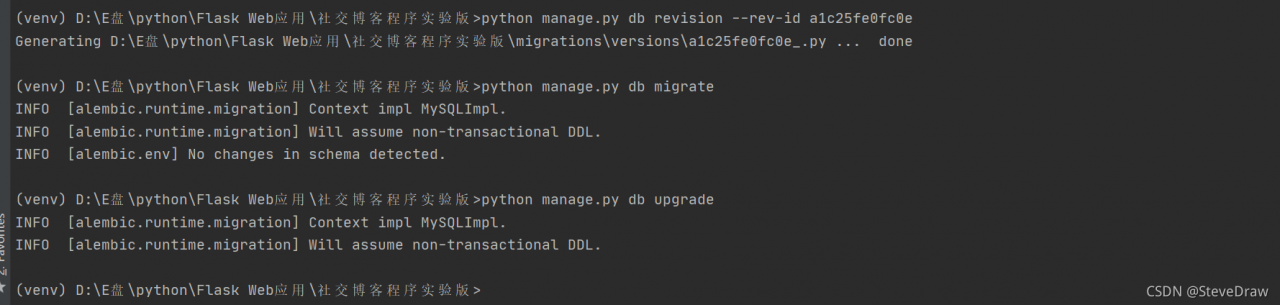
then, the database migration succeeds
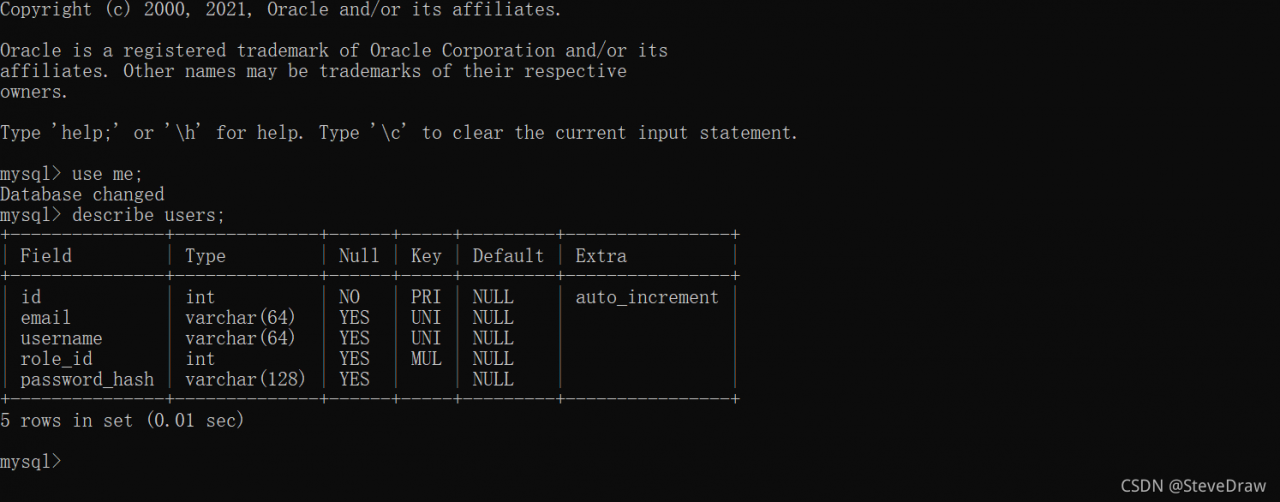
Finally, if there are deficiencies in the article, criticism and correction are welcome!
[Solved] Pyodbc.ProgrammingError: No results. Previous SQL was not a query.
Call the stored procedure on the remote sqlserver server with Python. Code fragment:
    conn = pyodbc.connect(SERVER=host, UID=user, PWD=password, DATABASE=dbname,
                            DRIVER=driver)
    cur = conn.cursor()
    if not cur:
        raise (NameError, 'Database connection error)
    else:
        cur.execute("EXEC GetLastData")
        resList = list()
        resList = cur.fetchall()
Execution error:
pyodbc.ProgrammingError: No results. Previous SQL was not a query.
After checking, the stored procedure can be executed normally in the sqlserver environment. It seems that there is a problem when calling pyodbc. A similar problem is found on stackoverflow. The answer is as follows:
the problem was solved by adding set NOCOUNT on; to the beginning of the anonymous code block. That statement suppresses the record count values generated by DML statements like UPDATE … and allows the result set to be retrieved directly.
The problem is solved by adding it to the beginning of the anonymous code block. This statement suppresses the record count value generated by the DML statement and allows the set result to be retrieved directly. SET NOCOUNT ON; UPDATE …
So add a sentence set NOCOUNT on to the stored procedure
CREATE proc [dbo].[GetLastData]
AS
BEGIN

SET NOCOUNT ON

declare @begindate datetime,@enddate datetime
select @begindate=CONVERT(varchar(7),GETDATE(),120)+'-01'
select @enddate=DATEADD(MONTH,1,@begindate)