Author Archives: Robins

coredns [ERROR] plugin/errors: 2 read udp : i/o timeout

This problem seems to be caused by the failure to resolve DNS, but it is difficult to restart after checking various configurations. Finally, it is found that there is a problem with the forwarding rule configuration. Just execute the following:

iptables -P INPUT ACCEPT
iptables -P FORWARD ACCEPT
iptables -P OUTPUT ACCEPT
iptables -F

Idea error: (4, 28) Java: package com.alibaba.fastjson does not exist

The package has been imported through Maven in DEA, and the location of the package can also be located in idea, but error is always reported when compiling, and the package cannot be found.

Presumably, the reason is that the version of idea is incompatible with the build built by Maven

It is recommended to uninstall the idea and install it with another version of the idea. If you do not want to replace the idea, you can take the following measures.

The solution is as follows:

Hosting the build and run of idea under maven

When checked, recompilation can run normally

[gdb] error while loading shared libraries: libcunit.so.1: cannot open shared object file

Encountered while using GDB

Missing separate debuginfos, use: debuginfo-install glibc-2.17-157.el7_3.5.x86_64

Modify enable = 1 of “/ etc/yum. Repos. D/CentOS debuginfo. Repo” file first; If the file does not exist, create it manually and add the following contents:

[debug]
name=CentOS-7 - Debuginfo
baseurl=http://debuginfo.centos.org/7/$basearch/ 
gpgcheck=1
gpgkey=file:///etc/pki/rpm-gpg/RPM-GPG-KEY-CentOS-Debug-7 
enabled=1

Then execute

sudo yum install -y glibc
sudo debuginfo-install glibc

If GDB cannot run after this, a prompt message will appear

error while loading shared libraries: libcunit.so.1: cannot open shared object file: No such file or directory
[Inferior 1 (process 23252) exited with code 0177]

resolvent

sudo find/-name "libcunit.so.1"

After finding the corresponding path, copy libcunit. So. 1 to the/lib64 directory

cp <find_path> /lib64

Then you can run normally.

error C4996 ‘pugixml_ Documentload ‘is declared as a rejected solution

Gbd28181Device.cpp(550,18): error C4996: ‘pugi::xml_ Document:: load ‘: declared deprecated

For the above problems, I find the following three solutions:

Method 1: Project Properties & gt; Configuration Properties > C/C++ > General > SDL checks off

Method 2: #pragma warning (disable: 4996)

Method: 3:/WD 4996

Could not write JSON: write javaBean error, fastjson version x.x.x, class

Could not write JSON: write javaBean error, fastjson version x.x.x, class

Possible causes of error reporting (welcome to add)

1. Serialization problem. The reason is that some fields in the bean object cannot be serialized. For example, fields of multipart type cannot be serialized. You can not serialize annotations through @ jsonfailed (serialize = false)

2. When converting JSON to object, there are some syntax problems in the attribute get/set, such as null pointer, type conversion, divisor and dividend in division are 0, etc

3. Syntax problem in get/set when database query returns (as above)

Plugin Error: Plugin “Android Code Generator“ is incompatible (supported only in IntelliJ IDEA)

1. Question

Plugin Error: Plugin “Android Code Generator” is incompatible (supported only in IntelliJ IDEA).

2. Solution

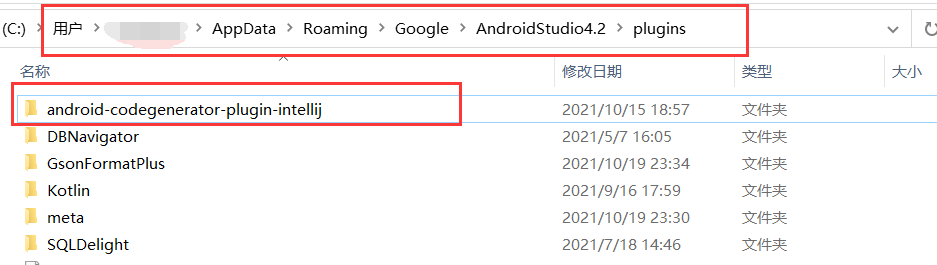
C:/Users/Admin/AppData/Roaming/Google/AndroidStudio4.2/plugins

After deleting the file, restart the as to solve the problem.

3. Detailed steps

1. Enter the directory of Disk C and click the [user] folder

2. Find the directory of your [administrator] user name, that is, admin above

3. If you enter at this time, you may not find the appdata folder, so you need to open the hidden directory to see it (take win10 as an example here)

4. Follow the above file path to find the directory where the file is located

5. Delete the error folder. This is Android codegenerator plugin IntelliJ

6. Restart Android studio

Error: EPERM: operation not permitted, mkdir ‘D:\nodejs\node_modules\npm\node_cache\_npx‘

Question:

  implement   NPX create react app XXX reports an error

PS D:\Desktop>npx create-react-app demo
Error: EPERM: operation not permitted, mkdir 'D:\nodejs\node_modules\npm\node_cache\_npx'
TypeError: Cannot read property 'get' of undefined
    at errorHandler (D:\nodejs\node_modules\npm\node_global\node_modules\npx\node_modules\npm\lib\utils\error-handler.js:213:18)
    at D:\nodejs\node_modules\npm\node_global\node_modules\npx\node_modules\npm\bin\npm-cli.js:83:20
    at cb (D:\nodejs\node_modules\npm\node_global\node_modules\npx\node_modules\npm\lib\npm.js:215:22)
    at D:\nodejs\node_modules\npm\node_global\node_modules\npx\node_modules\npm\lib\npm.js:253:24
    at D:\nodejs\node_modules\npm\node_global\node_modules\npx\node_modules\npm\lib\config\core.js:81:7
    at Array.forEach (<anonymous>)
    at D:\nodejs\node_modules\npm\node_global\node_modules\npx\node_modules\npm\lib\config\core.js:80:13
    at f (D:\nodejs\node_modules\npm\node_global\node_modules\npx\node_modules\npm\node_modules\once\once.js:25:25)
    at afterExtras (D:\nodejs\node_modules\npm\node_global\node_modules\npx\node_modules\npm\lib\config\core.js:178:20)
    at D:\nodejs\node_modules\npm\node_global\node_modules\npx\node_modules\npm\node_modules\mkdirp\index.js:35:29
D:\nodejs\node_modules\npm\node_global\node_modules\npx\node_modules\npm\lib\utils\error-handler.js:213
  if (npm.config.get('json')) {
                 ^

TypeError: Cannot read property 'get' of undefined
    at process.errorHandler (D:\nodejs\node_modules\npm\node_global\node_modules\npx\node_modules\npm\lib\utils\error-handler.js:213:18)
    at process.emit (events.js:400:28)
    at process._fatalException (internal/process/execution.js:167:25)
Install for [ 'create-react-app@latest' ] failed with code 7

terms of settlement:

Create react- app@latest Install to global

npm install create-react-app@latest -g

Run after installation

 npx create-react-app demo

So you can write the project

Running the test front-end project, Google browser accesses localhost with err_SSL_PROTOCOL_ERROR

Err appears in Google browser_SSL_PROTOCOL_ERROR

under test http://localhost:8080/ The following error occurred during

This web site cannot provide a secure connection. Localhost sent an invalid response err_SSL_PROTOCOL_ERROR

At this time, you need to open a blank page for input chrome://net-internals/#hsts
Find the delete domain policy
at the bottom of the left navigation bar. It has a delete domain security policies
example picture

then enter localhost in the domain input box and press Delete
and you’re done!

PS: this method is only for learning and use, and the user shall bear any legal disputes and consequences