Author Archives: Robins

Linux Ubuntu Django Error: uwsgi: error while loading shared libraries: libpcre.so.1

Deploy Django service under Ubuntu and report errors using uwsgi

uwsgi --http :8001 --wsgi-file test.py

Error Messages: uwsgi: error while loading shared libraries: libpcre.so.1: cannot open shared object file: No such file or directory

Solution:

sudo apt-get install libpcre3 libpcre3-dev # Install the required packages

find/-name libpcre.so.3 # Find libpcre.so.3 (usually in the root directory /lib/x86_64-linux-gnu)

Find /lib/x86_64-linux-gnu/libpcre.so.3

sudo ln -s /lib/x86_64-linux-gnu/libpcre.so.3 /usr/lib/libpcre.so.1 # Just make a soft link

[Solved] forrtl: error (200): program aborting due to control-C event

forrtl: error (200): program aborting due to control-C event
pycharm Error:
forrtl: error (200): program aborting due to control-C event
Image PC Routine Line Source
libifcoremd.dll 00007FFD5FCA3B58 Unknown Unknown Unknown
KERNELBASE.dll 00007FFDC015B933 Unknown Unknown Unknown
KERNEL32.DLL 00007FFDC15D7034 Unknown Unknown Unknown
ntdll.dll 00007FFDC2762651 Unknown Unknown Unknown

Solution:

pip install --upgrade scipy

Just run this in terminal. The principle is not clear.

[Solved] no all patern found! & Error on Generate Activation Code…

No all pattern found! And error on generate activation code

Error 1: no all pattern found!

Solution: Win + R, enter regedit

Computer found\HKEY_CURRENT_User\software\premiersoft,
delete Navicat in premiersoft and start again

Error 2: error on generate activation code

Solution: if the network is not disconnected during the operation, restart after the network is disconnected

Mybatis reports an error (error building sqlsession.) when using annotations without deleting redundant files

First, the SQL statement is read by using the mapping configuration file
the file is iuserdao.xml, as follows:

package com.wwh.dao;

import com.wwh.domain.User;
import org.apache.ibatis.annotations.Select;

import java.util.List;

/**
 * Created By DELL on 2021/10/21-17:41
 * Persistence layer interface for users
 */
public interface IUserDao {
    /**
     * Query all operations
     * @return
     */
    @Select("select * from user")
    List<User> findAll();
}

The main profile is:


```css
<?xml version="1.0" encoding="UTF-8"?>
<!DOCTYPE configuration
        PUBLIC "-//mybatis.org//DTD Config 3.0//EN"
        "http://mybatis.org/dtd/mybatis-3-config.dtd">
<!--The main configuration file for mybatis - >
<configuration>
    <! --configuration-environments-->
    <environments default="mysql">
        <! --configure the type of mysql -->
        <environment id="mysql">
            <! --configure the type of transaction -->
            <transactionManager type="JDBC"></transactionManager>
            <! -- Configure data source (connection pool) -->
            <dataSource type="POOLED">
                <! -- Configure the four basic information for connecting to the database -- >
                <property name="driver" value="com.mysql.jdbc.Driver"/>
                <property name="url" value="jdbc:mysql://localhost:3306/eesy"/>
                <property name="username" value="root"/>
                <property name="password" value="123456"/>
            </dataSource>

        </environment>
    </environments>

    <! -- Specify the location of the mapping profile, the mapping profile refers to a separate profile for each dao
        If the configuration is done with annotations, the class attribute should be used here to specify the fully qualified class name of the annotated dao
    -->
    <mappers>
        <mapper resource="com/wwh/dao/IUserDao.xml"/>
    </mappers>
</configuration>

Then, the SQL is read by annotation, and the main configuration file is changed to:

<?xml version="1.0" encoding="UTF-8"?>
<!DOCTYPE configuration
        PUBLIC "-//mybatis.org//DTD Config 3.0//EN"
        "http://mybatis.org/dtd/mybatis-3-config.dtd">
<!--The main configuration file for mybatis - >
<configuration>
    <! --configuration-environments-->
    <environments default="mysql">
        <! --configure the type of mysql -->
        <environment id="mysql">
            <! --configure the type of transaction -->
            <transactionManager type="JDBC"></transactionManager>
            <! -- Configure data source (connection pool) -->
            <dataSource type="POOLED">
                <! -- Configure the four basic information for connecting to the database -- >
                <property name="driver" value="com.mysql.jdbc.Driver"/>
                <property name="url" value="jdbc:mysql://localhost:3306/eesy"/>
                <property name="username" value="root"/>
                <property name="password" value="123456"/>
            </dataSource>

        </environment>
    </environments>

    <! -- Specify the location of the mapping profile, the mapping profile refers to a separate profile for each dao
        If the configuration is done with annotations, the class attribute should be used here to specify the fully qualified class name of the annotated dao
    -->
    <mappers>
        <mapper class="com.wwh.dao.IUserDao"/>
    </mappers>
</configuration>

The notes are:

package com.wwh.dao;

import com.wwh.domain.User;
import org.apache.ibatis.annotations.Select;

import java.util.List;

/**
 * Created By DELL on 2021/10/21-17:41
 * Persistence layer interface for users
 */
public interface IUserDao {
    /**
     * Query all operations
     * @return
     */
    @Select("select * from user")
    List<User> findAll();
}

When running the mapping configuration file discovery program, it can run through, but when running the annotation program, it is found that an error is reported:

### Error building SqlSession.
### The error may exist in com/wwh/dao/IUserDao.xml
### Cause: org.apache.ibatis.builder.BuilderException: Error parsing SQL Mapper Configuration. Cause: java.lang.IllegalArgumentException: Mapped Statements collection already contains value for com.wwh.dao.IUserDao.findAll
	at org.apache.ibatis.exceptions.ExceptionFactory.wrapException(ExceptionFactory.java:30)
	at org.apache.ibatis.session.SqlSessionFactoryBuilder.build(SqlSessionFactoryBuilder.java:80)
	at org.apache.ibatis.session.SqlSessionFactoryBuilder.build(SqlSessionFactoryBuilder.java:64)
	at com.wwh.test.MybatisTest.main(MybatisTest.java:27)
Caused by: org.apache.ibatis.builder.BuilderException: Error parsing SQL Mapper Configuration. Cause: java.lang.IllegalArgumentException: Mapped Statements collection already contains value for com.wwh.dao.IUserDao.findAll
	at org.apache.ibatis.builder.xml.XMLConfigBuilder.parseConfiguration(XMLConfigBuilder.java:121)
	at org.apache.ibatis.builder.xml.XMLConfigBuilder.parse(XMLConfigBuilder.java:99)
	at org.apache.ibatis.session.SqlSessionFactoryBuilder.build(SqlSessionFactoryBuilder.java:78)
	... 2 more
Caused by: java.lang.IllegalArgumentException: Mapped Statements collection already contains value for com.wwh.dao.IUserDao.findAll
	at org.apache.ibatis.session.Configuration$StrictMap.put(Configuration.java:872)
	at org.apache.ibatis.session.Configuration$StrictMap.put(Configuration.java:844)
	at org.apache.ibatis.session.Configuration.addMappedStatement(Configuration.java:668)
	at org.apache.ibatis.builder.MapperBuilderAssistant.addMappedStatement(MapperBuilderAssistant.java:302)
	at org.apache.ibatis.builder.annotation.MapperAnnotationBuilder.parseStatement(MapperAnnotationBuilder.java:351)
	at org.apache.ibatis.builder.annotation.MapperAnnotationBuilder.parse(MapperAnnotationBuilder.java:134)
	at org.apache.ibatis.binding.MapperRegistry.addMapper(MapperRegistry.java:72)
	at org.apache.ibatis.session.Configuration.addMapper(Configuration.java:741)
	at org.apache.ibatis.builder.xml.XMLConfigBuilder.mapperElement(XMLConfigBuilder.java:381)
	at org.apache.ibatis.builder.xml.XMLConfigBuilder.parseConfiguration(XMLConfigBuilder.java:119)
	... 4 more

Process finished with exit code 1

Viewing the error information, we can see that the reason is that your iuserdao.xml has not been deleted. After the annotation method is adopted, the relevant mapping configuration file has no effect. If it is not deleted, an error will be reported (even if it is marked as excluded)
after deletion, you can run through:

[Solved] JSON parse error: Cannot deserialize instance of `java.util.ArrayList<..> out of START_OBJECT token;

JSON parse error: Cannot deserialize instance of java.util.ArrayList<com.sangfor.ngsoc.knowledge.to.UserEntity> out of START_OBJECT token;
1. problem replication
① First, configure both knowledge and auth services into eureka.

eureka:
  client:
    serviceUrl:
      defaultZone: http://localhost:8761/eureka/

② The project path of auth service is:

server:
  port: 8081
  servlet.context-path: /ngso/AUTH/

③ Interface of remote auth service:

@Api(tags = "Usersheet")
@Slf4j
@Validated
@RestController
@ResponseResult
@RequestMapping("/api/v2")
public class UserController {

    @Autowired
    private IUserService userService;

    @PostMapping("/users/inner/exact")
    public PageData<UserEntity> exactPageQueryUserList(@Validated @RequestBody UserQo userQo,
                                                       @RequestParam(SessionKey.DOMAIN_ID) String domainId) {
        userQo.setDomainId(domainId);
        return userService.exactPageQueryUserList(userQo);
    }
}

④ Feign interface of knowledge service, calling the interface of remote auth service:

@FeignClient(name = "AUTH")
public interface AuthFeignService {
    @PostMapping("/ngso/AUTH/api/v2/users/inner/exact")
    PageData<UserResp> exactPageQueryUserList(
            @RequestBody UserReqDto userReqDto,
            @RequestParam(SessionKey.DOMAIN_ID) String domainId);
}

(5) calling feign interface in knowledge service:

@Override
public String addDoc() {
    List<String> userIds = new ArrayList<>();
     UserInfo userInfo = UserInfoShareHolder.getUserInfo();
    userIds.add(userInfo.getId());
    UserReqDto userReqDto = new UserReqDto(userIds);
    userReqDto.setPageNum(1);
    userReqDto.setPageSize(1);
    PageData<UserResp> pageDataApiResponse = authFeignService
        .exactPageQueryUserList(userReqDto, UserInfoShareHolder.getUserInfo().getDomainId());
}

Result error:

JSON parse error: Cannot deserialize instance of `java.util.ArrayList<com.sangfor.ngsoc.knowledge.to.UserEntity>` out of START_OBJECT token; 

2. Solutions

① First, directly call the auth service interface without using the remote service: localhost: 8081/NGSO/auth/API/V2/users/inner/exact

There are more code and message messages than the actual response data, indicating that the response data is encapsulated

{
    "code": 0,
    "message": "成功",
    "data": {
        "pageNum": 1,
        "pageSize": 1,
        "totalCount": 1,
        "data": [
            {
                "id": "fx-user-fec844b9e0dc0d80000004",
                "name": "sysadmin",
                "phone": "",
                "email": "",
                "description": "Built-in user: default platform system administrator account",
                "domainId": "fx-domain-fec833bfa0dbcc40000001",
                "projectId": " ",
                "enabled": 1,
                "createTime": "2021-10-18 15:41:17",
                "updateTime": "2021-10-21 16:35:11",
                "changeTime": "2021-10-18 16:44:37",
                "loginTime": "2021-10-21 16:35:11",
                "options": 0,
                "builtIn": 1
            }
        ]
    }
}

② View the code and add a layer of encapsulation:

@FeignClient(name = "AUTH" )
public interface AuthFeignService {
   @PostMapping("/ngso/AUTH/api/v2/users/inner/exact")
    ApiResponse<PageData<UserResp>> exactPageQueryUserList(
            @RequestBody UserReqDto userReqDto,
            @RequestParam(SessionKey.DOMAIN_ID) String domainId);
}
[Solved] MySQL: Syntax error or access violation: 1055 Expression #1 of SELECT list is not …

Reason for error.
MySQL 5.7.5 and above implements detection of functional dependencies. If only_full_group_by SQL mode is enabled (which it is by default), then MySQL rejects queries referenced by select lists, conditions, or sequential lists that will refer to unnamed non-aggregated columns in the group, rather than depend on them functionally. (Prior to 5.7.5, MySQL did not detect functional dependencies, and only_full_group_by was not enabled by default. For a description of the pre-5.7.5 behavior, see the MySQL 5.6 Reference Manual.)
You can view the contents of sql_mode by executing the following command.


  mysql> SHOW SESSION VARIABLES;

mysql> SHOW GLOBAL VARIABLES;

mysql> select @@sql_mode;

It can be seen that the value of sql_mode for both session and global is

ONLY_FULL_GROUP_BY,STRICT_TRANS_TABLES,NO_ZERO_IN_DATE,NO_ZERO_DATE,ERROR_FOR_DIVISION_BY_ZERO,NO_AUTO_CREATE_USER,NO_ENGINE_SUBSTITUTION

only_full_group_by Description. 
only_full_group_by : use this is to use the same group rules as oracle, select the columns to be in the group, or itself is an aggregated column (SUM, AVG, MAX, MIN) only, in fact, this configuration is currently a personal feeling and distinct similar, so remove the good

Solution:
Execute the following two commands.

mysql> set global sql_mode=’STRICT_TRANS_TABLES,NO_ZERO_IN_DATE,NO_ZERO_DATE,ERROR_FOR_DIVISION_BY_ZERO,NO_AUTO_CREATE_USER,NO_ENGINE_SUBSTITUTION’;

mysql> set session sql_mode=’STRICT_TRANS_TABLES,NO_ZERO_IN_DATE,NO_ZERO_DATE,ERROR_FOR_DIVISION_BY_ZERO,NO_AUTO_CREATE_USER,NO_ENGINE_SUBSTITUTION’;

These two commands, remove the sql_mode of ONLY_FULL_GROUP_BY
However, many users say to directly modify the mysql configuration file by adding sql_mode= to my.ini

[mysqld]
sql_mode=

Huang has also tried it himself. It’s really OK!

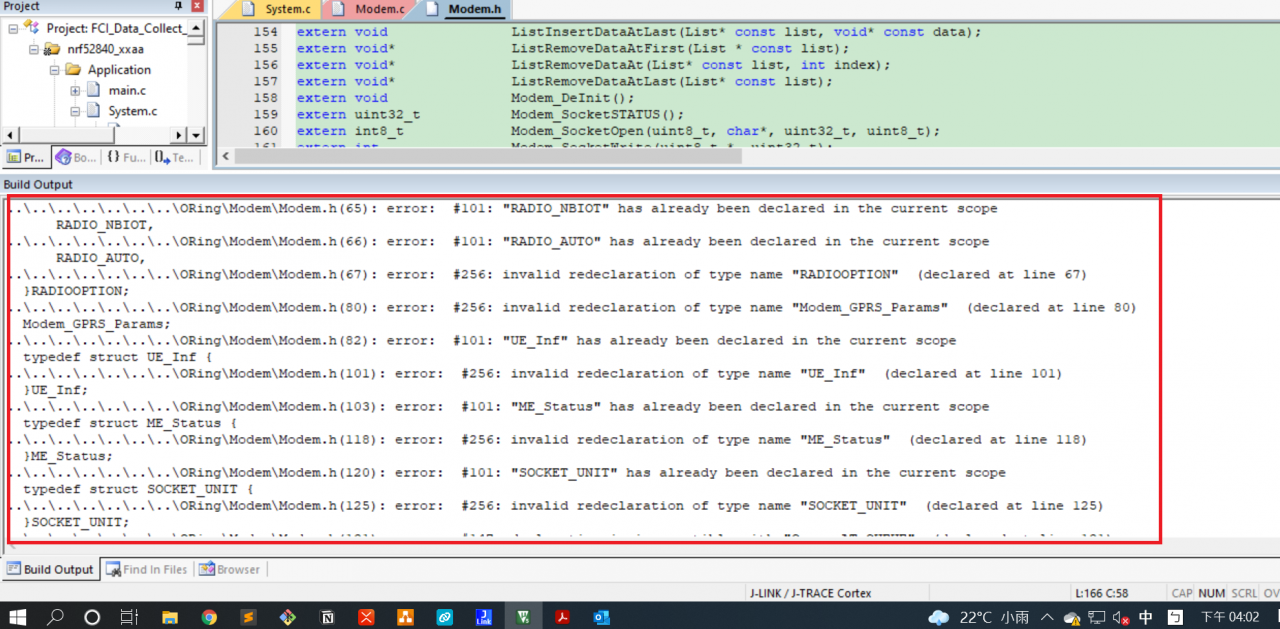
[Solved] Keil error: #101: “name“ has already been declared in the current scope


Keil compilation error


#include <stdio.h>
#include <stdlib.h>
...

#define Result_TIMOUT               3
#define Result_INTIAL               0
#define Result_ERROR                1

... 
typedef enum
{
    MD_INIT,
    HARDWARE_CHECK, 
    FILESYSTEM,     
    BS_SEARCH,      
    BS_REGISTER,    
    BS_REG_CHK,     
    ME_FC_INIT,
		ME_SOCKET,	
    ME_READY
}STATUS_MACHINE_INDEX;

... // struct, enum, union

extern md_Socket_CB 			SocketOpen_CB;
extern md_Socket_CB 			SocketClose_CB;

... 

Solution:

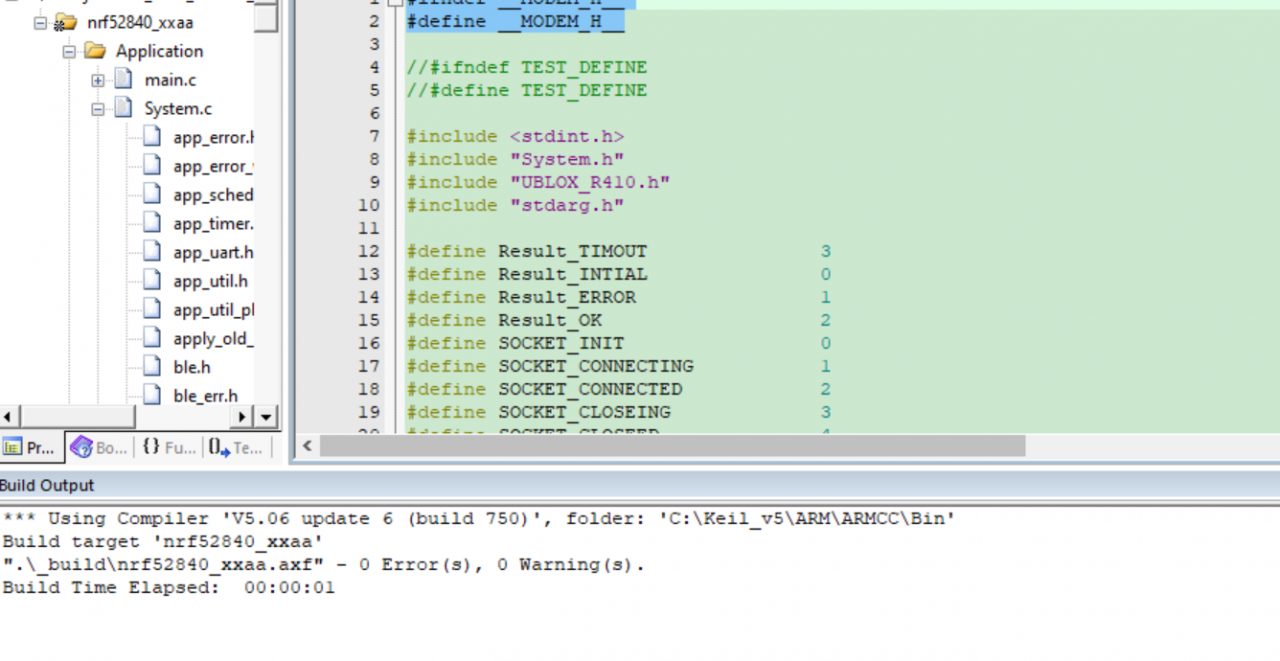
Use conditional compilation to prevent header files from being included repeatedly. Take the above code as an example

#ifndef __MODEM_H__
#define __MODEM_H__

#include <stdio.h>
#include <stdlib.h>
...

#define Result_TIMOUT               3
#define Result_INTIAL               0
#define Result_ERROR                1

... 
typedef enum
{
    MD_INIT,
    HARDWARE_CHECK, 
    FILESYSTEM,     
    BS_SEARCH,      
    BS_REGISTER,    
    BS_REG_CHK,     
    ME_FC_INIT,
		ME_SOCKET,	
    ME_READY
}STATUS_MACHINE_INDEX;

... // struct, enum, union

extern md_Socket_CB 			SocketOpen_CB;
extern md_Socket_CB 			SocketClose_CB;

...

#endif

Keil compiled successfully

[Solved] LibreSSL SSL_connect: SSL_ERROR_SYSCALL in connection to github.com:443

Error:
[!] Error installing DoubleConversion
[!] /usr/bin/git clone https://github.com/google/double-conversion.git /var/folders/_h/xtz7k0td2vv6r1hq9jswkyx40000gn/T/d20211021-51746-zrhmvm –template= –single-branch –depth 1 –branch v1.1.6
Cloning into ‘/var/folders/_h/xtz7k0td2vv6r1hq9jswkyx40000gn/T/d20211021-51746-zrhmvm’…
fatal: unable to access ‘https://github.com/google/double-conversion.git/’: LibreSSL SSL_connect: SSL_ERROR_SYSCALL in connection to github.com:443
Solution:

git config --global --add remote.origin.proxy ""

If the above method doesn’t work

Find ways to improve the network and use mobile phone hotspots
take a look at pod install several times

[Cadence Allegro PCB Design] error: Possible pin type conflict GND/VCC Power Connected to Output

An error is reported in the schematic diagram of cadence when running DRC, and the error information is as follows.

[cadence-DRC]error: Possible pin type conflict GND/VCC  Power Connected to Output

Solution:

Step 1: run DRC to find and analyze the error source

Run DRC. After the above error is output, the green circle is error. Click it to display the error message. We can see the green error reporting circle page. Clicking on the pin attribute is connected to the pin attribute output (the output attribute will generate the VCC on the previous page, resulting in the device sharing a VCC network), but normally, the pin attribute is passive/power. Therefore, we manually change the properties of the device pin to normal.

Step 2: Change [edit part] to power attribute

Select the power component, right-click and select [edit part] to enter pin modification in schematic library mode (it is impossible to change pin attribute in this mode), and change output to power attribute (or passive)

Step 3: run DRC again to solve the problem~

[Solved] error:#20: identifier “HAL_StatusTypeDef“ is undefined.

There are 30 errors during editing. The errors are: error: #20: identifier “hal_statustypedef” is undefined. After checking, all required Hal_Statustypedef files contain #include “stm32f4xx_hal_def.H”, which is contained in the options for target C/C + + inclusion path.

Rivers/CMSIS/device/St/stm32f4xx/include, and find stm32f4xx in the folder_hal_Def.H, which can also be seen in the compiled project.

Solution:

This problem is quite common. Basically, such an alarm occurs only when you add your own C file. Just add #include “stm32f0xx_hal.H” at the beginning of your own C file. Note that it is the beginning.

How to Solve Git Error: error: unable to unlink old ‘***.jar‘

1 problem description

When a new branch code (GIT fetch + git checkout – b) is pulled to operate a new local branch, there is a problem (GIT rebase, GIT stash, GIT checkout old branches will not prompt this error, and the same error will be reported on rollback on idea)

2 problem solving

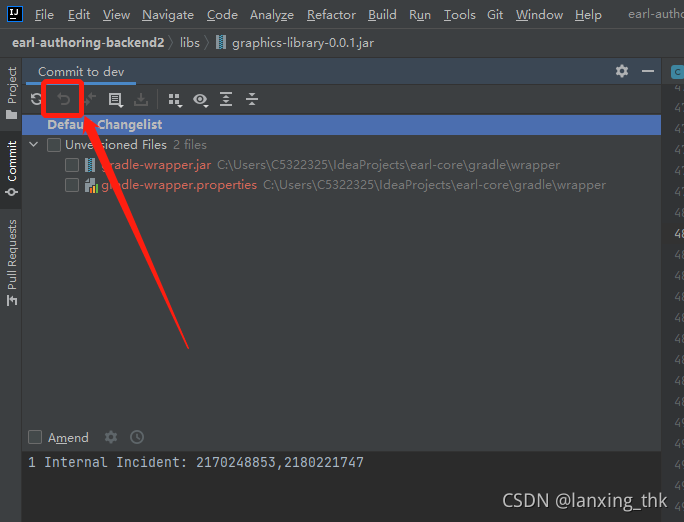
Stop the application (the project is running, and the jar package is referenced, which makes git unable to access). Rollback the jar package in the idea, select the jar package, and click the button

3 problem analysis

The project is running, the jar package is referenced, and git cannot be updated