Author Archives: Robins

Ise14.7 uses its own XST synthesis Error: error: ngdbuild: 604

“ERROR:NgdBuild:604 – logical block ‘TEMPERAURE_CTRL/AD7893 ’ with type ‘ad7893’ could not be resolved. A pin name misspelling can cause this, a missing edif or ngc file, case mismatch between the block name and the edif or ngc file name, or the misspelling of a type name. Symbol ’ is not supported in target ‘virtex5’.”

Solution:
1. Connect all the ports of the top-level module
2. Connect all the inputs and outputs of the sub-module, and assign values to the outputs

[Solved] Pdfplumber Read PDF Sheet Error: AttributeError: function/symbol ‘ARC4_stream_init‘ not found in library

Pdfplumber reports an error when reading PDF table attributeerror: function/symbol ‘arc4_stream_init’ not found in library

Solutions to errors reported

Error reporting item

When using pdfplumber to extract tables in PDF, you will be prompted that arc4 is missing_stream_init。

Traceback (most recent call last):

  File "C:\Users\Stan\Python\ALIRT\pdf extracter\test.py", line 50, in <module>
    text = convert_pdf_to_txt('test_pdf.pdf')

  File "C:\Users\Stan\Python\ALIRT\pdf extracter\test.py", line 40, in convert_pdf_to_txt
    for page in PDFPage.get_pages(fp, pagenos, maxpages=maxpages, password=password,caching=caching, check_extractable=True):

  File "C:\Users\Stan\anaconda3\lib\site-packages\pdfminer\pdfpage.py", line 127, in get_pages
    doc = PDFDocument(parser, password=password, caching=caching)

  File "C:\Users\Stan\anaconda3\lib\site-packages\pdfminer\pdfdocument.py", line 564, in __init__
    self._initialize_password(password)

  File "C:\Users\Stan\anaconda3\lib\site-packages\pdfminer\pdfdocument.py", line 590, in _initialize_password
    handler = factory(docid, param, password)

  File "C:\Users\Stan\anaconda3\lib\site-packages\pdfminer\pdfdocument.py", line 283, in __init__
    self.init()

  File "C:\Users\Stan\anaconda3\lib\site-packages\pdfminer\pdfdocument.py", line 291, in init
    self.init_key()

  File "C:\Users\Stan\anaconda3\lib\site-packages\pdfminer\pdfdocument.py", line 304, in init_key
    self.key = self.authenticate(self.password)

  File "C:\Users\Stan\anaconda3\lib\site-packages\pdfminer\pdfdocument.py", line 354, in authenticate
    key = self.authenticate_user_password(password)

  File "C:\Users\Stan\anaconda3\lib\site-packages\pdfminer\pdfdocument.py", line 361, in authenticate_user_password
    if self.verify_encryption_key(key):

  File "C:\Users\Stan\anaconda3\lib\site-packages\pdfminer\pdfdocument.py", line 368, in verify_encryption_key
    u = self.compute_u(key)

  File "C:\Users\Stan\anaconda3\lib\site-packages\pdfminer\pdfdocument.py", line 326, in compute_u
    result = ARC4.new(key).encrypt(hash.digest())  # 4

  File "C:\Users\Stan\anaconda3\lib\site-packages\Crypto\Cipher\ARC4.py", line 132, in new
    return ARC4Cipher(key, *args, **kwargs)

  File "C:\Users\Stan\anaconda3\lib\site-packages\Crypto\Cipher\ARC4.py", line 60, in __init__
    result = _raw_arc4_lib.ARC4_stream_init(c_uint8_ptr(key),

  File "C:\Users\Stan\anaconda3\lib\site-packages\cffi\api.py", line 912, in __getattr__
    make_accessor(name)

  File "C:\Users\Stan\anaconda3\lib\site-packages\cffi\api.py", line 908, in make_accessor
    accessors[name](name)

  File "C:\Users\Stan\anaconda3\lib\site-packages\cffi\api.py", line 838, in accessor_function
    value = backendlib.load_function(BType, name)

AttributeError: function/symbol 'ARC4_stream_init' not found in library 'C:\Users\Stan\anaconda3\lib\site-packages\Crypto\Util\..\Cipher\_ARC4.cp37-win_amd64.pyd': error 0x7f

Solution:

Downgrade:

pip install pycryptodome==3.0.0

Two methods

Method 1:

# Installation
$ pip install arc4
# Import ARC4 package
from arc4 import ARC4

Method 2:

# Installation
$ pip install crypto
# Import ARC4 package
from Crypto.Cipher import ARC4
[Solved] NPM node ERROR in main..js from Terser ChildProcessWorker.initialize Excaption

Error message

ERROR in main.c3605.js from Terser
Error: Call retries were exceeded
    at ChildProcessWorker.initialize (/home/node_modules/terser-webpack-plugin/node_modules/jest-worker/build/workers/ChildProcessWorker.js:193:21)
    at ChildProcessWorker._onExit (/home/node_modules/terser-webpack-plugin/node_modules/jest-worker/build/workers/ChildProcessWorker.js:274:12)
    at ChildProcess.emit (events.js:315:20)
    at Process.ChildProcess._handle.onexit (internal/child_process.js:275:12)
npm ERR! code ELIFECYCLE
npm ERR! errno 1

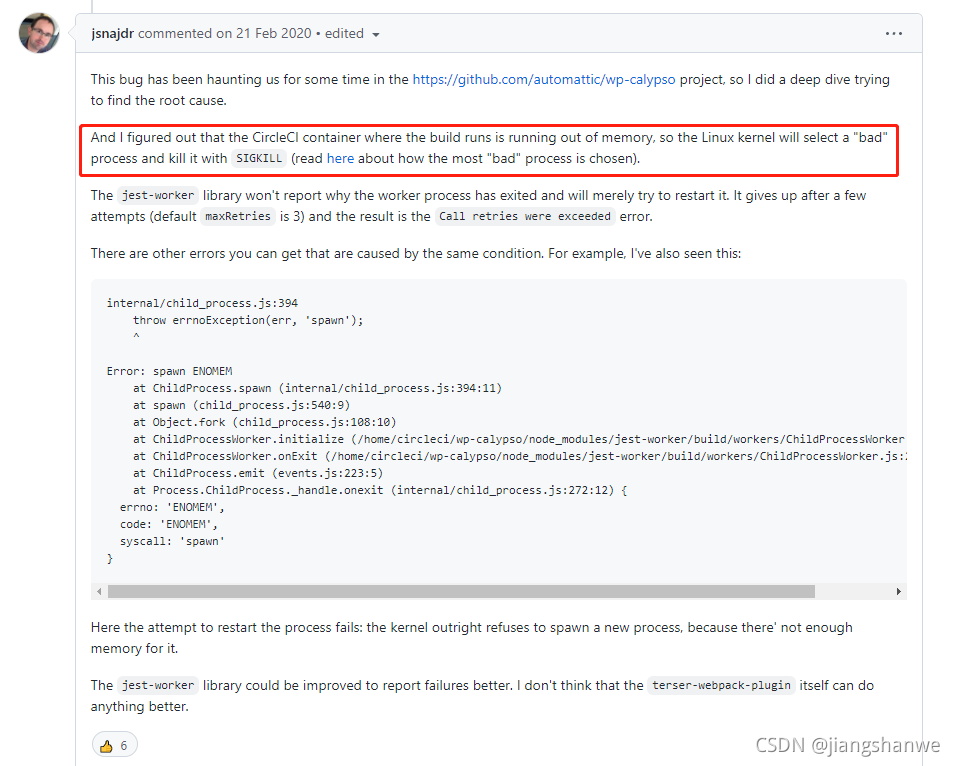
How to Find the Solution:
Since 2.3.0, webpack builds on CircleCI fail with “Error: Call retries were exceeded”

View operating system logs

less /var/log/messages

Solution

Increase server memory and reduce Max specified in the build command_old_space_Size value

[Solved] Spring Error: This application has no explicit mapping for /error

Whitelabel Error Page
This application has no explicit mapping for /error, so you are seeing this as a fallback.

Tue Oct 26 14:38:57 CST 2021
There was an unexpected error (type=Not Found, status=404).
No message available

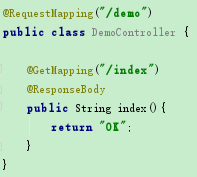
The reason is that the controller did not add @controller

solution: add @controller

[Solved] Initialization of anonymous inner class member variable causes java.lang.stackoverflowerror

Project scenario:

An abstract class A in Java needs to initialize a member variable of the same type anonymously,

public class Main {
  public static void main(String[] args) {
    new B();
  }

}

abstract class A {
   A a = new A() {//Member variables of the same type
     @Override
     void do_sth() {
       System.out.println("do nothing");
     }
   };
  abstract void do_sth();
}

class B extends A{

  @Override
  void do_sth() {
	System.out.println("doing B");
  }
}

Problem Description:

Java.lang.stackoverflowerror directly overflowed the stack


Cause analysis:

When creating object B, the anonymous inner class in object a is also created, and the inner class creates its own inner class, resulting in infinite recursion.


Solution:

Try not to use anonymous inner classes as member variables. If you want to use them, be sure to pay attention to whether they contain the possibility of infinite recursion.

error:unable to access jarfile cracker2017.jar [How to Solve]

Today, I encountered some problems when opening cracker2017.jar file. Please record it.

Command prompt opening method: press Win + R, enter CMD and enter.

First of all, you should use the absolute path to open the jar package!!!

Therefore, it is convenient to open the command prompt directly from the folder. (the file above the jar file)

On the command line, enter:

java -jar cracker2017.jar E:\Baiduwangpan\Myeclipse2017\Activation file

Java – jar the file name you want to open. Jar, and then type the path again

Note: the path is a folder above the jar file

Enter and you’ll open it! oh yeah!

oh,that’s a nice night.

[Solved] Linux: downloading arXiv papers using WGet: error 403: forbidden

Use command

wget https://arxiv.org/pdf/The_papers_you_need_to_download.pdf

from vengeance.”

Resolution arxiv.org (arxiv.org)…128.84.21.199
Connecting to arxiv.org (arxiv.org)|128.84.21.199|:443… Available403 Forbidden
2021-10-22 13:57:11 ERROR 403: Forbidden

The solution is:

Modified:

wget -U NoSuchBrowser/1.0 https://arxiv.org/pdf/The_papers_you_need_to_download.pdf

You can download it successfully

MySQLdb._exceptions.ProgrammingError appears when scrapy crawls Weibo hot comments

Problem code:

MySQLdb._exceptions.ProgrammingError: (1064, "You have an error in your SQL syntax; check the manual that corresponds to you
r MySQL server version for the right syntax to use near 'read,mention) values ('家长偏心对孩子的影响有多大',15424499,5655)'
at line 1")

First analyze the error message: MySQLdb._exceptions.ProgrammingError is because the connecting party did not respond correctly after a period of time or the connected host did not respond, and the connection attempt failed.

So I first checked the sql statement, and when I ran my sql statement in Navicat, I found:

Obviously, the read inside is the keyword index, and an error is reported.

Solution: change the key value in items to something else.

[Solved] Vue2.0 Error: Syntax Error: TypeError: eslint.CLIEngine is not a constructor

Solution:
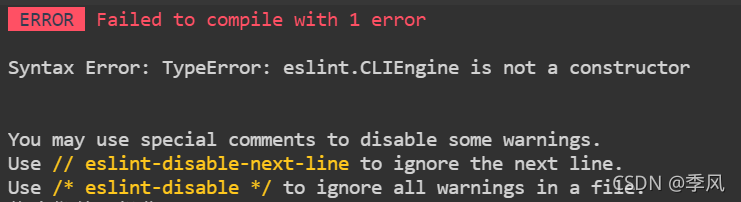
ERROR Failed to compile with 1 error
Syntax Error: TypeError: eslint.CLIEngine is not a constructor
You may use special comments to disable some warnings.
Use // eslint-disable-next-line to ignore the next line.
Use /* eslint-disable */ to ignore all warnings in a file.
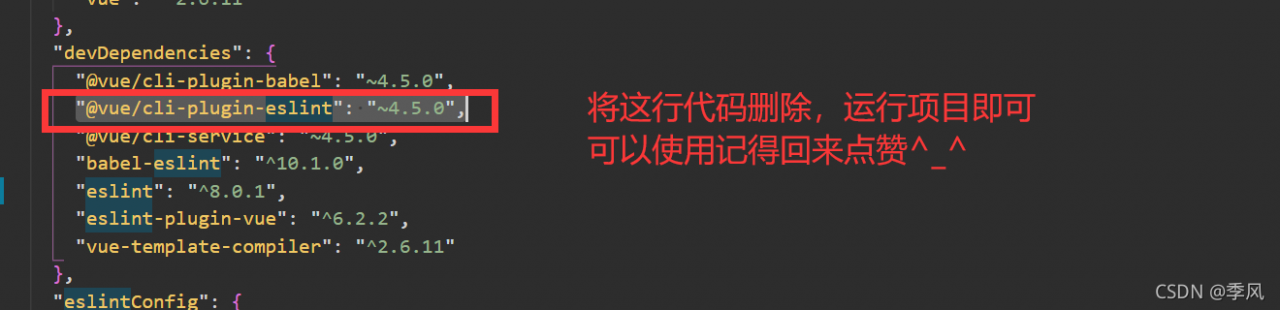
Open package.json and delete the following code and re-run

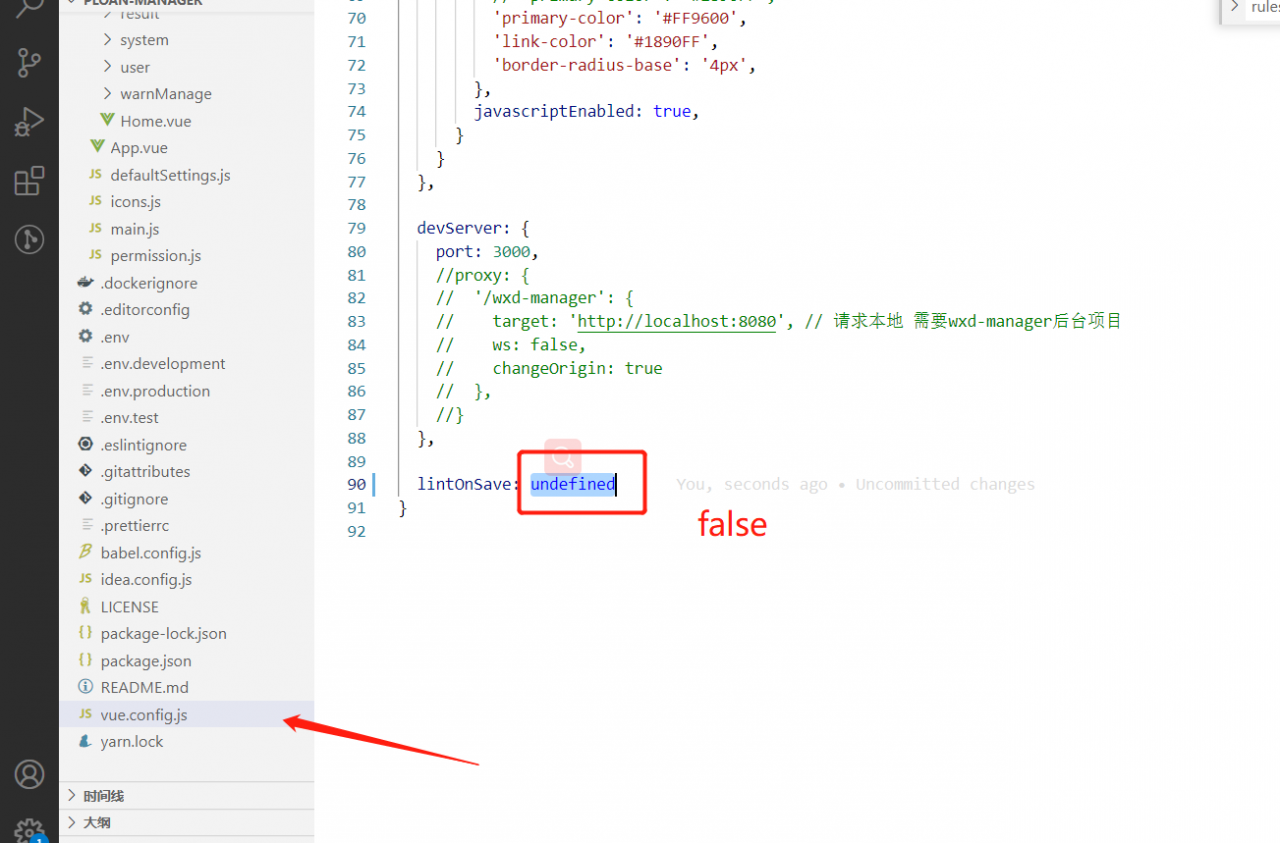
Or change lintOnSave to false in the vue.config.js file

Bin File Programming Failed, could not find core in coresight setup, erase error

Failed to burn bin file, could not find core in coresight setup, erase error

Problem-solving method

Question

Flash is locked and cannot be erased when burning bin. What should I do?

Solution:

Use the j-flash tool to select the corresponding kernel model (I use cortex-m33) for erase chip operation. Note that when erasing, the erasing start address is set to 0x8030000. If the default address is 0x8000000, the PBL and SBL will be erased together, and the PBL and SBL need to be burned again.

[Solved] Error: SRC refspec master doors not match any

Unable to submit successfully when pushing

error: src refspec master does not match any 
error: failed to push some refs to 'https://gitee.com/xxxxxxx/cool-admin-midway.git'

The content of the question is:

Error: SRC refspec master does not match any
error: failed to push some references to ” https://gitee.com/xxxxxxx/cool-admin-midway.git ’

That is, the warehouse is empty
solution:

Use the git add XXX. Py ( git add. add all) instruction to add all files, and then perform git commit – M “init” to commit all files,

git commit -m "init"

Then in execution

$ git remote add origin xxxxxxxx.git

Last use

$ git push -u origin master

In this way, the code can be uploaded successfully. You can see that the code is uploaded successfully in the warehouse

Summary:

In fact, you only need to do the following steps to upload local projects to GitHub

 1. create a local repository (i.e. folder) and turn it into a Git repository by git init.

 2. Copy the project into this folder and add it to the repository via git add . Add the project to the repository.

 3. commit the project to the repository by using git commit -m "comment content".

 4, after setting up the SSH key on Github, create a new remote repository by git remote add origin https://github.com/guyibang/TEST2.git Associate a local repository with a remote repository.

 5. Finally, push the project from the local repository to the remote repository (i.e. Github) via git push -u origin master; (if the README file is automatically created when you create a new remote repository, it will report an error, see above for the solution).

Complete steps for uploading files locally to gitee

Git global settings:

git config --global user.name "namexxxx"
git config --global user.email "emailxxx"

Create a git repository:

mkdir test_code
cd test_code
git init
git add xxxx (to add files, git add . Add all)
git commit -m "first commit"
git remote add origin https://xxxxx.git
git push -u origin master