Author Archives: Robins

[Solved] ERROR Error loading vue.config.js: ERROR Error: Command failed: git describe

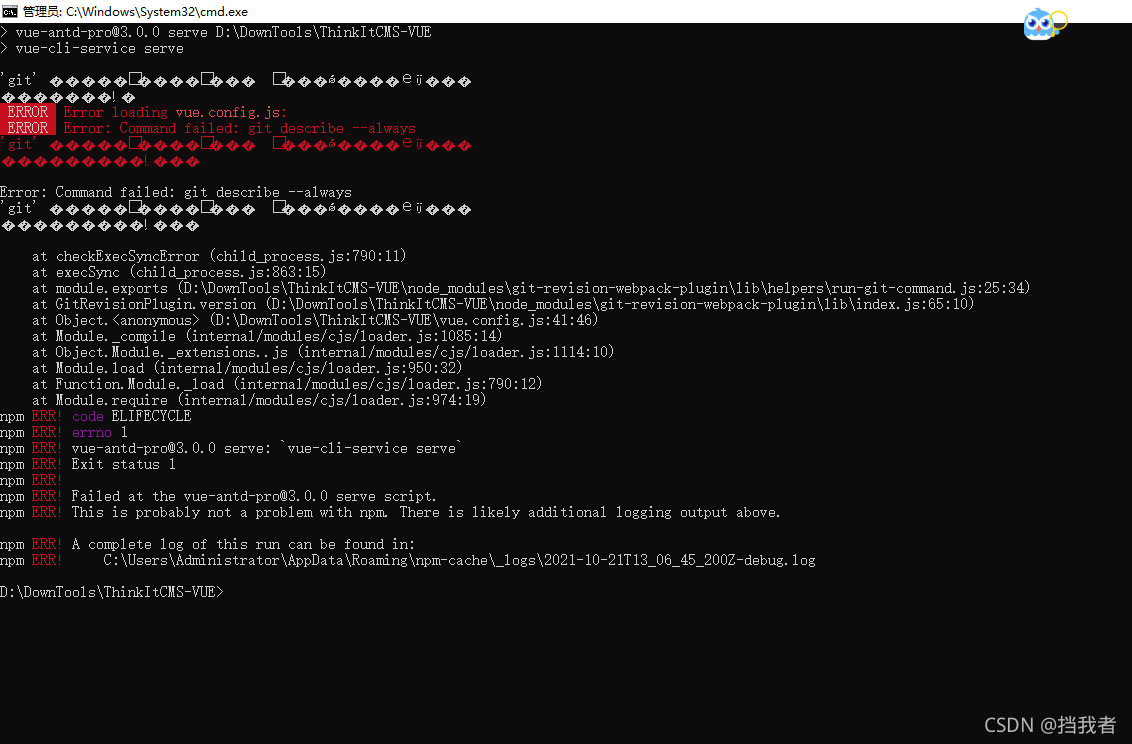
Recently, a front-end and back-end separation project was implemented using git clone. A problem was encountered during the front-end startup. Node.js was used    The NPM run serve command and the yarn run serve command will report an error when starting the front-end project. You have tried to download the dependent node that has been installed_ The modules folder and the whole front-end project still reported this problem. Baidu found the error: command failed: git describe — always, and did not find the corresponding article

Later, I finally found the problem and reported the error because of the environment variable problem of GIT

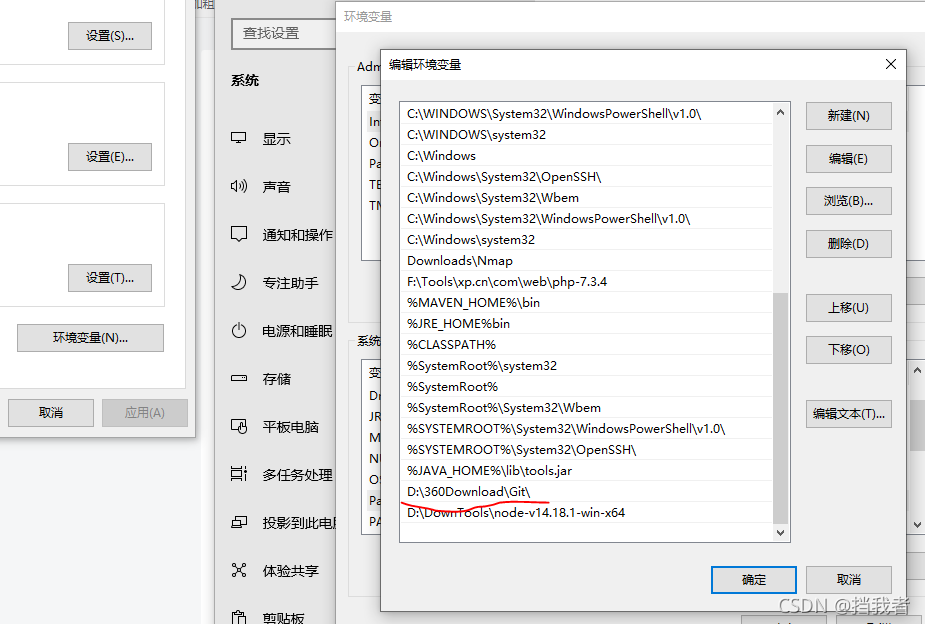
First, this is the wrong git configuration, which leads to the error: command failed: git describe — always problem

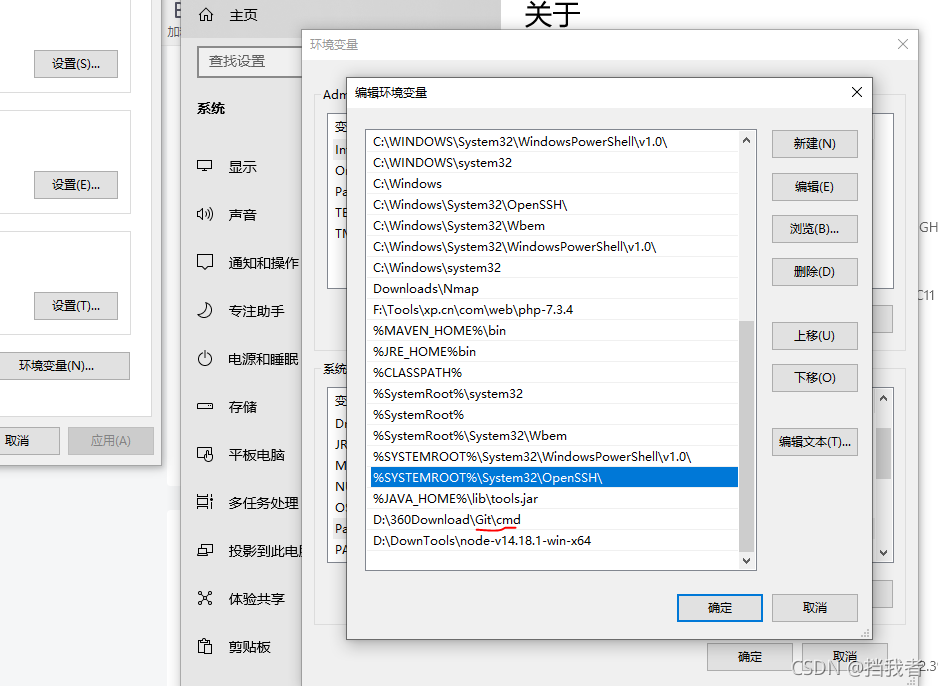
The following is how to correctly configure environment variables. Add CMD after the original path

Then, create a new CMD and enter yarn run serve to run normally. The problem I encountered is solved in this way

How to Solve JVM Common Errors: outofmemoryerror & stackoverflowerror

OutOfMemoryError

Error cause: java.lang.outofmemoryerror: Java heap space heap memory overflow
solution: adjust the size of the heap memory

// -Xms1m -Xmx10m -XX:+PrintGCDetails
		List<Object> listObject = new ArrayList<>();
		for (int i = 0; i < 10; i++) {
			System.out.println("i:" + i);
			Byte[] bytes = new Byte[1 * 1024 * 1024];
			listObject.add(bytes);
		}
		System.out.println("Added successfully...");

StackOverflowError

Cause of error: java.lang.stackoverflowerror is expressed as stack overflow, which generally occurs in recursive calls
solution: set the maximum thread call depth, which is 1m by default

//-Xss5m Set the maximum call depth
public class StackTest {
	private static int count;
	public static void count(){
		try {
			count++;
			count(); 
		} catch (Throwable e) {
			System.out.println("the maximum depth:"+count);
			e.printStackTrace();
		}
	}
	public static void main(String[] args) {
			 count();
	}
}

[Solved] Opencv Compile Error: (CMake Error: The following variables are used in this project, but they are set to not)

report errors

On Jetson NX, an error occurred while compiling opencv4.1.1. The error is as follows

CMake Error: The following variables are used in this project, but they are set to NOTFOUND.
Please set them or make sure they are set and tested correctly in the CMake files:
CUDA_cublas_LIBRARY (ADVANCED)
    linked by target "opencv_cudev" in directory /opt/opencv4/opencv_contrib-4.1.1/modules/cudev
    linked by target "opencv_test_cudev" in directory /opt/opencv4/opencv_contrib-4.1.1/modules/cudev/test
    linked by target "opencv_test_core" in directory /opt/opencv4/opencv-4.1.1/modules/core
    linked by target "opencv_perf_core" in directory /opt/opencv4/opencv-4.1.1/modules/core
    linked by target "opencv_core" in directory /opt/opencv4/opencv-4.1.1/modules/core
    linked by target "opencv_test_cudaarithm" in directory /opt/opencv4/opencv_contrib-4.1.1/modules/cudaarithm
    linked by target "opencv_cudaarithm" in directory /opt/opencv4/opencv_contrib-4.1.1/modules/cudaarithm
    linked by target "opencv_cudaarithm" in directory /opt/opencv4/opencv_contrib-4.1.1/modules/cudaarithm
    linked by target "opencv_perf_cudaarithm" in directory /opt/opencv4/opencv_contrib-4.1.1/modules/cudaarithm
    linked by target "opencv_flann" in directory /opt/opencv4/opencv-4.1.1/modules/flann
    linked by target "opencv_test_flann" in directory /opt/opencv4/opencv-4.1.1/modules/flann
    linked by target "opencv_perf_imgproc" in directory /opt/opencv4/opencv-4.1.1/modules/imgproc
    linked by target "opencv_test_imgproc" in directory /opt/opencv4/opencv-4.1.1/modules/imgproc
    linked by target "opencv_imgproc" in directory /opt/opencv4/opencv-4.1.1/modules/imgproc
    linked by target "opencv_test_ml" in directory /opt/opencv4/opencv-4.1.1/modules/ml
    linked by target "opencv_ml" in directory /opt/opencv4/opencv-4.1.1/modules/ml
    linked by target "opencv_test_phase_unwrapping" in directory /opt/opencv4/opencv_contrib-4.1.1/modules/phase_unwrapping
    linked by target "opencv_phase_unwrapping" in directory /opt/opencv4/opencv_contrib-4.1.1/modules/phase_unwrapping
    linked by target "opencv_plot" in directory /opt/opencv4/opencv_contrib-4.1.1/modules/plot
    linked by target "opencv_test_quality" in directory /opt/opencv4/opencv_contrib-4.1.1/modules/quality
    linked by target "opencv_quality" in directory /opt/opencv4/opencv_contrib-4.1.1/modules/quality
    linked by target "opencv_test_reg" in directory /opt/opencv4/opencv_contrib-4.1.1/modules/reg
    linked by target "opencv_reg" in directory /opt/opencv4/opencv_contrib-4.1.1/modules/reg
    linked by target "opencv_perf_reg" in directory /opt/opencv4/opencv_contrib-4.1.1/modules/reg
    linked by target "opencv_surface_matching" in directory /opt/opencv4/opencv_contrib-4.1.1/modules/surface_matching
    linked by target "opencv_test_cudafilters" in directory /opt/opencv4/opencv_contrib-4.1.1/modules/cudafilters
    linked by target "opencv_perf_cudafilters" in directory /opt/opencv4/opencv_contrib-4.1.1/modules/cudafilters
    linked by target "opencv_cudafilters" in directory /opt/opencv4/opencv_contrib-4.1.1/modules/cudafilters
    linked by target "opencv_test_cudaimgproc" in directory /opt/opencv4/opencv_contrib-4.1.1/modules/cudaimgproc
    linked by target "opencv_cudaimgproc" in directory /opt/opencv4/opencv_contrib-4.1.1/modules/cudaimgproc
    linked by target "opencv_perf_cudaimgproc" in directory /opt/opencv4/opencv_contrib-4.1.1/modules/cudaimgproc
    linked by target "opencv_test_cudawarping" in directory /opt/opencv4/opencv_contrib-4.1.1/modules/cudawarping
    linked by target "opencv_cudawarping" in directory /opt/opencv4/opencv_contrib-4.1.1/modules/cudawarping
    linked by target "opencv_perf_cudawarping" in directory /opt/opencv4/opencv_contrib-4.1.1/modules/cudawarping
    linked by target "opencv_dnn" in directory /opt/opencv4/opencv-4.1.1/modules/dnn
    linked by target "opencv_perf_dnn" in directory /opt/opencv4/opencv-4.1.1/modules/dnn
    linked by target "opencv_test_dnn" in directory /opt/opencv4/opencv-4.1.1/modules/dnn
    linked by target "opencv_features2d" in directory /opt/opencv4/opencv-4.1.1/modules/features2d
    linked by target "opencv_perf_features2d" in directory /opt/opencv4/opencv-4.1.1/modules/features2d
    linked by target "opencv_test_features2d" in directory /opt/opencv4/opencv-4.1.1/modules/features2d
    linked by target "opencv_test_fuzzy" in directory /opt/opencv4/opencv_contrib-4.1.1/modules/fuzzy
    linked by target "opencv_fuzzy" in directory /opt/opencv4/opencv_contrib-4.1.1/modules/fuzzy
    linked by target "opencv_hfs" in directory /opt/opencv4/opencv_contrib-4.1.1/modules/hfs
    linked by target "opencv_test_img_hash" in directory /opt/opencv4/opencv_contrib-4.1.1/modules/img_hash
    linked by target "opencv_img_hash" in directory /opt/opencv4/opencv_contrib-4.1.1/modules/img_hash
    linked by target "opencv_imgcodecs" in directory /opt/opencv4/opencv-4.1.1/modules/imgcodecs
    linked by target "opencv_perf_imgcodecs" in directory /opt/opencv4/opencv-4.1.1/modules/imgcodecs
    linked by target "opencv_test_imgcodecs" in directory /opt/opencv4/opencv-4.1.1/modules/imgcodecs
    linked by target "opencv_test_line_descriptor" in directory /opt/opencv4/opencv_contrib-4.1.1/modules/line_descriptor
    linked by target "opencv_perf_line_descriptor" in directory /opt/opencv4/opencv_contrib-4.1.1/modules/line_descriptor
    linked by target "opencv_line_descriptor" in directory /opt/opencv4/opencv_contrib-4.1.1/modules/line_descriptor
    linked by target "opencv_test_photo" in directory /opt/opencv4/opencv-4.1.1/modules/photo
    linked by target "opencv_photo" in directory /opt/opencv4/opencv-4.1.1/modules/photo
    linked by target "opencv_perf_photo" in directory /opt/opencv4/opencv-4.1.1/modules/photo
    linked by target "opencv_test_saliency" in directory /opt/opencv4/opencv_contrib-4.1.1/modules/saliency
    linked by target "opencv_saliency" in directory /opt/opencv4/opencv_contrib-4.1.1/modules/saliency
    linked by target "opencv_test_videoio" in directory /opt/opencv4/opencv-4.1.1/modules/videoio
    linked by target "opencv_videoio" in directory /opt/opencv4/opencv-4.1.1/modules/videoio
    linked by target "opencv_perf_videoio" in directory /opt/opencv4/opencv-4.1.1/modules/videoio
    linked by target "opencv_test_xphoto" in directory /opt/opencv4/opencv_contrib-4.1.1/modules/xphoto
    linked by target "opencv_perf_xphoto" in directory /opt/opencv4/opencv_contrib-4.1.1/modules/xphoto
    linked by target "opencv_xphoto" in directory /opt/opencv4/opencv_contrib-4.1.1/modules/xphoto
    linked by target "opencv_calib3d" in directory /opt/opencv4/opencv-4.1.1/modules/calib3d
    linked by target "opencv_perf_calib3d" in directory /opt/opencv4/opencv-4.1.1/modules/calib3d
    linked by target "opencv_test_calib3d" in directory /opt/opencv4/opencv-4.1.1/modules/calib3d
    linked by target "opencv_test_cudacodec" in directory /opt/opencv4/opencv_contrib-4.1.1/modules/cudacodec
    linked by target "opencv_cudacodec" in directory /opt/opencv4/opencv_contrib-4.1.1/modules/cudacodec
    linked by target "opencv_perf_cudacodec" in directory /opt/opencv4/opencv_contrib-4.1.1/modules/cudacodec
    linked by target "opencv_test_cudafeatures2d" in directory /opt/opencv4/opencv_contrib-4.1.1/modules/cudafeatures2d
    linked by target "opencv_cudafeatures2d" in directory /opt/opencv4/opencv_contrib-4.1.1/modules/cudafeatures2d
    linked by target "opencv_perf_cudafeatures2d" in directory /opt/opencv4/opencv_contrib-4.1.1/modules/cudafeatures2d
    linked by target "opencv_test_cudastereo" in directory /opt/opencv4/opencv_contrib-4.1.1/modules/cudastereo
    linked by target "opencv_cudastereo" in directory /opt/opencv4/opencv_contrib-4.1.1/modules/cudastereo
    linked by target "opencv_perf_cudastereo" in directory /opt/opencv4/opencv_contrib-4.1.1/modules/cudastereo
    linked by target "opencv_test_highgui" in directory /opt/opencv4/opencv-4.1.1/modules/highgui
    linked by target "opencv_highgui" in directory /opt/opencv4/opencv-4.1.1/modules/highgui
    linked by target "opencv_test_objdetect" in directory /opt/opencv4/opencv-4.1.1/modules/objdetect
    linked by target "opencv_objdetect" in directory /opt/opencv4/opencv-4.1.1/modules/objdetect
    linked by target "opencv_perf_objdetect" in directory /opt/opencv4/opencv-4.1.1/modules/objdetect
    linked by target "opencv_rgbd" in directory /opt/opencv4/opencv_contrib-4.1.1/modules/rgbd
    linked by target "opencv_test_rgbd" in directory /opt/opencv4/opencv_contrib-4.1.1/modules/rgbd
    linked by target "opencv_test_shape" in directory /opt/opencv4/opencv_contrib-4.1.1/modules/shape
    linked by target "opencv_shape" in directory /opt/opencv4/opencv_contrib-4.1.1/modules/shape
    linked by target "opencv_test_structured_light" in directory /opt/opencv4/opencv_contrib-4.1.1/modules/structured_light
    linked by target "opencv_structured_light" in directory /opt/opencv4/opencv_contrib-4.1.1/modules/structured_light
    linked by target "opencv_text" in directory /opt/opencv4/opencv_contrib-4.1.1/modules/text
    linked by target "opencv_test_text" in directory /opt/opencv4/opencv_contrib-4.1.1/modules/text
    linked by target "opencv_ts" in directory /opt/opencv4/opencv-4.1.1/modules/ts
    linked by target "opencv_video" in directory /opt/opencv4/opencv-4.1.1/modules/video
    linked by target "opencv_perf_video" in directory /opt/opencv4/opencv-4.1.1/modules/video
    linked by target "opencv_test_video" in directory /opt/opencv4/opencv-4.1.1/modules/video
    linked by target "opencv_xfeatures2d" in directory /opt/opencv4/opencv_contrib-4.1.1/modules/xfeatures2d
    linked by target "opencv_perf_xfeatures2d" in directory /opt/opencv4/opencv_contrib-4.1.1/modules/xfeatures2d
    linked by target "opencv_test_xfeatures2d" in directory /opt/opencv4/opencv_contrib-4.1.1/modules/xfeatures2d
    linked by target "opencv_perf_ximgproc" in directory /opt/opencv4/opencv_contrib-4.1.1/modules/ximgproc
    linked by target "opencv_ximgproc" in directory /opt/opencv4/opencv_contrib-4.1.1/modules/ximgproc
    linked by target "opencv_test_ximgproc" in directory /opt/opencv4/opencv_contrib-4.1.1/modules/ximgproc
    linked by target "opencv_xobjdetect" in directory /opt/opencv4/opencv_contrib-4.1.1/modules/xobjdetect
    linked by target "opencv_test_aruco" in directory /opt/opencv4/opencv_contrib-4.1.1/modules/aruco
    linked by target "opencv_aruco" in directory /opt/opencv4/opencv_contrib-4.1.1/modules/aruco
    linked by target "opencv_bgsegm" in directory /opt/opencv4/opencv_contrib-4.1.1/modules/bgsegm
    linked by target "opencv_test_bgsegm" in directory /opt/opencv4/opencv_contrib-4.1.1/modules/bgsegm
    linked by target "opencv_test_bioinspired" in directory /opt/opencv4/opencv_contrib-4.1.1/modules/bioinspired
    linked by target "opencv_perf_bioinspired" in directory /opt/opencv4/opencv_contrib-4.1.1/modules/bioinspired
    linked by target "opencv_bioinspired" in directory /opt/opencv4/opencv_contrib-4.1.1/modules/bioinspired
    linked by target "opencv_ccalib" in directory /opt/opencv4/opencv_contrib-4.1.1/modules/ccalib
    linked by target "opencv_test_cudabgsegm" in directory /opt/opencv4/opencv_contrib-4.1.1/modules/cudabgsegm
    linked by target "opencv_cudabgsegm" in directory /opt/opencv4/opencv_contrib-4.1.1/modules/cudabgsegm
    linked by target "opencv_perf_cudabgsegm" in directory /opt/opencv4/opencv_contrib-4.1.1/modules/cudabgsegm
    linked by target "opencv_test_cudalegacy" in directory /opt/opencv4/opencv_contrib-4.1.1/modules/cudalegacy
    linked by target "opencv_cudalegacy" in directory /opt/opencv4/opencv_contrib-4.1.1/modules/cudalegacy
    linked by target "opencv_perf_cudalegacy" in directory /opt/opencv4/opencv_contrib-4.1.1/modules/cudalegacy
    linked by target "opencv_test_cudaobjdetect" in directory /opt/opencv4/opencv_contrib-4.1.1/modules/cudaobjdetect
    linked by target "opencv_perf_cudaobjdetect" in directory /opt/opencv4/opencv_contrib-4.1.1/modules/cudaobjdetect
    linked by target "opencv_cudaobjdetect" in directory /opt/opencv4/opencv_contrib-4.1.1/modules/cudaobjdetect
    linked by target "opencv_datasets" in directory /opt/opencv4/opencv_contrib-4.1.1/modules/datasets
    linked by target "opencv_dnn_objdetect" in directory /opt/opencv4/opencv_contrib-4.1.1/modules/dnn_objdetect
    linked by target "opencv_dpm" in directory /opt/opencv4/opencv_contrib-4.1.1/modules/dpm
    linked by target "opencv_test_face" in directory /opt/opencv4/opencv_contrib-4.1.1/modules/face
    linked by target "opencv_face" in directory /opt/opencv4/opencv_contrib-4.1.1/modules/face
    linked by target "opencv_test_optflow" in directory /opt/opencv4/opencv_contrib-4.1.1/modules/optflow
    linked by target "opencv_optflow" in directory /opt/opencv4/opencv_contrib-4.1.1/modules/optflow
    linked by target "opencv_perf_optflow" in directory /opt/opencv4/opencv_contrib-4.1.1/modules/optflow
    linked by target "opencv_stitching" in directory /opt/opencv4/opencv-4.1.1/modules/stitching
    linked by target "opencv_test_tracking" in directory /opt/opencv4/opencv_contrib-4.1.1/modules/tracking
    linked by target "opencv_tracking" in directory /opt/opencv4/opencv_contrib-4.1.1/modules/tracking
    linked by target "opencv_perf_tracking" in directory /opt/opencv4/opencv_contrib-4.1.1/modules/tracking
    linked by target "opencv_cudaoptflow" in directory /opt/opencv4/opencv_contrib-4.1.1/modules/cudaoptflow
    linked by target "opencv_perf_cudaoptflow" in directory /opt/opencv4/opencv_contrib-4.1.1/modules/cudaoptflow
    linked by target "opencv_test_cudaoptflow" in directory /opt/opencv4/opencv_contrib-4.1.1/modules/cudaoptflow
    linked by target "opencv_test_stereo" in directory /opt/opencv4/opencv_contrib-4.1.1/modules/stereo
    linked by target "opencv_stereo" in directory /opt/opencv4/opencv_contrib-4.1.1/modules/stereo
    linked by target "opencv_perf_stereo" in directory /opt/opencv4/opencv_contrib-4.1.1/modules/stereo
    linked by target "opencv_test_superres" in directory /opt/opencv4/opencv_contrib-4.1.1/modules/superres
    linked by target "opencv_superres" in directory /opt/opencv4/opencv_contrib-4.1.1/modules/superres
    linked by target "opencv_perf_superres" in directory /opt/opencv4/opencv_contrib-4.1.1/modules/superres
    linked by target "opencv_test_videostab" in directory /opt/opencv4/opencv_contrib-4.1.1/modules/videostab
    linked by target "opencv_videostab" in directory /opt/opencv4/opencv_contrib-4.1.1/modules/videostab
    linked by target "opencv_annotation" in directory /opt/opencv4/opencv-4.1.1/apps/annotation
    linked by target "opencv_visualisation" in directory /opt/opencv4/opencv-4.1.1/apps/visualisation
    linked by target "opencv_interactive-calibration" in directory /opt/opencv4/opencv-4.1.1/apps/interactive-calibration
    linked by target "opencv_version" in directory /opt/opencv4/opencv-4.1.1/apps/version

-- Configuring incomplete, errors occurred!
See also "/opt/opencv4/opencv-4.1.1/build/CMakeFiles/CMakeOutput.log".
See also "/opt/opencv4/opencv-4.1.1/build/CMakeFiles/CMakeError.log".

Solution

This is due to the lack of CUDA files.

Since I am CUDA 10.2, I choose cuda-toolkit-10-2 and the corresponding cuda-toolkit-x-x according to CUDA version. We install it directly, and the missing files will be downloaded and installed automatically,

sudo apt-get update
sudo apt-get install cuda-toolkit-10-2

After installation, recompile opnecv.

Error: Please renew the default configurations. [How to Solve]

Problems arising

The current configuration is shown in the following figure:

[SW1]int g0/0/1
[SW1-GigabitEthernet0/0/1]
[SW1-GigabitEthernet0/0/1]dis this
#
interface GigabitEthernet0/0/1
 port link-type trunk
 undo port trunk allow-pass vlan 1
 port trunk allow-pass vlan 2 to 4094
#
return

When the port link type needs to be modified or deleted, an error is reported   Error: please update the default configuration

[SW1-GigabitEthernet0/0/1]
[SW1-GigabitEthernet0/0/1]port link-type access 
Error: Please renew the default configurations.
[SW1-GigabitEthernet0/0/1]
[SW1-GigabitEthernet0/0/1]undo port link-type 
Error: Please renew the default configurations.

Causes of occurrence

The reason for the error is that you have added the port to a VLAN, so you will report an error when changing or deleting it.

For example, if you want to delete “parent folder”, you have to delete “child folder” first. It means to delete it layer by layer. The same is true of Huawei’s configuration commands, which are undo level by level.

|--Parent Folder
|---- subfolder

Solution

To undo all commands except “port link type trunk”, you can change the link type or undo the command.

[SW1-GigabitEthernet0/0/1]dis this
#
interface GigabitEthernet0/0/1
 port link-type trunk
 undo port trunk allow-pass vlan 1
#
return
[SW1-GigabitEthernet0/0/1]
[SW1-GigabitEthernet0/0/1]undo port trunk allow-pass vlan all
[SW1-GigabitEthernet0/0/1]
[SW1-GigabitEthernet0/0/1]port trunk allow-pass vlan 1
[SW1-GigabitEthernet0/0/1]
[SW1-GigabitEthernet0/0/1]dis this
#
interface GigabitEthernet0/0/1
 port link-type trunk
#
return
[SW1-GigabitEthernet0/0/1]
[SW1-GigabitEthernet0/0/1]undo port link-type 
[SW1-GigabitEthernet0/0/1]
[SW1-GigabitEthernet0/0/1]dis this
#
interface GigabitEthernet0/0/1
#
return

[Solved] ERROR org.apache.struts2.dispatcher.Dispatcher – Dispatcher initialization failed

Problem description
the newly created eclipse project cannot run JSP

the console reports an error, as shown in the figure

ERROR StatusLogger No log4j2 configuration file found. Using default configuration: logging only errors to the console.
09:04:55.281 [localhost-startStop-1] ERROR org.apache.struts2.dispatcher.Dispatcher - Dispatcher initialization failed
com.opensymphony.xwork2.config.ConfigurationException: Unable to load configuration.
	at com.opensymphony.xwork2.config.ConfigurationManager.getConfiguration(ConfigurationManager.java:70) ~[xwork-core-2.3.37.jar:2.3.37]
	at org.apache.struts2.dispatcher.Dispatcher.getContainer(Dispatcher.java:978) ~[struts2-core-2.3.37.jar:2.3.37]
	at org.apache.struts2.dispatcher.Dispatcher.init_PreloadConfiguration(Dispatcher.java:446) ~[struts2-core-2.3.37.jar:2.3.37]
	at org.apache.struts2.dispatcher.Dispatcher.init(Dispatcher.java:490) [struts2-core-2.3.37.jar:2.3.37]
	at org.apache.struts2.dispatcher.ng.InitOperations.initDispatcher(InitOperations.java:74) [struts2-core-2.3.37.jar:2.3.37]
	at org.apache.struts2.dispatcher.ng.filter.StrutsPrepareAndExecuteFilter.init(StrutsPrepareAndExecuteFilter.java:57) [struts2-core-2.3.37.jar:2.3.37]
	at org.apache.catalina.core.ApplicationFilterConfig.initFilter(ApplicationFilterConfig.java:281) [catalina.jar:7.0.107]
	at org.apache.catalina.core.ApplicationFilterConfig.getFilter(ApplicationFilterConfig.java:262) [catalina.jar:7.0.107]
	at org.apache.catalina.core.ApplicationFilterConfig.<init>(ApplicationFilterConfig.java:106) [catalina.jar:7.0.107]
	at org.apache.catalina.core.StandardContext.filterStart(StandardContext.java:4973) [catalina.jar:7.0.107]
	at org.apache.catalina.core.StandardContext.startInternal(StandardContext.java:5672) [catalina.jar:7.0.107]
	at org.apache.catalina.util.LifecycleBase.start(LifecycleBase.java:183) [catalina.jar:7.0.107]
	at org.apache.catalina.core.ContainerBase$StartChild.call(ContainerBase.java:1689) [catalina.jar:7.0.107]
	at org.apache.catalina.core.ContainerBase$StartChild.call(ContainerBase.java:1679) [catalina.jar:7.0.107]
	at java.util.concurrent.FutureTask.run(Unknown Source) [?:1.8.0_51]
	at java.util.concurrent.ThreadPoolExecutor.runWorker(Unknown Source) [?:1.8.0_51]
	at java.util.concurrent.ThreadPoolExecutor$Worker.run(Unknown Source) [?:1.8.0_51]
	at java.lang.Thread.run(Unknown Source) [?:1.8.0_51]
Caused by: com.opensymphony.xwork2.config.ConfigurationException: Action class [Action.complexAction] not found
	at com.opensymphony.xwork2.config.providers.XmlConfigurationProvider.verifyAction(XmlConfigurationProvider.java:486) ~[xwork-core-2.3.37.jar:2.3.37]
	at com.opensymphony.xwork2.config.providers.XmlConfigurationProvider.addAction(XmlConfigurationProvider.java:429) ~[xwork-core-2.3.37.jar:2.3.37]
	at com.opensymphony.xwork2.config.providers.XmlConfigurationProvider.addPackage(XmlConfigurationProvider.java:556) ~[xwork-core-2.3.37.jar:2.3.37]
	at com.opensymphony.xwork2.config.providers.XmlConfigurationProvider.loadPackages(XmlConfigurationProvider.java:295) ~[xwork-core-2.3.37.jar:2.3.37]
	at org.apache.struts2.config.StrutsXmlConfigurationProvider.loadPackages(StrutsXmlConfigurationProvider.java:112) ~[struts2-core-2.3.37.jar:2.3.37]
	at com.opensymphony.xwork2.config.impl.DefaultConfiguration.reloadContainer(DefaultConfiguration.java:264) ~[xwork-core-2.3.37.jar:2.3.37]
	at com.opensymphony.xwork2.config.ConfigurationManager.getConfiguration(ConfigurationManager.java:67) ~[xwork-core-2.3.37.jar:2.3.37]
	... 17 more
十月 22, 2021 9:04:55 上午 org.apache.catalina.core.StandardContext filterStart
Severe: Start filter exception
Unable to load configuration. - action - file:/F:/JavaEE/.metadata/.plugins/org.eclipse.wst.server.core/tmp0/wtpwebapps/Week7/WEB-INF/classes/struts.xml:14:64
	at org.apache.struts2.dispatcher.Dispatcher.init(Dispatcher.java:504)
	at org.apache.struts2.dispatcher.ng.InitOperations.initDispatcher(InitOperations.java:74)
	at org.apache.struts2.dispatcher.ng.filter.StrutsPrepareAndExecuteFilter.init(StrutsPrepareAndExecuteFilter.java:57)
	at org.apache.catalina.core.ApplicationFilterConfig.initFilter(ApplicationFilterConfig.java:281)
	at org.apache.catalina.core.ApplicationFilterConfig.getFilter(ApplicationFilterConfig.java:262)
	at org.apache.catalina.core.ApplicationFilterConfig.<init>(ApplicationFilterConfig.java:106)
	at org.apache.catalina.core.StandardContext.filterStart(StandardContext.java:4973)
	at org.apache.catalina.core.StandardContext.startInternal(StandardContext.java:5672)
	at org.apache.catalina.util.LifecycleBase.start(LifecycleBase.java:183)
	at org.apache.catalina.core.ContainerBase$StartChild.call(ContainerBase.java:1689)
	at org.apache.catalina.core.ContainerBase$StartChild.call(ContainerBase.java:1679)
	at java.util.concurrent.FutureTask.run(Unknown Source)
	at java.util.concurrent.ThreadPoolExecutor.runWorker(Unknown Source)
	at java.util.concurrent.ThreadPoolExecutor$Worker.run(Unknown Source)
	at java.lang.Thread.run(Unknown Source)
Caused by: Unable to load configuration. - action - file:/F:/JavaEE/.metadata/.plugins/org.eclipse.wst.server.core/tmp0/wtpwebapps/Week7/WEB-INF/classes/struts.xml:14:64
	at com.opensymphony.xwork2.config.ConfigurationManager.getConfiguration(ConfigurationManager.java:70)
	at org.apache.struts2.dispatcher.Dispatcher.getContainer(Dispatcher.java:978)
	at org.apache.struts2.dispatcher.Dispatcher.init_PreloadConfiguration(Dispatcher.java:446)
	at org.apache.struts2.dispatcher.Dispatcher.init(Dispatcher.java:490)
	... 14 more
Caused by: Action class [Action.complexAction] not found - action - file:/F:/JavaEE/.metadata/.plugins/org.eclipse.wst.server.core/tmp0/wtpwebapps/Week7/WEB-INF/classes/struts.xml:14:64
	at com.opensymphony.xwork2.config.providers.XmlConfigurationProvider.verifyAction(XmlConfigurationProvider.java:486)
	at com.opensymphony.xwork2.config.providers.XmlConfigurationProvider.addAction(XmlConfigurationProvider.java:429)
	at com.opensymphony.xwork2.config.providers.XmlConfigurationProvider.addPackage(XmlConfigurationProvider.java:556)
	at com.opensymphony.xwork2.config.providers.XmlConfigurationProvider.loadPackages(XmlConfigurationProvider.java:295)
	at org.apache.struts2.config.StrutsXmlConfigurationProvider.loadPackages(StrutsXmlConfigurationProvider.java:112)
	at com.opensymphony.xwork2.config.impl.DefaultConfiguration.reloadContainer(DefaultConfiguration.java:264)
	at com.opensymphony.xwork2.config.ConfigurationManager.getConfiguration(ConfigurationManager.java:67)
	... 17 more

There are many solutions to online search, such as jar package conflict in Tomcat and reinstalling tomcat, but other projects can still run before, so there is no blind operation. Some things still need to see the essence. In fact, where the problem appears has been prompted.

Caused by: com.opensymphony.xwork2.config.ConfigurationException: Action class [Action.complexAction] not found
	at com.opensymphony.xwork2.config.providers.XmlConfigurationProvider.verifyAction(XmlConfigurationProvider.java:486) ~[xwork-core-2.3.37.jar:2.3.37]
	at com.opensymphony.xwork2.config.providers.XmlConfigurationProvider.addAction(XmlConfigurationProvider.java:429) ~[xwork-core-2.3.37.jar:2.3.37]
	at com.opensymphony.xwork2.config.providers.XmlConfigurationProvider.addPackage(XmlConfigurationProvider.java:556) ~[xwork-core-2.3.37.jar:2.3.37]
	at com.opensymphony.xwork2.config.providers.XmlConfigurationProvider.loadPackages(XmlConfigurationProvider.java:295) ~[xwork-core-2.3.37.jar:2.3.37]
	at org.apache.struts2.config.StrutsXmlConfigurationProvider.loadPackages(StrutsXmlConfigurationProvider.java:112) ~[struts2-core-2.3.37.jar:2.3.37]
	at com.opensymphony.xwork2.config.impl.DefaultConfiguration.reloadContainer(DefaultConfiguration.java:264) ~[xwork-core-2.3.37.jar:2.3.37]
	at com.opensymphony.xwork2.config.ConfigurationManager.getConfiguration(ConfigurationManager.java:67) ~[xwork-core-2.3.37.jar:2.3.37]

Yes, complexaction was not found in the action configuration
there is a problem with the action configuration in the struts.xml file. If you also encounter this problem, first see if there is a problem with the configuration file

Xilinx Vitis Error Launching Program: Memory write error MMU section translation fault

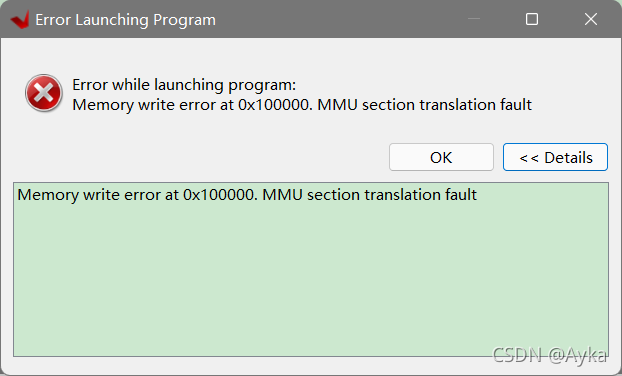
Run As -> Launch Hardware (Single Application Debug (GDB))  Error:
Error while launching program:
Memory write error at 0x100000. MMU section translation fault

The reason is that the JP4 interface is mistakenly connected to SD, but it can be connected to JTAG and the Program Device can be successfully connected.


NPM install Error: gyp ERR! stack Error: Could not find any Python installation to use

When the Vue project uses NPM install as a dependency, the following error is reported:

gyp verb command rebuild []
gyp verb command clean []
gyp verb clean removing "build" directory
gyp verb command configure []
gyp verb find Python Python is not set from command line or npm configuration
gyp verb find Python Python is not set from environment variable PYTHON
gyp verb find Python checking if "python3" can be used
gyp verb find Python - executing "python3" to get executable path
gyp verb find Python - "python3" is not in PATH or produced an error
gyp verb find Python checking if "python" can be used
gyp verb find Python - executing "python" to get executable path
gyp verb find Python - "python" is not in PATH or produced an error
gyp verb find Python checking if "python2" can be used
gyp verb find Python - executing "python2" to get executable path
gyp verb find Python - "python2" is not in PATH or produced an error
gyp verb find Python checking if Python is C:\Python37\python.exe
gyp verb find Python - executing "C:\Python37\python.exe" to get version
gyp verb find Python - "C:\Python37\python.exe" could not be run
gyp verb find Python checking if Python is C:\Python27\python.exe
gyp verb find Python - executing "C:\Python27\python.exe" to get version
gyp verb find Python - "C:\Python27\python.exe" could not be run
gyp verb find Python checking if the py launcher can be used to find Python
gyp verb find Python - executing "py.exe" to get Python executable path
gyp verb find Python - "py.exe" is not in PATH or produced an error
gyp ERR! find Python
gyp ERR! find Python Python is not set from command line or npm configuration
gyp ERR! find Python Python is not set from environment variable PYTHON
gyp ERR! find Python checking if "python3" can be used
gyp ERR! find Python - "python3" is not in PATH or produced an error
gyp ERR! find Python checking if "python" can be used
gyp ERR! find Python - "python" is not in PATH or produced an error
gyp ERR! find Python checking if "python2" can be used
gyp ERR! find Python - "python2" is not in PATH or produced an error
gyp ERR! find Python checking if Python is C:\Python37\python.exe
gyp ERR! find Python - "C:\Python37\python.exe" could not be run
gyp ERR! find Python checking if Python is C:\Python27\python.exe
gyp ERR! find Python - "C:\Python27\python.exe" could not be run
gyp ERR! find Python checking if the py launcher can be used to find Python
gyp ERR! find Python - "py.exe" is not in PATH or produced an error
gyp ERR! find Python
gyp ERR! find Python **********************************************************
gyp ERR! find Python You need to install the latest version of Python.
gyp ERR! find Python Node-gyp should be able to find and use Python. If not,
gyp ERR! find Python you can try one of the following options:
gyp ERR! find Python - Use the switch --python="C:\Path\To\python.exe"
gyp ERR! find Python   (accepted by both node-gyp and npm)
gyp ERR! find Python - Set the environment variable PYTHON
gyp ERR! find Python - Set the npm configuration variable python:
gyp ERR! find Python   npm config set python "C:\Path\To\python.exe"
gyp ERR! find Python For more information consult the documentation at:
gyp ERR! find Python https://github.com/nodejs/node-gyp#installation
gyp ERR! find Python **********************************************************
gyp ERR! find Python
gyp ERR! configure error
gyp ERR! stack Error: Could not find any Python installation to use
gyp ERR! stack     at PythonFinder.fail (E:\project\DBApi-master\dbapi-ui\node_modules\node-gyp\lib\find-python.js:302:47)
gyp ERR! stack     at PythonFinder.runChecks (E:\project\DBApi-master\dbapi-ui\node_modules\node-gyp\lib\find-python.js:136:21)
gyp ERR! stack     at PythonFinder.<anonymous> (E:\project\DBApi-master\dbapi-ui\node_modules\node-gyp\lib\find-python.js:200:18)
gyp ERR! stack     at PythonFinder.execFileCallback (E:\project\DBApi-master\dbapi-ui\node_modules\node-gyp\lib\find-python.js:266:16)
gyp ERR! stack     at exithandler (child_process.js:390:5)
gyp ERR! stack     at ChildProcess.errorhandler (child_process.js:402:5)
gyp ERR! stack     at ChildProcess.emit (events.js:400:28)
gyp ERR! stack     at Process.ChildProcess._handle.onexit (internal/child_process.js:280:12)     
gyp ERR! stack     at onErrorNT (internal/child_process.js:469:16)
gyp ERR! stack     at processTicksAndRejections (internal/process/task_queues.js:82:21)
gyp ERR! System Windows_NT 10.0.19042
gyp ERR! command "D:\\nodejs\\node.exe" "E:\\project\\DBApi-master\\dbapi-ui\\node_modules\\node-gyp\\bin\\node-gyp.js" "rebuild" "--verbose" "--libsass_ext=" "--libsass_cflags=" "--libsass_ldflags=" "--libsass_library="
gyp ERR! cwd E:\project\DBApi-master\dbapi-ui\node_modules\node-sass
gyp ERR! node -v v14.18.1
gyp ERR! node-gyp -v v7.1.2
gyp ERR! not ok
Build failed with error code: 1
npm WARN optional SKIPPING OPTIONAL DEPENDENCY: fsevents@~2.3.2 (node_modules\chokidar\node_modules\fsevents):
npm WARN notsup SKIPPING OPTIONAL DEPENDENCY: Unsupported platform for [email protected]: wanted {"os":"darwin","arch":"any"} (current: {"os":"win32","arch":"x64"})
npm WARN optional SKIPPING OPTIONAL DEPENDENCY: fsevents@^1.2.7 (node_modules\watchpack-chokidar2\node_modules\chokidar\node_modules\fsevents):
npm WARN notsup SKIPPING OPTIONAL DEPENDENCY: Unsupported platform for [email protected]: wanted {"os":"darwin","arch":"any"} (current: {"os":"win32","arch":"x64"})
npm WARN optional SKIPPING OPTIONAL DEPENDENCY: fsevents@^1.2.7 (node_modules\webpack-dev-server\node_modules\chokidar\node_modules\fsevents):
npm WARN notsup SKIPPING OPTIONAL DEPENDENCY: Unsupported platform for [email protected]: wanted {"os":"darwin","arch":"any"} (current: {"os":"win32","arch":"x64"})

npm ERR! code ELIFECYCLE
npm ERR! errno 1
npm ERR! [email protected] postinstall: `node scripts/build.js`
npm ERR! Exit status 1
npm ERR!
npm ERR! Failed at the [email protected] postinstall script.
npm ERR! This is probably not a problem with npm. There is likely additional logging output above.

npm ERR! A complete log of this run can be found in:
npm ERR!     C:\Users\WRD\AppData\Roaming\npm-cache\_logs\2021-10-20T05_42_34_767Z-debug.log 

This is due to the lack of Python dependencies. After downloading and installing on the python official website, delete the dependencies and re execute NPM install

[How to Modify] etcd-server-8-12: ERROR (spawn error)

My problem is here

 vi etcd-server-startup.sh

#This is wrong

[program:etcd-server-7-12]
command=/opt/etcd/etcd-server-startup.sh              ; the program (relative uses PATH, can take args)
numprocs=1                                            ; number of processes copies to start (def 1)
directory=/opt/etcd                                   ; directory to cwd to before exec (def no cwd)
autostart=true                                        ; start at supervisord start (default: true)
autorestart=true                                      ; retstart at unexpected quit (default: true)
startsecs=30                                          ; number of secs prog must stay running (def. 1)
startretries=3                                        ; max # of serial start failures (default 3)
exitcodes=0,2                                         ; 'expected' exit codes for process (default 0,2)
stopsignal=QUIT                                       ; signal used to kill process (default TERM)
stopwaitsecs=10                                       ; max num secs to wait b4 SIGKILL (default 10)
user=etcd                                             ; setuid to this UNIX account to run the program
redirect_stderr=true                                  ; redirect proc stderr to stdout (default false)
stdout_logfile=/data/logs/etcd-server/etcd.stdout.log ; stdout log path, NONE for none; default AUTO
stdout_logfile_maxbytes=64MB                          ; max # logfile bytes b4 rotation (default 50MB)
stdout_logfile_backups=5                              ; # of stdout logfile backups (default 10)
stdout_capture_maxbytes=1MB                           ; number of bytes in 'capturemode' (default 0)
stdout_events_enabled=false                           ; emit events on stdout writes (default false)


#Right
```bash
#!/bin/sh
./etcd --name etcd-server-8-12 \
    --data-dir /data/etcd/etcd-server \
    --listen-peer-urls https://192.168.118.12:2380 \
    --listen-client-urls https://192.168.118.12:2379,http://127.0.0.1:2379 \
    --quota-backend-bytes 8000000000 \
    --initial-advertise-peer-urls https://192.168.118.12:2380 \
    --advertise-client-urls https://192.168.118.12:2379,http://127.0.0.1:2379 \
    --initial-cluster  etcd-server-8-12=https://192.168.118.12:2380,etcd-server-8-21=https://192.168.118.21:2380,etcd-server-8-22=https://192.168.22:2380 \
    --ca-file ./certs/ca.pem \
    --cert-file ./certs/etcd-peer.pem \
    --key-file ./certs/etcd-peer-key.pem \
    --client-cert-auth  \
    --trusted-ca-file ./certs/ca.pem \
    --peer-ca-file ./certs/ca.pem \
    --peer-cert-file ./certs/etcd-peer.pem \
    --peer-key-file ./certs/etcd-peer-key.pem \
    --peer-client-cert-auth \
    --peer-trusted-ca-file ./certs/ca.pem \
    --log-output stdout
~                                                                                                                             
~                                                     

Etcd start stop command

 ~]# supervisorctl start etcd-server-7-12
 ~]# supervisorctl stop etcd-server-7-12
 ~]# supervisorctl restart etcd-server-7-12
 ~]# supervisorctl status etcd-server-7-12

Springcloud Project Error: web.client.HttpServerErrorException$InternalServerError: 500 Internal Server Error

Question

In the springcloud project, the consumer module uses resttemplate to call the provider module. When accessing a method in the consumer module, the following error occurs:

org.springframework.web.client.HttpServerErrorException$InternalServerError: 500 Internal Server Error
	at org.springframework.web.client.HttpServerErrorException.create(HttpServerErrorException.java:79) ~[spring-web-5.2.1.RELEASE.jar:5.2.1.RELEASE]
	at org.springframework.web.client.DefaultResponseErrorHandler.handleError(DefaultResponseErrorHandler.java:125) ~[spring-web-5.2.1.RELEASE.jar:5.2.1.RELEASE]
	at org.springframework.web.client.DefaultResponseErrorHandler.handleError(DefaultResponseErrorHandler.java:102) ~[spring-web-5.2.1.RELEASE.jar:5.2.1.RELEASE]
	at org.springframework.web.client.ResponseErrorHandler.handleError(ResponseErrorHandler.java:63) ~[spring-web-5.2.1.RELEASE.jar:5.2.1.RELEASE]
	at org.springframework.web.client.RestTemplate.handleResponse(RestTemplate.java:785) ~[spring-web-5.2.1.RELEASE.jar:5.2.1.RELEASE]
	at org.springframework.web.client.RestTemplate.doExecute(RestTemplate.java:743) ~[spring-web-5.2.1.RELEASE.jar:5.2.1.RELEASE]

Solution:

When I first saw the error of 500, I naturally thought it was the problem of background service. However, the log information in the consumer module was relatively general, so it was difficult to locate the problem. After checking, it was found that an error occurred when the consumer used resttemplate to call the provider service , so check the log of the provider module, and sure enough, more detailed error information was found:

java.lang.IllegalArgumentException: Parameter value [2021-10-25] did not match expected type [java.util.Date (n/a)]

Then the problem will be solved

How to Solve Error: libproxychains4.So error

when compiling proxychains ng project, “libproxychains4.So error” is reported
the reason for this is that there is no libproxychains 4.so library file on the current system. You can install a lower version of proxychains ng to solve this problem, such as proxychains ng v4.11. Here, take the example of installing proxychains ng v4.11 on the MAC system.

1 download proxychains ng v4.11

address: https://github.com/rofl0r/proxychains-ng/archive/refs/tags/v4.11.zip

2 disable SIP function

if your system is a MAC system (Apple System), please disable the SIP function. If not, ignore this section
open the black box console and enter the following commands in sequence

2.1 restart the system

sudo reboot

2.2 disable SIP in the system recovery interface

## 1) Boot up and press Option key to enter the system interface
## 2) Press and hold Command + R key to enter the system recovery interface
## 3) In [Tools] â€" [Terminal], enter the command.
csrutil disable
reboot 

2.3 viewing SIP

csrutil status

if “system integrity protection status: disabled.” is printed, it indicates that SIP has been closed.

3 install and configure proxychains

3.1 compiling and installing proxychains

cd proxychains-ng-4.11
./configure --prefix=/usr --sysconfdir=/etc
sudo make && make install
sudo make install-config

3.2 setting proxychains parameters

a) modify proxychains parameter

## Enter the configuration directory
cd /etc

## configuration file
sudo cp proxychains.conf proxychains.conf.bak

## Modify the configuration
sudo vi proxychains.conf

in the [proxylist] field of proxychains.conf file, disable Socks4 and enable Socks5, as follows:
// proxychains.conf

[ProxyList]
# add proxy here ...
# meanwile
# defaults set to "tor"
#socks4 	127.0.0.1 9050 ##Comment out sock4
socks5 127.0.0.1 XXXX ## Fill in this field

b) alias proxychains

sudo vi ~/.zshrc

## Add an alias to ~/.zshrc
alias pc4='proxychains4'

## Enabling configuration
source ~/.zshrc

c) test ProxyChain

pc4 curl cip.cc

the effect is as follows:
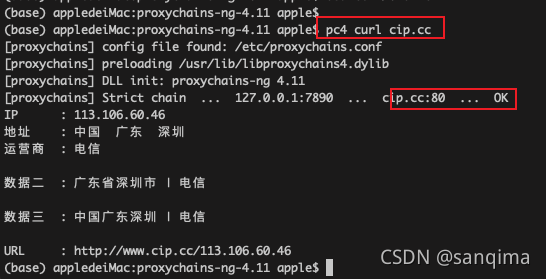
Figure (1) proxychain 4 runs successfully