Author Archives: Robins

Mybatis Error: The error may exist in xxxxMapper.xml [How to Solve]

After learning mybatis, this exception is reported during one-to-one mapping

### Error building SqlSession.
### The error may exist in StudentMapper.xml
### The error occurred while processing mapper_resultMap[AddressResult]
### Cause: org.apache.ibatis.builder.BuilderException: Error parsing SQL Mapper Configuration. Cause: org.apache.ibatis.builder.BuilderException: Error parsing Mapper XML. The XML location is 'StudentMapper.xml'. Cause: org.apache.ibatis.builder.BuilderException: Error resolving class. Cause: org.apache.ibatis.type.TypeException: Could not resolve type alias 'Address'.  Cause: java.lang.ClassNotFoundException: Cannot find class: Address

In fact, the exception report is quite clear. This is the mapping file, that is, the code in studentmapper.xml

	<resultMap id="selectStudentResult1" type="Student">
		<id property="studId" column="id"/>
		<result property="name" column="name"/>
		<result property="email" column="email"/>
		<result property="dob" column="dob"/>
		<result property="phone" column="phone"/>
		<association property="address" resultMap="AddressResult"/>
	</resultMap>

//Note the type of the following line
	<resultMap id="AddressResult" type="Address">
		<id property="addrId" column="addr_id"/>
		<result property="street" column="street"/>
		<result property="city" column="city"/>
		<result property="state" column="state"/>
		<result property="zip" column="zip"/>
		<result property="country" column="country"/>

	</resultMap>

	<! -- This is used to test one-to-one ResultMap One-to-one mapping of better method nesting results -->
	<select id="selectStudentWithAddress1" parameterType="int" resultMap="selectStudentResult1">
		select id,name,email,dob,phone,
		street,city,state,zip,country from students s left join addresses a
		on s.addr_id = a.addr_id
		where id = #{id}
	</select>

There are also corresponding files

The reason for my error is mybatis-config.xml in the configuration file. There is no alias for address. (because the type attribute in the resultmap uses address, the alias is called address)
(the type attribute is the fully qualified name of the class. Add address)

	<typeAliases>
		<typeAlias type="Full name" alias="Student" />
<!--		<typeAlias type="Full name" alias="Address"/>-->
	</typeAliases>

In this tab, you can also use package to set the default name of all classes in a directory
(if you use package, you don’t need to add the class name)

	<typeAliases>
		<package name="Full qualified name without class name" />
	</typeAliases>

This will work properly.

RuntimeError: stack expects each tensor to be equal size [How to Solve]

When debugging the code of densenet for classification task, the following errors are encountered in the process of image preprocessing:
runtimeerror: stack expectations each tensor to be equal size, but got [640, 640] at entry 0 and [560, 560] at entry 2
it means that the size of the loaded sheets is inconsistent
after searching, it is found that there should be a problem in the preprocessing process when I load the image
the following is the instantiation part of training data preprocessing.

train_transform = Compose(
        [
            LoadImaged(keys=keys),
            AddChanneld(keys=keys),
            CropForegroundd(keys=keys[:-1], source_key="tumor"),
            ScaleIntensityd(keys=keys[:-1]),
            # # Orientationd(keys=keys[:-1], axcodes="RAI"),
            Resized(keys=keys[:-1], spatial_size=(64, 64), mode='bilinear'),
            ConcatItemsd(keys=keys[:-1], name="image"),
            RandGaussianNoised(keys=["image"], std=0.01, prob=0.15),
            RandFlipd(keys=["image"], prob=0.5),  # , spatial_axis=[0, 1]
            RandAffined(keys=["image"], mode='bilinear', prob=1.0, spatial_size=[64, 64],    # The 3 here is because we don't know what the size of the three modal images will be after stitching, so we first use
                        rotate_range=(0, 0, np.pi/15), scale_range=(0.1, 0.1)),
            ToTensord(keys=keys),
        ]

    )

My keys are [“t2_img”, “dwi_img”, “adc_img”, “tumor”]
the error shows that the loaded tensor has dimensions [640, 640] and [560, 560], which are the dimensions of my original image, which indicates that there may be a problem in my clipping step or resize step. Finally, after screening, it is found that there is a problem in my resize step. In the resize step, I selected keys = keys [: – 1], that is, it does not contain “tumor”. Therefore, when resizing, my tumor image will still maintain the size of the original image, and the data contained in this dictionary will still be a whole when loaded, The dimensions of each dimension of the whole will automatically expand to the largest of the corresponding dimensions of all objects, so the data I loaded will still be the size of the original drawing. Make the following corrections:

 train_transform = Compose(
        [
            LoadImaged(keys=keys),
            AddChanneld(keys=keys),
            CropForegroundd(keys=keys[:-1], source_key="tumor"),
            ScaleIntensityd(keys=keys[:-1]),
            # # Orientationd(keys=keys[:-1], axcodes="RAI"),
            Resized(keys=keys, spatial_size=(64, 64), mode='bilinear'),  # remove [:-1]
            ConcatItemsd(keys=keys[:-1], name="image"),
            RandGaussianNoised(keys=["image"], std=0.01, prob=0.15),
            RandFlipd(keys=["image"], prob=0.5),  # , spatial_axis=[0, 1]
            RandAffined(keys=["image"], mode='bilinear', prob=1.0, spatial_size=[64, 64],    # The 3 here is because we don't know what the size of the three modal images will be after stitching, so we first use
                        rotate_range=(0, 0, np.pi/15), scale_range=(0.1, 0.1)),
            ToTensord(keys=keys),
        ]

    )

Run successfully!

[Solved] elasticsearch.bat Running Flashback.: Error occurred during initialization of VM, Error occurred during initializatio

Today, when I was learning elasticsearch, I didn’t want to run elasticsearch.bat. As a result, soon after running, there was no black frame, only a flashback. I guess it was too fast. I don’t even have a black box. I can’t see any error information.

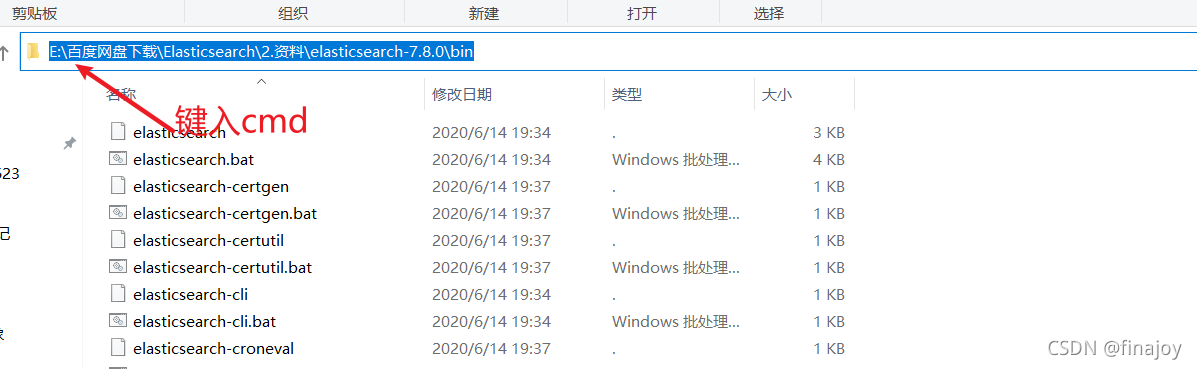
So I used CMD in the bin directory, as shown in the figure

Then execute the elasticsearch.bat file
Then you can see the error message error occurred during initialization of VM, error occurred during initialization.

Solution: I found Java_Home in my environment variable actually disappeared. Although I can still see the information by typing Java in the CMD window, it just disappeared. I guess it may be related to its disappearance, so I re-created Java_Home, locate the current Java directory, and start elasticsearch.bat again. It starts successfully!

Redis Error: (error) NOAUTH Authentication required. [How to Solve]

This error is encountered in the redis interface

127.0.0.1:6379> select 0
(error) NOAUTH Authentication required.

This error is caused by lack of authorization. You can enter a password to solve it at this time.

127.0.0.1:6379> auth "your Password"

Or specify a password when accessing the ‘redis’ client

redis-cli -h 127.0.0.1 -p 6379 -a "your Password"

Runtime error – [xcodeproj] unknown object version. [How to Solve]

Error during pod install:

### Error

“`
RuntimeError – [Xcodeproj] Unknown object version.
/Library/Ruby/Gems/2.6.0/gems/xcodeproj-1.15.0/lib/xcodeproj/project.rb:227:in `initialize_from_file’
/Library/Ruby/Gems/2.6.0/gems/xcodeproj-1.15.0/lib/xcodeproj/project.rb:112:in `open’
/Library/Ruby/Gems/2.6.0/gems/cocoapods-1.9.1/lib/cocoapods/installer/analyzer.rb:1177:in `block (2 levels) in inspect_targets_to_integrate’
/Library/Ruby/Gems/2.6.0/gems/cocoapods-1.9.1/lib/cocoapods/installer/analyzer.rb:1176:in `each’
/Library/Ruby/Gems/2.6.0/gems/cocoapods-1.9.1/lib/cocoapods/installer/analyzer.rb:1176:in `block in inspect_targets_to_integrate’
/Library/Ruby/Gems/2.6.0/gems/cocoapods-1.9.1/lib/cocoapods/user_interface.rb:64:in `section’
/Library/Ruby/Gems/2.6.0/gems/cocoapods-1.9.1/lib/cocoapods/installer/analyzer.rb:1171:in `inspect_targets_to_integrate’
/Library/Ruby/Gems/2.6.0/gems/cocoapods-1.9.1/lib/cocoapods/installer/analyzer.rb:106:in `analyze’
/Library/Ruby/Gems/2.6.0/gems/cocoapods-1.9.1/lib/cocoapods/installer.rb:410:in `analyze’
/Library/Ruby/Gems/2.6.0/gems/cocoapods-1.9.1/lib/cocoapods/installer.rb:235:in `block in resolve_dependencies’
/Library/Ruby/Gems/2.6.0/gems/cocoapods-1.9.1/lib/cocoapods/user_interface.rb:64:in `section’
/Library/Ruby/Gems/2.6.0/gems/cocoapods-1.9.1/lib/cocoapods/installer.rb:234:in `resolve_dependencies’
/Library/Ruby/Gems/2.6.0/gems/cocoapods-1.9.1/lib/cocoapods/installer.rb:156:in `install!’
/Library/Ruby/Gems/2.6.0/gems/cocoapods-1.9.1/lib/cocoapods/command/install.rb:52:in `run’
/Library/Ruby/Gems/2.6.0/gems/claide-1.0.3/lib/claide/command.rb:334:in `run’
/Library/Ruby/Gems/2.6.0/gems/cocoapods-1.9.1/lib/cocoapods/command.rb:52:in `run’
/Library/Ruby/Gems/2.6.0/gems/cocoapods-1.9.1/bin/pod:55:in `<top (required)>’
/usr/local/bin/pod:23:in `load’
/usr/local/bin/pod:23:in `<main>’
“`

Reason: Xcode version and CocoaPods version do not match, need to update CocoaPods
Solution.
Enter the command in the terminal

gem install cocoapods --pre

Error Messages:

ERROR:  While executing gem … (Gem::FilePermissionError)
You don’t have write permissions for the /Library/Ruby/Gems/2.6.0 directory.

Plus permissions:

sudo gem install cocoapods --pre

Execute pod install again successfully!

VSCode Error: collect2.exe:error:1d returned 1 exit status [How to Solve]

Recently, I learned the C + + program video of dark horse. When I realized the employee management system based on polymorphism, I knocked the same code as the video, but I couldn’t compile it successfully by using vscode, and the following errors occurred:

[Employee_Management_System.cpp 2021-10-22 13:58:17.099]
,,C:\Users\AAE3~1\AppData\Local\Temp\cc7ZdaG7.o:Employee_Management_System.cpp:(.text+0x1b): undefined reference to `WorkerManager::WorkerManager()'
C:\Users\AAE3~1\AppData\Local\Temp\cc7ZdaG7.o:Employee_Management_System.cpp:(.text+0x27): undefined reference to `WorkerManager::Show_Menu()'
C:\Users\AAE3~1\AppData\Local\Temp\cc7ZdaG7.o:Employee_Management_System.cpp:(.text+0x44): undefined reference to `WorkerManager::~WorkerManager()'
C:\Users\AAE3~1\AppData\Local\Temp\cc7ZdaG7.o:Employee_Management_System.cpp:(.text+0x57): undefined reference to `WorkerManager::~WorkerManager()'
collect2.exe: error: ld returned 1 exit status

After querying many blogs, it is found that the causes and solutions of errors such as collect.exe: error: 1D returned 1 exit status are as follows
1. The last compiled program is not closed, that is, the black box still exists. Find it and close or restart the IDE
2. The program has no main function or the main function is misspelled
3. Running in vscode will not help you save the code. You need to save the code before running
4. The file name and file path may cause errors in some compilers
5. There is an undefined reference. This is the case for this error. When instantiating the classes of other files in the main function, you need to define the .H file and .Cpp file of other classes to solve the problem.

#include<iostream>
#include"workerManager.h"
#include"workerManager.cpp"

git_error:unable to auto-detect email address [How to Solve]

the reason:
maybe I set the environment variable :home
the variable may impact the .gitconfig
this lead to me set the gitconfig failed(,and I could not do any commit!)
so ,I delete the home environment variable
And,It works.
If you have configured the home environment variable, try removing it and reconfiguring gitconfig

[Solved] Mvel2 Error: java.lang.VerifyError method: getKnownEgressType signature

Environmental information:

jdk: 8

mvel2: 2.0.19

Exception information:

java.lang.VerifyError: (class: ASMAccessorImpl_3009129941634644382940, method: getKnownEgressType signature: ()Ljava/lang/Class;) Illegal type in constant pool

The methods called are the following methods of the org.mvel2.mvel class:

public static Object executeExpression(Object compiledExpression, Object ctx, Map vars)

Error Messages:

java.lang.VerifyError: (class: ASMAccessorImpl_3009129941634644382940, method: getKnownEgressType signature: ()Ljava/lang/Class;) Illegal type in constant pool
at java.lang.Class.getDeclaredConstructors0(Native Method)
at java.lang.Class.privateGetDeclaredConstructors(Class.java:2671)
at java.lang.Class.getConstructor0(Class.java:3075)
at java.lang.Class.newInstance(Class.java:412)
at org.mvel2.optimizers.impl.asm.ASMAccessorOptimizer._initializeAccessor(ASMAccessorOptimizer.java:698)
at org.mvel2.optimizers.impl.asm.ASMAccessorOptimizer.compileAccessor(ASMAccessorOptimizer.java:832)
at org.mvel2.optimizers.impl.asm.ASMAccessorOptimizer.optimizeAccessor(ASMAccessorOptimizer.java:239)
at org.mvel2.optimizers.dynamic.DynamicGetAccessor.optimize(DynamicGetAccessor.java:83)
at org.mvel2.optimizers.dynamic.DynamicGetAccessor.getValue(DynamicGetAccessor.java:57)
at org.mvel2.ast.ASTNode.getReducedValueAccelerated(ASTNode.java:98)
at org.mvel2.compiler.ExecutableAccessor.getValue(ExecutableAccessor.java:42)
at org.mvel2.MVEL.executeExpression(MVEL.java:996)


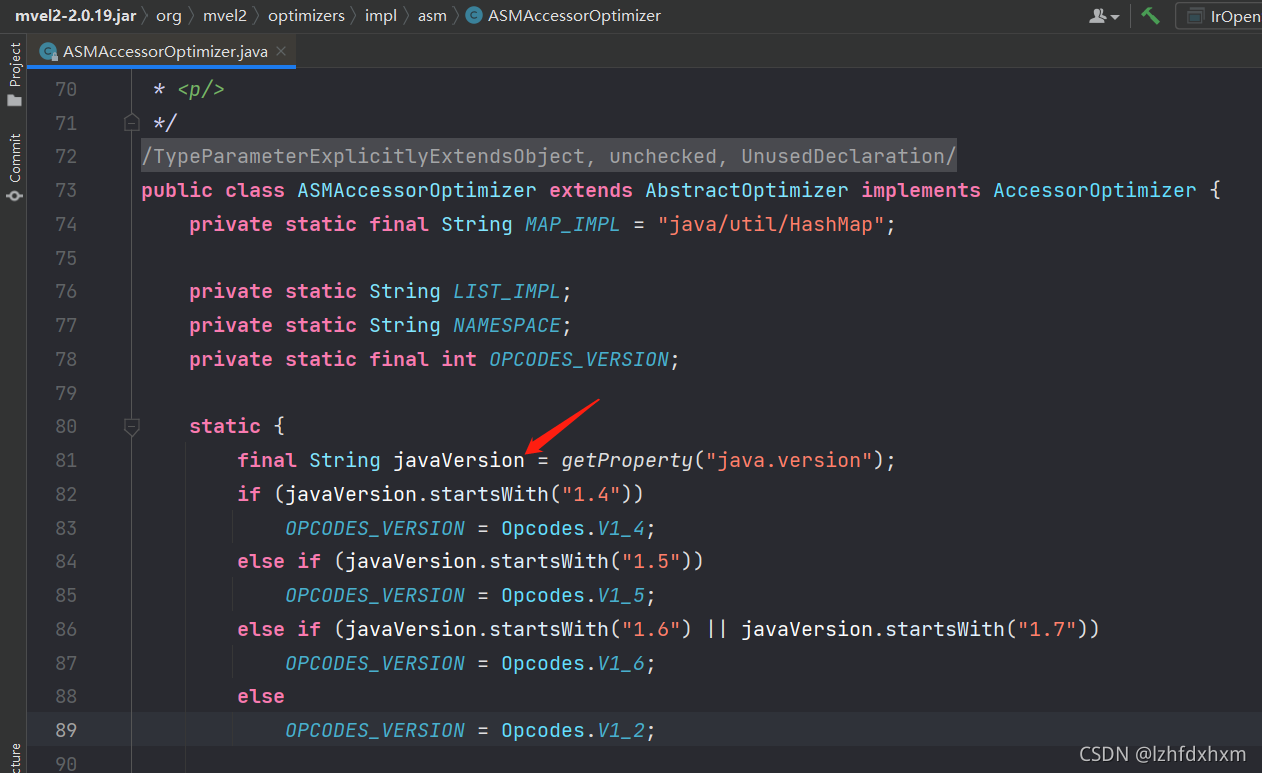
Partial source code of ASMAccessorOptimizer.

It can be seen that this version of mvel2 does not support jdk7 and jdk8, upgrade the version on the good

Error: loading shared libraries: cannot open shared object file: No such file or directory

Error : loading shared libraries: cannot open shared object file: No such file or directory

1. Problem Description:

The program s needs the support of Library L1 and Library L2 to run Library L1/L2 after installation, when executing software s, Library L2 shared object cannot be loaded, prompting that the file or path does not exist

**2. Solution:**

When the library is dynamic library, you need to indicate the path of the dynamic library for the operating system when running the program s.

2.1 determine the path of Library :
$ sudo find/-name library_name.so
2.2 determine whether the dynamic library path exists in the environment variable (ld_library_path) 
$ echo $LD_LIBRARY_PATH 
2.3 assign the dynamic library path to the environment variable (ld_library_path)
$ LD_LIBRARY_PATH=$LD_LIBRARY_PATH:/path/to/the/lib
$ export LD_LIBRARY_PATH

You can run the program.

expand:

**1. Library files in linux System: * *
library is a collection of precompiled code segments called functions. Libraries contain common functions that together form a package called a library. Functions are blocks of code that are reused throughout the program. Calling these code fragments repeatedly in the program can save time. You can avoid rewriting code multiple times. For programmers, libraries provide reusable functions, data structures, classes, and so on.

Libraries are not executable, which is the key difference between processes and applications. Libraries work at run time or compile time. In C programming language, there are two types of Libraries: dynamic library and static library.

**Dynamic and static libraries: * *
dynamic or shared libraries appear as independent files other than executable program files. Therefore, the program only needs one copy of the dynamic/shared library file at run time. The static libraries are locked in the program.

**2. linux system environment variables: * *
environment variables and shell variables:

Environment variables are managed by the shell. The difference between environment variables and regular shell variables is that shell variables are local variables of specific instances of shell, such as shell scripts, while environment variables are “inherited” by any program you start, including another shell. In other words, the new process obtains copies of its own variables. It can read and modify these variables and pass them to its child processes in turn. In fact, every UNIX process (not just shell) passes its environment variables to its child processes.

Environment variables are globally available in programs and their subroutines. Shell variables are only available in the current shell. Environment variables like $shell are valid system wide. In the current bash shell, $bash points to the execution path of bash, while $shell points to the shell (its value may be the same) defined as Default.

#Define the shell variable VAR and its value
[biocodee@localhost ~]$ VAR="This is a variable"
[biocodee@localhost ~]$ echo $VAR
This is a variable
# See if the shell variable exists in the environment variable env
[biocodee@localhost ~]$ env | grep VAR
# Convert a shell variable to an environment variable
[biocodee@localhost ~]$ export VAR
[biocodee@localhost ~]$ env | grep VAR
VAR=This is a variable

AttributeError: module ‘time‘ has no attribute ‘clock‘ [How to Solve]

AttributeError: module ‘time’ has no attribute ‘clock’
Error Messages:

# `flask_sqlalchemy` Error:
File "D:\python38-flasky\lib\site-packages\sqlalchemy\util\compat.py", line 172, in <module>
    time_func = time.clock
AttributeError: module 'time' has no attribute 'clock'

reason:

Python 3.8 no longer supports time.clock, but it still contains this method when calling. There is a version problem.

Solution:

Use the replacement method: time.perf_Counter(), such as:

import time
if win32 or jython:
    # time_func = time.clock
    time_finc = time.perf_counter()
else:
    time_func = time.time