Author Archives: Robins

Mayavi fails to get wglchoosepixelformatarb and other error reporting solutions

Development environment:

Win10 + Python 3.6 (virtual environment) + mayavi2 + pychar

Phenomenon:

This virtual environment used to work well in the past, but suddenly one day when drawing with mayavi, the following error appears:
error: in C: \ VPP \ standalone build \ VTK source \ rendering \ opengl2 \ vtkwin32openglrenderwindow.cxx, line 685

vtkWin32OpenGLRenderWindow (000001FACEF53880): failed to get wglChoosePixelFormatARB

ERROR: In C:\VPP\standalone-build\VTK-source\Rendering\OpenGL2\vtkWin32OpenGLRenderWindow.cxx, line 769

vtkWin32OpenGLRenderWindow (000001FACEF53880): failed to get valid pixel format.

ERROR: In C:\VPP\standalone-build\VTK-source\Rendering\OpenGL2\vtkOpenGLRenderWindow.cxx, line 785

vtkWin32OpenGLRenderWindow (000001FACEF53880): GLEW could not be initialized.

The program is a routine on the official website. The phenomenon is that after executing the program, if an error is reported, it exits after a few seconds.

Solution:

Consult relevant materials and initially locate the problem on environmental variables and drivers. Looking back on what I have done in recent days, I found that I have newly installed Master Lu and updated some drivers. So I tried to return the graphics card driver to the previous version, and the problem was successfully solved
the figure below shows that Master Lu has completed the rollback of the driver version


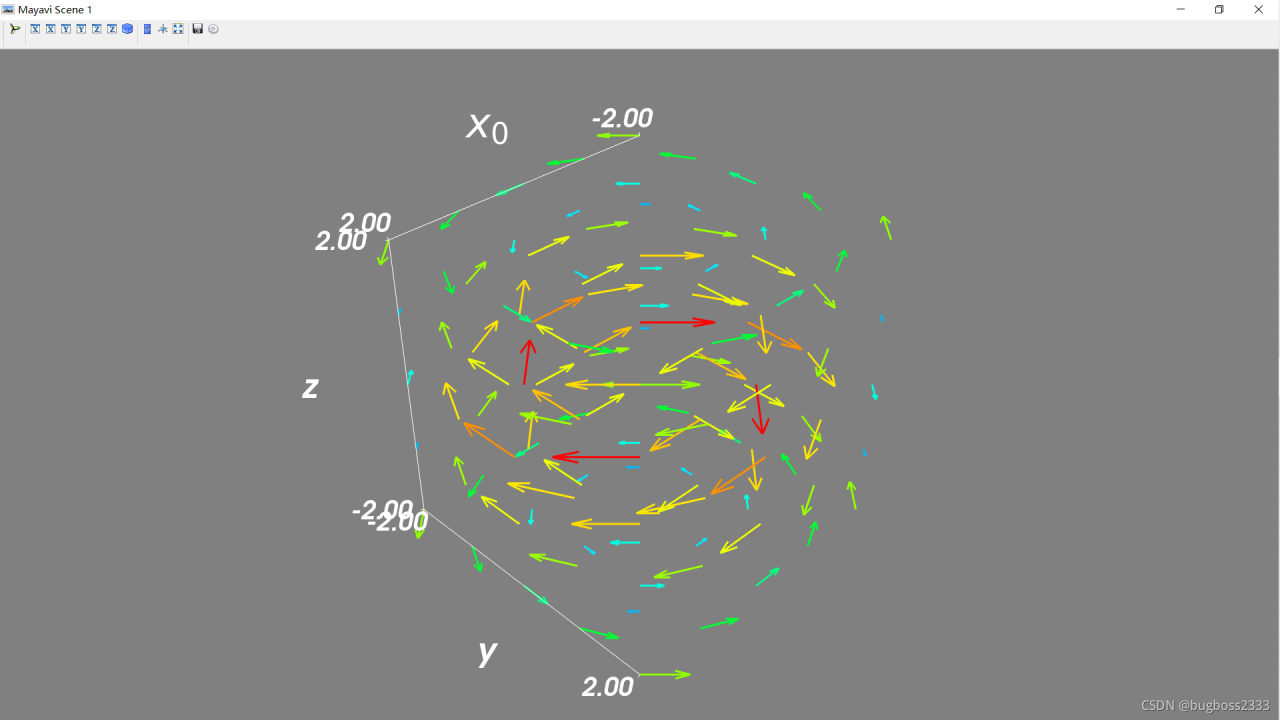
happy drawing again
Vue installs sass loader directly, and node sass reports an error

Vue installs sass loader directly, and node-sass reports an error

An error will be reported when using NPM I sass loader node sass - d to install directly. This is because the version of SASS loader is too high. Please install sass loader version 7.3.1

If you also need to customize the theme color, you happen to add a file named element variables.SCSS directly under SRC instead of using the command. Then you will encounter the incompatibility of node-sass versions later. On October 28, 2021, I installed version 6.0.1 here. At this time, I can change it to version 4.14.1

Springboot modifies the reference of the application.yml or. Properties file to report an error after startup

When working, in many cases, we will define the configuration used in production, testing, development and other environments, and then reference the corresponding configuration in application.yml or properties. Occasionally, when I modify the showsql property in the configuration, I start to report an error as soon as I start the project

Caused by: java.nio.charset.MalformedInputException: Input length = 1
	at java.nio.charset.CoderResult.throwException(CoderResult.java:281) ~[?:1.8.0_291]
	at sun.nio.cs.StreamDecoder.implRead(StreamDecoder.java:339) ~[?:1.8.0_291]
	at sun.nio.cs.StreamDecoder.read(StreamDecoder.java:178) ~[?:1.8.0_291]
	at java.io.InputStreamReader.read(InputStreamReader.java:184) ~[?:1.8.0_291]
	at org.yaml.snakeyaml.reader.UnicodeReader.read(UnicodeReader.java:125) ~[snakeyaml-1.23.jar:?]
	at org.yaml.snakeyaml.reader.StreamReader.update(StreamReader.java:183) ~[snakeyaml-1.23.jar:?]
	at org.yaml.snakeyaml.reader.StreamReader.ensureEnoughData(StreamReader.java:176) ~[snakeyaml-1.23.jar:?]
	at org.yaml.snakeyaml.reader.StreamReader.peek(StreamReader.java:136) ~[snakeyaml-1.23.jar:?]
	at org.yaml.snakeyaml.scanner.ScannerImpl.scanPlain(ScannerImpl.java:1999) ~[snakeyaml-1.23.jar:?]
	at org.yaml.snakeyaml.scanner.ScannerImpl.fetchPlain(ScannerImpl.java:1044) ~[snakeyaml-1.23.jar:?]
	at org.yaml.snakeyaml.scanner.ScannerImpl.fetchMoreTokens(ScannerImpl.java:399) ~[snakeyaml-1.23.jar:?]
	at org.yaml.snakeyaml.scanner.ScannerImpl.checkToken(ScannerImpl.java:227) ~[snakeyaml-1.23.jar:?]
	at org.yaml.snakeyaml.parser.ParserImpl$ParseBlockMappingKey.produce(ParserImpl.java:558) ~[snakeyaml-1.23.jar:?]
	at org.yaml.snakeyaml.parser.ParserImpl.peekEvent(ParserImpl.java:158) ~[snakeyaml-1.23.jar:?]
	at org.yaml.snakeyaml.parser.ParserImpl.checkEvent(ParserImpl.java:148) ~[snakeyaml-1.23.jar:?]
	at org.yaml.snakeyaml.composer.Composer.composeMappingNode(Composer.java:214) ~[snakeyaml-1.23.jar:?]
	at org.yaml.snakeyaml.composer.Composer.composeNode(Composer.java:144) ~[snakeyaml-1.23.jar:?]
	at org.yaml.snakeyaml.composer.Composer.composeValueNode(Composer.java:236) ~[snakeyaml-1.23.jar:?]
	at org.yaml.snakeyaml.composer.Composer.composeMappingChildren(Composer.java:227) ~[snakeyaml-1.23.jar:?]
	at org.yaml.snakeyaml.composer.Composer.composeMappingNode(Composer.java:215) ~[snakeyaml-1.23.jar:?]
	at org.yaml.snakeyaml.composer.Composer.composeNode(Composer.java:144) ~[snakeyaml-1.23.jar:?]
	at org.yaml.snakeyaml.composer.Composer.composeValueNode(Composer.java:236) ~[snakeyaml-1.23.jar:?]
	at org.yaml.snakeyaml.composer.Composer.composeMappingChildren(Composer.java:227) ~[snakeyaml-1.23.jar:?]
	at org.yaml.snakeyaml.composer.Composer.composeMappingNode(Composer.java:215) ~[snakeyaml-1.23.jar:?]
	at org.yaml.snakeyaml.composer.Composer.composeNode(Composer.java:144) ~[snakeyaml-1.23.jar:?]
	at org.yaml.snakeyaml.composer.Composer.composeValueNode(Composer.java:236) ~[snakeyaml-1.23.jar:?]
	at org.yaml.snakeyaml.composer.Composer.composeMappingChildren(Composer.java:227) ~[snakeyaml-1.23.jar:?]
	at org.yaml.snakeyaml.composer.Composer.composeMappingNode(Composer.java:215) ~[snakeyaml-1.23.jar:?]
	at org.yaml.snakeyaml.composer.Composer.composeNode(Composer.java:144) ~[snakeyaml-1.23.jar:?]
	at org.yaml.snakeyaml.composer.Composer.getNode(Composer.java:85) ~[snakeyaml-1.23.jar:?]
	at org.yaml.snakeyaml.constructor.BaseConstructor.getData(BaseConstructor.java:123) ~[snakeyaml-1.23.jar:?]
	at org.yaml.snakeyaml.Yaml$1.next(Yaml.java:547) ~[snakeyaml-1.23.jar:?]
	at org.springframework.beans.factory.config.YamlProcessor.process(YamlProcessor.java:200) ~[spring-beans-5.1.19.RELEASE.jar:5.1.19.RELEASE]
	at org.springframework.beans.factory.config.YamlProcessor.process(YamlProcessor.java:164) ~[spring-beans-5.1.19.RELEASE.jar:5.1.19.RELEASE]
	at org.springframework.boot.env.OriginTrackedYamlLoader.load(OriginTrackedYamlLoader.java:76) ~[spring-boot-2.1.18.RELEASE.jar:2.1.18.RELEASE]
	at org.springframework.boot.env.YamlPropertySourceLoader.load(YamlPropertySourceLoader.java:50) ~[spring-boot-2.1.18.RELEASE.jar:2.1.18.RELEASE]
	at org.springframework.boot.context.config.ConfigFileApplicationListener$Loader.loadDocuments(ConfigFileApplicationListener.java:544) ~[spring-boot-2.1.18.RELEASE.jar:2.1.18.RELEASE]
	at org.springframework.boot.context.config.ConfigFileApplicationListener$Loader.load(ConfigFileApplicationListener.java:499) ~[spring-boot-2.1.18.RELEASE.jar:2.1.18.RELEASE]
	... 28 more

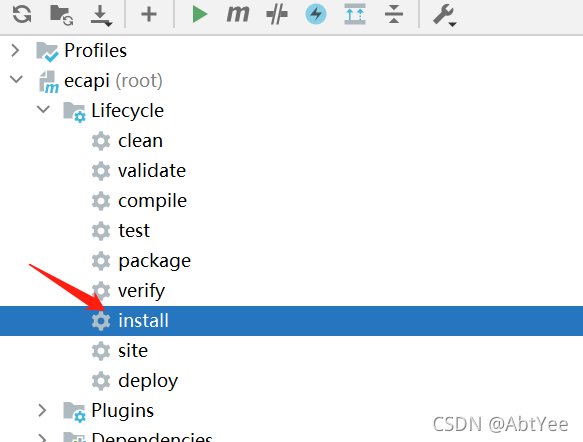
Then, if I restart the project after rebuilding, there will still be an error. At this time, we just need to reinstall in Maven to run successfully

The uni app references the vant component and reports an error unclosed bracket when compiling

report errors:

Module build failed (from ./node_modules/postcss-loader/src/index.js):
10:26:54.652 SyntaxError
10:26:54.653 (45:193) Unclosed bracket

global search

https://img.yzcdn.cn/vant/vant-icon-d3825a.woff

Locate the index.wxss file location  

...src:url(https://img.yzcdn.cn/vant/vant-icon-d3825a.woff2) format("woff2"),url(https://img.yzcdn.cn/vant/vant-icon-d3825a.woff) ......

Add a space after the comma of… (“woff2”), URL (HTTPS:…)

...src:url(https://img.yzcdn.cn/vant/vant-icon-d3825a.woff2) format("woff2"), url(https://img.yzcdn.cn/vant/vant-icon-d3825a.woff) ......

How to Solev QT compilation error “cannot find – LGL”

Cause: QT cannot find the dynamic link library of OpenGL. QT usually looks for dynamic link libraries in/usr/lib directory, but some Linux distributions will place OpenGL dynamic link libraries in other directories. For example, Ubuntu will be placed in/usr/lib/i386 Linux GNU/Mesa/. There are two solutions:

Method 1: directly copy the OpenGL dynamic link library file in/usr/lib/i386 Linux GNU/Mesa/directory to/usr/lib.

Note: the built-in OpenGL library in Linux will have the version number at the end, such as LIBGL.So.1, LIBGL.So.1.2. However, the file required by QT when linking does not have a version number, that is, libgl.so. Method 2: create a soft link for the OpenGL dynamic link library file in/usr/lib/i386 Linux GNU/Mesa/directory

ln -s /usr/lib/i386-linux-gnu/mesa/libGL.so.1 /usr/lib/libGL.so

Objectinputstream of IO stream reports an error (resolved)

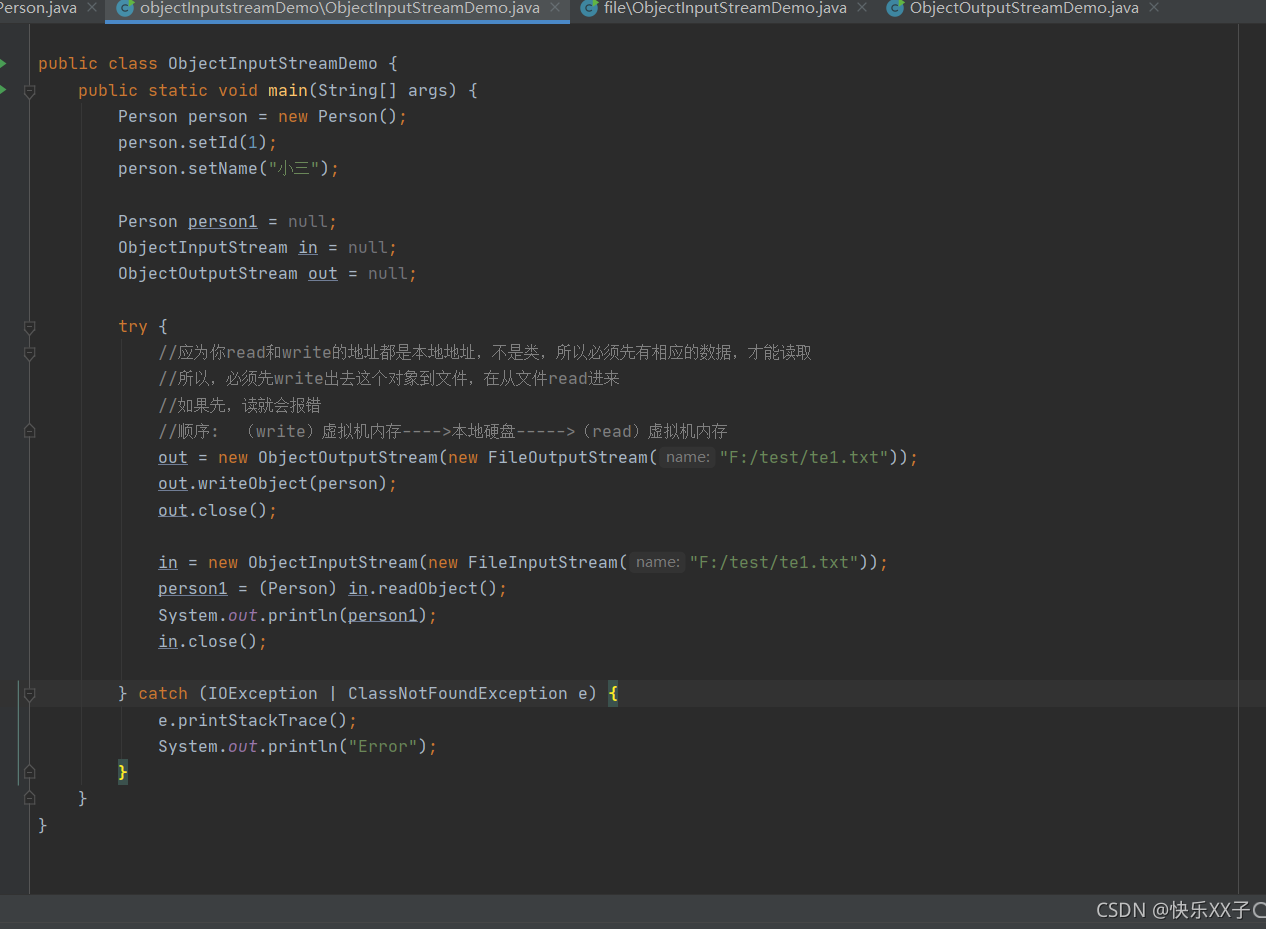
Problem: there was an error writing the serialized IO stream today

… eofexception:
exception in thread “main” java.io.streamcorruptedexception: invalid stream header: 7b312c22

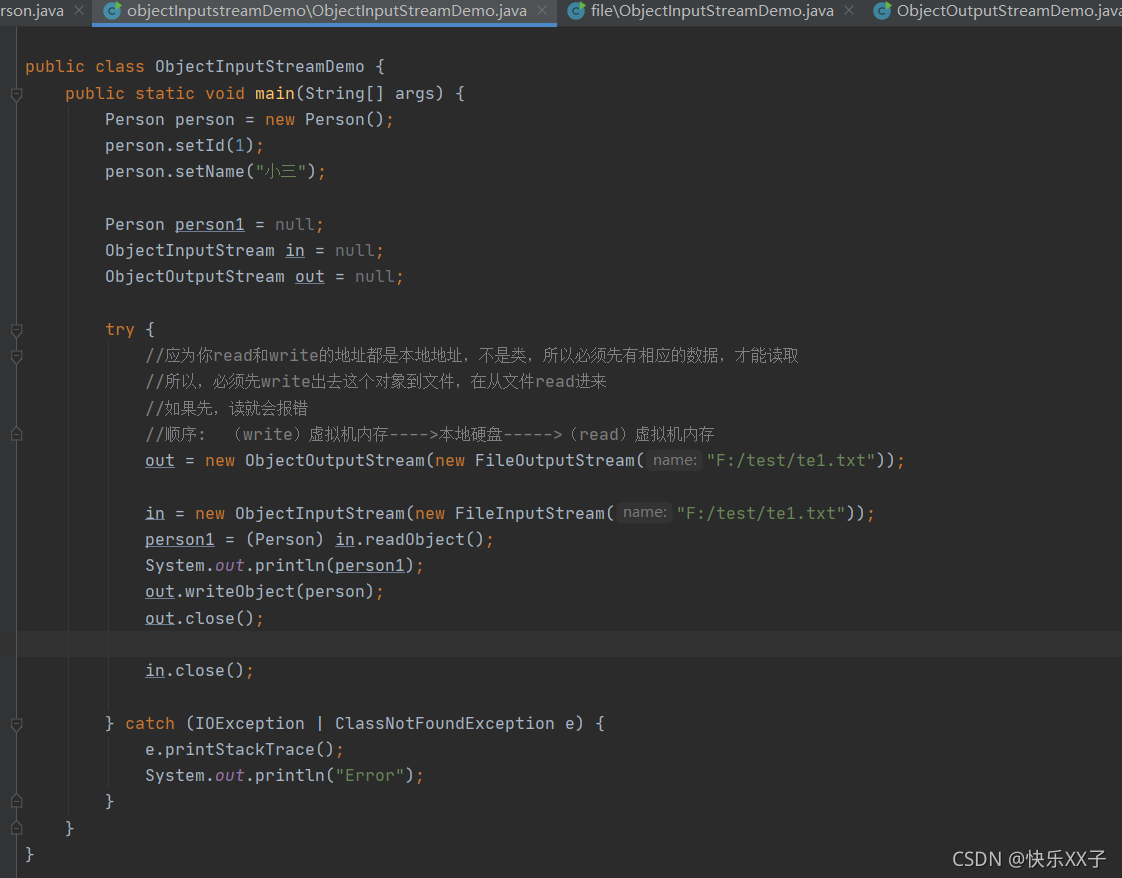
take a look at my code

After analysis, the problem has been solved:

Look at the correct code:

The code didn’t change, just changed the order inside and solved it successfully. The specific causes are described in the figure

HDFS Java API operation error (user permission)

Problem Description:

There is a problem when running Hadoop HDFS in idea. The error is as follows:
org. Apache. Hadoop. Security. Accesscontrolexception: permission denied: user = XXXX, access = write, inode = “/”: root: supergroup: drwxr-xr-x
because the user name of this machine is different from that of the Linux operating system, an error will be reported.

Solution:

Under Linux system, find the directory where Hadoop is installed, and find etc/Hadoop/HDFS site. XML
under this directory

<property>
  <name>dfs.permissions.enabled</name>
  <value>false</value>
  <description>
    If "true", enable permission checking in HDFS.
    If "false", permission checking is turned off,
    but all other behavior is unchanged.
    Switching from one parameter value to the other does not change the mode,
    owner or group of files or directories.
  </description>
</property>

Add the above code, restart the cluster, and there will be no problem in operation.

Solution:

The ultimate code, one line solution
Add system.setproperty ("hadoop_user_name", "root") to the Java code to set the permissions of the client to operate on HDFS. that will do

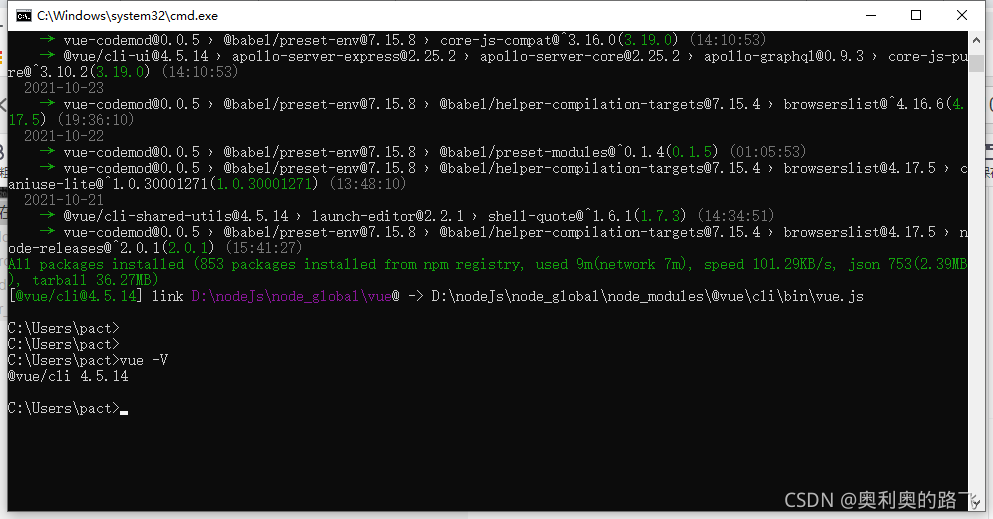
[Solved] Cnpm installation -g@ view/cli Error: error: eperm: operation not allowed…

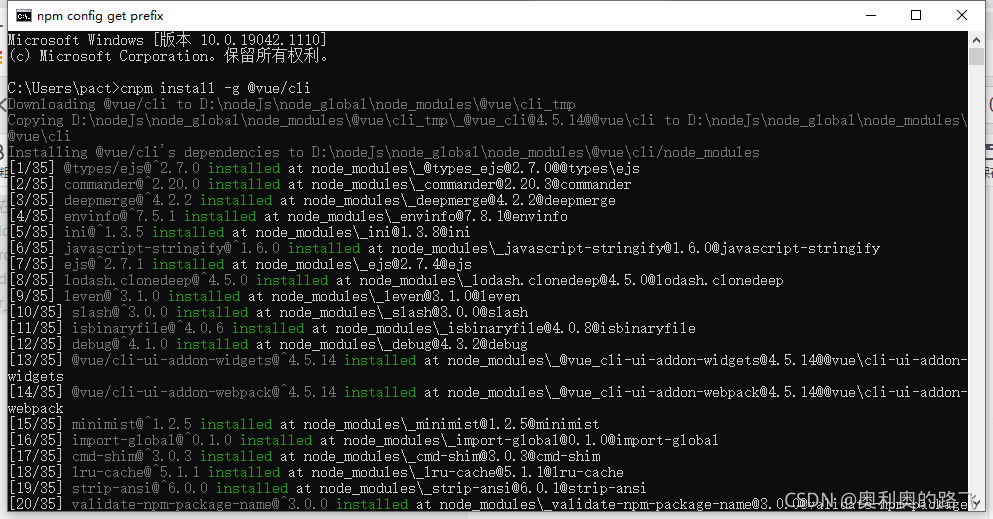
After installing node in Windows 10, node – V, NPM – V and cnpm – V are tested to be normal. Cnpm install – G @Vue/cli reports an error
error: eperm: operation not allowed, MKDIR'd:\nodejs\node_global\node_Modules\@Vue'

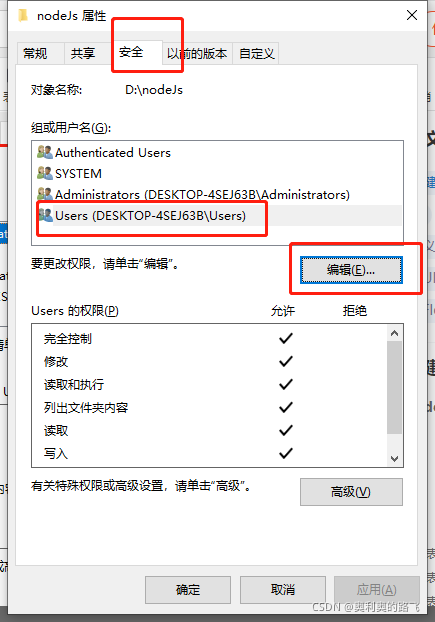
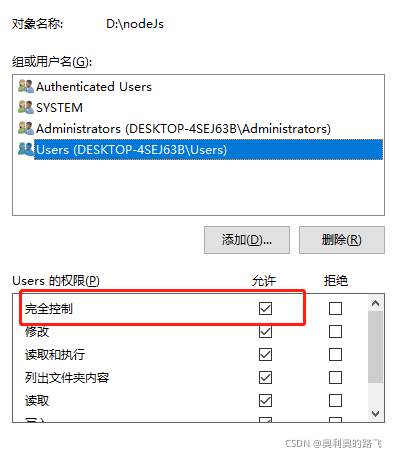
I found a lot of methods, but I found that the permission was insufficient, so I had a solution
click the attribute in the directory where node is installed to find the security

it’s ok to allow the setting completely

Random number random reports an error. Illegalargumentexception: bound must be positive

error code

    private static Random RANDOM = new Random();
    private static Integer randomOnce(Integer max, Integer min) {
        return RANDOM.nextInt(max) % (max - min + 1) + min;
    }

Error message

java.lang.IllegalArgumentException: bound must be positive
	at java.util.Random.nextInt(Random.java:388)

Solution

private static Random RANDOM = new Random();
    private static Integer randomOnce(Integer max, Integer min) {
        if (max<=0)
            throw new IllegalArgumentException("Random positive must be greater than 0");
        return RANDOM.nextInt(max) % (max - min + 1) + min;
    }

Git submit code error husky > pre commit [How to Solve]

Reason: the keyword is husky > Baidu found the problem after pre-commit. It was really a file under. Git in the local project that caused the submission failure. This file is a pre-commit file.

Solution steps:

1. Find the .Git folder in the project (you need to display the hidden files before they appear. To display the hidden files: click View Options view show hidden files to confirm). Double click to enter and you can see some files about GIT

2. Go to the .Git folder, go to the hooks folder, and find the pre-commit file.

Pre-commit (client) hook, which will run to check the code style before git types the submission information
If the code does not comply with the corresponding rules, an error is reported.

3. After deleting the file, we commit and find that it can be submitted successfully.

Second question:

Prompt when git pushes: refs cannot be pushed to the remote end

Solution: pull the mainline code again, merge, resolve the conflict, resubmit, and then push to the remote end.