Author Archives: Robins

How to Solve Archetype generate Error

Unable to add module to the current project as it is not of packaging type ‘pom’

I modified two places. You can have a try,
1. My original java version number was 15.0. Later, I added it completely according to version number 15 under Java – variant

<!-- java version --> 
  <profile>
      <id>jdk-15</id>
      <activation>
	    <activeByDefault>true</activeByDefault>
        <jdk>15</jdk>
      </activation>

      <properties>
        <maven.compiler.source>15</maven.compiler.source>
		<maven.compiler.target>15</maven.compiler.target>
		<maven.compiler.compilerVersion>15</maven.compiler.compilerVersion>
      </properties>
  </profile>

I suggest you complete it

2. I wrote a POM myself in the original project directory, and I deleted it
the second one I tested. The pom.xml file cannot be found in the directory where the project is to be created
then run the generate command to successfully create the project

[Solved] Docker Start Error: iptables failed: iptables –wait -t nat -A DOCKER -p tcp -d 0/0 –dport 10241

Start docker to report error content:
iptables failed: iptables –wait -t nat -A DOCKER -p tcp -d 0/0 –dport 10241 -j DNAT –to-destination 172.17.0.2:50000 ! -i docker0: iptables: No chain/target/match by that name.
(exit status 1)

Solution: Restart docker

systemctl restart docker

Petalinux-boot –jtag error [How to Solve]

petalinux-boot –jtag –u-boot –hw_server-url TCP:ubuntu:3121
Using the command as above will report an error similar to the one below.

Solution:
Set the compatibility of the virtual machine’s USB device to USB3.1, because the physical USB port my computer is connected to is USB3.1.

INFO: Sourcing build tools
INFO: Launching XSDB for file download and boot.
INFO: This may take a few minutes, depending on the size of your image.
rlwrap: warning: your KaTeX parse error: Expected ‘EOF’, got ‘#’ at position 170: … “name =~ “arm*#̲0″”. available …params(filter)”. available targets:$target_list””
(procedure “targets” line 177)
invoked from within
“targets -set -nocase -filter {name =~ “arm*#0”}”
(file “/tmp/tmp.tUZ8sEM2Wm” line 3)
INFO: The XSDB log is as follows

Git pull code error fatal: authentication failed fo

Git pull code error fatal: authentication failed fo

Detailed error reporting information:

git.exe pull --progress -v --no-rebase 
"http://nj.eliansun.com:8082/tfs/DefaultCollection/
%E6%B1%9F%E8%8B%8F%E5%8C%BB%E4%B
F%9D%E9%A1%B9%E7%9B%AE/_git/01_%E6%B
1%9F%E8%8B%8F%E5%8C%BB%E4%BF%9D%E
5%9B%BD%E5%AE%B6%E6%96%B0%E5%B9%B3%E5%8F%B0" zj_demo
fatal: Authentication failed for 'http://nj.eliansun.com:8082/tfs/DefaultCollection/%E6%B1%9F%E
8%8B%8F%E5%8C%
BB%E4%BF%9D%E9%A1%B9%E7%9B%AE/_git/01_%
E6%B1%9F%E8%8B%8F%E5%8C%BB%E4%BF%9D
%E5%9B%BD%E5%AE%B6%E6%96%B0%E5%B9%B3%E5%8F%B0/'

The general description is that your voucher is wrong. If you have changed your password recently, you need to modify your local voucher as follows:

Open control panel in --- user account --- credentials management --- windows credentials --- edit --- save

If the account and password are correct (not in accordance with the above), please look below

First kind

Use the command to re-enter the account password

git config --system --unset credential.helper

Errors, i.e. permission problems, may occur, for example:

error: could not lock config file C:/Program Files/Git/mingw64/etc/gitconfig: Permission denied

The file C:/program files/git/mingw64/etc has insufficient permissions. Change the operation permissions under this folder to all permissions. Windows 10 system can be set to everyone, and then re execute the above commands.

Second

If the above operation cannot modify the permission or the above operation is still invalid, you can use the tool [tortoisegit] for short, little turtle

The specific operations are as follows:
enter the little turtle setting page
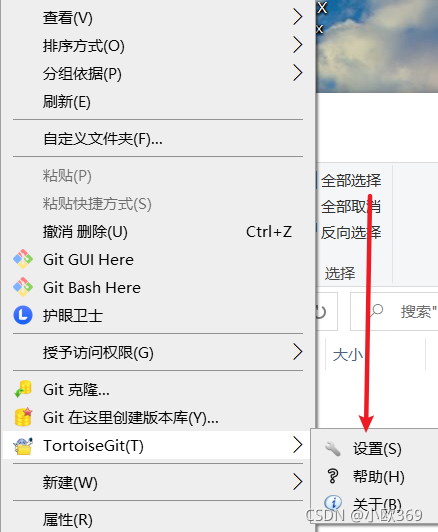
double click git, select Edit gitconfig (y) to enter the page, and then modify the following position

Amend as follows

[credential]
	helper = store

After pulling or other operations, you will be prompted to enter the account password before operation


JanusGraph Error: Unknown external index backend [How to Solve]

Use java to connect janusgraph to create a graph. The error is the code in line 50 of the program, which is used to generate a mixed index. The screenshot is as follows:

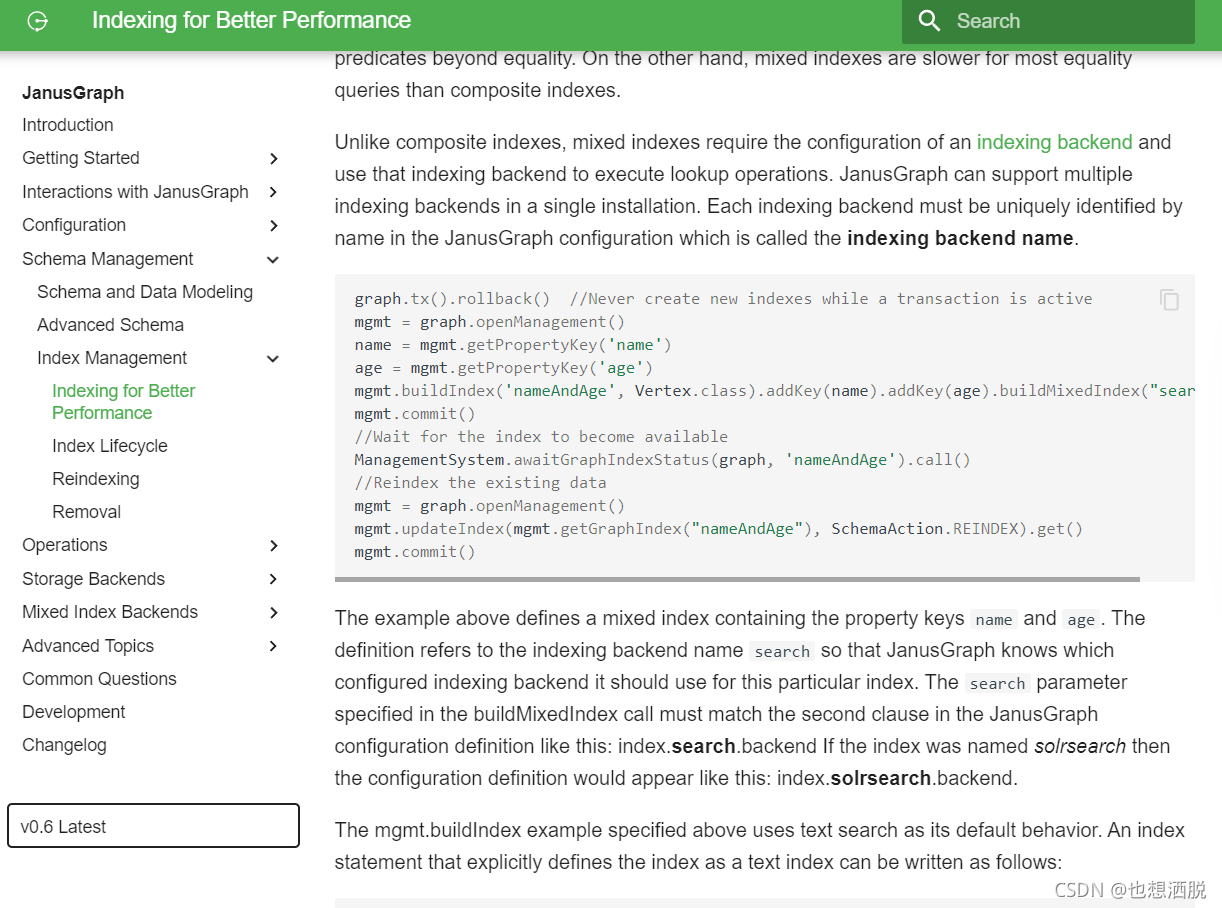
Later, a screenshot is posted in the official document of version 0.6:

the example about definitions a mixed index containing the property keys name and age. The definition references to the indexing backend name search so that janusgraph knows which configured indexing backend it should use for this particular index The search parameter specified in the buildmixedindex call must match the second claim in the janusgraph configuration definition like this: index.search.backend if the index was named solrsearch then the configuration definition would appear like this: index.solrsearch.backend.
this means that the parameters of the buildmixedindex method should be the same as those specified The written index configuration of the configuration file is consistent with the second sub sentence. For example, my is: index. Search. Backend = elasticsearch
then the parameter of buildmixedindex should be search. After the code in line 50 is modified, no error will be reported

openwrt ipv6 nat6 ip6tables [How to Solve]

Install packages
opkg update
opkg install kmod-ipt-nat6
Run ip6tables -t nat -L
Error:  ip6tables v1.4.21: can’t initialize ip6tables table `nat’: Table does not exist (do you need to insmod?)
Perhaps ip6tables or your kernel needs to be upgraded.

Solutioin:
The original ipv6 nat6 requires a kernel version of 3.9.0 or higher and an iptables version of 1.4.8 or higher.
Upgrade the corresponding kernel and iptables packages to solve the problem.

The date selector Report Null Error in element is cleared

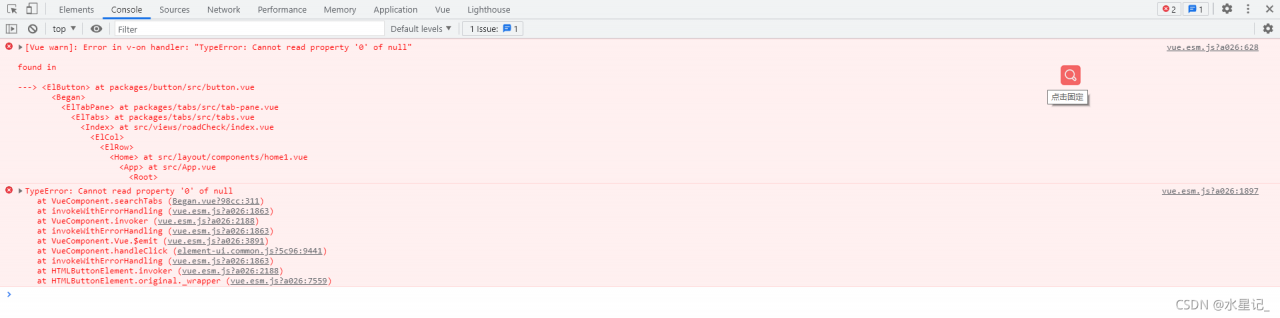
Recently, a small bug was found when using the date selector in element. When I clear the selected date and click search again, the console will report an error, as shown in the following figure:

After troubleshooting, I found that this problem occurs because when we click clear, the value value bound by V-model will change from a value to a null, so the console will report an error. There are also many solutions, such as re assigning value before the next call; Or you can also listen to the value of the V-model, and then solve the problem through judgment. The method I use is to directly judge the value of the V-model, and then assign the value if it meets the conditions. The specific implementation code is as follows:

core code:

//Event Methods
searchTabs() {
// parameters needed on the backend
let data = {
    sjlx: this.sjlx,
    pageNumber: this.pageSize,
    pageSize: this.pageNumber,
    zfry: this.road.enforce,
    jcjg: this.road.testing,
    sfcf: this.road.other,
    startTime: "",//start time
    endTime: "",//end time
}
// By determining the value of the v-model binding, it must be an Array value and must have two values
if (this.road.dateTime && Array.isArray(this.road.dateTime) && this.road.dateTime.length == 2) {
    // Assign the judged value to the startTime and endTime in data above
    data.startTime = new Date(this.road.dateTime[0]) // start time
    data.endTime = new Date(this.road.dateTime[1]) // end time
}
}

Full code:

html

 <div>
     <el-date-picker
             v-model="road.dateTime"
             type="datetimerange"
             start-placeholder="start-date"
             end-placeholder="end-date"
             :default-time="['12:00:00']"
             value-format="yyyy-MM-dd"
     >
     </el-date-picker>
 </div>

js

export default {
    data() {
        return {
        		pageNumber: 1, //Current page number
                pageSize: 10, //how many items are displayed on a page
          		//search criteria
                road: {
                    dateTime: "", //date
                    enforce: "", //Road enforcement officer
                    testing: "", //testing results
                    whether: "", //whether to penalize
                },
        }
    },
    methods:{
         	//Search
            searchTabs() {
                // parameters needed on the back end
                let data = {
                    sjlx: this.sjlx,
                    pageNumber: this.pageSize,
                    pageSize: this.pageNumber,
                    zfry: this.road.enforce,
                    jcjg: this.road.testing,
                    sfcf: this.road.other,
                    startTime: "",//start time
                    endTime: "",//end time
                }
                // By determining the value of the v-model binding, it must be an Array value and must have two values
                if (this.road.dateTime && Array.isArray(this.road.dateTime) && this.road.dateTime.length == 2) {
                    // Assign the judged value to the startTime and endTime in data above
                    data.startTime = new Date(this.road.dateTime[0]) // start time
                    data.endTime = new Date(this.road.dateTime[1]) // end time
                }
                // call the interface pass data to the backend
                search(data).then(res => {
                    // console.log(res, "search)....")
                    this.tableData = res.data.records
                    this.pageTotal = res.data.total
                })
            },
    }
}

So far, the problem has been solved.

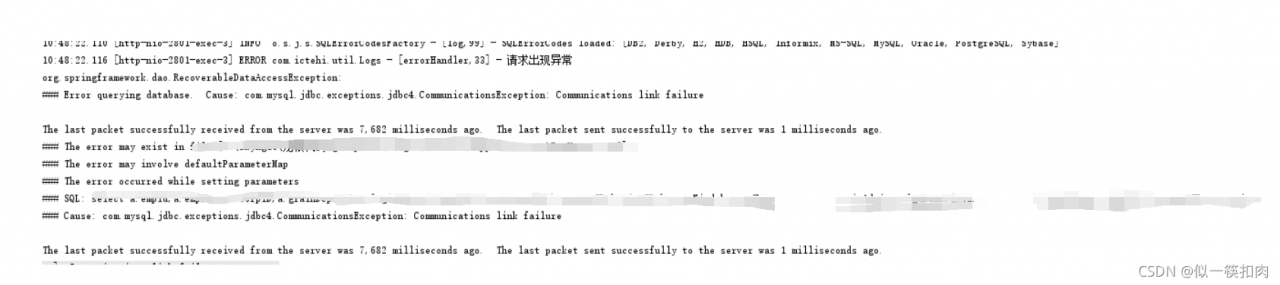
[Solved] MySQL connection error: communications link failure

com.mysql.jdbc.exceptions.jdbc4.CommunicationsException:Communications link failure

com.mysql.jdbc.exceptions.jdbc4.CommunicationsException: Communications link failure
The last packet sent successfully to the server was 0 milliseconds ago. The driver has not received any packets from the server.

1. Causes

Communication link failure occurs when Java connects to the database. Why can’t you log in

2 solution (my situation is invalid)

Method 1

[1] Login mysql,cmd command
mysql -h host address -u username -p user password (for example mysql -hlocalhost -uroot -p123456)

[2] Check the wait_timeout,cmd command.
show global variables like 'wait_timeout';


[3] If the wait_timeout is too small, modify it. cmd command:
set global wait_timeout=604800;
set global interactive_timeout=604800;

Method 2

Add the following parameter to the connection URL: &autoReconnect=true

3. Troubleshooting of other causes

If the above two methods are not solved, check whether there are problems in the server environment and database port.

After investigation, if the database port passes through nginx reverse proxy, or if the database port performs proxy operations through other servers, it is caused by nginx reverse proxy timeout that the database cannot be connected

You need to modify the configuration file of nginx and use steam agent Mysl

stream {
     upstream mysql {
         zone myapp1 64k;
         server localhost:3306 weight=1 max_fails=3 fail_timeout=30s;
     }
     server {
         listen 10086;
         proxy_connect_timeout 1s;
         proxy_timeout 3s;
         proxy_pass mysql;
    }
}

In other cases, you can also check whether the MySQL port has been proxy

React project is packaged and set as required Error [How to Solve]

./node_modules/antd/es/style/index.less (./node_modules/css-loader/dist/cjs.js??ref–6-oneOf-7-1!./node_modules/postcss-loader/src??postcss!./node_modules/resolve-url-loader??ref–6-oneOf-
7-3!./node_modules/less-loader/dist/cjs.js??ref–6-oneOf-7-4!./node_modules/antd/es/style/index.less)
ValidationError: Invalid options object. Less Loader has been initialized using an options object that does not match the API schema.

This is the problem with the less-loader version

yarn remove less-loader
yarn add [email protected]

[Solved] PostgreSQL Error: Could not connect to server: no such file or directory

1. Problem description

when operating PostgreSQL database service, an error message is received: 

Could not connect to server: no such file or directory

2. Solution

PostgreSQL error message “could not connect to server: no such file or directory” it is known that it is caused by the problem of postmaster

the error message indicates that PostgreSQL is not running in the system where the user logs in. When handling this common error, check “postmaster.PID” in the data directory. Ensure that the configuration of PostgreSQL allows TCP/IP connections

Vant configures multiple sites, and new sites 404 error [How to Solve]

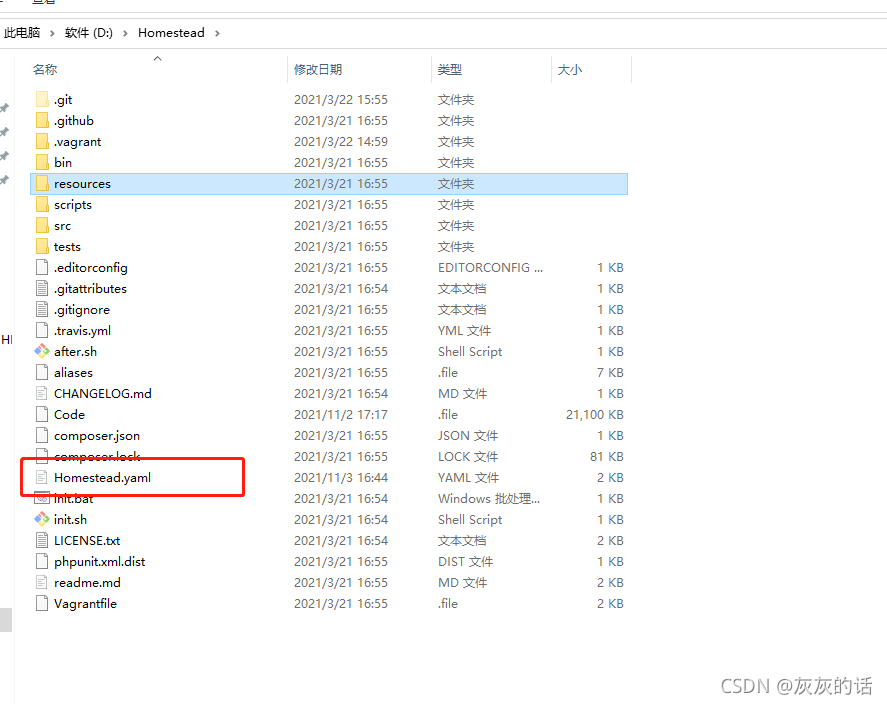
1.configure the homestead.yaml file
Add folder mapping, domain name directory mapping (note the layer mapped to the entry file)
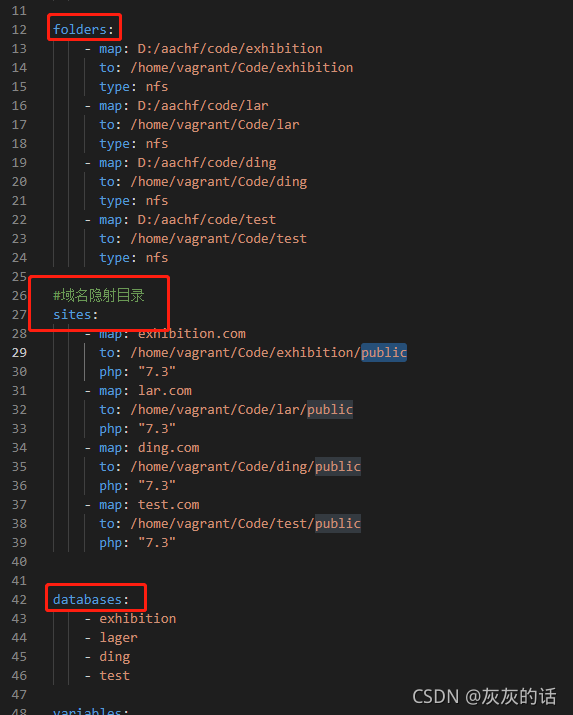
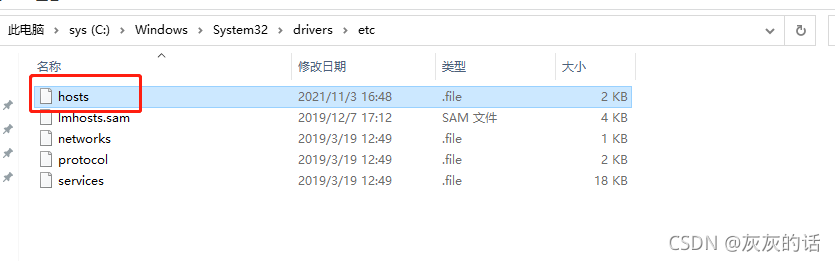
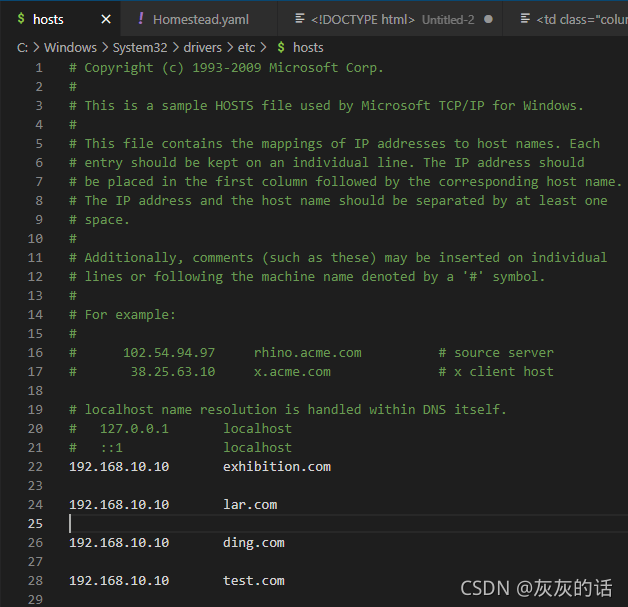
2. Configure hosts file

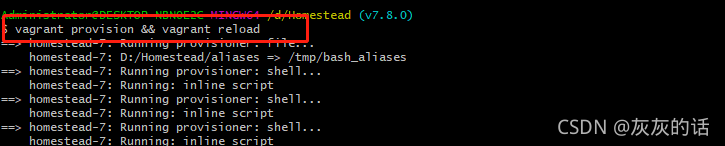
3. Reload vagrant (reload the modified configuration file)

vagrant provision&&vagrant reload

#After reloading the configuration, open vagrant
vagrant up && vagrant ssh

4. Restart nginx

service nginx restart

5. Successfully open the newly added site