Author Archives: Robins

An error occurs when pymysql uses% d to pass in parameters

Error:

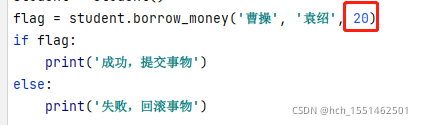
When using pymysql, an error occurs when using% d to pass parameters in the SQL statement. As shown in the figure:

Error information: typeerror:% d format: a number is required, not str

Cause of problem:

         When a parameter of type int is passed in, it is converted to a parameter of type str. Therefore, the solution is to change% d into% s, pass in int type, and it can still be executed.

Modified:

Data of type int passed in:

Can execute successfully

Solution:

          When data of type int is passed in, the parameter is still passed with% s.

Error reported by RNG when compiling StVO pl

The errors reported are as follows: StVO PL/SRC/stereoframehandler. CPP: 1266:35: error: ‘RND’ was not declared in this scope
color = scalar (color_dist (RND), color_dist (RND), color_dist (RND), color_dist (RND))
explanation: random_ In the Linux implementation, device () reads the/dev/urandom device, random_ The purpose of device () is to generate a true random number. The rand () function uses the linear congruence method to generate a random number, but this random number is actually a pseudo-random number
original address: https://blog.csdn.net/keneyr/article/details/105595613#commentBox
However, randm_ Device() is only valid under Linux, not under windows
solution: add #include & lt; in front of the stereoframehandler.cpp file; random> just fine

Error report of mongodb startup under Linux

Version:MongoDB 5.0.3

1. Use the configuration file to start the error 1:

View log:

  The reason is an error in the configuration file:

#mongod.conf

net:

        bindIp: localhost,172.20.10.9         # 172.20.10.9 LAN IP for host computer

After 172.20.10.9 of bindip is deleted, it can be started successfully, but the host cannot connect to mongodb. At this time, by changing bindip to bindipall: true, it means that all IPS are allowed to connect to this mongodb

If you want to configure multiple IP addresses but do not want all IP addresses to be accessible, the above instructions are used, and the partition cannot be started. Query the network and learn that it is configured through [IP1, IP2], and the result is also an error:

Conclusion:       If it is only accessed locally, you can configure localhost in bindip,

                 If other IPS want to access, they can only configure bindip: 0.0.0.0 or bindipall: true

2. Use the configuration file to start error 2:

Problem cause: caused by abnormal shutdown

Solution: delete the. Lock file under the data directory, and then specify the data directory to start by — dbpaht or add the — repair parameter. After successful startup, start it by using the configuration file method

3. Add in replica set   No response when arbitrating nodes

Problem: by executing the shell in the master node, rs.addarb (host: port) does not respond, and the arbitration node cannot be added. At this time, the version is 5.0.3

Solution: reduce the version to 4.0.1

[Solved] Mybatis uses the PageHelper paging plugin error: Could not find method on interface ibatis.executor.Executor named query.

(1) Problem Description
This week at work, the company’s project using mybatis and pagehelper for paging queries, start the project, query data actually reported an error, the error reported as follows.

Exception in thread “main” org.apache.ibatis.plugin.PluginException: Could not find method on interface org.apache.ibatis.executor.Executor named query. Cause: java.lang.NoSuchMethodException: org.apache.ibatis.executor.Executor.query(org.apache.ibatis.mapping.MappedStatement, java.lang.Object, org.apache.ibatis.session.RowBounds, org.apache.ibatis.session.ResultHandler, org.apache.ibatis.cache.CacheKey, org.apache.ibatis.mapping.BoundSql)

Exception in thread "main" org.apache.ibatis.plugin.PluginException: Could not find method on interface org.apache.ibatis.executor.Executor named query. Cause: java.lang.NoSuchMethodException: org.apache.ibatis.executor.Executor.query(org.apache.ibatis.mapping.MappedStatement, java.lang.Object, org.apache.ibatis.session.RowBounds, org.apache.ibatis.session.ResultHandler, org.apache.ibatis.cache.CacheKey, org.apache.ibatis.mapping.BoundSql)
	at org.apache.ibatis.plugin.Plugin.getSignatureMap(Plugin.java:63)
	at org.apache.ibatis.plugin.Plugin.wrap(Plugin.java:26)
	at com.github.pagehelper.PageInterceptor.plugin(PageInterceptor.java:151)
	at org.apache.ibatis.plugin.InterceptorChain.pluginAll(InterceptorChain.java:12)
	at org.apache.ibatis.session.Configuration.newExecutor(Configuration.java:289)
	at org.apache.ibatis.session.defaults.DefaultSqlSessionFactory.openSessionFromDataSource(DefaultSqlSessionFactory.java:78)
	at org.apache.ibatis.session.defaults.DefaultSqlSessionFactory.openSession(DefaultSqlSessionFactory.java:32)
Caused by: java.lang.NoSuchMethodException: org.apache.ibatis.executor.Executor.query(org.apache.ibatis.mapping.MappedStatement, java.lang.Object, org.apache.ibatis.session.RowBounds, org.apache.ibatis.session.ResultHandler, org.apache.ibatis.cache.CacheKey, org.apache.ibatis.mapping.BoundSql)
	at java.lang.Class.getMethod(Class.java:1786)
	at org.apache.ibatis.plugin.Plugin.getSignatureMap(Plugin.java:60)

After thinking for a long time, I didn’t understand what went wrong. Then I inadvertently checked the underlying source code of PageHelper and found that there were errors, as shown below:
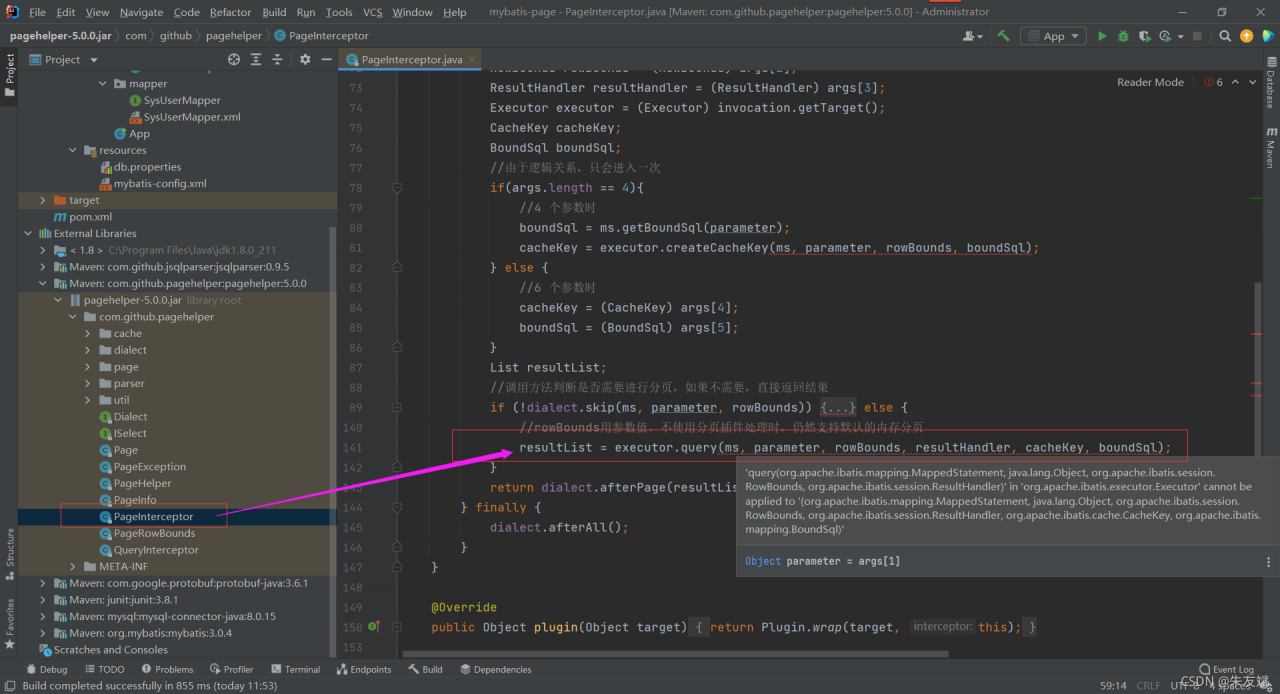
Then enter the query () method and jump to the source code of the mybatis framework. It is found that the method in the mybatis framework has only four parameters, while the query () method with six parameters is used in the PageHelper, resulting in an error.
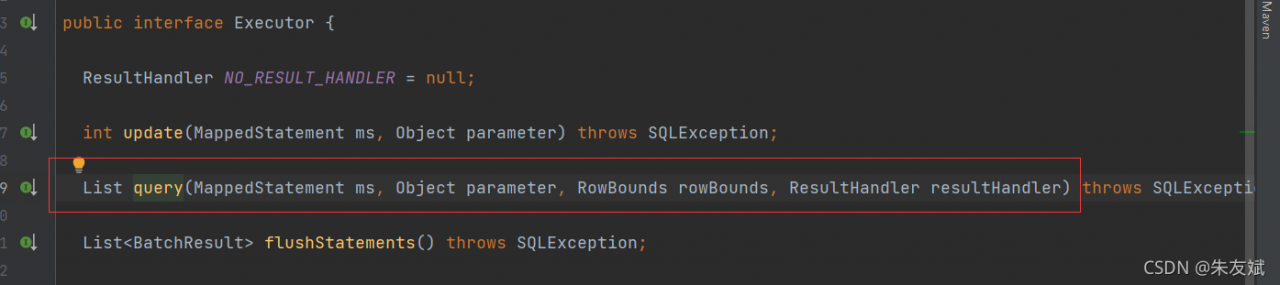
The reason for the problem is that there must be a mismatch between the versions of the mybatis framework and the page helper. I checked that the mybatis version used in the company’s project is 3.0.4 and the PageHelper version is 5.0.0. The solution is simple. Replace the corresponding framework version.

(2) Solution

There are two ways to solve this problem:

Change the version corresponding to mybatis and PageHelper (this is the simplest way). Instead of using the PageHelper plug-in, customize the mybatis paging plug-in

1. Method 1: replace mybatis version

I checked the page helper dependency repository and found that the page helper supports mybatis version 3.2.6 at least.

2. Custom mybatis paging plug-in

The version of mybatis 3.0.4 used by our company. At that time, the technical manager specially told me that if it is a problem with the dependent version, the dependency of PageHelper can be replaced at will, but the dependent version of mybatis cannot be replaced. Ah, I think it’s not just a custom mybatis paging plug-in… I can’t help it. I can only view some articles about custom paging plug-ins, and then write one myself. If necessary, you can check the article [mybatis implementation of custom paging plug-in].


Consumer service instance error: HTTP get http://xxx/actuator/health: 503 output: {“status”: “out_of_service”

Phenomenon

Some back-end services register with consumer and report an error HTTP get http://xxx/actuator/health: 503 output: {"status": "out_of_service", but other services can be registered normally. Find a way to print thin error messages on the Internet

Print detailed error information

Configure in the error reporting module: application.YML or bootstrap.YML as follows:

management:
  endpoint:
    health:
      show-details: always  
  endpoints:
    web:
      exposure:
        include: '*'    

Or add the following configuration in application.Properties :

management.endpoint.health.show-details=always
management.endpoints.web.exposure.include=*

Finally, after printing the detailed error information, I found that it was the ES cluster. I thought it was the problem of the consumer configuration that led to the wrong direction during troubleshooting.

Jd-gui error: ERROR launching ‘JD-GUI’ [How to Solve]

JD-GUI

Check ide of jar

URL
http://java-decompiler.github.io/
Found JD-GUI error after upgrading Big Sur

ERROR launching ‘JD-GUI’
No suitable Java version found on your system!
This program requires Java 1.8+
Make sure you install the required Java version.

Need to replace files
[The source site may have anti-theft chain mechanism, we suggest to save the image and upload it directly (img-tyA4R80g-1635526847601)(evernotecid://4E256570-D902-4601-B913-1C7B0CBD5BA0/appyinxiangcom/ 23501392/ENResource/p275)]
Content
Replace the content

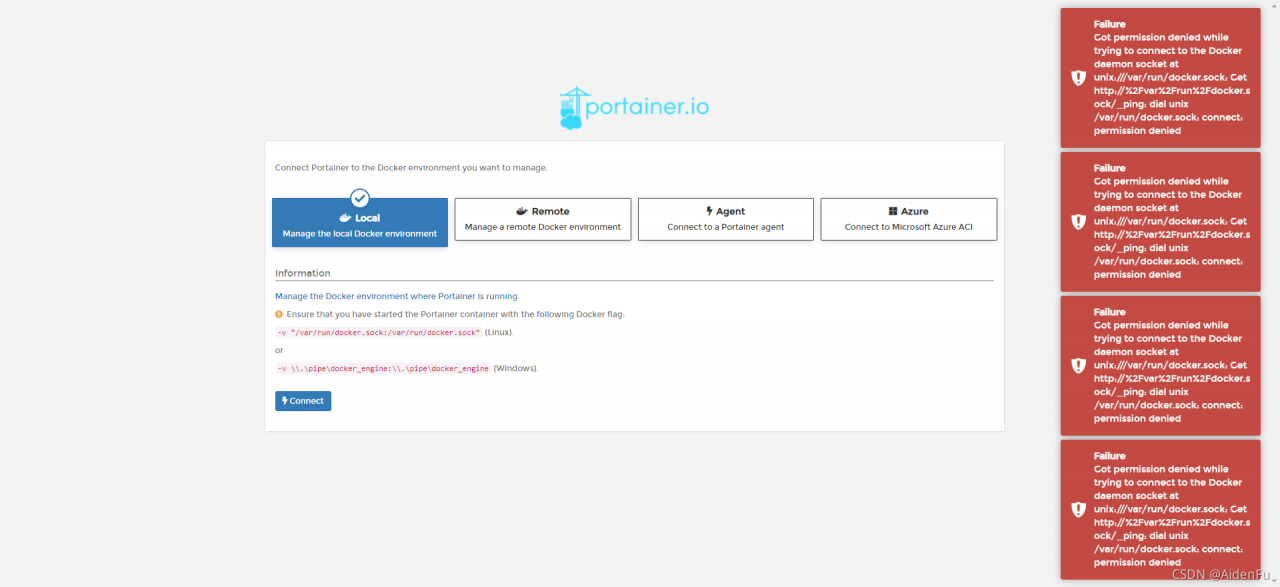
How to Solve Docker Portainer Connect Error

Container startup

[root@shusheng run]# docker run -d -p 9000:9000 --restart=always -v /var/run/docker.sock:/var/run/docker.sock --name prtainer-test portainer/portainer

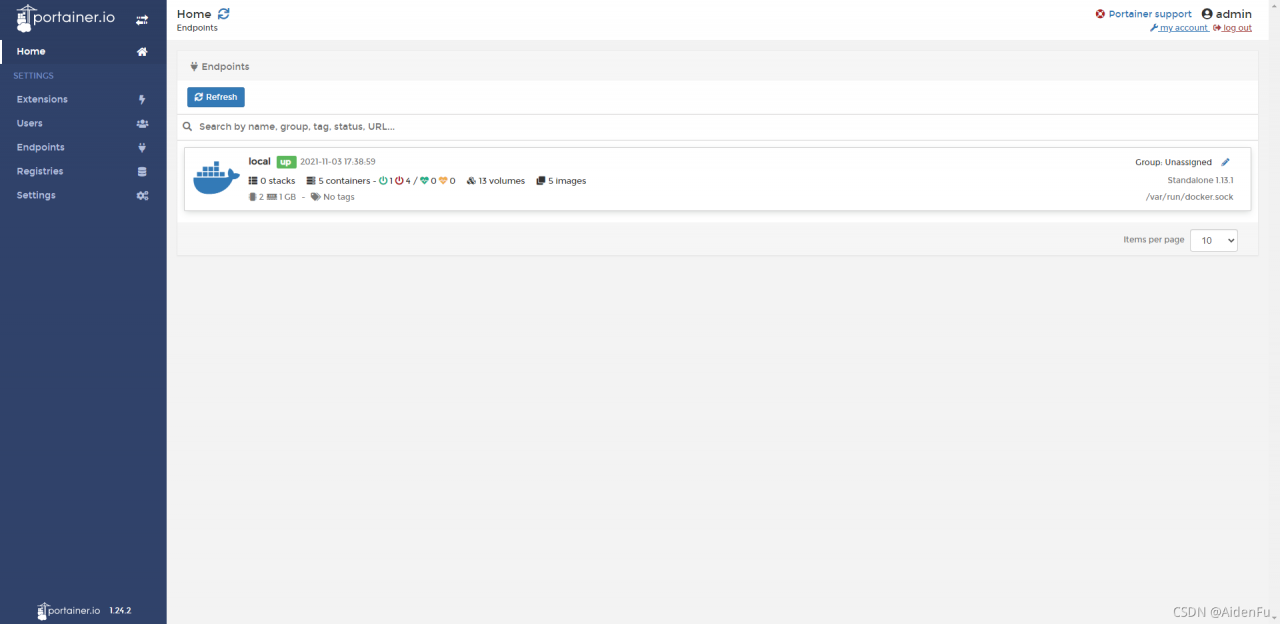
Portal interface access

Connect error resolution

Many Google articles talk about permission, but I use root to start it
until later

[root@shusheng run]# setenforce 0

Successfully solved

[Solved] Mybatis.generator error: Failed to execute goal org.mybatis.generator:mybatis-generator-maven-plugin:1.3.2

Failed to execute goal org.mybatis.generator:mybatis-generator-maven-plugin:1.3.2:generate (default-cli) on project pas-service-devops: Execution default-cli of goal org.mybatis.generator:mybatis-generator-maven-plugin:1.3.2:generate failed: Plugin org.mybatis.generator:mybatis-generator-maven-plugin:1.3.2 or one of its dependencies could not be resolved: Failure to find com.oracle:ojdbc14:jar:10.2.0.3 in http://maven.aliyun.com/nexus/content/repositories/central/ was cached in the local repository, resolution will not be reattempted until the update interval of alimaven has elapsed or updates are forced
maven dependency did not enter
Re-select dependency version :14 before, change to 8

				<dependency>
					<groupId>com.oracle.database.jdbc</groupId>
					<artifactId>ojdbc8</artifactId>
					<version>21.1.0.0</version>
				</dependency>
				<dependency>
					<groupId>cn.easyproject</groupId>
					<artifactId>orai18n</artifactId>
					<version>12.1.0.2.0</version>
				</dependency>

[Solved] Vermagic error and signature error in insmod

Handling of vermagic errors when insmod drives.
uname -a to see the vermagic on the environment
If the driver code is consistent, you can force to modify the UTS_RELEASE macro in include/generated/utsrelease.h to be consistent with the environment, and then compile the KO.
Signature error: signature and/or required key missing – tainting kernel
Reason: The kernel is enabled for signing, the driver is not signed.
Signature-related options in the kernel.
CONFIG_MODULE_SIG_FORMAT=y
CONFIG_MODULE_SIG=y
#CONFIG_MODULE_SIG_FORCE is not set
CONFIG_MODULE_SIG_ALL=y
#CONFIG_MODULE_SIG_SHA1 is not set
#CONFIG_MODULE_SIG_SHA224 is not set
#CONFIG_MODULE_SIG_SHA256 is not set
#CONFIG_MODULE_SIG_SHA384 is not set
CONFIG_MODULE_SIG_SHA512=y
CONFIG_MODULE_SIG_HASH=“sha512”
CONFIG_MODULE_SIG_KEY=“certs/signing_key.pem”
Signature method:
./scripts/sign-file sha512 ./certs/signing_key.pem ./certs/signing_key.x509 drivers/xxx.ko

[Solved] Tensorflow error or keras error and tf.keras error: oom video memory is insufficient

Hint: if you want to see a list of allocated tenants when oom happens, add Report_tensor_allocations_upon_oom to RunOptions for current allocation info.

Problem description

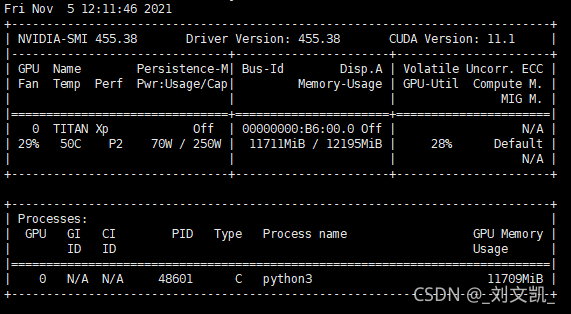
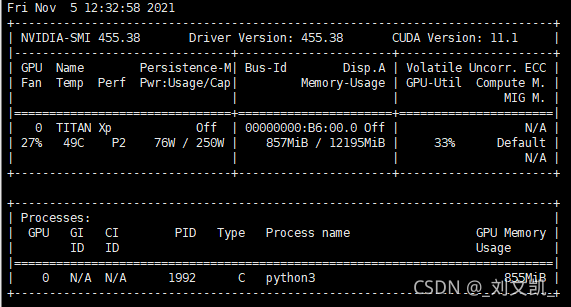
The problems encountered in today’s 50% off cross-validation and grid search are that the amount of data was too large or bitch_ It also occurs when the size is too large, as shown in the figure:
use the command: Watch – N 0.1 NVIDIA SMI in Linux to view the GPU usage

reason

Due to the lack of video memory, but it is not the real lack of video memory, but because TensorFlow has eaten up the video memory, but there is no actual effective utilization. Therefore, the required video memory can be allocated to TensorFlow. (keras based on TensorFlow is also applicable)

Solution:

1. Set small pitch_Size, although it can be used, the indicator does not cure the root cause
2. Manually set the GPU. In train.py:

(1) in tensorflow
import tensorflow as tf
import os

os.environ["CUDA_VISIBLE_DEVICES"] = "0" Specify which GPU to use
config = tf.ConfigProto()
config.gpu_options.allow_growth = True # Allocate video memory on demand
config.gpu_options.per_process_gpu_memory_fraction = 0.4 # Maximum memory usage 40%
session = tf.Session(config=config)) # Create tensorflow session
...
(2) in keras
import tensorflow as tf
from keras.models import Sequential
import os
from keras.backend.tensorflow_backend import set_session ## Different from tf.keras

os.environ["CUDA_VISIBLE_DEVICES"] = "0"
config = tf.ConfigProto()
config.gpu_options.allow_growth = True  # Allocate video memory on demand
set_session(tf.Session(config=config)) # Pass the settings to keras

model = Sequential()
...
(3) in tf.keras
import tensorflow as tf
from tensorflow.keras.models import Sequential

import os
from tensorflow_core.python.keras.backend import set_session # Different from tf.keras

os.environ["CUDA_VISIBLE_DEVICES"] = "0"
config = tf.ConfigProto()
config.gpu_options.allow_growth = True  # Allocate video memory on demand
config.gpu_options.per_process_gpu_memory_fraction = 0.4 # use 40% of the maximum video memory
set_session(tf.Session(config=config)) # Pass the settings to tf.keras

model = Sequential()
...

Supplement:
tf.keras can use data reading multithreading acceleration:

model.fit(x_train,y_train,use_multiprocessing=True, workers=4) # Enable multithreading, using 4 CPUs

Empty session:

from tensorflow import keras
keras.backend.clear_session() 

After emptying, you can continue to create a new session

Jest Vue $route error [How to Modify]

Jest Vue $route reported an error

When you run jest, you will always report errors in the page that uses $route. When you add the following code to jest, you will report other errors

FALSE:

test('Create groupManage data', async (done) => {
    wrapper.vm.$nextTick(() => {
      })
      done()
    })
  })

Finally, it was found that the correct router
was not added to the jest file:

import VueRouter from 'vue-router'

describe('groupManage', () => {
  const wrapper = mount(groupManage, {
    global: {
      plugins: [ElementPlus, VueRouter, store],  // Remember to add VueRouter
      mocks: {
        $route: {
          params: {
            image_uuid: '3'   // the data you may use in vue page
          }
        }
      }
    }
  })
})

Another: createlocalvue has been cancelled in the new Vue test utils