Author Archives: Robins

VScode import numpy Error: DLL load failed [How to Solve]

vscode & Anaconda import numpy failed: DLL load failed

Phenomenon:
in Anaconda prompt, import numpy is normal
in vscode, import numpy reports an error: DLL load failed

Error reason:
shell opening failed, resulting in CONDA activate failure. There is no environment, and naturally there is no numpy

Solution:
open the vscodesettings.json file

(type)               CTRL + SHIFT + P
(search for:)        open settings
(click:)             Preferences: Open Settings (JSON)

Add in settings.json:

	"terminal.integrated.profiles.windows":{
        "PowerShell": {
            "source": "PowerShell",
            "icon": "terminal-powershell"
        },
        "Command Prompt": {
            "path": [
                "${env:windir}\\Sysnative\\cmd.exe",
                "${env:windir}\\System32\\cmd.exe"
            ],
            "args": [],
            "icon": "terminal-cmd"
        },
        "Git Bash": {
            "source": "Git Bash"
        }
    },
    "terminal.integrated.defaultProfile.windows":"Command Prompt" 

In addition, I also refer to another blog. You need to configure the environment variable
and put the following contents into this computer -> Attribute -> Advanced system settings -> Environment variable -> Path path:

D:\anaconda
D:\anaconda\Scripts
D:\anaconda\Library\bin
D:\anaconda\Library\user\bin
D:\anaconda\Library\mingw-w64\bin

QT Error: Failed to create vertex shader [Three Methods to Fix]

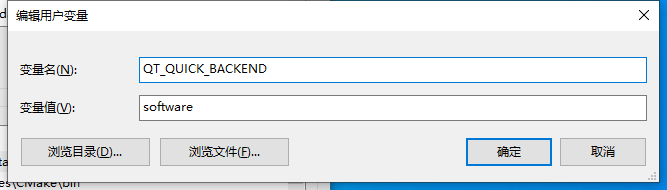
As in the question, qt6 runs the quick program. If this error occurs, you only need to set the value of the environment variable QT_QUICK_BACKEND to “software”.
there are three methods:

Solution:

Method 1: add this environment variable to the system environment variable, as shown in the figure below

This method is applicable to the global
right-click this computer icon -> Attribute -> Advanced system settings -> Environment variable – > New

after setting, you need to restart the IDE and rebuild the project
note: this method is not recommended, otherwise running the program on a computer without setting this environment variable may fail

Method 2: by setting environment variables in QT program

This method is applicable to a single program
set the environment variables applicable to this program in the main function

qputenv("QT_QUICK_BACKEND","software");

Method 3: directly set the scenegraphbacken

This method applies to a single program

#include <QQuickWindow>
QQuickWindow::setSceneGraphBackend("software");

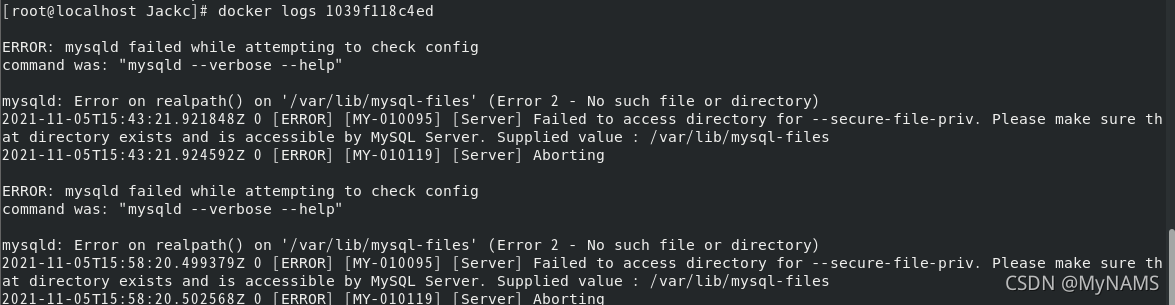
ERROR: mysqld failed while attempting to check config [How to Solve]

Problem Description:

the reason for the pit I encountered in learning docker is that the MySQL image used in the video is 5.7, and I use more than 8.0 (8.0.16) </ font>

Error code


Cause analysis:

Start from the third step, analyze step by step, and directly look at the solutions

1. Pull image

I pulled more than 8.0, so I encountered this pit

docker pull mysql:8.0.16

2. View mirror

docker images

3. Run container

docker run -p 3306:3306 --name mysql \
-v /mydata/mysql/log:/var/log/mysql \
-v /mydata/mysql/data:/var/lib/mysql \
-v /mydata/mysql/conf:/etc/mysql \
-e MYSQL_ROOT_PASSWORD=root -d mysql:8.0.16

After running, you can see the container ID, but it is empty when viewed with docker PS

4. View container

docker ps

5. View all containers

docker ps -a

6. View log analysis

docker logs 容器id

7. Cause

The configuration location of MySQL is wrong when running the container. The configuration location of MySQL 5.7 is/etc/MySQL. The configuration location above MySQL 8.0 is/etc/MySQL/conf.d. just modify the configuration location according to the MySQL version


Solution:

1. Delete container

docker rm Container id or NAME

2. Modify the configuration of the run container

The conf configuration is modified as shown in the figure below

/mydata/mysql/conf:/etc/mysql
					||
					||
					||
					\/
/mydata/mysql/conf:/etc/mysql/conf.d

3. Rerun

Summary:

Mysql8.0 and above configuration

docker run -p 3306:3306 --name mysql \
-v /mydata/mysql/log:/var/log/mysql \
-v /mydata/mysql/data:/var/lib/mysql \
-v /mydata/mysql/conf:/etc/mysql/conf.d \
-e MYSQL_ROOT_PASSWORD=root -d mysql:8.0.16

Mysql5.7 configuration

docker run -p 3306:3306 --name mysql \
-v /mydata/mysql/log:/var/log/mysql \
-v /mydata/mysql/data:/var/lib/mysql \
-v /mydata/mysql/conf:/etc/mysql \
-e MYSQL_ROOT_PASSWORD=root -d mysql:5.7

[Solved] Error: failed to create deliver client: orderer client failed to connect to orderer.example.com:7050

Error: failed to create deliver client: orderer client failed to connect to orderer.example.com:7050: failed to create new connection: context deadline exceeded
!!!!!!!!!!!!!!! Channel creation failed !!!!!!!!!!!!!!!!
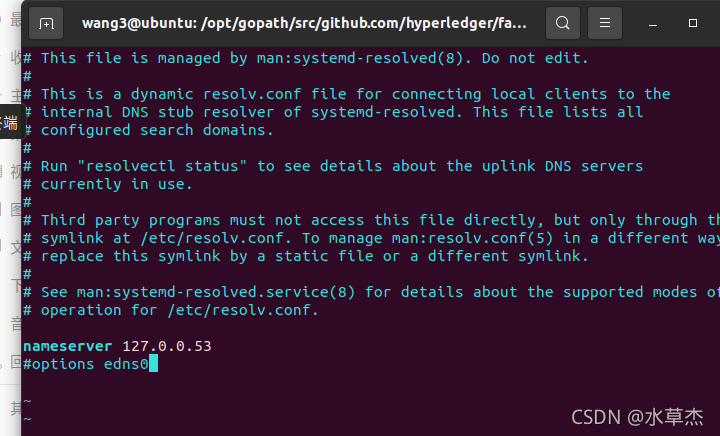
========= ERROR !!! FAILED to execute End-2-End Scenario ===========Solution: stop the network first
./byfn.sh -m down
Then enter: sudo vim /etc/resolv.conf
Then open the fabric-samples/first-network/base/docker-compose-base.yaml file
Add each environment:
– GODEBUG=netdns=go

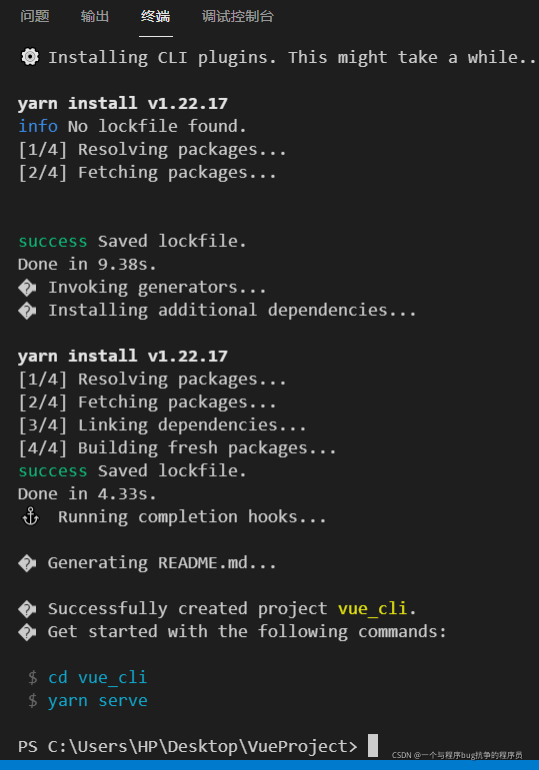
[Solved] error C:\Users\HP\Desktop\VueProject\vue_cli\node_modules\node-sass: Command failed.Exit code: 1

Vue-cli scaffolding to build a Vue project reports an error due to the installation of node-sass:

error C:\Users\HP\Desktop\VueProject\vue_cli\node_modules\node-sass: Command failed.
Exit code: 1
Command: node scripts/build.js
Arguments:
Directory: C:\Users\HP\Desktop\VueProject\vue_cli\node_modules\node-sass
Output:
Building: C:\Program Files\nodejs\node.exe C:\Users\HP\Desktop\VueProject\vue_cli\node_modules\node-gyp\bin\node-gyp.js rebuild --verbose --libsass_ext= --libsass_cflags= --libsass_ldflags= --libsass_library=
gyp info it worked if it ends with ok
gyp verb cli [
gyp verb cli   'C:\\Program Files\\nodejs\\node.exe',
gyp verb cli   'C:\\Users\\HP\\Desktop\\VueProject\\vue_cli\\node_modules\\node-gyp\\bin\\node-gyp.js',
gyp verb cli   'rebuild',
gyp verb cli   '--verbose',
gyp verb cli   '--libsass_ext=',
gyp verb cli   '--libsass_cflags=',
gyp verb cli   '--libsass_ldflags=',
gyp verb cli   '--libsass_library='
gyp verb cli ]
gyp info using [email protected]
gyp info using [email protected] | win32 | x64
gyp verb command rebuild []
gyp verb command clean []
gyp verb clean removing "build" directory
gyp verb command configure []
gyp verb download using dist-url https://oss.npmmirror.com/dist/node
gyp verb check python checking for Python executable "python2" in the PATH
gyp verb `which` failed Error: not found: python2
gyp verb `which` failed     at getNotFoundError (C:\Users\HP\Desktop\VueProject\vue_cli\node_modules\which\which.js:13:12)
gyp verb `which` failed     at F (C:\Users\HP\Desktop\VueProject\vue_cli\node_modules\which\which.js:68:19)
gyp verb `which` failed     at E (C:\Users\HP\Desktop\VueProject\vue_cli\node_modules\which\which.js:80:29)
gyp verb `which` failed     at C:\Users\HP\Desktop\VueProject\vue_cli\node_modules\which\which.js:89:16
gyp verb `which` failed     at C:\Users\HP\Desktop\VueProject\vue_cli\node_modules\isexe\index.js:42:5
gyp verb `which` failed     at C:\Users\HP\Desktop\VueProject\vue_cli\node_modules\isexe\windows.js:36:5
gyp verb `which` failed     at FSReqCallback.oncomplete (node:fs:198:21)
gyp verb `which` failed  python2 Error: not found: python2
gyp verb `which` failed     at getNotFoundError (C:\Users\HP\Desktop\VueProject\vue_cli\node_modules\which\which.js:13:12)
gyp verb `which` failed     at F (C:\Users\HP\Desktop\VueProject\vue_cli\node_modules\which\which.js:68:19)
gyp verb `which` failed     at E (C:\Users\HP\Desktop\VueProject\vue_cli\node_modules\which\which.js:80:29)
gyp verb `which` failed     at C:\Users\HP\Desktop\VueProject\vue_cli\node_modules\which\which.js:89:16
gyp verb `which` failed     at C:\Users\HP\Desktop\VueProject\vue_cli\node_modules\isexe\index.js:42:5
gyp verb `which` failed     at C:\Users\HP\Desktop\VueProject\vue_cli\node_modules\isexe\windows.js:36:5
gyp verb `which` failed     at FSReqCallback.oncomplete (node:fs:198:21) {
gyp verb `which` failed   code: 'ENOENT'
gyp verb `which` failed }
gyp verb check python checking for Python executable "python" in the PATH
gyp verb `which` succeeded python C:\Users\HP\anaconda3\python.EXE
gyp ERR! configure error
gyp ERR! stack Error: Command failed: C:\Users\HP\anaconda3\python.EXE -c import sys; print "%s.%s.%s" % sys.version_info[:3];
gyp ERR! stack   File "<string>", line 1
gyp ERR! stack     import sys; print "%s.%s.%s" % sys.version_info[:3];
gyp ERR! stack                                ^
gyp ERR! stack SyntaxError: invalid syntax
gyp ERR! stack
gyp ERR! stack     at ChildProcess.exithandler (node:child_process:397:12)
gyp ERR! stack     at ChildProcess.emit (node:events:390:28)
gyp ERR! stack     at maybeClose (node:internal/child_process:1064:16)
gyp ERR! stack     at Process.ChildProcess._handle.onexit (node:internal/child_process:301:5)
gyp ERR! System Windows_NT 10.0.19043
gyp ERR! command "C:\\Program Files\\nodejs\\node.exe" "C:\\Users\\HP\\Desktop\\VueProject\\vue_cli\\node_modules\\node-gyp\\bin\\node-gyp.js" "rebuild" "--verbose" "--libsass_ext=" "--libsass_cflags=" "--libsass_ldflags=" "--libsass_library="
gyp ERR! cwd C:\Users\HP\Desktop\VueProject\vue_cli\node_modules\node-sass
gyp ERR! node -v v16.13.0
gyp ERR! node-gyp -v v3.8.0
gyp ERR! not ok
Build failed with error code: 1
 ERROR  command failed: yarn


wrong reason:
The nodejs version is too high, my version is 16.x

Solution:
win+R open the cmd window and enter

node -v

Check the installed node version. If it is not v14.3.0, uninstall the original version and reinstall nodejs of v14.3.0.

Create the project again and solve it successfully!

Nodejs download address of v14.3.0 is attached:

[Solved] Pre requisite check “checksystemcommandavailable” failed

[oracle@db1 ~]$ /u01/app/oracle/product/11.2.0/db_1/OPatch/opatch apply -oh /u01/app/oracle/product/11.2.0/db_1  -local /soft/22646198/22502456
Oracle Interim patch installer version 11.2.0.3.29
Copyright (c) 2021, Oracle Corporation. all rights reserved.


Oracle home directory: /u01/app/oracle/product/11.2.0/db_1
Main product list: /u01/app/oraInventory
    From: /u01/app/oracle/product/11.2.0/db_1/oraInst.loc
OPatch version: 11.2.0.3.29
OUI version: 11.2.0.4.0
Log file location:/u01/app/oracle/product/11.2.0/db_1/cfgtoollogs/opatch/opatch2021-11-05_08-58-35AM_1.log

Verifying environment and performing prerequisite checks...
Prerequisite check "CheckSystemCommandAvailable" failed.
The details are:
Missing command :fuser
Prerequisite check "CheckSystemCommandAvailable" failed.
The details are:
Missing command :fuser
Prerequisite check "CheckSystemCommandAvailable" failed.
The details are:
Missing command :fuser
Prerequisite check "CheckSystemCommandAvailable" failed.
The details are:
Missing command :fuser
Prerequisite check "CheckSystemCommandAvailable" failed.
The details are:
Missing command :fuser
Prerequisite check "CheckSystemCommandAvailable" failed.
The details are:
Missing command :fuser
Prerequisite check "CheckSystemCommandAvailable" failed.
The details are:
Missing command :fuser
Prerequisite check "CheckSystemCommandAvailable" failed.
The details are:
Missing command :fuser
Prerequisite check "CheckSystemCommandAvailable" failed.
The details are:
Missing command :fuser
Prerequisite check "CheckSystemCommandAvailable" failed.
The details are:
Missing command :fuser
UtilSession Failed: 
Prerequisite check "CheckSystemCommandAvailable" failed.
Log file location: /u01/app/oracle/product/11.2.0/db_1/cfgtoollogs/opatch/opatch2021-11-05_08-58-35AM_1.log

OPatch failed with error code 73

Installation package:

yum install -y psmisc

Problem solving

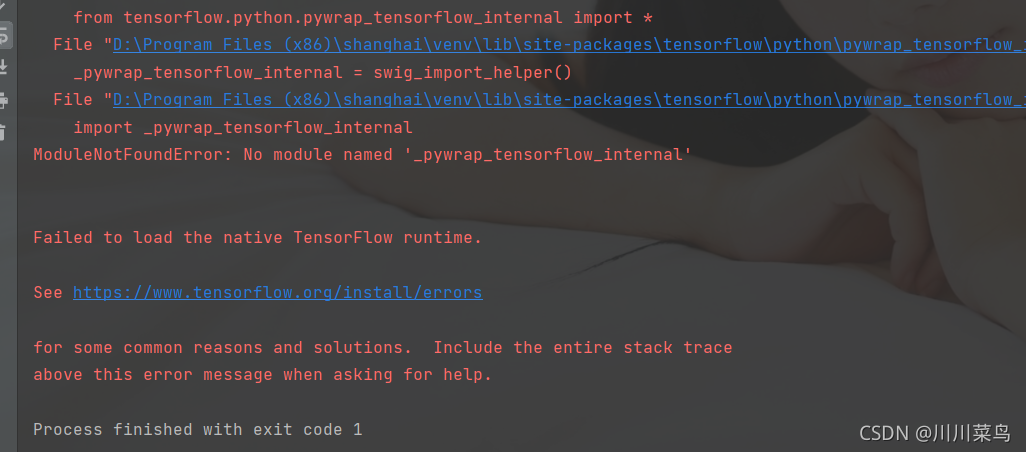
[Solved] TF2.4 Error: Failed to get convolution algorithm. This is probably because cuDNN failed to initialize

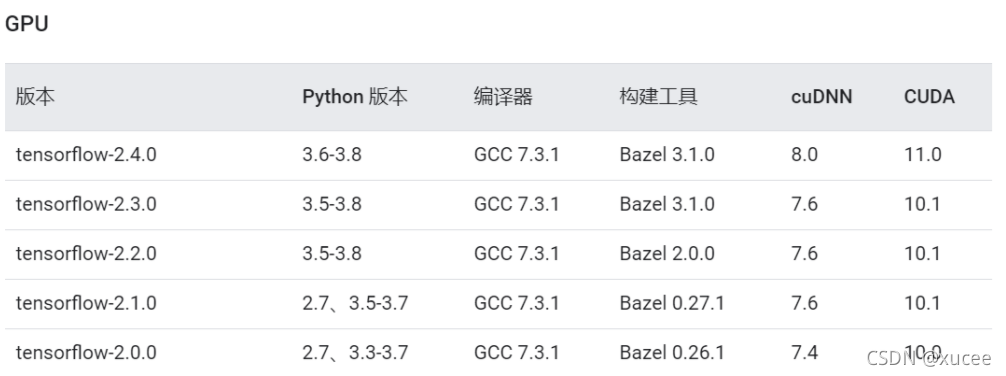
First, check whether the CUDA version and cudnn version are aligned.

Version number view:

Note that CUDA indicates the minimum compatibility. For example, version 2.4 and above 11.0 are OK. My side is 11.5, and there is no problem

The error on my side is caused by insufficient video memory

For the error of insufficient video memory, add the following code.

import tensorflow as tf
config = tf.compat.v1.ConfigProto()
config.gpu_options.allow_growth = True
session = tf.compat.v1.InteractiveSession(config=config)

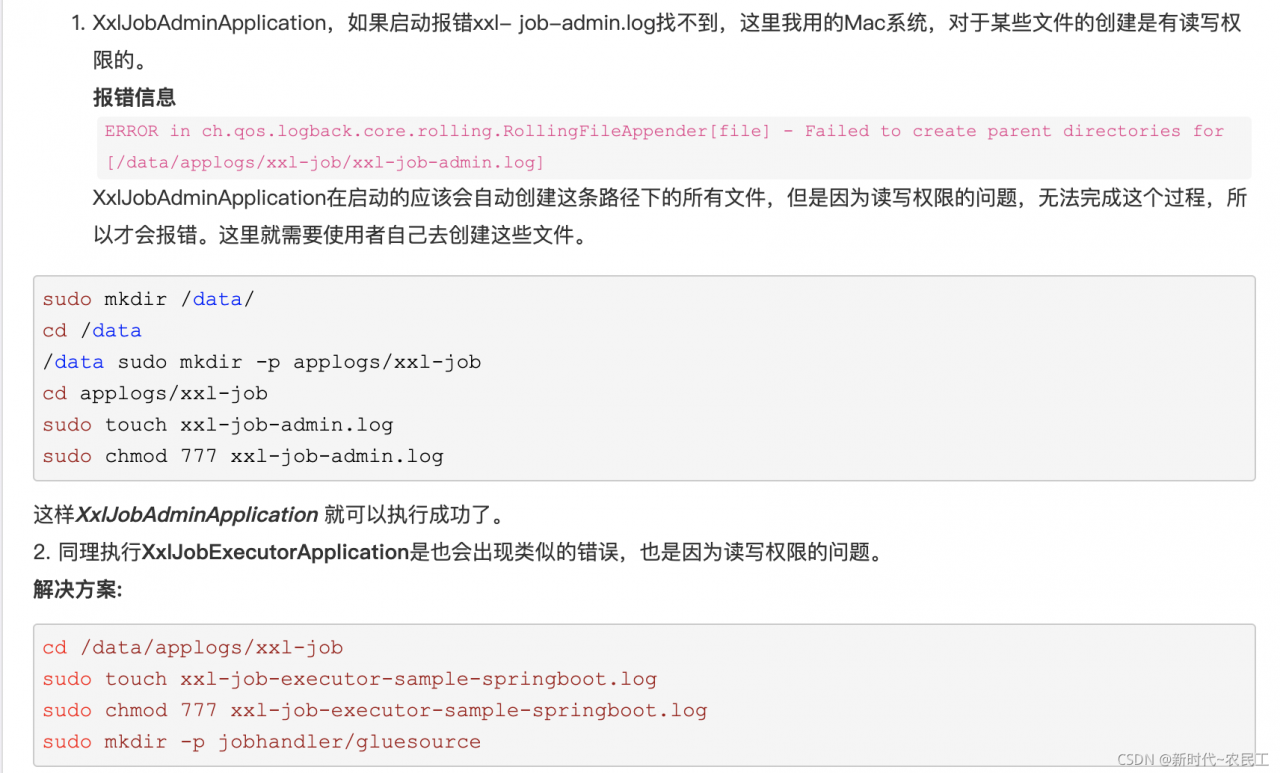
MAC-XXL_JOB Error: Failed to create parent directories for [/data/applogs/xxl-job/xxl-job-admin.log

MAC-XXL_ Job learning pit stepping record

Source download address startup error

Source download address

①. GitHub: https://github.com/xuxueli/xxl-job
②. code cloud: https://gitee.com/xuxueli0323/xxl-job

Startup error

The error information is as follows:

10:39:42,324 |-ERROR in ch.qos.logback.core.rolling.RollingFileAppender[file] - Failed to create parent directories for [/data/applogs/xxl-job/xxl-job-admin.log]
10:39:42,324 |-ERROR in ch.qos.logback.core.rolling.RollingFileAppender[file] - openFile(/data/applogs/xxl-job/xxl-job-admin.log,true) call failed. java.io.FileNotFoundException: /data/applogs/xxl-job/xxl-job-admin.log (No such file or directory)
	at java.io.FileNotFoundException: /data/applogs/xxl-job/xxl-job-admin.log (No such file or directory)
	at 	at java.io.FileOutputStream.open0(Native Method)
	at 	at java.io.FileOutputStream.open(FileOutputStream.java:270)
	at 	at java.io.FileOutputStream.<init>(FileOutputStream.java:213)
	at 	at ch.qos.logback.core.recovery.ResilientFileOutputStream.<init>(ResilientFileOutputStream.java:26)
	at 	at ch.qos.logback.core.FileAppender.openFile(FileAppender.java:204)
	at 	at ch.qos.logback.core.FileAppender.start(FileAppender.java:127)
	at 	at ch.qos.logback.core.rolling.RollingFileAppender.start(RollingFileAppender.java:100)
	at 	at ch.qos.logback.core.joran.action.AppenderAction.end(AppenderAction.java:90)
	at 	at ch.qos.logback.core.joran.spi.Interpreter.callEndAction(Interpreter.java:309)
	at 	at ch.qos.logback.core.joran.spi.Interpreter.endElement(Interpreter.java:193)
	at 	at ch.qos.logback.core.joran.spi.Interpreter.endElement(Interpreter.java:179)
	at 	at ch.qos.logback.core.joran.spi.EventPlayer.play(EventPlayer.java:62)
	at 	at ch.qos.logback.core.joran.GenericConfigurator.doConfigure(GenericConfigurator.java:165)
	at 	at ch.qos.logback.core.joran.GenericConfigurator.doConfigure(GenericConfigurator.java:152)
	at 	at ch.qos.logback.core.joran.GenericConfigurator.doConfigure(GenericConfigurator.java:110)
	at 	at ch.qos.logback.core.joran.GenericConfigurator.doConfigure(GenericConfigurator.java:53)
	at 	at ch.qos.logback.classic.util.ContextInitializer.configureByResource(ContextInitializer.java:75)
	at 	at ch.qos.logback.classic.util.ContextInitializer.autoConfig(ContextInitializer.java:150)
	at 	at org.slf4j.impl.StaticLoggerBinder.init(StaticLoggerBinder.java:84)
	at 	at org.slf4j.impl.StaticLoggerBinder.<clinit>(StaticLoggerBinder.java:55)
	at 	at org.slf4j.LoggerFactory.bind(LoggerFactory.java:150)
	at 	at org.slf4j.LoggerFactory.performInitialization(LoggerFactory.java:124)
	at 	at org.slf4j.LoggerFactory.getILoggerFactory(LoggerFactory.java:417)
	at 	at org.slf4j.LoggerFactory.getLogger(LoggerFactory.java:362)
	at 	at org.apache.commons.logging.LogAdapter$Slf4jAdapter.createLocationAwareLog(LogAdapter.java:130)
	at 	at org.apache.commons.logging.LogAdapter.createLog(LogAdapter.java:91)
	at 	at org.apache.commons.logging.LogFactory.getLog(LogFactory.java:67)
	at 	at org.apache.commons.logging.LogFactory.getLog(LogFactory.java:59)
	at 	at org.springframework.boot.SpringApplication.<clinit>(SpringApplication.java:206)
	at 	at com.xxl.job.admin.XxlJobAdminApplication.main(XxlJobAdminApplication.java:13)
10:39:42,324 |-INFO in ch.qos.logback.classic.joran.action.RootLoggerAction - Setting level of ROOT logger to INFO
10:39:42,324 |-INFO in ch.qos.logback.core.joran.action.AppenderRefAction - Attaching appender named [console] to Logger[ROOT]
10:39:42,324 |-INFO in ch.qos.logback.core.joran.action.AppenderRefAction - Attaching appender named [file] to Logger[ROOT]
10:39:42,325 |-INFO in ch.qos.logback.classic.joran.action.ConfigurationAction - End of configuration.
10:39:42,325 |-INFO in ch.qos.logback.classic.joran.JoranConfigurator@6e06451e - Registering current configuration as safe fallback point

Logging system failed to initialize using configuration from 'null'
java.lang.IllegalStateException: Logback configuration error detected: 
ERROR in ch.qos.logback.core.rolling.RollingFileAppender[file] - Failed to create parent directories for [/data/applogs/xxl-job/xxl-job-admin.log]
ERROR in ch.qos.logback.core.rolling.RollingFileAppender[file] - openFile(/data/applogs/xxl-job/xxl-job-admin.log,true) call failed. java.io.FileNotFoundException: /data/applogs/xxl-job/xxl-job-admin.log (No such file or directory)
	at org.springframework.boot.logging.logback.LogbackLoggingSystem.loadConfiguration(LogbackLoggingSystem.java:179)
	at org.springframework.boot.logging.logback.LogbackLoggingSystem.reinitialize(LogbackLoggingSystem.java:232)
	at org.springframework.boot.logging.AbstractLoggingSystem.initializeWithConventions(AbstractLoggingSystem.java:73)
	at org.springframework.boot.logging.AbstractLoggingSystem.initialize(AbstractLoggingSystem.java:60)
	at org.springframework.boot.logging.logback.LogbackLoggingSystem.initialize(LogbackLoggingSystem.java:132)
	at org.springframework.boot.context.logging.LoggingApplicationListener.initializeSystem(LoggingApplicationListener.java:312)
	at org.springframework.boot.context.logging.LoggingApplicationListener.initialize(LoggingApplicationListener.java:281)
	at org.springframework.boot.context.logging.LoggingApplicationListener.onApplicationEnvironmentPreparedEvent(LoggingApplicationListener.java:239)
	at org.springframework.boot.context.logging.LoggingApplicationListener.onApplicationEvent(LoggingApplicationListener.java:216)
	at org.springframework.context.event.SimpleApplicationEventMulticaster.doInvokeListener(SimpleApplicationEventMulticaster.java:176)
	at org.springframework.context.event.SimpleApplicationEventMulticaster.invokeListener(SimpleApplicationEventMulticaster.java:169)
	at org.springframework.context.event.SimpleApplicationEventMulticaster.multicastEvent(SimpleApplicationEventMulticaster.java:143)
	at org.springframework.context.event.SimpleApplicationEventMulticaster.multicastEvent(SimpleApplicationEventMulticaster.java:131)
	at org.springframework.boot.context.event.EventPublishingRunListener.environmentPrepared(EventPublishingRunListener.java:82)
	at org.springframework.boot.SpringApplicationRunListeners.lambda$environmentPrepared$2(SpringApplicationRunListeners.java:63)
	at java.util.ArrayList.forEach(ArrayList.java:1259)
	at org.springframework.boot.SpringApplicationRunListeners.doWithListeners(SpringApplicationRunListeners.java:117)
	at org.springframework.boot.SpringApplicationRunListeners.doWithListeners(SpringApplicationRunListeners.java:111)
	at org.springframework.boot.SpringApplicationRunListeners.environmentPrepared(SpringApplicationRunListeners.java:62)
	at org.springframework.boot.SpringApplication.prepareEnvironment(SpringApplication.java:375)
	at org.springframework.boot.SpringApplication.run(SpringApplication.java:333)
	at org.springframework.boot.SpringApplication.run(SpringApplication.java:1340)
	at org.springframework.boot.SpringApplication.run(SpringApplication.java:1329)
	at com.xxl.job.admin.XxlJobAdminApplication.main(XxlJobAdminApplication.java:13)

This means that the initialization log file is not created due to insufficient permissions! Then the online solution is the same as

but when I operate, I suddenly prompt that the parent directory has only read-only permission. What the hell

zhaoxiaofeng@zhaoxiaofengdeMacBook-Pro ~ % cd /
zhaoxiaofeng@zhaoxiaofengdeMacBook-Pro/% pwd     
/
zhaoxiaofeng@zhaoxiaofengdeMacBook-Pro/% sudo mkdir data
Password:
mkdir: data: Read-only file system
zhaoxiaofeng@zhaoxiaofengdeMacBook-Pro/% 

Then there is another search. Sure enough, it is the same to start SPI, etc., but the system restart will fail, so this can not essentially solve the problem. Later, in the comments of netizens, it was found that only adding “.” before recording log path can solve the problem. As follows:
will make complaints about /data/applogs/xxl-job/xxl-job-admin.log when ./data/applogs/xxl-job/xxl-job-admin.log
is replaced by ./data/applogs/xxl-job/xxl-job-admin.log
. Only copy and carry
I can’t help but sigh that I have commented on Daniel since ancient times

[Solved] android Execution failed for task ‘:app:processDebugManifest‘

Attribute application@appComponentFactory value=(androidx.core.app.CoreComponentFactory) from [androidx.core:core:1.3.1] AndroidManifest.xml:24:18-86
is also present at [com.android.support:support-compat:28.0.0] AndroidManifest.xml:22:18-91 value=(android.support.v4.app.CoreComponentFactory).
Suggestion: add ‘tools:replace=”android:appComponentFactory”‘ to <application> element at AndroidManifest.xml:5:5-20:19 to override.
See http://g.co/androidstudio/manifest-merger for more information about the manifest merger.

Execution failed for task ‘:app:processDebugManifest’.
> Manifest merger failed : Attribute application@appComponentFactory value=(androidx.core.app.CoreComponentFactory) from [androidx.core:core:1.3.1] AndroidManifest.xml:24:18-86
is also present at [com.android.support:support-compat:28.0.0] AndroidManifest.xml:22:18-91 value=(android.support.v4.app.CoreComponentFactory).
Suggestion: add ‘tools:replace=”android:appComponentFactory”‘ to <application> element at AndroidManifest.xml:5:5-20:19 to override.
* Try:
Run with –stacktrace option to get the stack trace. Run with –info or –debug option to get more log output. Run with –scan to get full insights.

After upgrading Android Studio to 4.2 today, I set up the project as before. A few days ago, it was fine (the previous version of Androidstudio 4.0). The third package and the version are the same. They are all copied from the runnable project. Suddenly this error was reported. According to other methods on the Internet, it will not work. The problem is mainly a package conflict, that is, the package conflict between appcomcat and AndroidX.
Solution:
It is found that after upgrading to Androidstudio4.2, in the gradle.properties file, the default android.enableJetifer = true attribute (that is, the third-party package is converted to AndroidX) is removed, and this attribute will not be reported after adding mistaken.

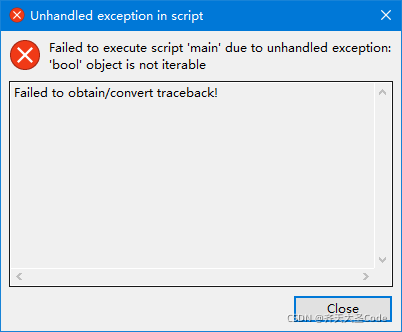
[Solved] Failed to obtain/convert traceback after Python Tkinter packages exe

Exe in Python Tkinter packaging causes failed to obtain/convert traceback!

Problem description

python 3.9
windows 10
Packaged and executed commands
pyinstaller -D -w -i xx.ico main.py

After using pyinstaller to package exe, click the EXE file and an error occurs
failed to obtain/convert traceback
the details are shown in the figure:

Cause of problem

After troubleshooting, it is found that there is no problem with the packaged commands. The problem is that the database does not import data during initialization. The data is null. Just fill in the corresponding database values
summary: the problem is that the code does not handle exceptions properly.

solve the problem

    handle the corresponding code exceptions (including those where exceptions may occur) and populate the database