Author Archives: Robins

[Vue warn]: Error in callback for watcher “value“ (How to Solve)

1. Full text description of error:

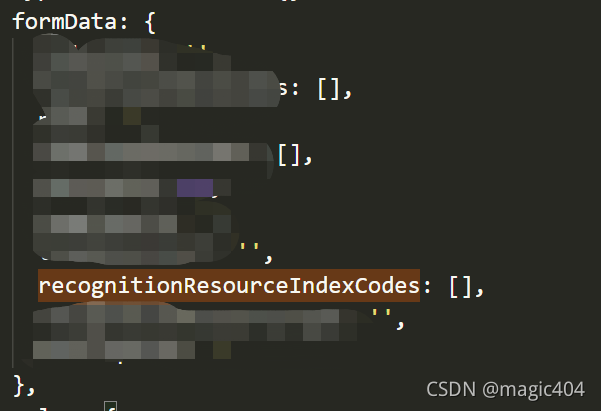
[Vue warn]: Error in callback for watcher “value”: “TypeError: Cannot read properties of undefined (reading ‘value’)

2. The problem point is the error reported when assigning a value to the secondary attribute of data

3. Reasons:

Assign a value directly to the method just opened on the page. The console will report the above error for the first time, but not for the second time. It is mainly to solve the problem of reporting an error for the first time

this.formData.recognitionResourceIndexCodes.push('Some value');

4. The solution is to use the omnipotent $nexttick

this.$nextTick(() => {
    this.formData.recognitionResourceIndexCodes.push('Some value');
});

Error:output with shape [1, 224, 224] doesn‘t match the broadcast shape [3, 224, 224]

Error: output with shape [1, 224, 224] don’t match the broadcast shape [3, 224, 224]
the image input by the original model is RGB three channel, and the input is single channel gray image.

# Error:output with shape [1, 224, 224] doesn't match the broadcast shape [3, 224, 224]
# The input image of the original model is RGB three-channel, and the one I input is a single-channel grayscale image.
# #------------------------------------------------ --------------------------------------
# from torch.utils.data import DataLoader
# dataloader = DataLoader(dataset, shuffle=True, batch_size=16)
# from torchvision.utils import make_grid, save_image
# dataiter = iter(dataloader)
# img = make_grid(next(dataiter)[0], 4) # Assemble a 4*4 grid image and convert it into 3 channels
# to_img(img)
# #-------------------------------------------------------------------------------------
# It seems that make_grid cannot be converted to 3 channels

The solution is as follows:

from torch import nn
from torchvision import datasets
from torchvision import transforms as T
from torch.utils.data import DataLoader
from torchvision.utils import make_grid, save_image
import numpy as np
import matplotlib.pyplot as plt

transform  = T.Compose([
         T.ToTensor(), #This will convert a numpy array between 0 and 255 into a floating point tensor between 0 and 1
          T.Normalize((0.5, ), (0.5, )), #In the normalize() method, we specify the mean of all channels of the normalized tensor image, and also specify the central deviation.
])
dataset = datasets.MNIST('data/', download=True, train=False, transform=transform)
dataloader = DataLoader(dataset, shuffle=True, batch_size=100)

print(type(dataset[0][0]),dataset[0][0].size())
# print(dataset[0][0])
# To draw a tensor image, we must change it back to a numpy array.
# We will do this in the function def im_convert(), which contains a parameter that will become a tensor image.
def im_convert(tensor):
    image=tensor.clone().detach().numpy()
    # The new tensor obtained using torch.clone() and the original data no longer share memory, but still remain in the calculation graph,
    # The clone operation supports gradient transfer and superposition without sharing data memory, so it is commonly used in scenarios where a unit in a neural network needs to be reused.
    # Usually if the requirements_grad of the original tensor=True, then:
    # tensor requires_grad=True after clone() operation
    # The tensor requires_grad=False after the detach() operation.
    image=image.transpose(1, 2, 0)
    # The tensor to be converted to a numpy array has the shape of the first, second and third dimensions. The first dimension represents the color channel, and the second and third dimensions represent the width and height of the image and pixels.
    # We know that each image in the MNIST dataset is a grayscale corresponding to a single color channel, and its width and height are 28 * 28 pixels. Therefore, the shape will be (1, 28, 28).
    # In order to draw an image, the shape of the image is required to be (28, 28, 1). Therefore, by swapping axis zero, one and two
    print(image.shape)
    image=image*(np.array((0.5, 0.5, 0.5))+np.array((0.5, 0.5, 0.5)))
    print(image.shape)
    # We normalize the image, and before we have to normalize it. Normalization is done by subtracting the average value and dividing by the standard deviation.
    # We will multiply by the standard deviation, and then add the average
    image=image.clip(0, 1)
    print(image.shape,type(image))
    return image
    # To ensure the range between 0 and 1, we use clip()
    # Function and passed zero and one as parameters. We apply the clip function to the minimum value 0 and maximum value 1 and return the image.

# It will create an object that allows us to pass through a variable training loader at a time.
# We access one element at a time by calling next on the dataiter.
# next() function will get our first batch of training data, and the training data will be divided into the following images and labels
dataiter=iter(dataloader)
images, labels=dataiter.next()

fig=plt.figure(figsize=(25, 6))
#fig=plt.figure(figsize=(25, 4)) #Picture output width is smaller than above
for idx in np.arange(20):
    ax=fig.add_subplot(2, 10, idx+1)
    plt.imshow(im_convert(images[idx]))
    ax.set_title([labels[idx].item()])
plt.show()

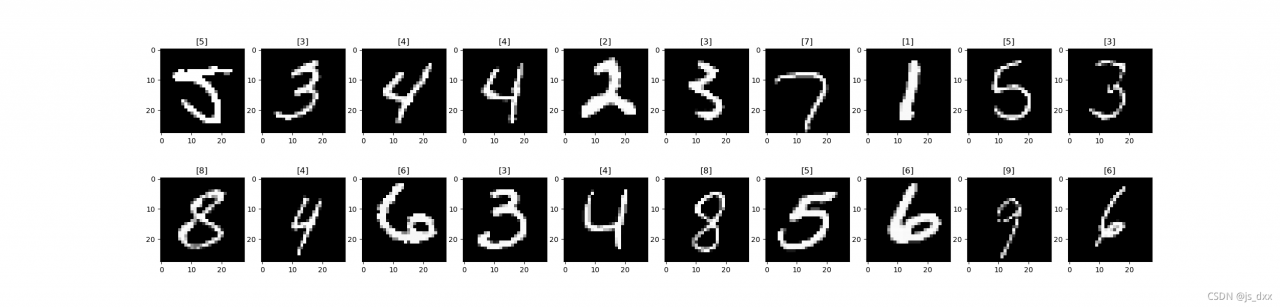
The final results are as follows:
[Solved] Keil-MDK Error: “Error: Encountered an improper argument”

Keil MDK solves the problem of “error: encoded an improved argument”


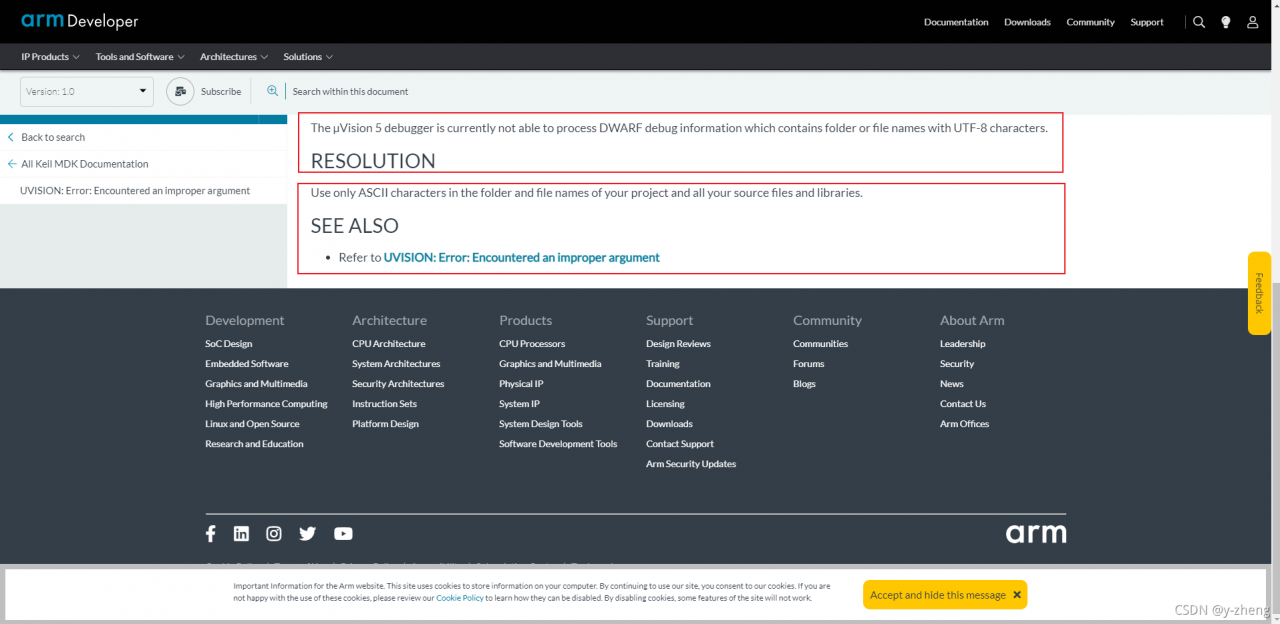
Arm official problem description and solutions: https://developer.arm.com/documentation/ka004382/latest


Cause of problem: μ The vision5 debugger is currently unable to process dwarf debugging information that contains folders or file names with UTF-8 characters. In other words, your project directory should be in Chinese, instead of using the directory with Chinese.

Solution: change all the paths to English, then clean up the project and recompile.

[Solved] it only responds to error and does not enter success after AJAX is successfully processed

1. Problem description

Front end request code

$.ajax({
    url: 'getOne', 	
    data: {		
        name: 'zhangsan',
        pwd: '123'
    },
    type: 'get',		
    dataType: 'json',	
    success: function (res) { 
        alert("成功" + res)
    },
    error: function (xhr, errorMessage, e) { 
        alert("失败" + errorMessage);
    }
})

Backend servlet code

@WebServlet(name = "getOne", urlPatterns = "/getOne")
public class GetOne extends HttpServlet {
    protected void doPost(HttpServletRequest request, HttpServletResponse response) throws ServletException, IOException {
        this.doGet(request, response);
    }

    protected void doGet(HttpServletRequest request, HttpServletResponse response) throws ServletException, IOException {
      	// Set encoding
       response.setContentType("application/json;charset=utf-8");
       // Processing business logic
        
         // Responding to the request, there may be IO exceptions in the way of using the stream, so the exception is caught
        PrintWriter out = response.getWriter();
        try {
            out.write("ajax request successful");
            out.close
        } catch (Exception exception) {
            out.write(exception);
        }
        out.close();
    }
}

Then it is found that after each processing, it will only respond to the abnormal error function and cannot enter success


2. Problem solving

The code above looks OK at first glance. I thought so at first. However, after some analysis, it is found that the format of the return value type at the back end is incorrect

What do you mean?

I set the JSON format in the back-end response

response.setContentType("application/json;charset=utf-8");

However, I output the ordinary string with the stream when responding, not the JSON format string

out.write("ajax request successful");

How to solve it?

Method 1: change the string format to JSON format
back end output: out.Write ("{'data':'ajax request succeeded '}")
front end: alert ("success" + res.data) method 2: change the type of request and processing to text
back end: response.setcontenttype ("application/JSON; charset = UTF-8")
front end: datatype: 'text'

[Solved] IDEA Start Porject Error: java: Compilation failed: internal java compiler error

When the project starts, the following problems are encountered:

java: Compilation failed: internal java compiler error

The problem is: compilation failure: internal java compiler error

The reason for this problem may be that the JDK version of the project is inconsistent.

The solution is as follows:

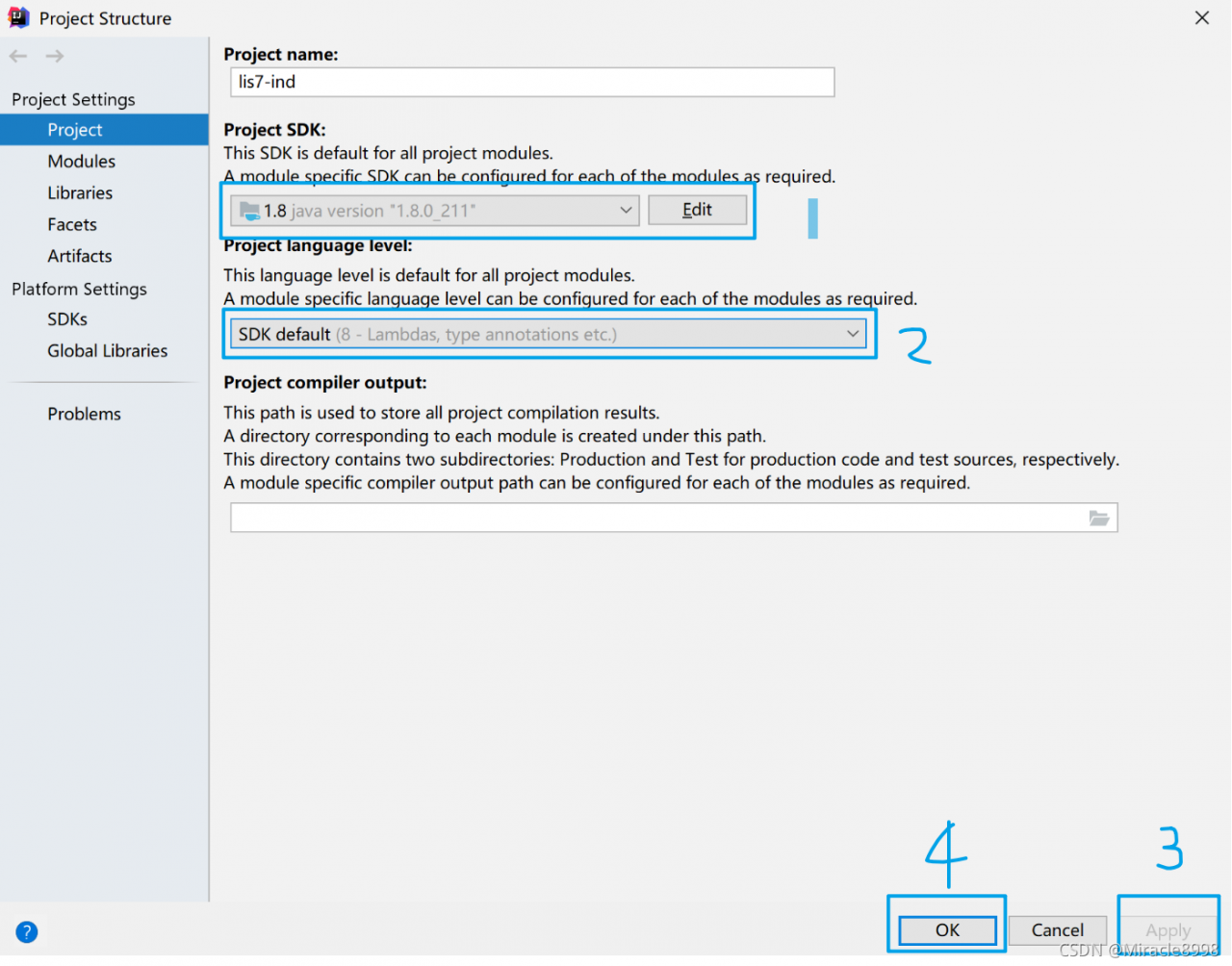
1. Check the JDK (Ctrl + Alt + Shift + s) of the project to ensure that it is the JDK version used by the machine. Here, take JDK1.8 as an example.

File ==》Project Structure ==》Project Settings ==》Project

2.   Check that the JDK of the project (Ctrl + Alt + Shift + s) is consistent with the JDK of the project.
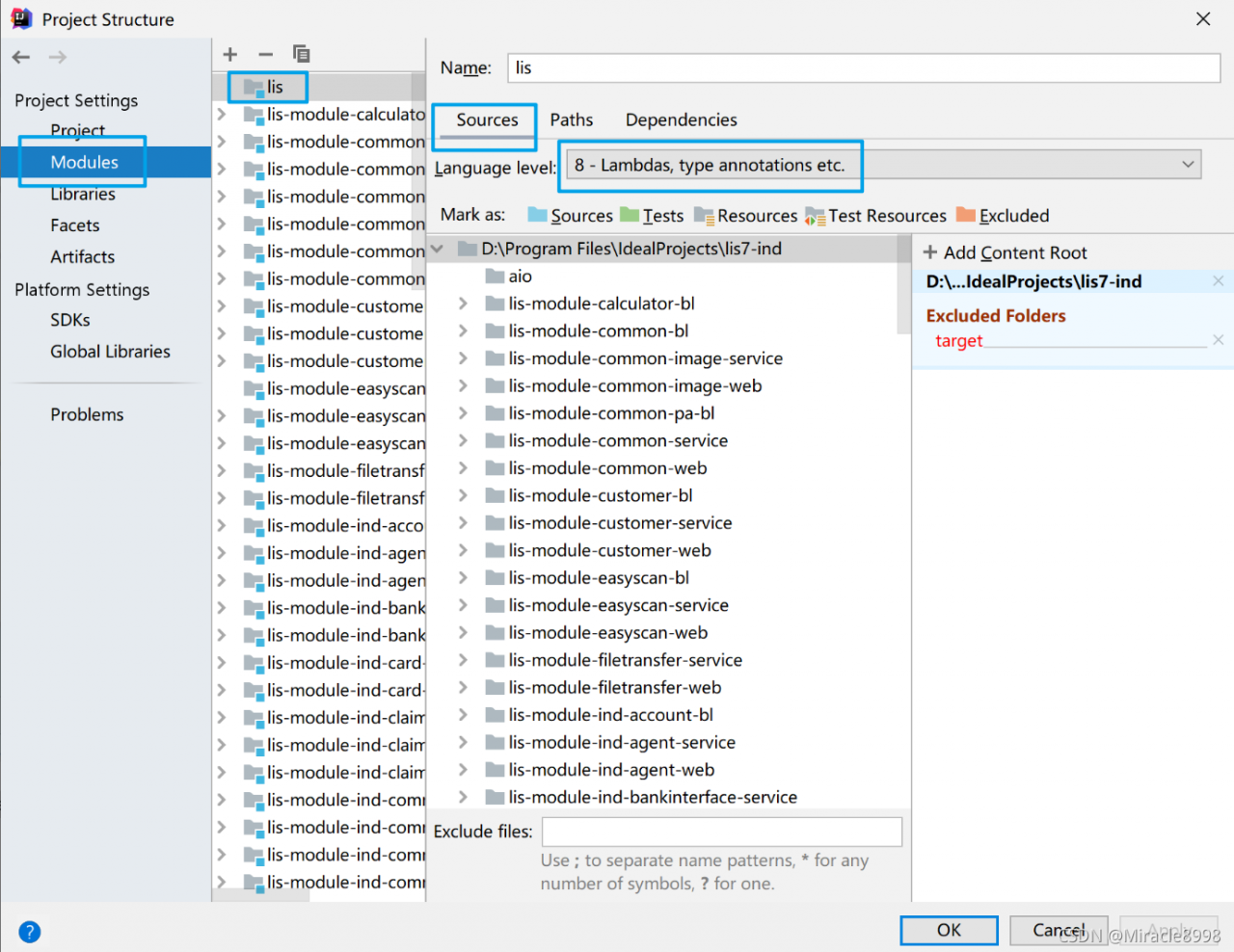

File = = “project structure = =” project settings = = “modules = = (project name to be modified) = =” sources = = ”

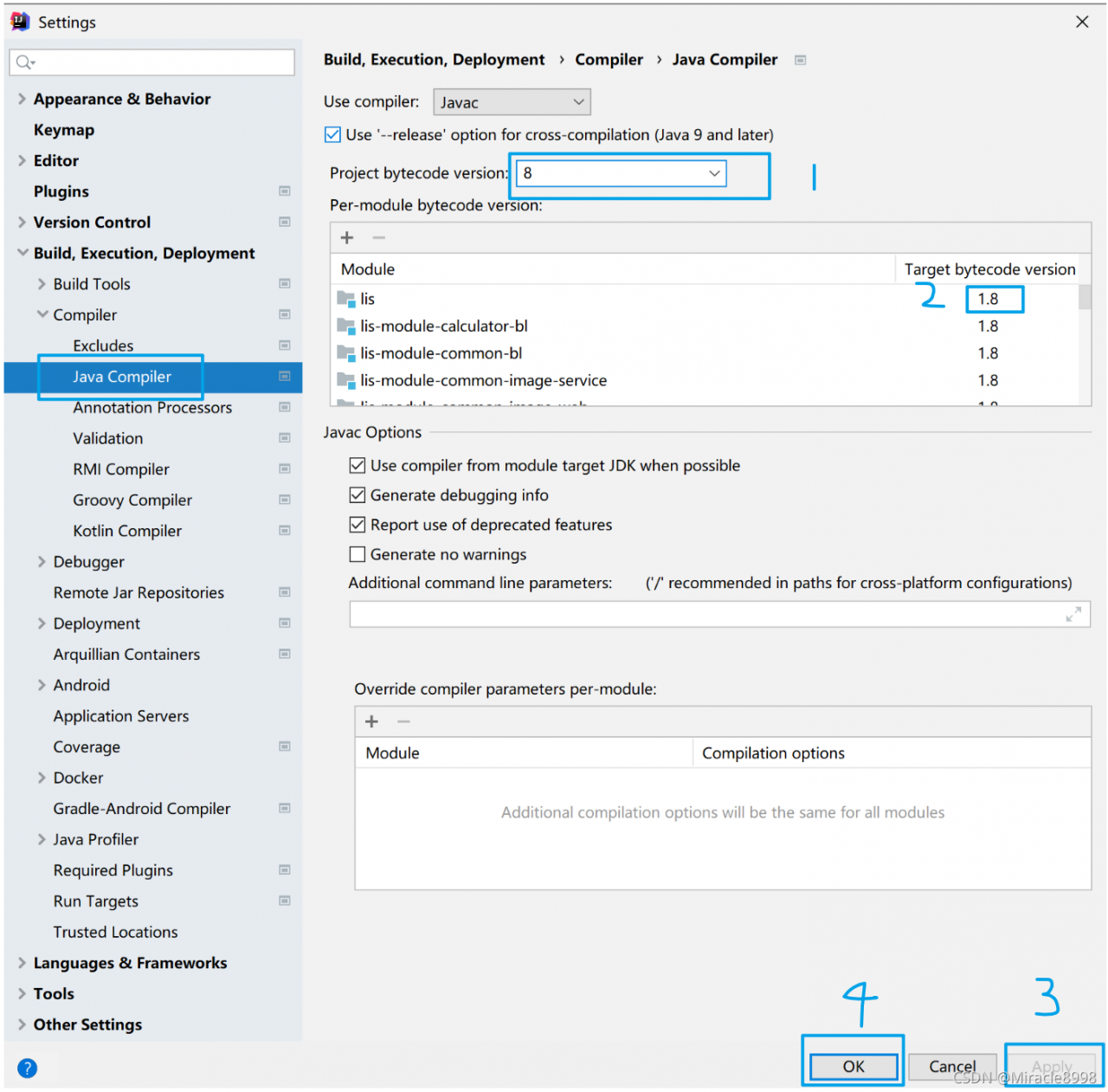
3. Check the Java configuration in idea to make the version consistent with the previous two.

File ==》Setting ==》Build,Execution,Deployment ==》Compiler ==》Java Compiler

After completing the above three steps, restart the project, there will be no problems at the beginning, and the project is started successfully.

Node.js Error: “Error: EBUSY: resource busy or locked, stat“

abnormal

Error: EBUSY: resource busy or locked, stat 'C:\swapfile.sys'
    at Object.statSync (node:fs:1536:3)
    at D:\NodeJs\node-demo\demo\world.js:7:24
    at FSReqCallback.oncomplete (node:fs:188:23) {
  errno: -4082,
  syscall: 'stat',
  code: 'EBUSY',
  path: 'C:\\swapfile.sys'
}

Node.js v17.1.0

error code

var fs = require('fs');

var rootPath = 'C:\\';
fs.readdir(rootPath, function (err, files) {
    for (var i = 0; i < files.length; i++) {
        var p = rootPath + files[i];
        var stats = fs.statSync(p);
        console.log(rootPath + 'Is it a directory:' + stats.isDirectory())
    }
});

Reason

Prompt error: EBUSY: resource busy or locked, stat indicates that the resource file is busy or locked, that is, the C:\swapfile.Sys file. But there is no such file in the C disk directory, even in the hidden file. But it can be found by opening everything software
is a system file.

Solution:

I don’t know how to solve it. The online solution seems to be invalid, so I can only block the file.

Correct code

var fs = require('fs');

var rootPath = 'C:\\';
fs.readdir(rootPath, function (err, files) {
    for (var i = 0; i < files.length; i++) {
        var p = rootPath + files[i];
        // Skip when encountering swapfile.sys file or System Volume Information directory
        if (p.endsWith('swapfile.sys') || p.endsWith('System Volume Information')) {
            continue;
        }
        var stats = fs.statSync(p);
        console.log(rootPath + 'Is it a directory:' + stats.isDirectory())
    }
});

[Solved] Python import Error: pip –upgrade Error: ERROR: Cannot uninstall ‘dnspython‘. It is a distutils installed

Background:
today we use package to install the module dnspython

[root@makel ~] wget http://www.dnspython.org/kits/1.9.4/dnspython-1.9.4.tar.gz
[root@makel ~] tar -xvf dnspython-1.9.4.tar.gz
[root@makel ~] cd dnspython-1.9.4/
[root@makel dnspython-1.9.4] python3 setup.py install

Solution process
1. Enter Python and import reports an error (problem found)

[root@makel ~] python3
Python 3.8.5 (default, Nov  7 2021, 21:47:38) 
[GCC 4.8.5 20150623 (Red Hat 4.8.5-44)] on linux
Type "help", "copyright", "credits" or "license" for more information.
>>> import dns.resolver
Traceback (most recent call last):
  File "<stdin>", line 1, in <module>
  File "/usr/local/python3/lib/python3.8/site-packages/dns/resolver.py", line 26, in <module>
    import dns.message
  File "/usr/local/python3/lib/python3.8/site-packages/dns/message.py", line 175
    return '<DNS message, ID ' + `self.id` + '>'
                                 ^
SyntaxError: invalid syntax

2. Try upgrading (– upgrade) and find that it still can’t be installed

[root@makel ~] pip3 install dnspython --upgrade
Looking in indexes: https://pypi.tuna.tsinghua.edu.cn/simple
Requirement already satisfied: dnspython in /usr/local/python3/lib/python3.8/site-packages (1.9.4)
Collecting dnspython
  Downloading https://pypi.tuna.tsinghua.edu.cn/packages/f5/2d/ae9e172b4e5e72fa4b3cfc2517f38b602cc9ba31355f9669c502b4e9c458/dnspython-2.1.0-py3-none-any.whl (241 kB)
     |████████████████████████████████| 241 kB 898 kB/s            
Installing collected packages: dnspython
  Attempting uninstall: dnspython
    Found existing installation: dnspython 1.9.4
ERROR: Cannot uninstall 'dnspython'. It is a distutils installed project and thus we cannot accurately determine which files belong to it which would lead to only a partial uninstall.

3. A new error occurred while attempting to uninstall

[root@makel ~] pip3 uninstall dnspython
Found existing installation: dnspython 1.9.4
ERROR: Cannot uninstall 'dnspython'. It is a distutils installed project and thus we cannot accurately determine which files belong to it which would lead to only a partial uninstall.

4. If the command cannot be unloaded, delete the file manually

[root@makel ~] cd /usr/local/python3  #Go to the directory where python is installed
[root@makel python3] find ./-name "*package*" #Fuzzy search package
./lib/python3.8/site-packages
./lib/python3.8/site-packages/setuptools/package_index.py
./lib/python3.8/site-packages/setuptools/__pycache__/package_index.cpython-38.pyc
./lib/python3.8/site-packages/setuptools/__pycache__/package_index.cpython-38.opt-1.pyc
......
[root@makel python3] cd lib/python3.8/site-packages/ #Find site-packages from the above results and go to this directory
[root@makel site-packages] ll  
total 96
drwxr-xr-x. 4 root root  4096 Nov 16 17:18 dns
-rw-r--r--. 1 root root  1277 Nov  9 22:31 dnspython-1.9.4-py3.8.egg-info
....
[root@makel site-packages] rm -rf dnspython-1.9.4-py3.8.egg-info   #Delete all files containing the module name

5. Reinstall and import successfully after installation

[root@makel site-packages] pip3 install dnspython #reinstall
[root@makel site-packages] python3
Python 3.8.5 (default, Nov  7 2021, 21:47:38) 
[GCC 4.8.5 20150623 (Red Hat 4.8.5-44)] on linux
Type "help", "copyright", "credits" or "license" for more information.
>>> import dns.resolver
>>> exit

[Solved] Git Clone Error: The TLS connection was non-properly terminated.

Operating system: Ubuntu 18.04

Test time: November 18, 2021

Problem Description:

Recently, the author encountered the following problems when downloading the repository on GitHub by using the GIT clone command, resulting in cloning failure

$ git clone https://github.com/pjreddie/darknet
Clone to 'darknet'...
fatal: unable to access 'https://github.com/pjreddie/darknet/': gnutls_handshake() failed: The TLS connection was non-properly terminated.

Solution:

Modify the HTTPS of the warehouse connection to git to clone

$ git clone https://github.com/pjreddie/darknet

[Solved] Vue Project Error: Syntax Error: TypeError: this.getOptions is not a function

Question:

Vue project, NPM run dev, the following error:

Or

reason:

The installed sass loader version is too high. Reinstall the lower version sass-loader.

Solution:

// Uninstall the current version
npm uninstall sass-loader

// Install the specified version
npm install --save-dev sass-loader@10