Author Archives: Robins

I/O error while reading input message; nested exception is java.io.IOException: Stream closed

SpringMVC control layer receives multiple front-end parameters
Report an error I/O error while reading input message; nested exception is java.io.IOException: Stream closed
[Controller]

	@PostMapping("/list")
    public Result<List<ReviseInfo>> list(@RequestBody ReviseInfo reviseInfo, @RequestBody ReviseRequest reviseRequest){
        return reviseAdaptor.list(reviseInfo, reviseRequest);
    }

ReviseInfo

@Data
public class ReviseInfo {
    /** Primary key Id */
     @MongoId
     private String id;
     /** Manuscript Id */
     private String subjectId;
     /** Version Id */
     private String versionId;
     /** Suspected error */
     private String fragOri;
     /** Suggested adjustment */
     private String fragFixed;
     /** 1-Unprocessed 2-Ignored 3-Corrected (3 not stored in the library)*/
    private Integer type;
}

ReviseRequest)

@Data
public class ReviseRequest {
	/** Error correction content list */
     private List<ReviseContent> data;
}

Transmission parameter

{
// Current manuscript ID
     "subjectId": "5f4b7a6cc04e43398921421aef8b77a2",
     // Error correction content list
     "data": [
         {
             "content": "Ningxia's good time record plans to investigate"
        }
    ]
}

Error I/O error while reading input message; Needed exception is java.io.ioexception: stream closed
solution
1. Create a new data transmission object, such as revisedto, and merge the required parameters into a dto
[revisedto]

@Data
public class ReviseDTO {
	/** Manuscript Id */
     private String subjectId;
/** Error correction content list */
    private List<ReviseContent> data;
}

[Controller]

	@PostMapping("/list")
    public Result<List<ReviseInfo>> list(@RequestBody ReviseDTO reviseDTO){
        return reviseAdaptor.list(reviseDTO);
    }

2. Use map < String, Object> Receive multiple parameters
[controller]

	@PostMapping("/list")
    public Result<List<ReviseInfo>> list(@RequestBody Map<String, Object> params){
        return reviseAdaptor.list(params);
    }

[Adaptor/serviceImpl]

import org.apache.commons.collections4.MapUtils;

	String subjectId = MapUtils.getString(params, "subjectId");
	List<ReviseContent> data = (List<ReviseInfo>)MapUtils.getObject(params, "data");
	// List<ReviseInfo> data = (List<ReviseInfo>)params.get("data");
[Solved] PHPMailer Failed to Send Email: SMTP Error: Could not connect to SMTP host.

1. First step

Open the debugging mode to view the error message

$mail->SMTPDebug = 2;

2. Add the following code to skip validation

Generally, for example, QQ mailbox and 163 mailbox will not fail to connect to the SMTP server. For example, the mail server with its own company domain name is prone to sending failure.

$mail->SMTPOptions = array(
        'ssl' => array(
            'verify_peer' => false,
            'verify_peer_name' => false,
            'allow_self_signed' => true
        )
    );

The referendum decided:

Link: https://github.com/PHPMailer/PHPMailer/wiki/Troubleshooting

stack overflow: https://stackoverflow.com/questions/3477766/phpmailer-smtp-error-could-not-connect-to-smtp-host

[Linux Docker Mirror] MYSQL Run sql Script Error: Failed to open file ‘/home/mydatabase.sql‘, error: 2

Failed to open file ‘/ home/mydatabase. SQL’, error: 2 when running SQL script in docker image MySQL in Linux

Today, an error occurred when using docker in centos7 to start MySQL and run SQL script files. The error information is as follows:

mysql> source /home/mydatabase.sql;
ERROR: 
Failed to open file '/home/mydatabase.sql', error: 2

After checking the Internet, the cause of the error should be the problem of path matching. The default path is the installation path of MySQL, so MySQL can only access all directories and files under its source directory. The solution is to directly specify the SQL script file to run when logging in. The specific steps are as follows:
first log in to MySQL and create the database to be used. The name of the database I created is Mydatabase1

root@4994c041aa3a: mysql -uroot -p 
Enter password: 

Welcome to the MySQL monitor.  Commands end with ; or \g.
Your MySQL connection id is 7
Server version: 5.7.36 MySQL Community Server (GPL)
Copyright (c) 2000, 2021, Oracle and/or its affiliates.
Oracle is a registered trademark of Oracle Corporation and/or its
affiliates. Other names may be trademarks of their respective
owners.
Type 'help;' or '\h' for help. Type '\c' to clear the current input statement.

mysql> create database mydatabase1;

Exit MySQL and log in again by running SQL script files

# Here mydatabase1 is the database created in the first step, and the file after'<' is the path of the sql script file to be run
root@4994c041aa3a: mysql -uroot -p mydatabase1 < /home/mydatabase.sql

log in again and find that the file has run successfully

root@4994c041aa3a: mysql -uroot -p 
Enter password: 
Welcome to the MySQL monitor.  Commands end with ; or \g.
Your MySQL connection id is 7
Server version: 5.7.36 MySQL Community Server (GPL)
Copyright (c) 2000, 2021, Oracle and/or its affiliates.
Oracle is a registered trademark of Oracle Corporation and/or its
affiliates. Other names may be trademarks of their respective
owners.
Type 'help;' or '\h' for help. Type '\c' to clear the current input statement.

mysql> show databases;
+--------------------+
| Database           |
+--------------------+
| information_schema |
| mysql              |
| performance_schema |
| mydatabase1        |
| sys                |
+--------------------+
5 rows in set (0.00 sec)

mysql> use mydatabase1;
Reading table information for completion of table and column names
You can turn off this feature to get a quicker startup with -A
Database changed

mysql> show tables;
+-----------------------------+
|    Tables_in_mydatabase1    |
+-----------------------------+
| t_disk                      |
| t_crl                       |
| t_menu                      |
| t_user                      |
+-----------------------------+
4 rows in set (0.00 sec)

Supplement:

# Docker start MySQL command under CentOS7
docker pull mysql:5.7
docker run -tid --name mysql -e MYSQL_ROOT_PASSWORD=root -p 3306:3306 mysql:5.7
docker exec -it mysql /bin/bash
mysql -uroot -p
Enter password:

C# Connect MYSQL Error: MySql.Data.MySqlClient.MySqlException:“SSL Connection error.”

To solve this exception, you need to ensure normal operation

MySqlConnection conn;// Represents an open connection to a MySQL database. This class cannot be inherited
MySqlCommand comm;// Represents the SQL statement to execute on the MySQL database. This class cannot be inherited
MySqlDataAdapter adapter;// Represents a set of data commands and database connections for populating datasets and updating MySQL databases. This class cannot be inherited.

The exceptions of error reporting are as follows

MySql.Data.MySqlClient.MySqlException:“SSL Connection error.”

IOException: unable to read data from the transport connection: an established connection was aborted by the software in your host

Connection string (exception)

string mysqlconn = "server=127.0.0.1;port=3306;user=root;password=root;database=wpfstudy;";

Connection string (normal)

string mysqlconn = "server=127.0.0.1;port=3306;user=root;password=root;database=wpfstudy;SslMode = none;";

Add the following statement to the connection string

SslMode = none;

When using. Net/C # to operate MySQL database, the default value of sslmode is preferred. If the server supports it, please use SSL

SSL (secure socket layer) uses data encryption, authentication and message integrity verification mechanisms to provide security assurance for application layer protocols based on reliable connections such as TCP. If the user’s transmission is not through SSL, the data in the network is transmitted in plaintext, which brings an opportunity for people with ulterior motives. Therefore, many large websites now have SSL enabled. Similarly, in our database, if the client connects to the server to obtain data instead of using SSL connection, the data may be stolen during transmission.

The functions provided by SSL protocol mainly include:

1. Confidentiality of data transmission: use symmetric key algorithm to encrypt the transmitted data
2. Authentication mechanism: use digital signature method to authenticate the server and client based on certificate, and the authentication of the client is optional
3. Message integrity verification: MAC algorithm is used to verify message integrity during message transmission.

[Solved] Win nvidia-smi Cann’t Use,Failed to initialize NVML: Unknown Error

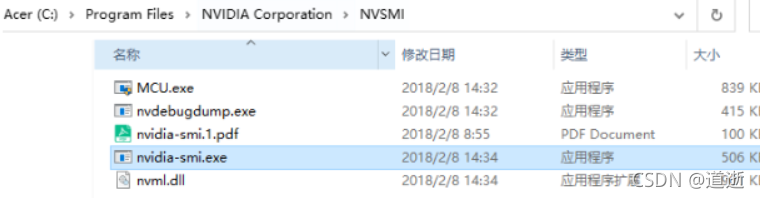
The problem encountered is that NVIDIA SMI cannot be used. You can first refer to the solution. There is no nvsmi folder under C:\program files\NVIDIA Corporation

And add the path to the system path

After that, if failed to initialize nvml: unknown error appears

Stay C:\windows\system32 find the corresponding files above and copy them to the nvmsi directory for replacement

[Solved] NPM Error: FATAL ERROR: Ineffective mark-compacts near heap limit Allocation failed

Problem Description:

Resolve NPM exception: fatal error: ineffective mark compacts near heap limit allocation failed

Solution:

1. Delete the. Npmrc file under C:\users {account}\.
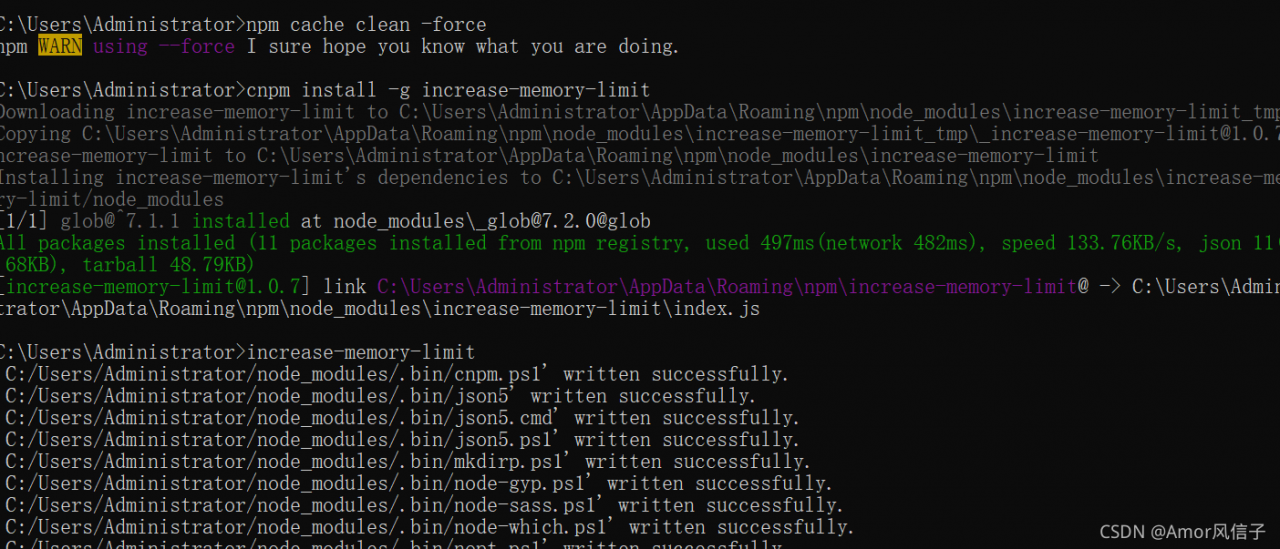
2. Clean it directly with the command. Enter
NPM cache clean – force
3 on the CMD console, or clean it directly with the command. Enter cnpm install – G increase memory limit on the CMD console, and then increase memory limit

when running the Vue project, no error will be reported

[Solved] Training yolov5 Error: attributeerror: can get attribute sppf on Module

Problem Description:

There was a problem running the yolov5-train.py file:

Attributeerror: cant get attribute sppf on module models.common… (followed by file path)

Solution:

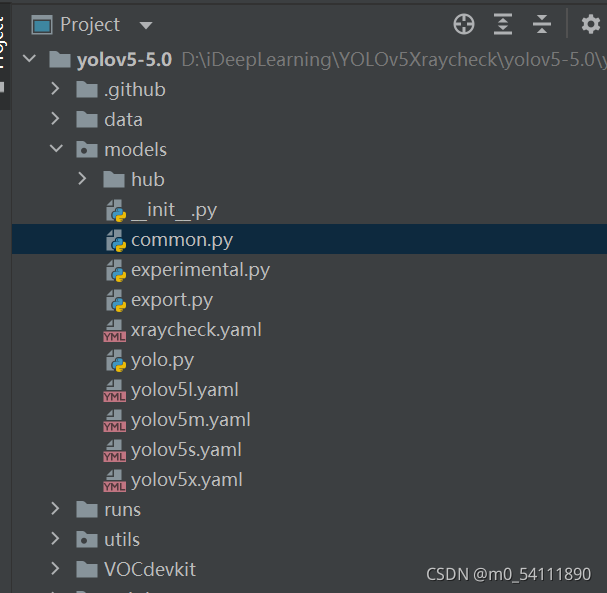
1. Double click to open the common.py file:

2. Add code:

import warnings

class SPPF(nn.Module):
    # Spatial Pyramid Pooling - Fast (SPPF) layer for YOLOv5 by Glenn Jocher
    def __init__(self, c1, c2, k=5):  # equivalent to SPP(k=(5, 9, 13))
        super().__init__()
        c_ = c1 // 2  # hidden channels
        self.cv1 = Conv(c1, c_, 1, 1)
        self.cv2 = Conv(c_ * 4, c2, 1, 1)
        self.m = nn.MaxPool2d(kernel_size=k, stride=1, padding=k // 2)

    def forward(self, x):
        x = self.cv1(x)
        with warnings.catch_warnings():
            warnings.simplefilter('ignore')  # suppress torch 1.9.0 max_pool2d() warning
            y1 = self.m(x)
            y2 = self.m(y1)
            return self.cv2(torch.cat([x, y1, y2, self.m(y2)], 1))


Copy and paste it directly into the common.py file.
Tips: Put import warnings on it!

(error) READONLY You can‘t write against a read only replica.

Because the master-slave replication cluster was configured before, the configuration was changed disorderly

There are two solutions:

1. Open the configuration file corresponding to the redis service, and change the value of the attribute slave read-only to no, so that it can be written.

2. Open the client mode through the redis cli command, and enter the slave of no one command

Pytorch Error: runtimeerror: expected scalar type double but found float

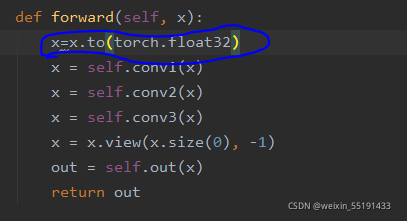
The reason for this problem may be that the data type of tensor is wrong, it may be the wrong type of input X in the backpropagation, or the wrong data type in the training and testing process. If it is the backpropagation process, it depends on which layer of neural network has the problem, and add x = x.to (torch. Float32) in front of which layer, For example, this problem occurs in the first layer of neural network. For example, this problem occurs in the first layer of convolution. The solution is as follows:

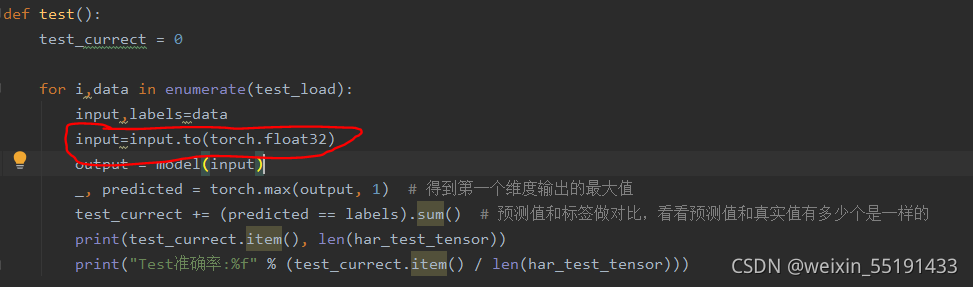
If this problem occurs in the training or test model, the solution is as follows:

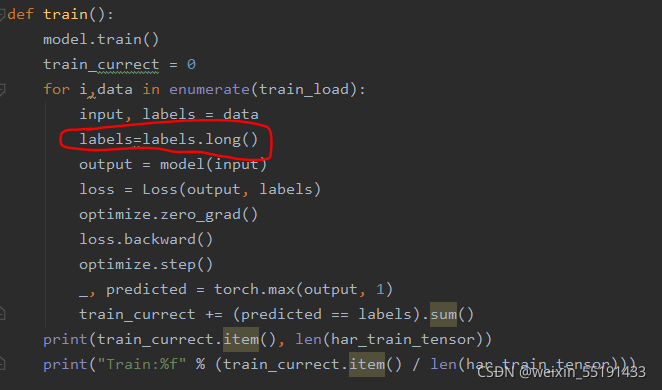
It is also possible that the type of labels is wrong during training or testing. The solutions are as follows:

error[E0061]: this function takes 1 argument but 2 arguments were supplied

Error in compiling Trust: error [e0061]: this function takes 1 argument but 2 arguments were supplied

I didn’t find the relevant information. The preliminary judgment may be the problem of the version, because the code can be compiled in a low version.

Solutions are for reference only:

Error code:

let secret_number = rand::thread_rng().gen_range(1, 101);

Correct code:

let secret_number = rand::thread_rng().gen_range(1..101);

Compile after modification.

Registry key Error: Java version has value ‘1.8‘, but ‘1.7‘ is required

Registry key Error: Java version has value ‘1.8’, but ‘1.7’ is required

Problem Description:

1. Jdk1.7.0 is installed first_ After 80, jdk1.8.0 was installed_ 181. The former is configured in the environment variable
2. The following error occurs when entering Java – version in CMD:

Error: Registry key 'Software\JavaSoft\Java Runtime Environment'\CurrentVersion'
has value '1.7', but '1.8' is required.
Error: could not find java.dll
Error: Could not find Java SE Runtime Environment.

Problem solving:

When upgrading from jdk1.7 to JDK1.8, there are three things to confirm:

1. System environment variables

2. Registry

Computer \ HKEY_ LOCAL_ MACHINE\SOFTWARE\JavaSoft\Java Runtime Environment

3. Update java.exe javaw.exe javaws.exe under C: \ windows \ system32

Error caused by too many versions of JDK installed on the computer

For example, there was no problem installing 1.7

After installing 1.8 and modifying the environment variables, the java.exe javaw.exe javaws.exe under C: \ windows \ system32 is still in the 1.7 installation package.

Just replace the java.exe of 1.7 with Java 1.8.

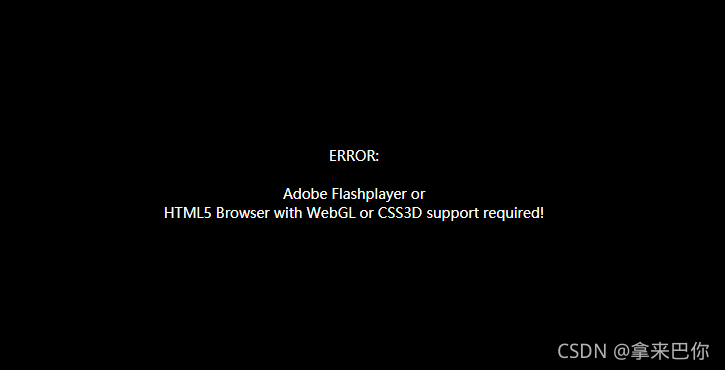
ERROR: Adobe Flashplayer or HTML5 Browser with WebGL or CSS3D support requ

Error appears on the pyqt5 qwebengine VR interface: Adobe flashplayer or HTML5 browser with webgl or css3d support requ

The following sentences can prevent the interface from flickering. If you add more, the image above will appear. As long as you leave other comments and the last sentence, you can solve the interface flickering and play VR video.

from PyQt5.QtCore import *
from PyQt5.QtGui import *   

# QCoreApplication.setAttribute(Qt.AA_UseSoftwareOpenGL,True)
# QCoreApplication.setAttribute(Qt.AA_UseSoftwareOpenGL, True)
# QGuiApplication.setAttribute(Qt.AA_UseSoftwareOpenGL, True)
# QApplication.setAttribute(Qt.AA_UseSoftwareOpenGL, True)

QCoreApplication.setAttribute(Qt.AA_UseOpenGLES, True)