Author Archives: Robins

/usr/bin/ssh-copy-id: ERROR: No identities found [How to Solve]

Look at the problem first

ssh-keygen -t rsa
ssh-copy-id localhost
/usr/bin/ssh-copy-id: ERROR: No identities found

The RSA and rsa.pub files are generated normally, but the SSH copy ID cannot be reported:/usr/bin/SSH copy ID: error: no identities found

After a closer look, the file size is 0

[hadoop@hadoop102 .ssh]$ ll
sum 0
-rw-------. 1 hadoop hadoop 0 11月 21 21:30 authorized_keys
-rw-------. 1 hadoop hadoop 0 11月 21 21:34 id_rsa
-rw-r--r--. 1 hadoop hadoop 0 11月 21 21:34 id_rsa.pub

Look at the virtual machine disk. It has been used up

[root@hadoop102 ~]# df -lh
Filesystem      Size  Used Avail Use% Mounted on
/dev/sda2        15G   15G     0 100% /
tmpfs           2.9G     0  2.9G   0% /dev/shm
/dev/sda1        93M   38M   51M  44% /boot

To see what not to delete some files

[root@hadoop102 /]# du -sm * | sort -n
du: Cannot access "proc/129429/task/129429/fd/4": No such file or directory
du: Cannot access "proc/129429/task/129429/fdinfo/4": No such file or directory
du: Cannot access "proc/129429/fd/4": No such file or directory
du: Cannot access "proc/129429/fdinfo/4": No such file or directory
0	proc
0	selinux
0	sys
1	data
1	dev
1	home
1	lost+found
1	media
1	mnt
1	mynewdisk
1	srv
1	tmp
8	bin
16	sbin
28	lib64
30	etc
37	boot
78	app
132	root
206	lib
524	var
2241	usr
11255	opt

This is deleted

[root@hadoop102 module]# df -lh
Filesystem      Size  Used Avail Use% Mounted on
/dev/sda2        15G   14G  553M  97% /
tmpfs           2.9G     0  2.9G   0% /dev/shm
/dev/sda1        93M   38M   51M  44% /boot

Then generate the secret key, and then execute SSH copy ID.
[Solved] VUE D:\project\vueProject\vue-02\src\components\hello.vue 5:5 error Parsing error: x-invalid-end-tag

Vue use failure:

D:\project\vueProject\vue-02\src\components\hello.vue

5:5   error   Parsing error: x-invalid-end-tag   vue/no-parsing-error

Such an error was reported when the slot was introduced. After careful inspection, it was found that the label of the slot was written incorrectly.

It should be the <slot/> slash at the back, and it will return to normal after the change.

<!-- /* html page */ -->
<template>
  <div>
    <!-- slot -->
    </slot>
    <h3>This is a custom component hello</h3>
  </div>

</template>


<!-- /* javaScript */ -->
<script>
  export default {

  }
</script>

<!-- /* css */ -->
<style>

</style>

Vue Error: error in mounted hook: TypeError: invalid src type

Remember the problem of using Vue once. The page console prompts, error in mounted hook: typeerror: invalid SRC type
the reason is that mounted mounts unused methods. Delete them.

<template>
	<button v-on:click ="add()">add</button>
	<button v-on:click ="edit()">edit</button>
</template>

<script>
...
mounted:function(){ 
    this.select();
	//this.del();  Delete the superfluous codes
},
methods:{
  select(){
  },
  add(){
  },
  edit(){
  }
}
</script>

Generate configDataContextRefres Error: Error creating bean with name ‘configDataContextRefresher‘

I have been tortured by this problem for a long time. My solution is as follows. I advise you to read the official documents that should be read, but don’t do it foolishly
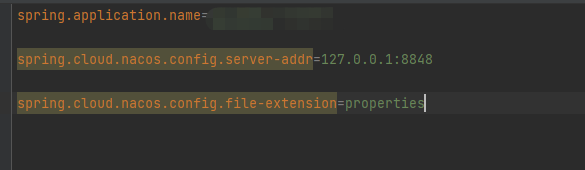
first write bootstrap.properties, and then write in the following:

these basic configurations

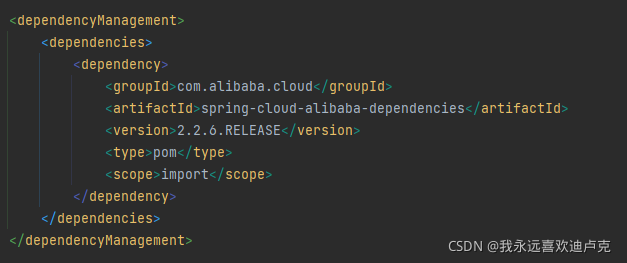
Then check whether you have introduced this dependency:

I read the error message. One of the error messages is springcloud context. After reading it for a long time, I think I should not have introduced it. However, I see a saying that it is useless to introduce context dependency in the version after 2020. It is necessary to quote the dependency in the above figure to read the configuration of Nacos from here.

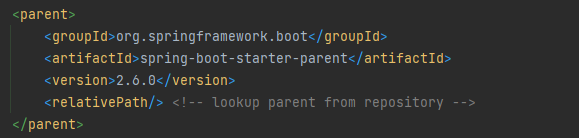
Finally, the versions of boot and cloud are posted, and the pro test can run:


[Solved] express-jwt Error: Error: algorithms should be set

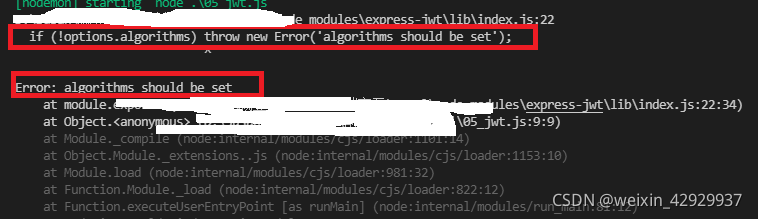
When using express JWT, the following errors are reported during compilation:

as a result of:

After JWT is updated on July 7, 2020, the installed express JWT module will default to version 6.0.0. The updated JWT needs to add the algorithms attribute to the configuration, that is, set the algorithm of JWT. Generally, hs256 is the default value for configuring algorithms:

net::ERR_HTTP2_PROTOCOL_ERROR 200 [How to Solve]

Scenario:

In the web environment, a request reports this problem, but other requests are normal. Open the F12 console and see the exception net:: err_HTTP2_PROTOCOL_Error 200 error

Troubleshooting:

Viewing the error.log report of nginx is that the permission of a temporary file is insufficient. The reason is that the account for starting nginx does not have operation permission in the previously reported directory

Solution:

1. Open the corresponding temporary directory to read and write permissions

2. Start nginx with the root account

[Solved] Eureka registry service starts error: Request execution error. Endpoint = defaultendpoint

Eureka registry service starts with an error request execution error. Endpoint = defaultendpoint {serviceurl = ' http://127.0.0.1:8000/eureka/ }

 Request execution error. endpoint=DefaultEndpoint{ serviceUrl='http://127.0.0.1:8000/eureka/}, exception=java.net.ConnectException: Connection refused: connect stacktrace=com.sun.jersey.api.client.ClientHandlerException: java.net.ConnectException: Connection refused: connect

There are two reasons for the above problems:

The defaultzone attribute in the configuration file does not recognize that when Eureka is started, it will pull the information of other services by default and set it to close to run normally
fetch registry: false

The application.yaml configuration file is as follows

server:
  port: 8000
  # server name
spring:
  application:
    name: eureka-server
# Eureka address information configuration
eureka:
  client:
    service-url:
      defaultZone: http://127.0.0.1:8000/eureka
    register-with-eureka: false # Whether to register your own information to EurekaServer, the default is true
     fetch-registry: false # Whether to pull information about other services, the default is true

[Solved] ERROR: Unable to find the development tool `cc`

ERROR: Unable to find the development tool cc in your path; please make sure that you have the package ‘gcc’ installed. If gcc is installed on your system, then please check that cc is in your PATH.

Solution:
You probably don’t have build-essential installed, and NVIDIA needs the compiler bits to actually install and handle the driver. Run sudo apt install build-essential and install the GCC compiler and such via that package.

Error:invalid new-expression of abstract class type XXX [How to Solve]

New an error is reported as follows:
error: invalid new expression of abstract class type XXX

Reason:
the subclass does not fully implement the pure virtual function of the parent class, that is, some functions in the parent class are not implemented in the subclass. The first line of error will prompt which function is not implemented.

Solution:
delete the pure virtual function not implemented in the parent class or implement it in the child class

[Solved] 1.fatal error: NvInfer.h: No such file or directory

yolov5 compile to generate engine error: /tensorrtx/yolov5/yololayer.h:6:10: fatal error: NvInfer.h: No such file or directory 6 | #include <NvInfer.h>
|          ^~~~~~~~~~~
compilation terminated.

1. The header file and library corresponding to tensorRT were not found.

In CMakeLists.txt
#tensorrt Add tensorrt corresponding header files and link libraries
# tensorrt
#include_directories(/usr/include/x86_64-linux-gnu/)
#link_directories(/usr/lib/x86_64-linux-gnu/)

include_directories(/home/******/TensorRT-7.2.3.4/include)
link_directories(/home/******/TensorRT-7.2.3.4/lib/)

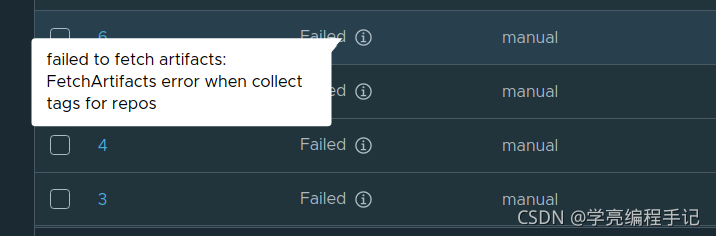
[Solved] Harbor image replicate Error: Fetchartifacts error when collect tags for repos

Solution:

https://github.com/goharbor/harbor/issues/12003

postgresql.conf:
sudo sed 's/max_connections =.*/max_connections=999/g'

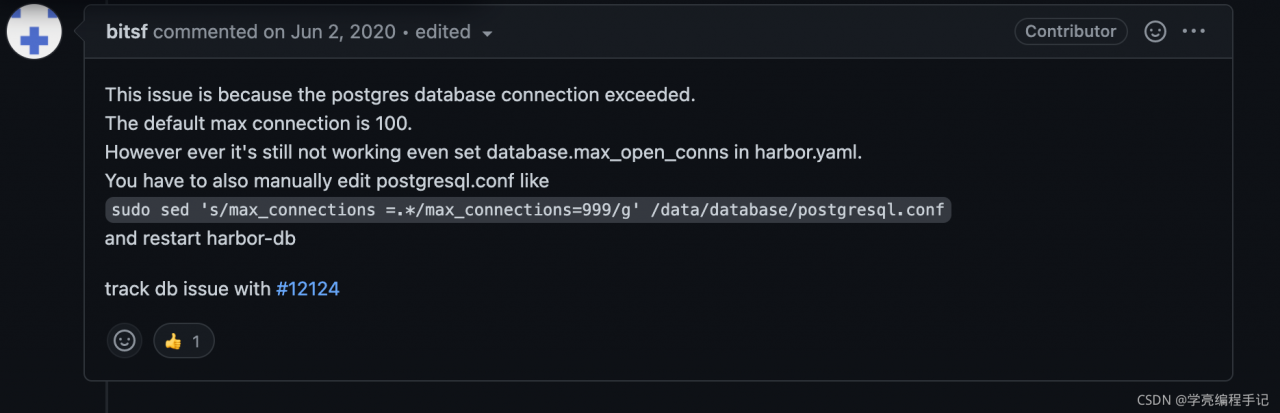
This issue is because the postgres database connection exceeded.
The default max connection is 100.
However ever it's still not working even set database.max_open_conns in harbor.yaml.
You have to also manually edit postgresql.conf like
sudo sed 's/max_connections =.*/max_connections=999/g' /data/database/postgresql.conf
and restart harbor-db

track db issue with #12124