Author Archives: Robins

[Modified] Hive SQL Error: SQL ERROR [10004] [42000]: Error while compiling statement: FAILED: SemanticException [Error

SQL ERROR [10004] [42000]: Error while compiling statement: FAILED: SemanticException [Error 10004]: Line 64:0 Invalid table alias or column reference ‘T4’: (possible column names are: order_id, order_status, update_time, charge_id, charge_status, station_id, station_name, soc, totalpower, i_a, i_b, i_c, u_a, u_b, u_c, pri_opr_id)


Change to:

ORDER BY
a,
b

[Solved] Git Clone Error: error:1407742E:SSL routines:SSL23_GET_SERVER_HELLO:tlsv1 alert protocol version

1. Error description

An error is reported when using the GIT command to clone a git warehouse, as shown below:

C:\Users\000>git clone https://hub.fastgit.org/githubhaohao/NDK_OpenGLES_3_0.git
Cloning into 'NDK_OpenGLES_3_0'...
fatal: unable to access 'https://hub.fastgit.org/githubhaohao/NDK_OpenGLES_3_0.git/': error:1407742E:SSL routines:SSL23_GET_SERVER_HELLO:tlsv1 alert protocol version

2. Analysis error

2.1 view http.sslversion version

The http.sslversion version is tlsv1.0 as follows:

C:\Users\000>git config http.sslVersion
tlsv1.0


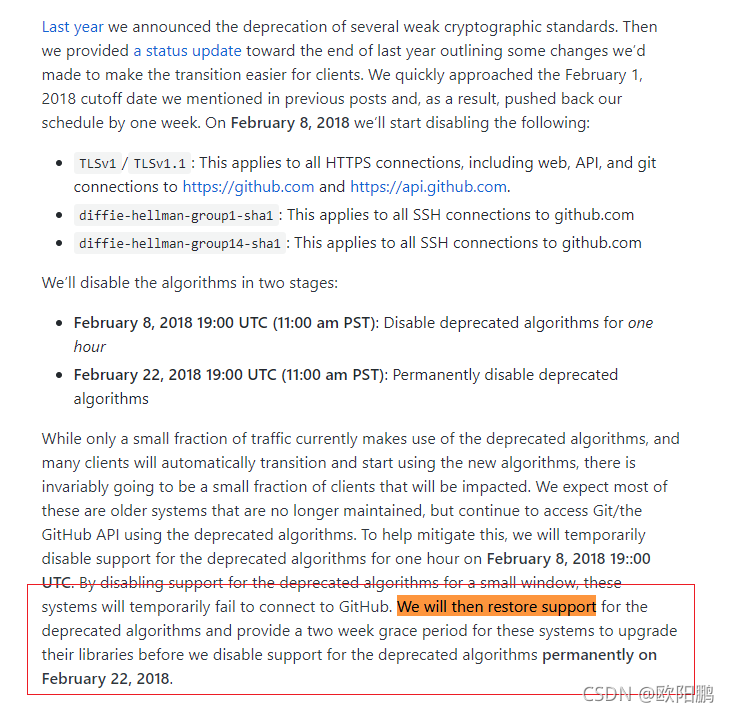
Weak cryptographic standards removal notice

We will then restore support for the deprecated algorithms and provide a two week grace period for these systems to upgrade their libraries before we disable support for the deprecated algorithms permanently on February 22, 2018.

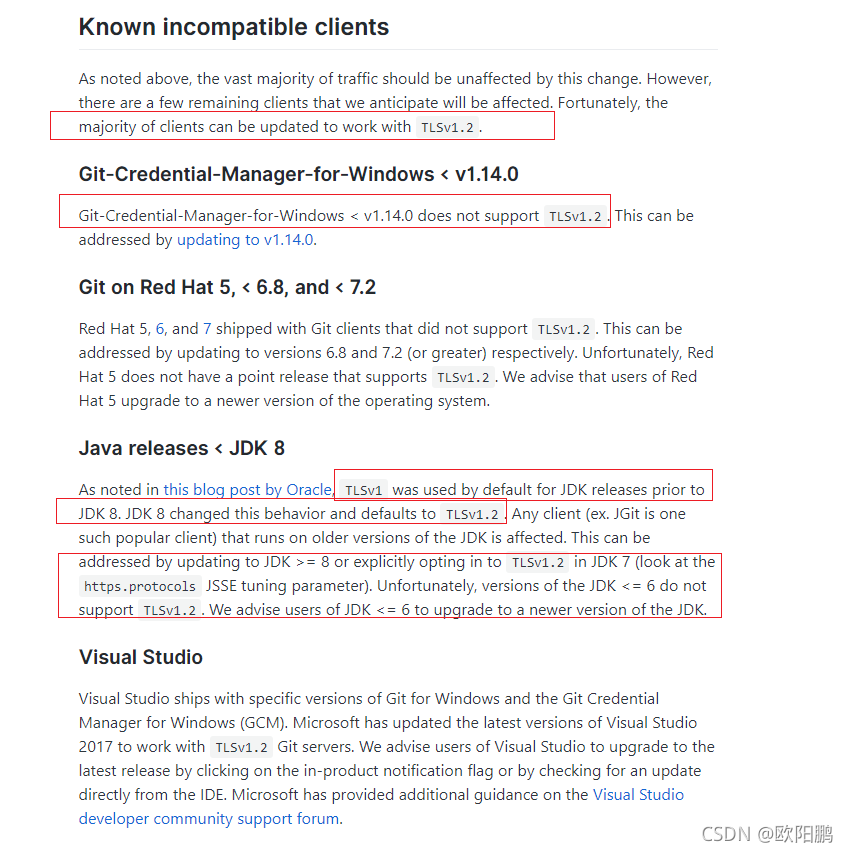
As noted above, the vast majority of traffic should be unaffected by this change. However, there are a few remaining clients that we anticipate will be affected. Fortunately, the majority of clients can be updated to work with TLSv1.2.


In a word, upgrade to the versionTLSv1.2.

3. Solution
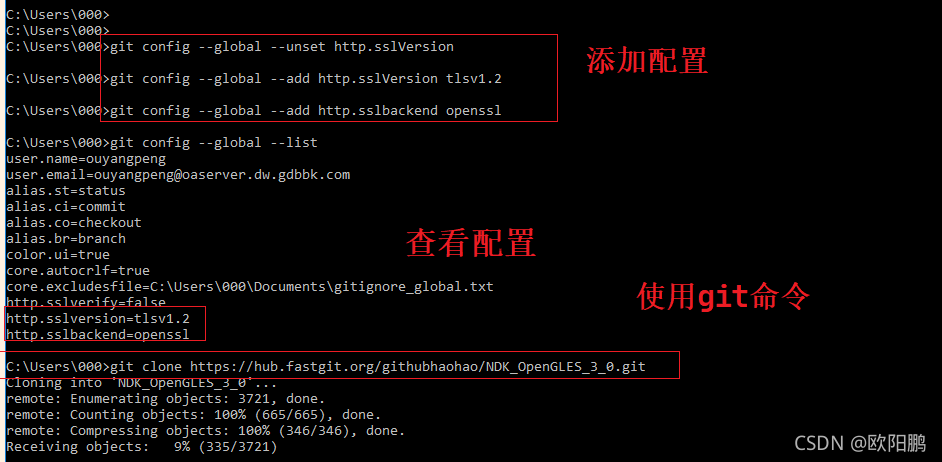
Add the following two configuration

C:\Users\000>git config --global --unset http.sslVersion

C:\Users\000>git config --global --add http.sslVersion tlsv1.2

C:\Users\000>git config --global --add http.sslbackend openssl

Then restart the GIT clone project, as shown below:

Linux Command Error: Redis (error) NOAUTH Authentication required

The authentication problem occurs because redis has set the authentication password
after startup, enter the following command:

127.0.0.1:6379> auth yourpassword

My password is redis123

127.0.0.1:6379> set name hello
(error) NOAUTH Authentication required.
127.0.0.1:6379> (error) NOAUTH Authentication required.
(error) ERR unknown command '(error)'
127.0.0.1:6379> auth redis123
ok

Redis can be operated normally.

[Solved] vue-roter 4 Error: Error: Invalid route component/Uncaught (in promise) Error: Invalid route component

Code

main.js:

import { createApp } from 'vue'
import App from './App.vue'
import router from './router'
import ElementPlus from 'element-plus'
import 'element-plus/dist/index.css'
import {store} from './store'
//Wrapping of request methods
import {postRequest} from "@/utils/api";
import {postKeyValueRequest} from "@/utils/api";
import {putRequest} from "@/utils/api";
import {deleteRequest} from "@/utils/api";
import {getRequest} from "@/utils/api";
import {initMenu} from "@/utils/menus";

router.beforeEach((to, from,next) => {

    if (to.path == '/') {
        next();
    }else {
        initMenu(router, store);
        next();
    }
})

const app = createApp(App)

app.use(ElementPlus)

app.config.globalProperties.postRequest=postRequest
app.config.globalProperties.postKeyValueRequest=postKeyValueRequest
app.config.globalProperties.putRequest=putRequest
app.config.globalProperties.deleteRequest=deleteRequest
app.config.globalProperties.getRequest=getRequest

app.use(router).use(store).mount('#app')

router\index.js:

import { createRouter, createWebHashHistory } from 'vue-router'
import Login from '../views/Login.vue'
import Home from '../views/Home.vue'
import Test1 from "@/views/Test1";
import Test2 from "@/views/Test2";


const routes = [
  {
    path: '/',
    name: 'Login',
    component: Login,
    hidden: true
  }
  ,{
    path: '/home',
    name: 'Home',
    component: Home,
    hidden: true
  },{
    path: '/home',
    name: 'Test Menu',
    component: Home,
    children:[
      {
        path: '/Test1',
        name: 'NAV 1',
        component: Test1
      },{
        path: '/Test2',
        name: 'NAV 2',
        component: Test2
      }
    ]
  }
]
//When the children in home go to the jump, first look for <router-view/> under home.

const router = createRouter({
  history: createWebHashHistory(),
  routes
})

export default router

Additional notes: login.vue is the login page. When logging off the user, you will jump to the login page with the jump code:

this.$router.replace("/");

Error message:

reference resources:

No slash is added to the named sub route with empty path
change the Path:'/' in main.JS and router\index.JS to Path:'
the problem is solved.


[Solved] Ubuntu Execute uci Error: uci: error while loading shared libraries: lib

Problem description

The following errors occur when testing UCI under Ubuntu

root@virtual-machine:/home//uci# uci 
uci: error while loading shared libraries: libuci.so: cannot open shared object file: No such file or directory

Solution

Modify the/etc/ld.so.conf file, add the/usr/local/lib path at the end of the file, and execute ldconfig to take effect immediately

echo /usr/local/lib >>/etc/ld.so.conf

Testing

Enter UCI again to see the following input

root@virtual-machine:/home/uci# uci 
Usage: uci [<options>] <command> [<arguments>]

Commands:
	batch
	export     [<config>]
	import     [<config>]
	changes    [<config>]
	commit     [<config>]
	add        <config> <section-type>
	add_list   <config>.<section>.<option>=<string>
	del_list   <config>.<section>.<option>=<string>
	show       [<config>[.<section>[.<option>]]]
	get        <config>.<section>[.<option>]
	set        <config>.<section>[.<option>]=<value>
	delete     <config>[.<section>[[.<option>][=<id>]]]
	rename     <config>.<section>[.<option>]=<name>
	revert     <config>[.<section>[.<option>]]
	reorder    <config>.<section>=<position>

Options:
	-c <path>  set the search path for config files (default: /etc/config)
	-d <str>   set the delimiter for list values in uci show
	-f <file>  use <file> as input instead of stdin
	-m         when importing, merge data into an existing package
	-n         name unnamed sections on export (default)
	-N         don't name unnamed sections
	-p <path>  add a search path for config change files
	-P <path>  add a search path for config change files and use as default
	-t <path>  set save path for config change files
	-q         quiet mode (don't print error messages)
	-s         force strict mode (stop on parser errors, default)
	-S         disable strict mode
	-X         do not use extended syntax on 'show'

[Solved] renren-fast Startup Error: Error creating bean with name ‘scheduleJobController‘

When doing the gulimall mall project, start Ren fast to report an error in the background. The error information is as follows:

org.springframework.beans.factory.UnsatisfiedDependencyException: Error creating bean with name 'scheduleJobController': Unsatisfied dependency expressed through field 'scheduleJobService'; nested exception is org.springframework.beans.factory.BeanCreationException: Error creating bean with name 'scheduleJobService': Invocation of init method failed; nested exception is io.renren.common.exception.RRException: 获取定时任务CronTrigger出现异常
	at org.springframework.beans.factory.annotation.AutowiredAnnotationBeanPostProcessor$AutowiredFieldElement.inject(AutowiredAnnotationBeanPostProcessor.java:643)
	at org.springframework.beans.factory.annotation.InjectionMetadata.inject(InjectionMetadata.java:116)
	at org.springframework.beans.factory.annotation.AutowiredAnnotationBeanPostProcessor.postProcessProperties(AutowiredAnnotationBeanPostProcessor.java:399)
	at org.springframework.beans.factory.support.AbstractAutowireCapableBeanFactory.populateBean(AbstractAutowireCapableBeanFactory.java:1422)
	at org.springframework.beans.factory.support.AbstractAutowireCapableBeanFactory.doCreateBean(AbstractAutowireCapableBeanFactory.java:594)
	at org.springframework.beans.factory.support.AbstractAutowireCapableBeanFactory.createBean(AbstractAutowireCapableBeanFactory.java:517)
	at org.springframework.beans.factory.support.AbstractBeanFactory.lambda$doGetBean$0(AbstractBeanFactory.java:323)

Cause analysis: beans cannot be created or loaded. The problem is generally in configuration

Solution steps:
1. Check dao tier, service tier, controller tier is annotated or not?

2. When the annotation of Dao tier, service tier and controller tier is complete, check whether the corresponding package is added to the package scanning for these annotations. If not, add it (generally check in the spring configuration file)

3. Check the corresponding YML and properties files, or check whether the database SQL is executed normally

The solution to this problem: delete the contents of the current database and re-execute the SQL file

[Solved] nacos Startup Error: Error creating bean with name ‘authFilterRegistration‘ defined in class path resource

Today, an error was suddenly reported when Nacos was started. The error information on the Nacos startup interface is as follows:

 Error creating bean with name 'authFilterRegistration' defined in class path resource
 [com/alibaba/nacos/core/auth/AuthConfig.class]: 
 Bean instantiation via factory method failed; 
 nested exception is org.springframework.beans.BeanInstantiationException:
 Failed to instantiate [org.springframework.boot.web.servlet.FilterRegistrationBean]:
 Factory method 'authFilterRegistration' threw exception;
 nested exception is org.springframework.beans.factory.UnsatisfiedDependencyException:
 Error creating bean with name 'authFilter':
 Unsatisfied dependency expressed through field 'authManager';
 nested exception is org.springframework.beans.factory.UnsatisfiedDependencyException: 
 Error creating bean with name 'nacosAuthManager':
 Unsatisfied dependency expressed through field 'authenticationManager';
 nested exception is org.springframework.beans.factory.UnsatisfiedDependencyException:
 Error creating bean with name 'nacosAuthConfig': 
 Unsatisfied dependency expressed through field 'userDetailsService';
 nested exception is org.springframework.beans.factory.UnsatisfiedDependencyException:
 Error creating bean with name 'nacosUserDetailsServiceImpl':
 Unsatisfied dependency expressed through field 'userPersistService'; 
 nested exception is org.springframework.beans.factory.UnsatisfiedDependencyException:
 Error creating bean with name 'externalUserPersistServiceImpl': 
 Unsatisfied dependency expressed through field 'persistService'; 
 nested exception is org.springframework.beans.factory.BeanCreationException: 
 Error creating bean with name 'externalStoragePersistServiceImpl': 
 Invocation of init method failed; nested exception is java.lang.RuntimeException:
 java.lang.RuntimeException: [db-load-error]load jdbc.properties error

Idea spooling error message:

[NACOS SocketTimeoutException httpGet] currentServerAddr:http://localhost:8848, err : connect timed out

Cause analysis: the project may not load Nacos related files correctly

Solution: delete the existing Nacos folder, decompress or download the Nacos compressed package again, and start startup.cmd. The problem is solved

If an error is reported, it may be that set mode = “” in the startup.cmd file is inappropriate

set BASE_DIR="%BASE_DIR:~0,-5%"

set CUSTOM_SEARCH_LOCATIONS=file:%BASE_DIR%/conf/

set MODE="cluster"
set FUNCTION_MODE="all"
set SERVER=nacos-server
set MODE_INDEX=-1
set FUNCTION_MODE_INDEX=-1
set SERVER_INDEX=-1
set EMBEDDED_STORAGE_INDEX=-1
set EMBEDDED_STORAGE=""

Solution: change set mode = "cluster" to set mode = "standalone".

[Solved] rqt_graph Skipped loading plugin with error & Format: “dot“ not recognized

rqt_graph run error:

[ERROR] [1637910144.803564743]: Skipped loading plugin with error: XML Document '/opt/ros/melodic/share/rqt_virtual_joy/plugin.xml' has no Root Element. This likely means the XML is malformed or missing..
RosPluginProvider._parse_plugin_xml() plugin file "/opt/ros/melodic/share/rqt_virtual_joy/plugin.xml" in package "rqt_virtual_joy" not found
['dot', '-Tdot', '/tmp/tmpVMQLCN'] return code: 1
stdout, stderr:

Format: "dot" not recognized. Use one of:
Traceback (most recent call last):
File "/opt/ros/melodic/lib/python2.7/dist-packages/rqt_graph/ros_graph.py", line 289, in _refresh_rosgraph
self._update_graph_view(self._generate_dotcode())
File "/opt/ros/melodic/lib/python2.7/dist-packages/rqt_graph/ros_graph.py", line 324, in _generate_dotcode
hide_dynamic_reconfigure=hide_dynamic_reconfigure)
File "/opt/ros/melodic/lib/python2.7/dist-packages/rqt_graph/dotcode.py", line 914, in generate_dotcode
dotcode = dotcode_factory.create_dot(dotgraph)
File "/opt/ros/melodic/lib/python2.7/dist-packages/qt_dotgraph/pydotfactory.py", line 175, in create_dot
dot = graph.create_dot()
File "/usr/lib/python2.7/dist-packages/pydot.py", line 1681, in <lambda>
self.create(format=f, prog=prog))
File "/usr/lib/python2.7/dist-packages/pydot.py", line 1900, in create
assert p.returncode == 0, p.returncode
AssertionError: 1
[1]    22100 abort (core dumped)  rqt_graph

The above message contains two errors.
One is that the plugin file is missing. Solution.
Create a new file plugin.xml in the /opt/ros/melodic/share/rqt_virtual_joy/ path and write the contents of the file.

<library path="src">
  <class name="My Plugin" type="rqt_virtual_joy.virtual_joy_module.MyPlugin" base_class_type="rqt_gui_py::Plugin">
    <description>
      An example Python GUI plugin to create a great user interface.
    </description>
    <qtgui>

      <group>
        <label>Robot Tools</label>
      </group>
      <!-- <group>
        <label>Subgroup</label>
      </group> -->

      <label>Virtual Joystick</label>
      <icon type="file">resource/input-gaming.png</icon>
      <statustip>Great user interface to provide real value.</statustip>
    </qtgui>
  </class>
</library>

Save and exit to fix problem 1;

The second problem is dot format recognition. Execute the command:

sudo dot -c

[Solved] Minio Error: javax.xml.stream.XMLStreamException: ParseError

Invocation of init method failed; nested exception is javax.xml.stream.XMLStreamException: ParseError at [row,col]:[1,3]
Message: The tags preceding the root element in the document must be properly formatted.
Caused by: io.minio.errors.XmlParserException: null

Configuration file outgoing error
the 127.0.0.1:9001 port in the configuration is changed to 9000
the 9001 port is a command line operation, so this error is caused

Error: Cannot find module ‘png-js‘ [How to Solve]

The following error is suddenly found in the execution script:

Error: cannot find module ‘PNG-JS’

the reason is that the docker container lacks module’ PNG-JS’. Here, execute the following command to install the module:

sudo docker exec -it Containner_name pnpm i png-js