Recently, I've been working on the application of Transformer to fine-grained images.
Solving the problem with the vit source code

KeyError: 'Transformer/encoderblock_0/MultiHeadDotProductAttention_1/query\kernel is not a file in the archive'

This is a problem when merging paths with os.path.join

Solution.

1. In the modeling.py file

Add '/' to the following paths:
ATTENTION_Q = "MultiHeadDotProductAttention_1/query/"
ATTENTION_K = "MultiHeadDotProductAttention_1/key/"
ATTENTION_V = "MultiHeadDotProductAttention_1/value/"
ATTENTION_OUT = "MultiHeadDotProductAttention_1/out/"
FC_0 = "MlpBlock_3/Dense_0/"
FC_1 = "MlpBlock_3/Dense_1/"
ATTENTION_NORM = "LayerNorm_0/"
MLP_NORM = "LayerNorm_2/"

2. In the vit_modeling_resnet.py file

ResNetV2 class Add '/' after each 'block' and 'unit'

self.body = nn.Sequential(OrderedDict([
    ('block1/', nn.Sequential(OrderedDict(
        [('unit1/', PreActBottleneck(cin=width, cout=width*4, cmid=width))] +
        [(f'unit{i:d}/', PreActBottleneck(cin=width*4, cout=width*4, cmid=width)) for i in range(2, block_units[0] + 1)],
        ))),
    ('block2/', nn.Sequential(OrderedDict(
        [('unit1/', PreActBottleneck(cin=width*4, cout=width*8, cmid=width*2, stride=2))] +
        [(f'unit{i:d}/', PreActBottleneck(cin=width*8, cout=width*8, cmid=width*2)) for i in range(2, block_units[1] + 1)],
        ))),
    ('block3/', nn.Sequential(OrderedDict(
        [('unit1/', PreActBottleneck(cin=width*8, cout=width*16, cmid=width*4, stride=2))] +
        [(f'unit{i:d}/', PreActBottleneck(cin=width*16, cout=width*16, cmid=width*4)) for i in range(2, block_units[2] + 1)],
        ))),
]))
Author Archives: Robins
NXP mx8 Platform tensorflow-lite build error [How to Solve]
Solutions provided by NXP
Compiling L5.4.3_1.0.0 BSP On Ubuntu 180.4 LTS – NXP Community
1. Compile tensorflow-lite with bitbake
bitbake tensorflow-lite -c do_configure -v -f
The following error occurs, at this time you can see the download of the wrong package
FAILED: ruy-populate-prefix/src/ruy-populate-stamp/ruy-populate-download
The specific path is
tmp/work/cortexa53-crypto-poky-linux/tensorflow-lite/2.5.0-r0/build/_deps/ruy-subbuild/ruy-populate-prefix/src/ruy-populate-stamp/ruy-populate-download
tmp/work/cortexa53-crypto-poky-linux/tensorflow-lite/2.5.0-r0/build/_deps/ruy-subbuild/ruy-populate-prefix/src/Check whether there is a corresponding zip package in the modified directory, and copy it to the tensorflow pack folder created in the corresponding root directory.
| FAILED: ruy-populate-prefix/src/ruy-populate-stamp/ruy-populate-download
| cd /work/code/temp/ver/build-imx-robot/tmp/work/cortexa53-crypto-poky-linux/tensorflow-lite/2.5.0-r0/build && /work/code/temp/ver/build-imx-robot/tmp/work/cortexa53-crypto-poky-linux/tensorflow-lite/2.5.0-r0/recipe-sysroot-native/usr/bin/cmake -P /work/code/temp/ver/build-imx-robot/tmp/work/cortexa53-crypto-poky-linux/tensorflow-lite/2.5.0-r0/build/_deps/ruy-subbuild/ruy-populate-prefix/src/ruy-populate-stamp/download-ruy-populate.cmake && /work/code/temp/ver/build-imx-robot/tmp/work/cortexa53-crypto-poky-linux/tensorflow-lite/2.5.0-r0/recipe-sysroot-native/usr/bin/cmake -P /work/code/temp/ver/build-imx-robot/tmp/work/cortexa53-crypto-poky-linux/tensorflow-lite/2.5.0-r0/build/_deps/ruy-subbuild/ruy-populate-prefix/src/ruy-populate-stamp/verify-ruy-populate.cmake && /work/code/temp/ver/build-imx-robot/tmp/work/cortexa53-crypto-poky-linux/tensorflow-lite/2.5.0-r0/recipe-sysroot-native/usr/bin/cmake -P /work/code/temp/ver/build-imx-robot/tmp/work/cortexa53-crypto-poky-linux/tensorflow-lite/2.5.0-r0/build/_deps/ruy-subbuild/ruy-populate-prefix/src/ruy-populate-stamp/extract-ruy-populate.cmake && /work/code/temp/ver/build-imx-robot/tmp/work/cortexa53-crypto-poky-linux/tensorflow-lite/2.5.0-r0/recipe-sysroot-native/usr/bin/cmake -E touch /work/code/temp/ver/build-imx-robot/tmp/work/cortexa53-crypto-poky-linux/tensorflow-lite/2.5.0-r0/build/_deps/ruy-subbuild/ruy-populate-prefix/src/ruy-populate-stamp/ruy-populate-download
| ninja: build stopped: subcommand failed.
|
| CMake Error at /work/code/temp/ver/build-imx-robot/tmp/work/cortexa53-crypto-poky-linux/tensorflow-lite/2.5.0-r0/recipe-sysroot-native/usr/share/cmake-3.19/Modules/FetchContent.cmake:989 (message):
|   Build step for ruy failed: 1
| Call Stack (most recent call first):
|   /work/code/temp/ver/build-imx-robot/tmp/work/cortexa53-crypto-poky-linux/tensorflow-lite/2.5.0-r0/recipe-sysroot-native/usr/share/cmake-3.19/Modules/FetchContent.cmake:1118:EVAL:2 (__FetchContent_directPopulate)
|   /work/code/temp/ver/build-imx-robot/tmp/work/cortexa53-crypto-poky-linux/tensorflow-lite/2.5.0-r0/recipe-sysroot-native/usr/share/cmake-3.19/Modules/FetchContent.cmake:1118 (cmake_language)
|   tools/cmake/modules/OverridableFetchContent.cmake:531 (FetchContent_Populate)
|   tools/cmake/modules/ruy.cmake:30 (OverridableFetchContent_Populate)
|   tools/cmake/modules/Findruy.cmake:16 (include)
|   CMakeLists.txt:197 (find_package)
|
|
| -- Configuring incomplete, errors occurred!
| See also "/work/code/temp/ver/build-imx-robot/tmp/work/cortexa53-crypto-poky-linux/tensorflow-lite/2.5.0-r0/build/CMakeFiles/CMakeOutput.log".
| See also "/work/code/temp/ver/build-imx-robot/tmp/work/cortexa53-crypto-poky-linux/tensorflow-lite/2.5.0-r0/build/CMakeFiles/CMakeError.log".
| + bb_sh_exit_handler
| + ret=1
| + [ 1 != 0 ]
| + echo WARNING: exit code 1 from a shell command.
| WARNING: exit code 1 from a shell command.
| + exit 1
The second error;
tmp/work/cortexa53-crypto-poky-linux/tensorflow-lite/2.5.0-r0/build/pthreadpool-download
Check whether there is a zip in this directory, and in the copy to tensorflow pack folder
ninja: build stopped: subcommand failed.
-- Downloading pthreadpool to /work/code/test/ver/build-imx-robot/tmp/work/cortexa53-crypto-poky-linux/tensorflow-lite/2.5.0-r0/build/pthreadpool-source (define PTHREADPOOL_SOURCE_DIR to avoid it)
-- Configuring done
-- Generating done
-- Build files have been written to: /work/code/test/ver/build-imx-robot/tmp/work/cortexa53-crypto-poky-linux/tensorflow-lite/2.5.0-r0/build/pthreadpool-download
[1/9] Creating directories for 'pthreadpool'
[2/9] Performing download step (download, verify and extract) for 'pthreadpool'
-- Downloading...
   dst='/work/code/test/ver/build-imx-robot/tmp/work/cortexa53-crypto-poky-linux/tensorflow-lite/2.5.0-r0/build/pthreadpool-download/pthreadpool-prefix/src/545ebe9f225aec6dca49109516fac02e973a3de2.zip'
   timeout='none'
   inactivity timeout='none'
-- Using src='https://github.com/Maratyszcza/pthreadpool/archive/545ebe9f225aec6dca49109516fac02e973a3de2.zip'
-- [download 100% complete]
-- verifying file...
       file='/work/code/test/ver/build-imx-robot/tmp/work/cortexa53-crypto-poky-linux/tensorflow-lite/2.5.0-r0/build/pthreadpool-download/pthreadpool-prefix/src/545ebe9f225aec6dca49109516fac02e973a3de2.zip'
-- Downloading... done
-- extracting...
     src='/work/code/test/ver/build-imx-robot/tmp/work/cortexa53-crypto-poky-linux/tensorflow-lite/2.5.0-r0/build/pthreadpool-download/pthreadpool-prefix/src/545ebe9f225aec6dca49109516fac02e973a3de2.zip'
     dst='/work/code/test/ver/build-imx-robot/tmp/work/cortexa53-crypto-poky-linux/tensorflow-lite/2.5.0-r0/build/pthreadpool-source'
-- extracting... [tar xfz]
3. Subsequent errors change in turn.
4. Execute this../cp.sh script during bitmake tensorflow Lite – C compile – V – f compilation, and tensorflow Lite will be compiled successfully.
#!/bin/bash
mkdir -p ./../build-imx-robot/tmp/work/cortexa53-crypto-poky-linux/tensorflow-lite/2.5.0-r0/build/_deps/ruy-subbuild/ruy-populate-prefix/src/
cp 54774a7a2cf85963777289193629d4bd42de4a59.zip  ./../build-imx-robot/tmp/work/cortexa53-crypto-poky-linux/tensorflow-lite/2.5.0-r0/build/_deps/ruy-subbuild/ruy-populate-prefix/src/


mkdir -p ./../build-imx-robot/tmp/work/cortexa53-crypto-poky-linux/tensorflow-lite/2.5.0-r0/build/cpuinfo-download/cpuinfo-prefix/src/
cp 5916273f79a21551890fd3d56fc5375a78d1598d.zip ../build-imx-robot/tmp/work/cortexa53-crypto-poky-linux/tensorflow-lite/2.5.0-r0/build/cpuinfo-download/cpuinfo-prefix/src/
Error c2065: ‘QAPP’: undeclared identifier [Solved]
error: qApp was not declared in this scope.
Solution: Add the Header File:
#include <QApplication>[Solved] rsync Error: @ERROR: chdir failed rsync error
Question
The client uses the Rsync command to synchronize the following errors:
@ERROR: chdir failed
rsync error: error starting client-server protocol (code 5) at main.c(1649) [sender=3.1.2]
Solution:
After troubleshooting, it is caused by the server directory creation failure
[ew_dbbak]
path = /data/dbbak/ew_dbbak/
JSON parse error: invalid UTF-8 solution series [How to Solve]
Today, the following error message will be prompted when you copy the project from the old workspace to the directory of the new workspace:
Request","exception":"org.springframework.http.converter.HttpMessageNotReadableException","message":"JSON parse error: Invalid UTF-8 middle byte 0x3f
The reasons for the above errors are: the JVM parameter does not configure the encoding format and the eclipse workspace does not specify the encoding format.
Solution: specify the JVM encoding format
Open windows -> Preferences-> java-> Installed jres select the local JRE version and click Edit
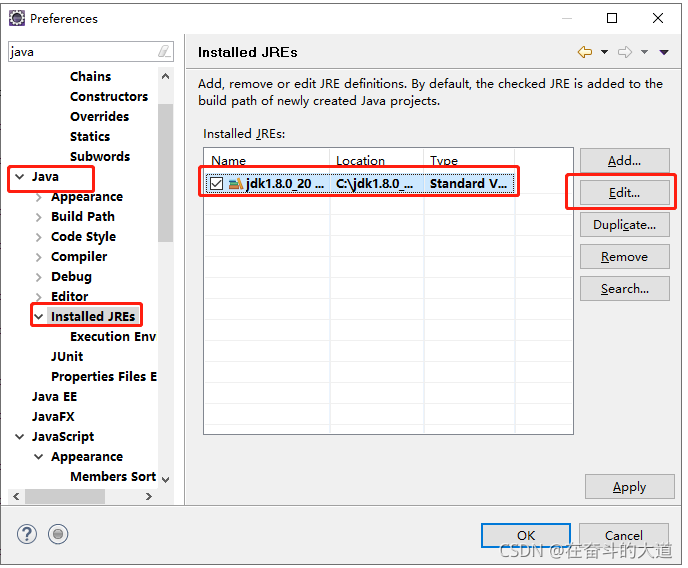
Add specified encoding format:
-Dfile.encoding=UTF-8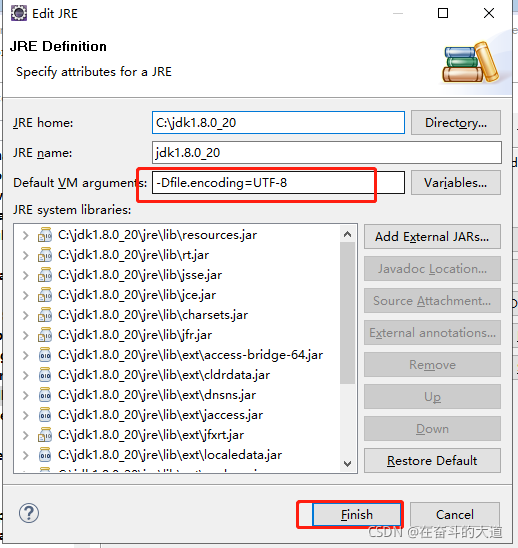
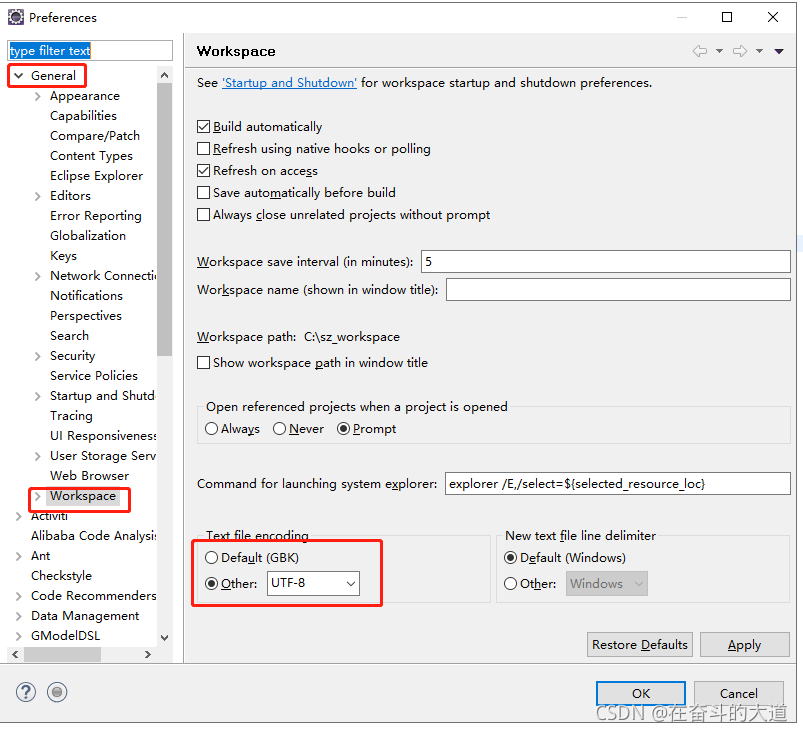
Specify the Workspace encoding format.
window-Preferences-General-workspace-other: UTF-8
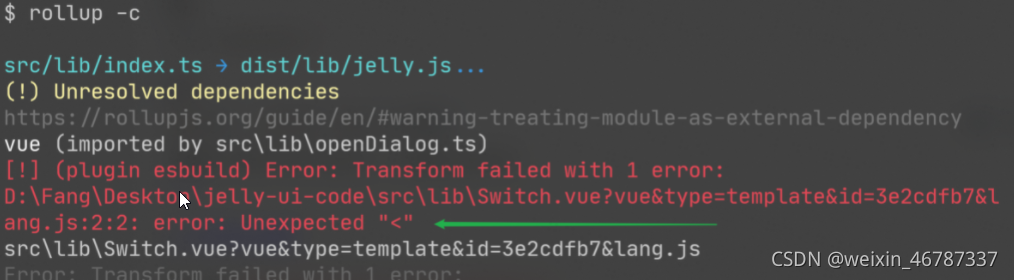
[Solved] Error: Transform failed with 1 error: error: Invalid option in transform() call: “jsx“
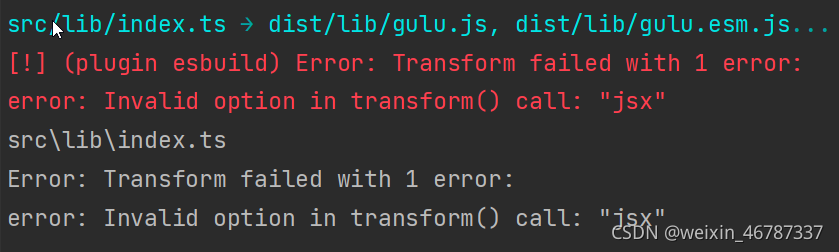
Error: Transform failed with 1 error: error: invalid option in transform() call: “JSX”
Solution:
-
- the option “JSX” is invalid due to the old esbuild version
-
- 2. Manually install the latest version of esbuild to solve it, But I think it’s better to update the package.json version of the plug-in
-
- rollback plugin esbuild version: find the esbuild in the package.json plug-in and manually modify the esbuild version: 0.12.7
-
- 3. Install yarn add — dev rollback plugin- [email protected] Can solve
Error reporting: as shown in the following figure
Solution
parkage.json configuration! This is very important
 "devDependencies": {
    "@vue/compiler-sfc": "3.0.0",
    "rollup-plugin-esbuild": "2.5.0",
    "rollup-plugin-scss": "2.6.0",
    "rollup-plugin-terser": "7.0.2",
    "rollup-plugin-vue": "6.0.0-beta.10",
    "sass": "1.32.11",
    "vite": "1.0.0-rc.1"
   }
Rollup.config.ts file configuration
import esbuild from 'rollup-plugin-esbuild'
import vue from 'rollup-plugin-vue'
const scss = require('rollup-plugin-scss');
const dartSass = require('sass');
import { terser } from "rollup-plugin-terser"

export default {
    input: 'src/lib/index.ts',
    output: [{
        globals: {
            vue: 'Vue'
        },
        name: 'Gulu',
        file: 'dist/lib/gulu.js',
        format: 'umd',
        plugins: [terser()]
    }, {
        name: 'Gulu',
        file: 'dist/lib/gulu.esm.js',
        format: 'es',
        plugins: [terser()]
    }],
    plugins: [
        scss({ include: /\.scss$/, sass: dartSass }),
        esbuild({
            include: /\.[jt]s$/,
            minify: process.env.NODE_ENV === 'production',
            target: 'es2015'
        }),
        vue({
            include: /\.vue$/,
        })
    ],
}
[Solved] Dvc push Error: (ERROR: configuration error…)
When you can’t push it, check whether your remote warehouse is stored in the corresponding file
Click on your .Div file. There are two files beginning with config, config and config.Local
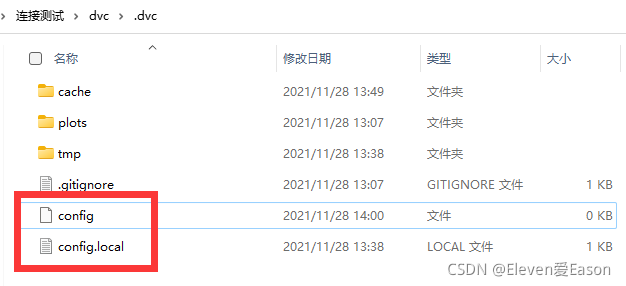
if your config.Local stores your remote warehouse address and there is nothing in config
So congratulations! Successful lying gun!
Solution:
When DVC identifies the directory of your remote warehouse, find the directory under your config file instead of config.Local, delete the config.Local file, and then remote add your warehouse path, and then you can push it
in a word, config cannot be empty
[Solved] Docker failed to start daemon: error initializing graphdriver: driver not supported
When the kubelet node joins, an error VFS not support is reported
[ERROR SystemVerification]: unsupported graph driver: vfs
/etc/docker/daemon.json
{
        "registry-mirrors":["https://registry.docker-cn.com"],
        "bridge":"nufront-br",
        "storage-driver":"devicemapper",   ####
        "exec-opts": ["native.cgroupdriver=systemd"],
        "insecure-registries": ["hadoop03:5000"]
}

###
systemctl daemon-reload
service docker start #Note error initializing graphdriver: driver not supported
reference resources: https://github.com/moby/moby/issues/15651, it is found that the current node downloads the docker CE decompression package and directly configures the service, not through Yum (offline environment…)
####

[root@nufront-worker-02 bin]# cd /opt/module/docker/
[root@nufront-worker-02 docker]# ll

-rwxr-xr-x 1 root root 39593864 Nov 23 11:12 containerd
-rwxr-xr-x 1 root root 21508168 Nov 23 11:12 ctr
-rwxr-xr-x 1 root root 60073904 Nov 23 11:12 docker
-rwxr-xr-x 1 root root 78951368 Nov 23 11:12 dockerd
-rwxr-xr-x 1 root root   708616 Nov 23 11:12 docker-init
-rwxr-xr-x 1 root root  2933646 Nov 23 11:12 docker-proxy
Try RPM installation
#######
[root@nufront-worker-02 docker]# ll
total 350072
-rw-r--r-- 1 root root   104408 Nov 23 11:12 audit-libs-2.8.5-4.el7.x86_64.rpm
-rw-r--r-- 1 root root    78256 Nov 23 11:12 audit-libs-python-2.8.5-4.el7.x86_64.rpm
-rwxr-xr-x 1 root root 39593864 Nov 23 11:12 containerd
-rw-r--r-- 1 root root 35130608 Nov 23 11:12 containerd.io-1.4.6-3.1.el7.x86_64.rpm
-rwxr-xr-x 1 root root  7270400 Nov 23 11:12 containerd-shim
-rwxr-xr-x 1 root root  9953280 Nov 23 11:12 containerd-shim-runc-v2
-rw-r--r-- 1 root root    40816 Nov 23 11:12 container-selinux-2.119.2-1.911c772.el7_8.noarch.rpm
-rwxr-xr-x 1 root root 21508168 Nov 23 11:12 ctr
-rwxr-xr-x 1 root root 60073904 Nov 23 11:12 docker
-rw-r--r-- 1 root root 27902344 Nov 23 11:12 docker-ce-20.10.7-3.el7.x86_64 (1).rpm
-rw-r--r-- 1 root root 34717572 Nov 23 11:12 docker-ce-cli-20.10.7-3.el7.x86_64.rpm
-rw-r--r-- 1 root root  9659320 Nov 23 11:12 docker-ce-rootless-extras-20.10.7-3.el7.x86_64.rpm
-rwxr-xr-x 1 root root 78951368 Nov 23 11:12 dockerd
-rwxr-xr-x 1 root root   708616 Nov 23 11:12 docker-init
-rwxr-xr-x 1 root root  2933646 Nov 23 11:12 docker-proxy
-rw-r--r-- 1 root root  4373740 Nov 23 11:12 docker-scan-plugin-0.8.0-3.el7.x86_64.rpm
-rwxr-xr-x 1 root root     1200 Nov 23 11:12 docker.service
-rw-r--r-- 1 root root    83764 Nov 23 11:12 fuse3-libs-3.6.1-4.el7.x86_64.rpm
-rw-r--r-- 1 root root    95424 Nov 23 11:12 fuse-libs-2.9.2-11.el7.x86_64.rpm
-rw-r--r-- 1 root root    55796 Nov 23 11:12 fuse-overlayfs-0.7.2-6.el7_8.x86_64.rpm
-rw-r--r-- 1 root root    67720 Nov 23 11:12 libcgroup-0.41-21.el7.x86_64.rpm
-rw-r--r-- 1 root root   101800 Nov 23 11:12 libcgroup-tools-0.41-21.el7.x86_64.rpm
-rw-r--r-- 1 root root    56824 Nov 23 11:12 libnetfilter_conntrack-1.0.6-1.el7_3.x86_64.rpm
-rw-r--r-- 1 root root    57460 Nov 23 11:12 libseccomp-2.3.1-4.el7.x86_64.rpm
-rw-r--r-- 1 root root   166012 Nov 23 11:12 libselinux-2.5-15.el7.x86_64.rpm
-rw-r--r-- 1 root root   154876 Nov 23 11:12 libselinux-utils-2.5-15.el7.x86_64.rpm
-rw-r--r-- 1 root root   154244 Nov 23 11:12 libsemanage-2.5-14.el7.x86_64.rpm
-rw-r--r-- 1 root root   115284 Nov 23 11:12 libsemanage-python-2.5-14.el7.x86_64.rpm
-rw-r--r-- 1 root root   304196 Nov 23 11:12 libsepol-2.5-10.el7.x86_64.rpm
-rw-r--r-- 1 root root    78740 Nov 23 11:12 libsepol-devel-2.5-10.el7.x86_64 (1).rpm
-rw-r--r-- 1 root root    78740 Nov 23 11:12 libsepol-devel-2.5-10.el7.x86_64.rpm
-rw-r--r-- 1 root root   938736 Nov 23 11:12 policycoreutils-2.5-34.el7.x86_64.rpm
-rw-r--r-- 1 root root   468316 Nov 23 11:12 policycoreutils-python-2.5-34.el7.x86_64.rpm
-rwxr-xr-x 1 root root 14485560 Nov 23 11:12 runc
-rw-r--r-- 1 root root   509568 Nov 23 11:12 selinux-policy-3.13.1-268.el7_9.2.noarch.rpm
-rw-r--r-- 1 root root  7335504 Nov 23 11:12 selinux-policy-targeted-3.13.1-268.el7_9.2.noarch.rpm
-rw-r--r-- 1 root root    83452 Nov 23 11:12 slirp4netns-0.4.3-4.el7_8.x86_64.rpm

[root@nufront-worker-02 docker]# rpm -ivh *.rpm  --nodeps --force


[root@nufront-worker-02 docker]# yum list installed | grep docker
docker-ce.x86_64                        3:20.10.7-3.el7                installed
docker-ce-cli.x86_64                    1:20.10.7-3.el7                installed
docker-ce-rootless-extras.x86_64        20.10.7-3.el7                  installed
docker-scan-plugin.x86_64               0.8.0-3.el7                    installed
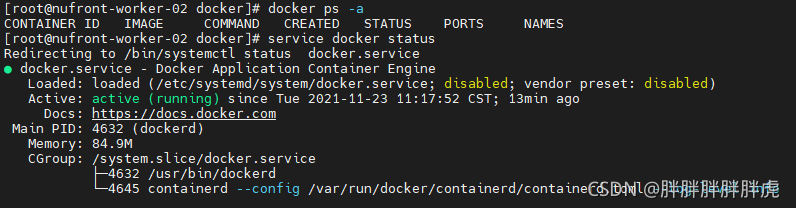
Docker can be started again…
[root@nufront-worker-02 docker]# docker info
Client:
 Context:    default
 Debug Mode: false
 Plugins:
  app: Docker App (Docker Inc., v0.9.1-beta3)
  buildx: Build with BuildKit (Docker Inc., v0.5.1-docker)
  scan: Docker Scan (Docker Inc., v0.8.0)

Server:
 Containers: 0
  Running: 0
  Paused: 0
  Stopped: 0
 Images: 0
 Server Version: 20.10.7
 Storage Driver: devicemapper ###
  Pool Name: docker-253:0-812466384-pool
  Pool Blocksize: 65.54kB
  Base Device Size: 10.74GB
  Backing Filesystem: xfs
  Udev Sync Supported: true
  Data file: /dev/loop0
  Metadata file: /dev/loop1
  Data loop file: /var/lib/docker/devicemapper/devicemapper/data
  Metadata loop file: /var/lib/docker/devicemapper/devicemapper/metadata
  Data Space Used: 11.8MB
  Data Space Total: 107.4GB
  Data Space Available: 107.4GB
  Metadata Space Used: 581.6kB
  Metadata Space Total: 2.147GB
  Metadata Space Available: 2.147GB
  Thin Pool Minimum Free Space: 10.74GB
  Deferred Removal Enabled: true
  Deferred Deletion Enabled: true
  Deferred Deleted Device Count: 0
  Library Version: 1.02.107-RHEL7 (2015-10-14)
 Logging Driver: json-file
 Cgroup Driver: systemd
 Cgroup Version: 1
 Plugins:
...
[Solved] Error:java: Compilation failed: internal java compiler error 解决办法
Problem: Error:java: Compilation failed: internal java compiler error Solution
Solution: Inconsistent settings in the JDK development tools.
1, check the project jdk (Ctrl+Alt+shift+S)
File ->Project Structure->Project Settings ->Project
2、View the jdk of the project (Ctrl+Alt+shift+S)
File ->Project Structure->Project Settings -> Modules -> (need to modify the name of the project) -> Sources ->
3、View Java configuration in idea
File ->Setting ->Build,Execution,Deployment -> Compiler -> Java Compiler
If the above three steps still fail
Clear IDEA cache Restart IDEA
File->Invalidate Caches/Restart
[Solved] curl error while loading shared libraries libcrypto.so.1.0.0
Curl: error while loading shared libraries: libcrypto.So.1.0.0 solution
1 problem description
When executing curl command, the following error message is reported:
curl: error while loading shared libraries: libcrypto.so.1.0.0: cannot open shared object file: No such file or directory

Error message:
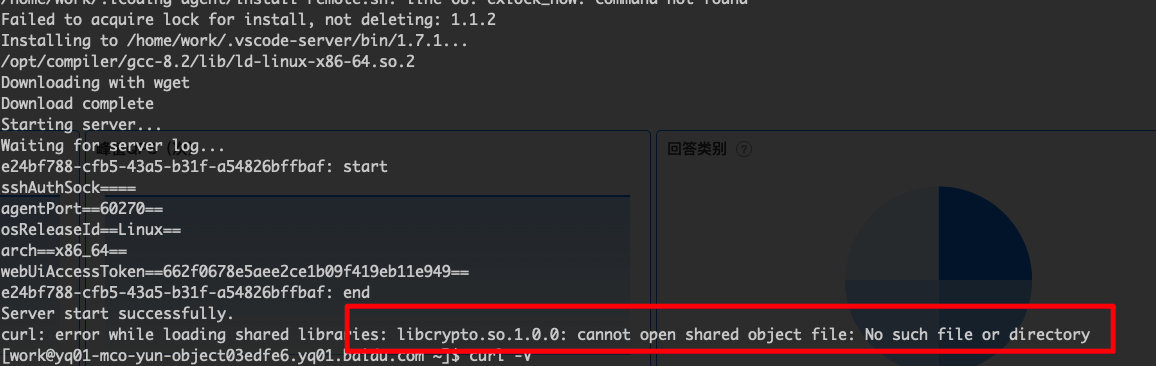
Find various schemes on the Internet, mainly as follows:
1. Reinstall curl 2. Update libcrypto
All the methods have been tried, but they have not been solved.
Finally, the solution is as follows: in curl command, establish target soft link.
The specific scheme is as follows:
2 solution
Basic idea.
Looking in the development machine, inside libcrypto.so.1.0.0 is already installed. According to the error report, this is because the curl command cannot find the dependency libcrypto.so.1.0.0
1. check the dependencies of curl command.
2. Find the missing shared library on the machine
3. Create a soft connection
2.1 using the LDD command to view dependencies
The LDD command is used to view the shared library required for the command to run. It is often used to solve some problems that the command cannot run due to the lack of a library file.
# View the absolute path of the command
which curl
# ~/anaconda3/bin/curl
Find the corresponding dependency:
ldd ~/anaconda3/bin/curl
	linux-vdso.so.1 =>  (0x00007fff666dd000)
	libcurl.so.4 => /home/work/anaconda3/bin/../lib/libcurl.so.4 (0x00007fd47e181000)
	librt.so.1 => /lib64/librt.so.1 (0x00007fd47dde2000)
	libz.so.1 => /home/work/anaconda3/bin/../lib/libz.so.1 (0x00007fd47dbcb000)
	libc.so.6 => /lib64/libc.so.6 (0x00007fd47d80a000)
	libssh2.so.1 => /home/work/anaconda3/bin/../lib/./libssh2.so.1 (0x00007fd47d5db000)
	libssl.so.1.1 => /home/work/anaconda3/bin/../lib/./libssl.so.1.1 (0x00007fd47e0da000)
	libcrypto.so.1.1 => /home/work/anaconda3/bin/../lib/./libcrypto.so.1.1 (0x00007fd47d32d000)
	libgssapi_krb5.so.2 => /home/work/anaconda3/bin/../lib/./libgssapi_krb5.so.2 (0x00007fd47e08a000)
	libkrb5.so.3 => /home/work/anaconda3/bin/../lib/./libkrb5.so.3 (0x00007fd47d251000)
	libk5crypto.so.3 => /home/work/anaconda3/bin/../lib/./libk5crypto.so.3 (0x00007fd47e06b000)
	libcom_err.so.3 => /home/work/anaconda3/bin/../lib/./libcom_err.so.3 (0x00007fd47e064000)
	libpthread.so.0 => /lib64/libpthread.so.0 (0x00007fd47d035000)
	/lib64/ld-linux-x86-64.so.2 (0x00007fd47dfea000)
	# See here that the message does not depend on
	libcrypto.so.1.0.0 (0x00007fd47cbf5000)
	libdl.so.2 => /lib64/libdl.so.2 (0x00007fd47c9f1000)
	libkrb5support.so.0 => /home/work/anaconda3/bin/../lib/././libkrb5support.so.0 (0x00007fd47e053000)
	libresolv.so.2 => /lib64/libresolv.so.2 (0x00007fd47c7d7000)
Then establish dependencies and soft links
2.2 find the missing shared library on the machine
Many shared libraries and other software may be installed automatically during installation, so you can directly find the shared libraries installed by other software and use them
# Find the missing shared library information
find ~ -name libcrypto.so.1.0.0

# The returned results are as follows.
# /home/work/anaconda3/libcrypto.so.1.0.0
2.3 establishing soft connection
Soft connect the found shared library to the Lib directory of the software installation:
# View the software installation path
which curl
# The result is as follows, the software was installed using anaconda
# ~/anaconda3/bin/curl

# Create a soft connection
ln -s /home/work/anaconda3/libcrypto.so.1.0.0 ~/anaconda3/bin/../lib/libcrypto.so.1.0.0
Note: the
/home/work/anaconda3/libcrypto. So. 1.0.0directory is the information found throughFind ~ - name libcrypto. So. 1.0.0.The
~/anaconda3/bin /../lib/directory is actually thebindirectory under thecurldirectory.
Check whether the soft link is established successfully
ldd ~/anaconda3/bin/curl
	linux-vdso.so.1 =>  (0x00007fffa19e9000)
	libcurl.so.4 => /home/work/anaconda3/bin/../lib/libcurl.so.4 (0x00007fa7c5d37000)
	librt.so.1 => /lib64/librt.so.1 (0x00007fa7c5998000)
	libz.so.1 => /home/work/anaconda3/bin/../lib/libz.so.1 (0x00007fa7c5781000)
	libc.so.6 => /lib64/libc.so.6 (0x00007fa7c53c0000)
	libssh2.so.1 => /home/work/anaconda3/bin/../lib/./libssh2.so.1 (0x00007fa7c5191000)
	libssl.so.1.1 => /home/work/anaconda3/bin/../lib/./libssl.so.1.1 (0x00007fa7c5c90000)
	libcrypto.so.1.1 => /home/work/anaconda3/bin/../lib/./libcrypto.so.1.1 (0x00007fa7c4ee3000)
	libgssapi_krb5.so.2 => /home/work/anaconda3/bin/../lib/./libgssapi_krb5.so.2 (0x00007fa7c5c40000)
	libkrb5.so.3 => /home/work/anaconda3/bin/../lib/./libkrb5.so.3 (0x00007fa7c4e07000)
	libk5crypto.so.3 => /home/work/anaconda3/bin/../lib/./libk5crypto.so.3 (0x00007fa7c5c21000)
	libcom_err.so.3 => /home/work/anaconda3/bin/../lib/./libcom_err.so.3 (0x00007fa7c5c1a000)
	libpthread.so.0 => /lib64/libpthread.so.0 (0x00007fa7c4beb000)
	/lib64/ld-linux-x86-64.so.2 (0x00007fa7c5ba0000)
	# Check for successful establishment
	libcrypto.so.1.0.0 => /home/work/anaconda3/bin/../lib/././libcrypto.so.1.0.0 (0x00007fa7c47ab000)
	libdl.so.2 => /lib64/libdl.so.2 (0x00007fa7c45a7000)
	libkrb5support.so.0 => /home/work/anaconda3/bin/../lib/././libkrb5support.so.0 (0x00007fa7c5c0a000)
	libresolv.so.2 => /lib64/libresolv.so.2 (0x00007fa7c438d000)
Spark Error: java.lang.StackOverflowError [How to Solve]
Spark broadcast class message java.lang.stackoverflowerror
Background: a 167m tree class needs to be broadcast, so the stack memory is not enough
solution: add in spark submit: (at present, due to the small data level, it runs in local mode)
spark-submit \$
--class bp_beauty_op.beauty_op \$
--master local[*] \$
--driver-java-options "-Xss256m" \$
test-1.0-SNAPSHOT.jar
Or add spark.Driver.Extrajavaoptions = “- xss256m”
in spark-defaults.conf to test the running.
[Solved] Mac Install homebrew Error: error: Not a valid ref: refs/remotes/origin/master
The MAC reports the following error after installing homeberw:
Press RETURN to continue or any other key to abort
==> /usr/bin/sudo /usr/sbin/chown -R aa:admin /opt/homebrew
==> Downloading and installing Homebrew...
HEAD is now at 8de10a05b Merge pull request #10472 from MikeMcQuaid/new-issue-templates
error: Not a valid ref: refs/remotes/origin/master
fatal: ambiguous argument 'refs/remotes/origin/master': unknown revision or path not in the working tree.
Use '--' to separate paths from revisions, like this:
'git [...] -- [...]'
fatal: the remote end hung up unexpectedly
fatal: early EOF
fatal: index-pack failed
Error: Fetching /opt/homebrew/Library/Taps/homebrew/homebrew-core failed!
fatal: invalid upstream 'origin/master'
Failed during: /opt/homebrew/bin/brew update --force --quiet
The solution is as follows:
Uninstall homebrew
/bin/bash -c "$(curl -fsSL https://raw.githubusercontent.com/Homebrew/install/HEAD/uninstall.sh)"
Set git compression:
git config --global core.compression 0
Set git buffer size:
git config --global http.postBuffer 1048576000
Reinstall brew
/bin/bash -c "$(curl -fsSL https://raw.githubusercontent.com/Homebrew/install/master/install.sh)"