Author Archives: Robins

[Solved] Nginx Certificate Fill Path Error: SSL: error:0200107B:system library:fopen:Unknown error:fopen

When nginx configures the SSL certificate, it starts with an error. The certificate file cannot be found. The error log is as follows:

2021/11/24 15:52:19 [emerg] 4124#3800: cannot load certificate "E:
ginx-1.21.4\ssl\6667030_xxxx.pem": BIO_new_file() failed (SSL: error:0200107B:system library:fopen:Unknown error:fopen('E:
ginx-1.21.4\ssl\6667030_xxxxxx.pem','r') error:2006D002:BIO routines:BIO_new_file:system lib)
2021/11/24 15:53:33 [emerg] 1832#4972: cannot load certificate "E:
ginx-1.21.4\ssl\6667030_xxxx.pem": BIO_new_file() failed (SSL: error:0200107B:system library:fopen:Unknown error:fopen('E:
ginx-1.21.4\ssl\6667030_xxxx.pem','r') error:2006D002:BIO routines:BIO_new_file:system lib)

Solution:

Change the address path of disk e to “\\”, which was written as “ssl_certificate”       E: “\nginx-1.21.4\SSL\6667030_xxxx.PEM”, it keeps reporting errors

 server {
        listen       443 ssl;
        server_name  xxxx;

        ssl_certificate      E:\\nginx-1.21.4\ssl\6667030_xxxx.pem;
        ssl_certificate_key  E:\\nginx-1.21.4\ssl\6667030_xxxx.key;

        ssl_session_cache    shared:SSL:1m;
        ssl_session_timeout  5m;

        ssl_ciphers  HIGH:!aNULL:!MD5;
        ssl_prefer_server_ciphers  on;


		location /api/ {
			client_max_body_size 1000m;
			alias   E:\dev\Server\api/;
            index  index.html index.htm;
        }
		
    }

[Solved] HiveSQL Error: “Error while processing statement: FAILED: Execution Error, return code 2“

Project scenario:

tip: briefly describe the project background here:
when writing hivesql today, some codes are executed, and the same errors are reported after execution


Problem Description:

tip: problems encountered in the project are described here: </ font>

Error while processing statement: FAILED: Execution Error, return code 2 from org.apache.hadoop.hive

Solution:

tip: fill in the specific solution to the problem here:
later, it was found that this is an MR execution error. The reason is that the program here needs to go through Mr, and I manually turned on the local mode. Just turn it off now. Slow down and slow down

set hive.exec.mode.local.auto=false;

[Solved] Windows10 Start Linux Subsystem Error: WslRegisterDistribution failed with error: 0x80370102

Question

Error installing Carla simulator installation failed 0x80070005 – access denied
error setup failed 0x80070005 – access is denied

One or more problems caused the setup to fail. Please fix the problem and try setting again. For more information, see the log file
installation failed

0x80070005 - Access is denied.

Solution:

Scenario option 1: run the installation file as an administrator
right click the installation file and select run as administrator. You need to work with your IT team to do this
option 2: temporarily disable anti-virus software
work with your IT team to temporarily disable any anti-virus software or malware running on your computer, and then try installing the software again.

reason

Antivirus or antimalware software prevents the installation of Carla simulator
additional information

e000: Error 0x80070005: Failed to write run key value. 
e000: Error 0x80070005: Failed to update resume mode. 
e000: Error 0x80070005: Failed to begin registration session. 
e000: Error 0x80070005: Failed to begin registration session in per-machine process. 
e000: Error 0x80070005: Failed to register bundle. 
i399: Apply complete, result: 0x80070005, restart: None, ba requested restart: No 

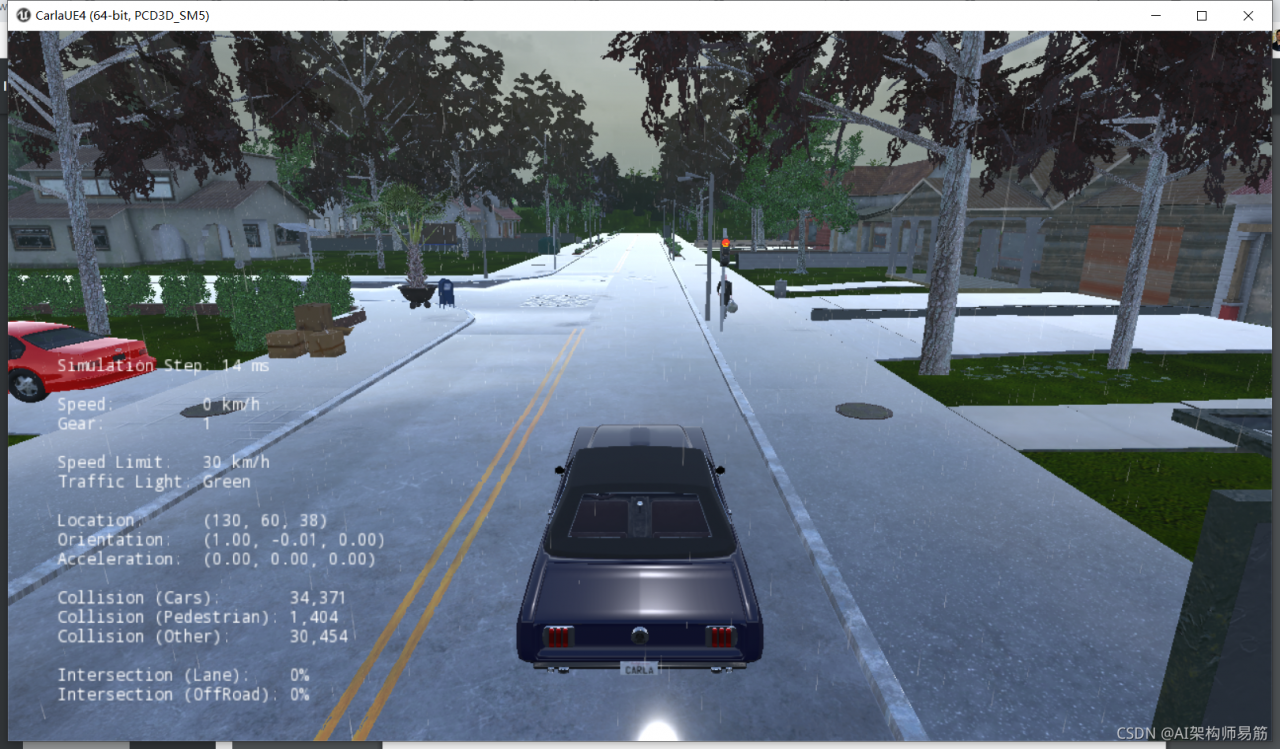
Carla emulator running interface

#Reference:
https://kb.tableau.com/articles/issue/error-setup-failed-0x80070005-access-is-denied-after-upgrading

[Solved] win32diskimager Error: An error occured when attempting to XXX, Error 5: Access is Denied

Problem Description:

today, you need to format the SD card as FAT32, and then write an img file to it. Use the card reader to connect the SD card to the host, and then use win32discriminator software to write an error to the specified drive letter: an error occurred when attempting to XXX, error 5: access is denied.

Problem-solving:

1) Download SD memory card formatter (official website)
2) select overwirte format to format
3) use win32diskimager to write again. Success!

I think some people on the Internet say that the card reader is broken. Change a card reader. You can try this method first. If not, replace the card reader.

[Solved] azkaban Upload zip Error :Error Chunking during uploading files to db


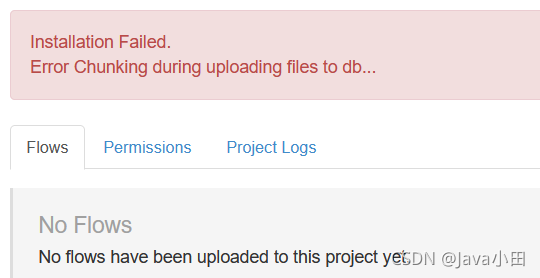
The page reported an error when uploading
Installation Failed
Error Chunking during uploading files to db
View web-server log:

2021/11/26 11:20:38.253 +0800 INFO [ProjectManagerServlet] [Azkaban] Installation Failed.
azkaban.project.ProjectManagerException: Error Chunking during uploading files to db...
	at azkaban.project.JdbcProjectImpl.uploadFileInChunks(JdbcProjectImpl.java:383)
	at azkaban.project.JdbcProjectImpl.lambda$uploadProjectFile$1(JdbcProjectImpl.java:226)
	at azkaban.db.DatabaseOperator.transaction(DatabaseOperator.java:95)
	at azkaban.project.JdbcProjectImpl.uploadProjectFile(JdbcProjectImpl.java:234)
	at azkaban.storage.DatabaseStorage.putProject(DatabaseStorage.java:58)
	at azkaban.storage.ProjectStorageManager.uploadProject(ProjectStorageManager.java:106)
	at azkaban.project.AzkabanProjectLoader.persistProject(AzkabanProjectLoader.java:221)
	at azkaban.project.AzkabanProjectLoader.uploadProject(AzkabanProjectLoader.java:146)
	at azkaban.project.ProjectManager.uploadProject(ProjectManager.java:507)
	at azkaban.webapp.servlet.ProjectManagerServlet.ajaxHandleUpload(ProjectManagerServlet.java:1828)
	at azkaban.webapp.servlet.ProjectManagerServlet.handleUpload(ProjectManagerServlet.java:2001)
	at azkaban.webapp.servlet.ProjectManagerServlet.handleMultiformPost(ProjectManagerServlet.java:211)
	at azkaban.webapp.servlet.LoginAbstractAzkabanServlet.doPost(LoginAbstractAzkabanServlet.java:308)
	at javax.servlet.http.HttpServlet.service(HttpServlet.java:688)
	at javax.servlet.http.HttpServlet.service(HttpServlet.java:770)
	at org.mortbay.jetty.servlet.ServletHolder.handle(ServletHolder.java:511)
	at org.mortbay.jetty.servlet.ServletHandler.handle(ServletHandler.java:401)
	at org.mortbay.jetty.servlet.SessionHandler.handle(SessionHandler.java:182)
	at org.mortbay.jetty.handler.ContextHandler.handle(ContextHandler.java:766)
	at org.mortbay.jetty.handler.HandlerWrapper.handle(HandlerWrapper.java:152)
	at org.mortbay.jetty.Server.handle(Server.java:326)
	at org.mortbay.jetty.HttpConnection.handleRequest(HttpConnection.java:542)
	at org.mortbay.jetty.HttpConnection$RequestHandler.content(HttpConnection.java:945)
	at org.mortbay.jetty.HttpParser.parseNext(HttpParser.java:756)
	at org.mortbay.jetty.HttpParser.parseAvailable(HttpParser.java:212)
	at org.mortbay.jetty.HttpConnection.handle(HttpConnection.java:404)
	at org.mortbay.jetty.bio.SocketConnector$Connection.run(SocketConnector.java:228)
	at org.mortbay.thread.QueuedThreadPool$PoolThread.run(QueuedThreadPool.java:582)

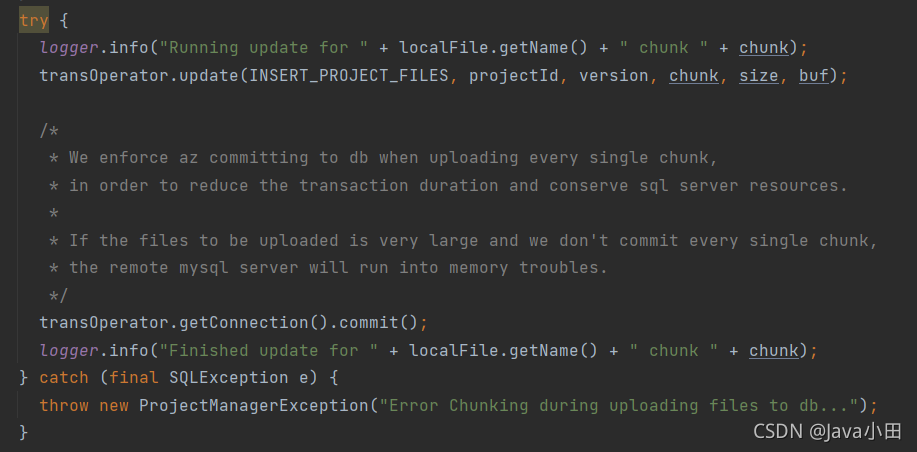
Can’t see what the problem is, then go to the code:

good guy, give me the exception directly
you can only roughly see that an error is reported when executing SQL
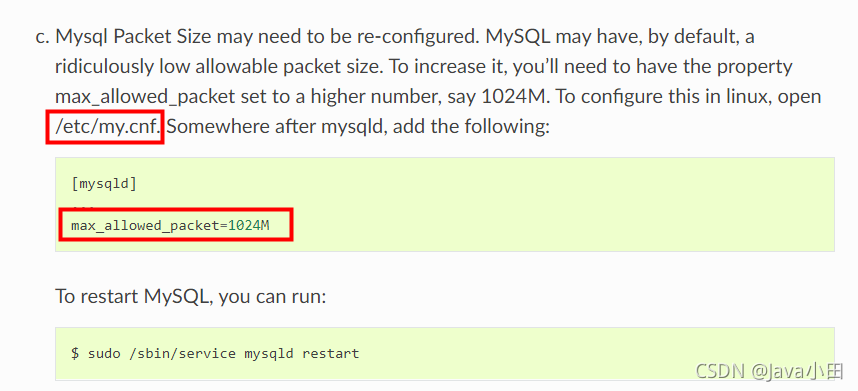
although I don’t know what the specific error is, I guess it’s the problem of database settings, because Azkaban uploads in other environments are normal.

View official documents: https://azkaban.readthedocs.io/en/latest/getStarted.html#database-Setup

the database settings are indeed missing. In addition, this problem can be solved

proxy error: could not proxy request [How to Solve]

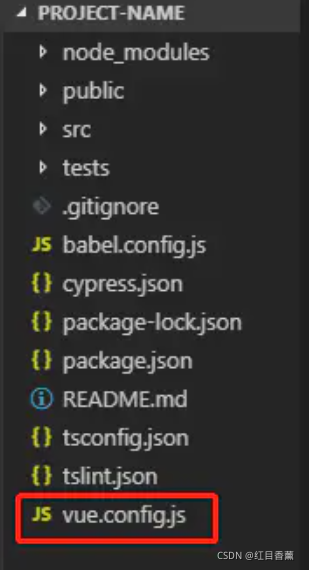
Find the vue.config.js file and change the address:

devServer: {
  proxy: {
    '/api': {
      target: "http://localhost:Port number own address", //This replacement is the local address
      changeOrigin: true,
      logLevel: "debug"
    }
  }
}

Note:

vue.config.js   Is an optional configuration file if the project’s (and   package.json   If this file exists in the root directory of the same level, it will be deleted  @ vue/cli-service   Automatic loading. You can also use   package.json   Medium   vue   Field, but note that this writing method requires you to strictly follow the JSON format.

Create in root directory: vue.config.js

[Solved] Mybatis Error: attempting to get column ‘XX’ from result set

Summary of common causes
1. The field name in the encapsulation set is inconsistent with the database column name. Check whether it is consistent and whether there is this field
2. Using Lombok or other operations results in no parameter free structure or no get/set
3. Use Druid, because the version problem leads to exception handling for the time type localdatetime.class; This solution: do not use druid or use other database connection sources for replacement or Druid version upgrade.
Let’s talk about the source of this exception first:
getResult in basetypehandler.java

  public T getResult(ResultSet rs, String columnName) throws SQLException {
    try {
      // Map database fields and entity class attributes in the result set
      return getNullableResult(rs, columnName);
    } catch (Exception e) {
      throw new ResultMapException("Error attempting to get column '" + columnName + "' from result set.  Cause: " + e, e);
    }
  }

There will be exceptions before this exception, that is, the exception will be caused by many reasons, which means there will be many solutions for the exception. Here is the processing and positioning process of the third exception handling scheme.
problem scenario description
Query the qualified course record information by date. The time field in the entity class is starttime (Format: yyyy MM DD HH: mm: SS), and the field in the database is start_ Time, field type datetime.
Stack exception information (some stack information is deleted due to length reason):

org.mybatis.spring.MyBatisSystemException: nested exception is org.apache.ibatis.executor.result.ResultMapException: Error attempting to get column 'start_time' from result set.  Cause: org.apache.ibatis.executor.result.ResultMapException: Error attempting to get column 'start_time' from result set.  Cause: java.sql.SQLFeatureNotSupportedException
	at org.apache.ibatis.binding.MapperMethod.executeForMany(MapperMethod.java:147)
Caused by: org.apache.ibatis.executor.result.ResultMapException: Error attempting to get column 'start_time' from result set.  Cause: org.apache.ibatis.executor.result.ResultMapException: Error attempting to get column 'start_time' from result set.  Cause: java.sql.SQLFeatureNotSupportedException
	at org.apache.ibatis.type.BaseTypeHandler.getResult(BaseTypeHandler.java:87)
	... 73 more
Caused by: org.apache.ibatis.executor.result.ResultMapException: Error attempting to get column 'start_time' from result set.  Cause: java.sql.SQLFeatureNotSupportedException
	at org.apache.ibatis.type.BaseTypeHandler.getResult(BaseTypeHandler.java:85)
	... 99 more
Caused by: java.sql.SQLFeatureNotSupportedException
	at com.alibaba.druid.pool.DruidPooledResultSet.getObject(DruidPooledResultSet.java:1771)
	at sun.reflect.NativeMethodAccessorImpl.invoke0(Native Method)
	at sun.reflect.NativeMethodAccessorImpl.invoke(NativeMethodAccessorImpl.java:62)
	at sun.reflect.DelegatingMethodAccessorImpl.invoke(DelegatingMethodAccessorImpl.java:43)
	at java.lang.reflect.Method.invoke(Method.java:498)
	at org.apache.ibatis.logging.jdbc.ResultSetLogger.invoke(ResultSetLogger.java:69)
	at com.sun.proxy.$Proxy190.getObject(Unknown Source)
	at org.apache.ibatis.type.LocalDateTimeTypeHandler.getNullableResult(LocalDateTimeTypeHandler.java:38)
	at org.apache.ibatis.type.LocalDateTimeTypeHandler.getNullableResult(LocalDateTimeTypeHandler.java:28)
	at org.apache.ibatis.type.BaseTypeHandler.getResult(BaseTypeHandler.java:85)
	... 101 more

Look at the stack information from the beginning. Obviously, it is the exception thrown by getnullableresult in localdatetimetypehandler.java.The earliest exception information: java.sql.sqlfeaturenotsupportedexception.
first look at getnullableresult in localdatetimetypehandler.java

  public LocalDateTime getNullableResult(ResultSet rs, String columnName) throws SQLException {
    return rs.getObject(columnName, LocalDateTime.class);
  }

 rs.getobject has many implementation methods. Because the Druid database connection source is used (the original version is 1.0.28), you can directly locate GetObject in druidpooledresultset.java:

 public <T> T getObject(String columnLabel, Class<T> type) throws SQLException {
        throw new SQLFeatureNotSupportedException();
    }

Looking through the source code according to druid1.0.28, it is found that localdatetime.Class about date type processing instructions are not supported, and sqlfeaturenotsupportedexception is thrown directly. Modify the Druid version in pom.xml, upgrade to 1.2.1, and then take a look at the implementation of this version:

  public <T> T getObject(String columnLabel, Class<T> type) throws SQLException {
        try {
            return this.rs.getObject(columnLabel, type);
        } catch (Throwable var4) {
            throw this.checkException(var4);
        }
    }

Note: the higher version supports localdatetime.Class processing. It is normal after retesting!

[Solved] Error: EPERM: operation not permitted (Permissions issue)

NPM download dependency error

npm ERR! code EPERM
npm ERR! syscall unlink
npm ERR! path E:\code\20200212\web\cbos2.0-wenlv-wx-cli\node_modules\.staging\caniuse-lite-70323fe6\data\features\document-scrollingelement.js
npm ERR! errno -4048
npm ERR! Error: EPERM: operation not permitted, unlink 'E:\code\20200212\web\cbos2.0-wenlv-wx-cli\node_modules\.staging\caniuse-lite-70323fe6\data\features\document-scrollingelement.js'
npm ERR!  [OperationalError: EPERM: operation not permitted, unlink 'E:\code\20200212\web\cbos2.0-wenlv-wx-cli\node_modules\.staging\caniuse-lite-70323fe6\data\features\document-scrollingelement.js'] {
npm ERR!   cause: [Error: EPERM: operation not permitted, unlink 'E:\code\20200212\web\cbos2.0-wenlv-wx-cli\node_modules\.staging\caniuse-lite-70323fe6\data\features\document-scrollingelement.js'] {
npm ERR!     errno: -4048,
npm ERR!     code: 'EPERM',
npm ERR!     syscall: 'unlink',
npm ERR!     path: 'E:\\code\\20200212\\web\\cbos2.0-wenlv-wx-cli\\node_modules\\.staging\\caniuse-lite-70323fe6\\data\\features\\document-scrollingelement.js'
npm ERR!   },
npm ERR!   errno: -4048,
npm ERR!   code: 'EPERM',
npm ERR!   syscall: 'unlink',
npm ERR!   path: 'E:\\code\\20200212\\web\\cbos2.0-wenlv-wx-cli\\node_modules\\.staging\\caniuse-lite-70323fe6\\data\\features\\document-scrollingelement.js',
npm ERR!   parent: 'cbos2.0-wenlv-wx-cli'
npm ERR! }
npm ERR!
npm ERR! The operation was rejected by your operating system.
npm ERR! It's possible that the file was already in use (by a text editor or antivirus),
npm ERR! or that you lack permissions to access it.
npm ERR!
npm ERR! If you believe this might be a permissions issue, please double-check the
npm ERR! permissions of the file and its containing directories, or try running
npm ERR! the command again as root/Administrator.

npm ERR! A complete log of this run can be found in:
npm ERR!     D:\nodejs\node_cache\_logs\2021-11-25T08_55_03_606Z-debug.log

NPM installation has reported this all the time before, thinking that the permissions are really insufficient. I feel a little strange. It’s useless to execute with administrator permissions. However, I checked later and thought it was a cache problem. Just clean up the cache without administrator permissions. But it doesn’t work (see below)

Method 1

Npmrc files need to be deleted.

Stress: it is not the npmrc file under the NPM module in the nodejs installation directory, but the. Npmrc file under C: \ users {account} \. Delete the dependency and download it again

Method 2

Or you can clean it directly with the command. On the console, enter:

npm cache clean --force

I think it’s because I downloaded cnpm before, which leads to permission problems. In the future, the problem will be solved by installing the package with cmpn

Unknown SSL protocol error in connection to xxx:443 [How to Solve]

1. Unknown SSL protocol error in connection to XXX: 443

Unknown SSL protocol error in connection to XXX: 443 occurs when Git is used to download from a remote location..

Method 1:

(example):

Set up proxy server:

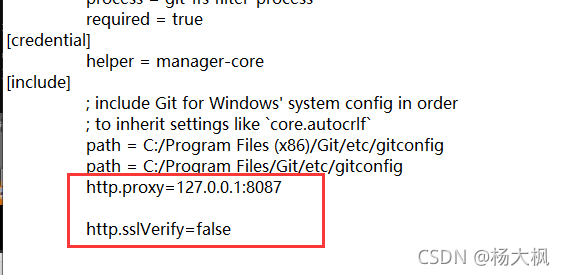
: Add in .gitconfig

http.proxy=127.0.0.1:8087

http.sslVerify=false

Method 2:

(example):

Type directly on the command line

git config --global http.proxy 127.0.0.1:8087

git config --global http.sslVerify false

[Solved] Error creating bean with name ‘accountService‘: Unsatisfied dependency expressed through field

Error creating bean with name ‘accountService’: Unsatisfied dependency expressed through field ‘accountDao’;

Spring integration mybatis error:

Warning: Exception encountered during context initialization - cancelling refresh attempt: org.springframework.beans.factory.UnsatisfiedDependencyException: Error creating bean with name 'accountService': Unsatisfied dependency expressed through field 'accountDao'; nested exception is org.springframework.beans.factory.BeanCreationException: Error creating bean with name 'accountDao' defined in file [D:\myJava\MyProject\springSSM_day06\target\classes\com\itheima\dao\AccountDao.class]: Cannot resolve reference to bean 'sqlSessionFactory' while setting bean property 'sqlSessionFactory'; nested exception is org.springframework.beans.factory.BeanCreationException: Error creating bean with name 'sqlSessionFactory' defined in class path resource [bean.xml]: Initialization of bean failed; nested exception is org.springframework.beans.ConversionNotSupportedException: Failed to convert property value of type 'java.lang.String' to required type 'javax.sql.DataSource' for property 'dataSource'; nested exception is java.lang.IllegalStateException: Cannot convert value of type 'java.lang.String' to required type 'javax.sql.DataSource' for property 'dataSource': no matching editors or conversion strategy found
Exception in thread "main" org.springframework.beans.factory.UnsatisfiedDependencyException: Error creating bean with name 'accountService': Unsatisfied dependency expressed through field 'accountDao'; nested exception is org.springframework.beans.factory.BeanCreationException: Error creating bean with name 'accountDao' defined in file [D:\myJava\MyProject\springSSM_day06\target\classes\com\itheima\dao\AccountDao.class]: Cannot resolve reference to bean 'sqlSessionFactory' while setting bean property 'sqlSessionFactory'; nested exception is org.springframework.beans.factory.BeanCreationException: Error creating bean with name 'sqlSessionFactory' defined in class path resource [bean.xml]: Initialization of bean failed; nested exception is org.springframework.beans.ConversionNotSupportedException: Failed to convert property value of type 'java.lang.String' to required type 'javax.sql.DataSource' for property 'dataSource'; nested exception is java.lang.IllegalStateException: Cannot convert value of type 'java.lang.String' to required type 'javax.sql.DataSource' for property 'dataSource': no matching editors or conversion strategy found
	at org.springframework.beans.factory.annotation.AutowiredAnnotationBeanPostProcessor$AutowiredFieldElement.inject(AutowiredAnnotationBeanPostProcessor.java:639)

Error code location: value = datasource

<bean id="dataSource" class="com.alibaba.druid.pool.DruidDataSource">
        <property name="driverClassName" value="${jdbc.driver}"></property>
        <property name="url" value="${jdbc.url}"></property>
        <property name="username" value="${jdbc.username}"></property>
        <property name="password" value="${jdbc.password}"></property>
    </bean>


<bean id="sqlSessionFactory" class="org.mybatis.spring.SqlSessionFactoryBean">
        <property name="dataSource" value="dataSource"></property>
        <property name="typeAliasesPackage" value="com.itheima.domain"></property>
    </bean>

Reason: because we use the factory to create Dao objects, we need to get connections from the data connection pool objects, so we can’t use value binding
value for binding strings
ref for binding objects

The correct is as follows: use ref to get the object

<bean id="sqlSessionFactory" class="org.mybatis.spring.SqlSessionFactoryBean">
        <property name="dataSource" ref="dataSource"></property>
        <property name="typeAliasesPackage" value="com.itheima.domain"></property>
    </bean>

[Solved] PhoenixParserException:ERROR 602 (42P00): Syntax error. Missing ‘EOF’

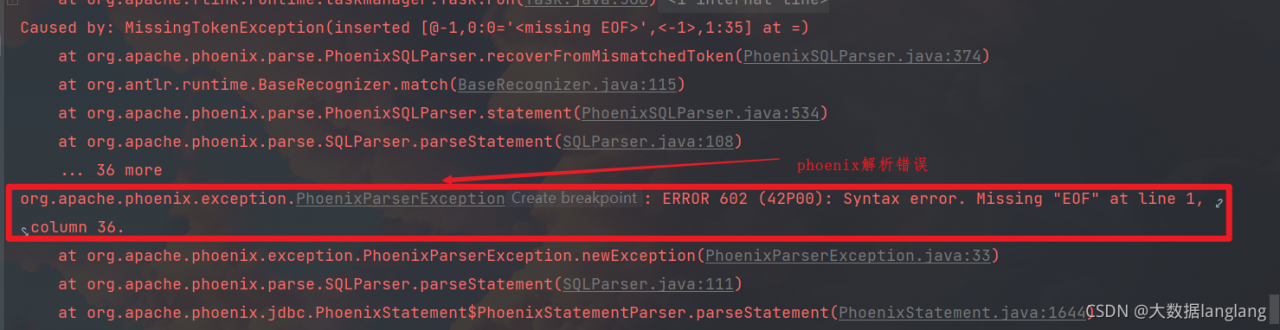
Error:
org.apache.phoenix.exception.PhoenixParserException: ERROR 602 (42P00): Syntax error. Missing “EOF” at line 1, column 36.

Codes:

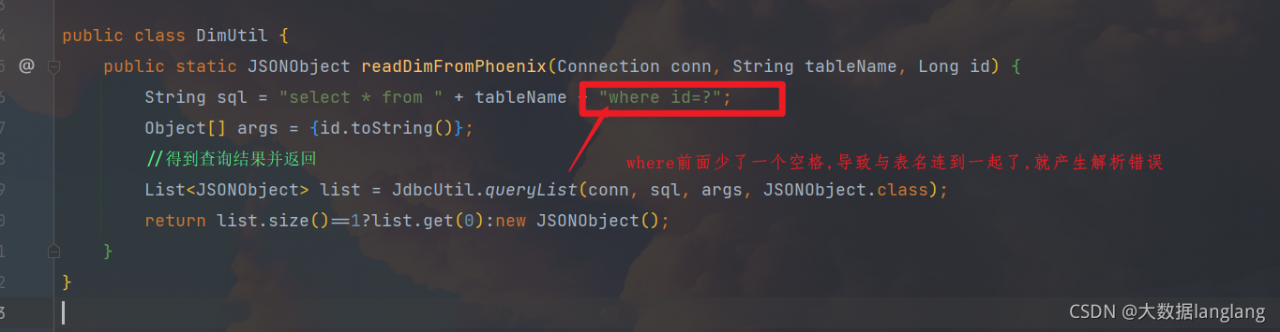
public class DimUtil {
    public static JSONObject readDimFromPhoenix(Connection conn, String tableName, Long id) {
        String sql = "select * from " + tableName + "where id=?";
        Object[] args = {id.toString()};
        //Get the query result and return
        List<JSONObject> list = JdbcUtil.queryList(conn, sql, args, JSONObject.class);
        return list.size()==1?list.get(0):new JSONObject();
    }
}

Error analysis:

Solution:

Just add a space in front of where.