Author Archives: Robins

Vscode uses /deep/ Syntax error [How to Solve]

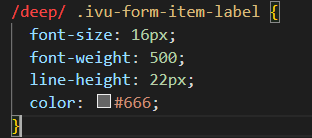
Use/deep/to report syntax errors in vscode and report them in red

When pulling other people’s items, you will encounter/deep/reporting syntax errors in vscode, but the items can run and we can’t modify them. The problem can be solved by modifying the configuration file of vscode

CSS> Lint: empty rules

then there is no red wavy line and no error is reported

How to Solve Vector Variable Error in sub thread

Once, when using an industrial camera for timing photo recognition, I encountered a situation: at that time, a sub thread was used for timing photo recognition, but after running, it was found that the error of memory overflow was reported when the sub thread was opened, resulting in the collapse of the program. After exclusion, it was found that the vector variable was used in the sub thread. After using the vector variable, the memory is not cleared, resulting in saving. You should use resize to clear the memory.

Program segment with error:

vector<Mat> channels;
split(imgRect, channels);
Mat img = channels.at(0);

Program segments that can operate normally after modification:

vector<Mat> channels;
split(imgRect, channels);
Mat img = channels.at(0);
channels.resize(0);

It is hereby recorded and shared

[Solved] Docker startup container error: permission denied””: unknown.

Docker installation is completed, an error is reported when starting the container, and the startup fails:

**

docker: Error response from daemon: OCI runtime create failed:
container_linux.go:345: starting container process caused
“process_linux.go:430: container init caused “write
/proc/self/attr/keycreate: permission denied””: unknown.

**
reason:

“Write/proc/self/attr/keycreate: permission denied” indicates that the file does not have write permission and access is denied

Solution:

Change the SELinux attribute in the config file under/etc/SELinux to the disabled
step

vi /etc/selinux/config

You can see that the attribute inside is: enforcementmandatory

Change the SELinux property to disabled

Restart docker and start the container

Datanode startup failed with an error: incompatible clusterids

Article catalog

Datanode failed to start and reported an error incompatible clusterids information error summary problem description problem cause analysis steps solution reference

Datanode startup failed with an error: incompatible clusterids

Information

Environment version: Hadoop 3.3.1 system version: CentOS 7.4 java version: Java se 1.8.0_ three hundred and one

Error report summary

java.io.IOException: Incompatible clusterIDs in /opt/module/hadoop-3.3.1/data/dfs/data: namenode clusterID = CID-aa23cfe4-9ad3-4c06-87fc-e862c8f3a722; datanode clusterID = CID-55fa9a51-7777-4ff4-87d6-4df7cf2cb8b9

Problem description

An error is reported when datanode is started. The contents of the error reported in/opt/module/hadoop-3.3.1/logs/hadoop-bordy-datanode-hadoop 102.log log are as follows:

2021-11-29 21:58:51,350 INFO org.apache.hadoop.hdfs.server.common.Storage: Using 1 threads to upgrade data directories (dfs.datanode.parallel.volumes.load.threads.num=1, dataDirs=1)
2021-11-29 21:58:51,354 INFO org.apache.hadoop.hdfs.server.common.Storage: Lock on /opt/module/hadoop-3.3.1/data/dfs/data/in_use.lock acquired by nodename 13694@hadoop102
2021-11-29 21:58:51,356 WARN org.apache.hadoop.hdfs.server.common.Storage: Failed to add storage directory [DISK]file:/opt/module/hadoop-3.3.1/data/dfs/data
java.io.IOException: Incompatible clusterIDs in /opt/module/hadoop-3.3.1/data/dfs/data: namenode clusterID = CID-aa23cfe4-9ad3-4c06-87fc-e862c8f3a722; datanode clusterID = CID-55fa9a51-7777-4ff4-87d6-4df7cf2cb8b9
        at org.apache.hadoop.hdfs.server.datanode.DataStorage.doTransition(DataStorage.java:746)
        at org.apache.hadoop.hdfs.server.datanode.DataStorage.loadStorageDirectory(DataStorage.java:296)
        at org.apache.hadoop.hdfs.server.datanode.DataStorage.loadDataStorage(DataStorage.java:409)
        at org.apache.hadoop.hdfs.server.datanode.DataStorage.addStorageLocations(DataStorage.java:389)
        at org.apache.hadoop.hdfs.server.datanode.DataStorage.recoverTransitionRead(DataStorage.java:561)
        at org.apache.hadoop.hdfs.server.datanode.DataNode.initStorage(DataNode.java:1753)
        at org.apache.hadoop.hdfs.server.datanode.DataNode.initBlockPool(DataNode.java:1689)
        at org.apache.hadoop.hdfs.server.datanode.BPOfferService.verifyAndSetNamespaceInfo(BPOfferService.java:394)
        at org.apache.hadoop.hdfs.server.datanode.BPServiceActor.connectToNNAndHandshake(BPServiceActor.java:295)
        at org.apache.hadoop.hdfs.server.datanode.BPServiceActor.run(BPServiceActor.java:854)
        at java.lang.Thread.run(Thread.java:748)
2021-11-29 21:58:51,358 ERROR org.apache.hadoop.hdfs.server.datanode.DataNode: Initialization failed for Block pool <registering> (Datanode Uuid a4eeff59-0192-4402-8278-4743158fa405) service to hadoop101/192.168.2.101:8020. Exiting.
java.io.IOException: All specified directories have failed to load.
        at org.apache.hadoop.hdfs.server.datanode.DataStorage.recoverTransitionRead(DataStorage.java:562)
        at org.apache.hadoop.hdfs.server.datanode.DataNode.initStorage(DataNode.java:1753)
        at org.apache.hadoop.hdfs.server.datanode.DataNode.initBlockPool(DataNode.java:1689)
        at org.apache.hadoop.hdfs.server.datanode.BPOfferService.verifyAndSetNamespaceInfo(BPOfferService.java:394)
        at org.apache.hadoop.hdfs.server.datanode.BPServiceActor.connectToNNAndHandshake(BPServiceActor.java:295)
        at org.apache.hadoop.hdfs.server.datanode.BPServiceActor.run(BPServiceActor.java:854)
        at java.lang.Thread.run(Thread.java:748)
2021-11-29 21:58:51,359 WARN org.apache.hadoop.hdfs.server.datanode.DataNode: Ending block pool service for: Block pool <registering> (Datanode Uuid a4eeff59-0192-4402-8278-4743158fa405) service to hadoop101/192.168.2.101:8020
2021-11-29 21:58:51,363 INFO org.apache.hadoop.hdfs.server.datanode.DataNode: Removed Block pool <registering> (Datanode Uuid a4eeff59-0192-4402-8278-4743158fa405)
2021-11-29 21:58:53,364 WARN org.apache.hadoop.hdfs.server.datanode.DataNode: Exiting Datanode
2021-11-29 21:58:53,424 INFO org.apache.hadoop.hdfs.server.datanode.DataNode: SHUTDOWN_MSG:
/************************************************************
SHUTDOWN_MSG: Shutting down DataNode at hadoop102/192.168.2.102
************************************************************/

Cause of problem

The upgrade function of Hadoop requires data node to store a permanent clusterid in its version file. When datanode starts, it will check and match the clusterid in the version file of namenode. If the two do not match, an exception of “incompatible clusterids” will appear. See the official CCR [hdfs-107]

Analysis steps

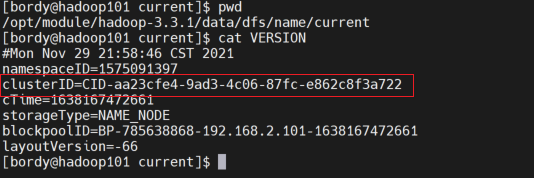
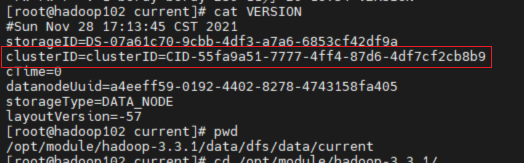
    View clusterid in the version file under /opt/module/hadoop-3.3.1/data/DFs/data/current in the datanode directory /opt/module/hadoop-3.3.1/data/DFs/name/current .
    view clusterid in the version file under /code> in the namnode directory /opt/module/hadoop-3.3.1/data/name/current . Br> found two files The clusterid in is missing and does not match. It is understood that in the HDFS architecture, each datanode needs to communicate with the namenode, and the clusterid is the unique ID of the namenode.

    terms of settlement

    Modify the clusterid value of the failed datanode to the clusterid of the primary namenode

    reference resources

    Hadoop failed to start datanode. There is a problem with clusterid - Wang Shen - blog Garden (cnblogs. Com)

[Solved] Flutter compile error: Failed to find Build Tools revision 29.0.2

Could not determine the dependencies of task ‘:app:compileDebugJavaWithJavac’.
> Failed to find Build Tools revision 29.0.2

This question:

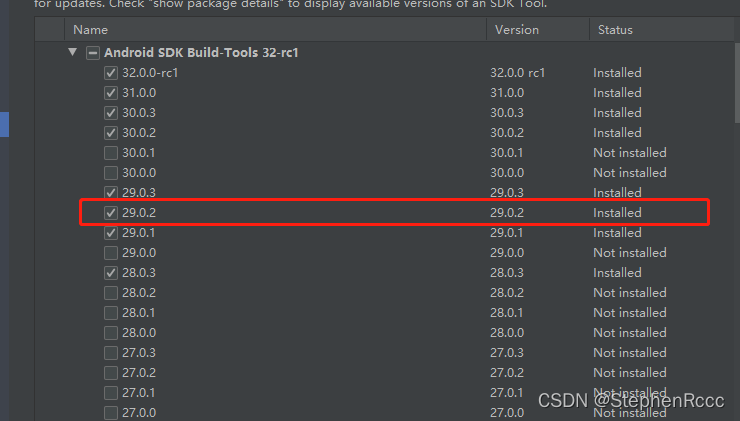
1. Is this version available in the build tools in the SDK? If not, install

2. Your sdk directory has been modified, if you modify it, you need to re-define the sdk path for flutter

flutter config --android-sdk E:/Android_SDK

The E:/Android_SDK at the back is my modified sdk path. After running, restart the compiler and you can compile normally in flutter run

[Solved] Caused by: org.springframework.beans.factory.NoSuchBeanDefinitionException: No qualifying bean of type…

Error reporting solution

Caused by: org.springframework.beans.factory.NoSuchBeanDefinitionException: No qualifying bean of type 'javax.sql.DataSource' available: expected at least 1 bean which qualifies as autowire candidate. Dependency annotations: {@org.springframework.beans.factory.annotation.Autowired(required=true)}

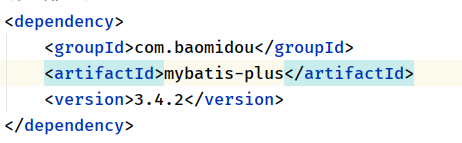
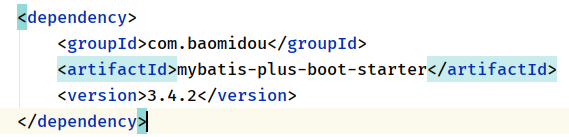
Mybats plus dependency import error

should import

Clion develops STM32, adds files and compiles with an error “no such file or directory”“

Clion adds files and compiles with an error “no such file or directory”

1.1 adding files

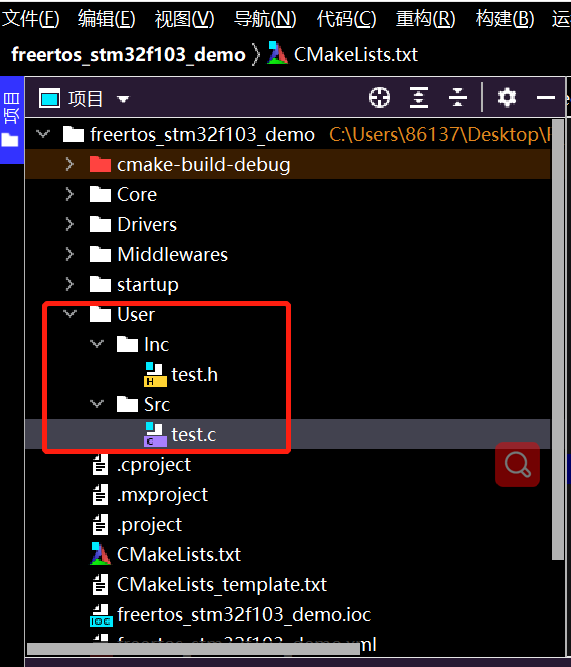
Create folders directly under the project directory and create source files and header files

After addition, errors will occur when writing. C files including. H files, which need to be modified cmakelist. TXT

Add header file

include_directories(Path1/path1 Path2/path2)

path1/path1 indicates the header file path. Different paths are separated by spaces, as shown in the following figure:

Add source file

file(GLOB_RECURSE SOURCES "directory/*.*")

directory indicates the path folder name. The source files under different paths are separated by spaces, as shown in the following figure:

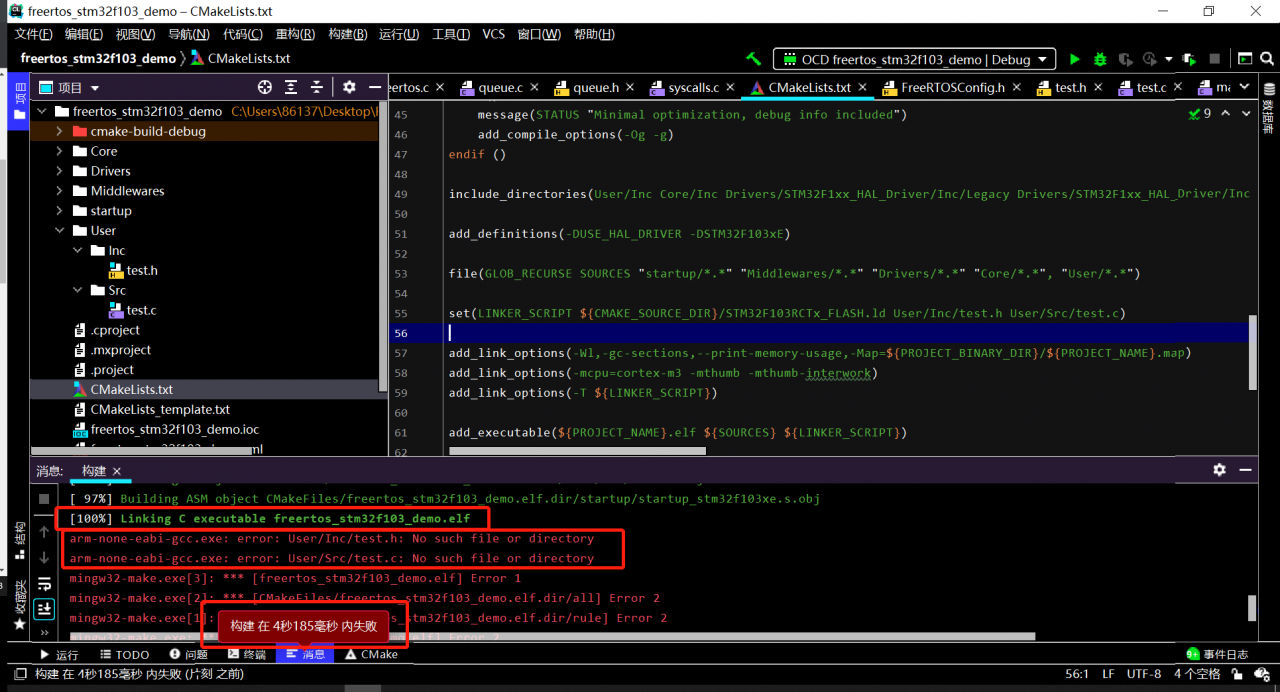
After completion, the compilation can reach 100%, but an error is reported: no such file or directory

By reference: clion 2020.2.4 cmake error reporting

When a newly added file is found, cmakelist. TXT will automatically add linker_ SCRIPT

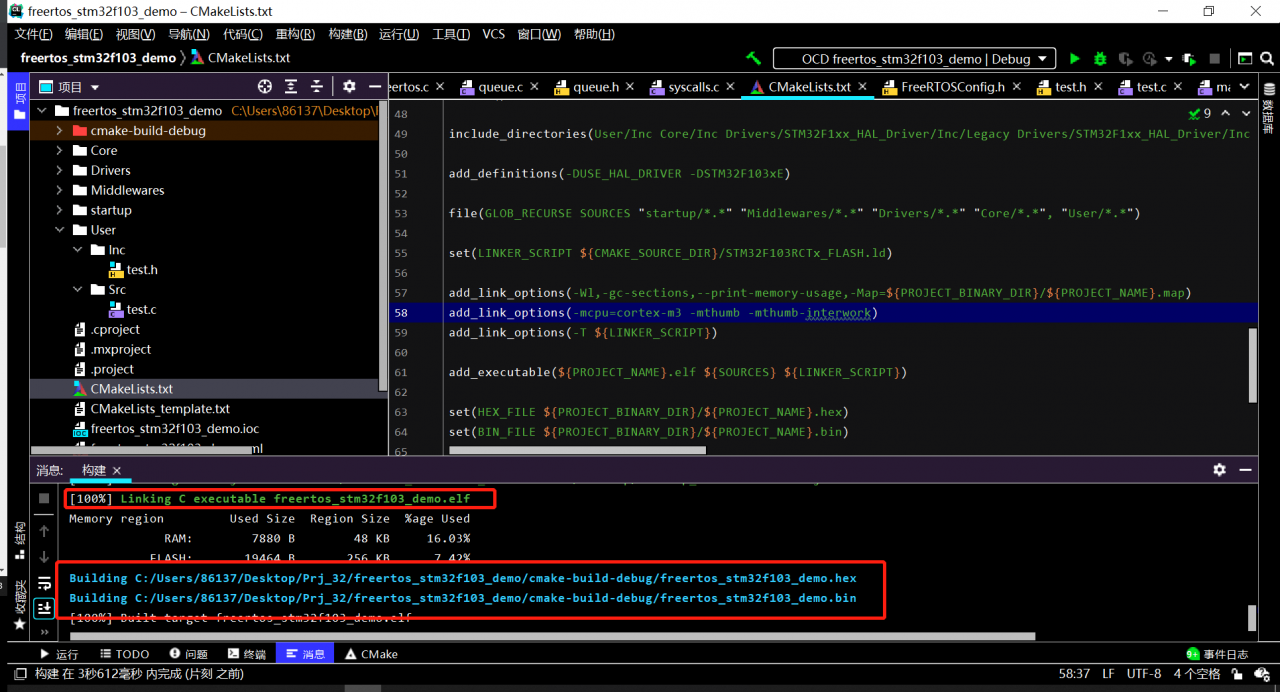
Delete the header file and source file behind it

set(LINKER_SCRIPT ${CMAKE_SOURCE_DIR}/STM32F103RFTx_FLASH.ld)

Compile again, no error will be reported and can be downloaded normally.

[Solved] Spring cloud introduces zuul dependency error

When creating the zuul project, I found that spring cloud routing does not have zuul
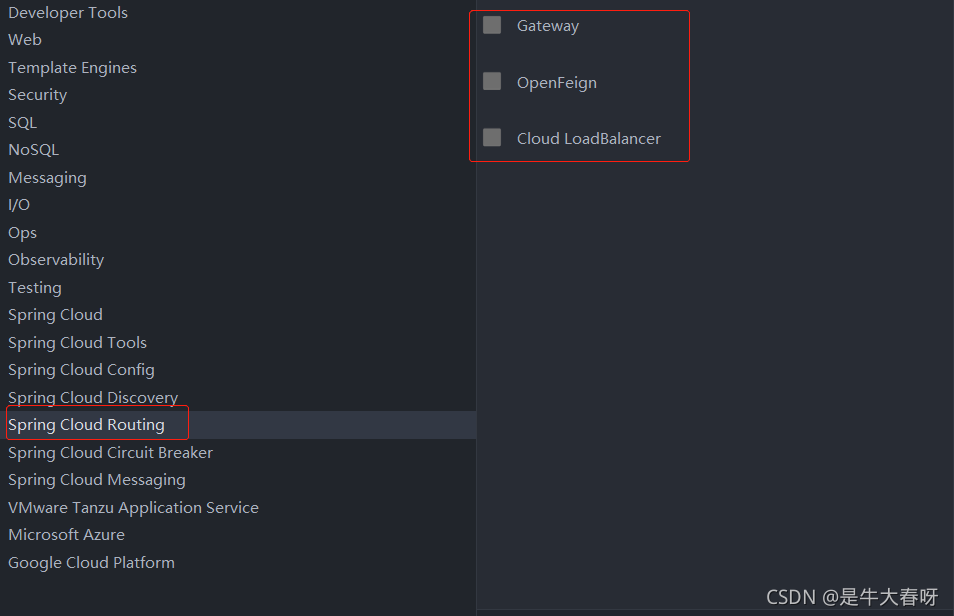
and then directly click next. I think it is possible to introduce zuul dependency by directly writing dependency code in POM file
then I added the following dependencies to the POM file:

   <dependency>
            <groupId>org.springframework.cloud</groupId>
            <artifactId>spring-cloud-starter-netflix-zuul</artifactId>
            <version>2.2.10.RELEASE</version>
        </dependency>

Then add @enablezuulproxy
to the startup class. Click Startup and find that an error is reported
Solution:
①: configure version and add & lt; spring-cloud.version>

    <properties>
        <java.version>1.8</java.version>
        <spring-cloud.version>2021.0.0-RC1</spring-cloud.version>
    </properties>

②: add unified version configuration

  <dependencyManagement>
        <dependencies>
            <dependency>
                <groupId>org.springframework.cloud</groupId>
                <artifactId>spring-cloud-dependencies</artifactId>
                <version>${spring-cloud.version}</version>
                <type>pom</type>
                <scope>import</scope>
            </dependency>
        </dependencies>
    </dependencyManagement>

③: add warehouse configuration

    <repositories>
        <repository>
            <id>spring-milestones</id>
            <name>Spring Milestones</name>
            <url>https://repo.spring.io/milestone</url>
            <snapshots>
                <enabled>false</enabled>
            </snapshots>
        </repository>
    </repositories>

Method ①, ② and ③ seem to be indispensable, otherwise it will not start.

(in fact, the spring boot version conflicts with the spring cloud version)
we can click the zuul dependency package to see that it contains the starter of spring boot
therefore, we can directly cancel the parent tag so that it does not introduce parent dependency

however, I don’t think it’s good to cancel the parent dependency directly. After all, there are few introductions, and there is no need to consider the conflict of versions. Therefore, in order not to remove the parent tag, we can introduce the version dependency that does not conflict between spring boot and spring cloud.

Attach the complete POM configuration:

<?xml version="1.0" encoding="UTF-8"?>
<project xmlns="http://maven.apache.org/POM/4.0.0" xmlns:xsi="http://www.w3.org/2001/XMLSchema-instance"
         xsi:schemaLocation="http://maven.apache.org/POM/4.0.0 https://maven.apache.org/xsd/maven-4.0.0.xsd">
    <modelVersion>4.0.0</modelVersion>
    <parent>
        <groupId>org.springframework.boot</groupId>
        <artifactId>spring-boot-starter-parent</artifactId>
        <version>2.0.6.RELEASE</version>
        <relativePath/> <!-- lookup parent from repository -->
    </parent>
    <groupId>cn.itcast.zuul</groupId>
    <artifactId>itcast-zuul</artifactId>
    <version>0.0.1-SNAPSHOT</version>
    <name>itcast-zuul</name>
    <description>Demo project for Spring Boot</description>
    <properties>
        <java.version>1.8</java.version>
    </properties>
    <dependencies>


        <dependency>
            <groupId>org.springframework.cloud</groupId>
            <artifactId>spring-cloud-starter-netflix-zuul</artifactId>
            <version>2.0.2.RELEASE</version>
        </dependency>
    </dependencies>

</project>

NVM use error: exit status [How to Solve]

Solution:

1. First, the installation directory should be free of spaces and Chinese

2. Check whether the administrator permission is turned on and check the steps

3. Change environment variables

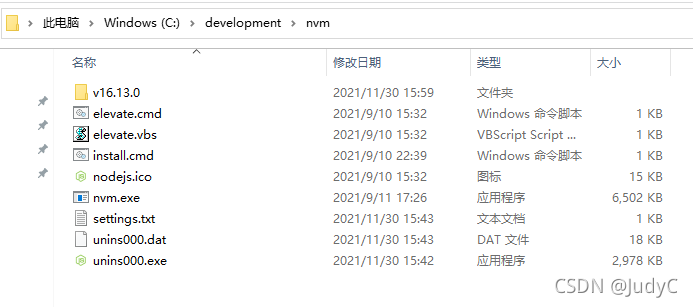
NVM_HOME should be the installation directory of nvm, such as C:\development\nvm
NVM_SYMLINK should be the directory of nodejs, as follows

should be C:\development\NVM\v16.13.0
note that both user variables and system variables need to be changed, and then OK OK
4. Close the terminal, reopen it, and then use NVM use.