When idea git submits the code, the account password is entered incorrectly. Clear the windows credentials. When submitting, the GIT account password input pop-up window still cannot pop up. At this time, you can try to open the idea settings and clear all passwords to re-enter. 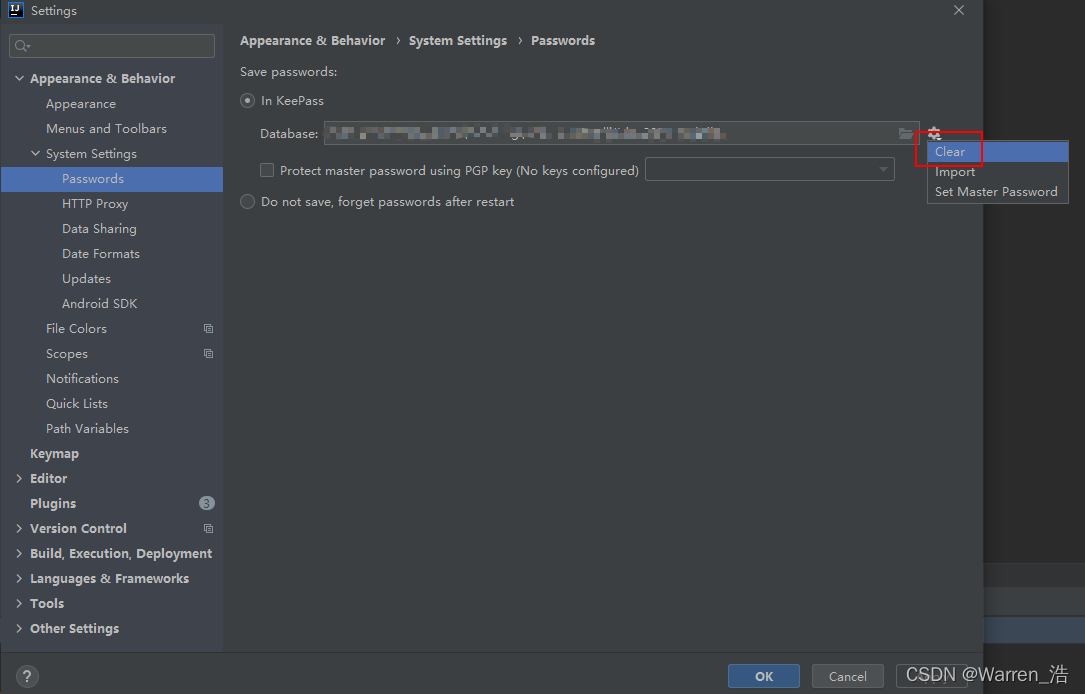
Author Archives: Robins
[Solved] SyntaxError: (unicode error) ‘unicodeescape‘ codec can‘t decode bytes in position 6-7: malformed
Successfully solved syntaxerror: (Unicode error) ‘Unicode eescape’ codec can’t decode bytes in position 6-7: malformed
solve the problem
input_image_path = ‘Inputs\Nnu01.jpg’
^
SyntaxError: (unicode error) ‘unicodeescape’ codec can’t decode bytes in position 6-7: malformed \N character escape
Solution ideas
Syntax error: (Unicode error) the ‘Unicode escape’ codec cannot decode bytes at positions 6-7: malformed\n character escape
Solution:
Escape character problem, caused by ‘\n’ in the string! You need to modify as follows, just add r in front!
input_image_path = r'Inputs\Nnu01.jpg'OK, it’s done!
deepin rosdep update Error: ERROR: Rosdep experienced an error: Could not detect OS,
Solution:
Locate /usr/lib/Python 3/dist packages/rospkg/OS_detect.Py , replace all Ubuntu characters with deepin
[Solved] Tomcat Start Project Error: Artifact xxxxxx:war exploded: Error during artifact deployment. See server log
Project scenario:
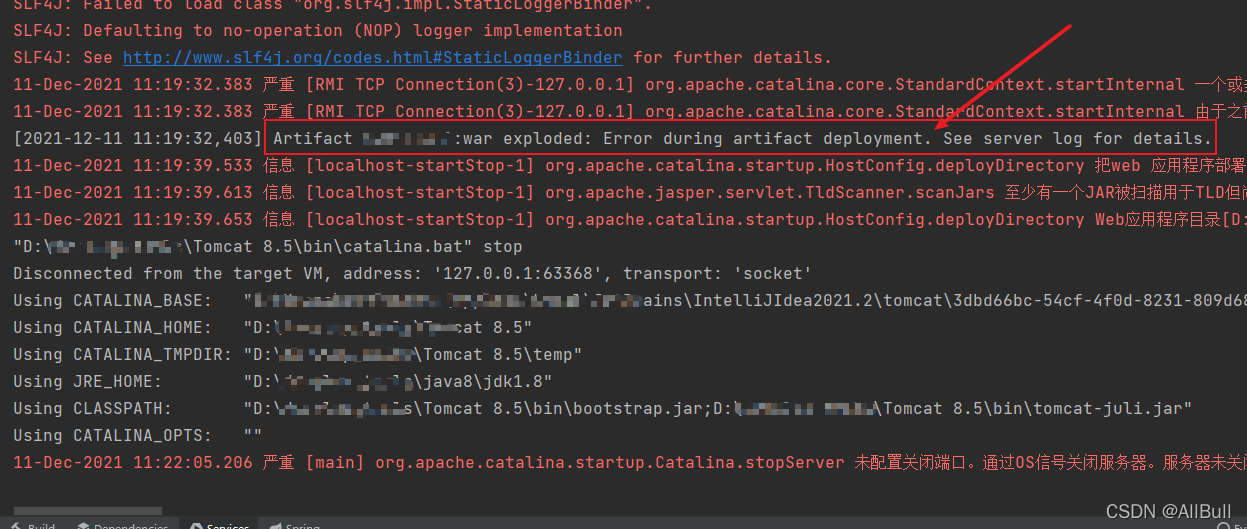
There was a problem starting Tomcat using idea:
Problem Description:
Artifact xxxxxx:war exploded: Error during artifact deployment. See server log for details.Cause analysis:
First go to Tomcat localhost log to view the log information.
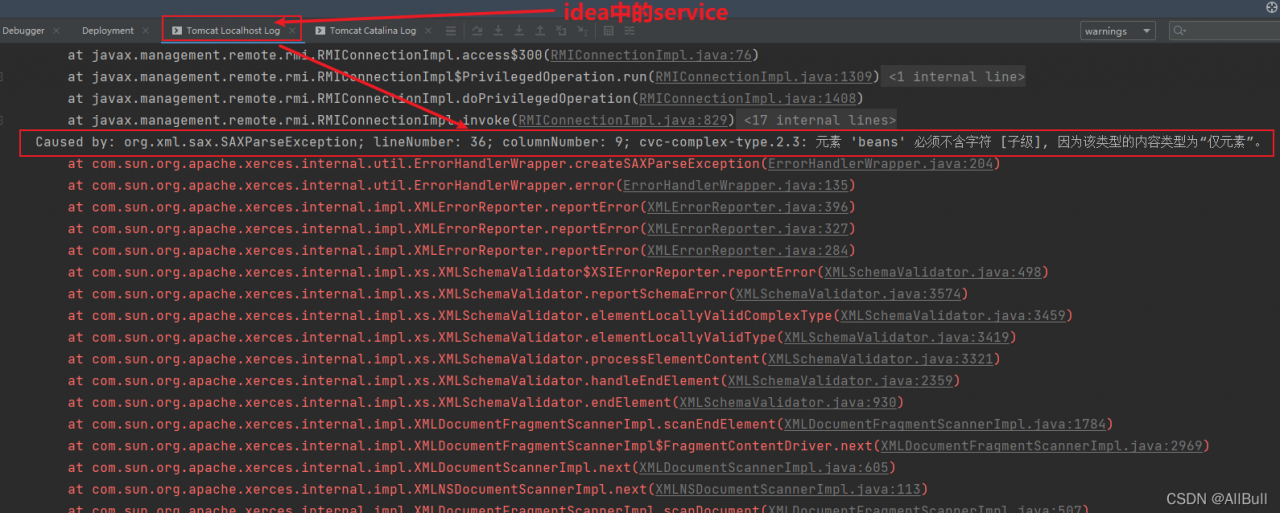
Follow the reason of the log information and modify it.
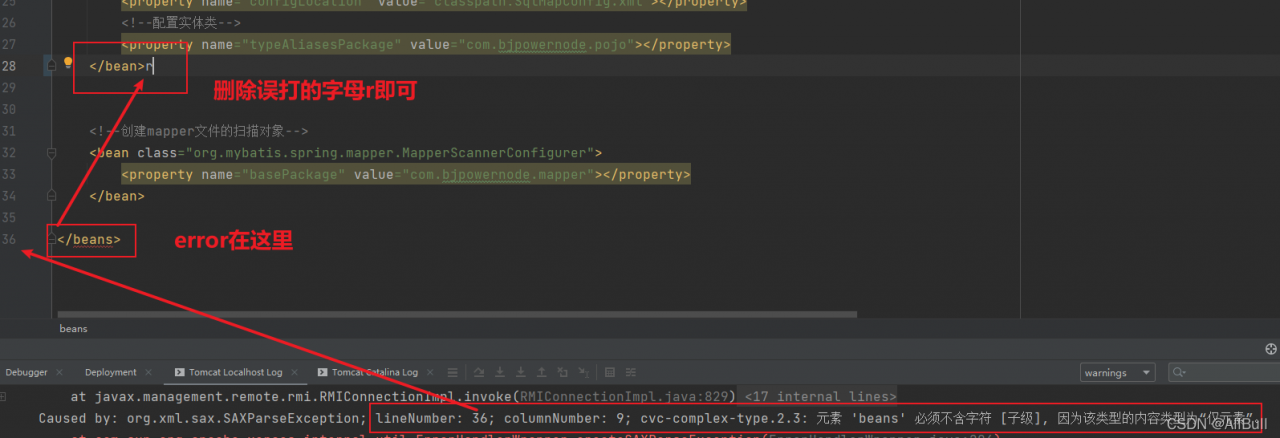
In this scenario, the problem is that the beans tag in the XML file reports an error. After careful inspection, it is found that a letter is mistakenly typed in the tag, resulting in the server’s failure to correctly interpret the XML file.
Solution:
Follow the reason of the log information and modify it.
In this scenario, the problem is that the beans tag in the XML file reports an error. After careful inspection, it is found that a letter is mistakenly typed in the tag, resulting in the server’s failure to correctly interpret the XML file.
[Solved] error: failed to push some refs to ‘https://gitee.com/wangdxstudy/mygirl.git‘
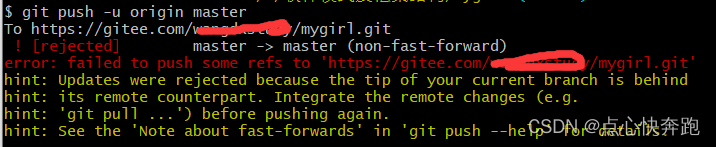
The main reason for this error is that there is no “. MD” file in the uploaded project

Solution:
1. Pull down MD file
git pull --rebase origin master2. Upload again
git push origin masterbe accomplished!!!
[Solved] Centos Mount Error: XFS: log mount mount/recovery failed : error -117
Virtual machine startup error XFS
XFS: log mount mount/recovery failed: error – 117 when the virtual machine is started. In fact, the virtual machine cannot be mounted. The solution is as follows:
Solution:
① Restart the virtual machine. After entering the startup interface, press e to enter the editing interface
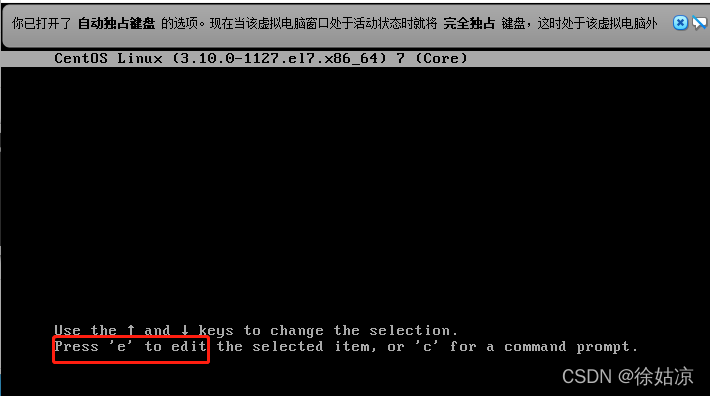
② Find the line of linux16 and make the following modifications
change RO to RW init =/sysboot/bin/sh, and delete console = ttys0
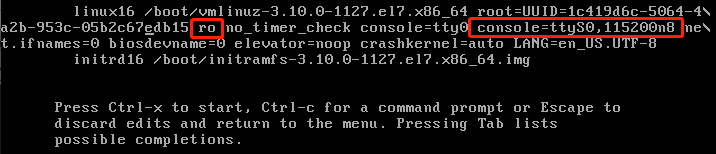

③ After modification, press Ctrl + X to start
④ a few minutes after startup, the command line will appear

⑤ On the command line, enter systemctl status sysboot Mount
⑥ enter XFS_ Repair – V – L path in the figure above
⑦ wait for the file to be cleaned before the command line appears. Enter the command reboot to restart the virtual machine
[Solved] error: Microsoft Visual C++ 14.0 is required. Get it with “Microsoft Visual C++ Build Tools“
I really encountered this problem when installing pandas in pycharm’s virtual running environment
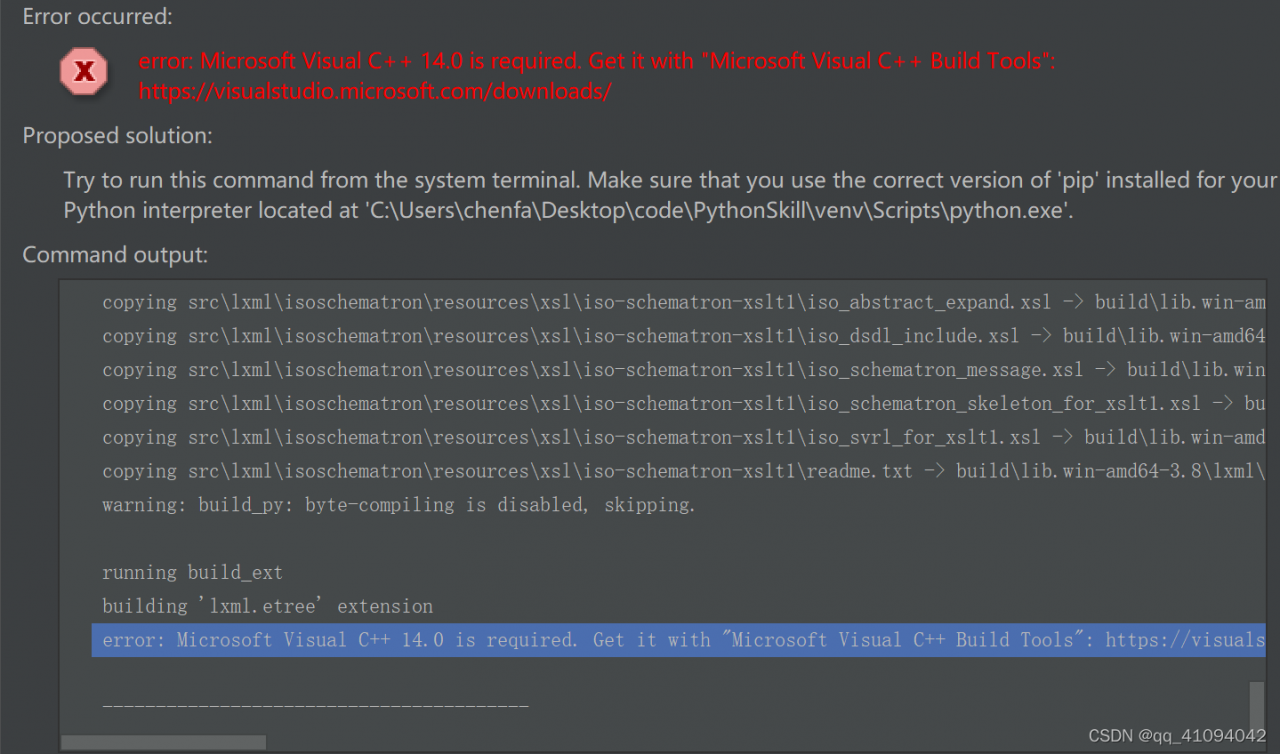
-
- install pandas
pip install pandas
Find the path of pandas in everything, and then copy it to the running environment and working environment of pycharm project
My working environment path for this project is:
C:\Users\**\Desktop\code\PythonSkill\venv\Lib\site-packages
[Solved] PDOException::(“SQLSTATE[42000]: Syntax error or access violation: 1071 Specified key was too long;
php artisan migrate Run Error:
PDOException:: (“SQLSTATE[42000]: Syntax error or access violation: 1071 Specified key was too long; max key length is 1000 bytes”)
Solution:
Add the following codes in the file of app/Providers/AppSeviceProvider.php:
use Illuminate\Support\Facades\Schema;
Add in the method of foot:
Schema::defaultStringLength(191);
<?php

namespace App\Providers;

use Illuminate\Support\Facades\Schema;
use Illuminate\Support\ServiceProvider;

class AppServiceProvider extends ServiceProvider
{
    /**
     * Register any application services.
     *
     * @return void
     */
    public function register()
    {
        //
    }

    /**
     * Bootstrap any application services.
     *
     * @return void
     */
    public function boot()
    {
        //
		Schema::defaultStringLength(191);
    }
}
After the prompt
pdoexception:: (“sqlstate [42s01]: base table or view already exists: 1050 table ‘users’ already exists”)
, delete the user table and re-run PHP artist migrate
[Solved] error: (-215:Assertion failed) size.width>0 && size.height>0 in function ‘imshow‘
Error: cv2.error: OpenCV(4.5.4) /tmp/pip-req-build-w88qv8vs/opencv/modules/highgui/src/window.cpp:1006: error: (-215:Assertion failed) size.width>0 && size.height>0 in function ‘imshow’
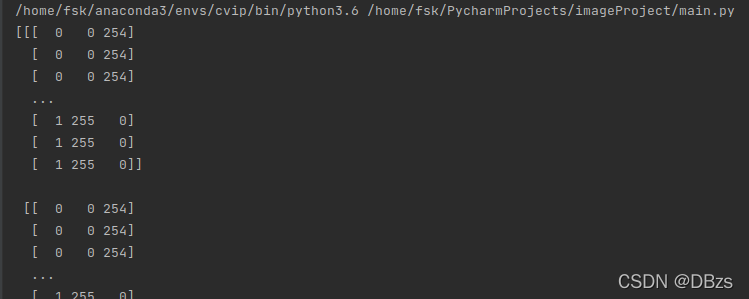
Check if there is a problem with the image path:
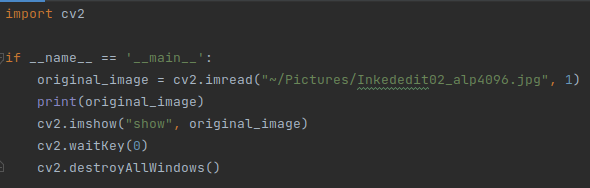
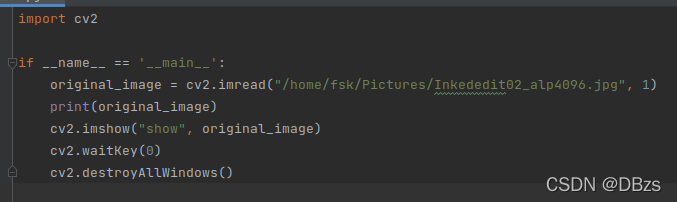
 It is found that None ==> You cannot use “~” to formulate the path, just modify it to the full path:
error A2031: gisters not allowed [How to Solve]
Error condition
.WHILE CL < BUF_L
			.IF BUF[CX] > MAX
				MOV MAX , BUF[CX]
			.ENDIF
		.ENDW

Cause of occurrence
It can only be used as an address register in the stack segment for BX, BP, Si, Di BP
Solution:
Change CXin the code to BX
HDF5 library version mismatched error [How to Solve]
HDF5 library version mismatched error
Error Messages:
Warning! ***HDF5 library version mismatched error***
The HDF5 header files used to compile this application do not match
the version used by the HDF5 library to which this application is linked.
Data corruption or segmentation faults may occur if the application continues.
This can happen when an application was compiled by one version of HDF5 but
linked with a different version of static or shared HDF5 library.
You should recompile the application or check your shared library related
settings such as 'LD_LIBRARY_PATH'.
You can, at your own risk, disable this warning by setting the environment
variable 'HDF5_DISABLE_VERSION_CHECK' to a value of '1'.
Setting it to 2 or higher will suppress the warning messages totally.
Headers are 1.10.2, library is 1.10.5
Solution:
pip uninstall h5py
pip install h5py