Author Archives: Robins

[Solved] PHP Fatal error: Uncaught Elasticsearch\Common\Exceptions\NoNodesAvailableException: No alive nodes

The environment background is docker DNMP installation of ES + PHP

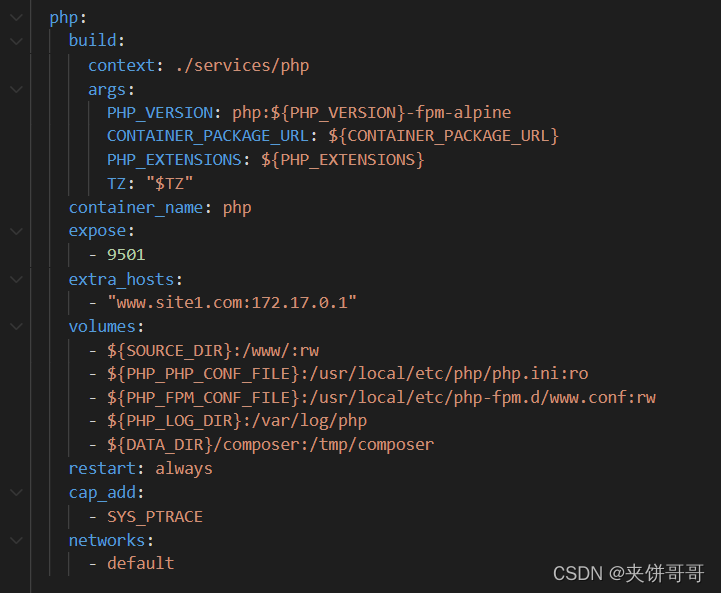
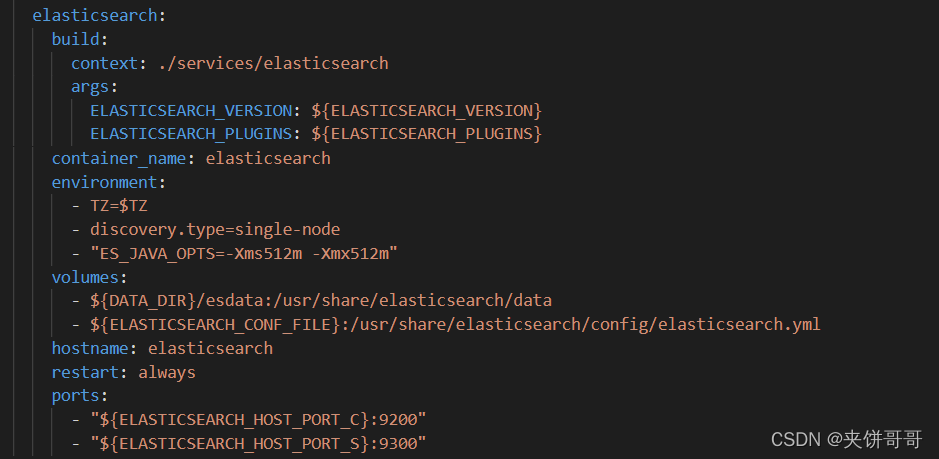
Corresponding docker compose configuration and corresponding port
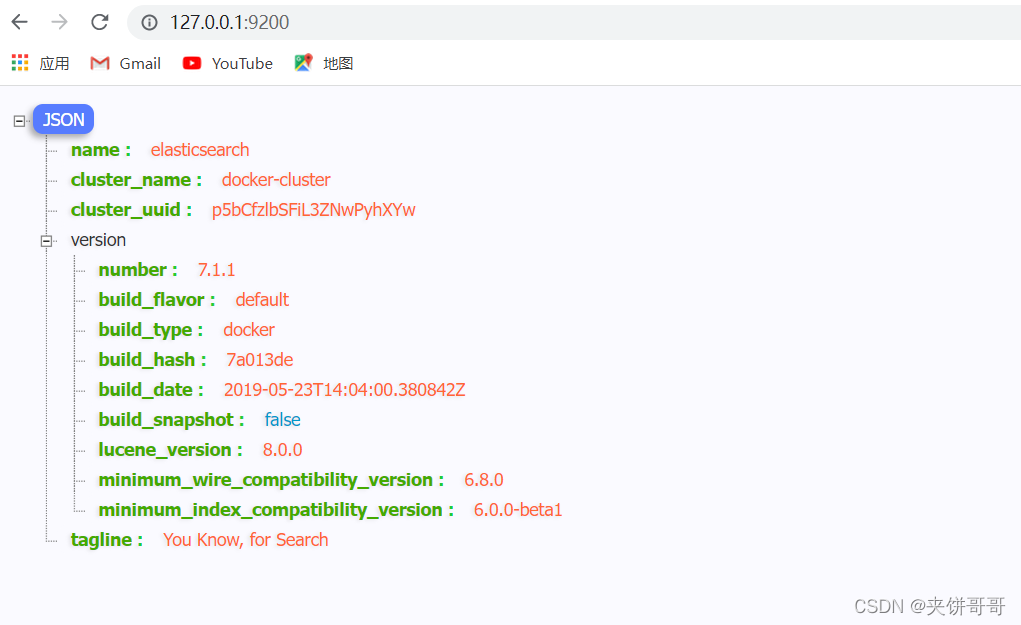
Port 9200 can also be accessed normally
Code
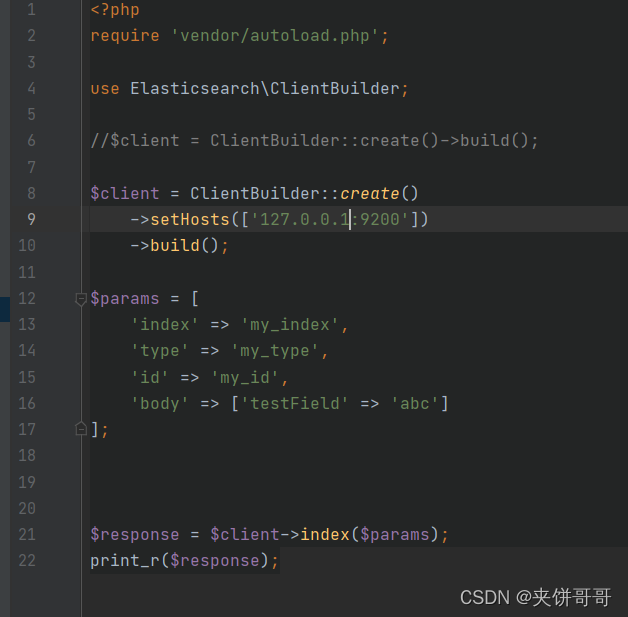
Then 500 errors are reported, including:

 PHP Fatal error:  Uncaught Elasticsearch\Common\Exceptions\NoNodesAvailableException: No alive nodes found in your cluster in /www/localhost/vendor/elasticsearch/elasticsearch/src/Elasticsearch/ConnectionPool/StaticNoPingConnectionPool.php:67
Stack trace:
#0 /www/localhost/vendor/elasticsearch/elasticsearch/src/Elasticsearch/Transport.php(87): Elasticsearch\ConnectionPool\StaticNoPingConnectionPool->nextConnection()
#1 /www/localhost/vendor/elasticsearch/elasticsearch/src/Elasticsearch/Transport.php(105): Elasticsearch\Transport->getConnection()
#2 /www/localhost/vendor/elasticsearch/elasticsearch/src/Elasticsearch/Connections/Connection.php(275): Elasticsearch\Transport->performRequest('POST', '/my_index/my_ty...', Array, '{"testField":"a...', Array)
#3 /www/localhost/vendor/react/promise/src/FulfilledPromise.php(28): Elasticsearch\Connections\Connection->Elasticsearch\Connections\{closure}(Array)
#4 /www/localhost/vendor/ezimuel/ringphp/src/Future/CompletedFutureValue.php(55): React\Promise\FulfilledPromise->then(Object(Clos in /www/localhost/vendor/elasticsearch/elasticsearch/src/Elasticsearch/ConnectionPool/StaticNoPingConnectionPool.php on line 67

The reason is that the node cannot be found. The solution is as follows: find your own IP and specify the IP
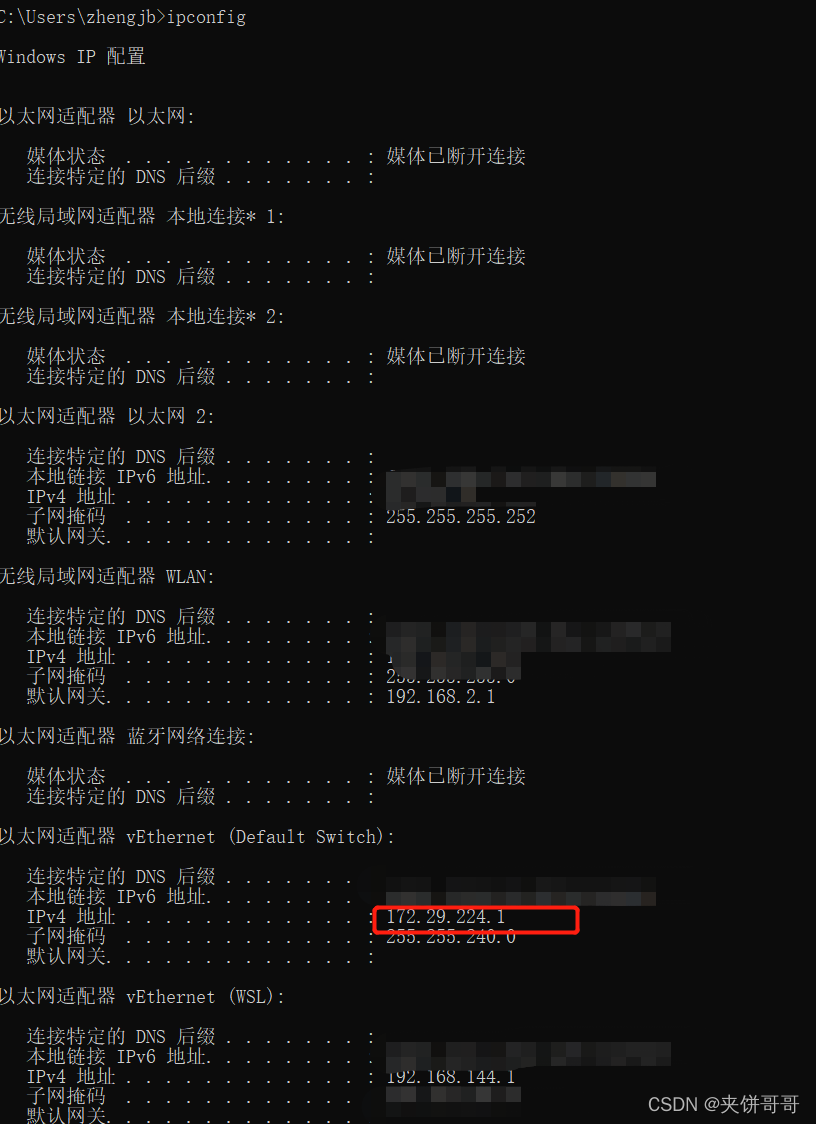
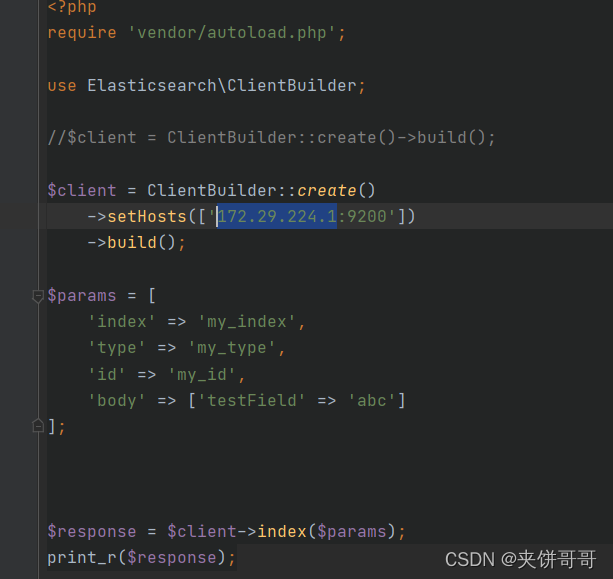
Then the execution is OK

[Errno 14] curl#6 – “Could not resolve host: yum.dockerproject.org; Unknown error“

1. Commands:

sudo yum install docker-ce docker-ce-cli containerd.ioLoaded plugins: fastestmirror

2. Error Messages:

Loading mirror speeds from cached hostfile
base                                                   | 3.6 kB     00:00
docker-ce-stable                                                                                                                                                                                                          | 3.5 kB  00:00:00
docker-ce-test                                                                                                                                                                                                            | 3.5 kB  00:00:00
https://yum.dockerproject.org/repo/main/centos/7/repodata/repomd.xml: [Errno 14] curl#6 – “Could not resolve host: yum.dockerproject.org; Unknown error”
Trying other mirror.

One of the configured repositories failed (Docker Repository),
and yum doesn’t have enough cached data to continue. At this point the only
safe thing yum can do is fail. There are a few ways to work “fix” this:
1. Contact the upstream for the repository and get them to fix the problem.
2. Reconfigure the baseurl/etc. for the repository, to point to a working
upstream. This is most often useful if you are using a newer
distribution release than is supported by the repository (and the
packages for the previous distribution release still work).
3. Run the command with the repository temporarily disabled
yum –disablerepo=dockerrepo …
4. Disable the repository permanently, so yum won’t use it by default. Yum
will then just ignore the repository until you permanently enable it
again or use –enablerepo for temporary usage:
yum-config-manager –disable dockerrepo
or
subscription-manager repos –disable=dockerrepo
5. Configure the failing repository to be skipped, if it is unavailable.
Note that yum will try to contact the repo. when it runs most commands,
so will have to try and fail each time (and thus. yum will be be much
slower). If it is a very temporary problem though, this is often a nice
compromise:
yum-config-manager –save –setopt=dockerrepo.skip_if_unavailable=true
failure: repodata/repomd.xml from dockerrepo: [Errno 256] No more mirrors to try.
https://yum.dockerproject.org/repo/main/centos/7/repodata/repomd.xml: [Errno 14] curl#6 – “Could not resolve host: yum.dockerproject.org; Unknown error”

3. Solution:

yum-config-manager –disable dockerrepo

Could not identify launch activity: Default Activity not foundError while Launching activity

Add in activity

<intent-filter>
                <action android:name="android.intent.action.MAIN"/>
                <category android:name="android.intent.category.LAUNCHER"/>
            </intent-filter>

When the app has multiple activities, the activity to be started is the main interface and is set to MAIN.

LAUNCHER indicates whether it is displayed in the mobile app list.

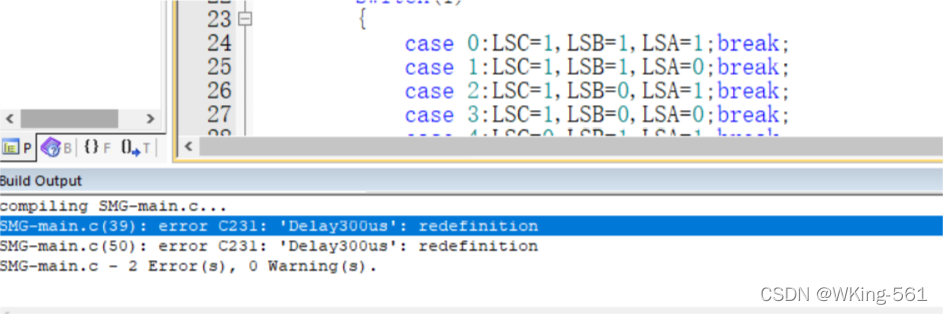
Function declare Error: Error C231: ‘delay300us’: redefinition

First of all, we know that we can’t avoid declaring sub functions when writing programs.

There was a problem during the test today:

After thinking about it, I declared the function in the previous writing, but the error “redefinition” was still reported. Later, I tried it

You need to prefix the function name with “void”.

[Solved] Could not identify launch activity: Default Activity not found Error while Launching activity

        <activity android:name=".ui.home.HomeActivity"
            android:configChanges="mcc|mnc"
            android:screenOrientation="portrait"
            android:theme="@style/Theme.Preference.DayNight"
            android:exported="true">
            <intent-filter>
                <action android:name="android.intent.action.MAIN" />
<!--                <category android:name="android.intent.category.LAUNCHER" />-->
            </intent-filter>
        </activity>

The reason for this is that the < category > line was commented out in the entry activity. The default activity is not found,
Remove the comment and the problem is gone!

[Solved] Networkx Error: Attributeerror: ‘graph’ object has no attribute ‘node’

When learning Networkx, you encounter an error when viewing node attributes:
attributeerror: ‘graph’ object has no attribute ‘node’

G= nx.Graph(name='undirected graph',data=2022) # Create undirected graph
G.add_nodes_from([1,2,3,4,5]) # Add nodes to the graph using the list
G.add_node(6,name='F',weight=12)
print(G.node[6]['name']) # Check the other attributes of the node according to its ID

The reason is that the lower version of Networkx has the node attribute, while the higher version does not use the node attribute
correction method 1: just change the node attribute to nodes
the correct code is as follows:

G= nx.Graph(name='undirected graph',data=2022) # Create undirected graph
G.add_nodes_from([1,2,3,4,5]) # Add nodes to the graph using the list
G.add_node(6,name='F',weight=12)
print(G.nodes[6]['name']) # Check the other attributes of the node based on its ID

Correction 2: reinstall the lower version of Networkx
PIP install: PIP install Networkx = = 2.3

[Solved] AttributeError: module ‘setuptools._distutils‘ has no attribute ‘version‘

AttributeError: module ‘setuptools._distutils’ has no attribute ‘version’
pytorch tensorboard error: AttributeError: module ‘setuptools._distutils’ has no attribute ‘version’

from torch.utils.tensorboard import SummaryWriter

writer=SummaryWriter("logs")

# writer.add_image()  
#y=x
for i in range(100):

    writer.add_scalar("y=x",i,i)  

writer.close()

Cause of problem:

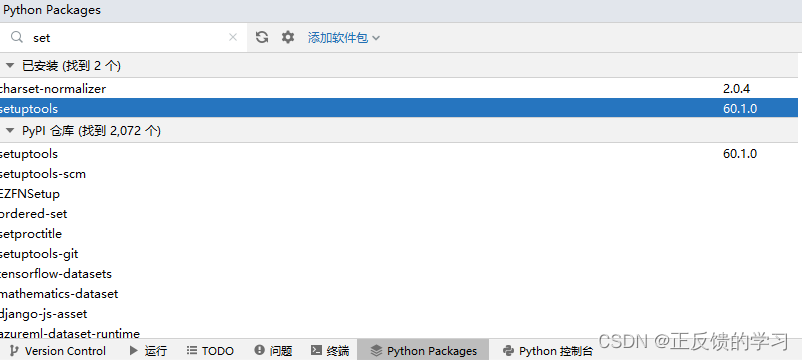
Setuptools version too high

Solution:

Install lower version setuptools
Enter:
PIP uninstall setuptools
PIP install setuptools = = 59.5.0// it needs to be lower than your previous version

[Solved] ClientError.Security.Unauthorized: The client is unauthorized due to authentication failure.

Neo.ClientError.Security.Unauthorized: The client is unauthorized due to authentication failure.
the authentication of the Community Edition failed. The solution:
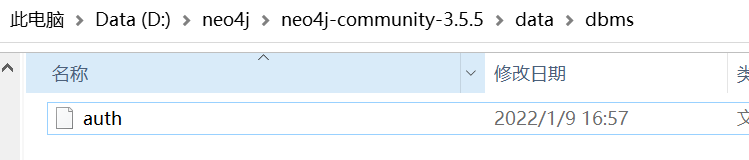
stop the service, find the auth file under the data/DBMS in the installation directory and delete it. (because my installation package was downloaded from the website, the former owner may have set the password, so after we delete it, the default password is neo4j). Just start the service.

In addition, the community version cannot be too high. It needs to adapt to its own java version. My java version is 1.8, so the community version needs to be version 4

[Solved] NameError: name ‘reload’ is not defined on ROS melody terminal

Solve in Ubuntu 18 After installing ROS melody under 04, the terminal appears NameError: name ‘reload’ is not defined

Method 1:

Comment out the melodic source in .bashrc, .zshrc, for example:

# source /opt/ros/melodic/setup.zsh

Method 2:

Comment out the code in /opt/ROS/melody/lib/python2.7/dist-packages/sitecustomize.py

#coding=utf8
#import sys
#reload(sys)
#sys.setdefaultencoding('utf8')