Author Archives: Robins

[Solved] integrated swagger Start Error: Failed to start bean ‘documentationPluginsBootstrapper‘;

Today, I reported an error when I was going to learn something new and build a new project integration swagger.

org.springframework.context.ApplicationContextException: Failed to start bean 'documentationPluginsBootstrapper'; nested exception is java.lang.NullPointerException
	at org.springframework.context.support.DefaultLifecycleProcessor.doStart(DefaultLifecycleProcessor.java:181) ~[spring-context-5.3.15.jar:5.3.15]
	at org.springframework.context.support.DefaultLifecycleProcessor.access$200(DefaultLifecycleProcessor.java:54) ~[spring-context-5.3.15.jar:5.3.15]
	at org.springframework.context.support.DefaultLifecycleProcessor$LifecycleGroup.start(DefaultLifecycleProcessor.java:356) ~[spring-context-5.3.15.jar:5.3.15]
	at java.lang.Iterable.forEach(Iterable.java:75) ~[na:1.8.0_241]
	at org.springframework.context.support.DefaultLifecycleProcessor.startBeans(DefaultLifecycleProcessor.java:155) ~[spring-context-5.3.15.jar:5.3.15]
	at org.springframework.context.support.DefaultLifecycleProcessor.onRefresh(DefaultLifecycleProcessor.java:123) ~[spring-context-5.3.15.jar:5.3.15]
	at org.springframework.context.support.AbstractApplicationContext.finishRefresh(AbstractApplicationContext.java:935) ~[spring-context-5.3.15.jar:5.3.15]
	at org.springframework.context.support.AbstractApplicationContext.refresh(AbstractApplicationContext.java:586) ~[spring-context-5.3.15.jar:5.3.15]
	at org.springframework.boot.web.servlet.context.ServletWebServerApplicationContext.refresh(ServletWebServerApplicationContext.java:145) ~[spring-boot-2.6.3.jar:2.6.3]
	at org.springframework.boot.SpringApplication.refresh(SpringApplication.java:732) [spring-boot-2.6.3.jar:2.6.3]
	at org.springframework.boot.SpringApplication.refreshContext(SpringApplication.java:414) [spring-boot-2.6.3.jar:2.6.3]
	at org.springframework.boot.SpringApplication.run(SpringApplication.java:302) [spring-boot-2.6.3.jar:2.6.3]
	at org.springframework.boot.SpringApplication.run(SpringApplication.java:1303) [spring-boot-2.6.3.jar:2.6.3]
	at org.springframework.boot.SpringApplication.run(SpringApplication.java:1292) [spring-boot-2.6.3.jar:2.6.3]
	at com.hf.logisticsinfo.LogisticsInfoApplication.main(LogisticsInfoApplication.java:10) [classes/:na]
Caused by: java.lang.NullPointerException: null
	at springfox.documentation.spi.service.contexts.Orderings$8.compare(Orderings.java:112) ~[springfox-spi-2.9.2.jar:null]
	at springfox.documentation.spi.service.contexts.Orderings$8.compare(Orderings.java:109) ~[springfox-spi-2.9.2.jar:null]
	at com.google.common.collect.ComparatorOrdering.compare(ComparatorOrdering.java:37) ~[guava-20.0.jar:na]
	at java.util.TimSort.countRunAndMakeAscending(TimSort.java:355) ~[na:1.8.0_241]
	at java.util.TimSort.sort(TimSort.java:220) ~[na:1.8.0_241]
	at java.util.Arrays.sort(Arrays.java:1438) ~[na:1.8.0_241]
	at com.google.common.collect.Ordering.sortedCopy(Ordering.java:855) ~[guava-20.0.jar:na]
	at springfox.documentation.spring.web.plugins.WebMvcRequestHandlerProvider.requestHandlers(WebMvcRequestHandlerProvider.java:57) ~[springfox-spring-web-2.9.2.jar:null]
	at springfox.documentation.spring.web.plugins.DocumentationPluginsBootstrapper$2.apply(DocumentationPluginsBootstrapper.java:138) ~[springfox-spring-web-2.9.2.jar:null]
	at springfox.documentation.spring.web.plugins.DocumentationPluginsBootstrapper$2.apply(DocumentationPluginsBootstrapper.java:135) ~[springfox-spring-web-2.9.2.jar:null]
	at com.google.common.collect.Iterators$7.transform(Iterators.java:750) ~[guava-20.0.jar:na]
	at com.google.common.collect.TransformedIterator.next(TransformedIterator.java:47) ~[guava-20.0.jar:na]
	at com.google.common.collect.TransformedIterator.next(TransformedIterator.java:47) ~[guava-20.0.jar:na]
	at com.google.common.collect.MultitransformedIterator.hasNext(MultitransformedIterator.java:52) ~[guava-20.0.jar:na]
	at com.google.common.collect.MultitransformedIterator.hasNext(MultitransformedIterator.java:50) ~[guava-20.0.jar:na]
	at com.google.common.collect.ImmutableList.copyOf(ImmutableList.java:249) ~[guava-20.0.jar:na]
	at com.google.common.collect.ImmutableList.copyOf(ImmutableList.java:209) ~[guava-20.0.jar:na]
	at com.google.common.collect.FluentIterable.toList(FluentIterable.java:614) ~[guava-20.0.jar:na]
	at springfox.documentation.spring.web.plugins.DocumentationPluginsBootstrapper.defaultContextBuilder(DocumentationPluginsBootstrapper.java:111) ~[springfox-spring-web-2.9.2.jar:null]
	at springfox.documentation.spring.web.plugins.DocumentationPluginsBootstrapper.buildContext(DocumentationPluginsBootstrapper.java:96) ~[springfox-spring-web-2.9.2.jar:null]
	at springfox.documentation.spring.web.plugins.DocumentationPluginsBootstrapper.start(DocumentationPluginsBootstrapper.java:167) ~[springfox-spring-web-2.9.2.jar:null]
	at org.springframework.context.support.DefaultLifecycleProcessor.doStart(DefaultLifecycleProcessor.java:178) ~[spring-context-5.3.15.jar:5.3.15]
	... 14 common frames omitted

The general reason is that due to the springboot version problem, the default strategy for matching the request path after 2.6 and spring MVC processing mapping has been changed from antpathmatcher to pathpatternparser.

So the solution here is also very simple

The first solution is to set up spring according to the official prompts mvc.pathmatch.Matching strategy is ant path matcher, which is effective and available for personal testing;

spring:
  mvc:
    pathmatch:
      matching-strategy: ant_path_matcher

The second solution is to directly reduce the springboot version. I’ll try to reduce it to level 2.4 here. There’s no problem

    <parent>
        <groupId>org.springframework.boot</groupId>
        <artifactId>spring-boot-starter-parent</artifactId>
        <version>2.4.0</version>
        <relativePath/> <!-- lookup parent from repository -->
    </parent>
scm_prepare_database.sh CDH initial data script execute error

Environment

CDH 5
MySQL 5.7.30

check the manual that corresponds to your MySQL server version for the right synta to use near '@ default character  
set utf8 at line 1

reason

For the problem of script execution mode, – P does not write a password after it. Execute it directly, and then enter the password. The result returns successful

/usr/share/cmf/schema/scm_prepare_database.sh mysql -h Database_ip -u username -p --scm-host cdhip scm scm scm

[Solved] GRPC-Server Error: com.google.common.base.Preconditions.checkArgument(ZLjava/lang/String; CLjava

Grpc server reports an error com google.common.base.Preconditions.checkArgument (ZLjava/lang/String;CLjava/lang/Object);

Problem background solution summary Lyric: I really want to take another bite, ผั๥๥๥ผั๥ณ, ผั๥ณ, ผั๥๥ณ This is the first song. It’s over. Have you guessed the title of the song?

Problem background

When working as grpc server, I can’t start it. The error report is printed as follows, but I can’t well see what’s wrong. Since grpc can be used when I test it alone, but as the project becomes more and more complex, more and more POM dependencies are introduced, so I began to find the reason from it

2022-01-25 11:01:39.896 ERROR [id-mapping-AsyncThread-1] o.s.a.i.SimpleAsyncUncaughtExceptionHandler.handleUncaughtException(SimpleAsyncUncaughtExceptionHandler.java:39): Unexpected exception occurred invoking async method: public void grpc.server.GrpcServer.start() throws java.io.IOException
java.lang.NoSuchMethodError: com.google.common.base.Preconditions.checkArgument(ZLjava/lang/String;CLjava/lang/Object;)V
	at io.grpc.Metadata$Key.validateName(Metadata.java:629)
	at io.grpc.Metadata$Key.<init>(Metadata.java:637)
	at io.grpc.Metadata$Key.<init>(Metadata.java:567)
	at io.grpc.Metadata$AsciiKey.<init>(Metadata.java:742)
	at io.grpc.Metadata$AsciiKey.<init>(Metadata.java:737)
	at io.grpc.Metadata$Key.of(Metadata.java:593)
	at io.grpc.Metadata$Key.of(Metadata.java:589)
	at io.grpc.internal.GrpcUtil.<clinit>(GrpcUtil.java:86)
	at io.grpc.internal.AbstractServerImplBuilder.<clinit>(AbstractServerImplBuilder.java:60)
	at io.grpc.netty.shaded.io.grpc.netty.NettyServerProvider.builderForPort(NettyServerProvider.java:39)
	at io.grpc.netty.shaded.io.grpc.netty.NettyServerProvider.builderForPort(NettyServerProvider.java:24)
	at io.grpc.ServerBuilder.forPort(ServerBuilder.java:41)
	at server.Server.start(GrpcServer.java:30)
	at grpc.server.GrpcServer$$FastClassBySpringCGLIB$$be87d0e.invoke(<generated>)
	at org.springframework.cglib.proxy.MethodProxy.invoke(MethodProxy.java:218)
	at org.springframework.aop.framework.CglibAopProxy$CglibMethodInvocation.invokeJoinpoint(CglibAopProxy.java:771)
	at org.springframework.aop.framework.ReflectiveMethodInvocation.proceed(ReflectiveMethodInvocation.java:163)
	at org.springframework.aop.framework.CglibAopProxy$CglibMethodInvocation.proceed(CglibAopProxy.java:749)
	at org.springframework.aop.interceptor.AsyncExecutionInterceptor.lambda$invoke$0(AsyncExecutionInterceptor.java:115)
	at java.util.concurrent.FutureTask.run(FutureTask.java:266)
	at java.util.concurrent.ThreadPoolExecutor.runWorker(ThreadPoolExecutor.java:1149)
	at java.util.concurrent.ThreadPoolExecutor$Worker.run(ThreadPoolExecutor.java:624)
	at java.lang.Thread.run(Thread.java:748)


Solution:

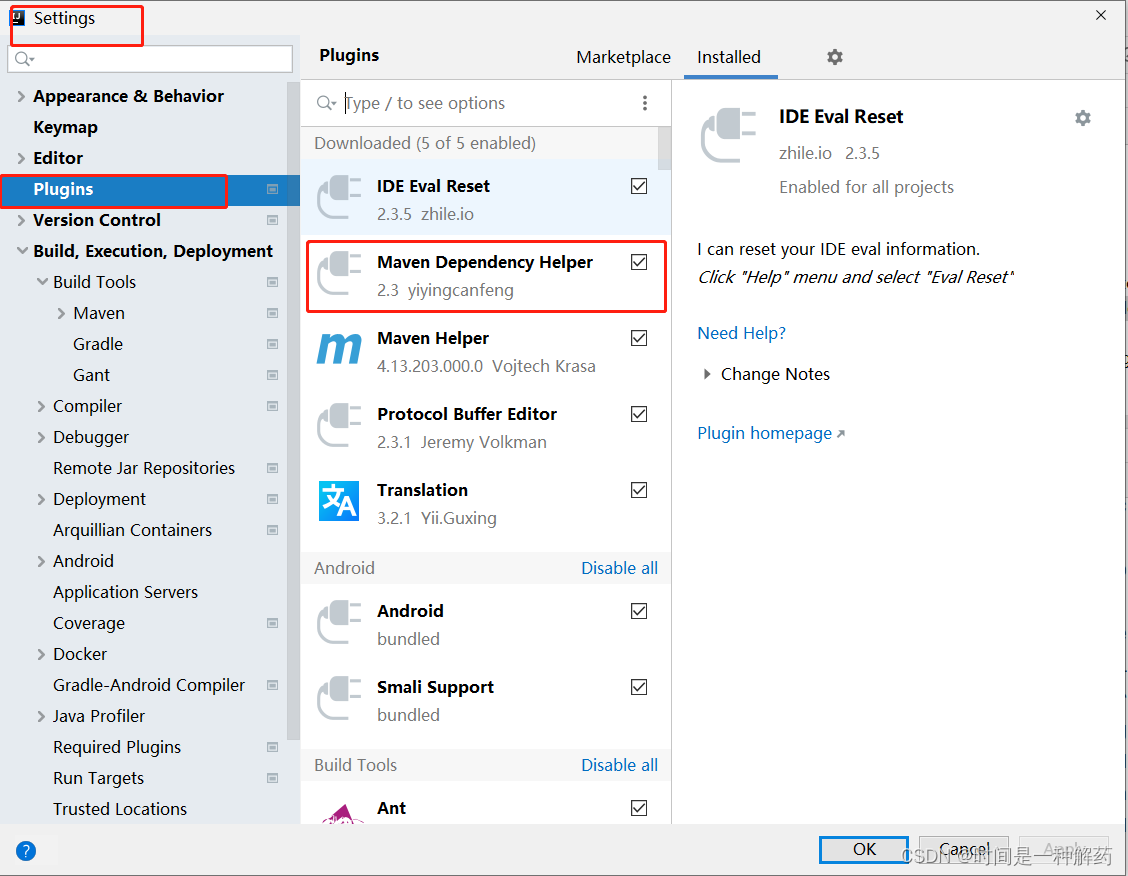
1. Analyze the imported jar package dependency and use file → setting to install Maven dependency helper dependency management

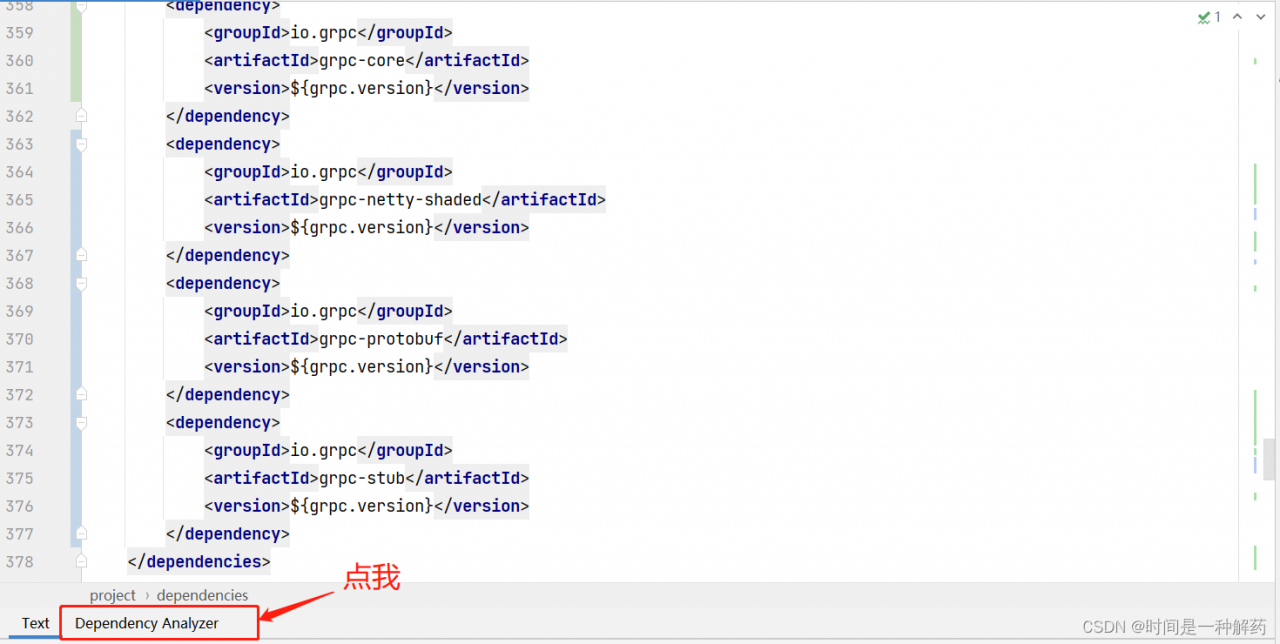
2 after installation, open the POM file, click dependency analyzer

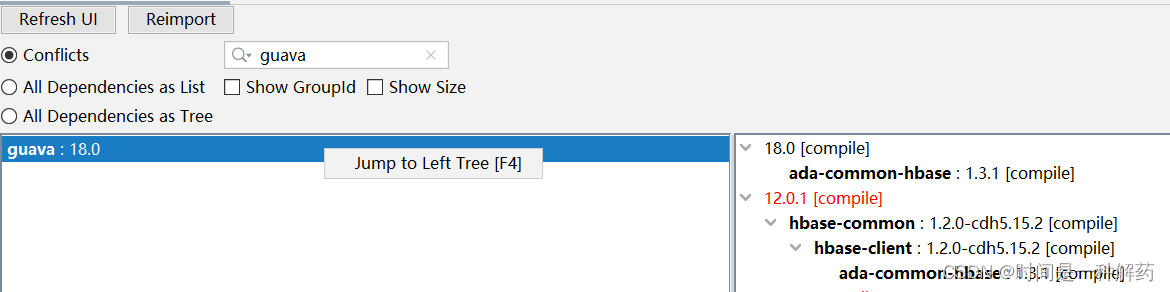
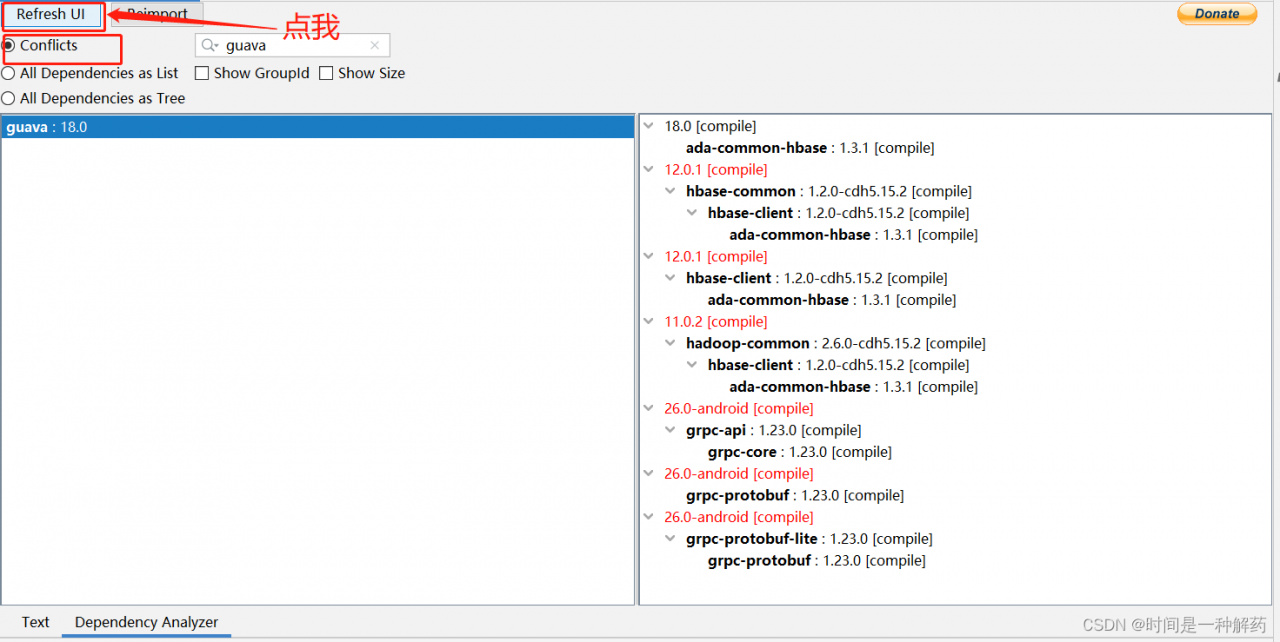
3 select conflicts and click refresh UI to refresh. You can see that guava: version 18.0 appears, which means there is a conflict with this dependency, It’s a repeated introduction,
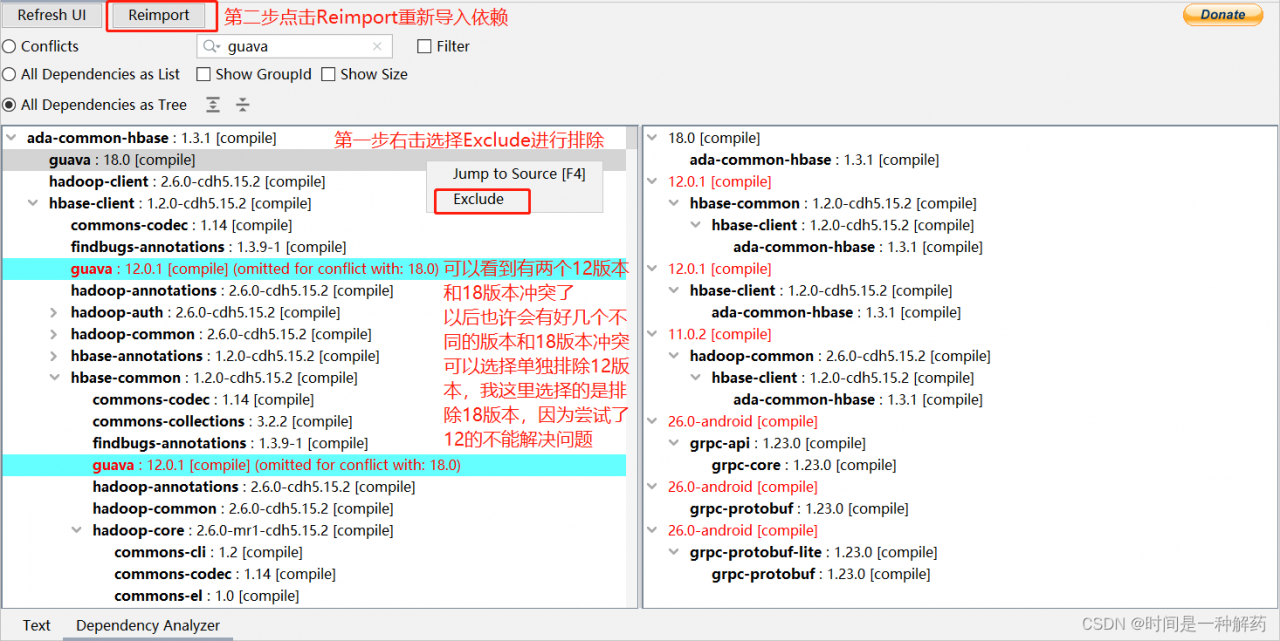
but the introduction of a problem is to exclude which repeated guava. This problem has been bothering me. My approach is to exclude the displayed dependencies first, and then continue to compile. If not, find other versions of guava for exclusion

4 because there is no exclusion option in Guava in right-click conflicts, Therefore, select jump to left tree to display more clearly

5 exclude 18 versions, re import

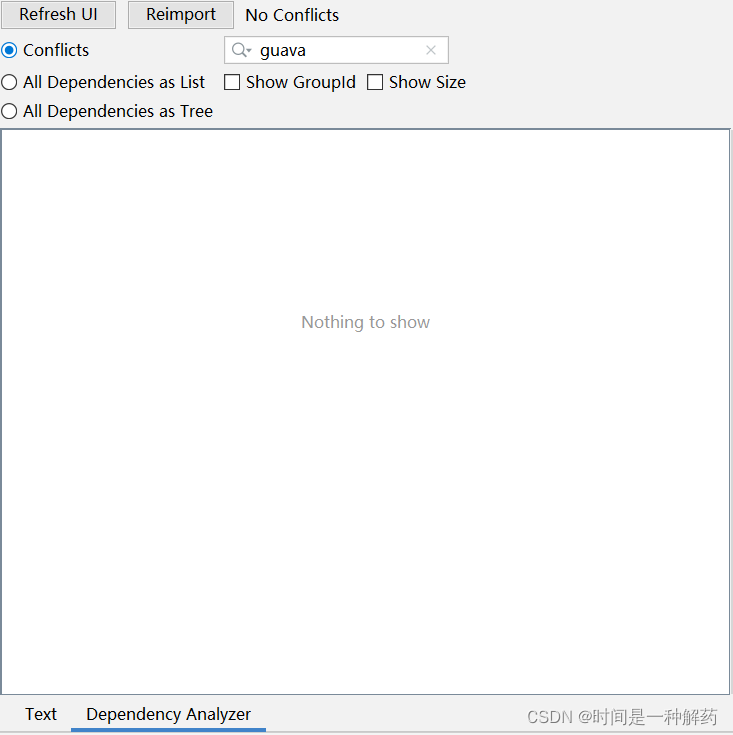
6 Click conflicts, and it is found that there is no conflict

7 at that time, the problem that the grpc server cannot be started is also solved

[Solved] Vue Start Project Error: ValidationError: webpack Dev Server Invalid Options

#Vue project development error
premise: during the development of Vue project, error: validationerror: webpack dev server invalid options appear when the project is started

problem analysis:
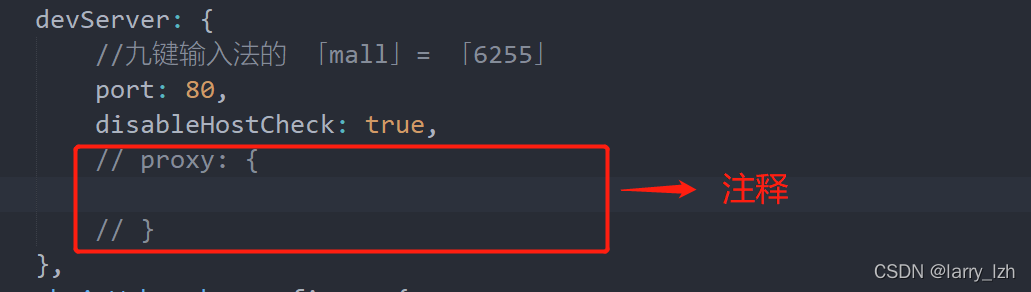
according to the problem description, the value of the “agent” object used to solve cross domain problems in the configuration file is empty

Solution:
find webpack.config.JS or Vue.config.JS
then find devserver and comment out the proxy or fill in the complete configuration

[Solved] electron Error: Uncaught TypeError: Cannot read property ‘BrowserWindow‘ of undefined

Electronic version 16+

There is a problem when using the remote module. The code is as follows:

const BrowserWindow = require(‘electron’). remote. BrowserWindow;

report errors:

Uncaught TypeError: Cannot read property ‘BrowserWindow’ of undefined

Solution:

1. Install remote:

npm install –save @electron/remote

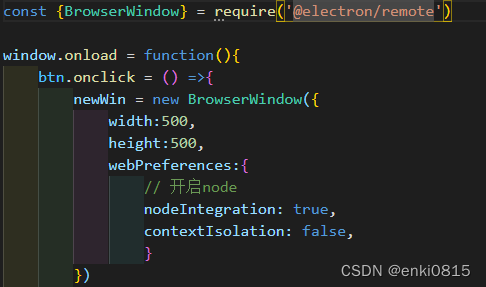
2. demo2.js:

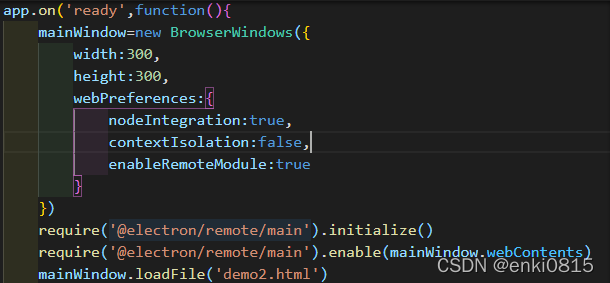
3. main.js:

It’s ready to run. The version of electron is updated too fast, and the rules are changed too fast.

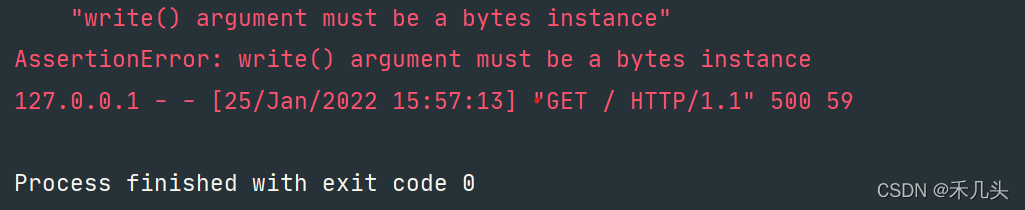
[Solved] wsgiref make_server Error: AssertionError: write() argument must be a bytes instance

from wsgiref.simple_server import make_server


def application(env, start_response):
    response_body = ["%s: %s" % (key, value) for key, value \
    in sorted(env.items())]
    response_body = '\n'.join(response_body)
    status = "200 ok"
    response_head = [("ContextType", "text/plain"), ("ContextLength",str(len(response_body)))]

    start_response(status, response_head)
    return [response_body]

httpd = make_server(
    "localhost",
    8000,
    application
)

httpd.handle_request()

An error is reported when accessing port 8000. The coding problem is modified in the

code

return [response_body]  
=>Modfied
return [response_body.encode('utf-8')]

Normal operation

OSS Error: The difference between the request time and the current time is too large

1. Problem
alicloud OSS reports an error when uploading a file: the difference between the request time and the current time is too large

2. Reason
the request was initiated 15 minutes later than the current time of the OSS server. The OSS determines that the request is invalid and returns an error

3. Solution
the system time of OSS adopts GMT time. The system time of the equipment needs to be adjusted to GMT time or its corresponding time zone.

[Solved] IDEA Error: Error running ‘Application‘: Command line is too long

Error running ‘application’ in idea: command line is too long Shorten command line for Application or also for Spring Boot default configuration

Problem background solution 1 (current project settings) solution 2 (global settings)

Lyric: I can’t go to a good school

Command line is too long. Shorten command line for Application or also for Spring Boot default configuration)

Problem background

When idea starts the project, it suddenly reports an error

Error running 'Application':
Command line is too long.Shorten command line for Application or also for Spring Boot default configuration.

Solution:

Method 1 (current project settings)

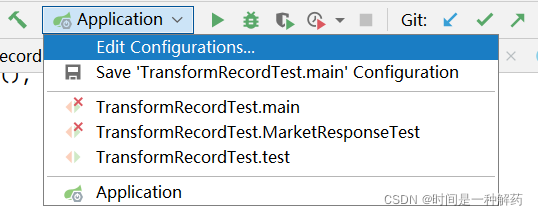
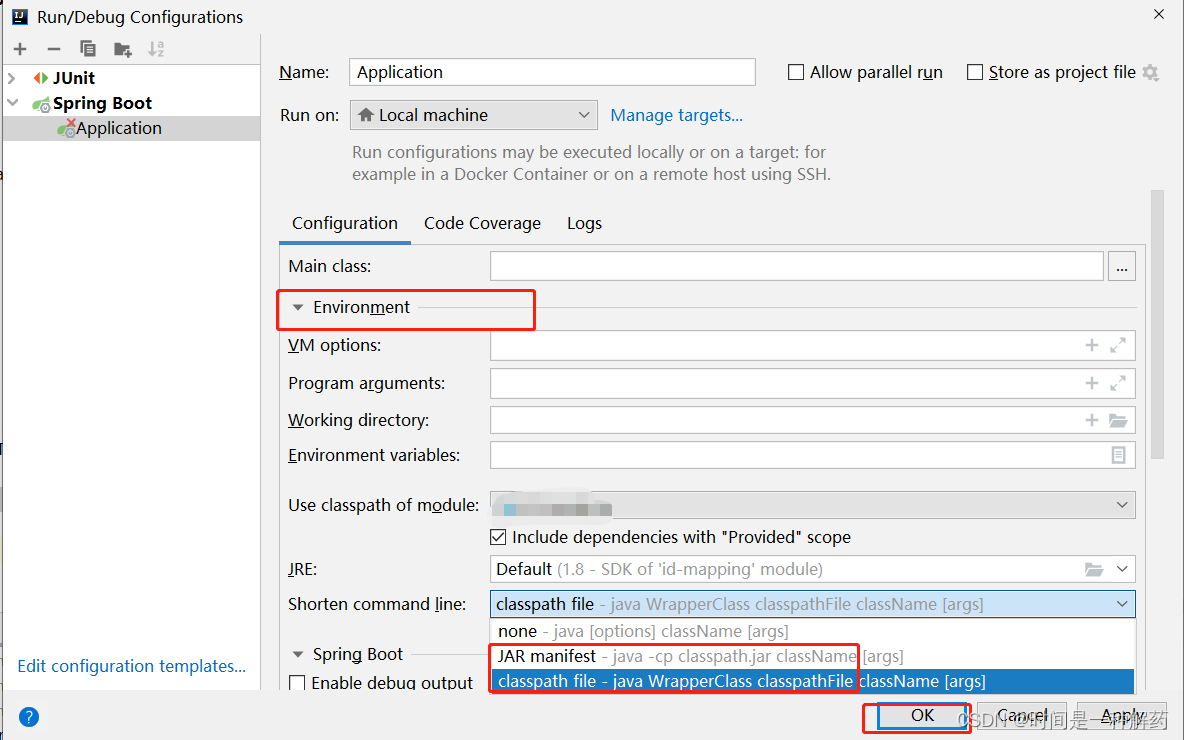
1 click Edit configurations

in the run drop-down box of the current project. 2 Click environment, select the short command line drop-down box, select classpath file or jar manifest, and click OK to confirm

Method 2 (global setting)

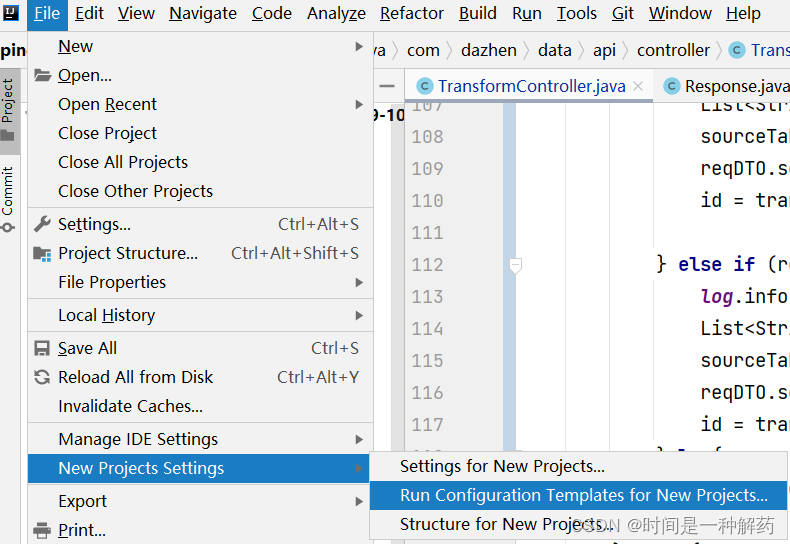
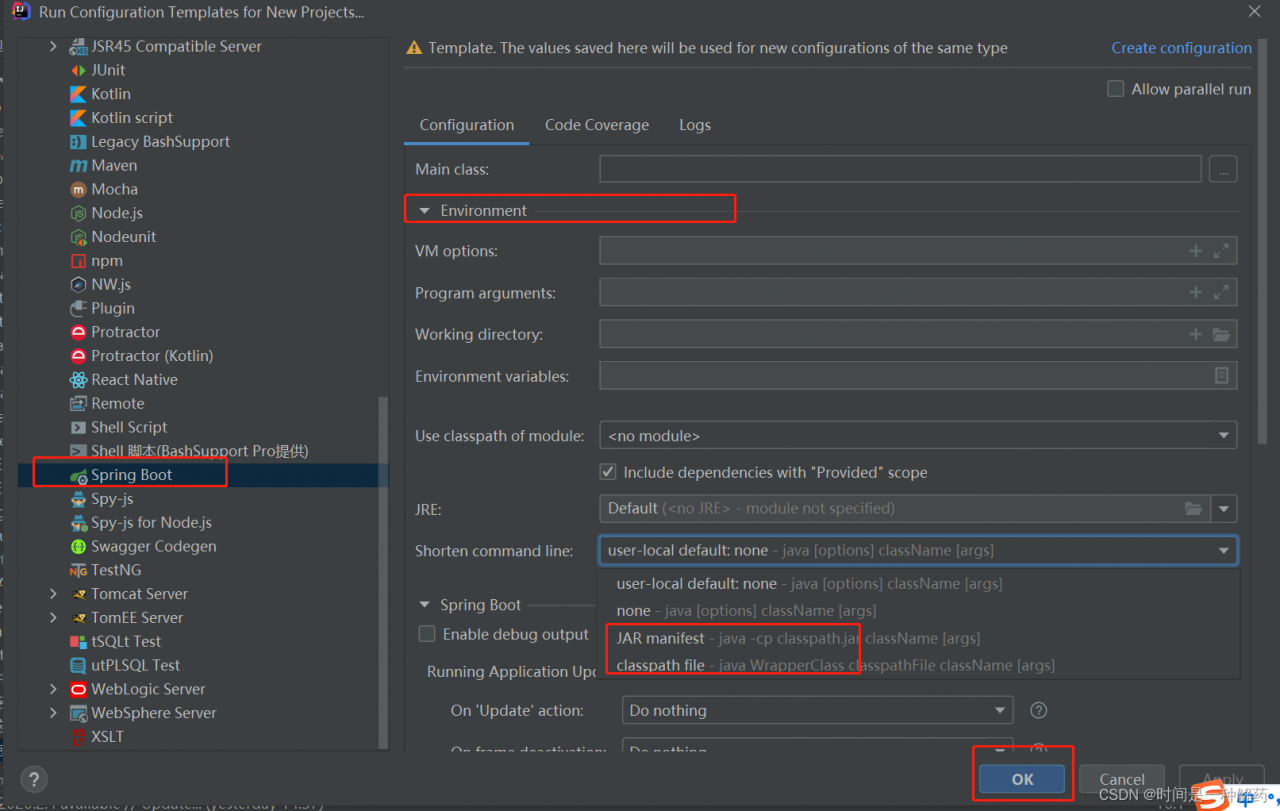
1. Since scheme 1 is the current project setting and other projects are not opened, you can set the global. Click file → new projects settings → run configuration templates for new projects

2. Click springboot project. Other projects are the same as scheme 1

Keras import package error: importerror: cannot import name ‘get_ config‘

ImportError: cannot import name ‘get_config’

Traceback (most recent call last):
  File "siameseNet.py", line 6, in <module>
    from keras.layers import Merge
  File "/usr/local/lib/python3.6/site-packages/keras/__init__.py", line 25, in <module>
    from keras import models
  File "/usr/local/lib/python3.6/site-packages/keras/models.py", line 19, in <module>
    from keras import backend
  File "/usr/local/lib/python3.6/site-packages/keras/backend.py", line 39, in <module>
    from tensorflow.python.eager.context import get_config
ImportError: cannot import name 'get_config'

Solution:

pip install keras == 2.1.0 --force-reinstall