Author Archives: Robins

JS async await Error: Uncaught SyntaxError: await is only valid in async functions and the top level bodies of modules

Uncaught SyntaxError
Uncaught SyntaxError: await is only valid in async functions and the top level bodies of modules
await the top level bodies of modules
Can not Run normally

<script type="text/javascript">
// Uncaught SyntaxError: await is only valid in async functions and the top level bodies of modules
let x = await tools();
console.log(x);
</script>

After modification

reference resources

<script type="text/javascript">
// demo
(async () => {
    let x = await tools();
    console.log(x);
})();
</script>

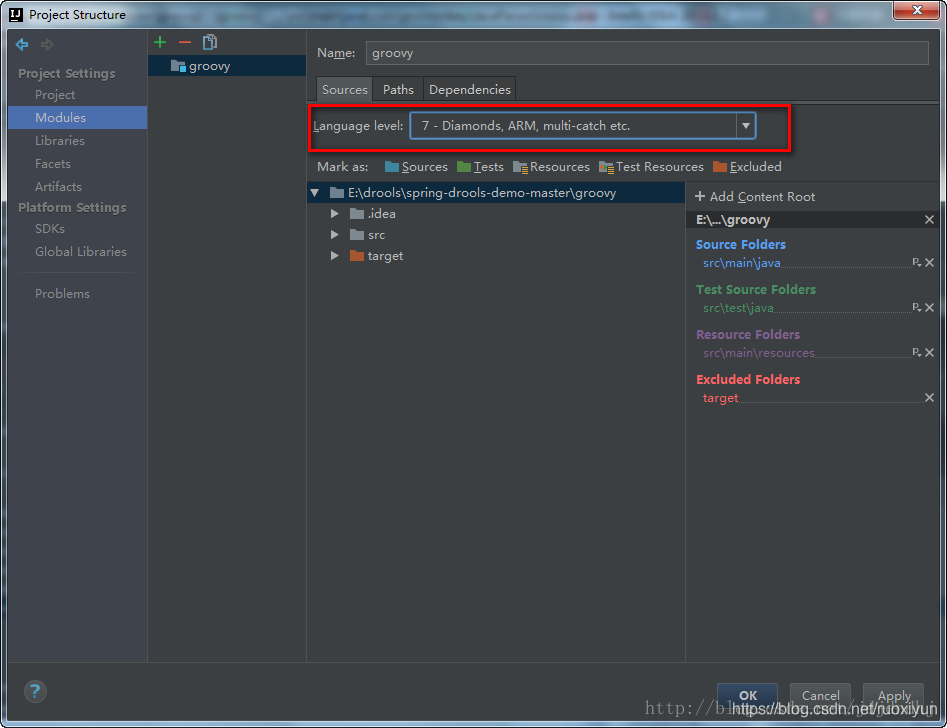
[Solved] Error:java: Compilation failed: internal java compiler error

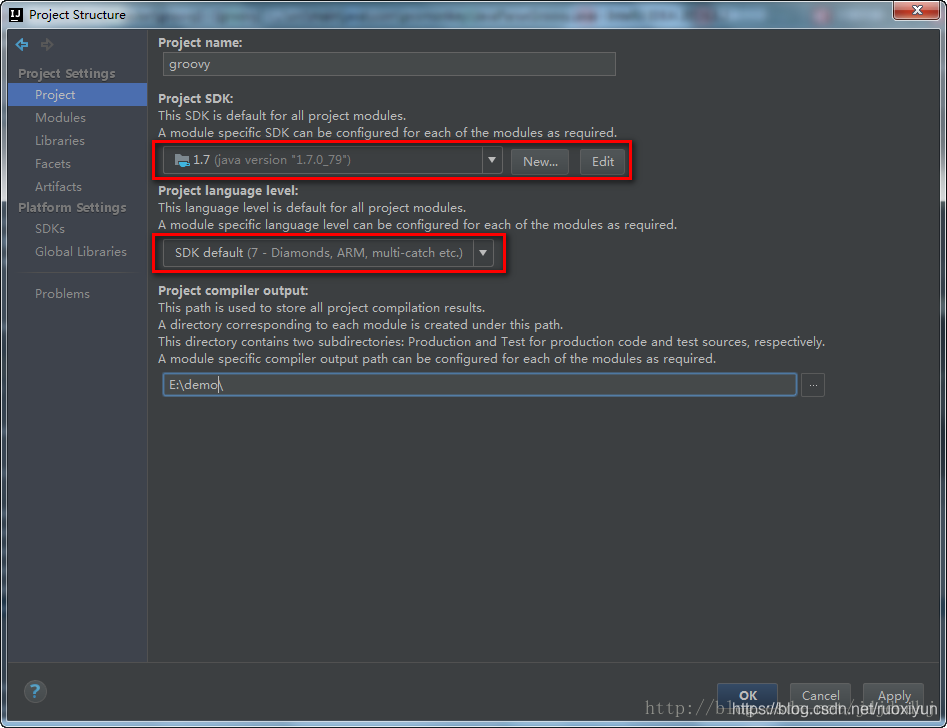
1, view the project’s jdk (Ctrl+Alt+shift+S)
File ->Project Structure->Project Settings ->Project

2. view the jdk of the project (Ctrl+Alt+shift+S)
File ->Project Structure->Project Settings -> Modules -> (the name of the project needs to be modified) -> Sources ->

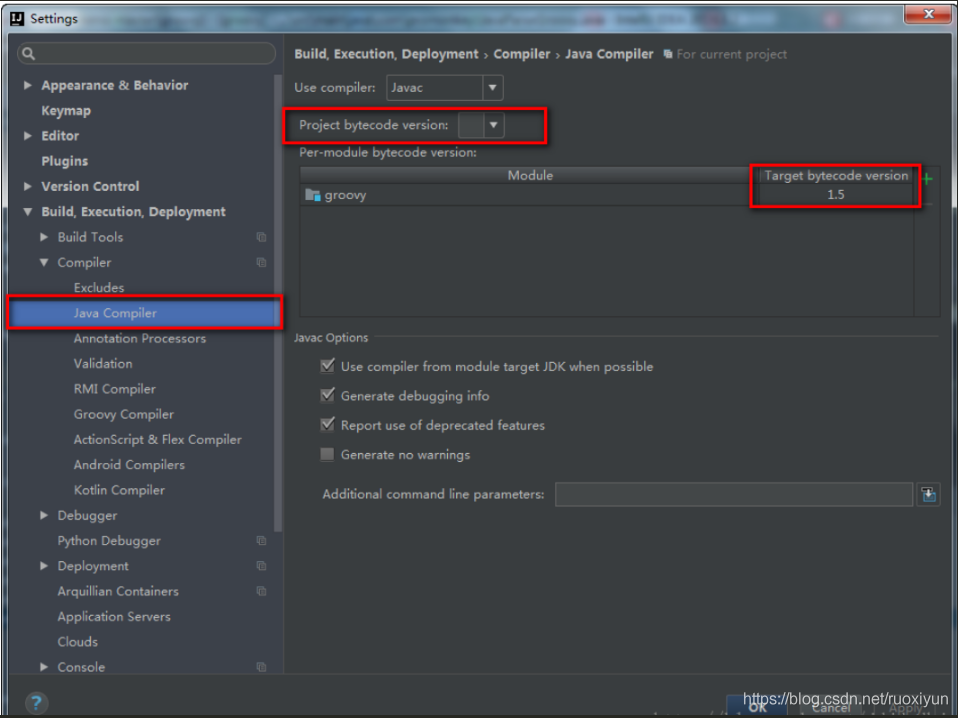
3. View Java configuration in idea
File ->Setting ->Build,Execution,Deployment -> Compiler -> Java Compiler

If the above three steps still fail
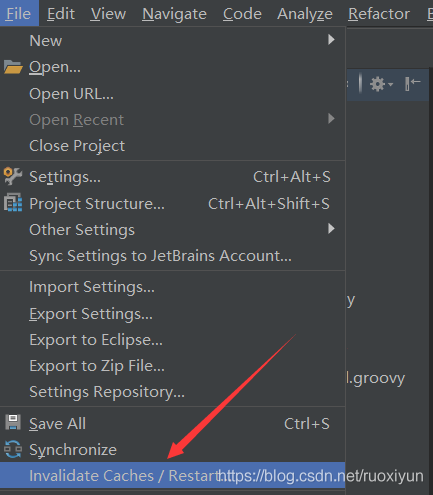
Clear IDEA cache Restart IDEA
File->Invalidate Caches/Restart

[Solved] The “QtRunWork“ task returned false but did not log an error

Recently in business development need to update the UI in the QThread, if the UI handle through the direct update will make the program reported an error, because the update of the UI in the thread will not be captured by the original thread of the EXEC event, will lead to message event blockage generated ERROR, so the use of the signal and slot mechanism, and then I declared a signals signal in the QThread, the compilation reported this error.

The "QtRunWork" task returned false but did not log an error

No detailed warning was given, and I later checked the relevant QT instructions to solve the problem.

Solution: Add a line of macro definition to the class where you use signals and slots.

Q_OBJECT

This will work, the signal and slotted based on Q_OBJECT, we need to declare it module to our class so that the QT compiler can instantiate it, otherwise it will be exception ERROR.

[Solved] Error getting ssh command ‘exit 0‘ : ssh command error:

docker-machine Create Certificate Stuck
docker-machine –debug create -d hyperv –hyperv-virtual-switch “Default Switch” docker-machine
Hint
https://github.com/minishift/minishift/issues/2722

Hi,
the only way for me to get around this was to disable the Windows 10
built-in OpenSSH Client, via Windows Features.
After that minishift used its internal ssh client and proceeded.
Unfortunately i am running into another issue after that, where the
control-plane pods are not starting and the minishift deployment fails,
since the API access times out.
Would be inteeresting to see if you get the same once you deal with the SSH
stuff
Am Fr., 30. Nov. 2018 um 12:15 Uhr schrieb denisjc7 <
[email protected]>:
…
Hi,
@LW81 https://github.com/LW81 I am experiencing the same issue on
basically the same configurations as yours. Did you find a solution?Thank
you
—
You are receiving this because you were mentioned.
Reply to this email directly, view it on GitHub
<#2722 (comment)>,
or mute the thread
https://github.com/notifications/unsubscribe-auth/ATAFNHdE_fyUXANlW2bT8vzeFZ8Un2Erks5u0RNggaJpZM4WHLXu

Solution:
Through [Settings] => [Applications] => [Optional Applications
Uninstall Windows 10 built-in OpenSSH Client
After using the built-in ssh, it runs successfully

[Solved] Rsync synchronization Error: @ERROR: Unknown module xxx

Scenario:

Push files from server a to server B

Error message

@ERROR: Unknown module ‘xxx’

rsync error: error starting client-server protocol (code 5) at main. c(1649) [sender=3.1.6]
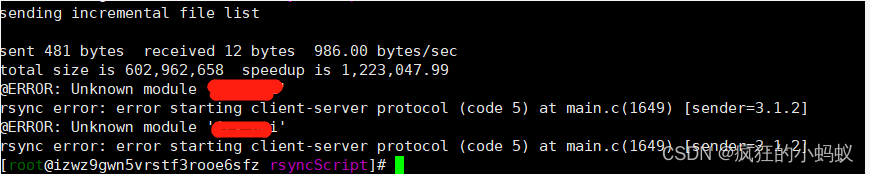
Finally, it is found that the default configuration file of Rsync is rsyncd.com under/etc.conf instead of the file rsyncd. In the/etc/rsyncd/folder.conf

Solution 1: directly configure /etc/rsyncd.conf file, the operation steps are omitted.
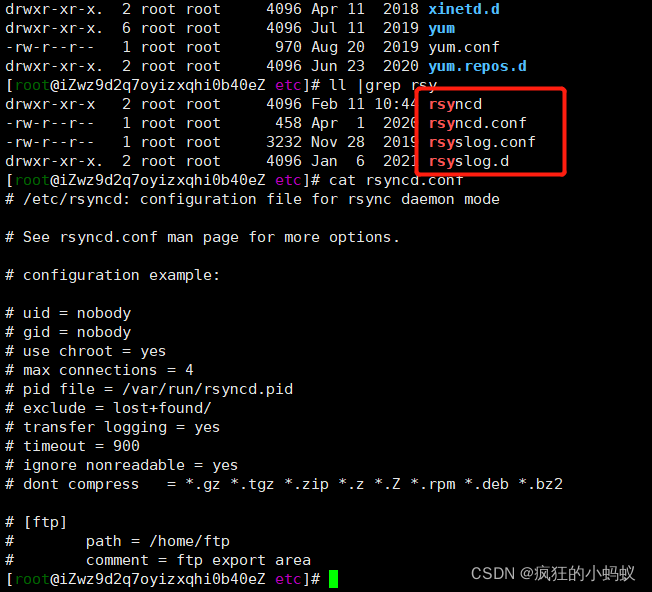
Solution 2:

(1) Modify VIM /lib/SYSTEMd/system/rsyncd.service,
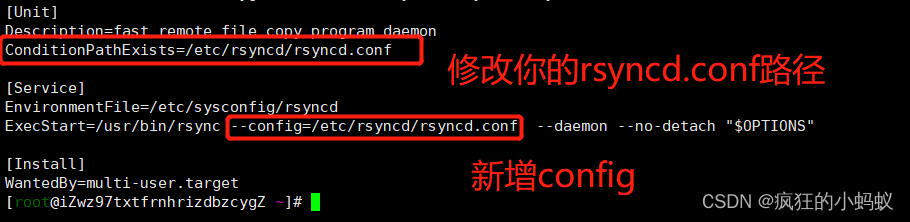
The following is the configuration content

[Unit]
Description=fast remote file copy program daemon
ConditionPathExists=/etc/rsyncd/rsyncd.conf

[Service]
EnvironmentFile=/etc/sysconfig/rsyncd
ExecStart=/usr/bin/rsync --config=/etc/rsyncd/rsyncd.conf  --daemon --no-detach "$OPTIONS"

[Install]
WantedBy=multi-user.target

(2) Reload the background process and restart the Rsync service to synchronize.

systemctl daemon-reload

systemctl restart rsyncd

Related commands:

Systemctl daemon reload daemon

Systemctl restart rsyncd restart synchronization service

Systemctl start rsyncd# start

Systemctl stop rsyncd stop

systemctl status rsyncd. Service view Rsync status

PS aux | grep Rsync | viewing process
CentOS 8: No URLs in mirrorlist error [How to Solve]

Question:

In CentOS 8, there is an error using yum. There is no URL in the image list, similar to the following:

Error: Failed to download metadata for repo 'appstream': Cannot prepare internal mirrorlist: No URLs in mirrorlist

reason:

On January 31, 2022, the CentOS team finally removed all packages of CentOS 8 from the official image.

CentOS 8 has expired on December 31, 2021, but the software package has been retained on the official image for some time. Now they are transferred to https://vault.centos.org

Solution:

If you still need to run CentOS 8, you can run it in/etc/yum repos. Update the source in D. Use vault.centos.Org instead of mirror.centos.org.

sudo sed -i -e "s|mirrorlist=|#mirrorlist=|g" /etc/yum.repos.d/CentOS-*
sudo sed -i -e "s|#baseurl=http://mirror.centos.org|baseurl=http://vault.centos.org|g" /etc/yum.repos.d/CentOS-*

Essentially, it replaces the previous URL with the URL that is still running. This problem should be solved within this period of time.

HIVE Error: Error: Error while processing statement: FAILED: Execution Error, return code 2 from org.apac

Cause: the container running on the slave machine tried to use too much memory and was killed by the nodemanager.

Solution: add memory

Set the memory configuration for map and reduce tasks in the configuration file mapred-site.xml of hadoop as follows: (The actual memory configured in the value needs to be modified according to the memory size of your machine and the application)

<property>
  <name>mapreduce.map.memory.mb</name>
  <value>1536</value>
</property>
<property>
  <name>mapreduce.map.java.opts</name>
  <value>-Xmx1024M</value>
</property>
<property>
  <name>mapreduce.reduce.memory.mb</name>
  <value>3072</value>
</property>
<property>
  <name>mapreduce.reduce.java.opts</name>
  <value>-Xmx2560M</value>
</property>

[Solved] error during connect: This error may indicate that the docker daemon is not running

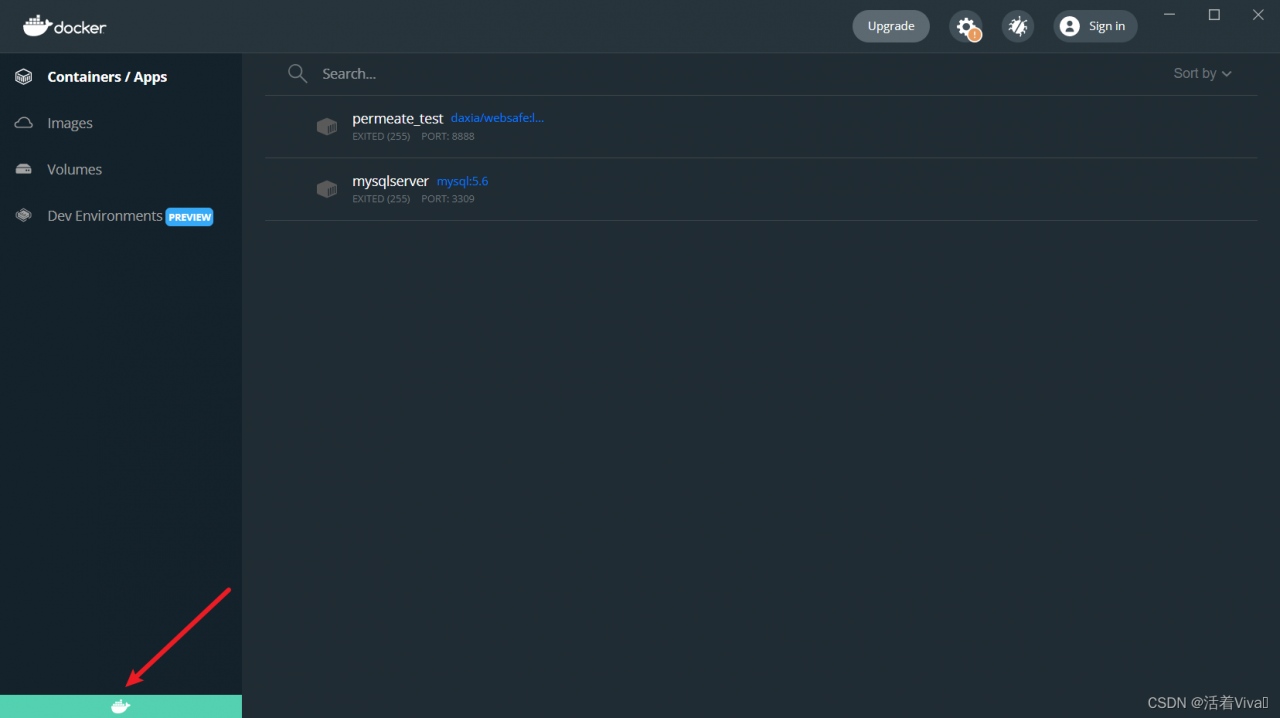
Because the shortcut key of my screenshot tool is Ctrl+q , and the shortcut key of docker desktop exit is also Ctrl+q, when I press Ctrl+q, docker desktop exits, and then when I enter the docker command in the console,

burst this line of error

error during connect: This error may indicate that the docker daemon is not running.: Get "http://%2F%2F.%2Fpipe%2Fdocker_engine/v1.24/containers/json": open //./pipe/docker_engine: The system cannot find the file specified.

Solution:
reopen docker desktop

when the color of the icon in the lower-left corner is the same as that shown in the picture, it proves that docker operates normally
then I go to CMD and enter the docker command

to see that there is no error

[Solved] appium Error: Original error: socket hang up

App automation error reporting and appium error reporting:

Encountered internal error running command: UnknownError: An unknown server-side error occurred while processing the command.original error: Could not proxy command to the remote server.original error: socket hang up

Solution:
uninstall appium setting and other appium installed apps on the device, uninstall the automatically started app (operation object APK), and restart the device

[Solved] Golang Error: fatal error: concurrent map writes

The specific codes are as follows:

package main

import (
	"fmt"
	"time"
)

var m = make(map[int]int, 10)

func solution(n int){
	res := 1
	for i:=1; i<=n; i++{
		res = res * i
	}
	m[n] = res
}

func main(){
	for i:=1; i<=200; i++{
		go solution(i)
	}
	time.Sleep(time.Second*10)
	for ind, val := range m{
		fmt.Printf("[%d] = %d \n", ind, val)
	}
}

The following error occurred:

fatal error: concurrent map writes


runtime.mapassign_fast64(0x10b7760, 0xc00001e1b0, 0x12, 0x0)
        /usr/local/go/src/runtime/map_fast64.go:176 +0x325 fp=0xc000106fa0 sp=0xc000106f60 pc=0x1010bc5
main.solution(0x12)
        /Users/lcq/go/src/go_base/gochanneldemo/channeldemo.go:15 +0x65 fp=0xc000106fd8 sp=0xc000106fa0 pc=0x10a88a5
runtime.goexit()
        /usr/local/go/src/runtime/asm_amd64.s:1374 +0x1 fp=0xc000106fe0 sp=0xc000106fd8 pc=0x1062c41
created by main.main
        /Users/lcq/go/src/go_base/gochanneldemo/channeldemo.go:20 +0x58

The main reason is because map is not thread-safe, so it is not safe to use map in case of concurrency.
Solution.

    1. Add a lock
    2. Use sync.map
    3. Use a channel (multiple threads operating a channel is thread-safe)

ORA-04088: error during execution of trigger [How to Solve]

ORA-00001: unique constraint XXXXXXX violated
ORA-06512: at “XXXXXXXXX”, line 5
ORA-04088: error during execution of trigger ‘TRRIGER_ NAME’

This is mostly because trrigger is in use. This error will be reported if it performs merge into operation or inserts or updates the target table.

Solution: close trrigger and execute merge into, insert and update statements.

alter trigger trriger_name disable;

After executing the statement, turn on trrigger.

alter trigger trriger_name enable;

Disadvantages:

Data loss may occur between disable and enable.