Error:
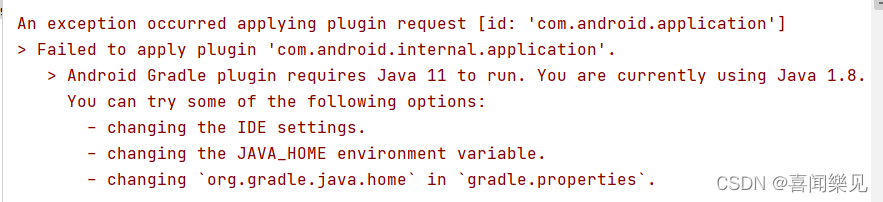
In fact, the IDE has given the reason and solution
just change “Java 1.8” to “Java 11” (please see how to operate it) 👇)
Solution:
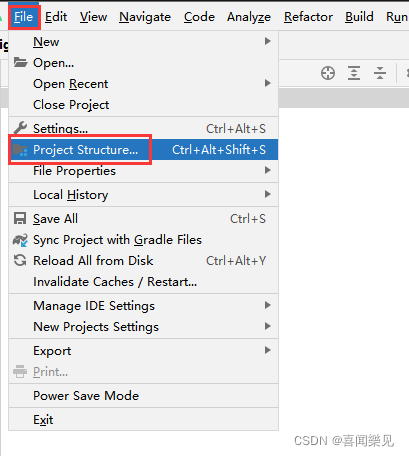
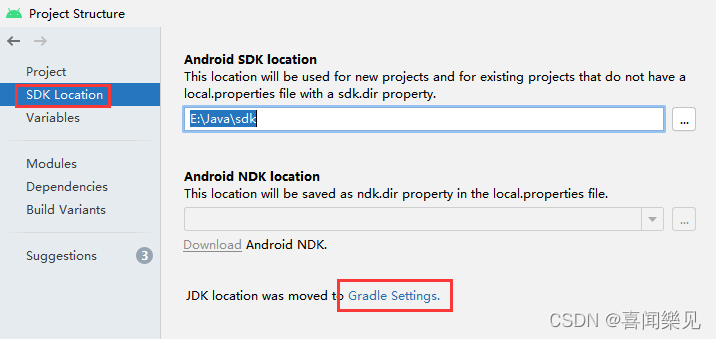
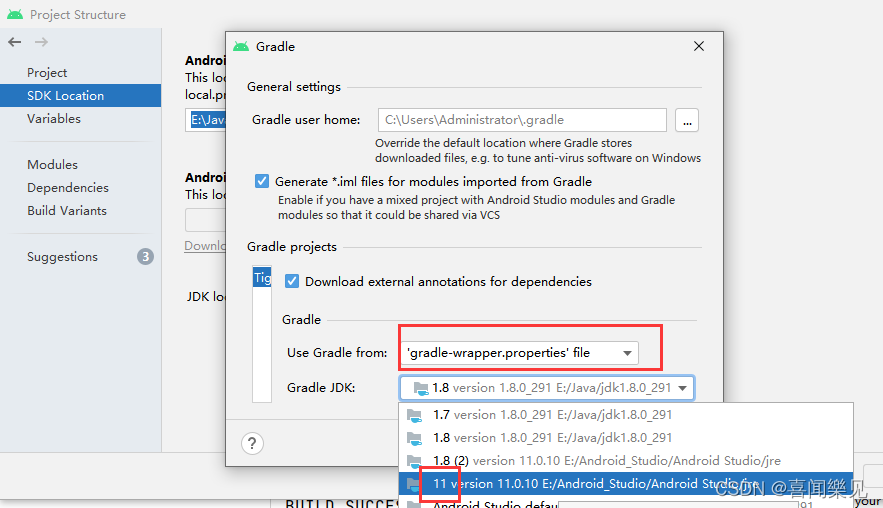
Error:
In fact, the IDE has given the reason and solution
just change “Java 1.8” to “Java 11” (please see how to operate it) 👇)
Solution:
Today, you can’t connect the virtual machine with finalshell. Later, you can modify the static IP address and restart the network.service.failed, display failed to start LSB: bring up/do...
Solution:
systemctl stop NetworkManager
systemctl  disable NetworkManager
systemctl restart network
Background
Recently, when running sparksql, I frequently print logs and report errors in the middle of execution:
WARN TaskMemoryManager: Failed to allocate a page (104876 bytes), try again.
WARN TaskMemoryManager: Failed to allocate a page (104876 bytes), try again.
…
reason
There is not enough memory to perform tasks, and resources need to be recycled frequently
Solution:
1. Optimize SQL scripts. (preferred, that’s how I solved it at that time)
2. Increase driver memory, — driver memory 6g
My SQL at that time was simplified as follows:
select name
from stu
where id in (select id from in_stu);
Stu data volume is 800W, in_stu data volume is 1.2kW
Optimized as:
select name
from stu
where id in (select distinct id from in_stu);
after optimization, The data volume of In_stu ID is reduced to 11 W, and the problem is solved.
Description:
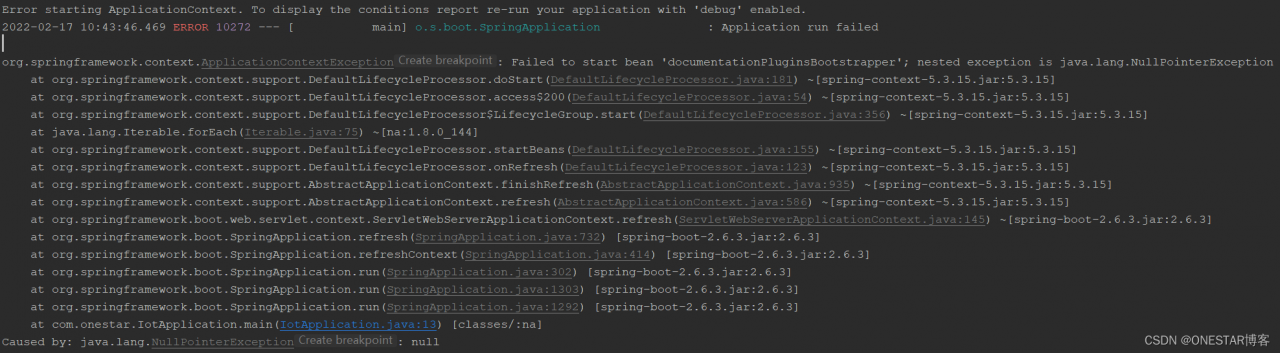
When using springboot to integrate swagger2config, an error is reported. The error information is as follows:
Analysis:
I am using Springboot 2.6.3, Spring Boot 2.6.X uses PathPatternMatcher to match paths, the path matching used by Springfox referenced by Swagger is based on AntPathMatcher, so it needs to be configured.
Solution:
Add the following configuration to the YML configuration file:
spring:
  mvc:
    pathmatch:
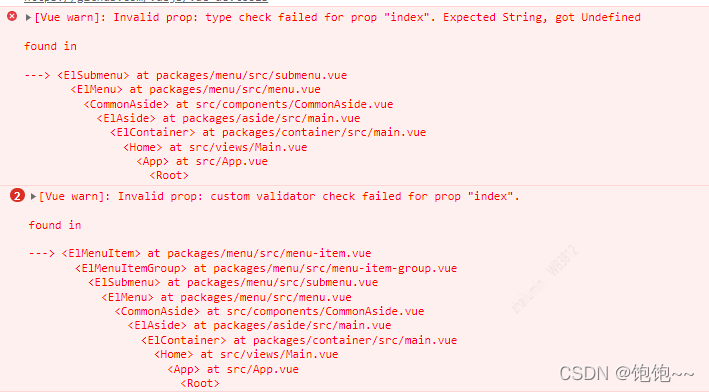
matching-strategy: ANT_PATH_MATCHERThe console of the background management system of Vue + element UI reports the following error messages
Solution:
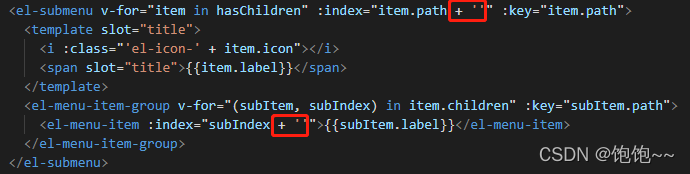
Add ” after the parameter in attribute: index
1. Error
nvidia-smi input error:
NVIDIA-SMI has failed because it couldn’t communicate with the NVIDIA driver. Make sure that the latest NVIDIA driver is installed and running.
input torch.cuda.is_available() return false
2. Solution
Simply execute two commands.

sudo apt-get install dkms
sudo dkms install -m nvidia -v 470.94 (470.94 is the driver version number)

Use the command ll /usr/src/ to see a nvidia-470.94/ folder underneath, the version number varies from your computer
Error Messages:
failed call to cuInit: CUDA_ERROR_NO_Device: no CUDA capable device is detected
this is also what I encountered when running a CNN SVM classifier program of tensorflow GPU today. It’s not the problem of the program. It’s our graphics card.
Solution:
import tensorflow as tf

config = tf.compat.v1.ConfigProto()
config.gpu_options.allow_growth = True
session = tf.compat.v1.InteractiveSession(config=config)
Just add these lines of code to the head of the code, and you don’t need to write this code belowos.environ['CUDA_VISIBLE_DEVICES'] = '/gpu:0'
Here is a example code on how to read Json format datas for web game development.
How to Read JSON Format Data with JAVA
/**
 *
 * @param result JSON string
 * @param name JSON array name
 * @param fields The fields contained in the JSON string
 * @return Returns a list of type List<Map<String,Object>>, Map<String,Object> corresponding to the structure "id": "1"
 */
public static List<Map<String, Object>> convertJSON2List(String result,
        String name, String[] fields) {
    List<Map<String, Object>> list = new ArrayList<Map<String, Object>>();
    try {
        JSONArray array = new JSONObject(result).getJSONArray(name);

        for (int i = 0; i < array.length(); i++) {
            JSONObject object = (JSONObject) array.opt(i);
            Map<String, Object> map = new HashMap<String, Object>();
            for (String str : fields) {
                map.put(str, object.get(str));
            }
            list.add(map);
        }
    } catch (JSONException e) {
        Log.e("error", e.getMessage());
    }
    return list;
}
If let or var variables are used to declare in TS, an error will appear:
Slint: identifier ‘errmsg’ will never be reassigned; Use ‘const’ instead of ‘let’. (prefer const)

code snippet:

Solution:
1. Use const to declare
2. Open tslint.json file under the project, set prefer-const to false.
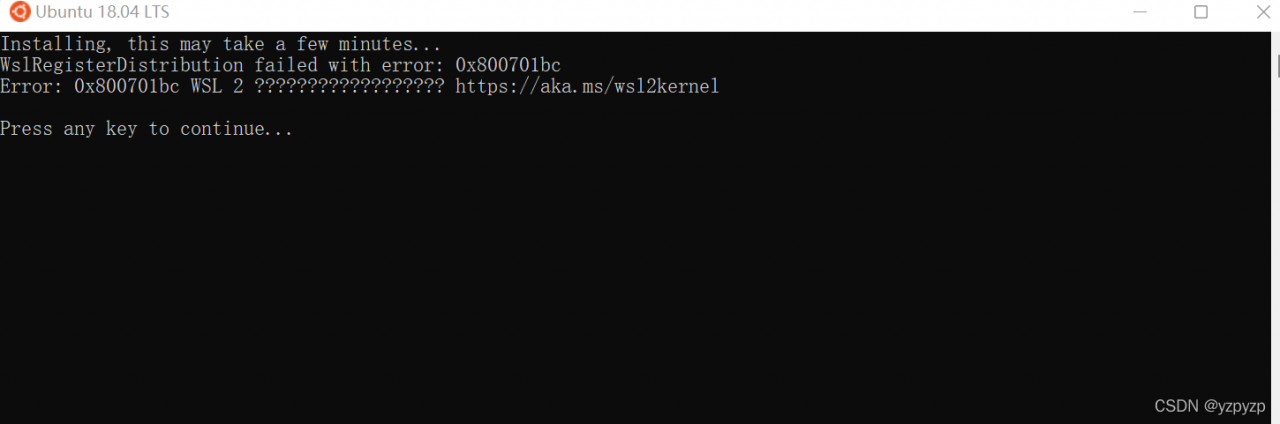
After WSL is enabled on the windows system, install Ubuntu in the Microsoft Store, and then open Ubuntu. Prompt:
 Cause:
After wsl1 is upgraded to wsl2, but the kernel is not upgraded, so this error message will appear, just go to Microsoft WSL official website to download and install the latest WSL2 Linux kernel update package for x64 computers.
Solution:
1、Download the latest wsl installation package, download address: https://wslstorestorage.blob.core.windows.net/wslblob/wsl_update_x64.msi
2、After downloading the installation package, just run the installation directly!
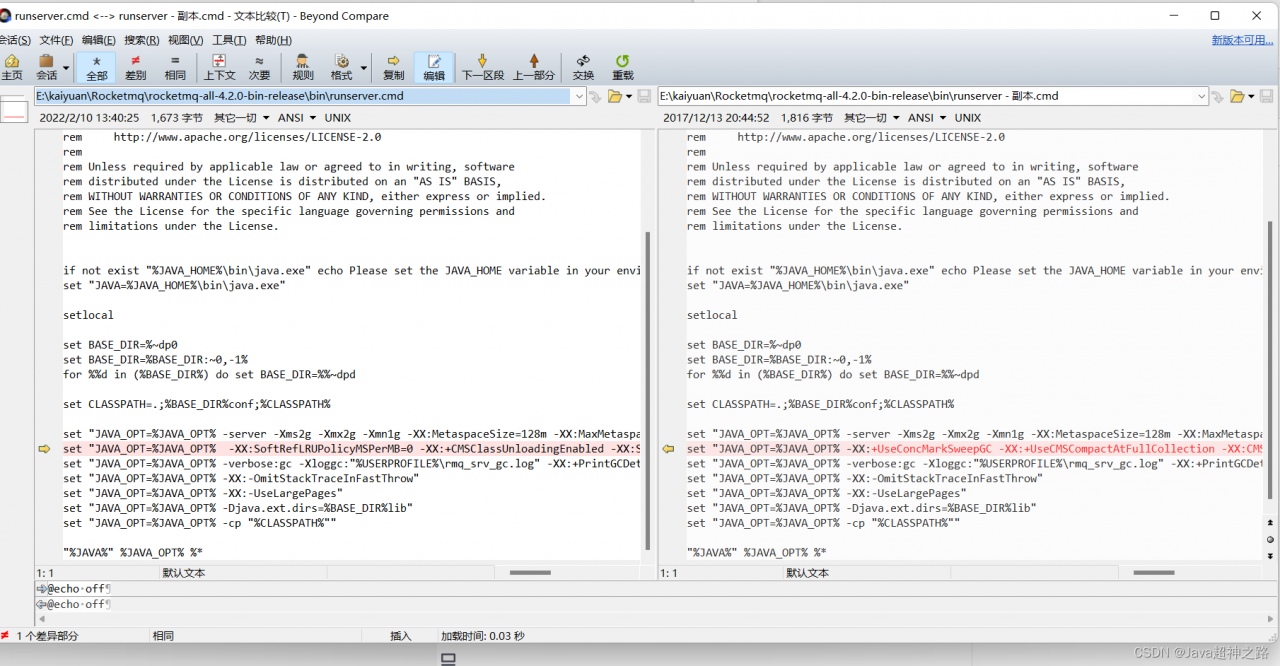
Java HotSpot ™ 64-Bit Server VM warning: Option UseConcMarkSweepGC was deprecated
It may be a JDK version problem
jdk1.8 is OK
if you want to use a higher version, such as jdk11
Windows:
Modify bin\runserver.cmd
Linux:
Modify bin\runserver.sh
before modification:
set "JAVA_OPT=%JAVA_OPT% -XX:+UseConcMarkSweepGC -XX:+UseCMSCompactAtFullCollection -XX:CMSInitiatingOccupancyFraction=70 -XX:+CMSParallelRemarkEnabled -XX:SoftRefLRUPolicyMSPerMB=0 -XX:+CMSClassUnloadingEnabled -XX:SurvivorRatio=8 -XX:-UseParNewGC"
After modification:
set "JAVA_OPT=%JAVA_OPT% -XX:SoftRefLRUPolicyMSPerMB=0 -XX:+CMSClassUnloadingEnabled -XX:SurvivorRatio=8"
1. Version
cocos3.4
2. Defects of stringify
Customized a fragment shader, mimicking the official method, using STRINGIFY to convert the code to strings. Run it and report an error
cocos2d: ERROR: Failed to compile shader: uniform mat4 CC_PMatrix;
uniform mat4 CC_MVMatrix; uniform mat4 CC_MVPMatrix; uniform mat3
CC_NormalMatrix; uniform vec4 CC_Time; uniform vec4 CC_SinTime;
uniform vec4 CC_CosTime; uniform vec4 CC_Random01; uniform sampler2D
CC_Texture0; uniform sampler2D CC_Texture1; uniform sampler2D
CC_Texture2; uniform sampler2D CC_Texture3; //CC INCLUDES ENDvarying vec4 v_fragmentColor; varying vec2 v_texCoord; uniform float
outlineSize; uniform vec3 outlineColor; uniform vec2 textureSize;
uniform vec3 foregroundColor; const float cosArray[12] = { 1 cocos2d:
ERROR: 0:? : ‘pre-mature EOF’ : syntax error syntax error
The following is the reason for my guess error:
the problem lies in the initialization statement of floating-point array. Stringify is a macro definition function, which is defined as:
#define STRINGIFY(A) #A
Here a # syntax of macro definition is used to convert A into a string. When A contains a ‘,’ character, A is truncated and incomplete. For example, STRINGIFY (int a,b) expects the string to be “int a,b”, but in fact it will be “int a”. In fact, STRINGIFY is expanded with two arguments, the first being int a and the second being b.
3. Solutions
3.1. Add ()
Call STRINGIFY with brackets in the argument: STRINGIFY((AB)). However, the string obtained this way will also be bracketed and needs to be unbracketed, which is more troublesome
3.2. Write directly as a string
For example:
GLchar my_vert[] = "\
attribute vec4 a_position;\n\
attribute vec2 a_texCoord;\n\
attribute vec4 a_color;\n\
\n\
#ifdef GL_ES    \n\
varying lowp vec4 v_fragmentColor;   \n\
varying mediump vec2 v_texCoord;   \n\
#else  \n\
varying vec4 v_fragmentColor;\n\
varying vec2 v_texCoord;  \n\
#endif  \n\
\n\
void main()  \n\
{  \n\
	gl_Position = CC_PMatrix * a_position;  \n\
	v_fragmentColor = a_color;  \n\
	v_texCoord = a_texCoord;  \n\
}";
It’s also troublesome. You need to add \n\ to each line.
3.3. Write the code into a file
For example:
#ifdef GL_ES
precision lowp float;
#endif

varying vec4 v_fragmentColor;
varying vec2 v_texCoord;

void main()
{
	float ff=1;
	gl_FragColor = texture2D(CC_Texture0, v_texCoord);
	float f=(gl_FragColor.r+gl_FragColor.g+gl_FragColor.b)/3.0f;
	gl_FragColor=vec4(f,f,f,gl_FragColor.a);
}
Save the above code as ccShader_PositionTextureColor_noMVP_Gray.fsh file. Then use
std::string fragmentSource=FileUtils::getInstance()->getStringFromFile(FileUtils::getInstance()->fullPathForFilename("shaders/ccShader_PositionTextureColor_noMVP_Gray.fsh"));
Direct reading.