Author Archives: Robins

VMRC installation occurred: failed to install the hcmon driver

according to the official document VMware Remote Console 10.0.1 release notes

access address: https://docs.vmware.com/cn/VMware-Remote-Console/10.0/rn/vmware-remote-console-1001-release-notes.html

  • installing VMware Remote Console on a system that already has other VMware applications installed may cause the following error:
    Failed to install the HCmon driver
    solution: go to the services TAB of task manager and stop VMUSBArbService. Then proceed with the installation.
    or, start the.msi installer from a command prompt window that you opened with administrator privileges.
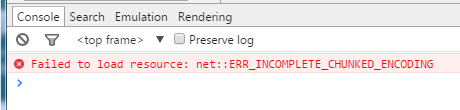
  • Failed to load resource: net::ERR_INCOMPLETE_CHUNKED_ENCODING

    error message:

    Failed to load resource: net::ERR_INCOMPLETE_CHUNKED_ENCODING

    environmental phenomena

    chrome

    chrome browser, the previous access to the interface is what, access to the error of this url, the interface is still what looks like, but does not respond to mouse and keyboard events!
    press F12 to open the debug window. An error message appears:

    IE compatible kernel

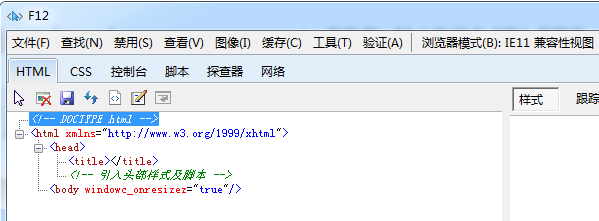
    IE compatible kernel browser, after opening the interface is blank, press F12, open the debugging window, display the following content:

    error cause:

    online search, there are articles mentioned is response.close, response.end and so on caused, but I visited the JSP page, how can it be related to this!

    based on this page on another problem occurred “HTTP Status 500 – /online.jsp (line: 495, column: 2) File [/foot.jsp] not found” opened the JSP page code analysis, found the problem:
    actually USES JSP :include

    <jsp:include flush="true" page="/head.jsp" ></jsp:include>

    The

    head.jsp file does not exist, which results in this problem!

    = = = = = = = = = = = = = = = = = = = = = = = = = = = = = = = = = = = = = = = = = = =
    PS: mice no girlfriend particularly depressed, finally a bat agreed to marry him, the mouse is very happy. Others laugh him to have no vision, mouse: you understand what, she somehow is a stewardess.

    launch failed.Binary Not found in Linux / Ubuntu solution

    launch failed.Binary not found the solution:

    first of all when you’re confused about mingw solutions online, I’ll tell you to stop reading about mingw. Under Linux, mingw is not used, but

    is directly completed by Linux GCC

    1, look at your Eclipse Console output, if there is g++ not found, it means your system g++ did not install successfully.

    Solution: Ctrl+Alt+t to terminal (console) mode, enter sudo apt-get install g++

    2, not yet?

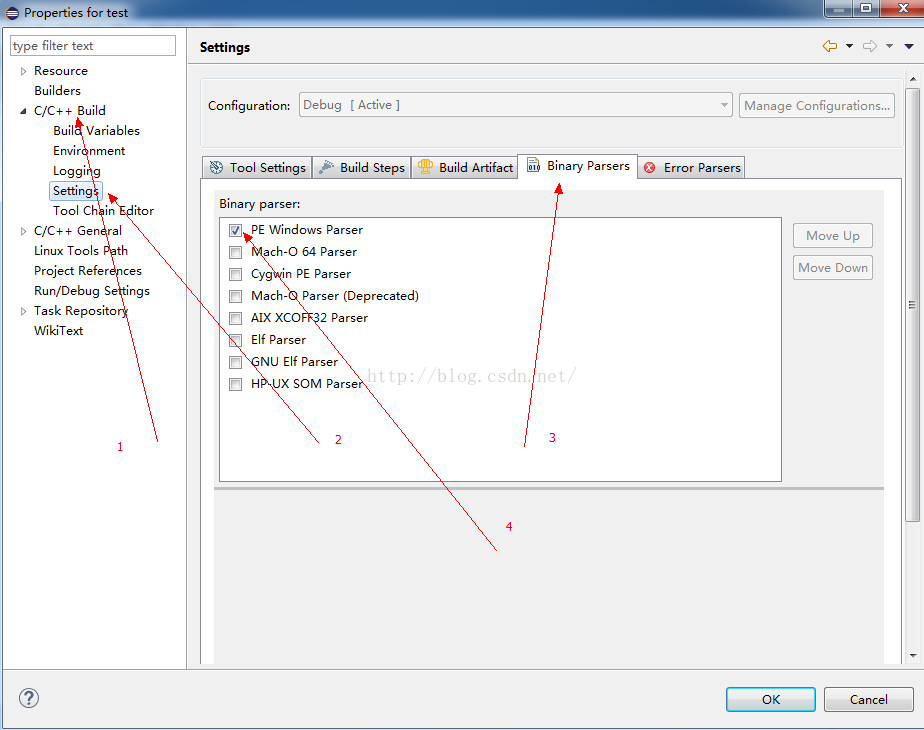
    Project-> Properties-> C/C++Build-> Settings-> Binary Parsers

    check GNU Elf Parser and Elf Parser

    and then don’t forget about Project-> Build All (Ctrl+B), then run (Ctrl+ F11)

    . If you see the item below come out called Binaries, Congradulations! Configured successfully, ready to run!

    3, not yet?

    check your file name is XXX. CPP ?And XXX must not contain “. “such symbols


    under Windows is best used mingw…

    http://hi.baidu.com/doctorjohnson/blog/item/2fafa2431187e11d9213c67e.html

    【wget failed】Connecting to 127.0.0.1:7890… failed: Connection refused.

    always reports this error when downloading the configuration file while configuring the coolfly agent. At first, I thought it was the problem that the agency website gave out there, stalling for a long time is not good. Then during wine installation today, after adding the PPA Channel, execute the Apt-get Update to report the same error. The error was finally found at

    set before the proxy address, not changed back.

    --2020-02-18 12:10:33--  https://rbq.caipin.pro/link/cias4tBlguQQ9EVF?clash=1
    Connecting to 127.0.0.1:7890... failed: Connection refused.
    

    although (set) inside (network proxy) was changed back to automatic, it could be seen from env| grep-i proxy command that the system was still accessed through the proxy port, but VPN was not set successfully at this time, so it became unable to download.

    i2@i2:~/Downloads $ env|grep -I proxy
    http_proxy=http://127.0.0.1:7890/
    socks_proxy=socks://127.0.0.1:7891/
    https_proxy=https://127.0.0.1:7890/


    the solution is as follows [1] :

    $ unset http_proxy
    $ unset https_proxy
     
    $ env|grep -I proxy
    未输出任何东西
    

    Specific reference:

    [1]
    the author: no slope of the former Soviet union
    link: https://www.jianshu.com/p/d6730c16a4c9
    source: Jane books
    copyright owned by the author. Commercial reprint please contact the author for authorization, non-commercial reprint please indicate the source.

    Solution to the problem of installing lxml in Pip

    1. The following error occurred while installing LXML using PIP:

    & gt; > > pip install lxml

    C:\Users\Chen>pip install lxml
    Collecting lxml
      Using cached lxml-3.5.0.tar.gz
    Installing collected packages: lxml
      Running setup.py install for lxml ... error
        Complete output from command "d:\program files\python\python.exe" -u -c "import setuptools, tokenize;__file__='C:\\Users\\CHENJU~1\\AppData\\Local\\Temp\\pip-build-id5180h6\\lxml\\setup.py';
        Building lxml version 3.5.0.
        Building without Cython.
        ERROR: b"'xslt-config' \xb2\xbb\xca\xc7\xc4\xda\xb2\xbf\xbb\xf2\xcd\xe2\xb2\xbf\xc3\xfc\xc1\xee\xa3\xac\xd2\xb2\xb2\xbb\xca\xc7\xbf\xc9\xd4\xcb\xd0\xd0\xb5\xc4\xb3\xcc\xd0\xf2\r\n\xbb\xf2\xc
        ** make sure the development packages of libxml2 and libxslt are installed **
    
        Using build configuration of libxslt
        running install
        running build
        running build_py
        creating build
        creating build\lib.win32-3.5
        creating build\lib.win32-3.5\lxml
        copying src\lxml\builder.py -> build\lib.win32-3.5\lxml
        copying src\lxml\cssselect.py -> build\lib.win32-3.5\lxml
        copying src\lxml\doctestcompare.py -> build\lib.win32-3.5\lxml
        copying src\lxml\ElementInclude.py -> build\lib.win32-3.5\lxml
        copying src\lxml\pyclasslookup.py -> build\lib.win32-3.5\lxml
        copying src\lxml\sax.py -> build\lib.win32-3.5\lxml
        copying src\lxml\usedoctest.py -> build\lib.win32-3.5\lxml
        copying src\lxml\_elementpath.py -> build\lib.win32-3.5\lxml
        copying src\lxml\__init__.py -> build\lib.win32-3.5\lxml
        creating build\lib.win32-3.5\lxml\includes
        copying src\lxml\includes\__init__.py -> build\lib.win32-3.5\lxml\includes
        creating build\lib.win32-3.5\lxml\html
        copying src\lxml\html\builder.py -> build\lib.win32-3.5\lxml\html
        copying src\lxml\html\clean.py -> build\lib.win32-3.5\lxml\html
        copying src\lxml\html\defs.py -> build\lib.win32-3.5\lxml\html
        copying src\lxml\html\diff.py -> build\lib.win32-3.5\lxml\html
        copying src\lxml\html\ElementSoup.py -> build\lib.win32-3.5\lxml\html
        copying src\lxml\html\formfill.py -> build\lib.win32-3.5\lxml\html
        copying src\lxml\html\html5parser.py -> build\lib.win32-3.5\lxml\html
        copying src\lxml\html\soupparser.py -> build\lib.win32-3.5\lxml\html
        copying src\lxml\html\usedoctest.py -> build\lib.win32-3.5\lxml\html
        copying src\lxml\html\_diffcommand.py -> build\lib.win32-3.5\lxml\html
        copying src\lxml\html\_html5builder.py -> build\lib.win32-3.5\lxml\html
        copying src\lxml\html\_setmixin.py -> build\lib.win32-3.5\lxml\html
        copying src\lxml\html\__init__.py -> build\lib.win32-3.5\lxml\html
        creating build\lib.win32-3.5\lxml\isoschematron
        copying src\lxml\isoschematron\__init__.py -> build\lib.win32-3.5\lxml\isoschematron
        copying src\lxml\lxml.etree.h -> build\lib.win32-3.5\lxml
        copying src\lxml\lxml.etree_api.h -> build\lib.win32-3.5\lxml
        copying src\lxml\includes\c14n.pxd -> build\lib.win32-3.5\lxml\includes
        copying src\lxml\includes\config.pxd -> build\lib.win32-3.5\lxml\includes
        copying src\lxml\includes\dtdvalid.pxd -> build\lib.win32-3.5\lxml\includes
        copying src\lxml\includes\etreepublic.pxd -> build\lib.win32-3.5\lxml\includes
        copying src\lxml\includes\htmlparser.pxd -> build\lib.win32-3.5\lxml\includes
        copying src\lxml\includes\relaxng.pxd -> build\lib.win32-3.5\lxml\includes
        copying src\lxml\includes\schematron.pxd -> build\lib.win32-3.5\lxml\includes
        copying src\lxml\includes\tree.pxd -> build\lib.win32-3.5\lxml\includes
        copying src\lxml\includes\uri.pxd -> build\lib.win32-3.5\lxml\includes
        copying src\lxml\includes\xinclude.pxd -> build\lib.win32-3.5\lxml\includes
        copying src\lxml\includes\xmlerror.pxd -> build\lib.win32-3.5\lxml\includes
        copying src\lxml\includes\xmlparser.pxd -> build\lib.win32-3.5\lxml\includes
        copying src\lxml\includes\xmlschema.pxd -> build\lib.win32-3.5\lxml\includes
        copying src\lxml\includes\xpath.pxd -> build\lib.win32-3.5\lxml\includes
        copying src\lxml\includes\xslt.pxd -> build\lib.win32-3.5\lxml\includes
        copying src\lxml\includes\etree_defs.h -> build\lib.win32-3.5\lxml\includes
        copying src\lxml\includes\lxml-version.h -> build\lib.win32-3.5\lxml\includes
        creating build\lib.win32-3.5\lxml\isoschematron\resources
        creating build\lib.win32-3.5\lxml\isoschematron\resources\rng
        copying src\lxml\isoschematron\resources\rng\iso-schematron.rng -> build\lib.win32-3.5\lxml\isoschematron\resources\rng
        creating build\lib.win32-3.5\lxml\isoschematron\resources\xsl
        copying src\lxml\isoschematron\resources\xsl\RNG2Schtrn.xsl -> build\lib.win32-3.5\lxml\isoschematron\resources\xsl
        copying src\lxml\isoschematron\resources\xsl\XSD2Schtrn.xsl -> build\lib.win32-3.5\lxml\isoschematron\resources\xsl
        creating build\lib.win32-3.5\lxml\isoschematron\resources\xsl\iso-schematron-xslt1
        copying src\lxml\isoschematron\resources\xsl\iso-schematron-xslt1\iso_abstract_expand.xsl -> build\lib.win32-3.5\lxml\isoschematron\resources\xsl\iso-schematron-xslt1
        copying src\lxml\isoschematron\resources\xsl\iso-schematron-xslt1\iso_dsdl_include.xsl -> build\lib.win32-3.5\lxml\isoschematron\resources\xsl\iso-schematron-xslt1
        copying src\lxml\isoschematron\resources\xsl\iso-schematron-xslt1\iso_schematron_message.xsl -> build\lib.win32-3.5\lxml\isoschematron\resources\xsl\iso-schematron-xslt1
        copying src\lxml\isoschematron\resources\xsl\iso-schematron-xslt1\iso_schematron_skeleton_for_xslt1.xsl -> build\lib.win32-3.5\lxml\isoschematron\resources\xsl\iso-schematron-xslt1
        copying src\lxml\isoschematron\resources\xsl\iso-schematron-xslt1\iso_svrl_for_xslt1.xsl -> build\lib.win32-3.5\lxml\isoschematron\resources\xsl\iso-schematron-xslt1
        copying src\lxml\isoschematron\resources\xsl\iso-schematron-xslt1\readme.txt -> build\lib.win32-3.5\lxml\isoschematron\resources\xsl\iso-schematron-xslt1
        running build_ext
        building 'lxml.etree' extension
        error: Unable to find vcvarsall.bat
    
        ----------------------------------------

    2. Baidu to see how to solve the problem:

    it turns out that this problem requires a separate operating system to handle. Nothing under window.

    3. Linux system processing:

    sudo apt-get install python-dev libxml2-dev libxslt1-dev zlib1g-dev

    The or yum install…

    and then proceed with PIP install LXML

    Error analysis of veeam backup: failed to create NFC download stream

    Veeam backup virtual machine error: Failed to create NFC download stream.

    log is:

    2017/8/13 22:06:15 :: Processing 10.1_ad02 Error: DiskLib Error: [11].

    Failed to create NFC download stream. The NFC path: [NFC:// conn: 192.168.10.12 nfchost: ha – host, STG: 5942 [email protected]_ad02/10.112 _AD02. VMX].

    root cause analysis: https://www.veeam.com/kb1198

    1, port problems, Telnet host 902 port can be excluded;

    2. Access problem, re-verify the root account when adding the host;

    3. Physical host setup problem, check DNS;

    final problem:

    added by physical host, named Chinese caused, changed because English character backup copy is normal

    reproduced in: https://blog.51cto.com/aragoon/2398864

    Nginx start error: job for nginx.service failed because the control process exited with error code

    nginx startup error: nginx working. Service failed because control process exited, error code

    >>> service nginx restart
    Job for nginx.service failed because the control process exited with error code.
    See "systemctl status nginx.service" and "journalctl -xe" for details.

    as prompted:

    systemctl status nginx.service

    >>> systemctl status nginx.service
    
    ● nginx.service - A high performance web server and a reverse proxy server
       Loaded: loaded (/lib/systemd/system/nginx.service; enabled; vendor preset: enabled)
       Active: failed (Result: exit-code) since 五 2018-08-31 11:08:14 CST; 5min ago
      Process: 4668 ExecStop=/sbin/start-stop-daemon --quiet --stop --retry QUIT/5 --pidfile /run/nginx.pid (code=exited, status=1/FAILURE)
      Process: 28149 ExecStart=/usr/sbin/nginx -g daemon on; master_process on; (code=exited, status=1/FAILURE)
      Process: 28146 ExecStartPre=/usr/sbin/nginx -t -q -g daemon on; master_process on; (code=exited, status=0/SUCCESS)
     Main PID: 4455 (code=killed, signal=KILL)
    
    8月 31 11:08:13 user-70DGA014CN nginx[28149]: nginx: [emerg] bind() to 0.0.0.0:80 failed (98: Address already in use)
    8月 31 11:08:13 user-70DGA014CN nginx[28149]: nginx: [emerg] bind() to [::]:80 failed (98: Address already in use)
    8月 31 11:08:13 user-70DGA014CN nginx[28149]: nginx: [emerg] bind() to 0.0.0.0:80 failed (98: Address already in use)
    8月 31 11:08:13 user-70DGA014CN nginx[28149]: nginx: [emerg] bind() to [::]:80 failed (98: Address already in use)
    8月 31 11:08:14 user-70DGA014CN nginx[28149]: nginx: [emerg] still could not bind()
    8月 31 11:08:14 user-70DGA014CN systemd[1]: nginx.service: Control process exited, code=exited status=1
    8月 31 11:08:14 user-70DGA014CN systemd[1]: Failed to start A high performance web server and a reverse proxy server.
    8月 31 11:08:14 user-70DGA014CN systemd[1]: nginx.service: Unit entered failed state.
    8月 31 11:08:14 user-70DGA014CN systemd[1]: nginx.service: Failed with result 'exit-code'.
    8月 31 11:08:49 user-70DGA014CN systemd[1]: Stopped A high performance web server and a reverse proxy server.

    journalctl -xe

    >>> journalctl -xe
    8月 31 11:08:12 user-70DGA014CN nginx[28149]: nginx: [emerg] bind() to 0.0.0.0:80 failed (98: Address already in use)
    8月 31 11:08:12 user-70DGA014CN nginx[28149]: nginx: [emerg] bind() to [::]:80 failed (98: Address already in use)
    8月 31 11:08:12 user-70DGA014CN nginx[28149]: nginx: [emerg] bind() to 0.0.0.0:80 failed (98: Address already in use)
    8月 31 11:08:12 user-70DGA014CN nginx[28149]: nginx: [emerg] bind() to [::]:80 failed (98: Address already in use)
    8月 31 11:08:13 user-70DGA014CN nginx[28149]: nginx: [emerg] bind() to 0.0.0.0:80 failed (98: Address already in use)
    8月 31 11:08:13 user-70DGA014CN nginx[28149]: nginx: [emerg] bind() to [::]:80 failed (98: Address already in use)
    8月 31 11:08:13 user-70DGA014CN nginx[28149]: nginx: [emerg] bind() to 0.0.0.0:80 failed (98: Address already in use)
    8月 31 11:08:13 user-70DGA014CN nginx[28149]: nginx: [emerg] bind() to [::]:80 failed (98: Address already in use)
    8月 31 11:08:14 user-70DGA014CN nginx[28149]: nginx: [emerg] still could not bind()
    8月 31 11:08:14 user-70DGA014CN systemd[1]: nginx.service: Control process exited, code=exited status=1
    8月 31 11:08:14 user-70DGA014CN systemd[1]: Failed to start A high performance web server and a reverse proxy server.
    -- Subject: nginx.service 
    -- Defined-By: systemd
    -- Support: http://lists.freedesktop.org/mailman/listinfo/systemd-devel
    -- 
    -- nginx.service 
    -- 
    -- Output:“failed”。
    8月 31 11:08:14 user-70DGA014CN systemd[1]: nginx.service: Unit entered failed state.
    8月 31 11:08:14 user-70DGA014CN systemd[1]: nginx.service: Failed with result 'exit-code'.
    8月 31 11:08:49 user-70DGA014CN systemd[1]: Stopped A high performance web server and a reverse proxy server.
    -- Subject: nginx.service 
    -- Defined-By: systemd
    -- Support: http://lists.freedesktop.org/mailman/listinfo/systemd-devel
    -- 
    -- nginx.service 

    From the above information, it can be seen that nginx’s port 80 is being used (but this is not the main issue) </p b>

    first solution:

    note:

    if used to modify the/etc/nginx/conf. D/default. Conf or/etc/nginx/nginx. Conf file, and use the command: systemctl restart nginx. The service, so will appear the error information is as follows:

    >>> service nginx restart
    Job for nginx.service failed because the control process exited with error code.
    See "systemctl status nginx.service" and "journalctl -xe" for details.

    you need to open default.conf or nginx.conf to see if a semicolon is missing.

    second solution:

    1. uninstalls nginx and deletes nginx files.
    2. reload nginx

    To solve the running error of eclipse for C / C + +: launch failed binary not found

    sometimes we don’t like to use vs. Dear friends, like to use the eclipse practice c/c + + code, the construction of the environment, portal: http://jingyan.baidu.com/article/17bd8e523d7b9185ab2bb8f2.html

    and then you might follow all the above steps and still hang when you run, and then you need to check the following two places:

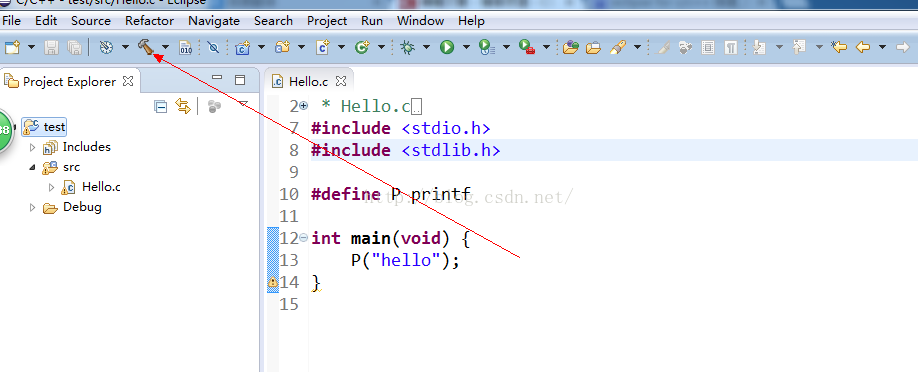
    1. If you haven’t built the project, click on the following position to build it and run it again. If not, scroll down to see

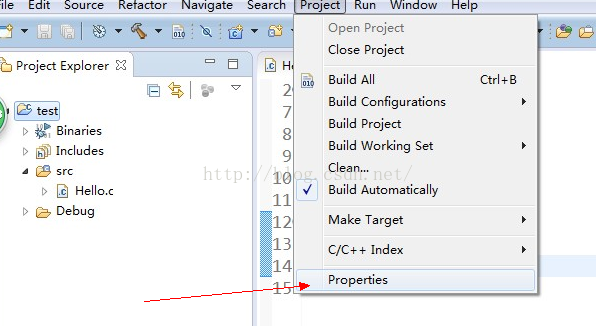
    2. Change one setting :


    Solve “error: failed to commit transaction” in arch Linux

    if you are suffering from the same problem, here is a quick solution. — Sk

    useful links to the original text please visit the”
    “for clickable in-text links, full-size original images and related articles.

    thank you
    Compile the |
    https://www.ostechnix.com/how-to-solve-error-failed-to-commit-transaction-conflicting-files-in-arch-linux/

    The author | Sk

    |DarkSun (lujun9972)???83.0 contributions: 318 days

    self update Arch Linux desktop has been for a month. Today I tried to update my Arch Linux system, and encountered an error “Error: failed to commit Transaction (conflicting files) STFL: /usr/lib/libstfl.so.0 exists in Filesystem”. It appears that Pacman was unable to update a library that already exists on the file system (/usr/lib/libstfl.so.0). If you have the same problem, here’s a quick solution.

    resolves the “error: failed to commit transaction (conflicting files)”

    in Arch Linux
    There are three ways to do

    .

    1. Simply ignore the STFL library that caused the problem during the upgrade and try to update the system again. See this guide to learn how [1] can be ignored when updated.

    2. Override this package with the command:


    1. $ sudo pacman -Syu --overwrite /usr/lib/libstfl.so.0

    3. Manually delete the STFL library and upgrade the system again. Make sure that the target package is not dependent on any other significant package. You can check if there is a conflict by going to Archlinux.org.


    1. $ sudo rm /usr/lib/libstfl.so.0

    now, try updating the system:


    1. $ sudo pacman -Syu

    I choose the third method, directly delete the file and upgrade the Arch Linux system. It will work!

    hope you found this article helpful. There’s more good stuff. Stay tuned!

    cheers!


    via: https://www.ostechnix.com/how-to-solve-error-failed-to-commit-transaction-conflicting-files-in-arch-linux/

    the author: SK [3] topic selection: lujun9972 , lujun9972 proofread: wxy

    this article by the LCTT original compilation, Linux China launch honor