error: 'vector' does not name a typeSolutions:
Add the following code at the beginning of the file:
#include <vector>
using namespace std;
Kafka : WARN Error while fetching metadata with correlation id xx : {=UNKNOWN_TOPIC_OR_PARTITION}
1. The beautiful

Background 2.
I don’t know why the kafka command sends messages all the time
bin/kafka-console-producer.sh --broker-list localhost:9092 --topic test
[2016-10-08eclipse cdt Program “make” not found in PATH
System environment: win7 x64
1. Download the JDK installation package to install and set system environment variables. Such as:
D: \ \ Program Files \ Java \ jdk1.8.0 _131 \ bin. D:\MinGW\bin;
Enter Java Javac validation on the CMD command line.
2. Download the Eclipse IDE for C/C++ Developers (CDT) installation package and open Eclipse directly after installation.
3. Download MinGW and select the C /C++ option to download. Then configure and select MinGW
Windows > > Preferences > > c/c++ > > New c/c++ Projects > > Exectable> > MinGW GCC> is selected for Empty Project; > Click apply & gt; > Ok // set MinGW as the default option
The eclipse CDT Program “make” not found in PATH problem can be solved in the following two points:
Right project & GT; > Preferences > > C\C++ Build > > Tool Chain Editor > > Change Current toolchain to MinGW GCC
Right project & GT; > Preferences > > C\C++ Build > > Tool Chain Editor > > Change Current builder to GNU Make builder
Shih:
You can change the builder (builder) from CDT Internal Builder to External make, change the builder type from Internal Builer to External Builder in builder Settings of C/C++ Build in project properties, and finally fill in the program name of make in Build command. For example, MinGW’s Mingw32-make. This can also be achieved by changing the Current Builder to Gnu Make Builder in C/C++ Build→Tool Chain Editor. The two are different interface displays of the same setting.
Build a hello c program first (CTRL +B), in run (CTRL +F11)
Mysql cannot allocate memory for the buffer pool solution
Further optimize the reference documentation for problem cause resolution
Cause of the problem
Last night, I modified the database and added a “FULLTEXT” index for the field. However, this morning, I found that the database could not be connected and could not be restarted. So I checked the log file:
cat /var/log/mysqld.logThe following error log was found:
130728  6:50:14 InnoDB: Initializing buffer pool, size = 128.0M
InnoDB: mmap(137363456 bytes) failed; errno 12
130728  6:50:14 InnoDB: Completed initialization of buffer pool
130728  6:50:14 InnoDB: Fatal error: cannot allocate memory for the buffer pool
The short answer is that there is no way to allocate 128M memory for mysql’s Buffer pool.
reason is obvious, the lack of memory, after looking up data found that the original parameter is mainly used to cache innodb table index, data, the buffer when inserting data. My server only has 1 gb of memory, so this parameter crashed mysql when it started allocating the cache for the index.
The solution
The configurations for mysql are inside /ect/ mysqlt.cnf (the Ubuntu directory is slightly different, where you can find it using whereis my.cnf).
vim /etc/my.cnfYou can see the fourth line:
#innodb_buffer_pool_size = 128MThe default configuration shown here is 128M, which is the annotation status. We just need to remove the annotation and change 128 to a smaller size (depending on your personal situation). I will change it to:
innodb_buffer_pool_size = 50M
That’s about it.
Further optimization
Generally appear this kind of problem students, the memory is certainly not large, so we can set swap partition, which is often said virtual memory.
is illustrated the role of the swap here won’t do, simply means can assist Mem points of memory.
direct code:
dd if=/dev/zero of=/swapfile bs=1M count=1024
mkswap /swapfile
swapon /swapfile
Finally, add the code /swapfile swap swap defaults 0 0 to the /etc/fstab file.
freeIf you can see Mem and SWAP, it’s successful.
and finally restart mysql.
Reference documentation
http://hongjiang.info/aliyun-vps-mysql-aborting/
Solutions to Django is not importable in this environment
(1) the first thing to illustrate the point, now on the network all kinds of copy, about today I encountered this problem, didn’t find a good way to online, and open a, then open a, completely identical copy, was no, really is too sad, to solve the problem it took me 4 to 5 hours (I am a rookie!
If this article does not obtain my consent, do not reprint and plagiarism!
(2) PyCharm downloaded from the Internet or copied from other computers cannot be opened directly, and some Settings need to be made, which is very annoying! Of course, the main problem is to set up the interpreter, but there are other problems, such as Django is not importable in this environment. My software version is python3.4.3 and django 2.0.7
(3) Solutions to this problem:
The file – & gt; Open, find your project file (project name), as follows, my project file is under the Learn folder, which has 4 projects
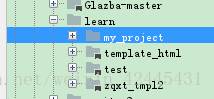
Then look at the following:
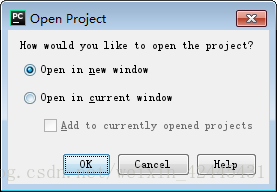
Select open in the new window to open a new window. Select another window to close the one you are currently open.
My entire project list is as follows:
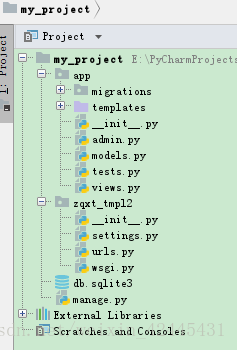
It doesn’t matter that my project name is not the same as zaxt_tMP12 under the project.
And then: file – & gt; Settings – & gt; Project Interpreter
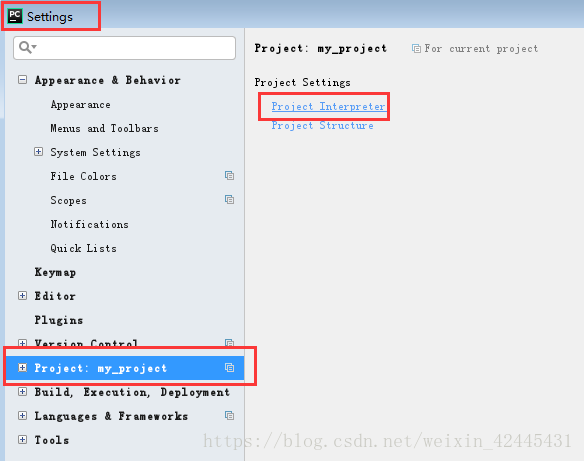
Then, look at the picture:
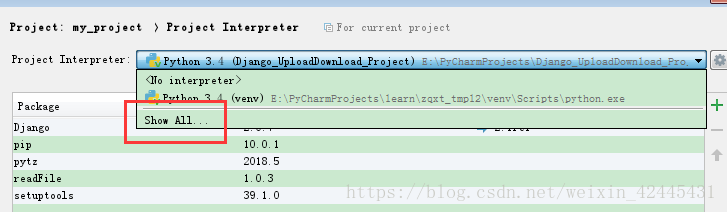
Hide interpreters that connect to other projects:
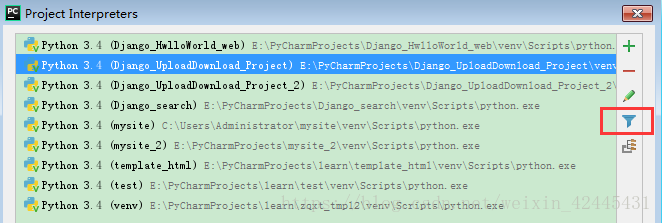
The effect is as follows, then green + :
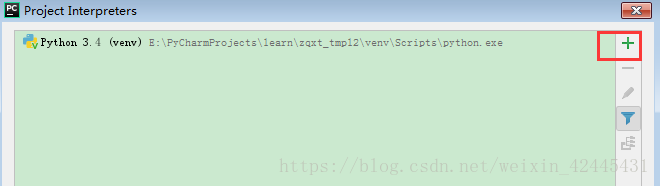
If it’s OK, the result is like this (don’t follow it here, I’m just showing you!! :
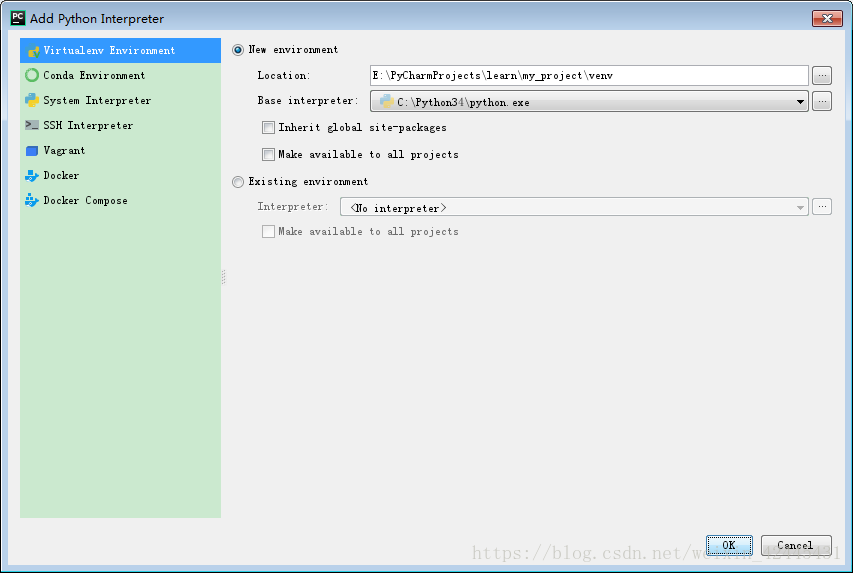
Django is not importable in this environment if you don’t grab Inherit global site-packages, you will get an error when you run.
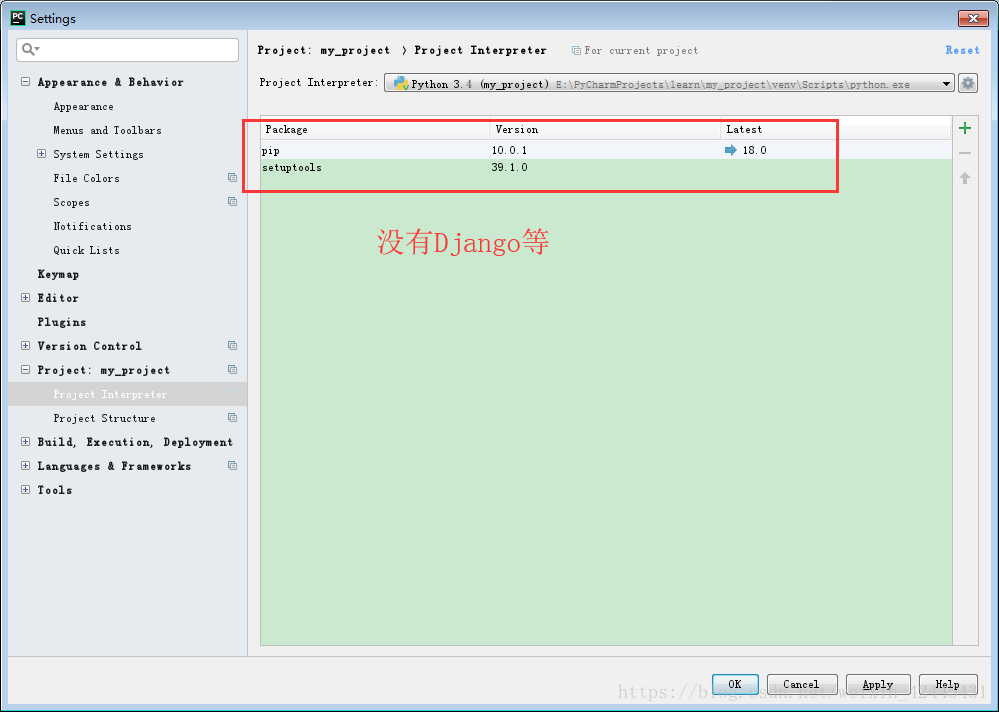
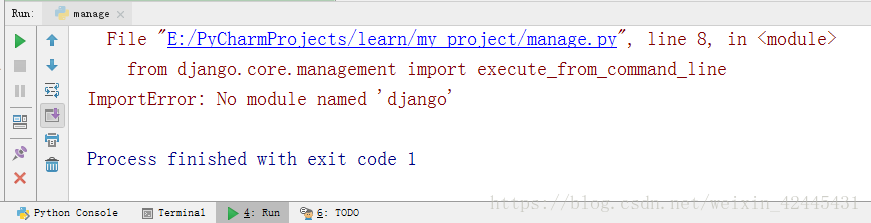
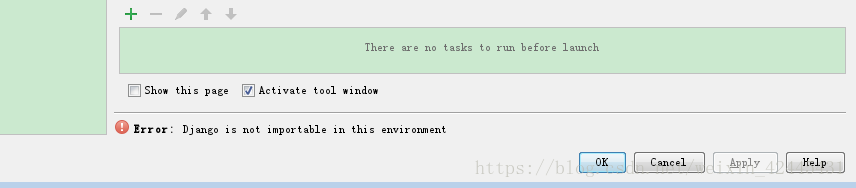
Very distressed! ?You’ve been messing with me for a long time. In fact, here’s what you should do:
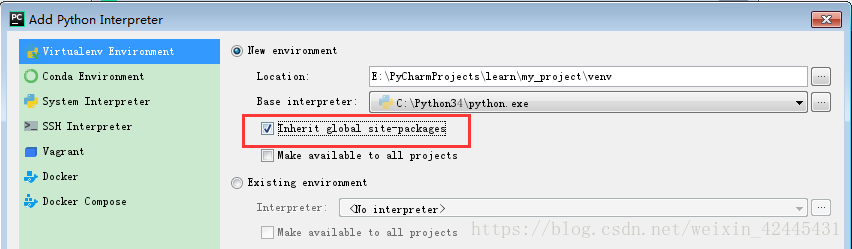
Then, apply – & gt; ok
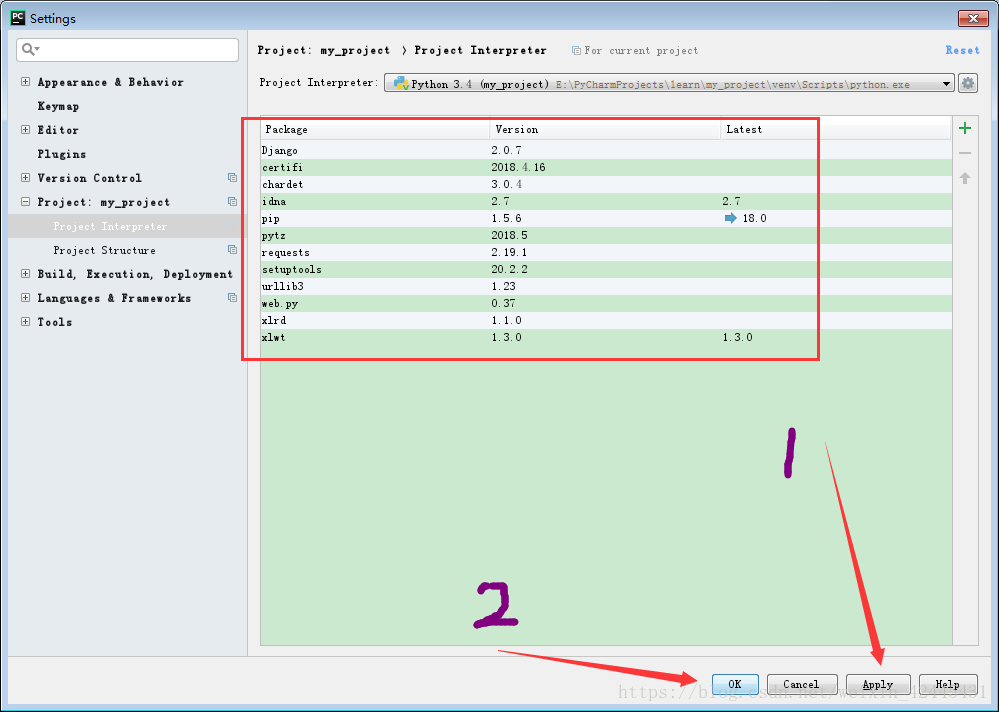
Django is out!!
(4) Finally, add an interpreter:

Select the interpreter we set up in the previous step! And run manager.py Runserver. Click Run again and you’re ready to run!
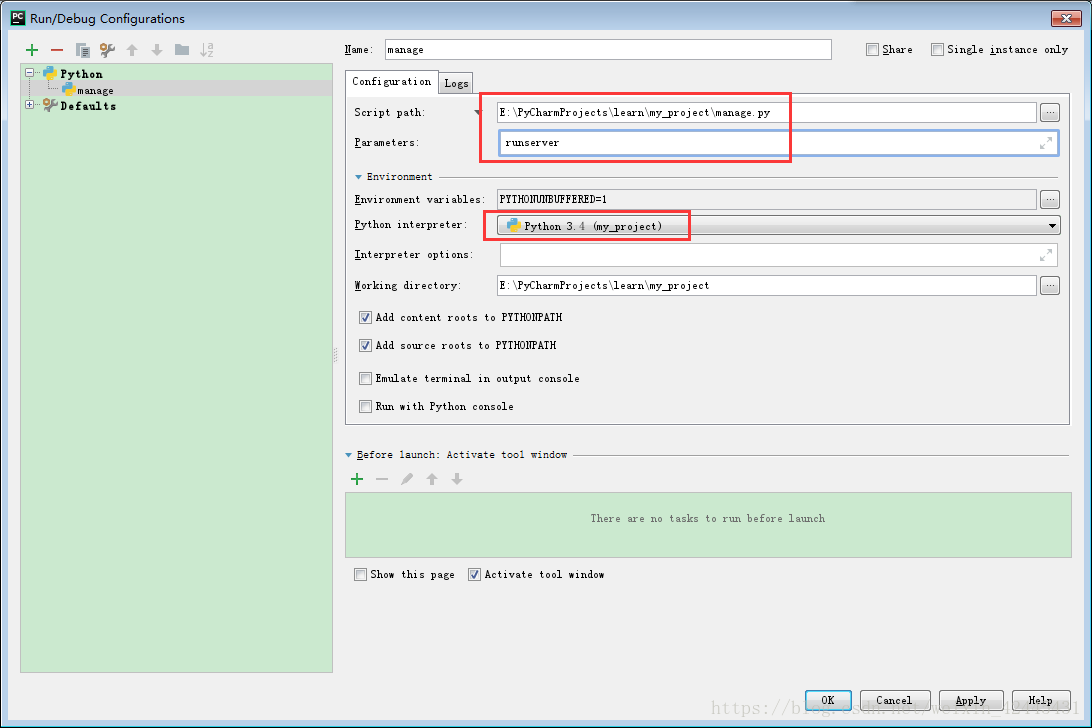
It took quite a while to write the document, redid it and liked it if it helped.
If this article does not obtain my consent, do not reprint and plagiarism!
Bus error: 10
In the process of debugging, a “Bus error: 10” suddenly appeared, which was quite unexpected. Why did such a spectacular problem occur?
The starting address of type int data must be a multiple of 4, otherwise it will cause the bus error mentioned above. With this in mind, I searched for a long time but couldn’t find any address misaligned.
When I compiled again, I found something fishy about the compilation process. The Makefile compiles the source file “.c/.cpp “into”.o “files (binaries), and then links these”.o “files to target files (executables, libraries, etc.). If some of these files are modified, the Makefile reduces compilation time by detecting the timestamp and compiling only the files that are modified later. So the question is, what happens if you change the header file?Examples are as follows:
Suppose you are going to modify two files, classA.h classa.cpp, add a member variable to the header file, and do the processing in the source file.
The two files classb.cpp classC.cpp will include the classA.h file. Because of the include type, the actual code in the file has been written to the source file and compiled into a “.o “file.
When the modification is completed, there is no change in classb. CPP classc. CPP, so when comparing the timestamp, determine that classb. CPP classc. CPP does not need to be compiled again. However, the header file classA.h of the classb. CPP classC.cpp file has really changed, so when the data is accessed, the address offset of its members will be greatly changed, no error can be found at compile time, but the execution will explode…
Solution: To sum up, it is not difficult to find the problem. The header files held before and after the code are scattered, resulting in running errors. It is only necessary to compile the classes of the modified header files that depend on, and the simple solution is to compile the current project after clean.
This blog is just for the sake of documenting a childish problem you’ve committed: if the header file changes, recompile it all or die…
The above!
So the question is, can the Makefile add dependencies on the source file’s head file?Detects the timestamp of the dependency header file and the “.o “file and compiles them. Make a note of it and study it later.
MySQL ERROR 1054 (42S22): Unknown column’password’ in’field list’ error
After MySQL login is successful, use the command
update user set password=password("1234") where user="root";
ERROR: ERROR 1054 (42S22) Unknown column ‘password’ in ‘field list’
D:\DevelopTools\mysql-5.7.10-winx64\bin>mysql -u root -p
Enter password:
Welcome to the MySQL monitor.  Commands end with ; or \g.
Your MySQL connection id is 2
Server version: 5.7.10 MySQL Community Server (GPL)

Copyright (c) 2000, 2015, Oracle and/or its affiliates. All rights reserved.

Oracle is a registered trademark of Oracle Corporation and/or its
affiliates. Other names may be trademarks of their respective
owners.

Type 'help;' or '\h' for help. Type '\c' to clear the current input statement.

mysql> use mysql
Database changed
mysql> update user set password=password("1234") where user="root";
ERROR 1054 (42S22): Unknown column 'password' in 'field list'
I checked the data and found that after MySQL5.7, the password field no longer exists, it turns into Authentication_string
update user set authentication_string=password("1234") where user="root";
The command to modify again is ok. Do not forget to flush MySQL privileges with the flush privileges command after the
modifications.
mysql> update user set authentication_string=password("1234") where user="root";
Query OK, 1 row affected, 1 warning (0.00 sec)
Rows matched: 1  Changed: 1  Warnings: 1

mysql> flush privileges;
Query OK, 0 rows affected (0.00 sec)
When does
mysql need “flush” privileges?The
flush privileges command essentially disconnects the user information/privilege Settings in the current user and privilige table from the mysql library (the built-in library of the mysql database) into memory. If MySQL user data and permissions have been modified and you want to take effect without restarting the MySQL service, you need to execute this command. After changing the Settings of the ROOT account in case you cannot log in again after restarting, flush directly to see if the permissions are valid. Without taking too much risk.
Resources:
https://blog.csdn.net/u014756827/article/details/53164926
Solve the error when installing apk after compiling Android Studio: Error while Installing APK
Today, when installing APK after compiling the application with Android Studio, an error was reported, as shown below:
The APK file build\outputs\apk\OYP_2.3.4_I2Base_6476_official_debug.apk does not exist on disk.
Error while Installing APK
1 2
 as shown in the figure below
2. Solutions
1. Tried build-& GT; Clean Project recompiled, still invalid
2, try to restart Android Studio invalid
Then I went to open build\outputs\apk\ directory, and found that the apk file was compiled, but the file name was exactly:
oyp_2.3.4 _i2base_6478_official_debug.apk
looks like the following:
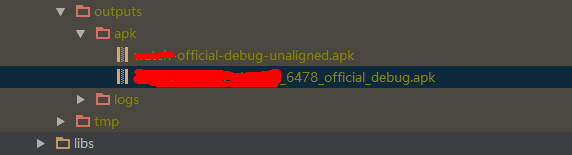
Therefore, the APK file compiled by Android Studio is
OYP_2. 3.4 _I2Base_6478_official_debug. Apk
And it wants to install the APK filename exactly
Oyp_2.3.4 _i2base_6476_official_debug.apk
will therefore report an error. Google checked the error, on the http://stackoverflow.com website has an article about the solution of the error, the link as shown below:
http://stackoverflow.com/questions/34039834/the-apk-file-does-not-exist-on-disk
Solution:
as shown in the following figure:
Step 1: Click the Gradle button in the Android Studio sidebar, as shown below
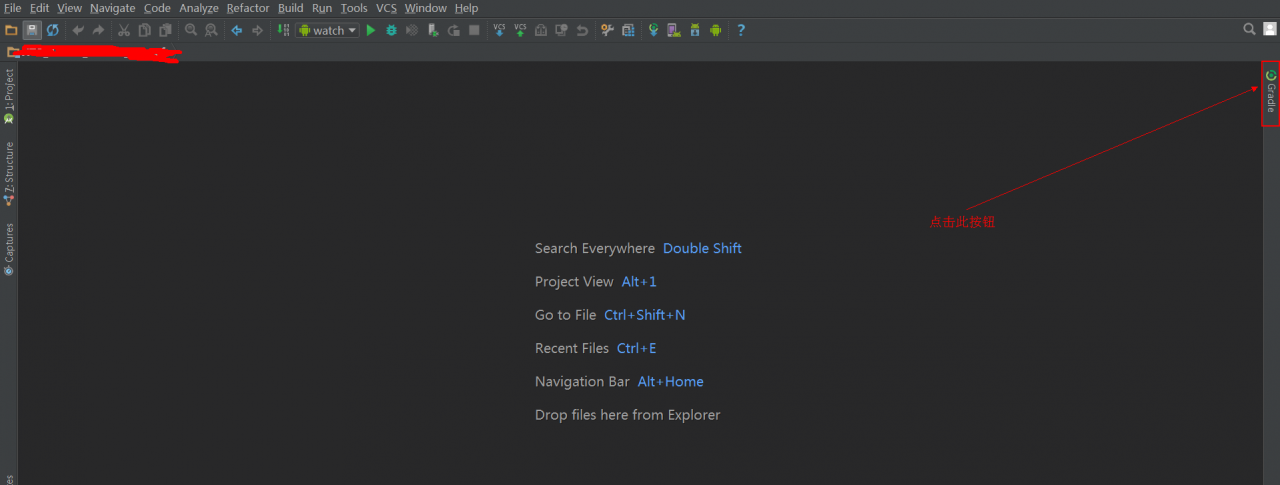
Step 2: Refresh the Gradle configuration
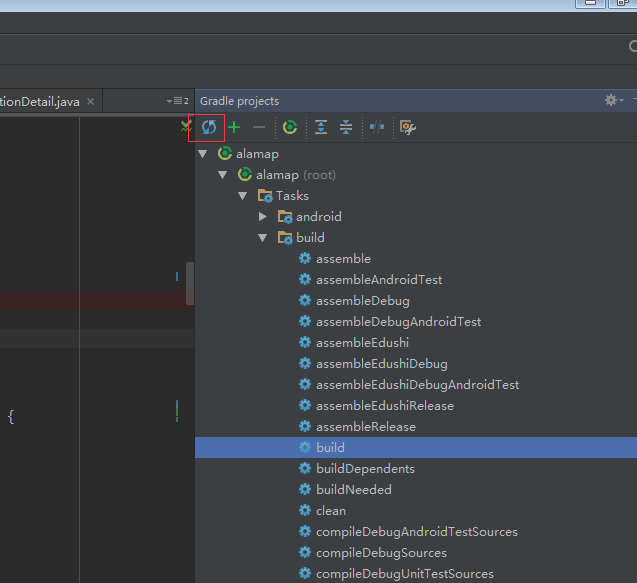
Step 3: Recompile can, will not report an error.
RAC Error is 16191 Error 1017 received logging on to the standby
Error 1017 received logging on to the standby————————————————————
Check that the primary and standby are using a password file
and remote_login_passwordfile is set to SHARED or EXCLUSIVE,
and that the SYS password is same in the password files.
returning error ORA – 16191
————————————————————
PING[ARC2]: Heartbeat failed to connect to standby ‘pandb_dg’. Error is 16191.
Solutions:
1. Change the password once for both RAC1 and RAC2 nodes.
SQL> Alter User sys identified by sys;
2. The rac1 and regenerate the password file:
orapwd file =/u01/app/oracle/product/11.2.0/db_1/DBS/orapwpandb password = sys force = y ignorecase = y
the password file copy to the standby server side, and rac2.
problem solving.
Installation and use of R language ggmap package
R language GGMap package installation and use
Ggmap is a map drawing package that calls the Google Maps API via the get_map function.
1 The first attempt went wrong
At the beginning, get_map was used to fetch the map data directly in R. However, an error occurred. The interface to display the function request refused our request (HTTP error code: 403).
library(ggmap)
map=get_map(location='San Fransico',maptype='roadmap',zoom=12)
URL:http://maps.googleapis.com/maps/api/staticmap?center=San+Fransico& zoom=12& size=640x640& scale=2& maptype=roadmap& language=en-EN& sensor=false
2 Baidu Discovery
From July 16, 2018, Google will limit the number of API requests, charge fees for exceeding the limit, and make it mandatory for all projects to use the official API Key. Without the API Key, the quality of the map may degrade or the map will not work. The API key must be associated with a credit card, and if the limit is exceeded, Google will start charging from the credit card. The search giant first offered users a $200 a month credit for free. Google slashed the number of free requests, from 25,000 per day to 28,000 per month, or about 1,000 per day, to a quarter of that. Google users who do not apply for a settlement account can only access the interface once a day.
3. Solving problems
So errors occur because of the lack of interface in the request URL key, to apply for a key in the Google maps developer platform:
https://developers.google.cn/maps/documentation/
We also found that we need to associate the credit card account, that is, the account that needs to be cleared by the Google map interface. After completing a series of applications, we found through the URL that to retrieve this function, we need to enable the staticmap interface. After enabling the interface, we got the KEY of the staticmap interface, but we found that the package we just downloaded directly in R could not add the KEY parameter to the URL. Later, it was found that someone on GitHub had updated the ggmap package. Then remove the ggmap package installed previously, install the latest ggmap package from GitHub, and directly enter the code in R to install:
if(!requireNamespace("devtools")) install.packages("devtools")
devtools::install_github("dkahle/ggmap", ref = "tidyup")
library(ggmap)
register_google(key=”your google map API key”)
Add the KEY parameter to register_google() and call the get_map() function to get the map data. If you get an error message that register_google is not register_google, you have not successfully installed the GGMap package from GitHub.
https://stackoverflow.com/questions/53275443/unable-to-use-register-google-in-r
When I call get_map(), I find an error prompting HTTP request to send REQUEST_DENIED. It was found on StackOverflow that Google map still needs to apply for Geocoding API interface. After applying for the interface, it should be ok to call get_map.
https://stackoverflow.com/questions/52565472/get-map-not-passing-the-api-key/52617929#52617929
Appendix:
1, ggmap packet address: https://github.com/dkahle/ggmap
2, methods other than Google maps, can also study the openstreetmap:
https://www.openstreetmap.org/user/jbelien/diary/44356
error: stray ‘\302’ in program
Answer: this kind of error, the possibility program itself does not have syntax error, should be the code of each line space is wrong, just need to delete the program error line in front of the space, and then let the program go back to solve the problem!
When docker creates a container command: Error response from daemon: No command specified
[root@test3 containers]# docker run -itd –name=container4 ubuntu-ssh-20190622
docker: Error response from daemon: No command specified.
See ‘docker run –help’.
Try other images and find out whether you can create containers or not. The answer to the question is obvious:
[root @ test3 containers] # docker images
the REPOSITORY TAG IMAGE ID CREATED the SIZE
ubuntu – SSH – 20190622 latest af84d755fccd 37 Minutes line 240 MB
ubuntu – SSH – 20190622 ansible e91bf9461302 21 hours line 240 MB
ubuntu latest 4 c108a37151f 4 days a line 64.2 MB
busybox latest e4db68de4ff2 8 days line 1.22 MB
HTTPD latest e77c77f17b46 11 days line 140 MB
Without CMD command, use docker inspect [mirror name] to see if the create container image cannot be created, if the CMD inside is null, and if the other one exists. The solution is to add:
if my mirror name:
[root@test3 containers]# docker create ubuntu-ssh-20190622:ansible /bin/bash
163f0d4046c4282da375344ca871a83bf1cfe175b73acf178a58138c315a922a