\end{lstlisting} don’t add a newline after it!! \
Author Archives: Robins
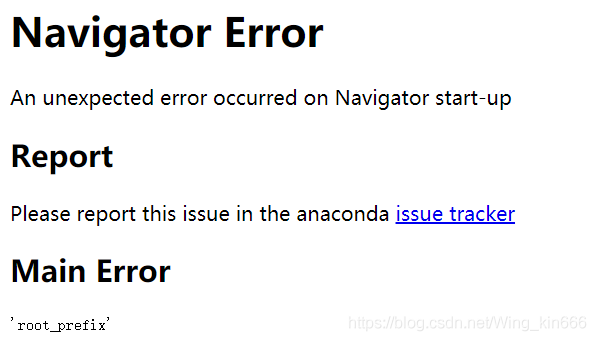
Anaconda opens Navigator to report an error and a web page appears Navigator Error An unexpected error occurred on Navigator start-up Report
Anaconda Navigator opens the following web page:
solution:
1. Run with the administrator: Anaconda Prompt
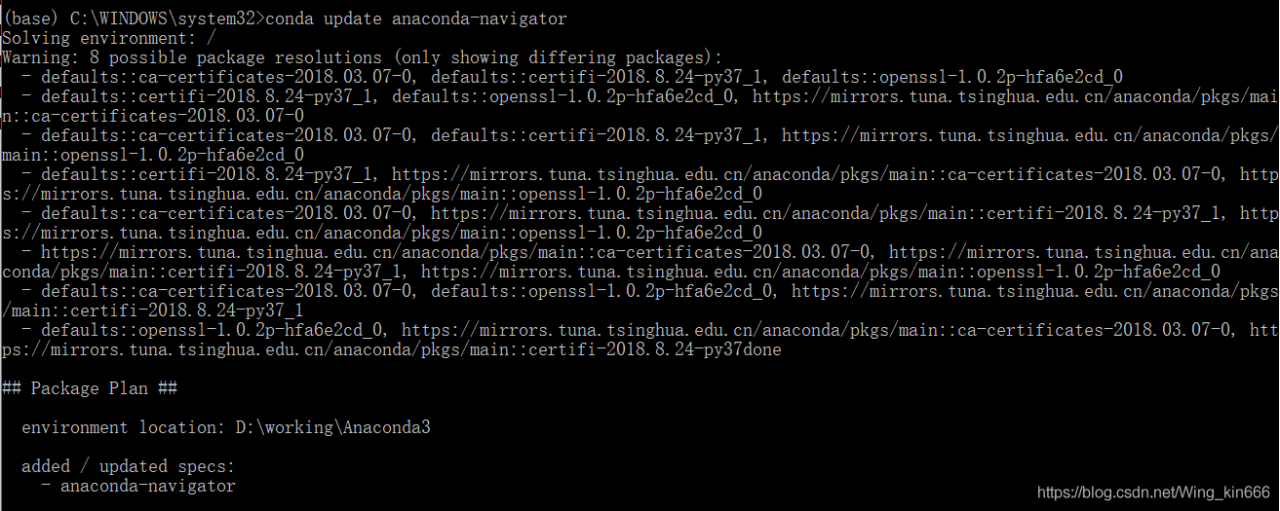
2. Conda update anaconda-navigator
this command may cause the following error:
InvalidTypeError: Parameter _channels = ‘- https://mirrors.tuna.tsinghua.edu.cn/anaconda/pkgs/main/ – https://mirrors.tuna.tsinghua.edu.cn/anaconda/cloud/bioconda/ declared in C: \ Users \ 12270 condarc has type STR.
Valid types:- tuple

Solution: Find the.condarc file under C:\Users\username folder and change it to the following:
channels:
  - https://mirrors.tuna.tsinghua.edu.cn/anaconda/pkgs/free/
  - https://mirrors.tuna.tsinghua.edu.cn/anaconda/pkgs/main/
  - https://mirrors.tuna.tsinghua.edu.cn/anaconda/pkgs/free/win-64
  - https://mirrors.tuna.tsinghua.edu.cn/anaconda/pkgs/free/noarch
  - https://mirrors.tuna.tsinghua.edu.cn/anaconda/pkgs/main/win-64
  - https://mirrors.tuna.tsinghua.edu.cn/anaconda/pkgs/main/noarch
show_channel_urls: true
3. Conda update anaconda-navigator
2019.11.14 Mac uses brew to report an error: parent directory is world writable but not sticky
Making the issue on the address: https://github.com/Homebrew/legacy-homebrew/issues/40345
Solutions:
Solutions:
sudo chmod +t /tmp
The Ethereum private chain is built, and the block information cannot be synchronized. The error is resolved: Node data write error err=”state node failed with all peers(1 tries, 1 peers)
In the afternoon, I tried to build a private ethereum chain, and then an error was reported when I joined the node. The error was reported as follows:
INFO [06-09|16:44:36.966] Block synchronisation started
INFO [06-09|16:44:36.973] Imported new block headers               count=0 elapsed=2.059ms number=265 hash=436ce2…310d57 age=27m26s   ignored=63
WARN [06-09|16:44:36.975] Node data write error                    err="state node 80477e…d1c7e3 failed with all peers (1 tries, 1 peers)"
WARN [06-09|16:44:36.976] Synchronisation failed, retrying         err="state node 80477e…d1c7e3 failed with all peers (1 tries, 1 peers)"
INFO [06-09|16:44:46.970] Imported new block headers               count=0 elapsed=1.040ms number=265 hash=436ce2…310d57 age=27m36s   ignored=63
WARN [06-09|16:44:46.972] Node data write error                    err="state node 80477e…d1c7e3 failed with all peers (1 tries, 1 peers)"
WARN [06-09|16:44:46.973] Synchronisation failed, retrying         err="state node 80477e…d1c7e3 failed with all peers (1 tries, 1 peers)"
INFO [06-09|16:44:56.970] Imported new block headers               count=0 elapsed=1.040ms number=265 hash=436ce2…310d57 age=27m46s   ignored=63
WARN [06-09|16:44:56.971] Node data write error                    err="state node 80477e…d1c7e3 failed with all peers (1 tries, 1 peers)"
WARN [06-09|16:44:56.972] Synchronisation failed, retrying         err="state node 80477e…d1c7e3 failed with all peers (1 tries, 1 peers)"
INFO [06-09|16:45:06.971] Imported new block headers               count=0 elapsed=1.084ms number=265 hash=436ce2…310d57 age=27m56s   ignored=63
WARN [06-09|16:45:06.973] Node data write error                    err="state node 80477e…d1c7e3 failed with all peers (1 tries, 1 peers)"
WARN [06-09|16:45:06.973] Synchronisation failed, retrying         err="state node 80477e…d1c7e3 failed with all peers (1 tries, 1 peers)"
INFO [06-09|16:45:16.971] Imported new block headers               count=0 elapsed=1.020ms number=265 hash=436ce2…310d57 age=28m6s    ignored=63
WARN [06-09|16:45:16.972] Node data write error                    err="state node 80477e…d1c7e3 failed with all peers (1 tries, 1 peers)"
There was no solution on the error reporting network, and I tried to restart the chain to no avail.
My solution is that USES a non-root account to carry out the chain operation again. If it doesn’t work, delete all the chains and use ordinary users to carry out the operation, mainly because I saw the error of Node data write error, which I suspect is related to the root user's permission.
I did it once with a normal user and it worked...
PYTHON 3 crawler has the problem of
Python3 teaches by hand
Official Python Manual
The problem
When writing crawlers in Python, I encountered an error of Urlopen:
>>> url = """https://www.google.com.hk/search?newwindow=1&safe=strict&biw=960&bih=430&noj=1&q=django&oq=django
&gs_l=serp.3...664389.664389.0.664921.1.1.0.0.0.0.0.0..0.0....0...1c..64.serp
..1.0.0.cfHP0MSxtWU
"""
... ...
<urlopen error no host given>
There are many reasons for this problem. For example, in order to prevent program access, some websites need to add headers, etc., in order to access normally, otherwise this error will be reported.
The solution
In fact, careful friends will find me above the code for elegance, with “” “” “” to continue line, and with the return to the URL path to truncate. So here’s the problem — this is the same as introducing the ‘/n’ character into the original URL string, so the path is wrong, so it won’t open!
As long as you don’t press enter, you can resume the normal use of urllib.request-open.
(Question: But how do you achieve line wrapping in this case?Just use ‘a’ + ‘b’ + ‘c’ ~)
Error: internal_relocation (type: OFFSET_IMM) not fixed up
This error occurred in start-s today while porting the Uboot relocation. 
Syntax error, annotations are only available if source level is 1.5 or greater.
Error:
1. Syntax Error, type parameters are only available if source level is 1.5 or greater. PageModel. Java. Java Problem
Syntax error. Type parameters are only available if the source level is 1.5 or greater.
1. Syntax Error, type parameters are only available if source level is 1.5 or greater. PageModel. Java. Java Problem
Syntax error. Type parameters are only available if the source level is 1.5 or greater.
2. Syntax error, Java compiler level does not match the version of the installed Java project facet. Project Problem (Java version Mismatch)
Syntax error, Java compiler level does not match the installed Java project version. Surface engineering problem (Java version mismatch)
3. Syntax error, annotations are only available if source level is 1.5 or greater
Syntax error. Comments are only available if the source level is greater than or equal to 1.5.
4. Syntax Error, Parameterized Types are only available if source level is 1.5 or greater. Java Problem
Syntax error. Parameterized types are only available at source level 1.5 or greater.
Reason: The Java compiler level does not match the Java project version installed
Solution: Project-& GT; Properties-> Java Compiler-> Compiler Compliance Level was selected for JDK version 5.0 or higher
In scan(file = file, what = what, sep = sep, quote = quote, dec = dec, : EOF within quoted string
When I read CSV files, such as SMs_raw < -read.csv (“E:/R/mlrdatasets/sms_spam. CSV “, stringsAsFactors = FALSE)
Warning message:
In scan(file = file, what = what, sep = sep, quote = quote, dec = dec, :
EOF within quoted string
method 1: call Sys. Setlocale (“LC_ALL”, “English”)
method 2: disable qutoe, set quote = “” “, change the statement to sms_raw < -read.csv (“E:/R/mlrdatasets/sms_spam. CSV “, stringsAsFactors = FALSE,quote = “”)
Warning message:
In scan(file = file, what = what, sep = sep, quote = quote, dec = dec, :
EOF within quoted string
method 1: call Sys. Setlocale (“LC_ALL”, “English”)
method 2: disable qutoe, set quote = “” “, change the statement to sms_raw < -read.csv (“E:/R/mlrdatasets/sms_spam. CSV “, stringsAsFactors = FALSE,quote = “”)
ERROR 1046 (3D000) at line 22: No database selected
ERROR 1046 (3D000) at line 22: No Database selected.
It is under study, and will be recorded for the time being
It is under study, and will be recorded for the time being
【ORA】Error 1031 received logging on to the standby
[ORA] Error 1031 Received logging on to the standby
Scene:
When building Windows Server 2008 R2 single-instance DG connected to Linux RAC (11.2.0.3), an error was reported on node 2:
Error 1031 received logging on to the standby
Solution:
The password file will be the same if you use Oracle as the password, but it turns out that you still need to recreate the password file, and the password file will be identical in all three places.
orapwd file=orapworcl password=oracle;
generated the password file; So just copy the password file from node 1 to node 2 and DG (change the file name to PWD instance name.ora, in this case pwdorcl.ora). If you check the alter log and it still gives an error, you need to redistribute and cancel the log application before starting the application log.
*** stop redo logging application
SQL> alter database recover managed standby database cancel;
*** open real-time logging application
SQL> alter database recover managed standby database using current logfile disconnect;
assigning to rvalue
Meet the vue has been an error assigning to rvalue solution, always thought that is a question of js code, look behind for a long time, were found in the HTML template v – model binding attribute is not defined in the data property. As follows:
<template>
    <div class="search-box">
        <div class="wrap">
            <input  v-model="searchText" class="search-input" type="text">
            <div class="search-botton"></div>
        </div>
    </div>
</template>

<script>
    export default {
        name: 'searchBox',
        data() {
            return {
            };
        }
    };
</script>
After modification:
<template>
    <div class="search-box">
        <div class="wrap">
            <input  v-model="searchText" class="search-input" type="text">
            <div class="search-botton"></div>
        </div>
    </div>
</template>

<script>
    export default {
        name: 'searchBox',
        data() {
            return {
                searchText: ''
            };
        }
    };
</script>
Solve problems.
The main thing to notice here is that in js code searchText is named in hump format, as well as in V-Model. Props being used in the template is not the same as wanting to convert the hump in JS to a short line. This is because the attributes in HTML are case-insensitive. However, v-Model is enclosed in quotation marks, so it is case sensitive, while short lines make an error. Detailed reference: https://blog.csdn.net/yuetingzhuying/article/details/49820689
win10 unable to start ssh-agent service, error :1058 solution
Reference [https://help.github.com/articles/generating-a-new-ssh-key-and-adding-it-to-the-ssh-agent/] set up SSH key, use the command SSH - add ~ /. SSH/id_rsa result Error
Error connecting to the agent: Unable to start ssh-agent: ssh-agent, error:
unable to start ssh-agent service, error :1058
win+R opens the service to see if the "OpenSSH Authentication Agent" service is enabled. If it is "disabled", set the service to "Automatic" and then open the service