Mysql database reported an error when loading file contents into the table:
mysql> LOAD DATA LOCAL INFILE '/path/pet.txt' INTO TABLE pet
       LINES TERMINATED BY '\r\n';
ERROR 1148: The used command is not allowed with this MySQL version
. If LOAD DATA LOCAL is disabled, either in the server or the client, a client that attempts to issue such a statement receives the following error message:
ERROR 1148: The used command is not allowed with this MySQL version
. For security reasons, The default is not allowed to load data remotely from client host.
Solution:
in two steps:
SET GLOBAL local_infile=1;
When connecting to the database
mysql -u Name -p --local-infile=1;
When using
  conn = pymysql.connect(host="localhost",
                           user="root",
                           password="111",
                           db="work2forecast",
                           charset="utf8mb4",
                           local_infile=1)
nodejs Error: Cannot find module ‘ejs‘
Error: _resolveFilename (module.js:325:15)
at function.module._load (module.js:276:25)
at require (module.js:353:17)
at require
at new View (d:\WebClient\webstormSpace\ day6shuomodules \express\lib\view.js:78:30)
at eventemet.render (d: \ WebClient \ webstormSpace \ day6shuoshuo \ node_modules \ express \ lib \ application js: 569:12)
the at ServerResponse. Render (d:\WebClient\webstormSpace\ day6shuomodules \lib\ respons.js :961:7)
at exports. ShowIndex (d:\WebClient\webstormSpace\ day6shuoroutes.js :7:9)
at Layer. Handle [as handle_request] (d:\WebClient\webstormSpace\ day6shuomodules \express\lib\router\ pace.js: 93:5)
at next (d:\WebClient\webstormSpace\day6shuoshuo\node_modules\express\lib\router\route.js:131:13)Reason: EjS module is not installed
Solutions:
CMD goes to the project directory and installs EJS: NPM install –save EJS
install sql server 2016 Error code 0x84B20001
Try running the following command at the command prompt (as an administrator) :
SFC/SCANNOW
2.
Fix a failed SQL Server installation from the installation center
- start the SQL Server installer (setup.exe) from the SQL Server installation media. After prerequisites and system validation, setup will display the SQL Server Installation Center page. Click Maintenance in the left navigation area, and then click Repair to start the repair operation.
If the installation center is started using the Start menu, the location of the installation media needs to be provided at this point.
Setup support rules and file routines will run to ensure that your system has the required software installed and that your computer has passed setup validation rules. Click OK or Install to continue. On the Select Instances page, select the instance that you want to fix, and then click Next to continue. The maintenance rules will run to verify the operation. To continue, click Next. The Ready to Fix page indicates that the operation is ready to proceed. To continue, click Fix. The fix progress page shows the status of the fix operation. The Finish page indicates that the action is complete.
Fix a failed INSTALLATION of SQL Server using the command prompt
Run the following command at the command prompt: setup.exe/Q /ACTION=Repair /INSTANCENAME= INSTANCENAME
3.
https://support.microsoft.com/en-gb/help/969052/how-to-restore-the-missing-windows-installer-cache-files-and-resolve-p?Wa = wsignin1.0
How to Fix distributed training report terminate called after throwing an instance of’std::length_error’
In conducting the training in a distributed fashion.
INFO: sensorflow:Reduce to /replica:0/task:0/device:CPU:0 then broadcast to (‘/replica:0/task:0/device:CPU:0’,)
I0408 04:01 41.507015 140706188736256 cross_device_ops. reduce to /replica:0/task:0/device:CPU:0 then broadcast to (‘/replica:0/task:0/device:CPU:0’ ,).
INFO: tensorflow:Create CheckpointSaverHook.
I0408 04:01 44.424420 140706188736256 basic_session_run_hooks. py: 541] to create CheckpointSaverHook.
Call termination after throwing the instance ‘std::length_error’
what(): basic_string::append
Fatal Python Error: Abort
I’ve spared a lot of troubleshooting, and by reducing the number of GPUs, I can run it normally!
BO error Error: RWI 00200 FWM 01014
I recently encountered (Error: RWI 00200) and (FWM 01014) when Working with BO reports using Java
The server cannot be found in {0} and cluster {1} with type NULL for the Webiserver service. All such servers may be shut down or disabled by an administrator. (FWM 01014)
Unable to find servers in CMS {0} and cluster {1} with kind {2} and service {3}. All such servers could be down or disabled by the administrator. (FWM 01014)
The error.
It was found that the reason for this error is that the service address is configured as the system IP, and there is no configuration mapping in the hosts file
The service address is: 192.168.2.90:2888
The system address is: ABC01:2898
Hosts file
192.168.2.92 abc01
The system address originally matched with the server address caused the problem
The above BO server is a cluster environment, the above problem must find the system administrator to clarify the service address and system address.
[Caffe] fatal error: hdf5.h: No such file or directory error solution
sudo apt-get install libhdf5-devIf an error is still reported after installation, open makefile.config, go to INCLUDE_DIRS and add /usr/include/hdf5/ Serial after it, as follows:
INCLUDE_DIRS := $(PYTHON_INCLUDE) /usr/local/include /usr/include/hdf5/serial LIBRARY_DIRS, then add /usr/lib/ x86_64-Linux-gnu /hdf5/serial, as follows:
LIBRARY_DIRS := $(PYTHON_LIB) /usr/local/lib /usr/lib /usr/lib/x86_64-linux-gnu/hdf5/serialRe-execute make All.
ruby 2.1.1 rails 4.2.0 Install gemset mysql command line tool for mac osx
Last login: Wed Aug 17 13:13:31 on ttys000
kevindeMacBook-Pro:~ kevin$ gem sources
*** CURRENT SOURCES ***

https://rubygems.org/
kevindeMacBook-Pro:~ kevin$ ruby -v
ruby 2.1.1p76 (2014-02-24 revision 45161) [x86_64-darwin12.0]
kevindeMacBook-Pro:~ kevin$ rvm gemset list

gemsets for ruby-2.1.1 (found in /Users/kevin/.rvm/gems/ruby-2.1.1)
   (default)
   global
=> rails420

kevindeMacBook-Pro:~ kevin$ rails -v
Rails 4.2.0
kevindeMacBook-Pro:~ kevin$ raisl server
-bash: raisl: command not found
kevindeMacBook-Pro:~ kevin$ rvm use 2.1,1@rails420
ruby-2.1,1 is not installed.
To install do: 'rvm install ruby-2.1,1'
kevindeMacBook-Pro:~ kevin$ rvm use 2.1.1@rails420
Using /Users/kevin/.rvm/gems/ruby-2.1.1 with gemset rails420
kevindeMacBook-Pro:~ kevin$ rails server
Usage:
  rails new APP_PATH [options]

Options:
  -r, [--ruby=PATH]                                      # Path to the Ruby binary of your choice
                                                         # Default: /Users/kevin/.rvm/rubies/ruby-2.1.1/bin/ruby
  -m, [--template=TEMPLATE]                              # Path to some application template (can be a filesystem path or URL)
      [--skip-gemfile], [--no-skip-gemfile]              # Don't create a Gemfile
  -B, [--skip-bundle], [--no-skip-bundle]                # Don't run bundle install
  -G, [--skip-git], [--no-skip-git]                      # Skip .gitignore file
      [--skip-keeps], [--no-skip-keeps]                  # Skip source control .keep files
  -O, [--skip-active-record], [--no-skip-active-record]  # Skip Active Record files
  -S, [--skip-sprockets], [--no-skip-sprockets]          # Skip Sprockets files
      [--skip-spring], [--no-skip-spring]                # Don't install Spring application preloader
  -d, [--database=DATABASE]                              # Preconfigure for selected database (options: mysql/oracle/postgresql/sqlite3/frontbase/ibm_db/sqlserver/jdbcmysql/jdbcsqlite3/jdbcpostgresql/jdbc)
                                                         # Default: sqlite3
  -j, [--javascript=JAVASCRIPT]                          # Preconfigure for selected JavaScript library
                                                         # Default: jquery
  -J, [--skip-javascript], [--no-skip-javascript]        # Skip JavaScript files
      [--dev], [--no-dev]                                # Setup the application with Gemfile pointing to your Rails checkout
      [--edge], [--no-edge]                              # Setup the application with Gemfile pointing to Rails repository
      [--skip-turbolinks], [--no-skip-turbolinks]        # Skip turbolinks gem
  -T, [--skip-test-unit], [--no-skip-test-unit]          # Skip Test::Unit files
      [--rc=RC]                                          # Path to file containing extra configuration options for rails command
      [--no-rc], [--no-no-rc]                            # Skip loading of extra configuration options from .railsrc file

Runtime options:
  -f, [--force]                    # Overwrite files that already exist
  -p, [--pretend], [--no-pretend]  # Run but do not make any changes
  -q, [--quiet], [--no-quiet]      # Suppress status output
  -s, [--skip], [--no-skip]        # Skip files that already exist

Rails options:
  -h, [--help], [--no-help]        # Show this help message and quit
  -v, [--version], [--no-version]  # Show Rails version number and quit

Description:
    The 'rails new' command creates a new Rails application with a default
    directory structure and configuration at the path you specify.

    You can specify extra command-line arguments to be used every time
    'rails new' runs in the .railsrc configuration file in your home directory.

    Note that the arguments specified in the .railsrc file don't affect the
    defaults values shown above in this help message.

Example:
    rails new ~/Code/Ruby/weblog

    This generates a skeletal Rails installation in ~/Code/Ruby/weblog.
    See the README in the newly created application to get going.
kevindeMacBook-Pro:~ kevin$ bundle install
Could not locate Gemfile or .bundle/ directory
kevindeMacBook-Pro:~ kevin$ gem update
Updating installed gems
Updating actionmailer
Fetching: activesupport-5.0.0.1.gem (100%)
ERROR:  Error installing actionmailer:
	activesupport requires Ruby version >= 2.2.2.
Updating actionpack
ERROR:  Error installing actionpack:
	activesupport requires Ruby version >= 2.2.2.
Updating actionview
ERROR:  Error installing actionview:
	activesupport requires Ruby version >= 2.2.2.
Updating activejob
ERROR:  Error installing activejob:
	activesupport requires Ruby version >= 2.2.2.
Updating activemodel
ERROR:  Error installing activemodel:
	activesupport requires Ruby version >= 2.2.2.
Updating activerecord
ERROR:  Error installing activerecord:
	activesupport requires Ruby version >= 2.2.2.
Updating bigdecimal
Fetching: bigdecimal-1.2.7.gem (100%)
Building native extensions.  This could take a while...
Successfully installed bigdecimal-1.2.7
Parsing documentation for bigdecimal-1.2.7
Installing ri documentation for bigdecimal-1.2.7
Installing darkfish documentation for bigdecimal-1.2.7
Done installing documentation for bigdecimal after 1 seconds
Updating executable-hooks
Fetching: executable-hooks-1.3.2.gem (100%)
Building native extensions.  This could take a while...
ERROR:  Error installing executable-hooks:
	ERROR: Failed to build gem native extension.

    /Users/kevin/.rvm/rubies/ruby-2.1.1/bin/ruby extconf.rb
/Users/kevin/.rvm/gems/ruby-2.1.1@rails420/gems/executable-hooks-1.3.2/lib/executable-hooks/regenerate_binstubs_command.rb:71:in `initialize': Permission denied @ rb_sysopen - /Users/kevin/.rvm/rubies/ruby-2.1.1/bin/fuzzy_match (Errno::EACCES)
	from /Users/kevin/.rvm/gems/ruby-2.1.1@rails420/gems/executable-hooks-1.3.2/lib/executable-hooks/regenerate_binstubs_command.rb:71:in `open'
	from /Users/kevin/.rvm/gems/ruby-2.1.1@rails420/gems/executable-hooks-1.3.2/lib/executable-hooks/regenerate_binstubs_command.rb:71:in `block in try_to_fix_binstubs'
	from /Users/kevin/.rvm/gems/ruby-2.1.1@rails420/gems/executable-hooks-1.3.2/lib/executable-hooks/regenerate_binstubs_command.rb:69:in `map'
	from /Users/kevin/.rvm/gems/ruby-2.1.1@rails420/gems/executable-hooks-1.3.2/lib/executable-hooks/regenerate_binstubs_command.rb:69:in `try_to_fix_binstubs'
	from /Users/kevin/.rvm/gems/ruby-2.1.1@rails420/gems/executable-hooks-1.3.2/lib/executable-hooks/regenerate_binstubs_command.rb:46:in `block in execute_no_wrapper'
	from /Users/kevin/.rvm/gems/ruby-2.1.1@rails420/gems/executable-hooks-1.3.2/lib/executable-hooks/regenerate_binstubs_command.rb:44:in `each'
	from /Users/kevin/.rvm/gems/ruby-2.1.1@rails420/gems/executable-hooks-1.3.2/lib/executable-hooks/regenerate_binstubs_command.rb:44:in `execute_no_wrapper'
	from extconf.rb:19:in `<main>'
bundler 1.12.5
bundler 1.6.1
byebug 9.0.5
erubis 2.7.0
executable-hooks 1.3.1
fuzzy_match 2.0.4

extconf failed, exit code 1

Gem files will remain installed in /Users/kevin/.rvm/gems/ruby-2.1.1@rails420/gems/executable-hooks-1.3.2 for inspection.
Results logged to /Users/kevin/.rvm/gems/ruby-2.1.1@rails420/extensions/x86_64-darwin-12/2.1.0-static/executable-hooks-1.3.2/gem_make.out
Updating fuzzy_match
Fetching: fuzzy_match-2.1.0.gem (100%)
Successfully installed fuzzy_match-2.1.0
Parsing documentation for fuzzy_match-2.1.0
Installing ri documentation for fuzzy_match-2.1.0
Installing darkfish documentation for fuzzy_match-2.1.0
Done installing documentation for fuzzy_match after 0 seconds
Updating io-console
Fetching: io-console-0.4.6.gem (100%)
Building native extensions.  This could take a while...
Successfully installed io-console-0.4.6
Parsing documentation for io-console-0.4.6
Installing ri documentation for io-console-0.4.6
Installing darkfish documentation for io-console-0.4.6
Done installing documentation for io-console after 0 seconds
Updating json
Fetching: json-2.0.2.gem (100%)
Building native extensions.  This could take a while...
Successfully installed json-2.0.2
Parsing documentation for json-2.0.2
Installing ri documentation for json-2.0.2
Installing darkfish documentation for json-2.0.2
Done installing documentation for json after 1 seconds
Updating psych
Fetching: psych-2.1.0.gem (100%)
Building native extensions.  This could take a while...
Successfully installed psych-2.1.0
Parsing documentation for psych-2.1.0
Installing ri documentation for psych-2.1.0
Installing darkfish documentation for psych-2.1.0
Done installing documentation for psych after 1 seconds
Updating rack
ERROR:  Error installing rack:
	rack requires Ruby version >= 2.2.2.
Updating rails
ERROR:  Error installing rails:
	activesupport requires Ruby version >= 2.2.2.
Updating rails-dom-testing
Fetching: rails-dom-testing-2.0.1.gem (100%)
Successfully installed rails-dom-testing-2.0.1
Parsing documentation for rails-dom-testing-2.0.1
Installing ri documentation for rails-dom-testing-2.0.1
Installing darkfish documentation for rails-dom-testing-2.0.1
Done installing documentation for rails-dom-testing after 0 seconds
Updating railties
ERROR:  Error installing railties:
	activesupport requires Ruby version >= 2.2.2.
Updating rdoc
Fetching: rdoc-4.2.2.gem (100%)
Depending on your version of ruby, you may need to install ruby rdoc/ri data:

<= 1.8.6 : unsupported
 = 1.8.7 : gem install rdoc-data; rdoc-data --install
 = 1.9.1 : gem install rdoc-data; rdoc-data --install
>= 1.9.2 : nothing to do! Yay!
Successfully installed rdoc-4.2.2
Parsing documentation for rdoc-4.2.2
Installing ri documentation for rdoc-4.2.2
Installing darkfish documentation for rdoc-4.2.2
Done installing documentation for rdoc after 13 seconds
Updating rubygems-bundler
Building native extensions.  This could take a while...
# In case of problems run the following command to update binstubs:
gem regenerate_binstubs
Successfully installed executable-hooks-1.3.2
Fetching: rubygems-bundler-1.4.4.gem (100%)
Successfully installed rubygems-bundler-1.4.4
Parsing documentation for executable-hooks-1.3.2
Installing ri documentation for executable-hooks-1.3.2
Installing darkfish documentation for executable-hooks-1.3.2
Parsing documentation for rubygems-bundler-1.4.4
Installing ri documentation for rubygems-bundler-1.4.4
Installing darkfish documentation for rubygems-bundler-1.4.4
Done installing documentation for executable-hooks, rubygems-bundler after 0 seconds
Updating test-unit
Fetching: power_assert-0.3.0.gem (100%)
Successfully installed power_assert-0.3.0
Fetching: test-unit-3.2.1.gem (100%)
Successfully installed test-unit-3.2.1
Parsing documentation for power_assert-0.3.0
Installing ri documentation for power_assert-0.3.0
Installing darkfish documentation for power_assert-0.3.0
Parsing documentation for test-unit-3.2.1
Installing ri documentation for test-unit-3.2.1
Installing darkfish documentation for test-unit-3.2.1
Done installing documentation for power_assert, test-unit after 3 seconds
Gems updated: activesupport activesupport activesupport activesupport activesupport activesupport bigdecimal executable-hooks fuzzy_match io-console json psych rack activesupport rails-dom-testing activesupport rdoc executable-hooks rubygems-bundler power_assert test-unit
kevindeMacBook-Pro:~ kevin$ rails -v
Rails 4.2.0
kevindeMacBook-Pro:~ kevin$ ruby -v
ruby 2.1.1p76 (2014-02-24 revision 45161) [x86_64-darwin12.0]
kevindeMacBook-Pro:~ kevin$ cd /Volumes/WORK/CodingNetHeiPis/dangqi
kevindeMacBook-Pro:dangqi kevin$ rails sever
Rails is not currently installed on this system. To get the latest version, simply type:

    $ sudo gem install rails

You can then rerun your "rails" command.
kevindeMacBook-Pro:dangqi kevin$ ruby -v
ruby 2.1.1p76 (2014-02-24 revision 45161) [x86_64-darwin12.0]
kevindeMacBook-Pro:dangqi kevin$ rvm use 2.1.1@rails420
Using /Users/kevin/.rvm/gems/ruby-2.1.1 with gemset rails420
kevindeMacBook-Pro:dangqi kevin$ rails server
Could not find nokogiri-1.6.6.2 in any of the sources
Run `bundle install` to install missing gems.
kevindeMacBook-Pro:dangqi kevin$ bundle install
Fetching source index from https://ruby.taobao.org/
Could not verify the SSL certificate for
https://ruby.taobao.org/quick/Marshal.4.8/nokogiri-1.6.6.2.gemspec.rz.
There is a chance you are experiencing a man-in-the-middle attack, but most
likely your system doesn't have the CA certificates needed for verification. For
information about OpenSSL certificates, see http://bit.ly/ruby-ssl. To connect
without using SSL, edit your Gemfile sources and change 'https' to 'http'.
kevindeMacBook-Pro:dangqi kevin$ gem sources
*** CURRENT SOURCES ***

https://rubygems.org/
kevindeMacBook-Pro:dangqi kevin$ gemfile sources
-bash: gemfile: command not found
kevindeMacBook-Pro:dangqi kevin$ Gemfile sources
-bash: Gemfile: command not found
kevindeMacBook-Pro:dangqi kevin$ sudo gem sources
Password:
*** CURRENT SOURCES ***

https://rubygems.org/
kevindeMacBook-Pro:dangqi kevin$ sudo gem sources -r https://rubygems.org/
https://rubygems.org/ removed from sources
kevindeMacBook-Pro:dangqi kevin$ sudo gem sources -a https://ruby.ruby-china.org/
Error fetching https://ruby.ruby-china.org/:
	no such name (https://ruby.ruby-china.org/specs.4.8.gz)
kevindeMacBook-Pro:dangqi kevin$ sudo gem sources -a https://gems.ruby-china.org/
https://gems.ruby-china.org/ added to sources
kevindeMacBook-Pro:dangqi kevin$ sudo gem sources
*** CURRENT SOURCES ***

https://gems.ruby-china.org/
kevindeMacBook-Pro:dangqi kevin$ gem sources
*** CURRENT SOURCES ***

https://gems.ruby-china.org/
kevindeMacBook-Pro:dangqi kevin$ bundle install
Fetching source index from https://ruby.taobao.org/
Could not verify the SSL certificate for
https://ruby.taobao.org/quick/Marshal.4.8/nokogiri-1.6.6.2.gemspec.rz.
There is a chance you are experiencing a man-in-the-middle attack, but most
likely your system doesn't have the CA certificates needed for verification. For
information about OpenSSL certificates, see http://bit.ly/ruby-ssl. To connect
without using SSL, edit your Gemfile sources and change 'https' to 'http'.
kevindeMacBook-Pro:dangqi kevin$ rails server
Could not find nokogiri-1.6.6.2 in any of the sources
Run `bundle install` to install missing gems.
kevindeMacBook-Pro:dangqi kevin$ curcurl http://curl.haxx.se/ca/cacert.pem -o /usr/local/etc/openssl/cert.pem
-bash: curcurl: command not found
kevindeMacBook-Pro:dangqi kevin$ curl http://curl.haxx.se/ca/cacert.pem -o /usr/local/etc/openssl/cert.pem
  % Total    % Received % Xferd  Average Speed   Time    Time     Time  Current
                                 Dload  Upload   Total   Spent    Left  Speed
100   304  100   304    0     0    203      0  0:00:01  0:00:01 --:--:--   203
kevindeMacBook-Pro:dangqi kevin$ bundle install
Fetching source index from https://ruby.taobao.org/
Could not verify the SSL certificate for
https://ruby.taobao.org/quick/Marshal.4.8/nokogiri-1.6.6.2.gemspec.rz.
There is a chance you are experiencing a man-in-the-middle attack, but most
likely your system doesn't have the CA certificates needed for verification. For
information about OpenSSL certificates, see http://bit.ly/ruby-ssl. To connect
without using SSL, edit your Gemfile sources and change 'https' to 'http'.
kevindeMacBook-Pro:dangqi kevin$ gem sources
*** CURRENT SOURCES ***

https://gems.ruby-china.org/
kevindeMacBook-Pro:dangqi kevin$ sudo gem sources
Password:
*** CURRENT SOURCES ***

https://gems.ruby-china.org/
kevindeMacBook-Pro:dangqi kevin$ bundle install
Fetching source index from https://ruby.taobao.org/
Could not verify the SSL certificate for
https://ruby.taobao.org/quick/Marshal.4.8/nokogiri-1.6.6.2.gemspec.rz.
There is a chance you are experiencing a man-in-the-middle attack, but most
likely your system doesn't have the CA certificates needed for verification. For
information about OpenSSL certificates, see http://bit.ly/ruby-ssl. To connect
without using SSL, edit your Gemfile sources and change 'https' to 'http'.
kevindeMacBook-Pro:dangqi kevin$ open .rvm
The file /Volumes/WORK/CodingNetHeiPis/dangqi/.rvm does not exist.
kevindeMacBook-Pro:dangqi kevin$ open ./rvm
The file /Volumes/WORK/CodingNetHeiPis/dangqi/rvm does not exist.
kevindeMacBook-Pro:dangqi kevin$ open /usr/bin/
kevindeMacBook-Pro:dangqi kevin$ rvm pkg install openssl

Beware, 'rvm pkg ...' is deprecated, read about the new autolibs feature: 'rvm help autolibs'.

Checking requirements for osx.
Certificates in '/usr/local/etc/openssl/cert.pem' are already up to date.
Requirements installation successful.
Fetching openssl-1.0.1i.tar.gz to /Users/kevin/.rvm/archives
  % Total    % Received % Xferd  Average Speed   Time    Time     Time  Current
                                 Dload  Upload   Total   Spent    Left  Speed
100 4318k  100 4318k    0     0   545k      0  0:00:07  0:00:07 --:--:--  955k
Extracting openssl to /Users/kevin/.rvm/src/openssl-1.0.1i....
Configuring openssl in /Users/kevin/.rvm/src/openssl-1.0.1i....................-
Compiling openssl in /Users/kevin/.rvm/src/openssl-1.0.1i......................-
Installing openssl to /Users/kevin/.rvm/usr....................................|

Please note that it's required to reinstall all rubies:

    rvm reinstall all --force

Updating openssl certificates....
kevindeMacBook-Pro:dangqi kevin$ rails server
Could not find nokogiri-1.6.6.2 in any of the sources
Run `bundle install` to install missing gems.
kevindeMacBook-Pro:dangqi kevin$ bundle install
Fetching source index from https://ruby.taobao.org/
^Z
[1]+  Stopped                 bundle install
kevindeMacBook-Pro:dangqi kevin$ where gemfile
-bash: where: command not found
kevindeMacBook-Pro:dangqi kevin$ gemfile -h
-bash: gemfile: command not found
kevindeMacBook-Pro:dangqi kevin$ gem sources
*** CURRENT SOURCES ***

https://gems.ruby-china.org/
kevindeMacBook-Pro:dangqi kevin$ bundle install
Fetching source index from https://ruby.taobao.org/
Could not verify the SSL certificate for
https://ruby.taobao.org/quick/Marshal.4.8/nokogiri-1.6.6.2.gemspec.rz.
There is a chance you are experiencing a man-in-the-middle attack, but most
likely your system doesn't have the CA certificates needed for verification. For
information about OpenSSL certificates, see http://bit.ly/ruby-ssl. To connect
without using SSL, edit your Gemfile sources and change 'https' to 'http'.
kevindeMacBook-Pro:dangqi kevin$ bundle install
Fetching gem metadata from https://gems.ruby-china.org/............
Fetching version metadata from https://gems.ruby-china.org/..
Resolving dependencies...
Using rake 10.4.2
Using i18n 0.7.0
Using json 1.8.3
Using minitest 5.8.2
Using thread_safe 0.3.5
Using builder 3.2.2
Using erubis 2.7.0
Using mini_portile 0.6.2
Using rack 1.6.4
Installing mime-types 2.4.3
Using arel 6.0.3
Installing awesome_print 1.6.1
Installing bcrypt 3.1.10 with native extensions
Installing coderay 1.1.0
Using debug_inspector 0.0.2
Using bundler 1.12.5
Installing cancancan 1.13.1
Installing hitimes 1.2.3 with native extensions
Installing chinese_pinyin 1.0.0
Using thor 0.19.1
Installing connection_pool 2.2.0
Installing dotenv 2.0.2
Installing request_store 1.2.0
Installing multipart-post 2.0.0
Installing multi_xml 0.5.5
Installing jwt 1.5.2
Installing open4 1.3.4
Installing mina-scp 0.1.2
Installing multi_json 1.11.2
Installing mysql2 0.3.20 with native extensions

Gem::Ext::BuildError: ERROR: Failed to build gem native extension.

    /Users/kevin/.rvm/rubies/ruby-2.1.1/bin/ruby extconf.rb
checking for ruby/thread.h... yes
checking for rb_thread_call_without_gvl() in ruby/thread.h... yes
checking for rb_thread_blocking_region()... yes
checking for rb_wait_for_single_fd()... yes
checking for rb_hash_dup()... yes
checking for rb_intern3()... yes
checking for mysql_query() in -lmysqlclient... no
-----
libmysqlclient is missing. Trying again with extra runtime libraries...
-----
checking for main() in -lm... yes
checking for mysql_query() in -lmysqlclient... no
checking for main() in -lz... yes
checking for mysql_query() in -lmysqlclient... no
checking for main() in -lsocket... no
checking for main() in -lnsl... no
checking for main() in -lmygcc... no
-----
libmysqlclient is missing. You may need to 'brew install mysql' or 'port install mysql', and try again.
-----
*** extconf.rb failed ***
Could not create Makefile due to some reason, probably lack of necessary
libraries and/or headers.  Check the mkmf.log file for more details.  You may
need configuration options.

Provided configuration options:
	--with-opt-dir
	--without-opt-dir
	--with-opt-include
	--without-opt-include=${opt-dir}/include
	--with-opt-lib
	--without-opt-lib=${opt-dir}/lib
	--with-make-prog
	--without-make-prog
	--srcdir=.
	--curdir
	--ruby=/Users/kevin/.rvm/rubies/ruby-2.1.1/bin/ruby
	--with-mysql-dir
	--without-mysql-dir
	--with-mysql-include
	--without-mysql-include=${mysql-dir}/include
	--with-mysql-lib
	--without-mysql-lib=${mysql-dir}/lib
	--with-mysql-config
	--without-mysql-config
	--with-mysql-dir
	--without-mysql-dir
	--with-mysql-include
	--without-mysql-include=${mysql-dir}/include
	--with-mysql-lib
	--without-mysql-lib=${mysql-dir}/lib
	--with-mysqlclientlib
	--without-mysqlclientlib
	--with-mlib
	--without-mlib
	--with-mysqlclientlib
	--without-mysqlclientlib
	--with-zlib
	--without-zlib
	--with-mysqlclientlib
	--without-mysqlclientlib
	--with-socketlib
	--without-socketlib
	--with-nsllib
	--without-nsllib
	--with-mygcclib
	--without-mygcclib

extconf failed, exit code 1

Gem files will remain installed in /Users/kevin/.rvm/gems/ruby-2.1.1@rails420/gems/mysql2-0.3.20 for inspection.
Results logged to /Users/kevin/.rvm/gems/ruby-2.1.1@rails420/extensions/x86_64-darwin-12/2.1.0-static/mysql2-0.3.20/gem_make.out
Installing netrc 0.11.0
Installing oauth 0.4.7
Installing puma 2.15.3 with native extensions
Installing ruby-hmac 0.4.0
Installing rails_param 0.9.0
Installing redis 3.2.1
Installing rufus-scheduler 3.1.8
Installing settingslogic 2.0.9
Installing faker 1.5.0
Using tzinfo 1.2.2
Installing nokogiri 1.6.6.2 with native extensions

Gem::Ext::BuildError: ERROR: Failed to build gem native extension.

    /Users/kevin/.rvm/rubies/ruby-2.1.1/bin/ruby extconf.rb
checking if the C compiler accepts ... yes
checking if the C compiler accepts -Wno-error=unused-command-line-argument-hard-error-in-future... no
Building nokogiri using packaged libraries.
-----
The file "/usr/include/iconv.h" is missing in your build environment,
which means you haven't installed Xcode Command Line Tools properly.

To install Command Line Tools, try running `xcode-select --install` on
terminal and follow the instructions.  If it fails, open Xcode.app,
select from the menu "Xcode" - "Open Developer Tool" - "More Developer
Tools" to open the developer site, download the installer for your OS
version and run it.
-----
*** extconf.rb failed ***
Could not create Makefile due to some reason, probably lack of necessary
libraries and/or headers.  Check the mkmf.log file for more details.  You may
need configuration options.

Provided configuration options:
	--with-opt-dir
	--without-opt-dir
	--with-opt-include
	--without-opt-include=${opt-dir}/include
	--with-opt-lib
	--without-opt-lib=${opt-dir}/lib
	--with-make-prog
	--without-make-prog
	--srcdir=.
	--curdir
	--ruby=/Users/kevin/.rvm/rubies/ruby-2.1.1/bin/ruby
	--help
	--clean
	--use-system-libraries
	--enable-static
	--disable-static
	--with-zlib-dir
	--without-zlib-dir
	--with-zlib-include
	--without-zlib-include=${zlib-dir}/include
	--with-zlib-lib
	--without-zlib-lib=${zlib-dir}/lib
	--enable-cross-build
	--disable-cross-build

extconf failed, exit code 1

Gem files will remain installed in /Users/kevin/.rvm/gems/ruby-2.1.1@rails420/gems/nokogiri-1.6.6.2 for inspection.
Results logged to /Users/kevin/.rvm/gems/ruby-2.1.1@rails420/extensions/x86_64-darwin-12/2.1.0-static/nokogiri-1.6.6.2/gem_make.out
Using rack-test 0.6.3
Installing sprockets 3.4.0
Installing mail 2.6.3
Installing better_errors 2.1.1
Installing binding_of_caller 0.7.2 with native extensions
Installing timers 4.1.1
Installing faraday 0.9.2
Installing httparty 0.13.7
Installing mina 0.3.7
An error occurred while installing mysql2 (0.3.20), and Bundler cannot continue.
Make sure that `gem install mysql2 -v '0.3.20'` succeeds before bundling.
kevindeMacBook-Pro:dangqi kevin$ gem list

*** LOCAL GEMS ***

actionmailer (4.2.0)
actionpack (4.2.0)
actionview (4.2.0)
activejob (4.2.0)
activemodel (4.2.0)
activerecord (4.2.0)
activesupport (4.2.6, 4.2.0)
arel (7.1.1, 6.0.3)
awesome_print (1.6.1)
bcrypt (3.1.10)
better_errors (2.1.1)
bigdecimal (1.2.7, 1.2.4)
binding_of_caller (0.7.2)
builder (3.2.2)
bundler (1.12.5, 1.6.1)
bundler-unload (1.0.2)
byebug (9.0.5)
cancancan (1.13.1)
chinese_pinyin (1.0.0)
coderay (1.1.0)
coffee-script-source (1.10.0)
concurrent-ruby (1.0.3.pre3, 1.0.2)
connection_pool (2.2.0)
crass (1.0.2)
debug_inspector (0.0.2)
dotenv (2.0.2)
erubis (2.7.0)
execjs (2.7.0)
executable-hooks (1.3.2, 1.3.1)
faker (1.5.0)
faraday (0.9.2)
ffi (1.9.14)
fuzzy_match (2.1.0, 2.0.4)
gem-wrappers (1.2.7, 1.2.4)
globalid (0.3.7)
hitimes (1.2.3)
httparty (0.13.7)
i18n (0.7.0)
io-console (0.4.6, 0.4.2)
json (2.0.2, 1.8.3, 1.8.1)
jwt (1.5.2)
loofah (2.1.0.rc2)
mail (2.6.4, 2.6.3)
method_source (0.8.2)
mime-types (3.1, 2.4.3)
mime-types-data (3.2016.0521)
mina (0.3.7)
mina-scp (0.1.2)
mini_portile (0.6.2)
mini_portile2 (2.1.0)
minitest (5.9.0, 5.8.2, 4.7.5)
multi_json (1.12.1, 1.11.2)
multi_xml (0.5.5)
multipart-post (2.0.0)
nap (1.1.0)
netrc (0.11.0)
nio4r (1.2.1)
nokogiri (1.6.8)
oauth (0.4.7)
open4 (1.3.4)
pkg-config (1.1.7)
power_assert (0.3.0)
psych (2.1.0, 2.0.3)
puma (3.6.0, 2.15.3)
rack (1.6.4)
rack-test (0.6.3)
rails (4.2.0)
rails-deprecated_sanitizer (1.0.3)
rails-dom-testing (2.0.1, 1.0.7)
rails-html-sanitizer (1.0.3)
rails_param (0.9.0)
railties (4.2.0)
rake (11.2.2, 10.4.2, 10.1.0)
rb-fsevent (0.9.7)
rdoc (4.2.2, 4.1.0)
redis (3.2.1)
request_store (1.2.0)
ruby-hmac (0.4.0)
rubygems-bundler (1.4.4, 1.4.3)
rufus-scheduler (3.1.8)
rvm (1.11.3.9)
sass (3.4.22)
settingslogic (2.0.9)
spring (1.7.2)
sprockets (4.0.0.beta2, 3.4.0)
sprockets-rails (3.1.1)
sqlite3 (1.3.11)
test-unit (3.2.1, 2.1.1.0)
thor (0.19.1)
thread_safe (0.3.5)
tilt (2.0.5)
timers (4.1.1)
turbolinks-source (5.0.0)
tzinfo (1.2.2)
websocket-extensions (0.1.2)
kevindeMacBook-Pro:dangqi kevin$ rails server
Could not find nokogiri-1.6.6.2 in any of the sources
Run `bundle install` to install missing gems.
kevindeMacBook-Pro:dangqi kevin$ bundle install
Fetching gem metadata from https://gems.ruby-china.org/............
Fetching version metadata from https://gems.ruby-china.org/..
Resolving dependencies...
Using rake 10.4.2
Using i18n 0.7.0
Using json 1.8.3
Using minitest 5.8.2
Using thread_safe 0.3.5
Using builder 3.2.2
Using erubis 2.7.0
Using mini_portile 0.6.2
Using rack 1.6.4
Using mime-types 2.4.3
Using arel 6.0.3
Using awesome_print 1.6.1
Using bcrypt 3.1.10
Using coderay 1.1.0
Using debug_inspector 0.0.2
Using bundler 1.12.5
Using cancancan 1.13.1
Using hitimes 1.2.3
Using chinese_pinyin 1.0.0
Using thor 0.19.1
Using connection_pool 2.2.0
Using dotenv 2.0.2
Using request_store 1.2.0
Using multipart-post 2.0.0
Using multi_xml 0.5.5
Using jwt 1.5.2
Using open4 1.3.4
Using mina-scp 0.1.2
Using multi_json 1.11.2
Installing mysql2 0.3.20 with native extensions

Gem::Ext::BuildError: ERROR: Failed to build gem native extension.

    /Users/kevin/.rvm/rubies/ruby-2.1.1/bin/ruby extconf.rb
checking for ruby/thread.h... yes
checking for rb_thread_call_without_gvl() in ruby/thread.h... yes
checking for rb_thread_blocking_region()... yes
checking for rb_wait_for_single_fd()... yes
checking for rb_hash_dup()... yes
checking for rb_intern3()... yes
checking for mysql_query() in -lmysqlclient... no
-----
libmysqlclient is missing. Trying again with extra runtime libraries...
-----
checking for main() in -lm... yes
checking for mysql_query() in -lmysqlclient... no
checking for main() in -lz... yes
checking for mysql_query() in -lmysqlclient... no
checking for main() in -lsocket... no
checking for main() in -lnsl... no
checking for main() in -lmygcc... no
-----
libmysqlclient is missing. You may need to 'brew install mysql' or 'port install mysql', and try again.
-----
*** extconf.rb failed ***
Could not create Makefile due to some reason, probably lack of necessary
libraries and/or headers.  Check the mkmf.log file for more details.  You may
need configuration options.

Provided configuration options:
	--with-opt-dir
	--without-opt-dir
	--with-opt-include
	--without-opt-include=${opt-dir}/include
	--with-opt-lib
	--without-opt-lib=${opt-dir}/lib
	--with-make-prog
	--without-make-prog
	--srcdir=.
	--curdir
	--ruby=/Users/kevin/.rvm/rubies/ruby-2.1.1/bin/ruby
	--with-mysql-dir
	--without-mysql-dir
	--with-mysql-include
	--without-mysql-include=${mysql-dir}/include
	--with-mysql-lib
	--without-mysql-lib=${mysql-dir}/lib
	--with-mysql-config
	--without-mysql-config
	--with-mysql-dir
	--without-mysql-dir
	--with-mysql-include
	--without-mysql-include=${mysql-dir}/include
	--with-mysql-lib
	--without-mysql-lib=${mysql-dir}/lib
	--with-mysqlclientlib
	--without-mysqlclientlib
	--with-mlib
	--without-mlib
	--with-mysqlclientlib
	--without-mysqlclientlib
	--with-zlib
	--without-zlib
	--with-mysqlclientlib
	--without-mysqlclientlib
	--with-socketlib
	--without-socketlib
	--with-nsllib
	--without-nsllib
	--with-mygcclib
	--without-mygcclib

extconf failed, exit code 1

Gem files will remain installed in /Users/kevin/.rvm/gems/ruby-2.1.1@rails420/gems/mysql2-0.3.20 for inspection.
Results logged to /Users/kevin/.rvm/gems/ruby-2.1.1@rails420/extensions/x86_64-darwin-12/2.1.0-static/mysql2-0.3.20/gem_make.out
Using netrc 0.11.0
Using oauth 0.4.7
Using puma 2.15.3
Using ruby-hmac 0.4.0
Using rails_param 0.9.0
Using redis 3.2.1
Using rufus-scheduler 3.1.8
Using settingslogic 2.0.9
Using faker 1.5.0
Using tzinfo 1.2.2
Installing nokogiri 1.6.6.2 with native extensions

Gem::Ext::BuildError: ERROR: Failed to build gem native extension.

    /Users/kevin/.rvm/rubies/ruby-2.1.1/bin/ruby extconf.rb
checking if the C compiler accepts ... yes
checking if the C compiler accepts -Wno-error=unused-command-line-argument-hard-error-in-future... no
Building nokogiri using packaged libraries.
-----
The file "/usr/include/iconv.h" is missing in your build environment,
which means you haven't installed Xcode Command Line Tools properly.

To install Command Line Tools, try running `xcode-select --install` on
terminal and follow the instructions.  If it fails, open Xcode.app,
select from the menu "Xcode" - "Open Developer Tool" - "More Developer
Tools" to open the developer site, download the installer for your OS
version and run it.
-----
*** extconf.rb failed ***
Could not create Makefile due to some reason, probably lack of necessary
libraries and/or headers.  Check the mkmf.log file for more details.  You may
need configuration options.

Provided configuration options:
	--with-opt-dir
	--without-opt-dir
	--with-opt-include
	--without-opt-include=${opt-dir}/include
	--with-opt-lib
	--without-opt-lib=${opt-dir}/lib
	--with-make-prog
	--without-make-prog
	--srcdir=.
	--curdir
	--ruby=/Users/kevin/.rvm/rubies/ruby-2.1.1/bin/ruby
	--help
	--clean
	--use-system-libraries
	--enable-static
	--disable-static
	--with-zlib-dir
	--without-zlib-dir
	--with-zlib-include
	--without-zlib-include=${zlib-dir}/include
	--with-zlib-lib
	--without-zlib-lib=${zlib-dir}/lib
	--enable-cross-build
	--disable-cross-build

extconf failed, exit code 1

Gem files will remain installed in /Users/kevin/.rvm/gems/ruby-2.1.1@rails420/gems/nokogiri-1.6.6.2 for inspection.
Results logged to /Users/kevin/.rvm/gems/ruby-2.1.1@rails420/extensions/x86_64-darwin-12/2.1.0-static/nokogiri-1.6.6.2/gem_make.out
Using rack-test 0.6.3
Using sprockets 3.4.0
Using mail 2.6.3
Using better_errors 2.1.1
Using binding_of_caller 0.7.2
Using timers 4.1.1
Using faraday 0.9.2
Using httparty 0.13.7
Using mina 0.3.7
An error occurred while installing mysql2 (0.3.20), and Bundler cannot continue.
Make sure that `gem install mysql2 -v '0.3.20'` succeeds before bundling.
kevindeMacBook-Pro:dangqi kevin$ gem install mysql2 -v 0.3.20
Building native extensions.  This could take a while...
ERROR:  Error installing mysql2:
	ERROR: Failed to build gem native extension.

    /Users/kevin/.rvm/rubies/ruby-2.1.1/bin/ruby extconf.rb
checking for ruby/thread.h... yes
checking for rb_thread_call_without_gvl() in ruby/thread.h... yes
checking for rb_thread_blocking_region()... yes
checking for rb_wait_for_single_fd()... yes
checking for rb_hash_dup()... yes
checking for rb_intern3()... yes
checking for mysql_query() in -lmysqlclient... no
-----
libmysqlclient is missing. Trying again with extra runtime libraries...
-----
checking for main() in -lm... yes
checking for mysql_query() in -lmysqlclient... no
checking for main() in -lz... yes
checking for mysql_query() in -lmysqlclient... no
checking for main() in -lsocket... no
checking for main() in -lnsl... no
checking for main() in -lmygcc... no
-----
libmysqlclient is missing. You may need to 'brew install mysql' or 'port install mysql', and try again.
-----
*** extconf.rb failed ***
Could not create Makefile due to some reason, probably lack of necessary
libraries and/or headers.  Check the mkmf.log file for more details.  You may
need configuration options.

Provided configuration options:
	--with-opt-dir
	--without-opt-dir
	--with-opt-include
	--without-opt-include=${opt-dir}/include
	--with-opt-lib
	--without-opt-lib=${opt-dir}/lib
	--with-make-prog
	--without-make-prog
	--srcdir=.
	--curdir
	--ruby=/Users/kevin/.rvm/rubies/ruby-2.1.1/bin/ruby
	--with-mysql-dir
	--without-mysql-dir
	--with-mysql-include
	--without-mysql-include=${mysql-dir}/include
	--with-mysql-lib
	--without-mysql-lib=${mysql-dir}/lib
	--with-mysql-config
	--without-mysql-config
	--with-mysql-dir
	--without-mysql-dir
	--with-mysql-include
	--without-mysql-include=${mysql-dir}/include
	--with-mysql-lib
	--without-mysql-lib=${mysql-dir}/lib
	--with-mysqlclientlib
	--without-mysqlclientlib
	--with-mlib
	--without-mlib
	--with-mysqlclientlib
	--without-mysqlclientlib
	--with-zlib
	--without-zlib
	--with-mysqlclientlib
	--without-mysqlclientlib
	--with-socketlib
	--without-socketlib
	--with-nsllib
	--without-nsllib
	--with-mygcclib
	--without-mygcclib

extconf failed, exit code 1

Gem files will remain installed in /Users/kevin/.rvm/gems/ruby-2.1.1@rails420/gems/mysql2-0.3.20 for inspection.
Results logged to /Users/kevin/.rvm/gems/ruby-2.1.1@rails420/extensions/x86_64-darwin-12/2.1.0-static/mysql2-0.3.20/gem_make.out
kevindeMacBook-Pro:dangqi kevin$ brew install mysql
==> Downloading https://homebrew.bintray.com/bottles/mysql-5.7.14.el_capitan.bot
######################################################################## 100.0%
==> Pouring mysql-5.7.14.el_capitan.bottle.tar.gz
==> /usr/local/Cellar/mysql/5.7.14/bin/mysqld --initialize-insecure --user=kevin
==> Caveats
We've installed your MySQL database without a root password. To secure it run:
    mysql_secure_installation

To connect run:
    mysql -uroot

To have launchd start mysql now and restart at login:
  brew services start mysql
Or, if you don't want/need a background service you can just run:
  mysql.server start
==> Summary
Android studio compile and run report: AAPT2 error: check logs for details
AAPT2 error: check logs for details Most issues are resource files or code errors, but Android Studio does not prompt that file to report an error
com.android.build.gradle.tasks.ResourceException: Error: java.util.concurrent.ExecutionException: com.android.builder.internal.aapt.v2.Aapt2Exception: AAPT2 error: check logs for details
	at com.android.build.gradle.tasks.MergeResources.doFullTaskAction(MergeResources.java:296)
	at com.android.build.gradle.internal.tasks.IncrementalTask.taskAction(IncrementalTask.java:106)
	at sun.reflect.NativeMethodAccessorImpl.invoke0(Native Method)
	at sun.reflect.NativeMethodAccessorImpl.invoke(NativeMethodAccessorImpl.java:62)
	at sun.reflect.DelegatingMethodAccessorImpl.invoke(DelegatingMethodAccessorImpl.java:43)
	at java.lang.reflect.Method.invoke(Method.java:498)
	at org.gradle.internal.reflect.JavaMethod.invoke(JavaMethod.java:73)
	at org.gradle.api.internal.project.taskfactory.IncrementalTaskAction.doExecute(IncrementalTaskAction.java:46)
	at org.gradle.api.internal.project.taskfactory.StandardTaskAction.execute(StandardTaskAction.java:39)
	at org.gradle.api.internal.project.taskfactory.StandardTaskAction.execute(StandardTaskAction.java:26)
	at org.gradle.api.internal.tasks.execution.ExecuteActionsTaskExecuter$1.run(ExecuteActionsTaskExecuter.java:121)
	at org.gradle.internal.progress.DefaultBuildOperationExecutor$RunnableBuildOperationWorker.execute(DefaultBuildOperationExecutor.java:336)
	at org.gradle.internal.progress.DefaultBuildOperationExecutor$RunnableBuildOperationWorker.execute(DefaultBuildOperationExecutor.java:328)
	at org.gradle.internal.progress.DefaultBuildOperationExecutor.execute(DefaultBuildOperationExecutor.java:199)
	at org.gradle.internal.progress.DefaultBuildOperationExecutor.run(DefaultBuildOperationExecutor.java:110)
	at org.gradle.api.internal.tasks.execution.ExecuteActionsTaskExecuter.executeAction(ExecuteActionsTaskExecuter.java:110)
	at org.gradle.api.internal.tasks.execution.ExecuteActionsTaskExecuter.executeActions(ExecuteActionsTaskExecuter.java:92)
	at org.gradle.api.internal.tasks.execution.ExecuteActionsTaskExecuter.execute(ExecuteActionsTaskExecuter.java:70)
	at org.gradle.api.internal.tasks.execution.OutputDirectoryCreatingTaskExecuter.execute(OutputDirectoryCreatingTaskExecuter.java:51)
	at org.gradle.api.internal.tasks.execution.SkipUpToDateTaskExecuter.execute(SkipUpToDateTaskExecuter.java:62)
	at org.gradle.api.internal.tasks.execution.ResolveTaskOutputCachingStateExecuter.execute(ResolveTaskOutputCachingStateExecuter.java:54)
	at org.gradle.api.internal.tasks.execution.ValidatingTaskExecuter.execute(ValidatingTaskExecuter.java:60)
	at org.gradle.api.internal.tasks.execution.SkipEmptySourceFilesTaskExecuter.execute(SkipEmptySourceFilesTaskExecuter.java:97)
	at org.gradle.api.internal.tasks.execution.CleanupStaleOutputsExecuter.execute(CleanupStaleOutputsExecuter.java:87)
	at org.gradle.api.internal.tasks.execution.ResolveTaskArtifactStateTaskExecuter.execute(ResolveTaskArtifactStateTaskExecuter.java:52)
	at org.gradle.api.internal.tasks.execution.SkipTaskWithNoActionsExecuter.execute(SkipTaskWithNoActionsExecuter.java:52)
	at org.gradle.api.internal.tasks.execution.SkipOnlyIfTaskExecuter.execute(SkipOnlyIfTaskExecuter.java:54)
	at org.gradle.api.internal.tasks.execution.ExecuteAtMostOnceTaskExecuter.execute(ExecuteAtMostOnceTaskExecuter.java:43)
	at org.gradle.api.internal.tasks.execution.CatchExceptionTaskExecuter.execute(CatchExceptionTaskExecuter.java:34)
	at org.gradle.execution.taskgraph.DefaultTaskGraphExecuter$EventFiringTaskWorker$1.run(DefaultTaskGraphExecuter.java:248)
	at org.gradle.internal.progress.DefaultBuildOperationExecutor$RunnableBuildOperationWorker.execute(DefaultBuildOperationExecutor.java:336)
	at org.gradle.internal.progress.DefaultBuildOperationExecutor$RunnableBuildOperationWorker.execute(DefaultBuildOperationExecutor.java:328)
	at org.gradle.internal.progress.DefaultBuildOperationExecutor.execute(DefaultBuildOperationExecutor.java:199)
	at org.gradle.internal.progress.DefaultBuildOperationExecutor.run(DefaultBuildOperationExecutor.java:110)
	at org.gradle.execution.taskgraph.DefaultTaskGraphExecuter$EventFiringTaskWorker.execute(DefaultTaskGraphExecuter.java:241)
	at org.gradle.execution.taskgraph.DefaultTaskGraphExecuter$EventFiringTaskWorker.execute(DefaultTaskGraphExecuter.java:230)
	at org.gradle.execution.taskgraph.DefaultTaskPlanExecutor$TaskExecutorWorker.processTask(DefaultTaskPlanExecutor.java:123)
	at org.gradle.execution.taskgraph.DefaultTaskPlanExecutor$TaskExecutorWorker.access$200(DefaultTaskPlanExecutor.java:79)
	at org.gradle.execution.taskgraph.DefaultTaskPlanExecutor$TaskExecutorWorker$1.execute(DefaultTaskPlanExecutor.java:104)
	at org.gradle.execution.taskgraph.DefaultTaskPlanExecutor$TaskExecutorWorker$1.execute(DefaultTaskPlanExecutor.java:98)
	at org.gradle.execution.taskgraph.DefaultTaskExecutionPlan.execute(DefaultTaskExecutionPlan.java:626)
	at org.gradle.execution.taskgraph.DefaultTaskExecutionPlan.executeWithTask(DefaultTaskExecutionPlan.java:581)
	at org.gradle.execution.taskgraph.DefaultTaskPlanExecutor$TaskExecutorWorker.run(DefaultTaskPlanExecutor.java:98)
	at org.gradle.internal.concurrent.ExecutorPolicy$CatchAndRecordFailures.onExecute(ExecutorPolicy.java:63)
	at org.gradle.internal.concurrent.ManagedExecutorImpl$1.run(ManagedExecutorImpl.java:46)
	at java.util.concurrent.ThreadPoolExecutor.runWorker(ThreadPoolExecutor.java:1142)
	at java.util.concurrent.ThreadPoolExecutor$Worker.run(ThreadPoolExecutor.java:617)
	at org.gradle.internal.concurrent.ThreadFactoryImpl$ManagedThreadRunnable.run(ThreadFactoryImpl.java:55)
	at java.lang.Thread.run(Thread.java:745)
Caused by: Error: java.util.concurrent.ExecutionException: com.android.builder.internal.aapt.v2.Aapt2Exception: AAPT2 error: check logs for details
	at com.android.ide.common.res2.MergedResourceWriter.end(MergedResourceWriter.java:332)
	at com.android.ide.common.res2.DataMerger.mergeData(DataMerger.java:301)
	at com.android.ide.common.res2.ResourceMerger.mergeData(ResourceMerger.java:412)
	at com.android.build.gradle.tasks.MergeResources.doFullTaskAction(MergeResources.java:285)
	... 48 more
	Suppressed: java.lang.RuntimeException: Some file processing failed, see logs for details
		at com.android.builder.internal.aapt.QueuedResourceProcessor.waitForAll(QueuedResourceProcessor.java:121)
		at com.android.builder.internal.aapt.QueuedResourceProcessor.end(QueuedResourceProcessor.java:141)
		at com.android.builder.internal.aapt.v2.QueueableAapt2.close(QueueableAapt2.java:104)
		at com.android.build.gradle.tasks.MergeResources.doFullTaskAction(MergeResources.java:293)
		... 48 more
Caused by: java.util.concurrent.ExecutionException: java.util.concurrent.ExecutionException: com.android.builder.internal.aapt.v2.Aapt2Exception: AAPT2 error: check logs for details
	at com.google.common.util.concurrent.AbstractFuture.getDoneValue(AbstractFuture.java:503)
	at com.google.common.util.concurrent.AbstractFuture.get(AbstractFuture.java:462)
	at com.google.common.util.concurrent.AbstractFuture$TrustedFuture.get(AbstractFuture.java:79)
	at com.android.ide.common.res2.MergedResourceWriter.end(MergedResourceWriter.java:327)
	... 51 more
Caused by: java.util.concurrent.ExecutionException: com.android.builder.internal.aapt.v2.Aapt2Exception: AAPT2 error: check logs for details
	at com.google.common.util.concurrent.AbstractFuture.getDoneValue(AbstractFuture.java:503)
	at com.google.common.util.concurrent.AbstractFuture.get(AbstractFuture.java:462)
	at com.google.common.util.concurrent.AbstractFuture$TrustedFuture.get(AbstractFuture.java:79)
	at com.android.builder.internal.aapt.v2.QueueableAapt2.lambda$compile$0(QueueableAapt2.java:136)
	at java.util.concurrent.ThreadPoolExecutor.runWorker(ThreadPoolExecutor.java:1142)
	at java.util.concurrent.ThreadPoolExecutor$Worker.run(ThreadPoolExecutor.java:617)
	... 1 more
Caused by: com.android.builder.internal.aapt.v2.Aapt2Exception: AAPT2 error: check logs for details
	at com.android.builder.png.AaptProcess$NotifierProcessOutput.handleOutput(AaptProcess.java:443)
	at com.android.builder.png.AaptProcess$NotifierProcessOutput.err(AaptProcess.java:395)
	at com.android.builder.png.AaptProcess$ProcessOutputFacade.err(AaptProcess.java:312)
	at com.android.utils.GrabProcessOutput$1.run(GrabProcessOutput.java:104)
We can’t find the specific error at all from this error!
Print error message
Directly operate in the Terminal of Android Studio and type a command:
gradlew compileDebugSources --stacktrace -info
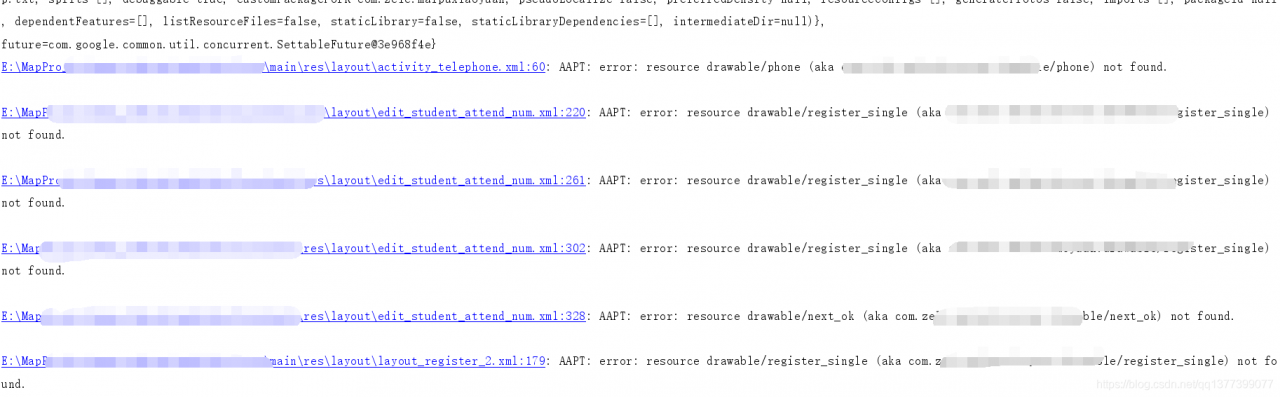
originally was a layout file reporting a resource error!
VBoxManage.exe: error: Resize hard disk operation for this format is not implemented yet!
VirtualBox is running out of virtual disk space. Default is 10gb. Want to expand, the graphical interface did not find an actionable menu. Google solved it with VBoxManage, the command tool that comes with Vbox.
C:\Program Files\Oracle\VirtualBox> VBoxManage modifyhd e:\ Vbox \Ubuntu12.04\ ubuntu1204-201302-disk1.vmdk –resize 30000
0%…
Progress state: VBOX_E_NOT_SUPPORTED
VBoxManage.exe: error: Resize hard disk operation for this format is not implemented yet!
the original virtual machine used VMDK format, this command can only support vdi format.
found that you can use VBoxManager to convert virtual hard disk storage file format
C:\Program Files\Oracle\VirtualBox> VBoxManage clonehd e:\ Vbox \Ubuntu12.04\ ubuntu1204-201302-disk1.vmdk e:\ Vbox \ ubuntu1204-201310-disk1.vdi –format vdi
0%… 10%… 20%… 30%… 40%… 50%… 60%… 70%… 80%… 90%… Clone hard disk created in format ‘VDI’. UUID: 455b7aa4-d776-8353-d9b5b3fa1
09b
C:\Program Files\Oracle\VirtualBox> Clone hard disk created in format ‘VDI’. VBoxManage modifyhd e:\ Vbox \Ubuntu12.04\Ubunt
u1204-201310-disk1.vdi –resize 30000
0%… 10%… 20%… 30%… 40%… 50%… 60%… 70%… 80%… 90%… 100%
No more reporting that mistake.
This article from: http://blog.sina.com.cn/s/blog_484d87770101olzr.html
When linux installs rpm, it prompts: can’t create transaction lock on /var/lib/rpm/.rpm.lock error
[hadoop@hadoop186 rpm]$ rpm -ivh libconfuse-2.5-4.el5.x86_64.rpm
Warning: libconfuse-2.5-4.el5.x86_64.rpm: ヘッダ V3 DSA/SHA1 Signature, key ID 217521f6: NOKEY
エラー: can't create transaction lock on /var/lib/rpm/.rpm.lock (許可がありません)
Error reason: Permission problem
[hadoop@hadoop186 sbin]$ ll  /var/lib/rpm/
Totally 95584
-rw-r--r--. 1 root root 10678272  7月 10 11:41 2014 Basenames
-rw-r--r--. 1 root root    12288  5月  4 11:58 2014 Conflictname
-rw-r--r--. 1 root root  2170880  7月 10 11:41 2014 Dirnames
-rw-r--r--. 1 root root 10604544  7月 10 11:41 2014 Filedigests
-rw-r--r--. 1 root root    36864  7月 10 11:41 2014 Group
-rw-r--r--. 1 root root    24576  7月 10 11:41 2014 Installtid
-rw-r--r--. 1 root root    86016  7月 10 11:41 2014 Name
-rw-r--r--. 1 root root    24576  5月  5 15:29 2014 Obsoletename
-rw-r--r--. 1 root root 73293824  7月 10 11:41 2014 Packages
-rw-r--r--. 1 root root  1331200  7月 10 11:41 2014 Providename
-rw-r--r--. 1 root root   667648  7月 10 11:41 2014 Provideversion
-rw-r--r--. 1 root root    12288  3月 27 14:11 2014 Pubkeys
-rw-r--r--. 1 root root   512000  7月 10 11:41 2014 Requirename
-rw-r--r--. 1 root root   323584  7月 10 11:41 2014 Requireversion
-rw-r--r--. 1 root root   163840  7月 10 11:41 2014 Sha1header
-rw-r--r--. 1 root root    77824  7月 10 11:41 2014 Sigmd5
-rw-r--r--. 1 root root    12288  3月 27 14:46 2014 Triggername
-rw-r--r--  1 root root    24576  7月 10 11:41 2014 __db.001
-rw-r--r--  1 root root   229376  7月 10 11:41 2014 __db.002
-rw-r--r--  1 root root  1318912  7月 10 11:41 2014 __db.003
-rw-r--r--  1 root root   753664  7月 10 11:41 2014 __db.004
solution:
Enter “su” and password at the terminal, log in root, and log in as root will not be prompted
[hadoop@hadoop186 rpm]$ su - root
パスワード:
[root@hadoop186 ~]# pwd
/root
[root@hadoop186 ~]# cd /home/hadoop/rpm/
[root@hadoop186 rpm]# ll
合計 164
-rw-rw-r--. 1 hadoop hadoop 31792  6月 20 17:00 2014 argtable-2.13-2.el6.x86_64.rpm
-rw-rw-r--  1 hadoop hadoop 87025  7月 10 11:38 2014 libconfuse-2.5-4.el5.x86_64.rpm
-rw-rw-r--  1 hadoop hadoop 15013  7月 10 11:38 2014 libconfuse-devel-2.5-4.el5.x86_64.rpm
-rw-rw-r--. 1 hadoop hadoop 26256  6月 20 17:00 2014 log4c-devel-1.2.4-1.el6.x86_64.rpm
[root@hadoop186 rpm]# rpm -ivh libconfuse-2.5-4.el5.x86_64.rpm
警告: libconfuse-2.5-4.el5.x86_64.rpm: ヘッダ V3 DSA/SHA1 Signature, key ID 217521f6: NOKEY
準備中...                ########################################### [100%]
   1:libconfuse             ########################################### [100%]
[root@hadoop186 rpm]# rpm -ivh libconfuse-devel-2.5-4.el5.x86_64.rpm
警告: libconfuse-devel-2.5-4.el5.x86_64.rpm: ヘッダ V3 DSA/SHA1 Signature, key ID 217521f6: NOKEY
準備中...                ########################################### [100%]
   1:libconfuse-devel       ########################################### [100%]
[root@hadoop186 rpm]# Unhandled rejection Error: EACCES: permission denied, open ‘/Users
Unhandled rejection Error: EACCES: permission denied, open ‘/Users
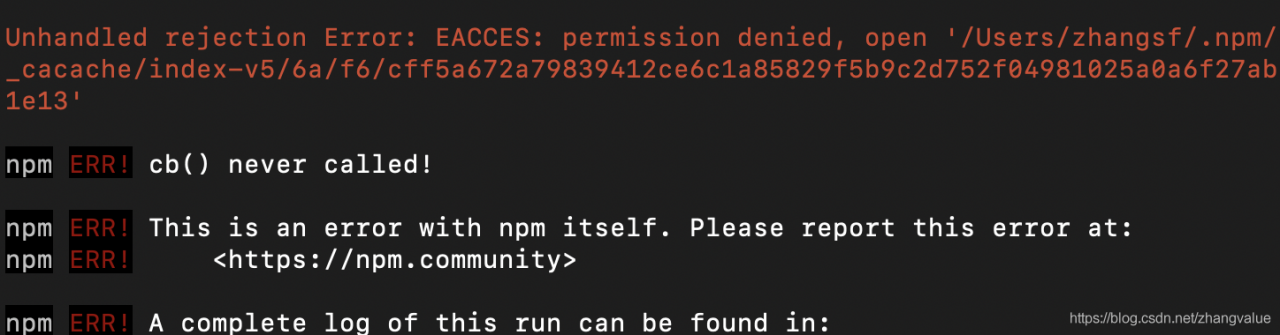
Reason: Insufficient permissions
Solutions:
sudo chown -R $(whoami) ~/.npm
Re-Create