During the test, the data was manually modified in the database, but the associated data was not cleared, resulting in data conflict and failure to insert when the data was re-inserted. The original data could be modified or deleted
Error message
In the morning, my colleague in the data group told me that there were several programs reporting errors. After checking the log, the error message was found:
After a search, it was revealed that the error was caused by the banner_TIMEOUT default setting being too short, only 15s.
Error analysis
See the transport code under Paramiko library. Py:
class Transport(threading.Thread, ClosingContextManager):
        self.banner_timeout = 15
        # how long (seconds) to wait for the handshake to finish after SSH
Reset the banner_TIMEOUT property value
Most of the methods on the Internet is to modify the source code, reinstall, feel a little trouble. I’m going to reset the properties in the code.
transport = paramiko.Transport((self.host, self.port))
print(transport.banner_timeout)
transport.banner_timeout = 30
print(transport.banner_timeout)
After testing, the two printed property values are different, indicating that the property is set successfully and the problem is solved.
Recently updated when cydia to the sub – process/usr/libexec/cydia cydo returned anerror code (2) of the scarlet letter is how to return a responsibility?
Solution: Delete all the updates and var/lib/dpk/updates (lots of numbered files and one TMP.i file)
python2.7
gevent
Use the GEvent coroutine to initiate an HTTP request
Using python’s own standard DNS library,
Frequent errors
[Errno 8] nodename nor servname provided, or not known
Check some articles, DNS resolution is a problem with a lot of concurrency.
Solution: Instead of using Python’s DNS resolution standard library, use gEvent’s built-in DNS resolution module to replace the standard library.
(When the following patch_all() is implemented, GEvent will help us replace a series of standard libraries.)
from gevent import monkey;monkey.patch_all()
At this point, [Errno 8] Nodename Nor Servname provided, or Not known issues only happen the first time DNS is resolved, only once.
In the process of developing apps with Android Studio, I believe everyone has encountered this problem. However, I have read some answers on the Internet and failed to solve the problem. Therefore, I have checked again myself.
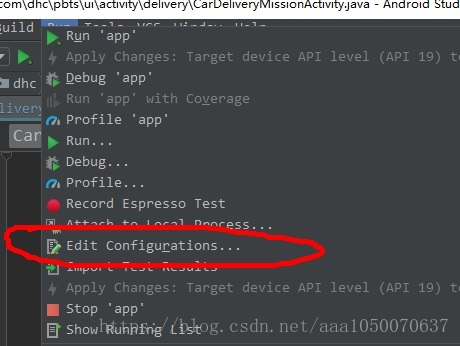
Start by selecting Run from the Top navigation bar of Android Studio, as shown in the figure
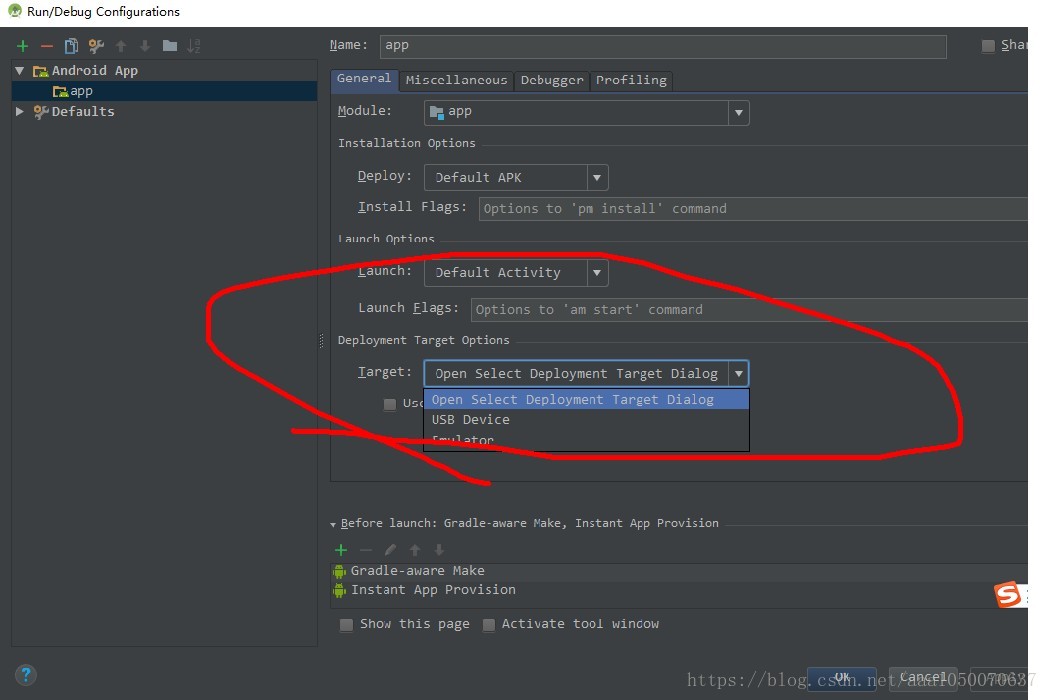
Then open Edit Configurations… , the following options appear, as shown in the figure
Select the first one here
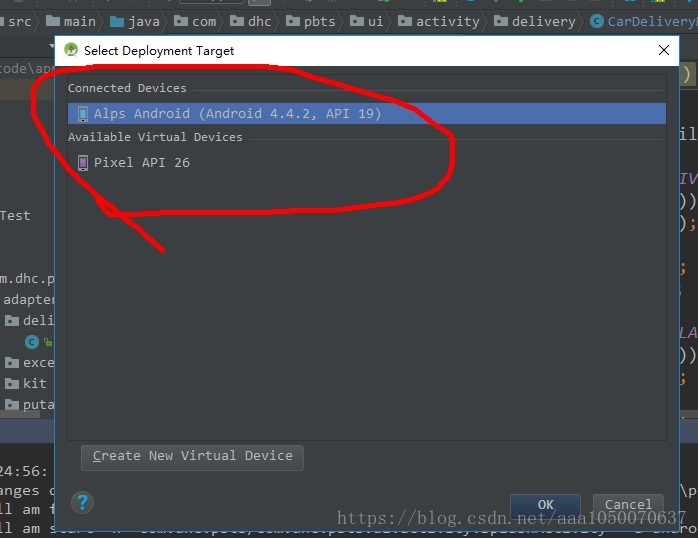
And then at this point, run the APP, click Run, and the following one will appear, as shown in the figure
Congratulations, now your virtual machine, or real machine, is out!!
If this interface does not come out, you can choose to restart the simulator or re-plug the UB real machine, and it will come out. Thank you for watching. I hope it helped you
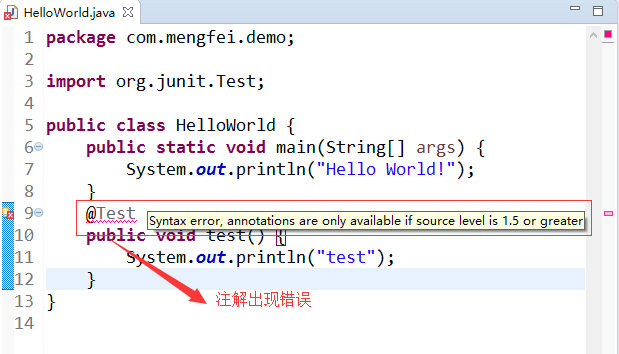
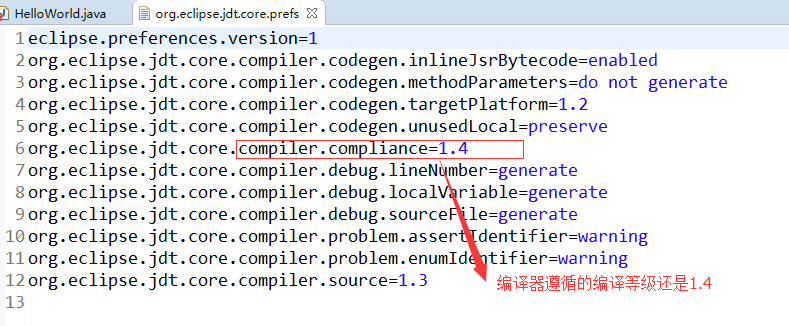
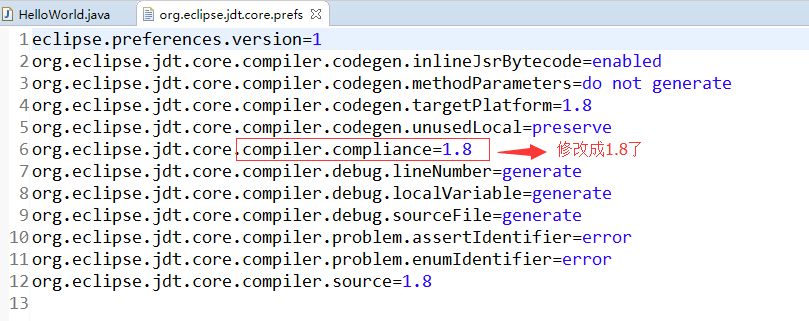
I. Problem descriptionSyntax error, annotations are only available if source level is 1.5 or greater, indicating that the annotations are only available in jdk1.5 or higher, as shown in the figure below:
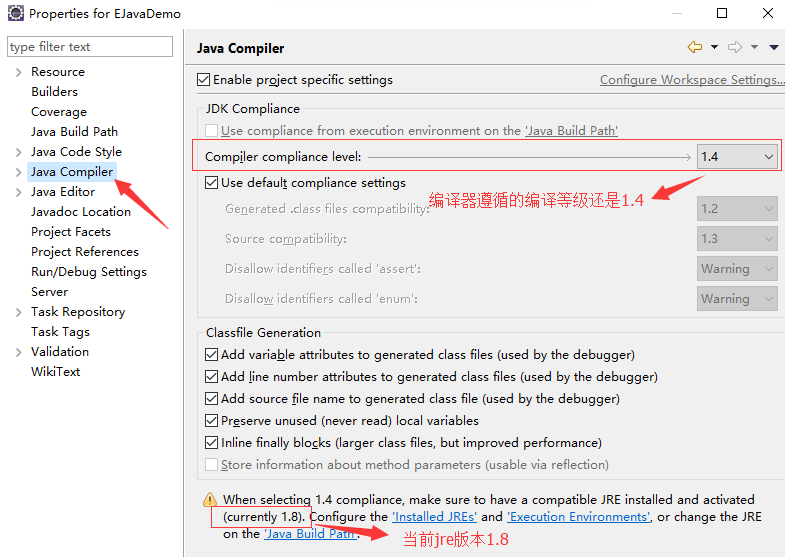
My JDK is configured to be 1.8, which is not supposed to be the case. I checked the configuration of my project and found the problem
Second, the cause of the problem
The compiler followed a low compilation level, used the default configuration file at project creation time, and did not update as configured with the JDK version
Here is the configuration information for the configuration file:
3. Solutions
1. Click the project shortcut Alt + Enter or right-click the project and select Properties at the bottom to enter the project configuration page
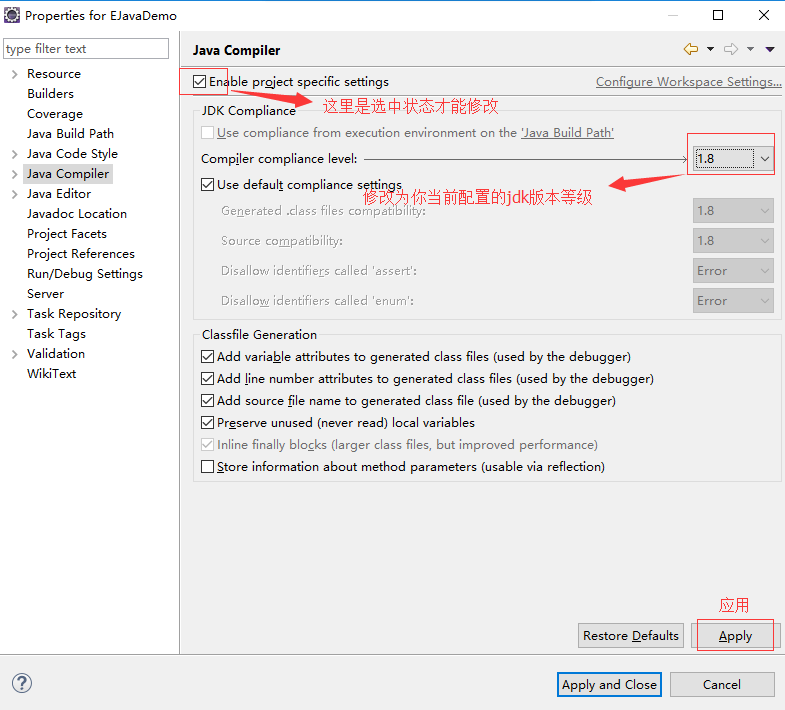
2. Modify the compilation level of the compiler
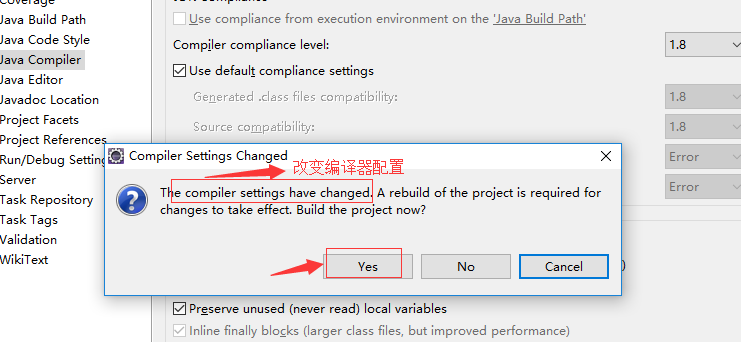
3. Change the configuration
4. The configuration file was modified successfully
Unknown error: to the dx.jar the SDK folder! Recently, I gradually migrated to Android Studio. After updating the Android SDK Manager, I opened the Eclipse Run project and reported an error. Search for various solutions and find:
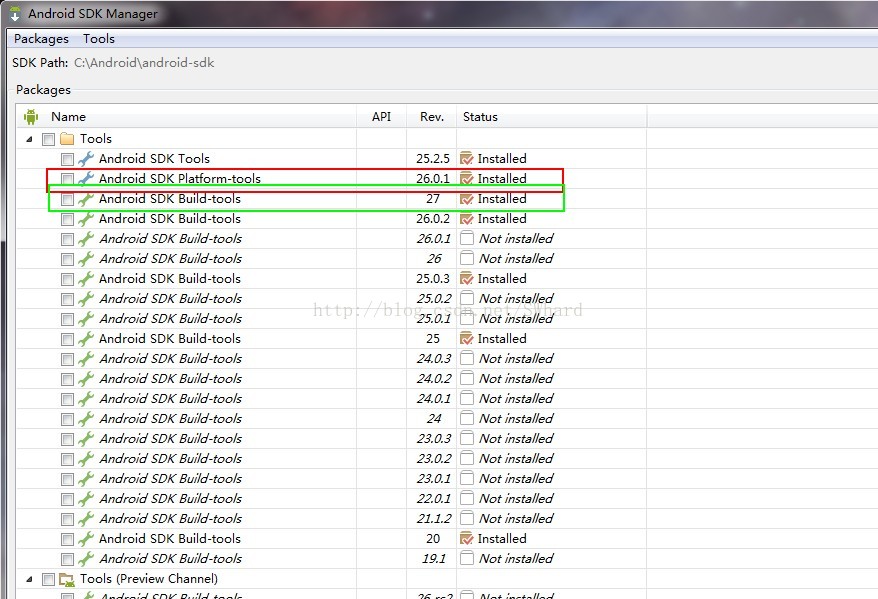
The version of Android SDK build-Tools has been higher than the version of Android SDK platform-tools, as shown in the figure
Since Android Studio sometimes has to use the higher-version build-Tools, simply deleting the higher-version build-Tools won’t do (see Unknown Error: to the dx.jar the SDK Folder! Solution).
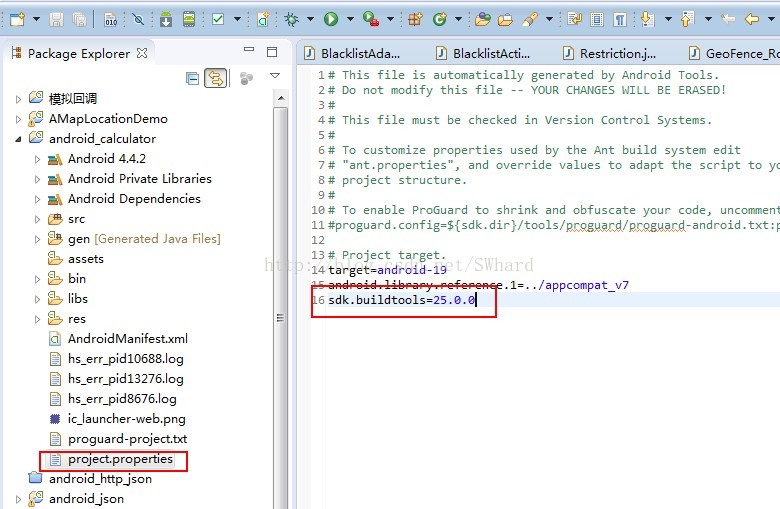
Finally, the relevant answer is found on Stack Overflow (Android ADT Error, was not loaded from the SDK Folder), and the modification is shown in the figure:
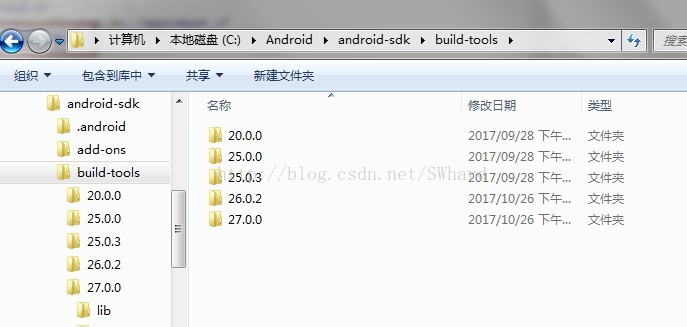
Add sdK.buildTools = the build Tools version already installed on your computer
Can.Close test:
Target = android – 24.
SDK buildtools = 25.0.3
Effective!!!!!
You can also avoid this problem by simply deleting the latest 26.0.0 and 27.0.0 folders
Due to work reasons, Fedora 14 is needed. After installing the system, yum is used to install the software and report an error:
[root@bogon liu]# yum install samba samba-client samba-swat
Loaded plugins: langpacks, presto, refresh-packagekit
Adding en_US to language list
Error: Cannot retrieve repository metadata (repomd.xml) for repository: fedora. Please verify its path and try again
The solution is as follows:
1. Delete all files except Fedora.repo in /etc/yum.repos. D.
2. Modify the content of fedora.repo file, add the comment symbol ‘#’ in front of mirrorList, remove the comment symbol before baseurl, and replace the url.
The modified Fedora.repo file reads as follows:
During the development of projects, it is often necessary to use ADB command for debugging. When the mobile phone is connected to the computer and ready to use adb shell command, the following error occurs
jason@zhanghailongdeMacBook-Pro ~ % adb shell
error: more than one device/emulator
According to the error prompt, the error is caused by the connection of multiple devices on the computer, and adb shell command does not know which one to operate, so the error is exploded. Check with ADB Devices:
jason@zhanghailongdeMacBook-Pro ~ % adb devices
List of devices attached
LGUS9982d76c740 device
192.168.201.7:5555 device
Sure enough, several devices appear. If you want to debug for a particular device, you need to specify the name of the device for adb command, such as debugging for device 2F54EE0:
jason@zhanghailongdeMacBook-Pro ~ % adb -s LGUS9982d76c740 shell
Joan:/$
In this way, it is possible to debug normally. If there is still a problem with the above method, the following scheme is recommended:
// Kill adb Server first :adb kill-server
// Restart ADB Server: ADB Start-up – Server
A compiler, the compiler error error: jump to case label [- fpermissive], the error: crosses initialization of 'XXXX' </ code>, to simple combing the related content
I. Problem code
int main()
{
  int test = 2;
  switch(test)
  {
    case 1:
      int i = 1;
      cout << i;
      break;
    case 2:
      cout << i;
      break;
    default:
      cout << "error" << endl;
  }
}

//test.cpp: In function 'int main()':
//test.cpp: error: jump to case label [-fpermissive]
//   case 2:
//        ^
//test.cpp: error:   crosses initialization of 'int i'
//    int b = 1;
//test.cpp: error: jump to case label [-fpermissive]
//   default:
//   ^
//test.cpp:11:8: error:   crosses initialization of 'int i'
//    int b = 1;
As can be seen from the above code, since there is no separate block in switch to qualify the declaration period of variable I, the scope of the variable is the initialization point to the end of switch. In this case, the compiler will report an error because we are not sure whether this variable will be used in other cases and whether it was initialized before it was used. For example, if test has a value of 2 and case 2 is executed directly, an undefined variable will cause an exception. This is a compiler error crosses initialization </ code>.
After inspection, it is found that the compiler will report an error no matter whether the other branches contain defined variables or not, as long as the variables are not braced in the case.
int main()
{
  int test = 2;
  switch(test)
  {
    case 1:
      int i = 1;
      cout << i;
      break;
    case 2:
      cout << 3;
      break;
    default:
      cout << "error" << endl;
  }
}

//test.cpp: In function 'int main()':
//test.cpp: error: jump to case label [-fpermissive]
//   case 2:
//        ^
//test.cpp: error:   crosses initialization of 'int i'
//    int i = 1;
//test.cpp: error: jump to case label [-fpermissive]
//   default:
//   ^
//test.cpp: error:   crosses initialization of 'int i'
//    int i = 1;
The code of case 1 is enclosed with {}, and the scope of variable I is clearly set to avoid access by other cases
2. The scope of variable I is put outside the switch, and every case in the switch can be accessed
The
switch statement is a kind of goto statement, so goto has the same properties. The following goto statement will not be executed, variable I will definitely be defined, but will report the same error as above. This means that there can be no variables between goto and the tag. Variables must appear before the goto or after the tag.
int main()
{
    if(0)
    {
        goto end;
    }

    int i = 1;

    end:
       cout << i;
}

//test.cpp: In function 'int main()':
//test.cpp error: jump to label 'end' [-fpermissive]
//   end:
//   ^
//test.cpp error:   from here [-fpermissive]
//          goto end;
//               ^
//test.cpp: error:   crosses initialization of 'int i'
//     int i = 1;
In the above example, it is possible to initialize a variable before the goto tag or after the end tag
Linux installation of VMWare under a problem, recently due to project needs, we have to Fedora8 system to install a virtual machine, the above run a Windows Server 2003, after a hard time to find a Linux version of VMWare, after installation, every time you start the virtual machine will report.
Unable to change the power state of the virtual machine: internal error.
This is an error.
At first I thought there was a problem with the vmware settings, but I finally found the answer on the Internet:
I encountered this problem when running a Vmware workstation under Ubuntu Jaunty. I get an error when shutting down the machine via an NX session.
It’s the result of a zombie ‘vmware-vmx’ process running. All you need to do is kill the process. This command sends ‘signal 9’ to the process. When sent to the process, SIGKILL causes the process to terminate immediately. Contrary to SIGTERM and SIGINT, this signal cannot be captured or ignored. More info:More sigkill info.
After that, I was able to start the virtual machine without any problems.