Author Archives: Robins

How to eliminate ADB error “more than one device and emulator”

When I connected to the phone to charge, I started the emulator debugging and executed ADB instruction, and reported an error.
C:\Users\gaojs> adb shell
error: more than one device and emulator
C:\Users\gaojs> adb install e:\good.apk
error: more than one device and emulator
In this case, first check to see if there are actually multiple devices or simulators.
C:\Users\gaojs> Adb devices
List of devices attached
emulator-5554 device
4dfadcb86b00cf05 device
you can find out that there are multiple devices, so you need to specify the device serial number for the adb command.
C:\Users\gaojs> Adb -s emulator-5554 shell
as shown above, add the -s parameter to the command! If there is actually only one device or simulator, and we have offline status;

, which means that ADB has a BUG, needs to be handled in the following way:

C:\Users\gaojs>
adb kill-server

C:\Users\gaojs>
Taskkill /f /im adb. Exe
the first command is a service to kill adb and the second command is a process to kill adb!

if the first command doesn’t work, consider using the second command to try again!

MySQL appears: ERROR 1049 (42000): Unknown database’XXX’ solution

The problem
Remember that when you installed MySQL database, you typed it from the command line

mysql -u root -p password

When I entered the command today, I found that it was incorrect, and I was asked to enter the password again, and then returned

“ERROR 1049 (42000): Unknown database '123'”

The figure shows

The error message is that you don’t know the 123 database, meaning that the password after -p represents the database name. But the argument after -p is supposed to mean password, which is weird.
To solve
So I went through the blog that I summarized earlier and found that the statement looked like this

mysql -u root -p123

can see that -p and password are linked together, there is no space between them
and then log in naturally!!
Then I looked at a wave and I found:
-U can be followed by the user name or a space, but the password must not be followed by a space.
if Spaces are added, mysql will assume that the last one is a library name.
we can look at the correct statement:

(1)mysql -u root -p123

(2)mysql -uroot -p123

KVM–Host does not support any virtualization…

Phenomenon: When virt-install creates a new virtual machine, prompt Host does not support any Virtualization options.
environment: CentOS7, KVM, CPU: Intel(R) Xeon(R) CPU e5-2609,
qemu-kvm, qemu-kvm-tools, virt-manager, libvirt virt-install four major components have been normally installed,
selinux has been closed, iptables have been fully released,
processing steps:
1. General step, advanced BIOS to see whether the CPU is on virtualization, confirm that
2, grep-e ‘(VMX | SVM)’ /proc/cpuinfo, check whether there is echo information, found that there is, also means that step 1 is not blind. Grep KVM
3, dmesg |, grep KVM, the actual function is the same as step 1 and step 2, confirm again whether the host supports virtualization, if not, KVM :disabled by BIOS will be displayed, here I do not have any echo. 4. At this point, the usual solutions on baidu and Google have come to an end and the problem has not been solved… Only themselves to think of a way, here a little fooling around step ten thousand steps.
5, systemctl status libvirtd suddenly found that there was an error in the libvirt log:
internal error: Failed to probe QEMU binary with QMP: /usr/libexec/ qem-kvm: relocation error: /lib64/ libspy-server. so.1
.
6, baidu learned that spice server is provided as a library for qemu use, compiled is libspice server.
, however, is a completely unknown thing to debug and debug, so let’s see if qemu- KVM has any problems.
7, ll /usr/libexec/qemu- KVM first see if qemu- KVM has execution permissions, found that there is, then normal.
8, /usr/libexec/qemu-kvm –version run manually, find error:
version libssl.so.10 not defined in file libssl.so.10
9, still get the solution through baidu solution:
/usr/libexec/qemu-kvm –version normal display version
virt-install
failure solved successfully!
/usr/libexec/qemu-kvm –version
virt-install
failure solved! Thank:

https://blog.51cto.com/506554897/1972914 http://bbs.chinaunix.net/thread-3691547-1-1.html

Reproduced in: https://blog.51cto.com/7308842/2395997

Error, some other host already uses address (How to Fix)

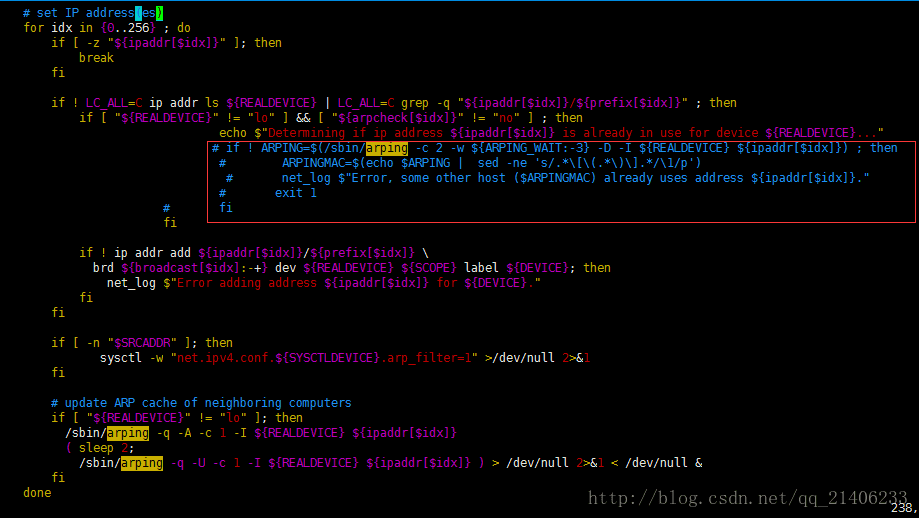
Today, I suddenly can’t connect the virtual machine, Error, some other host already USES address Error, other IP or such Error, fortunately, a search on the Internet found the solution is as follows:1. Vim /etc/sysconfig/network-scripts/ifup-eth modify configuration files

2, comment out this IP judgment can be quickly located through /arping

3. Save, exit and restart the network card
The service network restart
Note: Use the SED feature to find it
Data search and display
Search for lines with the root keyword in /etc/passwd

nl /etc/passwd | sed '/root/p'
1  root:x:0:0:root:/root:/bin/bash
2  daemon:x:1:1:daemon:/usr/sbin:/bin/sh
3  bin:x:2:2:bin:/bin:/bin/sh
4  sys:x:3:3:sys:/dev:/bin/sh
5  sync:x:4:65534:sync:/bin:/bin/sync
....

If root finds it, it prints the matching row in addition to all the rows.
With -n, only the lines containing the template will be printed.

nl /etc/passwd | sed -n '/root/p'
1  root:x:0:0:root:/root:/bin/bash

#nl ifup-eth | sed-n ‘/arping/p’ 216 line 245 line WFTW)

Problems with vue project installation No ESLint configuration found

Error No ESLint configuration found occurs when ESLint is selected when installing vue project with low version scaffold. The solution is as follows:
npm init -ynpm install eslint –save-dev./node_modules/.bin/eslint –init
The problem with No ESLint Configuration Found was resolved after the above three steps, but there will be other errors, so if there is a. Eslintrc.js file in the project, change it to the following. If there is No file created, write the following code:

module.exports = {
  root: true,
  parserOptions: {
    parser: 'babel-eslint'
  },
  env: {
    browser: true,
  },
  extends: [
    error-prevention
   
    'plugin:vue/essential', 
   
    'standard'
  ],
  
  plugins: [
    'vue'
  ],
  
  rules: {
    
    'generator-star-spacing': 'off',
    
    'no-debugger': process.env.NODE_ENV === 'production' ?'error' : 'off'
  }
}

There’s nothing wrong with running a project now! ✌ ️ ✌ ️ ✌ ️ ✌ ️ ✌ ️ ✌ ️

Thoroughly solve mysql error: 1030,’Got error 28 from storage engine’

To tell you the truth, online articles are the same, no one can solve, all is to say that the memory is good, but there is no teaching can not clean the small white… = =
The problem is that the server system is full, and the temporary file directory specified by mysql is full, which is roughly what this means.
Now let’s solve the problem that /dev/vda1 is full, and I actually have no idea where /dev/vda1 is or what it is, but I later learned that this is a virtio-block type device.
Talk about it:

A line beginning with ‘c’ indicates that the device is a character device, and a line beginning with ‘b’ indicates that it is a block device.
/dev/vda and /dev/vDB are both virtio-block devices, while /dev/sda is an SD, or SCSI, device.  

On the whole!
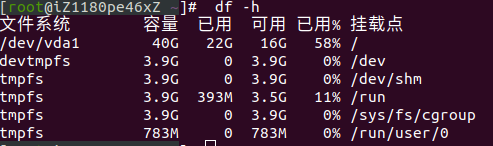
First login server: Execute DF-H means:
Check the disk usage space of a server, and find that the disk has been used 100%(this is the graph after I solved the problem, it has been restored to normal, the remaining 42% is enough).
1, CD to the root directory, du-sh * to see which directory takes up a lot of space, some up to a dozen G, so you should keep an eye on this directory
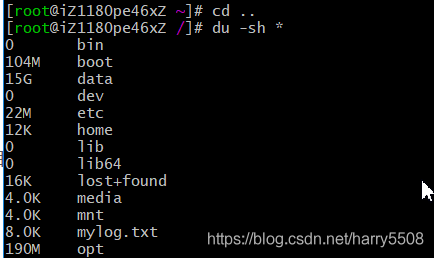
2, CD takes up a lot of memory directory, continue du-sh *
Found data directory incredibly 15G, enter the data directory: CD data
Then look for the large file:
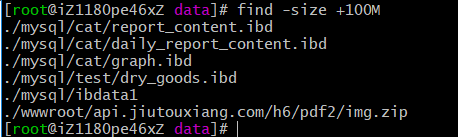
File search command:

find -size +100M
This means to find files larger than 100M. M is Megabyte

You can also query the folder footprint to show the total space occupied by the directory:

Use: DU-h –max-depth=1/path
For example, du-h –max-depth=1 /var
This is to see which folder takes up the most memory in the directory

If you want to locate a large file:

ls -lhS
This is to display the file from large to small

3. Repeat the first two steps and decide whether to delete or remove them according to the actual situation
 
4. You can clear the log if it is too large

Run command:
cat /dev/null > file.log

Pro test, catalina.out in mysql folder can be deleted, execute:

echo “” > catalina.out

This log file is usually large.
5, if the package is too large, do not need to be able to uninstall
Perform unload

Rmp-e software name

Or delete

Rm-rf folder name

 
6, the large file is almost deleted, again DF-H, disk space can be reserved for a little half, absolutely perfect solution to the mysql 1030 problem!



Error: Can’t bind the tftp port! Solution


Use tftpd32..
Can’t bind the TFTP port!
Can’t bind the TFTP port! Either you do not have necessary privilege or a TFTP daemon is already started.
the solution is simple:
just run the regedit, open the registry,
HKEY_LOCAL_MACHINE -> SOFTWARE – & gt; TFTPD32, delete the entire TFTPD32 folder.
go to open tftpd32. Exe is normal.