Tag Archives: python

TypeError: int() can’t convert non-string with explicit base

1. Error description

>>> int(67,8);
		  
Traceback (most recent call last):
  File "<pyshell#172>", line 1, in <module>
    int(67,8);
TypeError: int() can't convert non-string with explicit base

2. Cause of error

The int() function is used to convert a string or number type to an integer. If there is only one parameter value, the value can be string or number. However, two parameters are passed in, the first parameter is string, and the second parameter is hexadecimal (binary, octal, decimal or hexadecimal). Now in the above example, the first parameter is a number, and the second parameter is octal, so an error will be reported

3. Solutions

If you want to convert an octal number to decimal, you can do this:

>>> int('67',8);
		  
55
>>> 

ValueError: Object arrays cannot be loaded when allow_ Pickle = false solution

When numpy is used to load a large amount of binary data, such as. NPY file and. Pkl file, the default allow is set_ Pickle = false will cause the error and find the corresponding np.load (path)

np.load(path, allow_pickle=True)

Or reduce numpy to below 1.16:

pip install numpy==1.15.0 -i http://pypi.douban.com/simple/ --trusted-host pypi.douban.com

It can be solved.

The scheme failed with ‘command’ failed

PIP install pylibmc installation failure and its solution. During installation, the following errors are reported, and there may be other errors, similar to the following:

pip install pylibmc==1.6.1
Looking in indexes: https://pypi.tuna.tsinghua.edu.cn/simple
Collecting pylibmc==1.6.1
  Using cached https://pypi.tuna.tsinghua.edu.cn/packages/a7/0c/f7a3af34b05c167a69ed1fc330b06b658dac4ab25b8632c52d1022dd5337/pylibmc-1.6.1.tar.gz (64 kB)
Building wheels for collected packages: pylibmc
  Building wheel for pylibmc (setup.py) ... error
  ERROR: Command errored out with exit status 1:
   command: /Users/yangchangjia/PycharmProjects/Nox/venv/bin/python -u -c 'import sys, setuptools, tokenize; sys.argv[0] = '"'"'/private/var/folders/x7/zprpyfhx3h3g5qs3c_z_gxqc0000gn/T/pip-install-14fh8zn_/pylibmc/setup.py'"'"'; __file__='"'"'/private/var/folders/x7/zprpyfhx3h3g5qs3c_z_gxqc0000gn/T/pip-install-14fh8zn_/pylibmc/setup.py'"'"';f=getattr(tokenize, '"'"'open'"'"', open)(__file__);code=f.read().replace('"'"'\r\n'"'"', '"'"'\n'"'"');f.close();exec(compile(code, __file__, '"'"'exec'"'"'))' bdist_wheel -d /private/var/folders/x7/zprpyfhx3h3g5qs3c_z_gxqc0000gn/T/pip-wheel-73t1n0ft
       cwd: /private/var/folders/x7/zprpyfhx3h3g5qs3c_z_gxqc0000gn/T/pip-install-14fh8zn_/pylibmc/
  Complete output (28 lines):
  /private/var/folders/x7/zprpyfhx3h3g5qs3c_z_gxqc0000gn/T/pip-install-14fh8zn_/pylibmc/setup.py:98: DeprecationWarning: 'U' mode is deprecated
    with open("README.rst", "U", encoding="utf-8") as r:
  /private/var/folders/x7/zprpyfhx3h3g5qs3c_z_gxqc0000gn/T/pip-install-14fh8zn_/pylibmc/setup.py:100: DeprecationWarning: 'U' mode is deprecated
    with open("src/pylibmc-version.h", "U", encoding="utf-8") as r:
  running bdist_wheel
  running build
  running build_py
  creating build
  creating build/lib.macosx-10.15-x86_64-3.8
  creating build/lib.macosx-10.15-x86_64-3.8/pylibmc
  copying src/pylibmc/autoconf.py -> build/lib.macosx-10.15-x86_64-3.8/pylibmc
  copying src/pylibmc/pools.py -> build/lib.macosx-10.15-x86_64-3.8/pylibmc
  copying src/pylibmc/client.py -> build/lib.macosx-10.15-x86_64-3.8/pylibmc
  copying src/pylibmc/__init__.py -> build/lib.macosx-10.15-x86_64-3.8/pylibmc
  copying src/pylibmc/test.py -> build/lib.macosx-10.15-x86_64-3.8/pylibmc
  copying src/pylibmc/consts.py -> build/lib.macosx-10.15-x86_64-3.8/pylibmc
  copying src/pylibmc/__main__.py -> build/lib.macosx-10.15-x86_64-3.8/pylibmc
  running build_ext
  building '_pylibmc' extension
  creating build/temp.macosx-10.15-x86_64-3.8
  creating build/temp.macosx-10.15-x86_64-3.8/src
  clang -Wno-unused-result -Wsign-compare -Wunreachable-code -DNDEBUG -g -fwrapv -O3 -Wall -I/Library/Developer/CommandLineTools/SDKs/MacOSX10.15.sdk/usr/include -I/Library/Developer/CommandLineTools/SDKs/MacOSX10.15.sdk/usr/include -DUSE_ZLIB -I/Users/yangchangjia/PycharmProjects/Nox/venv/include -I/Users/yangchangjia/.pyenv/versions/3.8.6/include/python3.8 -c src/_pylibmcmodule.c -o build/temp.macosx-10.15-x86_64-3.8/src/_pylibmcmodule.o -fno-strict-aliasing -std=c99
  In file included from src/_pylibmcmodule.c:34:
  src/_pylibmcmodule.h:42:10: fatal error: 'libmemcached/memcached.h' file not found
  #include <libmemcached/memcached.h>
           ^~~~~~~~~~~~~~~~~~~~~~~~~~
  1 error generated.
  error: command 'clang' failed with exit status 1
  ----------------------------------------
  ERROR: Failed building wheel for pylibmc
  Running setup.py clean for pylibmc
Failed to build pylibmc
Installing collected packages: pylibmc
    Running setup.py install for pylibmc ... error
    ERROR: Command errored out with exit status 1:
     command: /Users/yangchangjia/PycharmProjects/Nox/venv/bin/python -u -c 'import sys, setuptools, tokenize; sys.argv[0] = '"'"'/private/var/folders/x7/zprpyfhx3h3g5qs3c_z_gxqc0000gn/T/pip-install-14fh8zn_/pylibmc/setup.py'"'"'; __file__='"'"'/private/var/folders/x7/zprpyfhx3h3g5qs3c_z_gxqc0000gn/T/pip-install-14fh8zn_/pylibmc/setup.py'"'"';f=getattr(tokenize, '"'"'open'"'"', open)(__file__);code=f.read().replace('"'"'\r\n'"'"', '"'"'\n'"'"');f.close();exec(compile(code, __file__, '"'"'exec'"'"'))' install --record /private/var/folders/x7/zprpyfhx3h3g5qs3c_z_gxqc0000gn/T/pip-record-tox14kc6/install-record.txt --single-version-externally-managed --compile --install-headers /Users/yangchangjia/PycharmProjects/Nox/venv/include/site/python3.8/pylibmc
         cwd: /private/var/folders/x7/zprpyfhx3h3g5qs3c_z_gxqc0000gn/T/pip-install-14fh8zn_/pylibmc/
    Complete output (28 lines):
    /private/var/folders/x7/zprpyfhx3h3g5qs3c_z_gxqc0000gn/T/pip-install-14fh8zn_/pylibmc/setup.py:98: DeprecationWarning: 'U' mode is deprecated
      with open("README.rst", "U", encoding="utf-8") as r:
    /private/var/folders/x7/zprpyfhx3h3g5qs3c_z_gxqc0000gn/T/pip-install-14fh8zn_/pylibmc/setup.py:100: DeprecationWarning: 'U' mode is deprecated
      with open("src/pylibmc-version.h", "U", encoding="utf-8") as r:
    running install
    running build
    running build_py
    creating build
    creating build/lib.macosx-10.15-x86_64-3.8
    creating build/lib.macosx-10.15-x86_64-3.8/pylibmc
    copying src/pylibmc/autoconf.py -> build/lib.macosx-10.15-x86_64-3.8/pylibmc
    copying src/pylibmc/pools.py -> build/lib.macosx-10.15-x86_64-3.8/pylibmc
    copying src/pylibmc/client.py -> build/lib.macosx-10.15-x86_64-3.8/pylibmc
    copying src/pylibmc/__init__.py -> build/lib.macosx-10.15-x86_64-3.8/pylibmc
    copying src/pylibmc/test.py -> build/lib.macosx-10.15-x86_64-3.8/pylibmc
    copying src/pylibmc/consts.py -> build/lib.macosx-10.15-x86_64-3.8/pylibmc
    copying src/pylibmc/__main__.py -> build/lib.macosx-10.15-x86_64-3.8/pylibmc
    running build_ext
    building '_pylibmc' extension
    creating build/temp.macosx-10.15-x86_64-3.8
    creating build/temp.macosx-10.15-x86_64-3.8/src
    clang -Wno-unused-result -Wsign-compare -Wunreachable-code -DNDEBUG -g -fwrapv -O3 -Wall -I/Library/Developer/CommandLineTools/SDKs/MacOSX10.15.sdk/usr/include -I/Library/Developer/CommandLineTools/SDKs/MacOSX10.15.sdk/usr/include -DUSE_ZLIB -I/Users/yangchangjia/PycharmProjects/Nox/venv/include -I/Users/yangchangjia/.pyenv/versions/3.8.6/include/python3.8 -c src/_pylibmcmodule.c -o build/temp.macosx-10.15-x86_64-3.8/src/_pylibmcmodule.o -fno-strict-aliasing -std=c99
    In file included from src/_pylibmcmodule.c:34:
    src/_pylibmcmodule.h:42:10: fatal error: 'libmemcached/memcached.h' file not found
    #include <libmemcached/memcached.h>
             ^~~~~~~~~~~~~~~~~~~~~~~~~~
    1 error generated.
    error: command 'clang' failed with exit status 1
    ----------------------------------------
ERROR: Command errored out with exit status 1: /Users/yangchangjia/PycharmProjects/Nox/venv/bin/python -u -c 'import sys, setuptools, tokenize; sys.argv[0] = '"'"'/private/var/folders/x7/zprpyfhx3h3g5qs3c_z_gxqc0000gn/T/pip-install-14fh8zn_/pylibmc/setup.py'"'"'; __file__='"'"'/private/var/folders/x7/zprpyfhx3h3g5qs3c_z_gxqc0000gn/T/pip-install-14fh8zn_/pylibmc/setup.py'"'"';f=getattr(tokenize, '"'"'open'"'"', open)(__file__);code=f.read().replace('"'"'\r\n'"'"', '"'"'\n'"'"');f.close();exec(compile(code, __file__, '"'"'exec'"'"'))' install --record /private/var/folders/x7/zprpyfhx3h3g5qs3c_z_gxqc0000gn/T/pip-record-tox14kc6/install-record.txt --single-version-externally-managed --compile --install-headers /Users/yangchangjia/PycharmProjects/Nox/venv/include/site/python3.8/pylibmc Check the logs for full command output.

Solution:

brew install libmemcached
pip install wheel
pip install pylibmc

Installation successful:

pip install pylibmc
Looking in indexes: https://pypi.tuna.tsinghua.edu.cn/simple
Collecting pylibmc
  Using cached https://pypi.tuna.tsinghua.edu.cn/packages/a7/0c/f7a3af34b05c167a69ed1fc330b06b658dac4ab25b8632c52d1022dd5337/pylibmc-1.6.1.tar.gz (64 kB)
Building wheels for collected packages: pylibmc
  Building wheel for pylibmc (setup.py) ... done
  Created wheel for pylibmc: filename=pylibmc-1.6.1-cp38-cp38-macosx_10_15_x86_64.whl size=33323 sha256=9a8ecb4933b8a455b7ffe9db042011f3a9865c18441b8e5204d843bc0e6da1a3
  Stored in directory: /Users/yangchangjia/Library/Caches/pip/wheels/a1/8e/7e/d1b6684901c01de15a45efb8b5172c1dc7b9c6a7386d369839
Successfully built pylibmc
Installing collected packages: pylibmc
Successfully installed pylibmc-1.6.1

Import error: no module named cryptography.hazmat.backends

Install cryptography from the command line

pip install  cryptography

If sslerror: (‘the read operation timed out ‘), re execute the above command.

If there is a problem of requirement already satisfied (use — upgrade to upgrade): Cryptography in C: / / python27 / lib / site packages, execute the following statement:

pip install cryptography –upgrade

Python Numpy.ndarray ValueError:assignment destination is read-only

reference resources: http://stackoverflow.com/questions/13572448/change-values-in-a-numpy-array

###################################################################3

Get the video stream from the raspberry pie camera and convert it to opencv format:

http://blog.csdn.net/u012005313/article/details/51482994

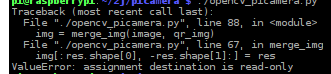
At the same time, you want to operate on each frame, but there is an error:

ValueError:assignment destination is read-only

Images cannot be manipulated because they are read-only.

Find a way on stackhover: because in Python, the opencv image format is Numpy.ndarray You can modify the properties of ndarray by:

img.flags.writeable = True

####################################################################

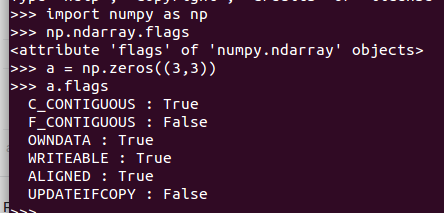
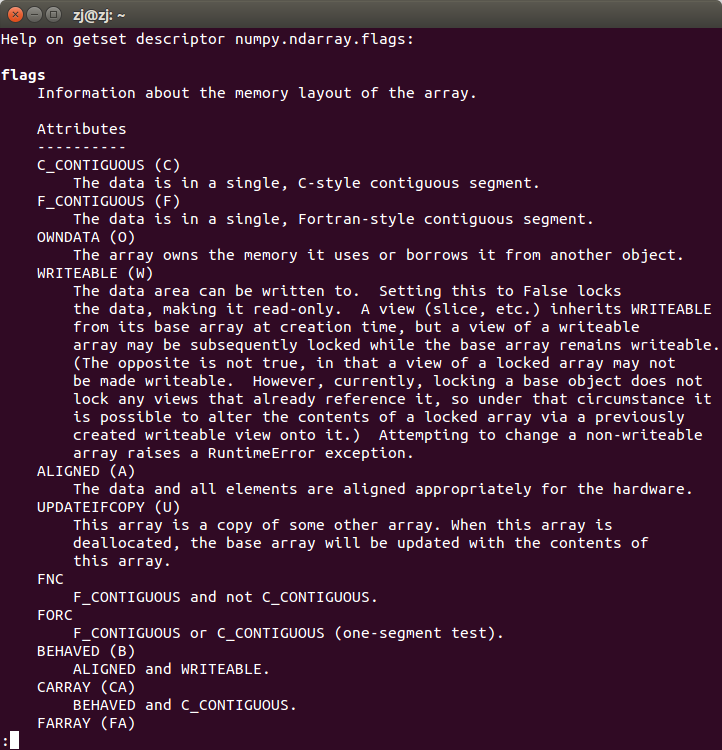
Numpy.ndarray It has the following attributes:

C_ CONTIGUOUS(c_ contiguous)

F_ CONTIGUOUS(f_ contiguous)

OWNDATA(owndata)

WRITEABLE(writeable)

ALIGNED(aligned)

UPDATEIFCOPY(updateifcopy)

import numpy as np
help(np.ndarray.flags)

The flags property is information about the array memory layout

Among them, the flags attribute can be modified in the form of a dictionary, for example:

a.flags['WRITEABLE'] = True

You can also use lowercase attribute names:

a.flags.writeable = True

Abbreviations (‘c ‘/’f’, etc.) are only used in dictionary form

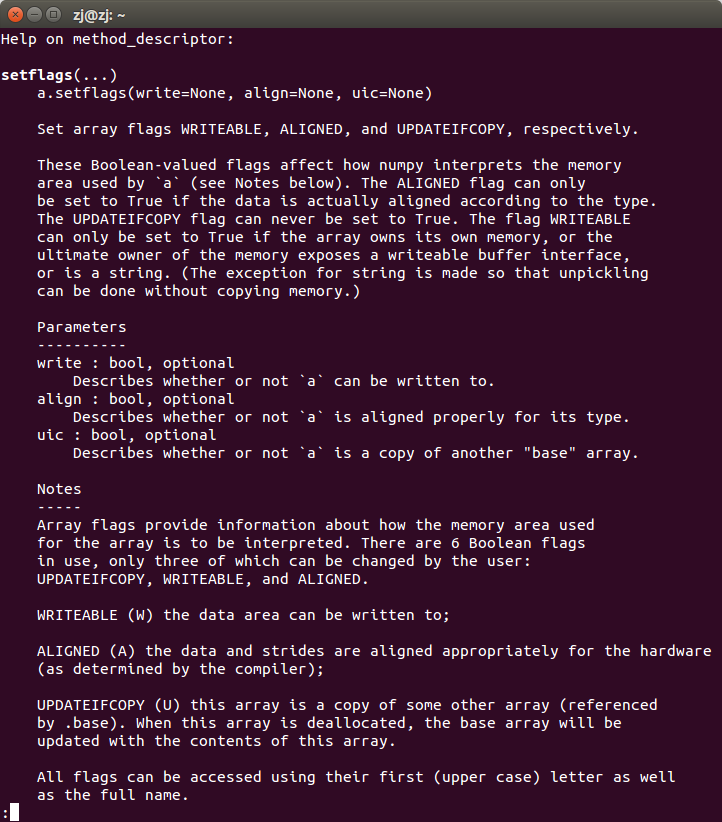
Only the attributes updateifcopy, writeable and aligned can be modified by users in three ways

1. Direct assignment:

a.flags.writeable = True

2. Dictionary input:

a.flags['WRITEABLE'] = True

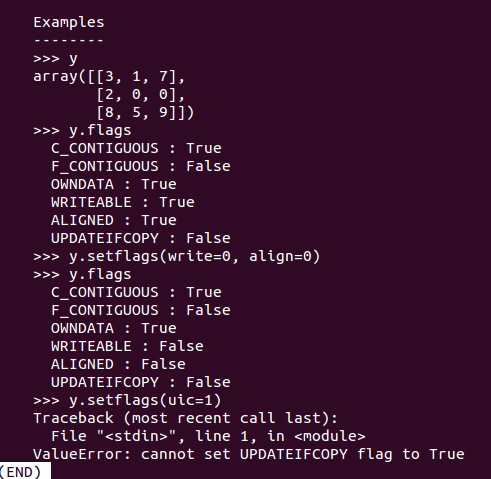
3. Use function ndarray.setflags :

help(np.ndarray.setflags)

Solve the problem that “figure size 640×480 with 1 axes” does not display pictures in jupyter notebook

Problem code: (negligible code)

import numpy as np
from sklearn.feature_selection import SelectKBest, f_classif
import matplotlib.pyplot as plt
predictors = ["Pclass", "Sex", "Age", "SibSp", "Parch", "Fare", "Embarked", "FamilySize", "Title", "NameLength"]

# Perform feature selection
selector = SelectKBest(f_classif, k=5)
selector.fit(titanic[predictors], titanic["Survived"])

# Get the raw p-values for each feature, and transform from p-values into scores
scores = -np.log10(selector.pvalues_)

# Plot the scores.  See how "Pclass", "Sex", "Title", and "Fare" are the best?
plt.bar(range(len(predictors)), scores)
plt.xticks(range(len(predictors)), predictors, rotation='vertical')
plt.show()

# Pick only the four best features.
predictors = ["Pclass", "Sex", "Fare", "Title"]

alg = RandomForestClassifier(random_state=1, n_estimators=50, min_samples_split=8, min_samples_leaf=4)

Running results:
& lt; figure size 640x480 with 1 axes & gt;
no pictures are displayed

Solution:
Add % Matplotlib inline to the code header

import pandas #ipython notebook
titanic = pandas.read_csv("titanic_train.csv")
titanic.head(5)
#print (titanic.describe())
%matplotlib inline

The problem of “value error: zero length field name in format” in Python 2.6.6 of CentOS 6.9

[root@MrYang ~]# python
Python 2.6.6 (r266:84292, Aug 18 2016, 15:13:37)
[GCC 4.4.7 20120313 (Red Hat 4.4.7-17)] on linux2
Type "help", "copyright", "credits" or "license" for more information.
>>> from fabric.api import *
Traceback (most recent call last):
  File "<stdin>", line 1, in <module>
  File "/usr/lib/python2.6/site-packages/fabric/api.py", line 9, in <module>
    from fabric.context_managers import (cd, hide, settings, show, path, prefix,
  File "/usr/lib/python2.6/site-packages/fabric/context_managers.py", line 42, in <module>
    from fabric.state import output, win32, connections, env
  File "/usr/lib/python2.6/site-packages/fabric/state.py", line 9, in <module>
    from fabric.network import HostConnectionCache, ssh
  File "/usr/lib/python2.6/site-packages/fabric/network.py", line 24, in <module>
    import paramiko as ssh
  File "/usr/lib/python2.6/site-packages/paramiko/__init__.py", line 22, in <module>
    from paramiko.transport import SecurityOptions, Transport
  File "/usr/lib/python2.6/site-packages/paramiko/transport.py", line 89, in <module>
    class Transport(threading.Thread, ClosingContextManager):
  File "/usr/lib/python2.6/site-packages/paramiko/transport.py", line 103, in Transport
    _CLIENT_ID = 'paramiko_{}'.format(paramiko.__version__)
ValueError: zero length field name in format

When using the paramiko third-party library of python2.6.6 and python3.6 on centos6.9, the above error has been reported all the time

Python official recommendation str.format () to format strings, so using “{} / N”. Format (x) to process strings may encounter problems.

In Python 2 & gt; = 2.7 and python 3 & gt; = 3.1, str.format The positional parameter in () method can be omitted by default, but in Python 2 (& lt; 2.7) and python 3 (& lt; 3.1), you must display the specified (subscript starts from 0), otherwise “zero length field name in format” error will appear.

“{}CMD”.format( os.sep )# “{0} CMD”. Format can run normally in Python 2.7( os.sep )# in Python & lt; = 2.6 / 3.1, the specified subscript must be displayed, even if there is only one element.

Reference link: https://www.aliyun.com/jiaocheng/460757.html

Alibaba cloud builds FTP server 200 port command successful. Consider using PASV. 425 failed to establish connection

Alibaba cloud CentOS FTP server configures FTP in passive mode and reports an error
200 port command successful. Consider using PASV. 425 failed to establish connection

Answer:
you are using FTP in active mode.

Due to firewall and NAT, it may be troublesome to set up FTP in active mode nowadays.

The server may not be able to connect back to the client to establish a data transfer connection, which may be due to your local firewall or NAT.

Or your client does not know its external IP address, but provides an internal address to the server (in the
port
command), and the server obviously cannot use the internal address. But this is not the case, because vsftpd refuses the source address (
port) of FTP control connection by default_ Promiscuous
instruction).

Please refer to my article “active mode network configuration”.

If possible, you should use passive mode, as it usually does not require other settings on the client side. This is what the server suggests to you through “consider PASV.”. This
PASV
is the FTP command used to enter passive mode.

Unfortunately, the windows FTP command line client (
0 ftp.exe
)Passive mode is not supported at all. Now, it’s useless.

Please use any other third party windows FTP command line client instead. Most others support passive mode.

For example, the winscp FTP client defaults to passive mode, and provides guidelines for converting windows FTP scripts to winscp scripts.

(I’m the author of winscp)

Answer:
in fact, your window firewall blocks the connection, so you need to enter these commands from the administrator cmd.exe .

1) Netsh advfirewall add rule name = “FTP” dir = executing = allow program =% systemroot% \ \ system32\ ftp.exe Enable = yes protocol = TCP

2) Netsh advfirewall add rule name = “FTP” dir = executing = allow program =% systemroot% \ \ system32\ ftp.exe Enable = yes protocol = UDP

If something goes wrong, you can recover in the following ways:

1) Netsh advfirewall delete rule name = “FTP” program =% systemroot% \ \ system32\ ftp.exe

Questions:
I have setup FTP server in Ubuntu 12.04 LTS.

Now when when I try to connect to FTP server from Windows 7 through command-line
ftp.exe
, I get successfully connected but I cannot get the list of directory. I get error

200 PORT command successful. Consider using PASV.
425 Failed to establish connection.
Answers:
Try using the
passive
command before using
ls
.

From FTP client, to check if the FTP server supports passive mode, after login, type
quote PASV
.

Following are connection examples to a vsftpd server with passive mode on and off

vsftpd
with
pasv_ enable=NO
:

ftp localhost

Connected to localhost.localdomain .
220 (vsFTPd 2.3.5)
Name ( localhost:john ): anonymous
331 Please specify the password.
Password:
230 Login successful.
Remote system type is UNIX.
Using binary mode to transfer files.
ftp> quote PASV
550 Permission denied.
ftp>
vsftpd
with
pasv_ enable=YES
:

ftp localhost

Connected to localhost.localdomain .
220 (vsFTPd 2.3.5)
Name ( localhost:john ): anonymous
331 Please specify the password.
Password:
230 Login successful.
Remote system type is UNIX.
Using binary mode to transfer files.
ftp> quote PASV
227 Entering Passive Mode (127,0,0,1,173,104).
ftp>
Answers:
You are using the FTP in an active mode.

Setting up the FTP in the active mode can be cumbersome nowadays due to firewalls and NATs.

It’s likely because of your local firewall or NAT that the server was not able to connect back to your client to establish data transfer connection.

Or your client is not aware of its external IP address and provides an internal address instead to the server (in
PORT
command), which the server is obviously not able to use. But it should not be the case, as vsftpd by default rejects data transfer address not identical to source address of FTP control connection (the
port_ promiscuous
directive).

See my article Network Configuration for Active Mode.

If possible, you should use a passive mode as it typically requires no additional setup on a client-side. That’s also what the server suggested you by “Consider using PASV”. The
PASV
is an FTP command used to enter the passive mode.

Unfortunately Windows FTP command-line client (the
ftp.exe
) does not support passive mode at all. It makes it pretty useless nowadays.

Use any other 3rd party Windows FTP command-line client instead. Most other support the passive mode.

For example WinSCP FTP client defaults to the passive mode and there’s a guide available for converting Windows FTP script to WinSCP script.

(I’m the author of WinSCP)

Answers:
Actually your window firewall blocking the connection so you need to Enter these commands into cmd.exe from Administrator.

    netsh advfirewall firewall add rule name=”FTP” dir=in action=allow program=%SystemRoot%\System32\ ftp.exe enable=yes protocol=tcp netsh advfirewall firewall add rule name=”FTP” dir=in action=allow program=%SystemRoot%\System32\ ftp.exe enable=yes protocol=udp

if in case something goes wrong then you can revert by this:

    netsh advfirewall firewall delete rule name=”FTP” program=%SystemRoot%\System32\ ftp.exe
tf.layers.conv1d Function analysis (one dimensional convolution)

One dimensional convolution is usually used to process text, so the input is usually a long piece of text, which is a list of words


The function is defined as follows:

tf.layers.conv1d(
inputs,
filters,
kernel_size,
strides=1,
padding='valid',
data_format='channels_last',
dilation_rate=1,
activation=None,
use_bias=True,
kernel_initializer=None,
bias_initializer=tf.zeros_initializer(),
kernel_regularizer=None,
bias_regularizer=None,
activity_regularizer=None,
kernel_constraint=None,
bias_constraint=None,
trainable=True,
name=None,
reuse=None
)

The more important parameters are inputs, filters and kernel_ Size, which are described below


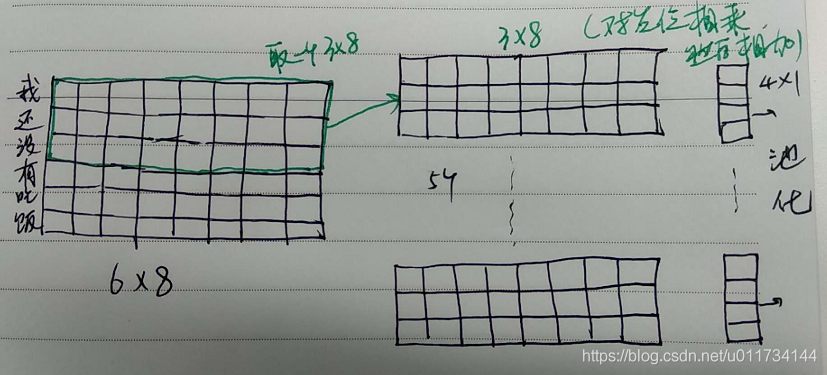
Inputs: input tensor. Dimension (none, a, b) is a three-dimensional tensor

None: usually the number of samples to be filled, batch_ size

A: the number of words or words in a sentence

B: vector dimension of word or word


Filters: the number of filters


kernel_ Size: the size of convolution kernel. Convolution kernel should be two-dimensional. Only one dimension needs to be specified here, because the second dimension of convolution kernel is consistent with the input word vector dimension, because for sentences, convolution can only move along the word direction, that is, it can only move in the column dimension


An example:

inputs = tf.placeholder (‘float’, shape=[None, 6, 8])

out = tf.layers.conv1d (inputs, 5, 3)


Note: for a sample, the sentence length is 6 words, and the dimension of the word vector is 8

filters=5, kernel_ Size = 3, so the dimension of convolution kernel is 3 * 8

Then the input 6 * 8 is convoluted by 3 * 8 convolution kernel to get a vector of 4 * 1 (4 = 6-3 + 1)

And because there are five filters, we get five 4 * 1 vectors

The drawing is as follows:


Typeerror: UFUNC ‘isn’t supported for the input types

It took me a lot of time to find the wrong problem, so I hope you can be inspired.

Look at the code explanation

da1
Out[1]: 
          a   b  c        aa
0  0.200000  a1  1  0.200000
1  0.500000  a2  2  0.500000
2  0.428571  a3  3  0.428571
3       NaN  a2  4       NaN
4  0.833333  a1  5  0.833333
5  0.750000  a1  6  0.750000
6  0.777778  a3  7  0.777778
7       NaN  a1  8       NaN
8      test  a3  9       NaN

In [2]: ddn1 = da1['a'].values

In [3]: ddn1
Out[3]: 
array([0.2, 0.5, 0.42857142857142855, nan, 0.8333333333333334, 0.75,
       0.7777777777777778, nan, 'test'], dtype=object)

The type dtype of numpy array is object

In [4]: np.isnan(ddn1)
---------------------------------------------------------------------------
TypeError                                 Traceback (most recent call last)
<ipython-input-414-406cd3e92434> in <module>
----> 1 np.isnan(ddn1)

TypeError: ufunc 'isnan' not supported for the input types, and the inputs could not be safely coerced to any supported types according to the casting rule ''safe''

The reason for the error is that the type dtype of numpy is object, not number.

In [5]: type(ddn1[:8])
Out[5]: numpy.ndarray
In [6]: type(ddn1[8])
Out[6]: str

Although the previous values are all numbers, the last value is a string, and all values of the array are not of the same type.

In [7]: ddn1 = ddn1[:8]

In [8]: ddn1
Out[8]: 
array([0.2, 0.5, 0.42857142857142855, nan, 0.8333333333333334, 0.75,
       0.7777777777777778, nan], dtype=object)

Even if the last string is truncated by slicing, the type of the array does not change.

ddn1 = ddn1.astype('float')

ddn1
Out[9]: 
array([0.2       , 0.5       , 0.42857143,        nan, 0.83333333,
       0.75      , 0.77777778,        nan])

np.isnan(ddn1)
Out[10]: array([False, False, False,  True, False, False, False,  True])

Need to display the array into a numeric type line (here is converted to float).

In [11]: ddn1 = np.append(ddn1,'test')

In [12]: ddn1
Out[12]: 
array(['0.2', '0.5', '0.42857142857142855', 'nan', '0.8333333333333334',
       '0.75', '0.7777777777777778', 'nan', 'test'], dtype='<U32')
In [13]: np.isnan(np.append(ddn1,'test'))
---------------------------------------------------------------------------
TypeError                                 Traceback (most recent call last)
<ipython-input-440-26598f53c9e6> in <module>
----> 1 np.isnan(np.append(ddn1,'test'))

TypeError: ufunc 'isnan' not supported for the input types, and the inputs could not be safely coerced to any supported types according to the casting rule ''safe''

When a text value is appended, the type dtype of the array is changed again, which is not numeric. Reuse np.isnan There must be a mistake.

The conclusion is that to avoid errors, the value type in the array must be float or int.