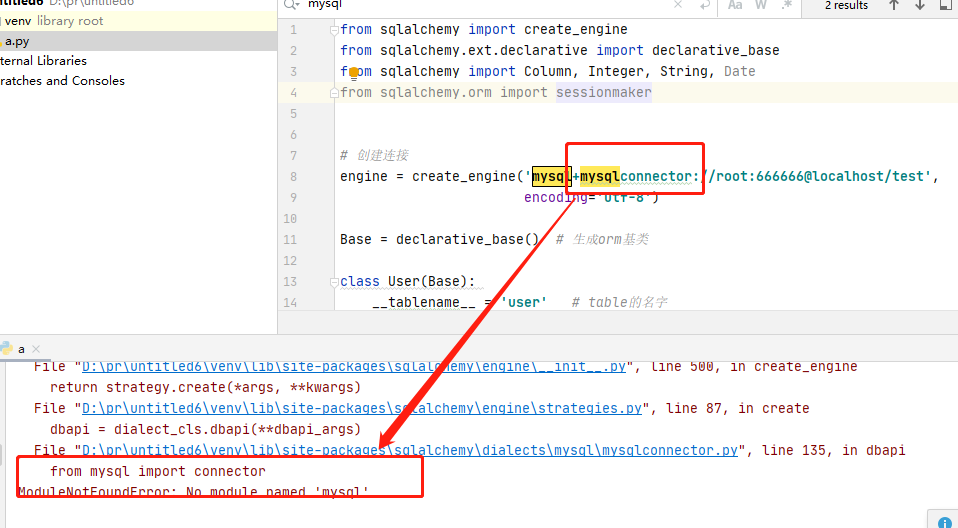
the solution:
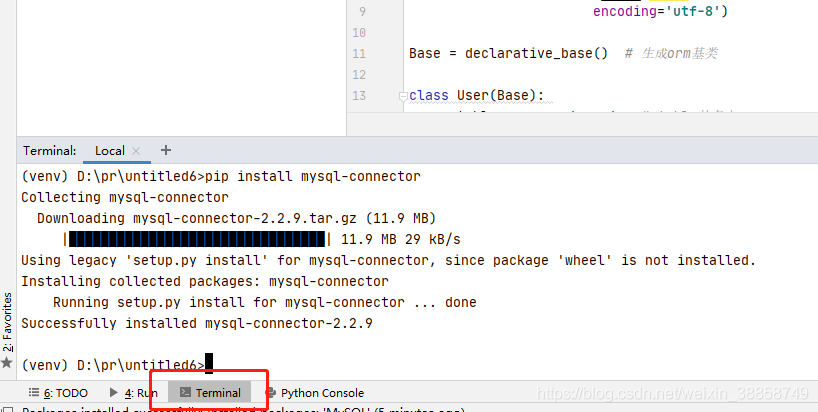
click on the terminal and type: PIP install mysql – connector installation is complete to
Tag Archives: python
Python: How to get the size of the picture (byte/kb/mb)
local image
from urllib import request
from PIL import Image
import os
import numpy as np
import requests,io

dirpath = r"E:\图片集\0\图片大小"
filenames = os.listdir(dirpath)

for filename in filenames[:]:
    portion = os.path.splitext(filename)  # 将文件名和缀名分成俩部分
    filepath = os.path.join(dirpath, filename)

    with open(filepath, "rb") as f:
        size = len(f.read())
        print("{}图片的大小{} byte,{} kb,{} Mb".format(filename,size, size/1e3, size/1e6))
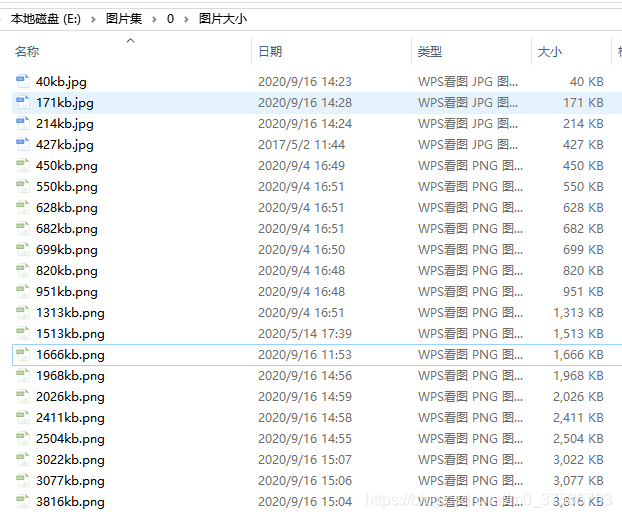
results:
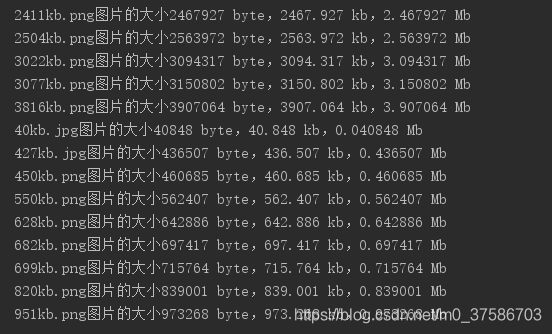
image url </ strong> </ p>
import requests,io

urls = ['http://******/image/0826/2411kb.png',
        'http://******/image/0826/2026kb.png',
        'http://******/image/0826/1968kb.png']
for url in urls:
    image = requests.get(url).content
    image_b = io.BytesIO(image).read()
    size = len(image_b)
    print("{}的大小{} byte,{} kb,{} Mb".format(url,size, size/1e3, size/1e6))
results:

Note: as can be seen from the above screenshot, byte/ KB /Mb values obtained from both the local image fetch size and url fetch size are larger than those seen on the computer. I don’t know why, but if anyone knows, please help to solve </p b>
Parallel processing in Python (Pool.map(), Pool.starmap(), Pool.apply ())
1. Parallel processing
parallel processing is a mode of operation in which tasks are run simultaneously in multiple processors on the same computer. The purpose of this mode of work is to reduce the total task processing time, but there is an additional overhead associated with communicating between processes, so for small tasks, the total task time increases rather than decreases.
in the Python language, the multiprocessing module runs a separate parallel process by using child processes instead of threads. It allows you to take advantage of multiple processors on your machine (Windows and Unix), that is, multiple processes can run
in memory completely independently
2. How many parallel processing can your device do at most
the maximum number of processes that can be run at one time is limited by the number of processors in the computer. You can use the cpu_count() function in the multiprocessing module to display
import multiprocessing as mp

print("Number of processers: ", mp.cpu_count())
like my computer only has four:
3. Execute synchronously and asynchronously </h3 b> In
parallel processing, there are two types of execution: synchronous and asynchronous
synchronous execution means that each process completes in the order in which it was started. This is done by locking the main program until the corresponding process has finished executing.
asynchronous execution , in other words, the execution of a process does not involve locking, and as a result, the order in which the process results are returned may be confusing, but in general, asynchronous execution completes faster.
There are two objects in the
multiprocessing module to implement parallel function execution: Pool class and Process class
</ strong>
</ p>

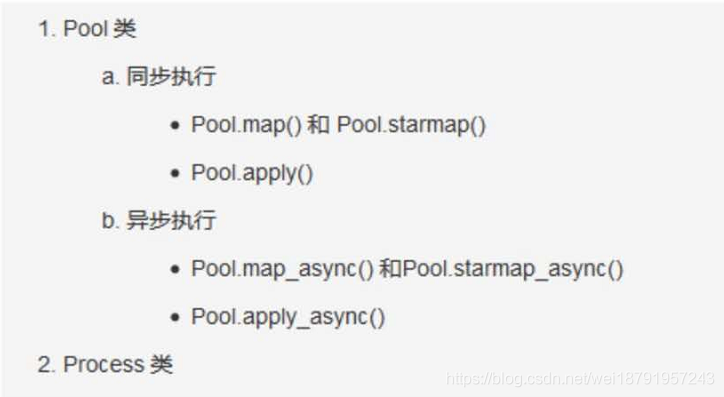
4. Practical problem solving example: calculate the number of elements </h3 b> within a given numerical range in each row
given a two-dimensional matrix (or list and multidimensional list), calculate the number of elements
within a given numerical range in each row
import numpy as np
from time import time

# RandomState()是一个伪随机数生成器
np.random.RandomState(100)
# 0, 10 : 生成0到10的随机整数
# size=[200000, 5]  即生成200000行,一列的 ndarray(二维矩阵的形式,每个里面5个元素)
arr = np.random.randint(0, 10, size=[200000, 5])
data = arr.tolist()  # 将numpy.ndarray 转化为list
# 因为是随机的,所以每次的数字不确定
data = data[:5]
print("数据为:", data)

"""
运行结果:
数据为: [[5, 6, 7, 0, 9], [4, 0, 6, 7, 4], [7, 3, 8, 3, 9], [2, 1, 9, 3, 2], [0, 0, 9, 5, 2]]


"""
4.1 </ strong> don’t use parallel processing reference code </ strong> </ p>
Thefunction howmany_within_range() is repeated to check howmany diseases the number in the range has returned a count
"""不使用并行处理"""

def howmany_within_range(row, minimum, maximum):
    count = 0
    for n in row:
        if minimum <= n <= maximum:
            count += 1
    return count


result = []
for row in data:
    result.append(howmany_within_range(row, minimum=4, maximum=8))
print("给定数值范围中的元素个数:", result[:10])
"""
注意:以下只是参考输出,因为输入序列是随机的,每次输出结果并不固定
运行结果:
给定数值范围中的元素 [3, 2, 3, 4, 2, 3, 3, 2, 2, 2]
"""
4.2 parallelize the function
The usual way to parallelize code is to take a specific function that can be run multiple times, put it on a different processor, and run it. To do this, you need to use the Pool class to initialize the number of n processors, and then pass the function you want to run and run to the parallel method in the Pool class.
The apply(), map() and starmap() methods are provided in the Pool() to run the passed functions in parallel.
What’s the difference between
apply() and map()?
apply() and map() both take the function to be parallelized as the main parameter, but the difference is that apply() takes the args parameter, which passes each parameter to the function to be parallelized, while map takes only one iterator as the parameter.
Therefore, it is better to use map() for simple, iterative operations for parallel processing, and for faster completion of work
2 Pool. The apply () for parallel processing </ strong> </ p>
if __name__ == '__main__':

    # 1.初始化 multiprocessing.Pool()
    pool = mp.Pool(mp.cpu_count())

    # 2.使用apply(), 将函数howmany_within_range作为主参传进去
    results = [pool.apply(howmany_within_range, args=(row, 4, 8)) for row in data]

    # 3. 不要忘记关闭进程
    pool.close()

    print(results[:10])
note: </ strong> use if __name__ = = “__main__ ‘: put your code in the following to perform, or complains </ p>
The freeze_support “()” line can be omitted if The program
is not going to be frozen to produce an executable. </ p>if we print outside of this program, we’ll see that it’s going to run in parallel, so we’ll print outside of this program </p b> multiple times
4.2.2 Parallelizing using the Pool. The map () </ strong> </ p>
pool.map () takes only one iterator argument. A simple change to howmany_within_range() is to howmany_within_range_rowonly(), which sets the minimum and maximum to fixed values, that is, . Accepting only the row data list iterator as input is not the best approach, but it clearly shows how it differs from apply()
import multiprocessing as mp

    def howmany_within_range_rowonly(row, minimum=4, maximum=8):
        count = 0
        for n in row:
            if minimum <= n <= maximum:
                count += 1
        return count

    pool = mp.Pool(mp.cpu_count())
    results = pool.map(howmany_within_range_rowonly,[row for row in data])
    pool.close()
    print(results[:10])
holdings using the Pool. The starmap to parallelize () </ strong> </ p>
, like pool.map (), pool.starmap () takes only one iterator argument, but in starmap() each element in the iterator is also an iterator. This internal iterator allows you to pass arguments to the parallelized function and unwrap them sequentially at execution time, as long as they are passed and unwrapped in the same order
actually, pool. starmap() is like a pool. map() version
that takes arguments
    import multiprocessing as mp

    pool = mp.Pool(mp.cpu_count())
    results = pool.starmap(howmany_within_range, [(row, 4, 8) for row in data])
    pool.close()
    print(results[:10])
5. Asynchronous parallel processing </h3 b>
and synchronous parallel processing peer asynchronous parallel processing functions apply_async(), map_async(), and starmap_async() allow parallel execution of processes asynchronously, that is, the next process can be started as soon as the previous one completes, regardless of the order in which it was started. Therefore, there is no guarantee that the result will be in the same order as the input
6. The use of the Pool. Apply_async to parallelize () </ strong> </ p>
keep updating
</ p>
ModuleNotFoundError: No module named ‘tensorflow.python’ And the pits encountered after installation
error
ModuleNotFoundError: No module named 'tensorflow.python'
after we installed tensorflow, we thought we had debuggable the environment and PIP install tensorflow, if
is entered in CMD
import tensorflow
(normally installed the GPU version tensorflow) :

but may be submitted to the above error, on the Internet a lot according to the results there is no use, 😂 is outrageous.
reason (personal summary) : the computer installed multiple python environment, not only the environment, but also anconda, etc., constitute the virtual environment, so you will encounter various problems when using the command conda to assemble the tensflow environment.
the solution: delete other environment, if you remove after the computer did not have the python environment, then reinstall it again, because I have more than one person has them around, “reshipment can solve the problem of ninety-nine percent”, but if pycharm with few words, I do not recommend to assemble anconda, unloading directly, in python’s official website to download the new version of python. After that, tensorFlow is assembled in the whole large Python environment; With the PIP command, there is little problem with reloading.
after installed, we can run the minist a piece of code: </ p>
from tensorflow.examples.tutorials.mnist import input_data

#加载数据集,参数为下载的路径,如果该路径下没有数据集的话,则会从网上自动下载。
#read_data_sets函数
mnist = input_data.read_data_sets("E:\\桌面\\datatest")
# 打印训练数据大小
print("Training data size:", mnist.train.num_examples)
# 打印验证集大小
print("Validating data size:", mnist.validation.num_examples)
# 打印测试集大小
print("Testing data size:", mnist.test.num_examples)
# 打印训练样例
print("Example training data", mnist.train.images[0])
# 打印训练样例的标签
print("Example training data label:", mnist.train.labels[0])
When
, ninety-nine percent of the time will error and remind:
ModuleNotFoundError: No module named 'tensorflow.tutorials'
We first enter the installation environment of tensorflow, and we can find the installation path
through python’s path method
import tensorflow as tf
print(tf.__path__)
after entering python environment, type the command and get the path, and then find the path of files
(about) the new version of the tensflow

enter the examples of the first file,
 there should be no my red line mark.
portal
go here to download, then copy in the directory, if it is the old version, find the examples file, the effect is the same, after found on the Internet part of the introduction code may also have problems. Note that we must refer to pylab with
from matplotlib import pylab
so, when you’re done, you can run the following code.
1.
from tensorflow.examples.tutorials.mnist import input_data
mnist = input_data.read_data_sets("MNIST_data", one_hot=True)
print ( ' 输入数据:', mnist.train.images)
print ( ' 输入数据打shape :', mnist.train.images.shape)
from matplotlib import pylab
im = mnist.train.images[1]
im = im.reshape(-1 ,28)
pylab.imshow(im)
pylab.show()
- note that our read_data_sets should never be interrupted when downloading data. If they are interrupted, they will report an error if they continue executing later. At this time, either change the path to download again, or find the original download path, delete it and run again.
TypeError: Decimal type object is not a JSON serialization solution
The data type calculated when python connects to a database using select sum(a) from b is Decimal. But this format doesn’t fit the json format, so we can cast the data we get. Convert to an integer, and you’ll be able to fit the JSON format.
@app.route('/c1')
def get_cl_data():
    data = utils.get_conn()
    # data = json.dumps({"confirm": data[0], "suspect": data[1], "heal": data[2], "dead": data[3]})
    # print(data)
    return jsonify({"confirm": int(data[0]), "suspect": int(data[1]), "heal": int(data[2]), "dead": int(data[3])})
</ div>
Python exports the gitlab project
Python export gitlab project
- install python-gitlab module
pip install python-gitlab python3 pip3 install python-gitlab - gitlab application API access token
path User Settings -> Access Tokens - configure pythongitlab.cfg and place
in the same directory
[global]
 default = username
 ssh_verify = False
 timeout = 8

 [username]
 url = https://gitlab.com
 private_token = xxxxxxxxxxxx
对于API v4使用url https://gitlab.com,如果您使用API v3使用url
https://gitlab.example.com</引用>
李- <>
import gitlab
gl = gitlab.Gitlab.from_config('username', ['python-gitlab.cfg'])
projects = gl.projects.list()
print(projects)
- or use the following code to get the group project
import gitlab
class GitlabAPI(object):

    def __init__(self, *args, **kwargs):
        self.gl = gitlab.Gitlab('https://gitlab.com', private_token='xxxxxxxxxxxxx', api_version='4')

    # 可行 先获取所有group ID, 然后根据group ID 获取项目地址
    def get_all_group(self):
        return self.gl.groups.list(all=True)
    def get_group_by_id(self, groupID):
        group = self.gl.groups.get(groupID)
        projects = group.projects.list(all=True)
        result_list = []
        for project in projects:
            result_list.append(project.http_url_to_repo)
        return result_list


apiObject = GitlabAPI()
groupProjects = apiObject.get_group_by_id(填写获取到的groupID)
print(groupProjects)
Django Issues: TypeError: “Settings” object is irreversible
Exception in thread django-main-thread:
Traceback (most recent call last):
  File "D:\Python37\lib\threading.py", line 926, in _bootstrap_inner
    self.run()
  File "D:\Python37\lib\threading.py", line 870, in run
    self._target(*self._args, **self._kwargs)
  File "D:\PyCharm\py_place\djangoSimpleproProject1\venv\lib\site-packages\django\utils\autoreload.py", line 53, in wrapper
    fn(*args, **kwargs)
  File "D:\PyCharm\py_place\djangoSimpleproProject1\venv\lib\site-packages\django\core\management\commands\runserver.py", line 138, in inner_run
    handler = self.get_handler(*args, **options)
  File "D:\PyCharm\py_place\djangoSimpleproProject1\venv\lib\site-packages\django\contrib\staticfiles\management\commands\runserver.py", line 27, in get_handler
    handler = super().get_handler(*args, **options)
  File "D:\PyCharm\py_place\djangoSimpleproProject1\venv\lib\site-packages\django\core\management\commands\runserver.py", line 65, in get_handler
    return get_internal_wsgi_application()
  File "D:\PyCharm\py_place\djangoSimpleproProject1\venv\lib\site-packages\django\core\servers\basehttp.py", line 45, in get_internal_wsgi_application
    return import_string(app_path)
  File "D:\PyCharm\py_place\djangoSimpleproProject1\venv\lib\site-packages\django\utils\module_loading.py", line 17, in import_string
    module = import_module(module_path)
  File "D:\Python37\lib\importlib\__init__.py", line 127, in import_module
    return _bootstrap._gcd_import(name[level:], package, level)
  File "<frozen importlib._bootstrap>", line 1006, in _gcd_import
  File "<frozen importlib._bootstrap>", line 983, in _find_and_load
  File "<frozen importlib._bootstrap>", line 967, in _find_and_load_unlocked
  File "<frozen importlib._bootstrap>", line 677, in _load_unlocked
  File "<frozen importlib._bootstrap_external>", line 728, in exec_module
  File "<frozen importlib._bootstrap>", line 219, in _call_with_frames_removed
  File "D:\PyCharm\py_place\djangoSimpleproProject1\djangoSimpleproProject1\wsgi.py", line 16, in <module>
    application = get_wsgi_application()
  File "D:\PyCharm\py_place\djangoSimpleproProject1\venv\lib\site-packages\django\core\wsgi.py", line 13, in get_wsgi_application
    return WSGIHandler()
  File "D:\PyCharm\py_place\djangoSimpleproProject1\venv\lib\site-packages\django\core\handlers\wsgi.py", line 127, in __init__
    self.load_middleware()
  File "D:\PyCharm\py_place\djangoSimpleproProject1\venv\lib\site-packages\django\core\handlers\base.py", line 39, in load_middleware
    for middleware_path in reversed(settings.MIDDLEWARE):
TypeError: 'set' object is not reversible
focus:
TypeError: 'set' object is not reversible
solution:
in setting. Py, change {} of
to []……
problem is, I haven’t changed
and I’m confused, I’ve seen a lot of big guys’ methods, it’s really just this emmmmmmmmmm
and I can’t figure out
Conscience installation: How To install Pyinstaller offline on Windows
could not install the Pyinstaller package online, so I downloaded the Pyinstaller offline package.
need to rely on package, download links: https://download.csdn.net/download/ryanji/12881427: </ p>
- pywin32_ctypes
- pefile
- future
- altgraph
installation order is as follows:
- altgraph
- pywin32_ctypes
- future
- pefile
- pyinstaller
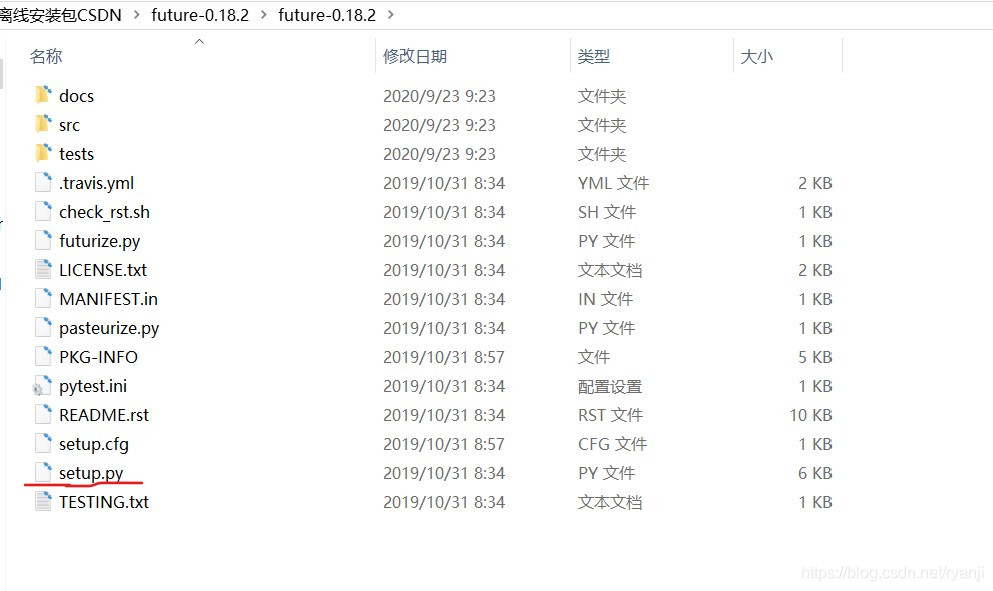
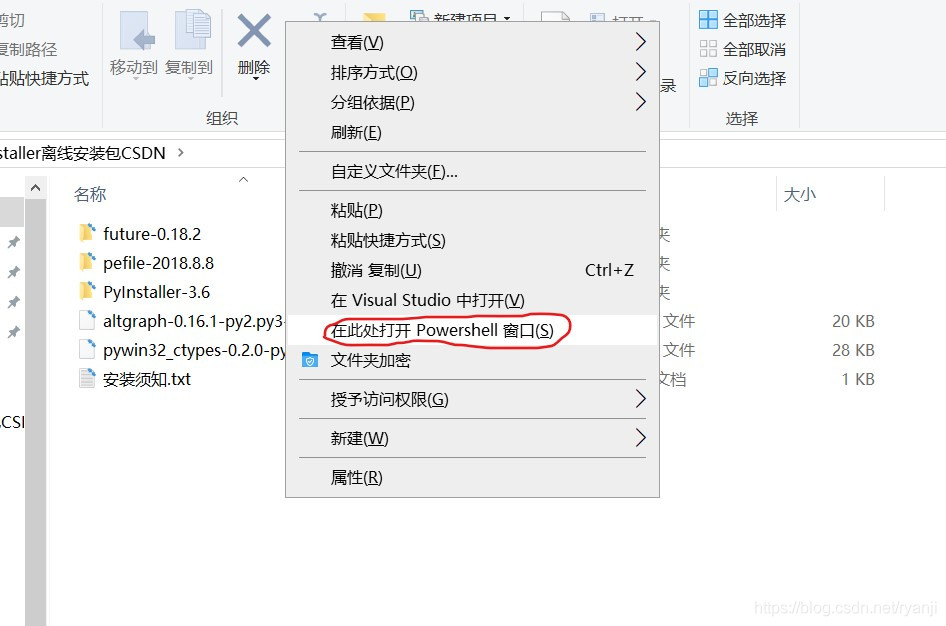
</ p>
Pip Installation Warning: can’t install the package because of EnvironmentError
error cause: PIP install cffi==1.14.3
error due to the environment, can’t install packages
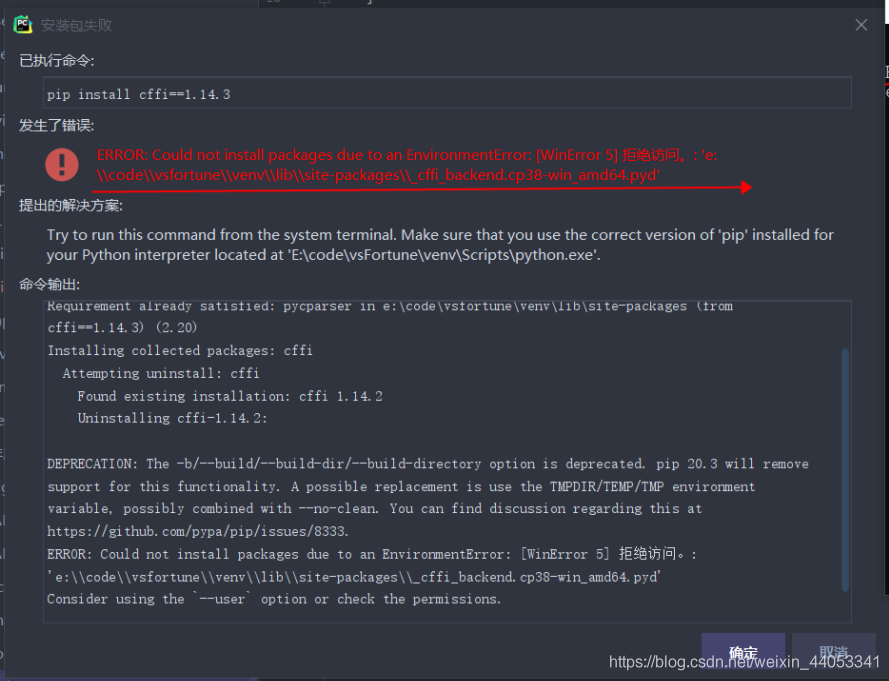
solution:
- PIP install –user your package name
- use your administrator account to run CMD installation
Python + Requests +Excel+Jenkins interface automation
python+requests+Excel+Jenkins interface automation
summary most people do interface automation process, found that basically is: python + requests do interface requests; Excel is used to store use cases; HTMLTestRunner generates test reports; Jenkins completes scheduled tasks.
actually takes only a fraction of the time to complete this process, with most of the time wasted in setting up the environment and writing use cases. Here I’m going to write down some of the problems.
interface request
(1) configuration request method: get and post method simple packaging, header parameter setting
# _*_coding:utf-8 _*
import requests

#get请求
def get(url,querystring):
    headers = requestHeader()
    response = requests.request("GET", url, headers=headers, params=querystring)
    # print response.url
    return response

#post请求
def post(url,payload,querystring):
    headers = requestHeader()
    response = requests.request("POST", url, data=payload, headers=headers, params=querystring)
    # print response.url
    return response

#设置请求的header
def requestHeader():
    headers = {
    'Content-Type': "application/json",
    'Cache-Control': "no-cache"
    }
    return headers
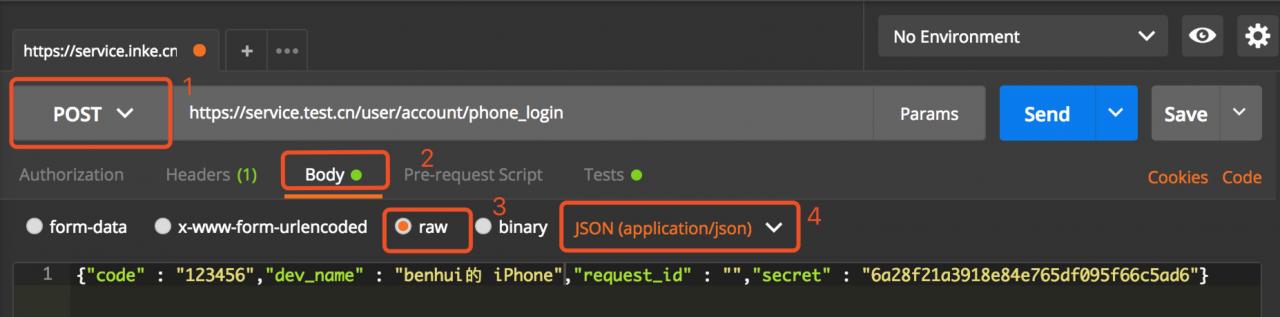
(2) for the body of a post request, we used a “dict” in text at the beginning, but it always returned “error”. After that, postman used to debug and directly copied the body reference that had been converted into json to make the request, and it worked.
WechatIMG12.jpeg
can be used to convert some problematic bodies in this way.
Another way to convert
(3) body to json: through ast module for conversion (recommended)
import ast
caseParams      =   ast.literal_eval(caseParams)
(4) get use case Excel
through openpyxl module

#用例名
caseName    =   caseFile.getCellVaule(ws,rowIndex,1)
#url
caseUrl     =   caseFile.getCellVaule(ws,rowIndex,3)
#请求方式
caseMethod  =   caseFile.getCellVaule(ws,rowIndex,4)
#参数
caseParams  =   caseFile.getCellVaule(ws,rowIndex,5)
note: in the process of obtaining the use case information, some parameters need to be fault-tolerant
A: whether there are parameters, if there are no parameters, need to pass null;
B: get parameter and post body need to be handled separately:
get parameter is ‘& Param ‘in the form of clear text spliced in the URL;
#将请求参数转换为json格式
caseParams  =   ast.literal_eval(caseParams)
keys        =   dict(caseParams).keys()
values      =   dict(caseParams).values()
for x in xrange(0,len(keys)):
  tempQuery[keys[x]] = values[x]
, the body of the post needs to be put in dict;
caseParams = ast.literal_eval(caseParams)
(5) split the required parameters and write the result to the file
#请求返回的内容,转换为json格式
text            =   json.loads(response.text)
                caseFile.setCellValue(ws,rowIndex,6,response.text)

#URL请求耗时
spendTime       =   response.elapsed.total_seconds()
                caseFile.setCellValue(ws,rowIndex,7,spendTime)

#请求结果状态
statue          =   response.status_code
                caseFile.setCellValue(ws,rowIndex,8,statue)
self.assertEqual(statue, 200)
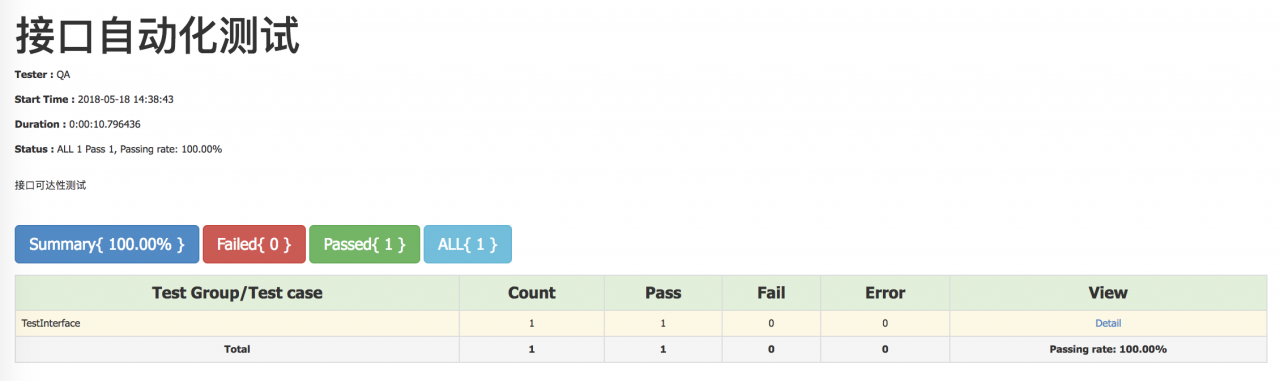
(6) writes the result of the request to an HTML file and displays

WechatIMG13.jpeg
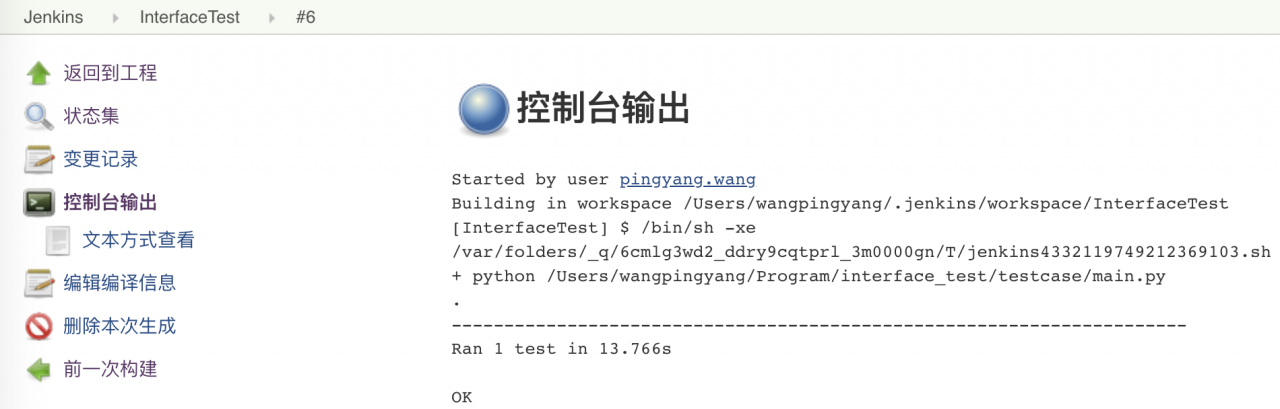
(7) is configured to Jenkins to periodically execute the accessibility of the view interface
learning Python address: https://ke.qq.com/course/2707042?flowToken=1025648
if there are any problems you for learning Python, learning methods, learning course, how to learn efficiently, can be consulting me at any time, or the lack of system study materials, I do this year longer, they think is experienced, can help everyone puts forward constructive Suggestions, this is my Python communication qun: 785128166, if you have any question can be consulting me at any time.
The PIP installation package was successful but the import failed
the problem I ran into was not installing the package in the virtual environment, taking the jieba package as an example
enter python in the virtual environment, and then you can import the package. We thought it was packaged, but it was actually installed in the basic environment.
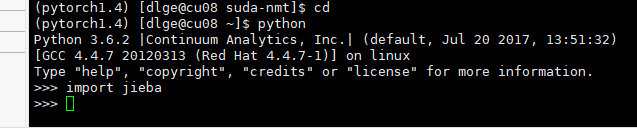
When
USES conda list to view the packages in the current environment, there is no jieba package.
conda listforgot the screenshot,,,,
so you need to install jieba using the PIP of the virtual environment.
after confirming wrapping in a virtual environment, switching to a python environment cannot be done by simply typing python commands. Instead, use virtual environment Python, just like the previous PIP.
for example, you now have two files, test.py and test.sh.
test.py
import torch
print(torch.__version__)
test.sh
python test.py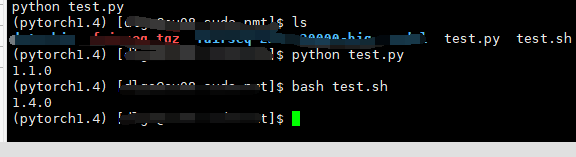
you can see that the PIP version printed in the virtual environment is different from the one printed in the bash script.
so while I installed jieba in the pytorch1.4 environment, the command I used directly was not python in pytorch1.4, but python in the base environment.
summary:
- whether the package to the environment
- used the python interpreter is not the package environment interpreter
there are a lot of ways to do it online, so this is a supplement to what’s possible.
Python RarFile unpack RAR package Error Rarfile.RarCannotExec: Cannot find Working Tool
recently encountered an error using python to unzip rar.
installation is the rarfile package, but the implementation of decompression error, the Internet to find a lot of methods have not solved.
import rarfile
path1 = "E://test.rar"
with rarfile.RarFile(path1) as rf:
    rf.extractall()
currently the main online solutions are as follows:
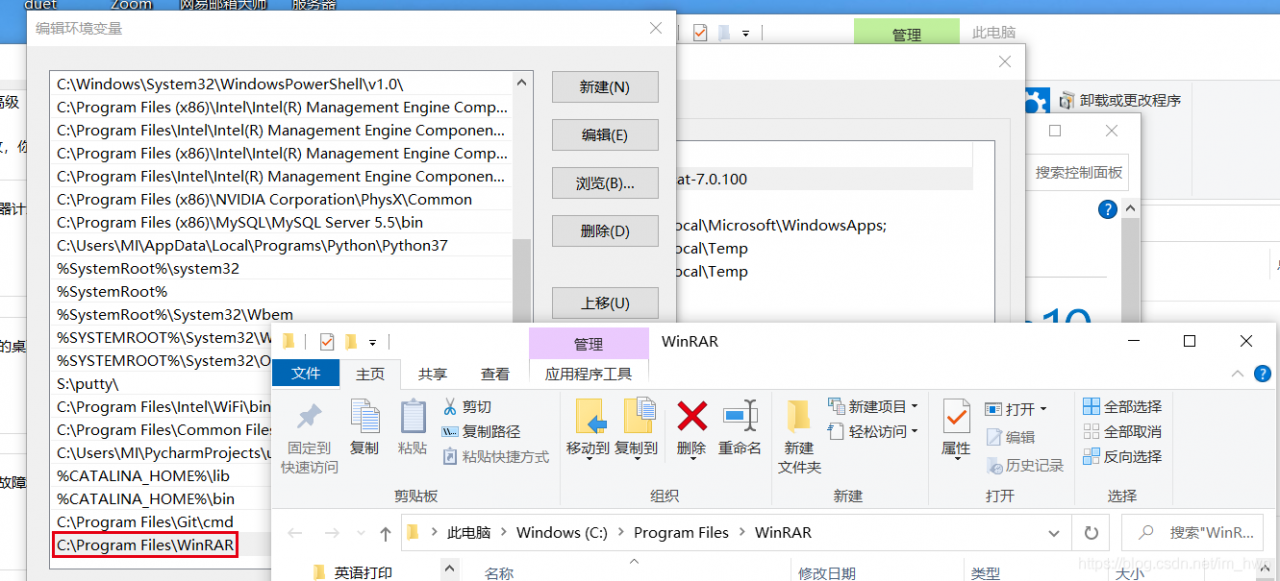
1. Put winrar. Exe under python project venv – scripts. 2. Install unrar on Windows and configure environment variables.
I tried the first method and found that it did not solve the problem, and I did not try the second method because I could not find a suitable installation package.
considering that winrar program is installed on the machine, so inspired by the second method, configure winrar path in the system environment variable, and then restarts pycharm, and the problem is found to be perfectly solved.