Tag Archives: python

Tensorflow in function tf.Print Method of outputting intermediate value

tensorflow because of its model based on the static map, lead to writing the code is hard to debug, besides using official debugging tools, the most direct way is to put the intermediate result output out of view, however, use the print function can only output directly the shape of a tensor variable, rather than numerical, want to use specific numerical output tensor needs tf. The print function. There are many instructions on the web about how to use this function. Here is a brief description:

Print(
    input_,
    data,
    message=None,
    first_n=None,
    summarize=None,
    name=None
	)

parameter:

  • input_ : tensor that passes through this operation.
  • data: list of tensors to print when calculating op.
  • message: a string, the prefix for the error message.
  • first_n: record first_n times only. Negative log, which is the default.
  • : print only a fixed number of entries for each tensor. If not, each input tensor prints up to three elements. Name: name of the operation (optional)

however, most of the resources on the web describe how to set up an op in the main function and then open a Session to execute sess.run(op), but what if you want to output an intermediate value in the function that does not return to the main function?In this case, a new Session cannot be opened in the function, but you can still create an op using TF.print.

import tensorflow as tf
import os

os.environ["CUDA_VISIBLE_DEVICES"] = "0"

def test():
    a=tf.constant(0)
    for i in range(10):  
        a_print = tf.Print(a,['a_value: ',a])
        a=a_print+1
    return a
    
if __name__=='__main__':
    with tf.Session() as sess:
        sess.run(test())

operation result:
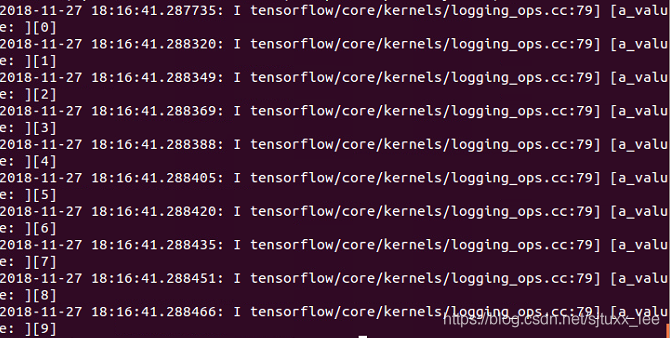
a_print can be understood as a new node in the figure. In the following code, when another variable USES a_print (example a=a_print+1), there will be data flowing from a_print node, and the value will be output. But how many times will the value be output?In fact, it is not how many times a_print is used in the following text, but how many times the data flow must flow from this node, which can be interpreted as how many times the OP of A_print is “defined”.

def test():
    a=tf.constant(0)
    a_print = tf.Print(a,['a_value: ',a])
    for i in range(10):  
        a=a_print+1
    return a
    
if __name__=='__main__':
    with tf.Session() as sess:
        sess.run(test())

if the test () function to this way, the operation result is:

output is performed only once, because a_print the op is defined only once, although back in circulation has been a used, but the data from it after only once, so will only print once, and a_print value is 0, always ultimately return a value of 1.
then change the code to the following example:

def test():
    a=tf.constant(0)
    a_print = tf.Print(a,['a_value: ',a])
    for i in range(10):  
        a_print=a_print+1
    return a
    
if __name__=='__main__':
    with tf.Session() as sess:
        sess.run(test())

The result of running

will not output anything, because the op of a_print is not related to any other variable, it is not used by any other variable, it is an isolated node in the graph, no data flow, it will not be executed.
and if I change this to

def test():
    a=tf.constant(0)
    a_print = tf.Print(a,['a_value: ',a])
    for i in range(10):  
        a_print=a_print+1
    return a_print
    
if __name__=='__main__':
    with tf.Session() as sess:
        sess.run(test())

run result

returns an a_print value of 10, which is also correct, because a_print is returned later, so there is a data flow through it and it will be executed, while a_print is only executed once because the definition of a_print is only executed once.

Python data cleaning — delete failed images__ Simple version

when using the caffe training algorithm to classify the model, during the training, it was suggested that the failure to read the pictures caused interruption, so I wrote a script to delete the failed pictures in advance. The script is as follows:

import os
import shutil
import warnings
import cv2
import io
 
from PIL import Image
warnings.filterwarnings("error", category=UserWarning)


base_dir = "/data/chw/images"
i = 0

def is_read_successfully(file):
    try:
        imgFile = Image.open(file)
        return True
    except Exception:
        return False

            
for parent, dirs, files in os.walk(base_dir):
    for file in files:
        if not is_read_successfully(os.path.join(parent, file)):
            print(os.path.join(parent, file))
            #os.remove(os.path.join(parent, file)) #真正使用时,这一行要放开,自己一般习惯先跑一遍,没有错误了再删除,防止删错。
            i = i + 1
print(i)


Python dynamically imports objects, importlib.import_ Module() uses

Background of

  • a function needs to be run by dynamically importing the corresponding configuration file according to the configuration of different projects.
solution

  • file structure
a #文件夹
	│a.py
	│__init__.py
b #文件夹
	│b.py
	│__init__.py
	├─c#文件夹
		│c.py
		│__init__.py

# c.py 中内容
args = {'a':1}

class C:
    
    def c(self):
        pass

Purpose of the

  • to a module import c.p y objects in the

  • solution

    a.py

    
    import importlib
    
    params = importlib.import_module('b.c.c') #绝对导入
    params_ = importlib.import_module('.c.c',package='b') #相对导入
    
    # 对象中取出需要的对象
    params.args #取出变量
    params.C  #取出class C
    params.C.c  #取出class C 中的c 方法
    

    import_module

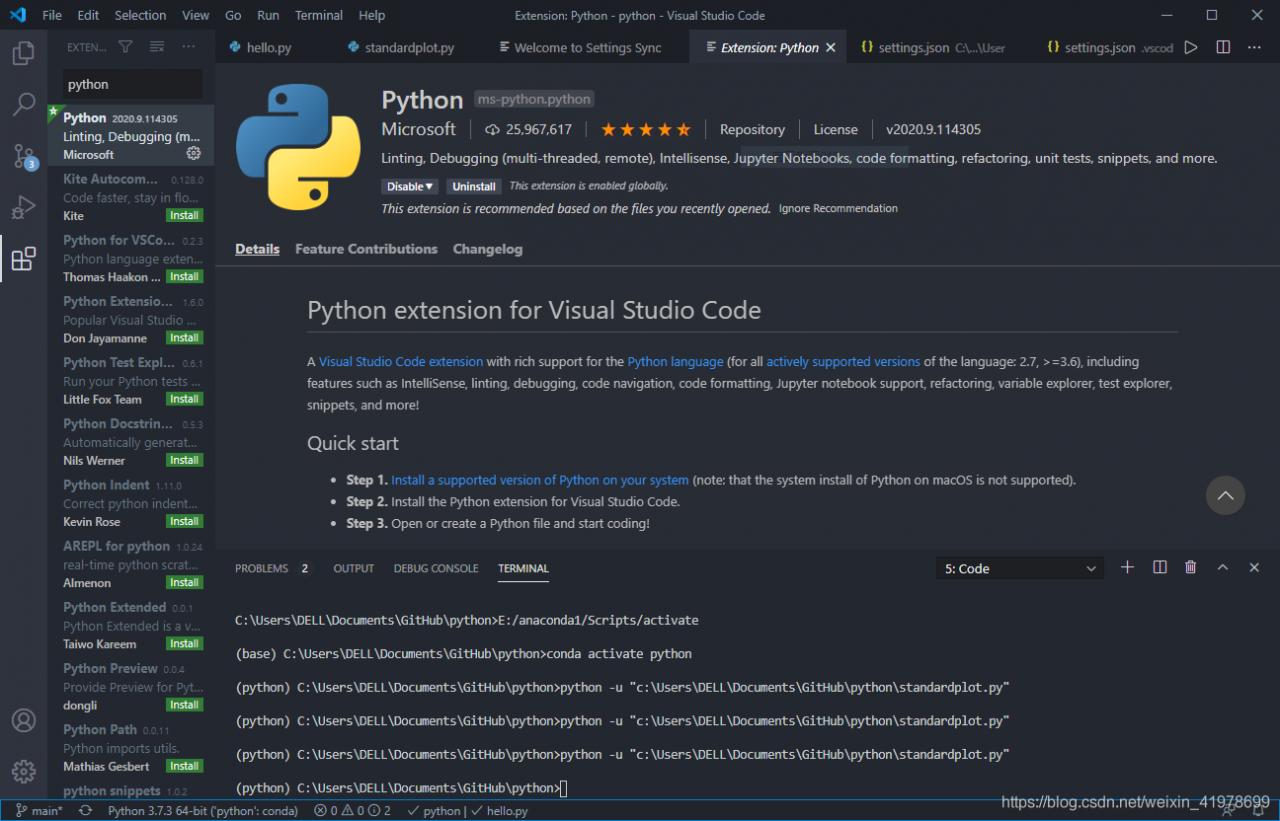
Anaconda + vscode usage problem summary

anaconda+vscode use problem

1, anaconda environment in vscode can not be used in the problem

  1. installation plug-in
    python and Anaconda Extension Pack
  2. in Anaconda configure corresponding environment
    here in addition to the base I also configure python and tfenv environment, here we take tfenv as an example, we can set the compiler version we want 2.x or 3.x, we can also install the package we want, very convenient.
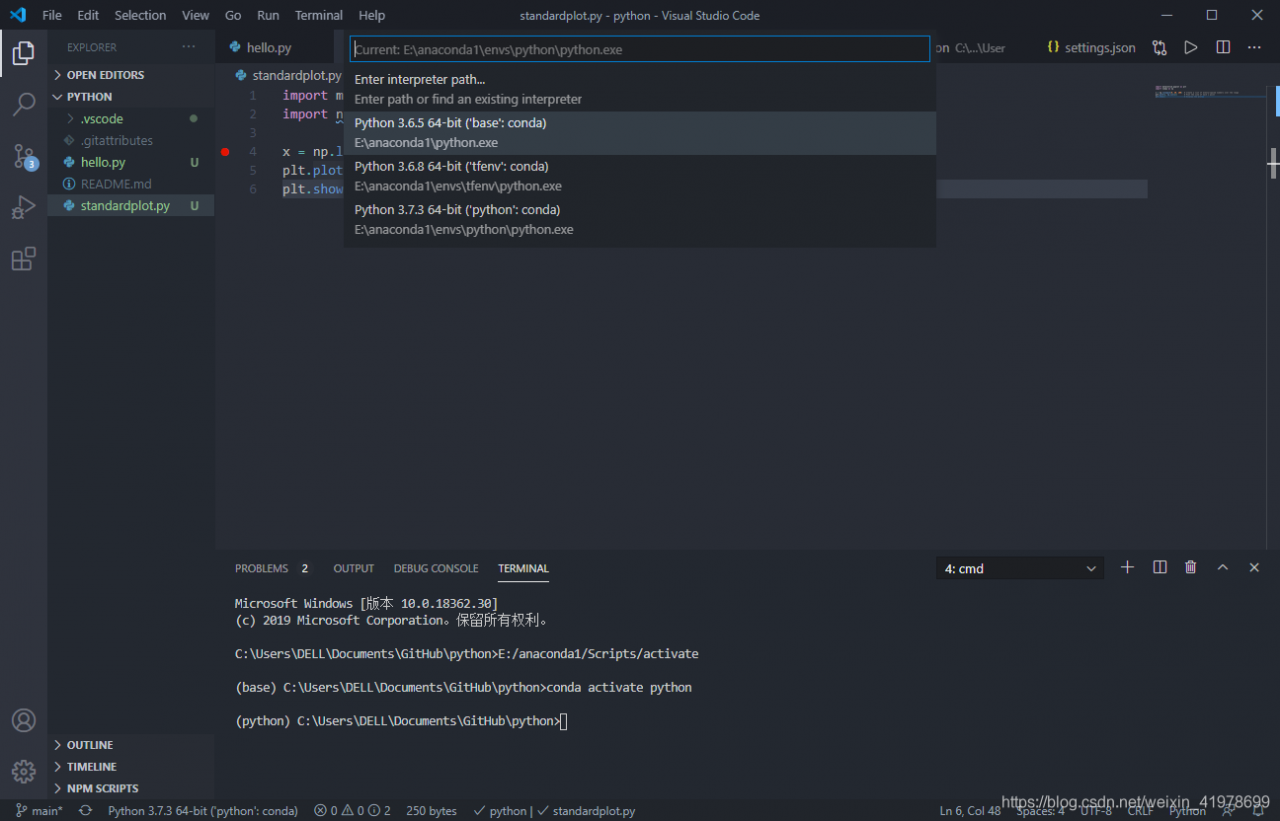
  3. select our compiler

    > in the lower left corner we can choose which interpreter we want to interpreter. Then, from the middle option that appears, we select the pen-to-last one which is tfenv: Conda environment
  4. to install the corresponding package
    our program needs the matplotlib package, first we install the package in anaconda, as shown in the figure, click apply (we can also install the matplotlib through the corresponding command of anaconda in CMD, we will not go into details here)

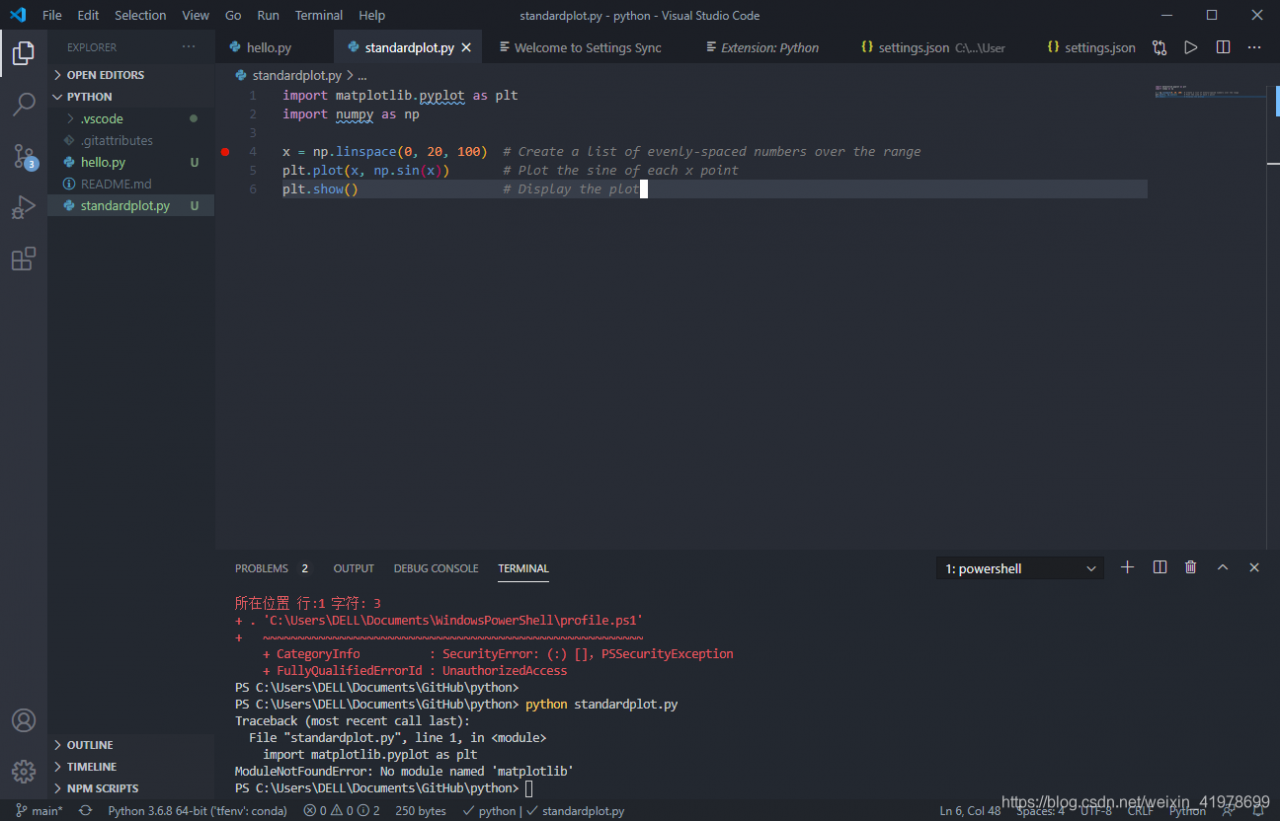
    after we install the matplotlib package, we run as shown in the figure, showing “ModuleNotFoundError: “No module named ‘matplotlib’ is mainly because although we chose the corresponding python.exe interpreter, the environment corresponding to tfenv did not import

    . There are two solutions
  • vscode default terminal is generally powershell: powershell solution
  • set terminal to CMD, then activate the tfenv environment with the command activate tfenv, and there will be no problem in running the program
  • Cannot call the same level library solution in pychar

    disclaimer in advance: I am a student (xiaobai). If I encounter problems in the course design and solve them, I will send this post to share the method.
    this article solve the problem of pycharm call library at the same level, close to measure effective

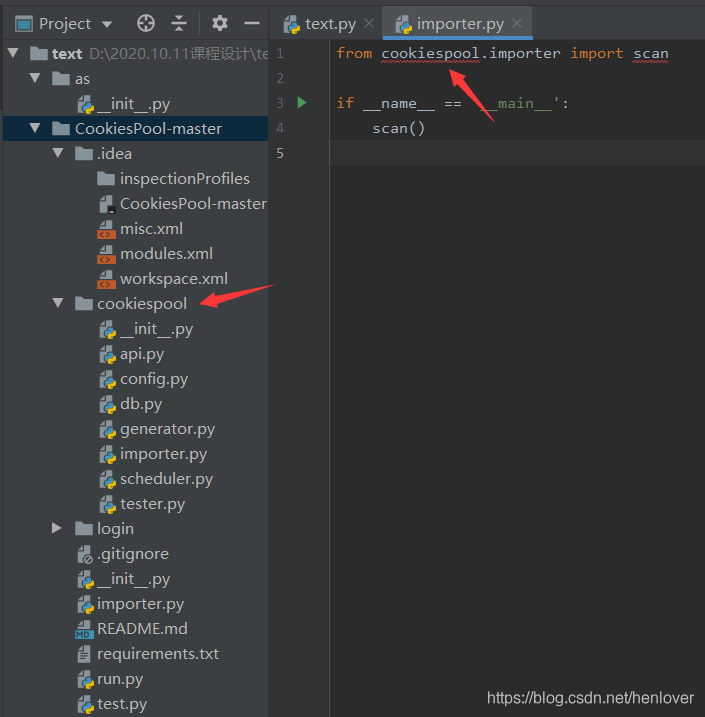
    without further explanation, the above picture is

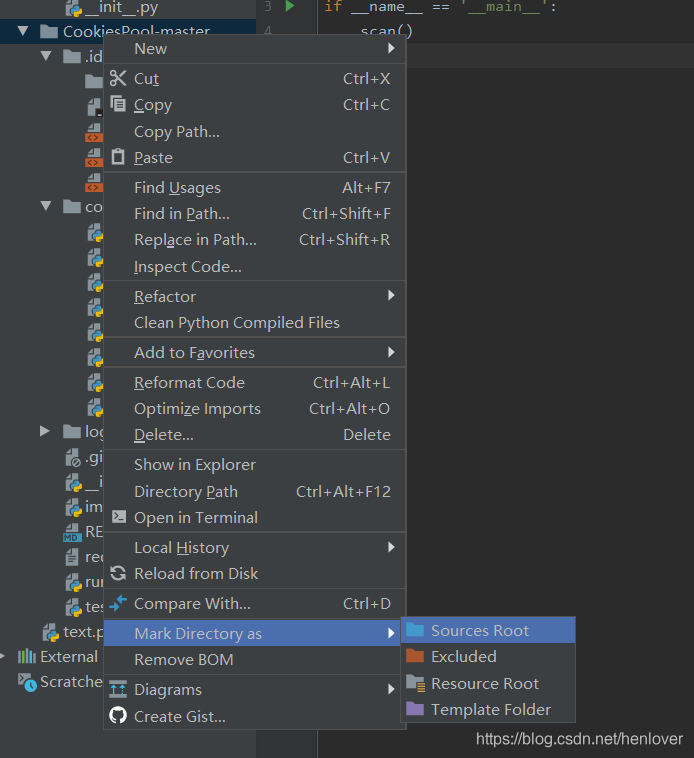
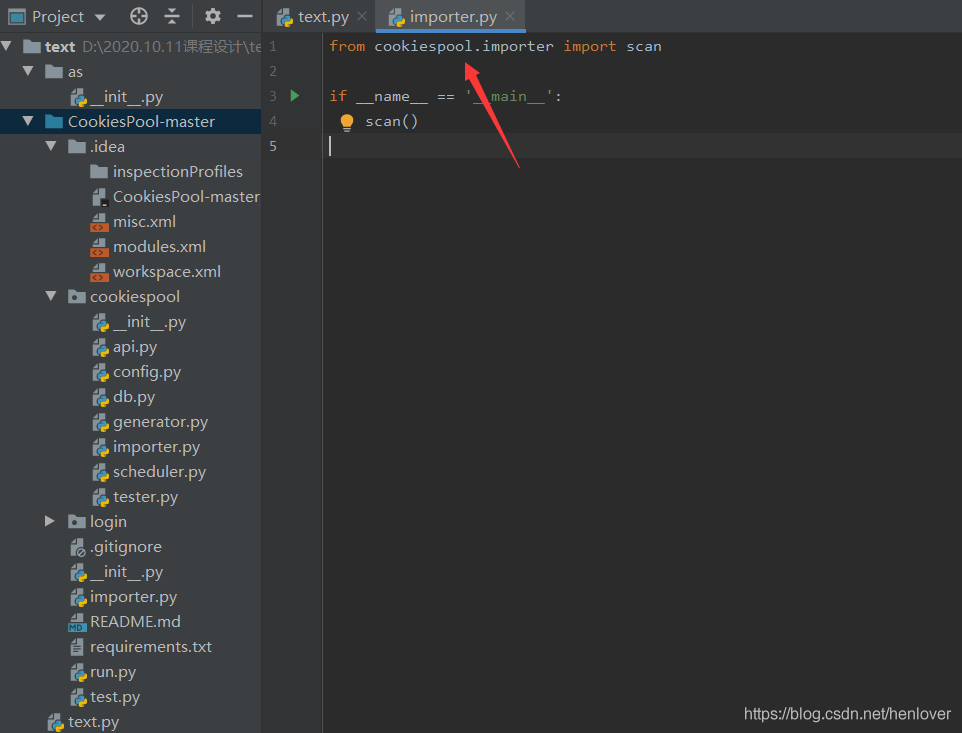
    as shown above, I want to call the function in cookiespool, the importer, but it keeps going red, what is the problem?This is because the copied package is directory, and the library that Pycharm calls is Python Project, so it cannot be recognized. The solution:


    as shown in the figure, labeled as sources root.

    Python installation problem: error: Command erred out with exit status 1:

    Try to run this command from the system terminal. Make sure that you use the correct version of ‘PIP’ installed for your Python interpreter located at “C: \ Users \ \ PycharmProjects \ pythonProject \ 123 venv \ Scripts \ python exe. ‘

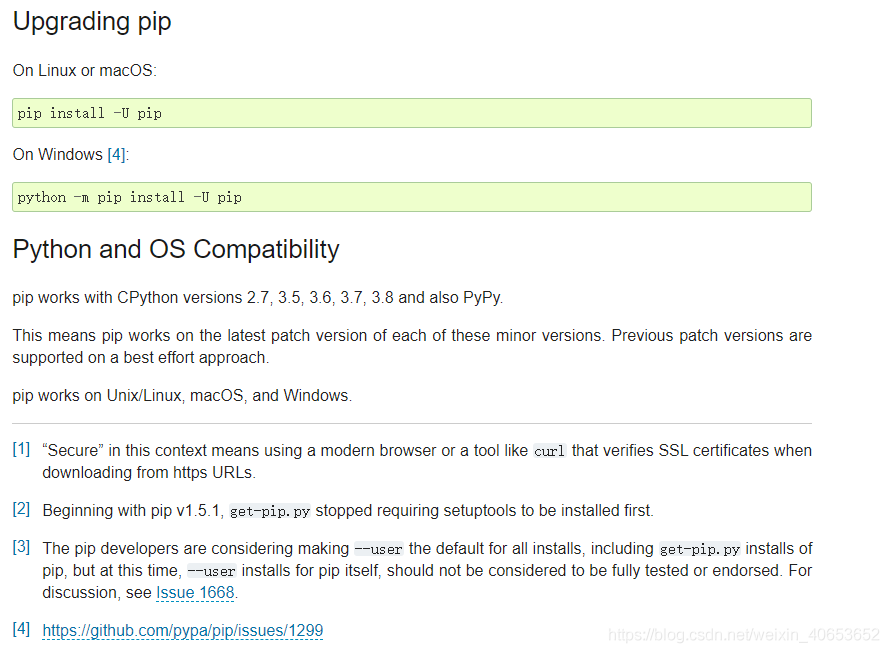
    this problem occurs because the Python version installed is relatively new and there is no PIP for the corresponding version. The solution is to install the older version. The author installed version 3.9, and the problem of installing version 3.8 is solved.

    Translate() and maketrans() methods of string in Python

    Explained

    use translate to replace specific characters in a string, such as 12345 for aeiou. Using translate requires the maketrans method to build the replacement table
    note: python2’s maketrans method needs to be imported, whereas python3 is built in. In python3, using the syntax of python2 to import: ImportError: cannot import name ‘maketrans’

    str.maketrans()

    python document interpretation

    Help on built-in function maketrans in str:
    
    str.maketrans = maketrans(...)
        Return a translation table usable for str.translate().
    
        If there is only one argument, it must be a dictionary mapping Unicode
        ordinals (integers) or characters to Unicode ordinals, strings or None.
        Character keys will be then converted to ordinals.
        If there are two arguments, they must be strings of equal length, and
        in the resulting dictionary, each character in x will be mapped to the
        character at the same position in y. If there is a third argument, it
        must be a string, whose characters will be mapped to None in the result.
    

    str.translate()

    python document interpretation

    Help on method_descriptor in str:
    
    str.translate = translate(self, table, /)
        Replace each character in the string using the given translation table.
        
          table
            Translation table, which must be a mapping of Unicode ordinals to
            Unicode ordinals, strings, or None.
            
    The table must implement lookup/indexing via __getitem__, for instance a
        dictionary or list.  If this operation raises LookupError, the character is
        left untouched.  Characters mapped to None are deleted.
    

    Example

    replace aeiou with 12345

    
    trantab = str.maketrans("aeiou", "12345")
    
    print ("EXAMPLE:aeiou".translate(trantab))
    

    Output

    is

    EXAMPLE:12345

    Numpy adds a new dimension: newaxis

    Newaxis contained in

    numpy can add one dimension to the original array

    np.newaxis produces a different array

    depending on where it is placed

    one-dimensional array

    x = np.random.randint(1, 8, size=5)
    
    x
    Out[48]: array([4, 6, 6, 6, 5])
    
    x1 = x[np.newaxis, :]
    
    x1
    Out[50]: array([[4, 6, 6, 6, 5]])
    
    x2 = x[:, np.newaxis]
    
    x2
    Out[52]: 
    array([[4],
           [6],
           [6],
           [6],
           [5]])

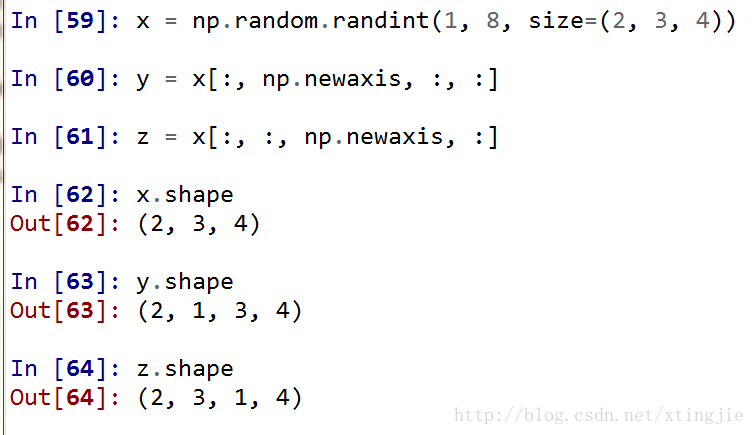
    as you can see from the above code,

    when putting newaxis first

    , which used to be 5, now becomes 1

    x
    < script type=”math/tex” id=”MathJax-Element-124″> \times< /script> 5, so the first dimension has changed, the second dimension has changed

    and when you put newaxis in the end, the shape of the new array that you output is 5

    x
    < script type=”math/tex” id=”MathJax-Element-125″> \times< /script> So 1, that’s another dimension that’s less than /p>
    So, where you put newaxis, you’ll see an extra dimension in your shape that’s less than /p b>

    is as follows:

    general problem

    is often a problem where you need to take a portion of the data out of the array, that is, take a “slice” or a “strip”

    , for example, you need to extract a column

    from a two-dimensional array

    when you take out the dimension becomes one

    if we want to reduce it to two dimensions, we need the above method

    Python global variables and global keywords

    Python global variables

    and the global keyword

    in Python variable usage, this error is often encountered :

    local variable 'a' referenced before assignment

    means that the local variable “a” is referenced before assignment.
    such as running the following code will cause this problem:

    a = 3
    def Fuc():
        print (a)
        a = a + 1
    Fuc()

    , but if you delete a = a + 1, the above problem will not occur.

    a = 3
    def Fuc():
        print (a)
    Fuc()

    it turns out that in Python, a = 3 defines the global variable a, scope to the end of the code from the definition, in a = 3 of the following functions can be cited the global variable a, but if you want to modify the functions and global variables with the same name, the function of the variable will become a local variable, before the change of the variable reference nature presents undistributed or undefined error.

    if you are sure to reference and modify global variables you must add the global keyword

    a = 3
    def Fuc():
        global a
        print (a)
        a=a+1
    Fuc()

    note: which function needs to modify the global variable, just declare it in the function.

    but there is a special function, and that is the main function:

    a = 3
    def Fuc():
        global a
        print (a)  # 1
        a = a + 1
    if __name__ == "__main__":
        print (a)  # 2
        a = a + 1
        Fuc()
        print (a)  # 3

    output is as follows (in Python3) :

    3
    4
    5

    three prints are executed in the order of 2, 1, 3. You can see that there is no global declared variable A in the main function, but you can still modify the global variable A. In a normal function, the global variable A needs to be declared globally in order to modify it.

    life is short, I use Python~

    Pandas sort according to a column_ values)

    pandas sort

    by a column
    There are many ways to sort

    pandas, sort_values means to sort

    by a certain column

    pd. Sort_values (” XXX “, inplace = True)

    means that pd is sorted by the field XXX. Inplace defaults to False. If this value is False, then the original pd order does not change, but returns the sorted