Tag Archives: python

locale.Error : the solution of unsupported locale setting

locale.Error: unsupported locale setting locale


Error: the solution set by unsupported locale
0. References 1. Cause of error 2. Solution


0. References
https://stackoverflow.com/questions/14547631/python-locale-error-unsupported-locale-setting


1. Report the cause of the error
The ubuntu 16.04 installed on the vagrant + virtualbox installed on the ubuntu 16.04 used the pip3 list and the python3-m venv venv both commands gave the error message as follows:

vagrant@ubuntu-xenial:~/microblog$ pip3 list
Traceback (most recent call last):
  File "/usr/bin/pip3", line 11, in <module>
    sys.exit(main())
  File "/usr/lib/python3/dist-packages/pip/__init__.py", line 215, in main
    locale.setlocale(locale.LC_ALL, '')
  File "/usr/lib/python3.5/locale.py", line 594, in setlocale
    return _setlocale(category, locale)
locale.Error: unsupported locale setting

The reason is that the system lacks the corresponding language package, which needs to be downloaded and installed.


2. Solutions
Use the locale locale to view the current language Settings:

vagrant@ubuntu-xenial:~$ locale
locale: Cannot set LC_ALL to default locale: No such file or directory
LANG=en_US.UTF-8
LANGUAGE=
LC_CTYPE="en_US.UTF-8"
LC_NUMERIC=zh_CN.UTF-8
LC_TIME=zh_CN.UTF-8
LC_COLLATE="en_US.UTF-8"
LC_MONETARY=zh_CN.UTF-8
LC_MESSAGES="en_US.UTF-8"
LC_PAPER=zh_CN.UTF-8
LC_NAME=zh_CN.UTF-8
LC_ADDRESS=zh_CN.UTF-8
LC_TELEPHONE=zh_CN.UTF-8
LC_MEASUREMENT=zh_CN.UTF-8
LC_IDENTIFICATION=zh_CN.UTF-8
LC_ALL=

It is found that there are two languages in this setting, one is en_us.utf-8 , and the other is zh_cn.utf-8 .
Use locale -a to view all available languages in the current system:

vagrant@ubuntu-xenial:~$ locale -a
C
C.UTF-8
en_US.utf8
id_ID.utf8
POSIX

It was found that zh_cn.utf-8 is missing in the available language above, and this is the reason for the error.
Use sudo apt install language-pack-zh-hans installation language:

vagrant@ubuntu-xenial:~$ sudo apt install language-pack-zh-hans
Reading package lists... Done
Building dependency tree       
Reading state information... Done
The following additional packages will be installed:
  language-pack-zh-hans-base
The following NEW packages will be installed:
  language-pack-zh-hans language-pack-zh-hans-base
0 upgraded, 2 newly installed, 0 to remove and 3 not upgraded.
Need to get 2110 kB of archives.
After this operation, 8545 kB of additional disk space will be used.
Do you want to continue?[Y/n] y
Get:1 http://archive.ubuntu.com/ubuntu xenial-updates/main amd64 language-pack-zh-hans-base all 1:16.04+20160627 [2108 kB]
Get:2 http://archive.ubuntu.com/ubuntu xenial-updates/main amd64 language-pack-zh-hans all 1:16.04+20160627 [1870 B]
Fetched 2110 kB in 3s (567 kB/s)           
perl: warning: Setting locale failed.
perl: warning: Please check that your locale settings:
    LANGUAGE = (unset),
    LC_ALL = (unset),
    LC_TIME = "zh_CN.UTF-8",
    LC_MONETARY = "zh_CN.UTF-8",
    LC_ADDRESS = "zh_CN.UTF-8",
    LC_TELEPHONE = "zh_CN.UTF-8",
    LC_NAME = "zh_CN.UTF-8",
    LC_MEASUREMENT = "zh_CN.UTF-8",
    LC_IDENTIFICATION = "zh_CN.UTF-8",
    LC_NUMERIC = "zh_CN.UTF-8",
    LC_PAPER = "zh_CN.UTF-8",
    LANG = "en_US.UTF-8"
    are supported and installed on your system.
perl: warning: Falling back to a fallback locale ("en_US.UTF-8").
locale: Cannot set LC_ALL to default locale: No such file or directory
Selecting previously unselected package language-pack-zh-hans-base.
(Reading database ... 89747 files and directories currently installed.)
Preparing to unpack .../language-pack-zh-hans-base_1%3a16.04+20160627_all.deb ...
Unpacking language-pack-zh-hans-base (1:16.04+20160627) ...
Selecting previously unselected package language-pack-zh-hans.
Preparing to unpack .../language-pack-zh-hans_1%3a16.04+20160627_all.deb ...
Unpacking language-pack-zh-hans (1:16.04+20160627) ...
Setting up language-pack-zh-hans (1:16.04+20160627) ...
Setting up language-pack-zh-hans-base (1:16.04+20160627) ...
Generating locales (this might take a while)...
  zh_CN.UTF-8... done
  zh_SG.UTF-8... done
Generation complete.

Finally, we generated the zh_cn.utf-8 language that we needed.
Using pip3 list and python3-m venv venv again will not give an error.

python SyntaxError: (unicode error) ‘unicodeescape’ codec can’t decode bytes in position 2-3: trunca

This is the error I made reading the file from the absolute path, using the following command

file = open('C:\Users\Wudl\Desktop\pi_digits1.txt','r')

The result is wrong

SyntaxError: (unicode error) 'unicodeescape' codec can't decode bytes in position 2-3: truncated \UXXXXXXXX escape

By looking up the problem, you find that \ is an escape character in Python
Encyclopaedia: Escape characters – all ASCII codes can be represented as “\” plus a number (usually in base 8). However, in C, some letters are defined with “\” before them to indicate common ASCII characters that cannot be displayed, such as \0,\t,\n, etc., which are called escape characters, because the following characters are not the original ASCII characters.
So it’s the error of \ being escaped as a character in the file, the two methods modify
1) add r before the path, the purpose of r is to prevent \ being escaped as a character, but to treat \ after r as a normal character \

file = open(r'C:\Users\Wudl\Desktop\pi_digits1.txt','r')

2) Use \ instead of \

file = open('C:\\Users\\Wudl\\Desktop\\pi_digits1.txt','r')

3) Use/replace \

file = open('C:/Users/Wudl/Desktop/pi_digits1.txt','r')

Error: connect econnreused 127.0.0.1:7890 in postman

Description of the problem: I checked Consle and found Postman had been frantically trying to link to port 7890, which I didn’t use. Could not send request.
Solution: 1. I installed Postman on my computer and then used the same service port. Check conSLE and find no connection to local port 7890. The two Settings were compared and found the same.
2. However, I always thought it was the problem of setting. Later, I tried to remove the check of setting- proxy-use the system Proxy
 
I guess the local proxy set the pot.

socket.error : [errno 10048] and view PID process number and port number

A socket program recently written in python has run with an error:
socket.error: [Errno 10048] normally each socket address (protocol/network address/port) is allowed only once
After searching, it is found that this prompt appears when the port is in conflict. The possible reason is that after a Socket is created in the server program and a port is opened, the Socket is not closed at the end of the program. Therefore, this error prompt will appear next time the program is started.
1, at the end of the server program to close the Socket
2. Or change the port number
3. Restart the machine
Win7 system quickly check the port number and pid process number:
1. Press Win+R key, enter CMD, open the command line.
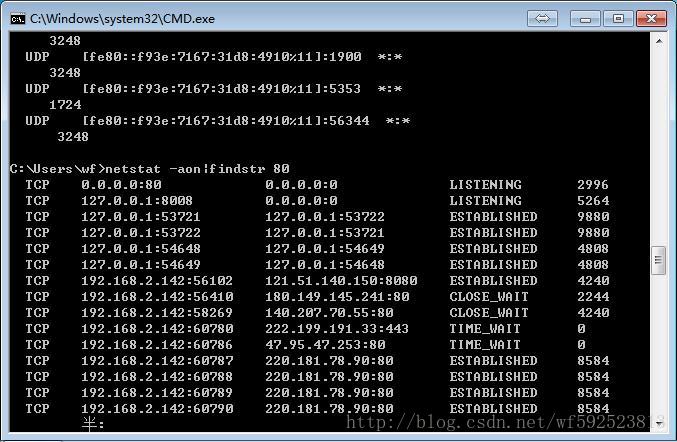
2. Enter netstat -aon|findstr in the CMD window to indicate the port number you want to see. Take netstat -aon|findstr 80 as an example:
3. As can be seen from the figure below, there is a program occupying port 80. On the far right is the process ID occupying the program: 2996;

4. Knowing the process ID, we just need to find out which program 2996 is. Continue typing the following command: tasklist|findstr “2996”, where 2996 is the previous process ID.
closes the corresponding process

    taskkill /F /IM httpd.exe  

View port status

netstat -aon

WindowsError: [Error 2] The system cannot find the file specified

I did a performance error opening Firefox with Selenium in ipython Notebooks, using the Firefox browser with the following code:

from selenium import webdriver
driver = webdriver.Firefox()

The error message is as follows:

The error the code returns is as follows:
    WindowsError                              Traceback (most recent call last)
<ipython-input-7-fd567e24185f> in <module>()
----> 1 driver = webdriver.Firefox()

Solutions:
When you try to initialize Firefox(), specify the Firefox binaries. The default path, FirefoxDriver, is in %PROGRAMFILES%\Mozilla Firefox\ Foxfox.exe. Specify the Firefox Driver or add the path of the Firefox binaries to the Windows path. The code to specify the firefoxdriver path is as follows:

from selenium import webdriver
from selenium.webdriver.firefox.firefox_binary import FirefoxBinary
binary = FirefoxBinary('path/to/binary')
driver = webdriver.Firefox(firefox_binary=binary)

Sweep yards attention
Practical AI Inn
Get the latest AI information and practical cases

WeChat ID: langu86

Perfectly solve the 1366 error of saving Chinese in MySQL

Most recently when using SQLAlchemy to store Chinese in a table in a mysql database:
Warning Code: 1366 penstring value: ‘\xE5\x9C\xA8’ for column ‘content’ at row 1
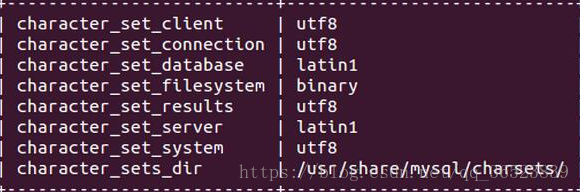
This is because we store Chinese, and our table does not support Chinese character set. We use show variables like ‘character%’. View mysql’s current encoding:

It can be seen that the character set of database and Server USES latin1, and latin1 does not support Chinese, which leads to the error of storing Chinese.
I tried two ways to avoid the Chinese storage error problem:
1: Set server and Database to UTF8 type
Use the following command to set input on the command line:
Show variables like ‘% char %’;
set character_set_server = utf8;
set character_set_database = utf8;
Use the command above. If not, show Create table. To see if the specific column has the wrong character set.
2: Set the default character set when building the table
When I build tables, I usually set the default character set to UTF8 in the SQL statement to avoid some problems:

sql='''create table analysis(city varchar(20),companySize varchar(20),education varchar(20))default charset=utf8'''

The default Charset = UTf8 is added at the end of the statement to set the default charset= UTf8, or at the end of the SQL statement if additional parameters need to be set.
 
★★★★★ ★★ warm tips:
This is a people encounter a problem, here said once: when using SQL statements, some of the words, letters is a class of special characters similar to python, import, etc., so if you want to use the key words, need to add the quotes ` to it, such as ` index `, the index is the key word, if used directly, will be an error. Therefore, I need to pay special attention to the fact that I always make mistakes when using it. I just can’t find the problem and think of other mistakes. Fortunately, I suddenly remember this problem mentioned by the database teacher accidentally.
 

python keyerror(0)


It’s not the key of the keyboard, it’s the key of the dict
When dict is evaluated, the key does not exist in the key() of dict, and an error is reported

When python reads key and value, if key does not exist, it will trigger KeyError error, as follows:

Python

t = {
    'a': '1',
    'b': '2',
    'c': '3',
}
print(t['d'])

It will appear:

KeyError: 'd'

The first solution
First, test whether the key exists, and then proceed to the next operation, such as:

Python

t = {
    'a': '1',
    'b': '2',
    'c': '3',
}
if 'd' in t:
    print(t['d'])
else:
    print('not exist')

There will be:

not exist

The second solution
Use the built-in get(key[,default]) method dict; if key exists, return its value; otherwise return default; Using this method will never trigger KeyError, as follows:

Python

t = {
    'a': '1',
    'b': '2',
    'c': '3',
}
print(t.get('d'))

There will be:

None

Add default parameter:

Python

t = {
    'a': '1',
    'b': '2',
    'c': '3',
}
print(t.get('d', 'not exist'))
print(t)

There will be:

not exist
{'a': '1', 'c': '3', 'b': '2'}

The third solution
Using dict built-in setdefault(key[,default]) method, if key exists, return its value; Otherwise insert this key, its value is default, and return default; Using this method will never trigger KeyError, as follows:

Python

t = {
    'a': '1',
    'b': '2',
    'c': '3',
}
print(t.setdefault('d'))
print(t)

There will be:

None
{'b': '2', 'd': None, 'a': '1', 'c': '3'}

Add default parameter:

Python

t = {
    'a': '1',
    'b': '2',
    'c': '3',
}
print(t.setdefault('d', 'not exist'))
print(t)

There will be:

not exist
{'c': '3', 'd': 'not exist', 'a': '1', 'b': '2'}

The fourth solution
Add the /___ b> method to the class dict. If key does not exist, it goes to the missing__() method without firing KeyError, e.g.

Python

t = {
    'a': '1',
    'b': '2',
    'c': '3',
}


class Counter(dict):

    def __missing__(self, key):
        return None
c = Counter(t)
print(c['d'])

There will be:

None

Change return value:

Python

t = {
    'a': '1',
    'b': '2',
    'c': '3',
}


class Counter(dict):

    def __missing__(self, key):
        return key
c = Counter(t)
print(c['d'])
print(c)

There will be:

d
{'c': '3', 'a': '1', 'b': '2'}

The fifth solution
Using the collections.defaultdict([default_factory[...]]) object, which is actually inherited from the dict and is actually used with the missing__ __() method, its default_factory argument is passed to the missing__() method,
if default_factory is None, it will be the same as dict, it will trigger KeyError error, as follows:

Python

import collections
t = {
    'a': '1',
    'b': '2',
    'c': '3',
}
t = collections.defaultdict(None, t)
print(t['d'])

There will be:

KeyError: 'd'

But if you really want to return None is not out of the question:

Python

import collections
t = {
    'a': '1',
    'b': '2',
    'c': '3',
}

def handle():
    return None
t = collections.defaultdict(handle, t)
print(t['d'])

There will be:

None

If the default_factory parameter is a data type, it will return its default value, such as:

Python

import collections
t = {
    'a': '1',
    'b': '2',
    'c': '3',
}
t = collections.defaultdict(int, t)
print(t['d'])

There will be:

0

Such as:

Python

import collections
t = {
    'a': '1',
    'b': '2',
    'c': '3',
}
t = collections.defaultdict(list, t)
print(t['d'])

There will be:

[]

Note:
if dict contains dict, key nested to get value, if a middle key0 does not exist, then all the above methods are invalid, and 1 KeyError2 will be triggered:

Python

import collections
t = {
    'a': '1',
    'b': '2',
    'c': '3',
}
t = collections.defaultdict(dict, t)
print(t['d']['y'])

There will be:

KeyError: 'y'

[Python] urlerror: < urlopen error timed out > error

These days when I do crawler with Python, I always encounter Python URLError: < urlopen error timed out> The more threads open, the more frequently they occur. Later proved that the program did not have a problem, checked the information on the Internet, the network is blocked, more than a few times to try it.  
For example, the original code looks like this:

if headers:
		req=urllib2.Request(url,headers=headers)
	else :
		req=urllib2.Request(url)
	opener=urllib2.build_opener(cookieproc)
	urllib2.install_opener(opener)
	page=urllib2.urlopen(req,timeout=5).read()

can be changed after adding a loop:

if headers:
		req=urllib2.Request(url,headers=headers)
	else :
		req=urllib2.Request(url)
	opener=urllib2.build_opener(cookieproc)
	urllib2.install_opener(opener)
	global Max_Num
	Max_Num=6
	for i in range(Max_Num):
		try:
			page=urllib2.urlopen(req,timeout=5).read()
			break
		except:
			if i < Max_Num-1:
				continue
			else :
				print 'URLError: <urlopen error timed out> All times is failed '

This exception can generally be resolved

Can’t find Python executable “D:\python3\python.exe”, you can set the PYTHON env variable.

An error
When installing APpium with NPM under Win10, the following error is reported:

Can't find Python executable "D:\Anaconda3\python.exe", you can set the PYTHON env variable.

solution
1. Set the Python execution file path. 2, to use python version 2.7.
Methods a
Set the global variable in Windows PYTHON to be the absolute path of PYTHON 2.7, for example:

D:\Anaconda2\python.exe

Set variables:

set PYTHONPATH=%PYTHON%

Method 2

npm config

python root:code for Hash MD5 was not found. Error

A host of other errors can come along:

ERROR:root:code for hash md5 was not found.
Traceback (most recent call last):
  File "/usr/local/Cellar/python@2/2.7.15/Frameworks/Python.framework/Versions/2.7/lib/python2.7/hashlib.py", line 147, in <module>
    globals()[__func_name] = __get_hash(__func_name)
  File "/usr/local/Cellar/python@2/2.7.15/Frameworks/Python.framework/Versions/2.7/lib/python2.7/hashlib.py", line 97, in __get_builtin_constructor
    raise ValueError('unsupported hash type ' + name)
ValueError: unsupported hash type md5
ERROR:root:code for hash sha1 was not found.
Traceback (most recent call last):
  File "/usr/local/Cellar/python@2/2.7.15/Frameworks/Python.framework/Versions/2.7/lib/python2.7/hashlib.py", line 147, in <module>
    globals()[__func_name] = __get_hash(__func_name)
  File "/usr/local/Cellar/python@2/2.7.15/Frameworks/Python.framework/Versions/2.7/lib/python2.7/hashlib.py", line 97, in __get_builtin_constructor
    raise ValueError('unsupported hash type ' + name)
ValueError: unsupported hash type sha1
ERROR:root:code for hash sha224 was not found.
Traceback (most recent call last):
  File "/usr/local/Cellar/python@2/2.7.15/Frameworks/Python.framework/Versions/2.7/lib/python2.7/hashlib.py", line 147, in <module>
    globals()[__func_name] = __get_hash(__func_name)
  File "/usr/local/Cellar/python@2/2.7.15/Frameworks/Python.framework/Versions/2.7/lib/python2.7/hashlib.py", line 97, in __get_builtin_constructor
    raise ValueError('unsupported hash type ' + name)
ValueError: unsupported hash type sha224
ERROR:root:code for hash sha256 was not found.
Traceback (most recent call last):
  File "/usr/local/Cellar/python@2/2.7.15/Frameworks/Python.framework/Versions/2.7/lib/python2.7/hashlib.py", line 147, in <module>
    globals()[__func_name] = __get_hash(__func_name)
  File "/usr/local/Cellar/python@2/2.7.15/Frameworks/Python.framework/Versions/2.7/lib/python2.7/hashlib.py", line 97, in __get_builtin_constructor
    raise ValueError('unsupported hash type ' + name)
ValueError: unsupported hash type sha256
ERROR:root:code for hash sha384 was not found.
Traceback (most recent call last):
  File "/usr/local/Cellar/python@2/2.7.15/Frameworks/Python.framework/Versions/2.7/lib/python2.7/hashlib.py", line 147, in <module>
    globals()[__func_name] = __get_hash(__func_name)
  File "/usr/local/Cellar/python@2/2.7.15/Frameworks/Python.framework/Versions/2.7/lib/python2.7/hashlib.py", line 97, in __get_builtin_constructor
    raise ValueError('unsupported hash type ' + name)
ValueError: unsupported hash type sha384
ERROR:root:code for hash sha512 was not found.
Traceback (most recent call last):
  File "/usr/local/Cellar/python@2/2.7.15/Frameworks/Python.framework/Versions/2.7/lib/python2.7/hashlib.py", line 147, in <module>
    globals()[__func_name] = __get_hash(__func_name)
  File "/usr/local/Cellar/python@2/2.7.15/Frameworks/Python.framework/Versions/2.7/lib/python2.7/hashlib.py", line 97, in __get_builtin_constructor
    raise ValueError('unsupported hash type ' + name)
ValueError: unsupported hash type sha512

This can generally be solved by brew reinstalling Python @2

brew install http://raw.githubusercontent.com/Homebrew/homebrew-core/86a44a0a552c673a05f11018459c9f5faae3becc/Formula/[email protected]

Note that brew install python@2 may report an Error: Error: No available formula with the name "python@2"

Brew unlink openssl if not possible.
openssl