Tag Archives: Operation and maintenance

The problem of inconsistent host names in building rabbitmq on Linux

1. Environment:

centos 7.3

2. Problem description

Today, the following error occurred in the process of deploying rabbitmq as a front-end and back-end message push

$ rabbitmqctl set_permissions -p/duni ".*" ".*" ".*"

Error: unable to connect to node rabbit@bbbbdddd: nodedown

DIAGNOSTICS
===========

attempted to contact: [rabbit@bbbbdddd]

rabbit@bbbbdddd:
  * connected to epmd (port 4369) on bbbbdddd
  * epmd reports node 'rabbit' running on port 25672
  * TCP connection succeeded but Erlang distribution failed

  * Hostname mismatch: node "rabbit@localhost" believes its host is different. Please ensure that hostnames resolve the same way locally and on "rabbit@localhost"


current node details:
- node name: 'rabbitmq-cli-92@bbbbdddd'
- home dir: /var/lib/rabbitmq
- cookie hash: h6TDjQ+DgPaVGJLMjcG4TA==

I can’t connect to the host where I deployed rabbitmq bbbbdddd

3. Google

Google found the corresponding problem in stack overflow

Here we say to give rabbitmq command permission, delete the service and then re install it. After trying, I found that I can’t do it…

Continue with Google, and some people say to correct Erlang’s Cookie:

Erlang will generate two cookie files: C: windows. Erlang. Cookie and C: user. Erlang. Cookie. Check whether the contents of the two files are consistent. If not, replace one with the other.

Windows platform, er… My environment is Linux, and I didn’t find two . Erlang. Cookie files in the root directory

$ find/--name .erlang.cookie
/var/lib/rabbitmq/.erlang.cookie

So I gave up.

4. Solutions

The final solution is to set the host name and restart the rabbitmq service

# Kill the rabbitmq process first
$ ps -ef | grep rabbitmq | grep -v grep | awk '{print $2}' | xargs kill -9

# set hostname (assume host ip is: 192.168.1.1, hostname set to: mq)
$ echo 192.168.1.1 mq > /etc/hosts
$ echo rabbitmq > /etc/hostname
$ export HOSTNAME=mq

# Restart rabbitmq
$ rabbitmq-server -detached
# Start the web socket service
$ rabbitmq-plugins enable rabbitmq_management rabbitmq_web_stomp
# Set up users and give them administrator privileges
$ rabbitmqctl add_user duni duni
$ rabbitmqctl set_user_tags duni administrator
# set user directory
$ rabbitmqctl set_permissions -p/duni ".*" ".*" ".*"

To solve the problem that windows Remote Desktop Services cannot copy and paste: restart rdpclip.exe

After connecting to the remote server, even if you select the “clipboard” function in the “local resources” tab, you still can’t copy and paste. The solution is found through Baidu, because the rdpclip.exe on the remote server doesn’t work properly. The solution is to open the task manager on the remote server, find the rdpclip.exe process, and close it.

Then enter rdpclip.exe in the start menu search box, press enter, and it will run again.

MySql Install Error: Can‘t connect to local MySQL server through socket ‘/tmp/mysql.sock‘

@[TOC] (error 2002 (HY000): can’t connect to local MySQL server through socket ‘/ TMP/MySQL. Socket’)

System overview

CentOS 7 + MySql-community-release-el6-5.noarch。

Install MySQL process

First, download the RPM installation package as follows:
WGet – P/usr/software/ http://repo.mysql.com/mysql-community-release-el-5.noarch.rpm
Then, run the following command to install the yum source:
RPM – IVH mysql-community-release-el-5. Noarch. RPM
after the yum source is installed, you can view it as follows:
ll/etc/yum. Repos. D/
if the yum source is installed correctly, It should be displayed:
total dosage 48
– rw-r – r–. 1 root 1664 November 23 2020 CentOS base. Repo
– rw-r – r–. 1 root 1309 November 23 2020 CentOS cr. repo
– rw-r – r–. 1 root 649 November 23 2020 CentOS debuginfo. Repo
– rw-r – r–. 1 root 314 November 23 2020 CentOS FastTrack. Repo
– rw-r – r–. 1 root 630 November 23 2020 Cen TOS media. Repo
– rw-r – r–. 1 root 1331 November 23 2020 CentOS sources. Repo
– rw-r – r–. 1 root 8515 November 23 2020 CentOS vault. Repo
– rw-r – r–. 1 root 616 November 23 2020 centos-x86_ Next, run the following command to install MySQL:
Yum – y install MySQL
at the end of the process, Run the following command to start MySQL service and report an error:
Service mysqld start
at this time, the error content is as shown in the question. After checking the above installation process with the following command, the packages to be installed are:
RPM – QA | grep MySQL
the packages to be seen at this time are as follows:
mysql-community-release-el6-5. Noarch
mysql-community-common-5.6.51-2. El6.x86_ 64
mysql-community-client-5.6.51-2.el6.x86_ 64
mysql-community-libs-5.6.51-2.el6.x86_ 64
you can see that there is no MySQL Server package in the above package. So next, install MySQL server with the following command:
Yum – y install MySQL server
after the above command is executed successfully, start MySQL service:
Service mysqld start
and then run:
MySQL – uroot to enter MySQL server.

Oracle can’t start the database due to deleting DBF file by mistake

Statement

First of all, this method can not recover the data. The purpose of this paper is to restore the database to normal, data can be discarded, mostly in the test environment.

Phenomenon

Delete the data file of the table space, resulting in an error when shutting down the database and the startup database, as follows:

SQL> startup;
ORACLE instance started.


Total System Global Area 4008546304 bytes
Fixed Size		    2259440 bytes
Variable Size		  872416784 bytes
Database Buffers	 3120562176 bytes
Redo Buffers		   13307904 bytes
Database mounted.
ORA-01157: cannot identify/lock data file 7 - see DBWR trace file
ORA-01110: data file 7: '/data/oracle/oradata/orclstd/PSR1.dbf'

Because an 8K table space can only have a maximum of 32g, this table space specifies multiple DBF files, and several DBF files are deleted at one time. There is an operation [drop user XXX cascade;], Delete the user’s, and the table space does not exist, but [startup;] Database, or error. Use the following statement to close the data file:

SQL> alter database datafile '/data/oracle/oradata/orclstd/PSR1.dbf' offline drop;


Database altered.


SQL>  alter database open;
 alter database open
*
ERROR at line 1:
ORA-01157: cannot identify/lock data file 7 - see DBWR trace file
ORA-01110: data file 7: '/data/oracle/oradata/orclstd/PSR2.dbf'


SQL> alter database datafile '/data/oracle/oradata/orclstd/PSR2.dbf' offline drop;


Database altered.


SQL> alter database open;
alter database open
*
ERROR at line 1:
ORA-01157: cannot identify/lock data file 9 - see DBWR trace file
ORA-01110: data file 9: '/data/oracle/oradata/orclstd/psr1_02.dbf'


SQL>  alter database datafile '/data/oracle/oradata/orclstd/psr1_02.dbf' offline drop;


Database altered.


SQL> alter database open;


Database altered.


SQL> shutdown immediate;
Database closed.
Database dismounted.
ORACLE instance shut down.
SQL> startup;
ORACLE instance started.


Total System Global Area 4008546304 bytes
Fixed Size		    2259440 bytes
Variable Size		  872416784 bytes
Database Buffers	 3120562176 bytes
Redo Buffers		   13307904 bytes
Database mounted.
Database opened.
SQL> exit

If other dBfs affect the database startup, execute [alter database open;] When the error is detected, continue the cycle until no error is detected.

Make the root user login through SSH and report the error of “permission denied, please try again”

When using SSH to log in to the ECS instance of the Linux system, if the root user enters the correct password, the following error message will appear.

Note: the non root user can log in normally, and the root user can log in normally through the management terminal.

Permission denied, please try again.

Please check the security log. If it contains the following error message, the problem is usually caused by the SELinux service enabled. Please refer to the solution to the problem caused by SELinux service. In other cases, please refer to the solution to the problem caused by forbidding the root user to log in.

error: Could not get shadow infromation for root.

 
Solutions to problems caused by forbidding root user to log in

Tips:

The related Linux configuration and instructions in this paper have been tested in CentOS 6.5 64 bit operating system. The operating system configuration of other types and versions may be different. Please refer to the official documents of the corresponding release for details. Related policies can improve the security of the server. Users are requested to decide whether to modify the relevant configuration based on the trade-off between security and ease of use.

Please refer to the following steps to check the configuration and modify it.

    log in to the ECS instance of Linux system through the management terminal

      View /etc/SSH/sshd through cat and other commands_ Whether the config configuration file contains a configuration similar to the following.

      PermitRootLogin no

      Note: the description of this parameter is as follows.

      If the parameter is not configured (by default), or the parameter value is configured to “yes”, the root user is allowed to log in. Only when the parameter value is set to “no”, will the root user be forbidden to log in.

      This parameter only affects the root user’s SSH login, and does not affect the root user’s login to the system through the management terminal and other ways.

      use VI and other editors to set the parameter value to “yes”, or delete the parameter, or comment (add “#” at the beginning) the whole line configuration. For example: ?Permitrootlogin yes .

      Note: it is recommended to back up the configuration file before modification.

      execute the following command to restart the SSH service.

      service sshd restart

      Try logging in to the server again using root. If the problem still exists, you can refer to the troubleshooting guide for remote login failure of ECS Linux SSH for further troubleshooting and analysis

       
      Solutions to problems caused by SELinux service

      You can choose to temporarily or permanently shut down SELinux service to solve the problem of SSH connection exception according to the needs of the on-site environment.

       
      Check SELinux service status

        log in to the Linux instance through the management terminal and execute the following command to view the current SELinux service status.

        /usr/sbin/sestatus -v 

        The system display is similar to the following.

        SELinux status:       enabled

        Tip: if

        The SELinux status parameter is

        enabled means that it is in the on state

        disabled is off.

       
      Temporarily shut down SELinux service

      Log in to the Linux instance and execute the following command to temporarily close SELinux.

      Tip: temporary modification of SELinux service status is real-time and effective, and there is no need to restart the system or instance.

      setenforce 0

       
      Permanently shut down SELinux service

      Log in to the Linux instance and execute the following command to shut down the SELinux service permanently.

      Tip: to permanently modify SELinux service status, you need to restart the system or instance before it can take effect.

      sed -i 's/SELINUX=enforcing/SELINUX=disabled/' /etc/selinux/config

      Tip: this command is only applicable when the SELinux service is in enforcing state.

db2 Database Error: table space access is not allowed

One day, my development colleague told me that the database couldn’t be used and reported “table space access is not allowed”. So I logged into the server to check db2diag. Log
and found that the log stopped in the morning

[14:51:46]db2inst1@gdtmsdb:~/sqllib/db2dump> ls -l|grep db2diag
[14:51:46]-rw-rw-rw- 1 db2inst1 db2iadm1 23195331  May 12 09:37 db2diag.log
[14:51:46]-rw-rw-rw- 1 db2inst1 db2iadm1 24481792  April  7 2016 db2diag.log_2016-04-08-13.49.13
[14:51:46]-rw-rw-rw- 1 db2inst1 db2iadm1 41023003  Jun  2 2017 db2diag.log_2017-06-02-10.27.09
[14:51:46]-rw-rw-rw- 1 db2inst1 db2iadm1 53019005  April  8 2019 db2diag.log_2019-04-09-07.10.34
[14:51:46]-rw-rw-rw- 1 db2inst1 db2iadm1    85065  April  9 2019 db2diag.log_2019-04-09-07.27.43
[14:51:46]-rw-rw-rw- 1 db2inst1 db2iadm1    63379  April  9 2019 db2diag.log_2019-04-09-07.33.49

2.Db2top – D tmsdb view the database table space
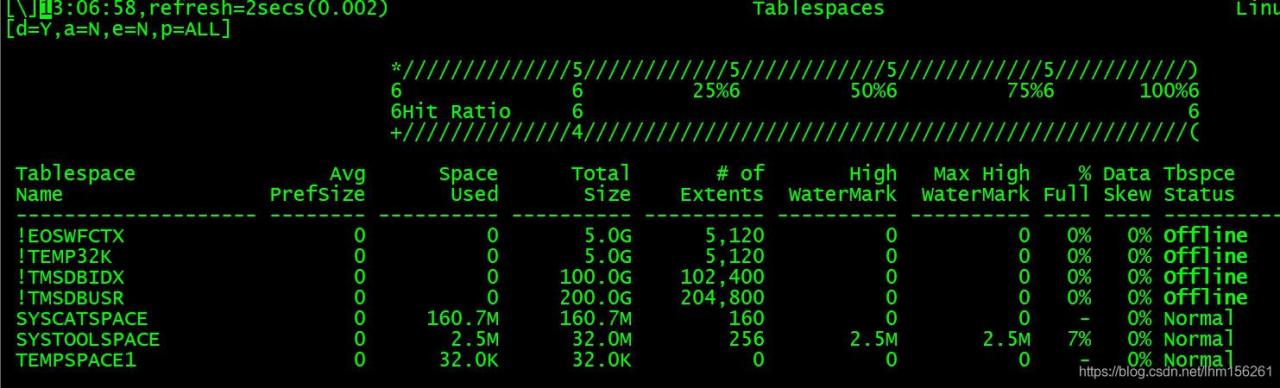
you can see that four file spaces are offline<Second, view the log information

[14:51:55]db2inst1@gdtmsdb:~/sqllib/db2dump> tail -n 1000 db2diag.log|more
14:52:07]2021-05-12-08.55.52.809736+480 E23154237E1192        LEVEL: Error (OS)
[14:52:07]PID     : 19571                TID : 47162285090560  PROC : db2sysc 0
[14:52:07]INSTANCE: db2inst1             NODE : 000            DB   : TMSDB
[14:52:07]APPHDL  : 0-7                  APPID: M000E092.CED2.210512005537
[14:52:07]AUTHID  : TMSUSR               HOSTNAME: gdtmsdb
[14:52:07]EDUID   : 25                   EDUNAME: db2agent (TMSDB) 0
[14:52:07]FUNCTION: DB2 UDB, oper system services, sqloopenp, probe:80
[14:52:07]MESSAGE : ZRC=0x840F0001=-2079391743=SQLO_ACCD "Access Denied"
[14:52:07]          DIA8701C Access denied for resource "", operating system return code 
[14:52:07]          was "".
[14:52:07]CALLED  : OS, -, open                             OSERR: EACCES (13)
[14:52:07]DATA #1 : Codepath, 8 bytes
[14:52:07]4:11:18:20:24:40
[14:52:07]DATA #2 : File name, 13 bytes
[14:52:07]/dev/raw/raw1
[14:52:07]DATA #3 : SQO Open File Options, PD_TYPE_SQO_FILE_OPEN_OPTIONS, 4 bytes
[14:52:07]SQLO_REVISE, SQLO_READWRITE, SQLO_SHAREWRITE, SQLO_USE_RAW_DEVICE, SQLO_WRITETHRU, SQLO_NO_FLUSH_ON_CLOSE
[14:52:07]DATA #4 : Hex integer, 4 bytes
[14:52:07]0x00000180
[14:52:07]DATA #5 : signed integer, 4 bytes
[14:52:07]0
[14:52:07]DATA #6 : Hex integer, 4 bytes
[14:52:07]0x00004000
[14:52:07]DATA #7 : String, 105 bytes
[14:52:07]Search for ossError*Analysis probe point after this log entry for further
[14:52:07]self-diagnosis of this problem.
[14:52:28]
[14:52:28]2021-05-12-08.55.52.811932+480 I23155430E3586        LEVEL: Error (OS)
[14:52:28]PID     : 19571                TID : 47162285090560  PROC : db2sysc 0
[14:52:28]INSTANCE: db2inst1             NODE : 000            DB   : TMSDB
[14:52:28]APPHDL  : 0-7                  APPID: M000E092.CED2.210512005537
[14:52:28]AUTHID  : TMSUSR               HOSTNAME: gdtmsdb
[14:52:28]EDUID   : 25                   EDUNAME: db2agent (TMSDB) 0
[14:52:28]FUNCTION: DB2 Common, OSSe, ossErrorIOAnalysis, probe:100
[14:52:28]CALLED  : OS, -, open                             OSERR: EACCES (13)
[14:52:28]DATA #1 : String, 111 bytes
[14:52:28]A total of 2 analysis will be performed :
[14:52:28] - User info
[14:52:28] - Path access permission
[14:52:28]
[14:52:28] Target file = /dev/raw/raw1
[14:52:28]DATA #2 : String, 184 bytes
[14:52:28]  Real user ID of current process       = 503
[14:52:28]  Effective user ID of current process  = 503
[14:52:28]  Real group ID of current process      = 304
[14:52:28]  Effective group ID of current process = 304
[14:52:28]DATA #3 : String, 41 bytes
[14:52:28]current sbrk(0) value: 0x000000000073a000
[14:52:28]DATA #4 : String, 204 bytes
[14:52:28]Information of each subdirectory leading up to the first inaccessible one is shown in the format below :
[14:52:28]   <UID>:<GID>:<permissions> (subdirectories)
[14:52:28]
[14:52:28]   0:0:755 (dev)
[14:52:28]   0:0:755 (raw)
[14:52:28]   0:6:660 (raw1)
[14:52:28]CALLSTCK: (Static functions may not be resolved correctly, as they are resolved to the nearest symbol)
[14:52:28]  [0] 0x00002AE4BD0AF4AB /db2home/db2inst1/sqllib/lib64/libdb2osse.so.1 + 0x2244AB
[14:52:53]  [1] 0x00002AE4BD0B0A33 ossLogSysRC + 0xB3
[14:52:53]  [2] 0x00002AE4BD0A28D4 /db2home/db2inst1/sqllib/lib64/libdb2osse.so.1 + 0x2178D4
[14:52:53]  [3] 0x00002AE4BD09FB9D ossErrorAnalysis + 0x2D
[14:52:53]  [4] 0x00002AE4B7034E6C sqloSystemErrorHandler + 0x77C
[14:52:53]  [5] 0x00002AE4B50036A6 sqloopenp + 0xA36
[14:52:53]  [6] 0x00002AE4B211D6FD _Z20sqlbDMSDoContainerOpP12SQLB_POOL_CBPK9SQLP_LSN8iP16SQLB_POOLCONT_CB12SQLB_CONT_OPjS3_P12SQLB_GLOBALSb + 0x
[14:52:53]18D
[14:52:53]  [7] 0x00002AE4B2136931 _Z16sqlbDMSStartPoolP12SQLB_GLOBALSP12SQLB_POOL_CBb + 0x221
[14:52:53]  [8] 0x00002AE4B1FED9AB _Z14sqlbStartPoolsP12SQLB_GLOBALS + 0x61B
[14:52:53]  [9] 0x00002AE4B209EA56 sqlbinit + 0x1D78
[14:52:53]  [10] 0x00002AE4B4098D02 /db2home/db2inst1/sqllib/lib64/libdb2e.so.1 + 0x3247D02
[14:52:53]  [11] 0x00002AE4B409206D _ZN16sqeLocalDatabase12FirstConnectEP8SQLE_BWARcP8sqeAgentP8sqlo_gmtiiPb + 0x18FD
[14:52:53]  [12] 0x00002AE4B4080FF8 _ZN8sqeDBMgr23StartUsingLocalDatabaseEP8SQLE_BWAP8sqeAgentRccP8sqlo_gmtPb + 0x1558
[14:52:53]  [13] 0x00002AE4B403339F _ZN14sqeApplication13AppStartUsingEP8SQLE_BWAP8sqeAgentccP5sqlcaPc + 0x43F
[14:52:53]  [14] 0x00002AE4B402A19C _ZN14sqeApplication13AppLocalStartEP14db2UCinterface + 0x57C
[14:52:53]  [15] 0x00002AE4B4252310 _Z11sqlelostWrpP14db2UCinterface + 0x40
[14:52:53]  [16] 0x00002AE4B4251237 _Z14sqleUCengnInitP14db2UCinterfacet + 0x6F7
[14:52:53]  [17] 0x00002AE4B424FB08 sqleUCagentConnect + 0x4A8
[14:52:53]  [18] 0x00002AE4B4363B36 _Z18sqljsConnectAttachP13sqljsDrdaAsCbP14db2UCinterface + 0xB6
[14:52:53]  [19] 0x00002AE4B432804E _Z16sqljs_ddm_accsecP14db2UCinterfaceP13sqljDDMObject + 0x3CE
[14:52:53]  [20] 0x00002AE4B431B628 _Z17sqljsParseConnectP13sqljsDrdaAsCbP13sqljDDMObjectP14db2UCinterface + 0x58
[14:52:53]  [21] 0x00002AE4B431BE6B _Z10sqljsParseP13sqljsDrdaAsCbP14db2UCinterfaceP8sqeAgentb + 0x36B
[14:52:53]  [22] 0x00002AE4B4316049 /db2home/db2inst1/sqllib/lib64/libdb2e.so.1 + 0x34C5049
[14:52:53]  [23] 0x00002AE4B43144DC /db2home/db2inst1/sqllib/lib64/libdb2e.so.1 + 0x34C34DC
[14:52:53]  [24] 0x00002AE4B4311519 /db2home/db2inst1/sqllib/lib64/libdb2e.so.1 + 0x34C0519
[14:52:53]  [25] 0x00002AE4B431110B _Z17sqljsDrdaAsDriverP18SQLCC_INITSTRUCT_T + 0xEB
[14:52:53]  [26] 0x00002AE4B400CC77 _ZN8sqeAgent6RunEDUEv + 0xAD7
[14:52:53]  [27] 0x00002AE4B58821F7 _ZN9sqzEDUObj9EDUDriverEv + 0xF7
[14:52:53]  [28] 0x00002AE4B5017C83 sqloEDUEntry + 0x303
[14:52:53]  [29] 0x00002AE4B0C3B806 /lib64/libpthread.so.0 + 0x7806
[14:52:53]  [30] 0x00002AE4BDE7F64D clone + 0x6D

You can see the key words [14:52:28] target file =/dev/raw/raw1. It seems that there is something wrong with this file system
check whether the device is bare or not with db2pd – D tmsdv – tab

[15:04:47]db2inst1@gdtmsdb:~> db2pd -d tmsdb -tab
[15:04:48]
[15:04:48]Database Member 0 -- Database TMSDB -- Active -- Up 0 days 04:25:13 -- Date 2021-05-12-13.20.50.628719
[15:04:48]
[15:04:48]Tablespace Configuration:
[15:04:48]Address            Id    Type Content PageSz ExtentSz Auto Prefetch BufID BufIDDisk FSC NumCntrs MaxStripe  LastConsecPg RSE  Name
[15:04:48]0x00002AEB8D5540C0 0     SMS  Regular 32768  32       Yes  192      1     1         Def 1        0          31           No   SYSCATSPACE
[15:04:48]0x00002AEB8D561260 1     SMS  SysTmp  32768  32       Yes  192      1     1         On  1        0          31           No   TEMPSPACE1
[15:04:48]0x00002AEB8D56E400 2     DMS  Large   32768  32       No   32       2     2         Def 1        0          31           Yes  EOSWFCTX
[15:04:48]0x00002AEB8D57B5A0 3     DMS  Large   32768  4        Yes  24       1     1         Def 1        0          3            Yes  SYSTOOLSPACE
[15:04:48]0x00002AEB8D588740 4     DMS  UsrTmp  32768  32       No   32       2     2         Def 1        0          31           No   TEMP32K
[15:04:48]0x00002AEB8D5958E0 5     DMS  Large   32768  32       No   32       2     2         Def 1        0          31           Yes  TMSDBUSR
[15:04:48]0x00002AEB8D5A2A80 6     DMS  Large   32768  32       No   32       3     3         Def 1        0          31           Yes  TMSDBIDX
[15:04:48]
[15:04:48]Tablespace Statistics:
[15:04:48]Address            Id    TotalPgs   UsablePgs  UsedPgs    PndFreePgs FreePgs    HWM        Max HWM    State      MinRecTime NQuiescers PathsDropped TrackmodState    
[15:04:48]0x00002AEB8D5540C0 0     5143       5143       5143       0          0          -          -          0x00000000 0          0          No           n/a              
[15:04:48]0x00002AEB8D561260 1     1          1          1          0          0          -          -          0x00000000 0          0          No           n/a              
[15:04:48]0x00002AEB8D56E400 2     163840     163808     0          0          0          0          0          0x00004000 0          0          No           n/a              
[15:04:48]0x00002AEB8D57B5A0 3     1024       1020       80         0          940        80         80         0x00000000 0          0          No           n/a              
[15:04:48]0x00002AEB8D588740 4     163840     163808     0          0          0          0          0          0x00004000 0          0          No           n/a              
[15:04:48]0x00002AEB8D5958E0 5     6553600    6553568    0          0          0          0          0          0x00004000 0          0          No           n/a              
[15:04:48]0x00002AEB8D5A2A80 6     3276800    3276768    0          0          0          0          0          0x00004000 0          0          No           n/a              
[15:04:48]
[15:04:48]Tablespace Autoresize Statistics:
[15:04:48]Address            Id    AS  AR  InitSize             IncSize              IIP MaxSize              LastResize                 LRF
[15:04:48]0x00002AEB8D5540C0 0     No  No  0                    0                    No  0                    None                       No  
[15:04:48]0x00002AEB8D561260 1     No  No  0                    0                    No  0                    None                       No  
[15:04:48]0x00002AEB8D56E400 2     No  No  0                    0                    No  0                    None                       No  
[15:04:48]0x00002AEB8D57B5A0 3     No  Yes -32768               -1                   No  None                 None                       No  
[15:04:48]0x00002AEB8D588740 4     No  No  0                    0                    No  0                    None                       No  
[15:04:48]0x00002AEB8D5958E0 5     No  No  0                    0                    No  0                    None                       No  
[15:04:48]0x00002AEB8D5A2A80 6     No  No  0                    0                    No  0                    None                       No  
[15:04:48]
[15:04:48]Tablespace Storage Statistics:
[15:04:48]Address            Id    DataTag  Rebalance SGID  SourceSGID
[15:04:48]0x00002AEB8D5540C0 0     0        No        -     -                    
[15:04:48]0x00002AEB8D561260 1     0        No        -     -                    
[15:04:48]0x00002AEB8D56E400 2     0        No        -     -                    
[15:04:48]0x00002AEB8D57B5A0 3     0        No        -     -                    
[15:04:48]0x00002AEB8D588740 4     0        No        -     -                    
[15:04:48]0x00002AEB8D5958E0 5     0        No        -     -                    
[15:04:48]0x00002AEB8D5A2A80 6     0        No        -     -                    
[15:04:48]
[15:04:48]Containers:
[15:04:48]Address            TspId ContainNum Type    TotalPgs   UseablePgs PathID     StripeSet  Container 
[15:04:48]0x00002AE4FDA42A40 0     0          Path    5143       5143       -          0          /db2data/tmsdb/db2inst1/NODE0000/SQL00001/SQLT0000.0
[15:04:48]0x00002AE4FDA3EC00 1     0          Path    1          1          -          0          /db2data/tmsdb/db2inst1/NODE0000/SQL00001/SQLT0001.0
[15:04:48]0x00002AE4FDA32C40 2     0          Disk    163840     163808     -          0          /dev/raw/raw1
[15:04:48]0x00002AE4FDA36C60 3     0          File    1024       1020       -          0          /db2data/tmsdb/db2inst1/NODE0000/SQL00001/SYSTOOLSPACE
[15:04:48]0x00002AE4FDA37C60 4     0          Disk    163840     163808     -          0          /dev/raw/raw2
[15:04:48]0x00002AE4FDA38C60 5     0          Disk    6553600    6553568    -          0          /dev/raw/raw3
[15:04:48]0x00002AE4FDA39C60 6     0          Disk    3276800    3276768    -          0          /dev/raw/raw4

You can see that four bare devices are used. Considering that the restart permission of bare devices will change, check the startup script of this machine

[15:13:00]gdtmsdb:/myscript # cat startServer.sh 
[15:13:00]chown db2inst1:db2iadm1 /dev/raw/raw1
[15:13:00]chown db2inst1:db2iadm1 /dev/raw/raw2
[15:13:00]chown db2inst1:db2iadm1 /dev/raw/raw3
[15:13:00]chown db2inst1:db2iadm1 /dev/raw/raw4
[15:13:00]
[15:13:00]su - db2inst1 -c "db2start"
[15:13:00]su - db2inst1 -c "db2 activate db tmsdb"

Power on needs to be re empowered. Check the permissions under/dev/raw, and it’s not db2inst1. Execute the self startup script written in advance, and the problem is solved.
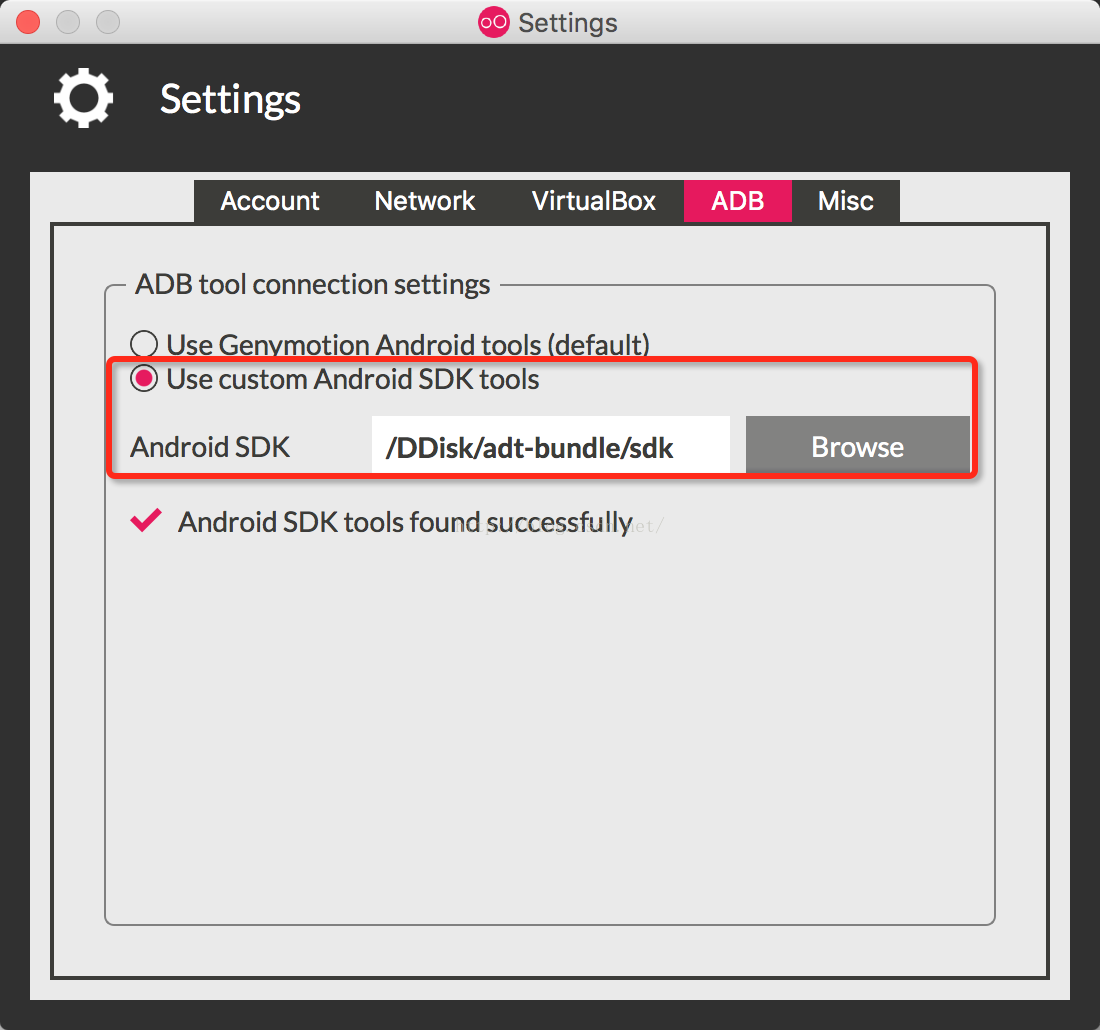
error: could not install *smartsocket* listener: Address already in use PM8:49 ADB server didn’t AC…

Enter adb command in the terminal and the error is as follows:
localhost:work zhangyg$ adb devices
List of devices attached
adb server version (32) doesn’t match this client (36); killing…
error: could not install *smartsocket* listener: Address already in use
ADB server didn’t ACK
* failed to start daemon *
error: cannot connect to daemon

The reason for the error was that I chose Android Tools using Genymotion, so it caused a conflict with ADB program under Android SDK.
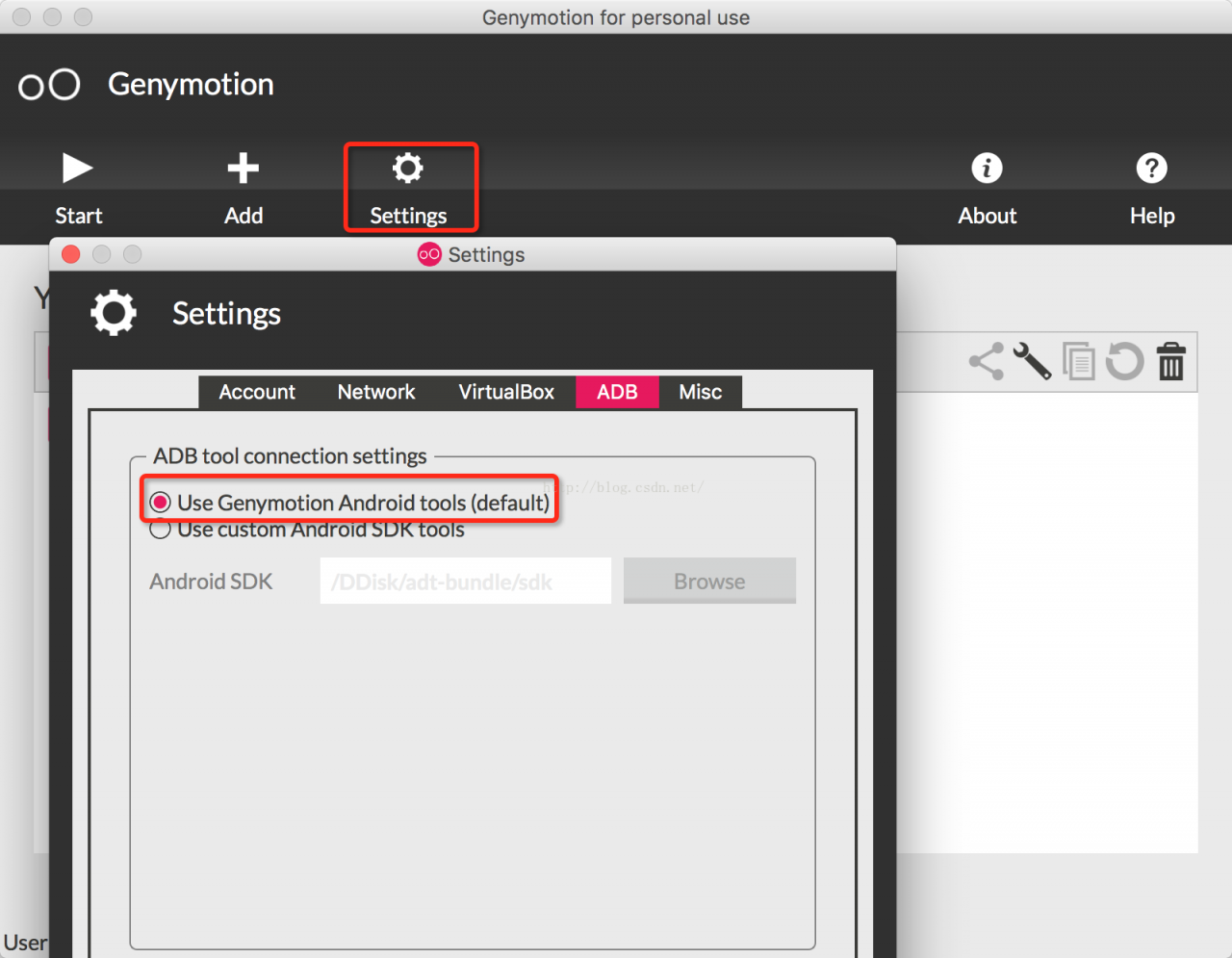
Click [Settings] in the main interface of Genymotion as shown below:

Select Use Custom Android SDK Tools, and then select the Androd SDK root directory, as shown in the figure below:

Restarting Genymotion’s virtual machine will solve the problem.

Can’t connect to MySQL server on ‘192.168.64.132‘

Sqlog failed to connect to MySQL database in Linux system
error message: can’t connect to MySQL server on ‘192.168.64.132’

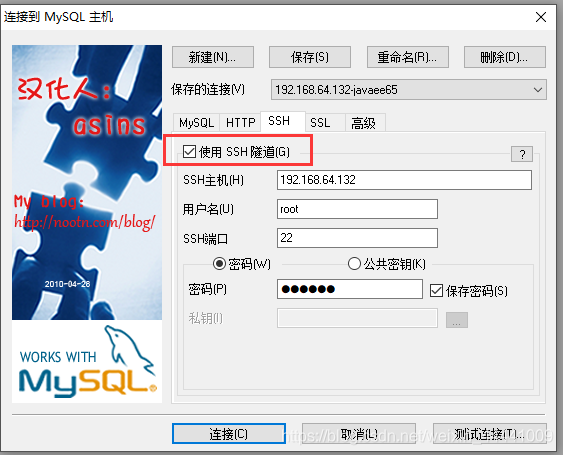
It can be connected before, but it is not enough to install the virtual machine image. According to the data, you can use SSH connection, and the configuration is as follows:

If you don’t use SSH connection, you need to use win’s telnet to test whether telnet 192.168.64.132 3306 and telnet 192.168.64.132 22 can connect 1, the virtual machine does not set IPv4 forwarding,
2, the virtual machine opens the firewall and does not expose port 3306( 22 can be connected, 3306 can not be connected).

Reference blog

Setting up automatic networking alias for Mac Terminal

Set up automatic networking alias for @Mac terminal
#= alias for connect wifi.
alias lsnt=‘networksetup -listallhardwareports’ # list network device
alias lswf=’/System/Library/PrivateFrameworks/Apple80211.framework/Versions/A/Resources/airport scan’ # scan wifi, and show list
alias onwf=‘networksetup -setairportpower en0 on’
alias offwf=‘networksetup -setairportpower en0 off’
alias lkwf=‘networksetup -setairportnetwork en0’
#- alias lk413=‘networksetup -setairportnetwork en0 HUAWEI-xxx passwd’
alias lk413=‘lkwf HUAWEI-xxx passwd’
alias lsbb=‘lsbb(){ lswf | grep pi | cut -c 23-32 | grep “$1” ;}; lsbb’ # scan BB wifi, and show list
alias lkbb=‘lkbb(){ lkwf “$1” passwd ; }; lkbb’
alias lkb=‘lkb(){ lkwf lsbb "$1" passwd ; }; lkb’

Nginx, which is suitable for front-end H5 requests, routes and forwards according to the URL and cuts the URL

1. Ruqirement
nginx accepts the request url uniformly and forwards it
http://172.16.51.91:9000/api/order/create/44010000
http://172.16.51.91:9000/api/order/create/44060000
目标:
http://172.15.10.13:9001/api/order/create
http://172.15.10.13:9002/api/order/create
2. nginx Settings

server {
        listen      9000;
        server_name  172.16.51.91;

		location ~*(44010000)$ {
                rewrite ^/(.*)/44010000$ http://172.15.10.13:9001/$1 permanent;
        }
		 location ~*(44060000)$ {
                 rewrite ^/(.*)/44060000$ http://172.15.10.13:9002/$1 permanent;
        }	

}

Nginx routes and forwards according to the URL and cuts the URL

1. Ruqirement
nginx accepts the request url uniformly and forwards it
http://172.16.51.91:9000/44010000/api/order/create
http://172.16.51.91:9000/44060000/api/order/create
goal:
http://172.15.10.13:9001/api/order/create
http://172.15.10.13:9002/api/order/create
2. nginx Setting

server {
    listen   9000;
    server_name 172.16.51.91;

	location /44010000/ {
		    proxy_pass http://172.15.10.13:9001/;
    }
		 location /44060000/ {
         proxy_pass http://172.15.10.13:10002/;
    }
}

Optimization and upgrade solution for one click deployment without Jenkins under Linux

1. Scene

Jenkins one click deployment has not been installed under Linux.

2. Operation process

① Manual upload.

② Delete history code.

③ Unzip the war package.

④ Delete the war package.

⑤ Restart Tomcat.

⑥ Show logs.

3. Process disassembly

1) Use the RZ command to upload the war package.

2) Use the following command to complete the rest of the work in one go. Note: the last line is reserved for carriage return and line feed to ensure that the command will be executed.

cd   /opt/codes/portal-system
rm -rf  META-INF
rm -rf  WEB-INF
rm -rf importDataModel.xlsx
unzip portal-system-1.0.0. RELEASE.war
rm -rf portal-system-1.0.0. RELEASE.war
/opt/server/tomcat_ portal_ system/bin/ restart.sh
 

3) restart.sh Please refer to the previous blog post for the script.

4. Incremental design scheme

cd /opt/codes/portal-system/WEB-INF/classes
rz
rm -r com
unzip com.zip  
rm -rf com.zip  
/opt/server/tomcat_ portal_ system/bin/ restart.sh
#tail -f /opt/server/tomcat_ portal_ system/logs/ info.log