Introduction: there are many problems about hosts on the Internet. After testing, I found out that it is not. After testing by myself, I introduced three solutions to most problems:
1. Firewall port not opened or closed
firewall generally local test will be closed, the line is generally open, it is recommended to add port
add port:
# --permanent 为永久添加,不指定此参数重启后失效
firewall-cmd --zone=public --add-port=9092/tcp --permanent
delete port:
firewall-cmd --zone=public --remove-port=80/tcp --permanent
view all ports:
firewall-cmd --zone=public --list-ports
view specified port:
firewall-cmd --zone= public --query-port=9092/tcp
view port status:
netstat -tunlp
overload:
firewall-cmd --reload
firewall command:
#开启防火墙
service firewalld start
#启用防火墙
service firewalld enable (永久生效)
#关闭防火墙
service firewalld stop (重启后失效)
#禁用防火墙
service firewalld disable (永久生效)
#重启防火墙
service firewalld restart
#查看状态
service firewalld status
2. Kafka service entry address not specified
edit the server.properties in the config directory of kafka, and add the address of the service entry to the external service:
注意:此ip为kafka所在主机的ip地址
listeners=PLAINTEXT://192.168.5.228:9092
3. The kafka version in the project is inconsistent with the kafka version installed on the server
modify maven pom. XML file, specify the corresponding kafka coordinates,
I installed kafka_2.12-2.1.0, the corresponding coordinates are:
<dependency>
      <groupId>org.apache.kafka</groupId>
      <artifactId>kafka_2.11</artifactId>
      <version>0.10.0.0</version>
</dependency>
Maven failed to start component [standard engine [Tomcat] when using tomcat7 Maven plugin plug-in run
when getting started on xxl-job today, use idea to import the project and build maven projects. To start the project with the Maven plugin, configure Run after you finish.
reports the following error:
[INFO] --- tomcat7-maven-plugin:2.2:run (default-cli) @ xxl-job-admin ---
[INFO] Running war on http://localhost:8080/xxl-job-admin
[INFO] Using existing Tomcat server configuration at D:\xxl-job-1.9.1\xxl-job-admin\target\tomcat
[INFO] create webapp with contextPath: /xxl-job-admin
九月 03, 2018 4:39:42 下午 org.apache.coyote.AbstractProtocol init
信息: Initializing ProtocolHandler ["http-bio-8080"]
九月 03, 2018 4:39:42 下午 org.apache.catalina.core.StandardService startInternal
信息: Starting service Tomcat
九月 03, 2018 4:39:42 下午 org.apache.catalina.core.StandardEngine startInternal
信息: Starting Servlet Engine: Apache Tomcat/7.0.47
九月 03, 2018 4:39:42 下午 org.apache.catalina.core.ContainerBase startInternal
严重: A child container failed during start
java.util.concurrent.ExecutionException: org.apache.catalina.LifecycleException: Failed to start component [StandardEngine[Tomcat].StandardHost[localhost].StandardContext[/xxl-job-admin]]
	at java.util.concurrent.FutureTask.report(FutureTask.java:122)
	at java.util.concurrent.FutureTask.get(FutureTask.java:192)
	at org.apache.catalina.core.ContainerBase.startInternal(ContainerBase.java:1123)
	at org.apache.catalina.core.StandardHost.startInternal(StandardHost.java:800)
	at org.apache.catalina.util.LifecycleBase.start(LifecycleBase.java:150)
	at org.apache.catalina.core.ContainerBase$StartChild.call(ContainerBase.java:1559)
	at org.apache.catalina.core.ContainerBase$StartChild.call(ContainerBase.java:1549)
	at java.util.concurrent.FutureTask.run(FutureTask.java:266)
	at java.util.concurrent.ThreadPoolExecutor.runWorker(ThreadPoolExecutor.java:1142)
	at java.util.concurrent.ThreadPoolExecutor$Worker.run(ThreadPoolExecutor.java:617)
	at java.lang.Thread.run(Thread.java:745)
Caused by: org.apache.catalina.LifecycleException: Failed to start component [StandardEngine[Tomcat].StandardHost[localhost].StandardContext[/xxl-job-admin]]
	at org.apache.catalina.util.LifecycleBase.start(LifecycleBase.java:154)
	... 6 more
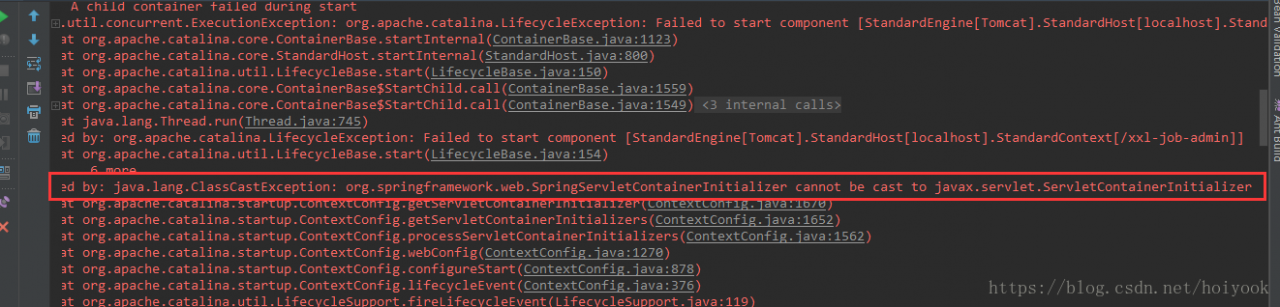
Caused by: java.lang.ClassCastException: org.springframework.web.SpringServletContainerInitializer cannot be cast to javax.servlet.ServletContainerInitializer
	at org.apache.catalina.startup.ContextConfig.getServletContainerInitializer(ContextConfig.java:1670)
	at org.apache.catalina.startup.ContextConfig.getServletContainerInitializers(ContextConfig.java:1652)
	at org.apache.catalina.startup.ContextConfig.processServletContainerInitializers(ContextConfig.java:1562)
	at org.apache.catalina.startup.ContextConfig.webConfig(ContextConfig.java:1270)
	at org.apache.catalina.startup.ContextConfig.configureStart(ContextConfig.java:878)
	at org.apache.catalina.startup.ContextConfig.lifecycleEvent(ContextConfig.java:376)
	at org.apache.catalina.util.LifecycleSupport.fireLifecycleEvent(LifecycleSupport.java:119)
	at org.apache.catalina.util.LifecycleBase.fireLifecycleEvent(LifecycleBase.java:90)
	at org.apache.catalina.core.StandardContext.startInternal(StandardContext.java:5322)
	at org.apache.catalina.util.LifecycleBase.start(LifecycleBase.java:150)
	... 6 more

九月 03, 2018 4:39:42 下午 org.apache.catalina.core.ContainerBase startInternal
严重: A child container failed during start
java.util.concurrent.ExecutionException: org.apache.catalina.LifecycleException: Failed to start component [StandardEngine[Tomcat].StandardHost[localhost]]
	at java.util.concurrent.FutureTask.report(FutureTask.java:122)
	at java.util.concurrent.FutureTask.get(FutureTask.java:192)
	at org.apache.catalina.core.ContainerBase.startInternal(ContainerBase.java:1123)
	at org.apache.catalina.core.StandardEngine.startInternal(StandardEngine.java:302)
	at org.apache.catalina.util.LifecycleBase.start(LifecycleBase.java:150)
	at org.apache.catalina.core.StandardService.startInternal(StandardService.java:443)
	at org.apache.catalina.util.LifecycleBase.start(LifecycleBase.java:150)
	at org.apache.catalina.core.StandardServer.startInternal(StandardServer.java:732)
	at org.apache.catalina.util.LifecycleBase.start(LifecycleBase.java:150)
	at org.apache.catalina.startup.Tomcat.start(Tomcat.java:341)
	at org.apache.tomcat.maven.plugin.tomcat7.run.AbstractRunMojo.startContainer(AbstractRunMojo.java:1238)
	at org.apache.tomcat.maven.plugin.tomcat7.run.AbstractRunMojo.execute(AbstractRunMojo.java:592)
	at org.apache.maven.plugin.DefaultBuildPluginManager.executeMojo(DefaultBuildPluginManager.java:137)
	at org.apache.maven.lifecycle.internal.MojoExecutor.execute(MojoExecutor.java:208)
	at org.apache.maven.lifecycle.internal.MojoExecutor.execute(MojoExecutor.java:154)
	at org.apache.maven.lifecycle.internal.MojoExecutor.execute(MojoExecutor.java:146)
	at org.apache.maven.lifecycle.internal.LifecycleModuleBuilder.buildProject(LifecycleModuleBuilder.java:117)
	at org.apache.maven.lifecycle.internal.LifecycleModuleBuilder.buildProject(LifecycleModuleBuilder.java:81)
	at org.apache.maven.lifecycle.internal.builder.singlethreaded.SingleThreadedBuilder.build(SingleThreadedBuilder.java:56)
	at org.apache.maven.lifecycle.internal.LifecycleStarter.execute(LifecycleStarter.java:128)
	at org.apache.maven.DefaultMaven.doExecute(DefaultMaven.java:305)
	at org.apache.maven.DefaultMaven.doExecute(DefaultMaven.java:192)
	at org.apache.maven.DefaultMaven.execute(DefaultMaven.java:105)
	at org.apache.maven.cli.MavenCli.execute(MavenCli.java:956)
	at org.apache.maven.cli.MavenCli.doMain(MavenCli.java:290)
	at org.apache.maven.cli.MavenCli.main(MavenCli.java:194)
	at sun.reflect.NativeMethodAccessorImpl.invoke0(Native Method)
	at sun.reflect.NativeMethodAccessorImpl.invoke(NativeMethodAccessorImpl.java:62)
	at sun.reflect.DelegatingMethodAccessorImpl.invoke(DelegatingMethodAccessorImpl.java:43)
	at java.lang.reflect.Method.invoke(Method.java:497)
	at org.codehaus.plexus.classworlds.launcher.Launcher.launchEnhanced(Launcher.java:289)
	at org.codehaus.plexus.classworlds.launcher.Launcher.launch(Launcher.java:229)
	at org.codehaus.plexus.classworlds.launcher.Launcher.mainWithExitCode(Launcher.java:415)
	at org.codehaus.plexus.classworlds.launcher.Launcher.main(Launcher.java:356)
	at org.codehaus.classworlds.Launcher.main(Launcher.java:47)
Caused by: org.apache.catalina.LifecycleException: Failed to start component [StandardEngine[Tomcat].StandardHost[localhost]]
	at org.apache.catalina.util.LifecycleBase.start(LifecycleBase.java:154)
	at org.apache.catalina.core.ContainerBase$StartChild.call(ContainerBase.java:1559)
	at org.apache.catalina.core.ContainerBase$StartChild.call(ContainerBase.java:1549)
	at java.util.concurrent.FutureTask.run(FutureTask.java:266)
	at java.util.concurrent.ThreadPoolExecutor.runWorker(ThreadPoolExecutor.java:1142)
	at java.util.concurrent.ThreadPoolExecutor$Worker.run(ThreadPoolExecutor.java:617)
	at java.lang.Thread.run(Thread.java:745)
Caused by: org.apache.catalina.LifecycleException: A child container failed during start
	at org.apache.catalina.core.ContainerBase.startInternal(ContainerBase.java:1131)
	at org.apache.catalina.core.StandardHost.startInternal(StandardHost.java:800)
	at org.apache.catalina.util.LifecycleBase.start(LifecycleBase.java:150)
	... 6 more

[INFO] ------------------------------------------------------------------------
[INFO] BUILD FAILURE
[INFO] ------------------------------------------------------------------------
[INFO] Total time: 3.579 s
[INFO] Finished at: 2018-09-03T16:39:42+08:00
[INFO] ------------------------------------------------------------------------
[ERROR] Failed to execute goal org.apache.tomcat.maven:tomcat7-maven-plugin:2.2:run (default-cli) on project xxl-job-admin: Could not start Tomcat: Failed to start component [StandardServer[-1]]: Failed to start component [StandardService[Tomcat]]: Failed to start component [StandardEngine[Tomcat]]: A child container failed during start -> [Help 1]
[ERROR]
[ERROR] To see the full stack trace of the errors, re-run Maven with the -e switch.
[ERROR] Re-run Maven using the -X switch to enable full debug logging.
[ERROR]
[ERROR] For more information about the errors and possible solutions, please read the following articles:
[ERROR] [Help 1] http://cwiki.apache.org/confluence/display/MAVEN/MojoExecutionException

Process finished with exit code 1
but can only use local Tomcat run, and then look up the Internet. Found the problem:
1. The servlet version that might be introduced is too high, such as version 3.1 that is compatible with the Tomcat7 plug-in, and you can try to downgrade 3.0.1. Can be introduced with reference to the official form: http://tomcat.apache.org/whichversion.html. Then I went this way and found it didn’t work. Because the current version of the project USES 3.0.1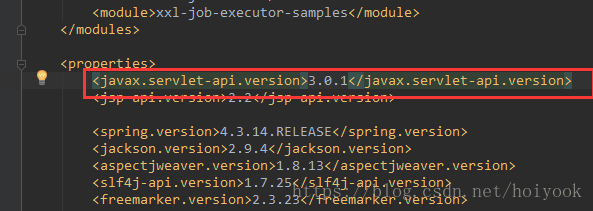 )
)
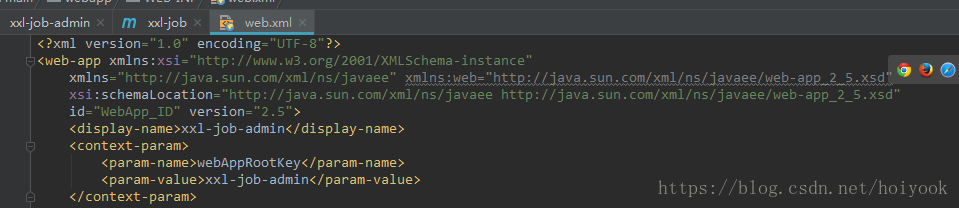
2, may is web. The XML version of the head is too high, can try to modify into: * * * * http://java.sun.com/xml/ns/javaee/ “id =” WebApp_ID “version =” 2.5 “& gt; **** or 2.4. (this doesn’t seem to work either, because it’s 2.5
 )
)
3, but observation error on the reasons, problems in: org. Springframework. Web. SpringServletContainerInitializer always be cast to javax.mail. Servlet. ServletContainerInitializer, meaning to the servlet API. The jar package caused by the conflict. You can try to exclude the Commons-Logging.jar package because servlet-apy.jar is introduced in Commons-logging.2.3.
( ) never tried
4. Try to add scope plus provided, that is, change the scope to be used when compiling, but you don’t need to bring:
for packaging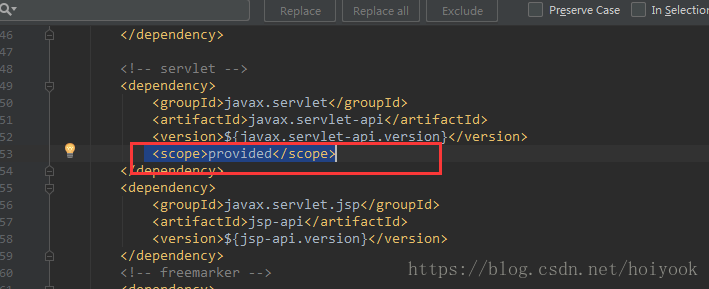
works.
I only tried the fourth one, and I solved the problem. And then I didn’t try any more.
Failed to execute goal org.apache.maven.plugins:maven-surefire-plugin:2.22.1:test (default-test)
was wrong today when using eclipse to execute the install command of maven:
Failed to execute goal org.apache.maven.plugins:maven-surefire-plugin:2.22.1:test (default-test)
this error, you can add the following plug-ins in the pom can be
<plugin>
	<groupId>org.apache.maven.plugins</groupId>
	<artifactId>maven-surefire-plugin</artifactId>
	<version>2.6</version>
	<configuration>
	<skipTests>true</skipTests>
	</configuration>
</plugin>
Failed to execute goal org.apache.maven.plugins:maven-javadoc-plugin:2.9.1:jar (default) on project
packing error :
[ERROR] Failed to execute goal org.apache.maven.plugins:maven-javadoc-plugin:2.9.1:jar (default) on project tencentlvb: MavenReportException: Error while creating archive:
[ERROR] Exit code: 1 - D:\workspace\tencentlvb\src\main\java\com\tangjianghua\tencentlvb\live\enums\DomainTypeEnum.java:12: ����: δ֪���: date
[ERROR] * @date 2020/2/21
[ERROR] ^
[ERROR] D:\workspace\tencentlvb\src\main\java\com\tangjianghua\tencentlvb\live\enums\DomainTypeEnum.java:13: ����: δ֪���: time
[ERROR] * @time 14:49
[ERROR] ^
[ERROR] D:\workspace\tencentlvb\src\main\java\com\tangjianghua\tencentlvb\live\enums\EventTypeEnum.java:10: ����: δ֪���: date
[ERROR] * @date 2020/2/23
[ERROR] ^
[ERROR] D:\workspace\tencentlvb\src\main\java\com\tangjianghua\tencentlvb\live\enums\EventTypeEnum.java:11: ����: δ֪���: time
[ERROR] * @time 20:13
[ERROR] ^
[ERROR] D:\workspace\tencentlvb\src\main\java\com\tangjianghua\tencentlvb\live\enums\IsDelayLiveEnum.java:13: ����: δ֪���: date
[ERROR] * @date 2020/2/21
[ERROR] ^
[ERROR] D:\workspace\tencentlvb\src\main\java\com\tangjianghua\tencentlvb\live\enums\IsDelayLiveEnum.java:14: ����: δ֪���: time
[ERROR] * @time 14:58
[ERROR] ^
[ERROR] D:\workspace\tencentlvb\src\main\java\com\tangjianghua\tencentlvb\live\enums\PlayTypeEnum.java:14: ����: δ֪���: date
[ERROR] * @date 2020/2/21
[ERROR] ^
[ERROR] D:\workspace\tencentlvb\src\main\java\com\tangjianghua\tencentlvb\live\enums\PlayTypeEnum.java:15: ����: δ֪���: time
[ERROR] * @time 14:53
[ERROR] ^
[ERROR] D:\workspace\tencentlvb\src\main\java\com\tangjianghua\tencentlvb\live\TencentLvbLiveClient.java:47: ����: ��Ҫ��ʶ��
[ERROR] * @param: domainName ���� ����
[ERROR] ^
[ERROR] D:\workspace\tencentlvb\src\main\java\com\tangjianghua\tencentlvb\live\TencentLvbLiveClient.java:48: ����: ��Ҫ��ʶ��
[ERROR] * @param: domainTypeEnum �������� ����
[ERROR] ^
[ERROR] D:\workspace\tencentlvb\src\main\java\com\tangjianghua\tencentlvb\live\TencentLvbLiveClient.java:49: ����: ��Ҫ��ʶ��
[ERROR] * @param: playTypeEnum ������������ Ĭ�Ϲ���
[ERROR] ^
[ERROR] D:\workspace\tencentlvb\src\main\java\com\tangjianghua\tencentlvb\live\TencentLvbLiveClient.java:50: ����: ��Ҫ��ʶ��
[ERROR] * @param: isDelayLiveEnum �Ƿ�����ֱ�� Ĭ�Ϸ�
[ERROR] ^
[ERROR] D:\workspace\tencentlvb\src\main\java\com\tangjianghua\tencentlvb\live\TencentLvbLiveClient.java:52: ����: ������������
[ERROR] * @exception
[ERROR] ^
[ERROR] D:\workspace\tencentlvb\src\main\java\com\tangjianghua\tencentlvb\live\TencentLvbLiveClient.java:54: ����: δ֪���: date
[ERROR] * @date 2020/2/21
[ERROR] ^
[ERROR] D:\workspace\tencentlvb\src\main\java\com\tangjianghua\tencentlvb\live\TencentLvbLiveClient.java:56: ����: domainNameû�� @param
[ERROR] public AddLiveDomainResponse addRealmName(String domainName, DomainTypeEnum domainTypeEnum, PlayTypeEnum playTypeEnum, IsDelayLiveEnum isDelayLiveEnum) {
[ERROR] ^
[ERROR] D:\workspace\tencentlvb\src\main\java\com\tangjianghua\tencentlvb\live\TencentLvbLiveClient.java:56: ����: domainTypeEnumû�� @param
[ERROR] public AddLiveDomainResponse addRealmName(String domainName, DomainTypeEnum domainTypeEnum, PlayTypeEnum playTypeEnum, IsDelayLiveEnum isDelayLiveEnum) {
[ERROR] ^
[ERROR] D:\workspace\tencentlvb\src\main\java\com\tangjianghua\tencentlvb\live\TencentLvbLiveClient.java:56: ����: playTypeEnumû�� @param
[ERROR] public AddLiveDomainResponse addRealmName(String domainName, DomainTypeEnum domainTypeEnum, PlayTypeEnum playTypeEnum, IsDelayLiveEnum isDelayLiveEnum) {
[ERROR] ^
[ERROR] D:\workspace\tencentlvb\src\main\java\com\tangjianghua\tencentlvb\live\TencentLvbLiveClient.java:56: ����: isDelayLiveEnumû�� @param
[ERROR] public AddLiveDomainResponse addRealmName(String domainName, DomainTypeEnum domainTypeEnum, PlayTypeEnum playTypeEnum, IsDelayLiveEnum isDelayLiveEnum) {
[ERROR] ^
[ERROR] D:\workspace\tencentlvb\src\main\java\com\tangjianghua\tencentlvb\live\TencentLvbLiveClient.java:76: ����: ��Ҫ��ʶ��
[ERROR] * @param: domainName ���� ����
[ERROR] ^
[ERROR] D:\workspace\tencentlvb\src\main\java\com\tangjianghua\tencentlvb\live\TencentLvbLiveClient.java:77: ����: ��Ҫ��ʶ��
[ERROR] * @param: domainTypeEnum �������� ����
[ERROR] ^
[ERROR] D:\workspace\tencentlvb\src\main\java\com\tangjianghua\tencentlvb\live\TencentLvbLiveClient.java:78: ����: ��Ҫ��ʶ��
[ERROR] * @param: playTypeEnum ������������ Ĭ�Ϲ���
[ERROR] ^
[ERROR] D:\workspace\tencentlvb\src\main\java\com\tangjianghua\tencentlvb\live\TencentLvbLiveClient.java:80: ����: ������������
[ERROR] * @exception
[ERROR] ^
[ERROR] D:\workspace\tencentlvb\src\main\java\com\tangjianghua\tencentlvb\live\TencentLvbLiveClient.java:82: ����: δ֪���: date
[ERROR] * @date 2020/2/21
[ERROR] ^
[ERROR] D:\workspace\tencentlvb\src\main\java\com\tangjianghua\tencentlvb\live\TencentLvbLiveClient.java:84: ����: domainNameû�� @param
[ERROR] public AddLiveDomainResponse addRealmName(String domainName, DomainTypeEnum domainTypeEnum, PlayTypeEnum playTypeEnum) {
[ERROR] ^
[ERROR] D:\workspace\tencentlvb\src\main\java\com\tangjianghua\tencentlvb\live\TencentLvbLiveClient.java:84: ����: domainTypeEnumû�� @param
[ERROR] public AddLiveDomainResponse addRealmName(String domainName, DomainTypeEnum domainTypeEnum, PlayTypeEnum playTypeEnum) {
[ERROR] ^
[ERROR] D:\workspace\tencentlvb\src\main\java\com\tangjianghua\tencentlvb\live\TencentLvbLiveClient.java:84: ����: playTypeEnumû�� @param
[ERROR] public AddLiveDomainResponse addRealmName(String domainName, DomainTypeEnum domainTypeEnum, PlayTypeEnum playTypeEnum) {
[ERROR] ^
[ERROR] D:\workspace\tencentlvb\src\main\java\com\tangjianghua\tencentlvb\live\TencentLvbLiveClient.java:101: ����: ��Ҫ��ʶ��
[ERROR] * @param: domainName ���� ����
[ERROR] ^
[ERROR] D:\workspace\tencentlvb\src\main\java\com\tangjianghua\tencentlvb\live\TencentLvbLiveClient.java:102: ����: ��Ҫ��ʶ��
[ERROR] * @param: domainTypeEnum �������� ����
[ERROR] ^
[ERROR] D:\workspace\tencentlvb\src\main\java\com\tangjianghua\tencentlvb\live\TencentLvbLiveClient.java:103: ����: ��Ҫ��ʶ��
[ERROR] * @param: playTypeEnum ������������
[ERROR] ^
[ERROR] D:\workspace\tencentlvb\src\main\java\com\tangjianghua\tencentlvb\live\TencentLvbLiveClient.java:105: ����: ������������
[ERROR] * @exception
[ERROR] ^
[ERROR] D:\workspace\tencentlvb\src\main\java\com\tangjianghua\tencentlvb\live\TencentLvbLiveClient.java:107: ����: δ֪���: date
[ERROR] * @date 2020/2/21
[ERROR] ^
[ERROR] D:\workspace\tencentlvb\src\main\java\com\tangjianghua\tencentlvb\live\TencentLvbLiveClient.java:109: ����: domainNameû�� @param
[ERROR] public AddLiveDomainResponse addRealmName(String domainName, DomainTypeEnum domainTypeEnum) {
[ERROR] ^
[ERROR] D:\workspace\tencentlvb\src\main\java\com\tangjianghua\tencentlvb\live\TencentLvbLiveClient.java:109: ����: domainTypeEnumû�� @param
[ERROR] public AddLiveDomainResponse addRealmName(String domainName, DomainTypeEnum domainTypeEnum) {
[ERROR] ^
[ERROR] D:\workspace\tencentlvb\src\main\java\com\tangjianghua\tencentlvb\live\TencentLvbLiveClient.java:124: ����: ��Ҫ��ʶ��
[ERROR] * @param: pushDomain
[ERROR] ^
[ERROR] D:\workspace\tencentlvb\src\main\java\com\tangjianghua\tencentlvb\live\TencentLvbLiveClient.java:125: ����: ��Ҫ��ʶ��
[ERROR] * @param: appName
[ERROR] ^
[ERROR] D:\workspace\tencentlvb\src\main\java\com\tangjianghua\tencentlvb\live\TencentLvbLiveClient.java:126: ����: ��Ҫ��ʶ��
[ERROR] * @param: streamName
[ERROR] ^
[ERROR] D:\workspace\tencentlvb\src\main\java\com\tangjianghua\tencentlvb\live\TencentLvbLiveClient.java:127: ����: @return û��˵��
[ERROR] * @return
[ERROR] ^
[ERROR] D:\workspace\tencentlvb\src\main\java\com\tangjianghua\tencentlvb\live\TencentLvbLiveClient.java:128: ����: ������������
[ERROR] * @exception
[ERROR] ^
[ERROR] D:\workspace\tencentlvb\src\main\java\com\tangjianghua\tencentlvb\live\TencentLvbLiveClient.java:130: ����: δ֪���: date
[ERROR] * @date 2020/2/23
[ERROR] ^
[ERROR] D:\workspace\tencentlvb\src\main\java\com\tangjianghua\tencentlvb\live\TencentLvbLiveClient.java:132: ����: domainû�� @param
[ERROR] public DescribeLiveStreamStateResponse describeLiveStreamState(String domain, String appName, String streamName){
[ERROR] ^
[ERROR]
.
.
.
reason :javac test does not pass
solution: skip the javac detection
add command
-Dmaven.javadoc.skip=true
Failed to execute goal on project XXXX-api: Could not resolve dependencies for pro
Failed to execute goal on project XXXX-api: Could not resolve dependencies for pro***************************************************
today met a maven packaging error, an error message that Could not resolve dependencies for pro * * * * * * * * * * * * * * * * * * * * * * * * * * * * * * * * * * * *
the reason is that the package name path was modified during the migration of the module. Try all kinds of cleanup and finally mention cleanup top level pom. XML
in a know reply
execute maven clean, then execute maven install and then repackage the specified module.
if the package is still wrong, please carefully check the reference package path and the real module package path are consistent;
Failed to execute goal org.apache.maven.plugins:maven-gpg-plugin:1.6:sign
error:
[ERROR] Failed to execute goal org.apache.maven.plugins:maven-gpg-plugin:1.6:sign (sign-artifacts) on project layering-cache: Exit code: 2 -> [Help 1]
org.apache.maven.lifecycle.LifecycleExecutionException: Failed to execute goal org.apache.maven.plugins:maven-gpg-plugin:1.6:sign (sign-artifacts) on project layering-cache: Exit code: 2
    at org.apache.maven.lifecycle.internal.MojoExecutor.execute (MojoExecutor.java:215)
    at org.apache.maven.lifecycle.internal.MojoExecutor.execute (MojoExecutor.java:156)
    at org.apache.maven.lifecycle.internal.MojoExecutor.execute (MojoExecutor.java:148)
    at org.apache.maven.lifecycle.internal.LifecycleModuleBuilder.buildProject (LifecycleModuleBuilder.java:117)
    at org.apache.maven.lifecycle.internal.LifecycleModuleBuilder.buildProject (LifecycleModuleBuilder.java:81)
    at org.apache.maven.lifecycle.internal.builder.singlethreaded.SingleThreadedBuilder.build (SingleThreadedBuilder.java:56)
    at org.apache.maven.lifecycle.internal.LifecycleStarter.execute (LifecycleStarter.java:128)
    at org.apache.maven.DefaultMaven.doExecute (DefaultMaven.java:305)
    at org.apache.maven.DefaultMaven.doExecute (DefaultMaven.java:192)
    at org.apache.maven.DefaultMaven.execute (DefaultMaven.java:105)
    at org.apache.maven.cli.MavenCli.execute (MavenCli.java:957)
    at org.apache.maven.cli.MavenCli.doMain (MavenCli.java:289)
    at org.apache.maven.cli.MavenCli.main (MavenCli.java:193)
    at sun.reflect.NativeMethodAccessorImpl.invoke0 (Native Method)
    at sun.reflect.NativeMethodAccessorImpl.invoke (NativeMethodAccessorImpl.java:62)
    at sun.reflect.DelegatingMethodAccessorImpl.invoke (DelegatingMethodAccessorImpl.java:43)
    at java.lang.reflect.Method.invoke (Method.java:498)
    at org.codehaus.plexus.classworlds.launcher.Launcher.launchEnhanced (Launcher.java:282)
    at org.codehaus.plexus.classworlds.launcher.Launcher.launch (Launcher.java:225)
    at org.codehaus.plexus.classworlds.launcher.Launcher.mainWithExitCode (Launcher.java:406)
    at org.codehaus.plexus.classworlds.launcher.Launcher.main (Launcher.java:347)
Caused by: org.apache.maven.plugin.MojoExecutionException: Exit code: 2
    at org.apache.maven.plugin.gpg.GpgSigner.generateSignatureForFile (GpgSigner.java:167)
    at org.apache.maven.plugin.gpg.AbstractGpgSigner.generateSignatureForArtifact (AbstractGpgSigner.java:205)
    at org.apache.maven.plugin.gpg.GpgSignAttachedMojo.execute (GpgSignAttachedMojo.java:176)
    at org.apache.maven.plugin.DefaultBuildPluginManager.executeMojo (DefaultBuildPluginManager.java:137)
    at org.apache.maven.lifecycle.internal.MojoExecutor.execute (MojoExecutor.java:210)
    at org.apache.maven.lifecycle.internal.MojoExecutor.execute (MojoExecutor.java:156)
    at org.apache.maven.lifecycle.internal.MojoExecutor.execute (MojoExecutor.java:148)
    at org.apache.maven.lifecycle.internal.LifecycleModuleBuilder.buildProject (LifecycleModuleBuilder.java:117)
    at org.apache.maven.lifecycle.internal.LifecycleModuleBuilder.buildProject (LifecycleModuleBuilder.java:81)
    at org.apache.maven.lifecycle.internal.builder.singlethreaded.SingleThreadedBuilder.build (SingleThreadedBuilder.java:56)
    at org.apache.maven.lifecycle.internal.LifecycleStarter.execute (LifecycleStarter.java:128)
    at org.apache.maven.DefaultMaven.doExecute (DefaultMaven.java:305)
    at org.apache.maven.DefaultMaven.doExecute (DefaultMaven.java:192)
    at org.apache.maven.DefaultMaven.execute (DefaultMaven.java:105)
    at org.apache.maven.cli.MavenCli.execute (MavenCli.java:957)
    at org.apache.maven.cli.MavenCli.doMain (MavenCli.java:289)
    at org.apache.maven.cli.MavenCli.main (MavenCli.java:193)
    at sun.reflect.NativeMethodAccessorImpl.invoke0 (Native Method)
    at sun.reflect.NativeMethodAccessorImpl.invoke (NativeMethodAccessorImpl.java:62)
    at sun.reflect.DelegatingMethodAccessorImpl.invoke (DelegatingMethodAccessorImpl.java:43)
    at java.lang.reflect.Method.invoke (Method.java:498)
    at org.codehaus.plexus.classworlds.launcher.Launcher.launchEnhanced (Launcher.java:282)
    at org.codehaus.plexus.classworlds.launcher.Launcher.launch (Launcher.java:225)
    at org.codehaus.plexus.classworlds.launcher.Launcher.mainWithExitCode (Launcher.java:406)
    at org.codehaus.plexus.classworlds.launcher.Launcher.main (Launcher.java:347)
[ERROR]
[ERROR] Re-run Maven using the -X switch to enable full debug logging.
[ERROR]
[ERROR] For more information about the errors and possible solutions, please read the following articles:
[ERROR] [Help 1] http://cwiki.apache.org/confluence/display/MAVEN/MojoExecutionException
solution:
New configuration file
-
~ /. Gnupg/GPG. Con- new configuration as follows:
use-agent pinentry-mode loopbackNew configuration file
-
~ /. Gnupg/GPG - agent. The conf- and then add the following configuration:
allow-loopback-pinentry - and then add the following configuration:
- new configuration as follows:
About the steps to create Maven’s (WEB) dependency using in idea
steps for creating maven dependencies in idea
- manually import JSP and Servlet and JSTL dependencies in the pom, so that the project has a web compilation environment
-
- JSTL support ‘
- Servlet compilation environment
- JSP compilation environment
0
1
manually imports JSPS and servlets and JSTL dependencies in the pom to give the project a web compilation environment
JSTL supports `
<dependency>
<groupId>javax.servlet</groupId>
<artifactId>jstl</artifactId>
<version>1.2</version>
</dependency>
servlet compilation environment
<dependency>
<groupId>javax.servlet</groupId>
<artifactId>javax.servlet-api</artifactId>
<version>3.1.0</version>
<scope>provided</scope>
</dependency>
JSP compilation environment
<dependency>
<groupId>javax.servlet</groupId>
<artifactId>jsp-api</artifactId>
<version>2.0</version>
<scope>provided</scope>
</dependency>
<dependency>
<groupId>javax.servlet</groupId>
<artifactId>jstl</artifactId>
<version>1.2</version>
</dependency>
<dependency>
<groupId>javax.servlet</groupId>
<artifactId>javax.servlet-api</artifactId>
<version>3.1.0</version>
<scope>provided</scope>
</dependency>
<dependency>
<groupId>javax.servlet</groupId>
<artifactId>jsp-api</artifactId>
<version>2.0</version>
<scope>provided</scope>
</dependency>
Error: java.lang.IllegalArgumentExcept :Property ‘sqlSessionFactory‘ or ‘sqlSessionTemplate‘ are required
conclusion: there was an error when the blogger was manually adding jar packages to the maven repository. The error was resolved by removing the dependent folder.
today to upload in ali cloud vod video, there is a jar package ali did not open source, need to manually introduced, when I was in the jar package is added to the maven, jar package name wrong, lead to the name of the folder and jar package name do not match, and then in the evening, there is a module was first started, to start the other modules, so the error, and then stop and then restart the start up of module, also not line, so I think it’s not code, after a search, see some people say that the JDK jar package might be the problem, I also touched the JDK and thought I had touched maven. Sure enough, once deleted, it was normal
Caused by: org.springframework.beans.factory.BeanCreationException: Error creating bean with name 'eduChapterMapper' defined in file [F:\wmjava\guli_school\target\classes\com\wm\eduService\mapper\EduChapterMapper.class]: Invocation of init method failed; nested exception is java.lang.IllegalArgumentException: Property 'sqlSessionFactory' or 'sqlSessionTemplate' are required
	at org.springframework.beans.factory.support.AbstractAutowireCapableBeanFactory.initializeBean(AbstractAutowireCapableBeanFactory.java:1794)
	at org.springframework.beans.factory.support.AbstractAutowireCapableBeanFactory.doCreateBean(AbstractAutowireCapableBeanFactory.java:594)
	at org.springframework.beans.factory.support.AbstractAutowireCapableBeanFactory.createBean(AbstractAutowireCapableBeanFactory.java:516)
	at org.springframework.beans.factory.support.AbstractBeanFactory.lambda$doGetBean$0(AbstractBeanFactory.java:324)
	at org.springframework.beans.factory.support.DefaultSingletonBeanRegistry.getSingleton(DefaultSingletonBeanRegistry.java:234)
	at org.springframework.beans.factory.support.AbstractBeanFactory.doGetBean(AbstractBeanFactory.java:322)
	at org.springframework.beans.factory.support.AbstractBeanFactory.getBean(AbstractBeanFactory.java:202)
	at org.springframework.beans.factory.config.DependencyDescriptor.resolveCandidate(DependencyDescriptor.java:276)
	at org.springframework.beans.factory.support.DefaultListableBeanFactory.doResolveDependency(DefaultListableBeanFactory.java:1307)
	at org.springframework.beans.factory.support.DefaultListableBeanFactory.resolveDependency(DefaultListableBeanFactory.java:1227)
	at org.springframework.beans.factory.annotation.AutowiredAnnotationBeanPostProcessor$AutowiredFieldElement.inject(AutowiredAnnotationBeanPostProcessor.java:640)
	... 33 common frames omitted
Caused by: java.lang.IllegalArgumentException: Property 'sqlSessionFactory' or 'sqlSessionTemplate' are required
	at org.springframework.util.Assert.notNull(Assert.java:201)
	at org.mybatis.spring.support.SqlSessionDaoSupport.checkDaoConfig(SqlSessionDaoSupport.java:122)
	at org.mybatis.spring.mapper.MapperFactoryBean.checkDaoConfig(MapperFactoryBean.java:73)
	at org.springframework.dao.support.DaoSupport.afterPropertiesSet(DaoSupport.java:44)
	at org.springframework.beans.factory.support.AbstractAutowireCapableBeanFactory.invokeInitMethods(AbstractAutowireCapableBeanFactory.java:1853)
	at org.springframework.beans.factory.support.AbstractAutowireCapableBeanFactory.initializeBean(AbstractAutowireCapableBeanFactory.java:1790)
	... 43 common frames omitted
Idea couldn’t be found org.springframework.context .support
use maven spring project management idea, operation times can’t find the org. Springframework. Context. The support.
reason: jar package has not been imported, or idea cannot find this jar package, need to check the configuration of maven
solution:
1. Reimport maven pom file
2. Check that the version of the jar package is compatible with the currently used JDK version
3. 4. Delete the configuration of localrepository in the conf folder in the maven installation directory. Manually specify the address of the localrepository in idea
After changing tomcat, the previous images cannot be displayed. All 404,
after changing tomcat, the previous images cannot be displayed, all 404, but js is normally loaded, can also get data from the library,**
since the images in the library are stored in relative paths, it may be a path problem. Remove all tomcat projects
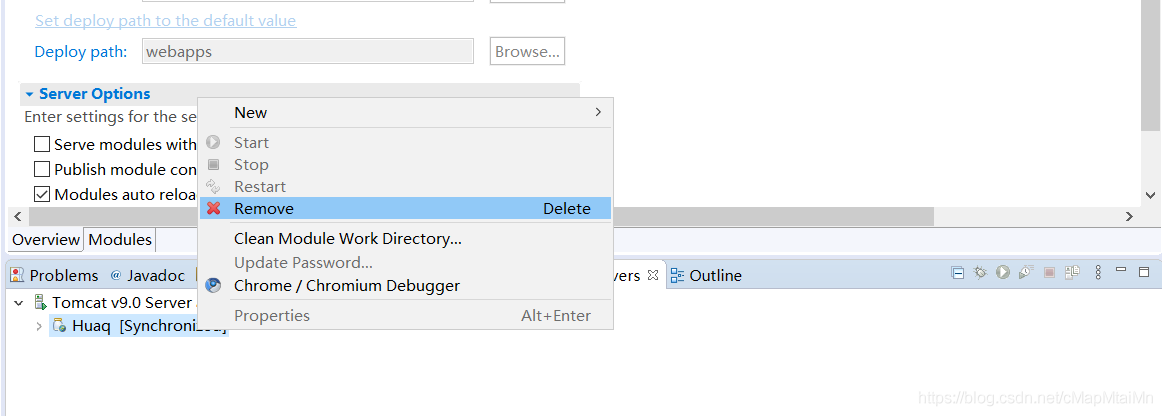
and then find the Deploy path and ServerLocation you set before
Maven download and configuration
maven download and configure
-
website https://maven.apache.org/
-
click on the download

-
in the Previous Choose archives of the Releases

-
choose to download the version of the
into to the directory selected binaries, click the apache maven – 3.6.1 track – bin. To download and unzip the zip
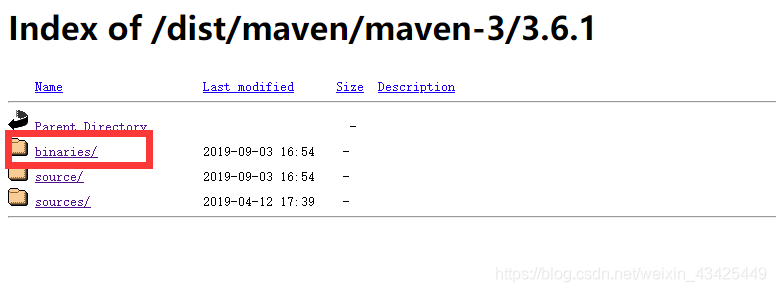
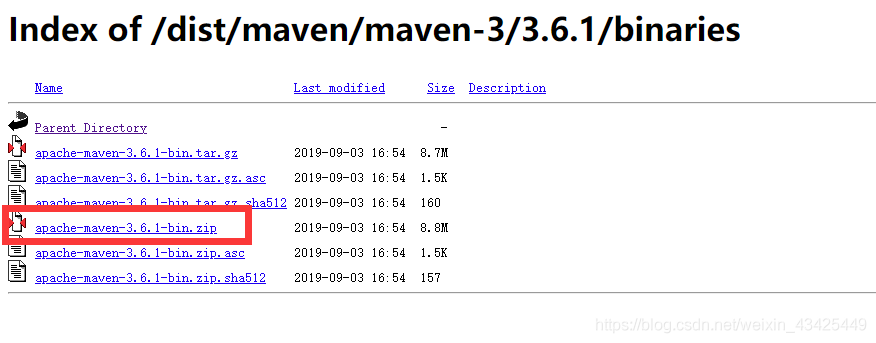
-
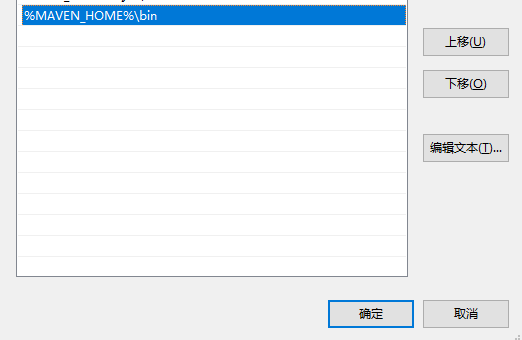
environment variable configuration of
add a new variable
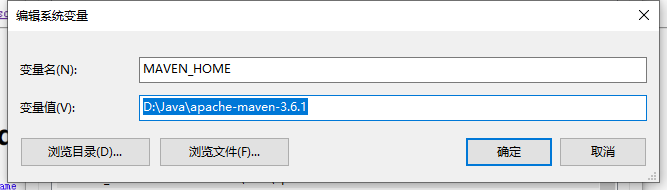
in the path configuration MAVEN_HOME % % \ bin
maven – input in the CMD version to see success
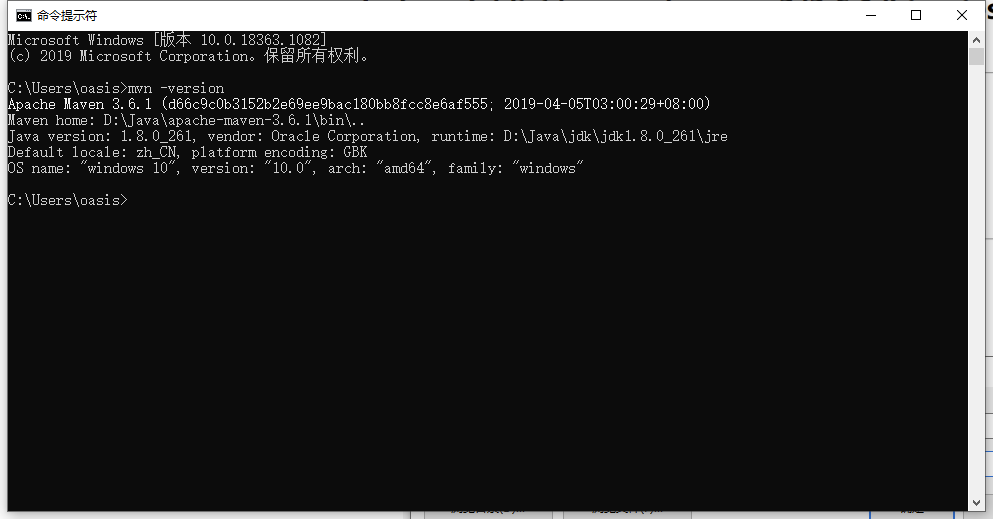
-
modify the configuration file
modify the apache maven – 3.6.1 \ conf \ Settings XML
-
specifies your warehouse location
<localRepository>D:\Java\apache-maven-3.6.1\repository</localRepository> -
configuration mirror
<mirrors> <!-- 阿里云仓库 --> <mirror> <id>alimaven</id> <name>aliyun maven</name> <url>http://maven.aliyun.com/nexus/content/repositories/central/</url> <mirrorOf>central</mirrorOf> </mirror> </mirrors> -
the idea of maven associated Settings
choose from the menu file – Settings

-
-
Maven global configuration
IDE no other Settings method to configure Maven globally (one time Maven)
recently when I was writing code with idea, I found that every time I opened a new project, I had to reconfigure Maven, which was particularly troublesome. Baidu online many idea one-time configuration Maven method.
found File--> Other Settings
but I didn't find in my idea other Settings

so I began to baidu have no other idea Solution for Settings option. Some people say File--> Settings--> Other Settings other Settings in Settings

the end result is, of course, I didn't find it.
I finally found the Default Settings changed his name Settings For New Projects

then go to configuration with respect to OK
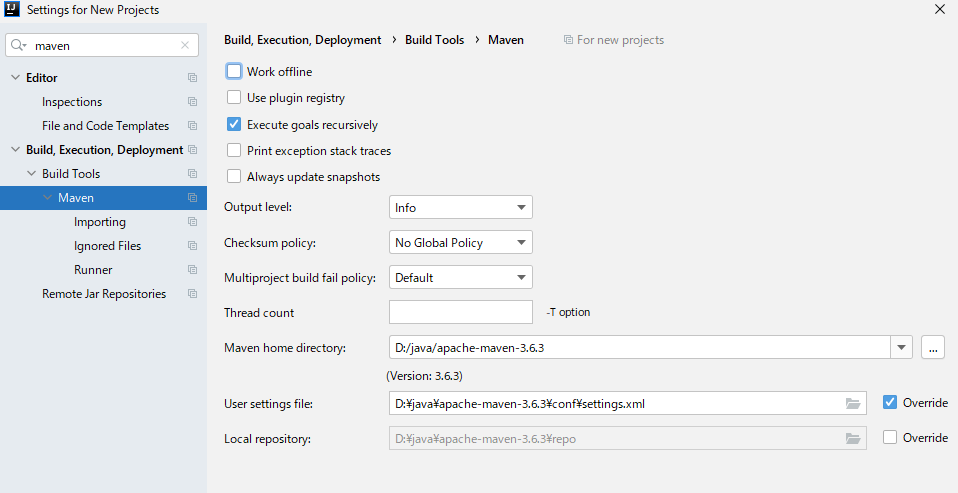
once again into the idea of Settings, found that the Maven has been configured.
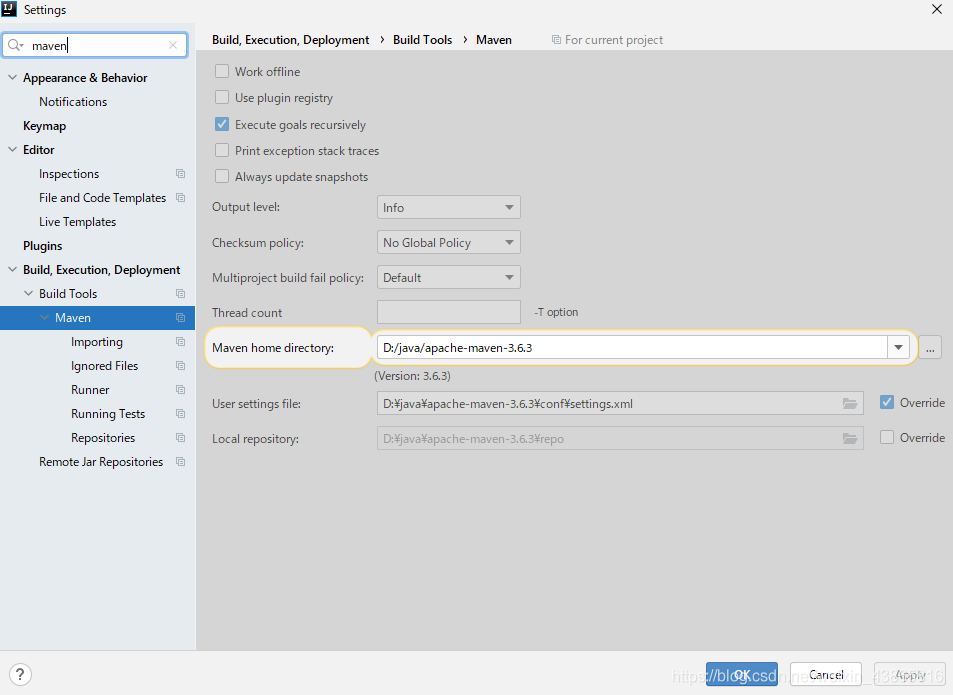
generally speaking, I'm not careful enough. I wish I could help others.
is recorded for query purpose.