Tag Archives: maven

Failed to execute goal org.apache.maven . plugins:maven-surefire-plugin :2.12.4:test

Today and yesterday, when I was doing the project and making progress, I found that MVN install could not succeed
always reported the following error:

[INFO] BUILD FAILURE
[INFO] ------------------------------------------------------------------------
[INFO] Total time: 4.698 s
[INFO] Finished at: 2020-11-15T16:58:47+08:00
[INFO] Final Memory: 11M/217M
[INFO] ------------------------------------------------------------------------
[ERROR] Failed to execute goal org.apache.maven.plugins:maven-surefire-plugin:2.12.4:test (default-test) on project CRMSystem: There are test failures.
[ERROR] 
[ERROR] Please refer to G:\Language Proctice\java\pro\20201109\CRMSystem\target\surefire-reports for the individual test results.
[ERROR] -> [Help 1]
[ERROR] 
[ERROR] To see the full stack trace of the errors, re-run Maven with the -e switch.
[ERROR] Re-run Maven using the -X switch to enable full debug logging.

some puzzled, looked up the information on the Internet but no result

Fortunately, the problem was finally solved and the solution was as follows:
2. In this case, add a method to the current test class and use the @test annotation

Zip to decompress the jar package, like the add file in the jar package

1. A JAR is just a ZIP package that can be unzip, and the possible path of unzip files is exactly the same.
2. If the JAR package contains exactly the same file, the ZIP add will not be used and a zip error will be reported: zip file structure invalid
3. Add classes to a JAR package, such as classes from the compiled classes, go to the classes directory and use the command zip-r your. Jar./*
4. The FAT JAR packaged with assembly may not contain its own classes, so use the methods in 3 to ensure that the JAR contains its own classes

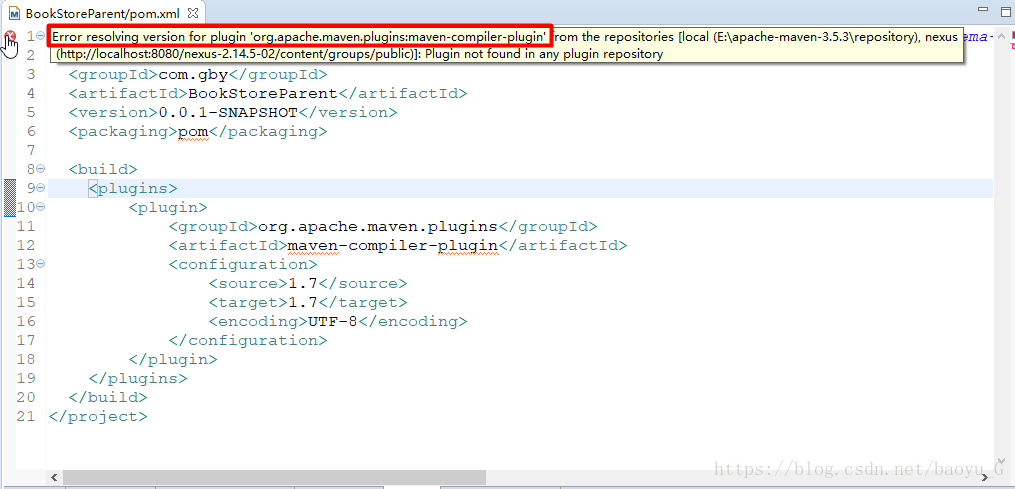
Error resolving version for plugin ‘org.apache.maven.plugins:maven-compiler-plugin’ from the repo…

Error resolving version for the plugin ‘. Org, apache maven plugins: maven — the compiler plugin ‘from the repositories [local (E: \ apache maven – 3.5.3 \ repository). Nexus
(http://localhost:8080/nexus-2.14.5-02/content/groups/public)]] : plugins not found in any Plugin repository
The above error occurred at the beginning of the parent project to create the Maven aggregation project. You can see that the maven-Complier-plugin version of org.apache.maven.plugin resolves the error. The wrong configuration is as follows:

Solution: Declare a version for the plug-in:
Add & lt; version> Tags:

  <build>
      <plugins>
          <plugin>
              <groupId>org.apache.maven.plugins</groupId>
              <artifactId>maven-compiler-plugin</artifactId>
              <version>2.5.1</version>
              <configuration>
                  <source>1.7</source>
                  <target>1.7</target>
                  <encoding>UTF-8</encoding>
              </configuration>
          </plugin>
      </plugins>
  </build>

javac Task Error source release 1.7 requires target release

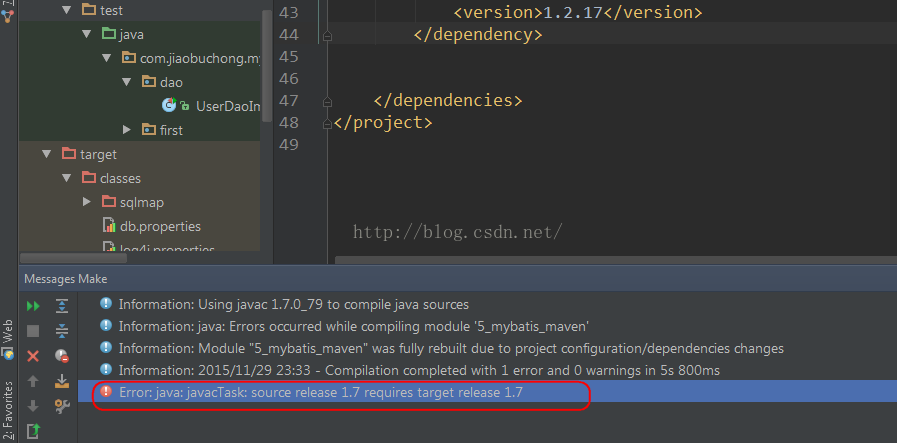
The following error occurred while compiling Java code using IDEA:
Error: Java: javacTask: source release 1.7 requires target release 1.7
Above:

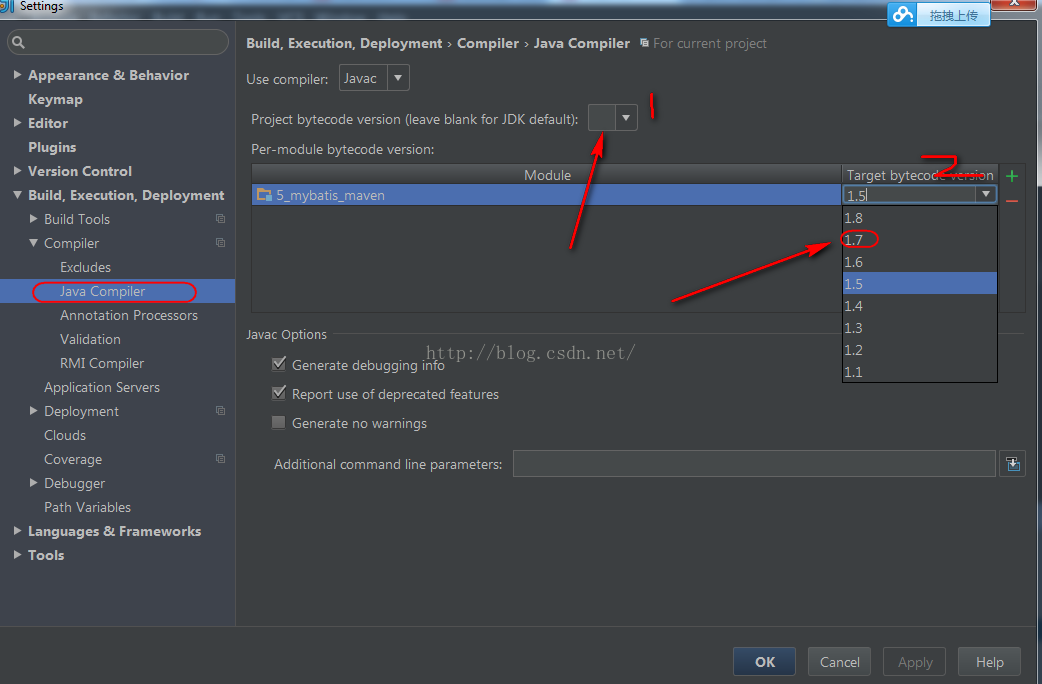
When such a problem occurs, you can set it in Settings:

Just set the compiler version to 1.7 here. The first place is where the project is set and the second place is where the module is set.

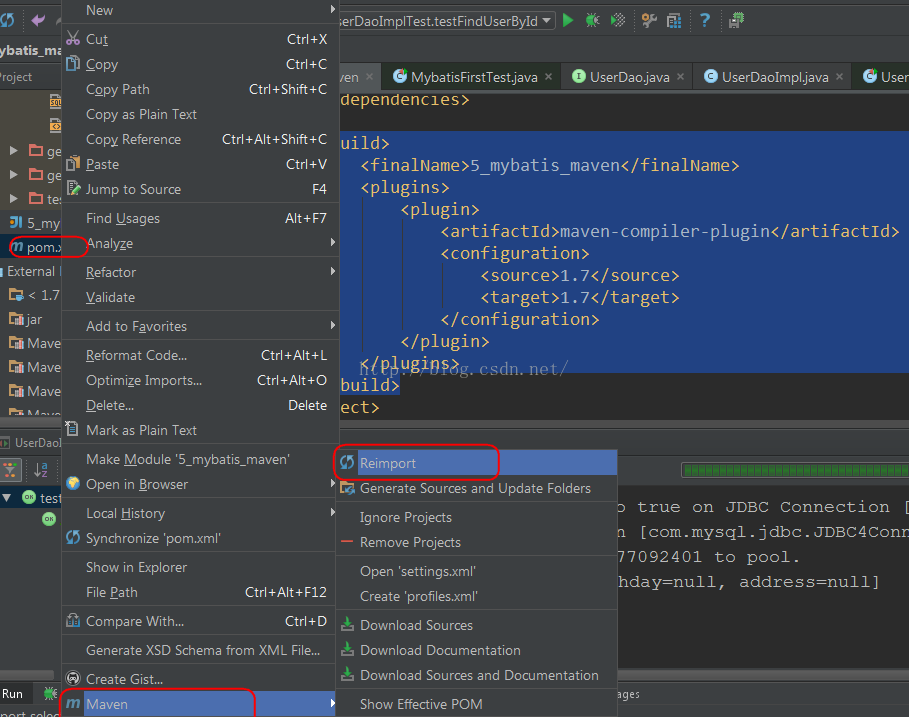
To build with Maven, specify the compiled version of Java directly in the POM, adding the following code:

    <build>
        <finalName>5_mybatis_maven</finalName>
        <plugins>
            <plugin>
                <artifactId>maven-compiler-plugin</artifactId>
                <configuration>
                    <source>1.7</source>
                    <target>1.7</target>
                </configuration>
            </plugin>
        </plugins>
    </build>

Then select pom.xml and right click, and Reimport will tell Maven to download the corresponding plug-in:


Now to compile, is not to see the rainbow in the wind and rain!
Reference link:
http://stackoverflow.com/questions/12900373/idea-javac-source-release-1-7-requires-target-release-1-7

Error parsing lifecycle processing instructions

Create a simple Maven project, modify pom.xml to add Spring Boot-related starter, as follows:

	<parent>
	    <groupId>org.springframework.boot</groupId>
	    <artifactId>spring-boot-starter-parent</artifactId>
	    <version>1.5.9.RELEASE</version>
	</parent>
	<dependencies>
	    <dependency>
	        <groupId>org.springframework.boot</groupId>
	        <artifactId>spring-boot-starter-web</artifactId>
	    </dependency>
	</dependencies>

This is the focus, but I found that I made a mistake when adding the Spring-boot-starter parent, with the following information: Error parsing processing instructions jump to definition in parent POm. Refer to the following figure:

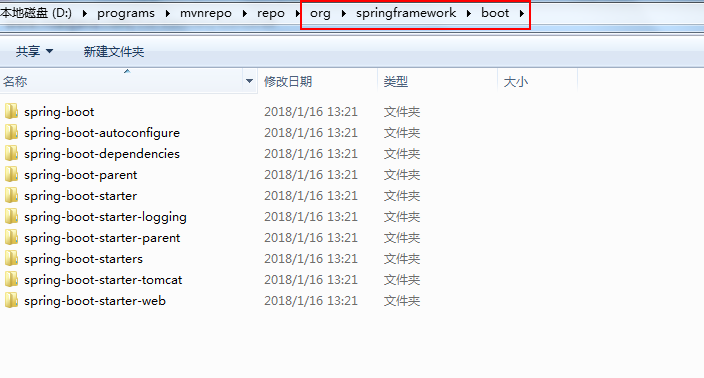
Maybe maven got mad again. Using Alt +F5 to force update the maven project, it still reported an error. Finally, the jar package under the directory org/springframework/boot in the maven repository was deleted, and the error will not be reported when updating the maven project.

Maven compilation error Checksum validation failed, error in opening zip file

Problem: Error reporting MVN compile time
1) Checksum Validation Failed, expected < ! DOCTYPE but is c53aeb6e9e798502f6e4d9283b4747c24ceba6f5.
2) read/Users/m2/repository/com/alibaba/druid/1.0.20/druid – 1.0.20. An error occurred when the jar; error in opening zip file

[INFO] --------------------------------[ jar ]---------------------------------
Downloading from codelds: https://code.lds.org/nexus/content/groups/main-repo/org/springframework/spring-core/4.2.6.RELEASE/spring-core-4.2.6.RELEASE.pom
Downloaded from codelds: https://code.lds.org/nexus/content/groups/main-repo/org/springframework/spring-core/4.2.6.RELEASE/spring-core-4.2.6.RELEASE.pom (0 B at 0 B/s)
[WARNING] The POM for org.springframework:spring-core:jar:4.2.6.RELEASE is invalid, transitive dependencies (if any) will not be available, enable debug logging for more details
Downloading from codelds: https://code.lds.org/nexus/content/groups/main-repo/org/springframework/spring-core/4.2.6.RELEASE/spring-core-4.2.6.RELEASE.jar
[WARNING] Checksum validation failed, expected <!DOCTYPE but is c53aeb6e9e798502f6e4d9283b4747c24ceba6f5 from codelds for https://code.lds.org/nexus/content/groups/main-repo/org/springframework/spring-core/4.2.6.RELEASE/spring-core-4.2.6.RELEASE.jar
[WARNING] Could not validate integrity of download from https://code.lds.org/nexus/content/groups/main-repo/org/springframework/spring-core/4.2.6.RELEASE/spring-core-4.2.6.RELEASE.jar: Checksum validation failed, expected <!DOCTYPE but is c53aeb6e9e798502f6e4d9283b4747c24ceba6f5
[WARNING] Checksum validation failed, expected <!DOCTYPE but is c53aeb6e9e798502f6e4d9283b4747c24ceba6f5 from codelds for https://code.lds.org/nexus/content/groups/main-repo/org/springframework/spring-core/4.2.6.RELEASE/spring-core-4.2.6.RELEASE.jar
Downloaded from codelds: https://code.lds.org/nexus/content/groups/main-repo/org/springframework/spring-core/4.2.6.RELEASE/spring-core-4.2.6.RELEASE.jar (7.5 kB at 1.9 kB/s)

. . . .
[ERROR] Error while reading /Users/.m2/repository/com/alibaba/druid/1.0.20/druid-1.0.20.jar; error in opening zip file
[ERROR] Error reading /Users/.m2/repository/org/hibernate/hibernate-core/4.3.11.Final/hibernate-core-4.3.11.Final.jar; error in opening zip file
[ERROR] Error reading /Users/.m2/repository/org/hibernate/hibernate-ehcache/4.3.11.Final/hibernate-ehcache-4.3.11.Final.jar; error in opening zip file
[ERROR] Error reading /Users/.m2/repository/org/quartz-scheduler/quartz/2.2.2/quartz-2.2.2.jar; error in opening zip file
[ERROR] Error when reading /Users/.m2/repository/com/oracle/ojdbc6/11.2.0.3/ojdbc6-11.2.0.3.jar; error in opening zip file
[ERROR] Error reading /Users/.m2/repository/com/alibaba/druid/1.0.20/druid-1.0.20.jar; error in opening zip file
[ERROR] Error reading /Users/.m2/repository/org/hibernate/hibernate-core/4.3.11.Final/hibernate-core-4.3.11.Final.jar; error in opening zip file
[ERROR] Error reading /Users/.m2/repository/org/hibernate/hibernate-ehcache/4.3.11.Final/hibernate-ehcache-4.3.11.Final.jar; error in opening zip file
[ERROR] Error reading /Users/.m2/repository/org/quartz-scheduler/quartz/2.2.2/quartz-2.2.2.jar; error in opening zip file
[ERROR] Error when reading /Users/.m2/repository/com/oracle/ojdbc6/11.2.0.3/ojdbc6-11.2.0.3.jar; error in opening zip file

Analysis:
Asked under Baidu, said the JAR package download problem, may be the permission of what the problem, Blah blah blah…
Solution:
Watch the pom project, refers to the remote warehouse, https://code.lds.org/nexus/content/groups/main-repo,
Browser view found that the site is being maintained, so changed the address of the remote warehouse, with the central warehouse to download the compilation can be;

How to Fix Spring Boot OTS parsing error: Failed to convert WOFF 2.0

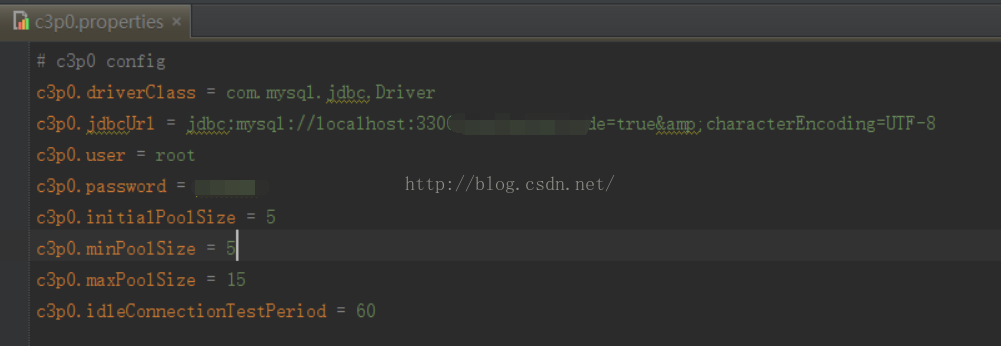
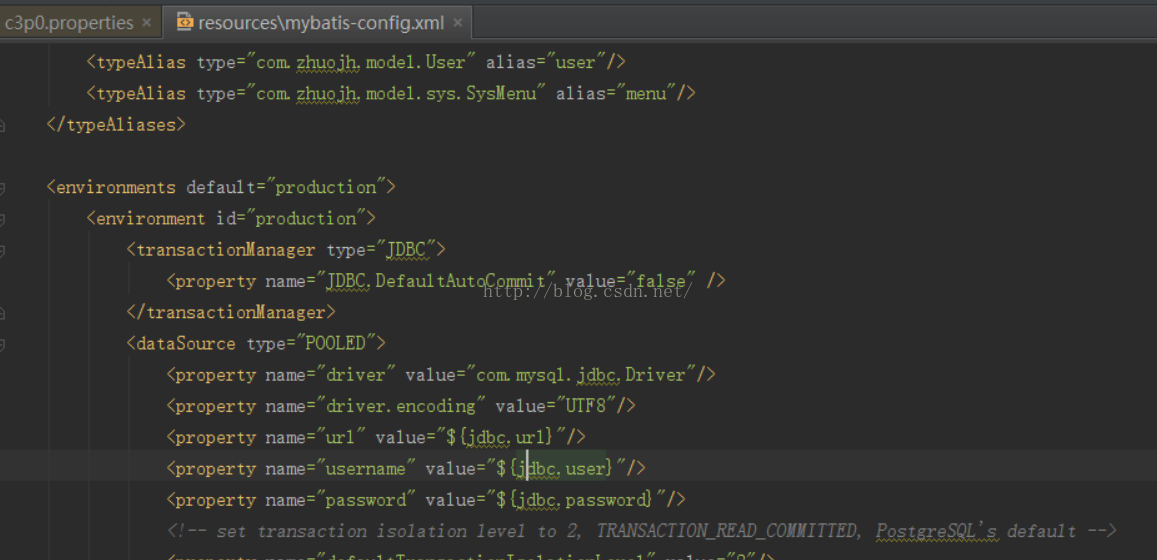
In order to facilitate the configuration in the project, often use the properties file save configuration information, project started, need to open maven filtering with the properties of the attribute value replace placeholders in the configuration file, for example, I used in the project of c3p0.. the properties file database connection information, so that every time I need to change the database connection information, only need to modify the c3p0. The properties of the file, Using the ${} read value in mybatis config. XML (see figure below), using maven’s Resource plug-in to turn Filtering on, replaces ${} in the XML file with the contents of Properties at compile time.


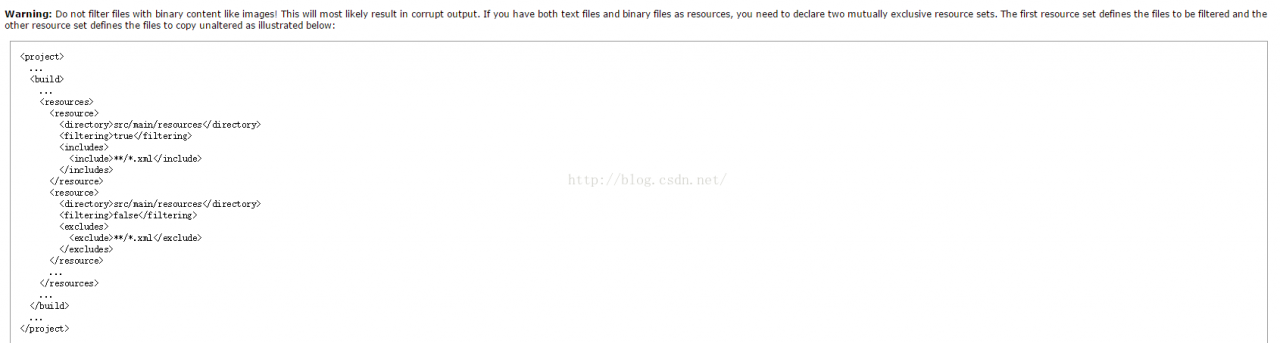
When I was using Spring Boot, all the files related to my page were placed in the SRC /resource/ directory. After starting the project, the icon of the page (font-awesome is used) could not be used. I have checked the official document and explained as follows: means that turning on The Filtering function using Maven’s Resource plug-in destroys files with binary content.
According to the official document needs to modify the configuration as follows (this project is an example) :

<resources>
            <resource>
                <directory>${project.basedir}/src/main/resources</directory>
                <filtering>true</filtering>
                <excludes>
                    <exclude>static/fonts/**</exclude>
                </excludes>
            </resource>
            <resource>
                <directory>${project.basedir}/src/main/resources</directory>
                <filtering>false</filtering>
                <includes>
                    <include>static/fonts/**</include>
                </includes>
            </resource>
        </resources>

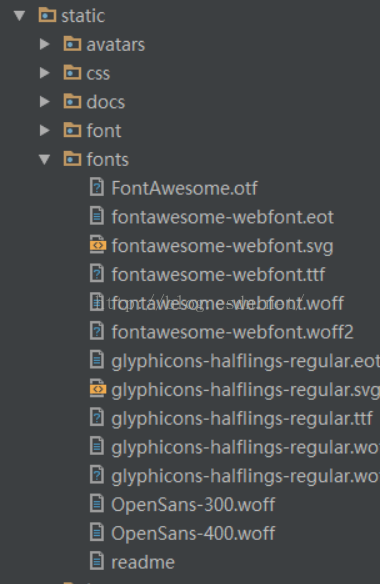
Static directory part content:


After the project is compiled, the files will not be corrupted.

Failed to read artifact descriptor for * maven

in the process of my code writing, this Maven error suddenly and inexplicably appeared,

Failed to read artifact descriptor for org.apache.hadoop:hadoop-common:jar:2.4.0

query the cause of the problem, the original version is not matched, just the problem.

so here’s the solution:

1.
After opening the project, there is a Maven projects on the right side of Intellij, click on it, there is a Lifecycle, click on it again, you can see clean , validate, compile, .... Right-click clean, select Run 'project[clean]', where the project is the actual name of our project.
2.
In the same place (Lifecycle) find the install, select Run 'project[install]', where the project is also the name of our specific project, this process is longer, if you have encountered which jar package can not be downloaded, you can manually put it into the local m2 directory.
3.
Finally, find the Maven projects and click on "Reimport All Maven Projects", this time the error "Failed to .... " Disappears, required dependencies start downloading. 

Failed to execute goal org.codehaus.mojo:exec-maven-plugin:1.6.0

1。问题描述

利用maven导包,运行Mybatis案例的主要函数时报的错。

[ERROR] 执行目标org.codehaus.mojo:exec-maven-plugin:1.6.0:exec (default-cli)项目mybatis_annotation:命令执行失败。:进程退出错误:1(退出值:1)->
[ERROR]
[ERROR]要查看错误的完整堆栈跟踪,请使用-e开关重新运行Maven。
[ERROR]使用-X开关重新运行Maven以启用完整的调试日志记录。
[ERROR] [Help 1] http://cwiki.apache.org/confluence/display/MAVEN/MojoExecutionException


[ERROR] [Help 1] http://cwiki.apache.org/confluence/display/MAVEN/MojoExecutionException

2。解决办法(三种可参考的方法)

方法一:<字体>在pom.xm中添加以下内容——<代码> exec-maven-plugin

 <build>
        <plugins>
            <plugin>
                <groupId>org.codehaus.mojo</groupId>
                <artifactId>exec-maven-plugin</artifactId>
                <version>1.6.0</version>
<!--                <executions>-->
<!--                    <execution>-->
<!--                        <goals>-->
<!--                            <goal>java</goal>-->
<!--                        </goals>-->
<!--                    </execution>-->
<!--                </executions>-->
                <configuration>
                    <classpathScope>test</classpathScope>
<!--                    <mainClass>com.itheima.test.MybatisTest</mainClass>-->
                </configuration>
            </plugin>
        </plugins>
    </build>

annotation section can not add

method 2: modify code

note: this error will sometimes occur after adding ** check the code section of the main function for errors. ** if the resource is closed before the method is called, etc.

method three: reference source inside the. Idea file to replace their own creation maven project. Idea file.

can also solve the problem of confused Chinese code, which can be seen as the reason for the initial configuration of idea. I haven’t found the specific configuration method yet, please inform me if there are specific configuration change steps or other reasons. Thanks for

here


. Analyze the reason

I replaced the main function with @test to run the Test method. The code can run normally, but it still won’t work if I replace it with the main function again. Two plugins need to be introduced here: maven-compiler-plugin and Exec-Maven-Plugin.
**maven-compiler-plugin: ** compiling Java code, you can specify the JDK version of the project source code, the compiled JDK version, and the code
exec-maven-plugin : to execute the class file, where the plug-in configuration should specify the path to execute the class. Only the exec-maven-plugin

is concerned here
4. Call database Chinese garbled code problem

1. The first type: in setting-> maven-> Runner-> VM Options
enter -dfile.encoding =gb2312
the first method is not bad, and the second method is not good, but I think it will be used in other places, code here first
2. The second type: po. XML type to add

<properties>
	<!-- 文件拷贝时的编码 -->
	<project.build.sourceEncoding>UTF-8</project.build.sourceEncoding>
	<project.reporting.outputEncoding>UTF-8</project.reporting.outputEncoding>
	<!-- 编译时的编码 -->
    <maven.compiler.encoding>UTF-8</maven.compiler.encoding>
</properties>

5. Internal label analysis

1.< goal > The exec consists of two goals :exec :exec and exec: Java. How should you choose?First, you need to remember that exec:exec is always more powerful and flexible than ExEC: Java, except that the main difference between the two is in thread management: Exec: Exec always starts a new thread and exits (closes the application) from the VM when only daemon threads are left. For exec: Java, when all non-daemon threads terminate, the daemon thread is interrupted by Joine or interrupt and should not be closed. But for the average user, the difference doesn’t matter. For both options, in general, if your project is very easy to start without setting JVM parameters, system properties, or command-line arguments, use exec: Java,

2.< classpathScope >

compile
is compile by default, so we don’t configure anything, so we just mean compile. Compile means that the dependent project needs to participate in the compilation of the current project. Of course, subsequent tests, the run cycle also participate in the compilation, so it is a strong dependency. When packing, you usually need to include it.

test
scope for test indicates that the dependent project only participates in test-related work, including compiling and executing the test code. Typical examples are junit.

Runntime indicates that the dependent project does not need to participate in compiling the project, but it does need to participate in the later test and run cycles. Compared to compile, we skip compilation, which, frankly, isn’t very different from compile in terminal projects (non-open source, internal enterprise systems). Relatively common implementation such as JSR×××, the corresponding API JAR is compile, the specific implementation is runtime, compile only needs to know the interface is enough. A good example is the Oracle JDBC driver package, which generally has a scope of runntime. In addition, the dependency of runntime is usually used with optional, which is true. I can do it with A, or I can do it with B.

Provided provided means you can package it without having to package it, and other facilities (Web Container) provide it. In fact, this dependency can theoretically be involved in compiling, testing, running, and so on. So we compile, but we do exclude in the packaging phase.

In terms of engagement, it also provides the same. However, dependencies are not captured from maven repository, but from local file system, which must be used with the systemPath attribute.
ERROR: Failed to parse POMs (How to Fix)

recently had this problem while working on the Jenkins build release,

ERROR: Failed to parse POMs
java.io.IOException: Can't read POM: /opt/gamma/.jenkins/jobs/indra-parent/workspace/pom.xml
	at jenkins.plugins.maveninfo.extractor.properties.PomPropertiesFinder.findProperties(PomPropertiesFinder.java:54)
	at jenkins.plugins.maveninfo.extractor.MavenInfoExtractor.extract(MavenInfoExtractor.java:58)
	at jenkins.plugins.maveninfo.extractor.MavenInfoEnvironment.tearDown(MavenInfoEnvironment.java:42)
	at hudson.maven.MavenModuleSetBuild$MavenModuleSetBuildExecution.doRun(MavenModuleSetBuild.java:882)
	at hudson.model.AbstractBuild$AbstractBuildExecution.run(AbstractBuild.java:534)
	at hudson.model.Run.execute(Run.java:1720)
	at hudson.maven.MavenModuleSetBuild.run(MavenModuleSetBuild.java:531)
	at hudson.model.ResourceController.execute(ResourceController.java:98)
	at hudson.model.Executor.run(Executor.java:410)

maven has actually been built and turned out to be a pom.xml header

The error was caused by a corrupt XML header which contained merge conflicts.

head is normal after modification for the following

<?xml version="1.0" encoding="UTF-8"?>
<project xmlns="http://maven.apache.org/POM/4.0.0" xmlns:xsi="http://www.w3.org/2001/XMLSchema-instance"
		 xsi:schemaLocation="http://maven.apache.org/POM/4.0.0 http://maven.apache.org/xsd/maven-4.0.0.xsd">


Solve the error of POM file failed to read artifact descriptor for XXX under IntelliJ idea

I tried to run one of the company’s self-developed projects today, but found that the pom file always Failed to read the artifact descriptor for XXX ; The diagram below

but a closer look, the some briefcases have ah, why there will be such a mistake?So search the Internet for various solutions,

try mvn-u clean install and maven Reimport even change maven setting. XML file .

finally found a feasible scheme, the specific operation is as follows:

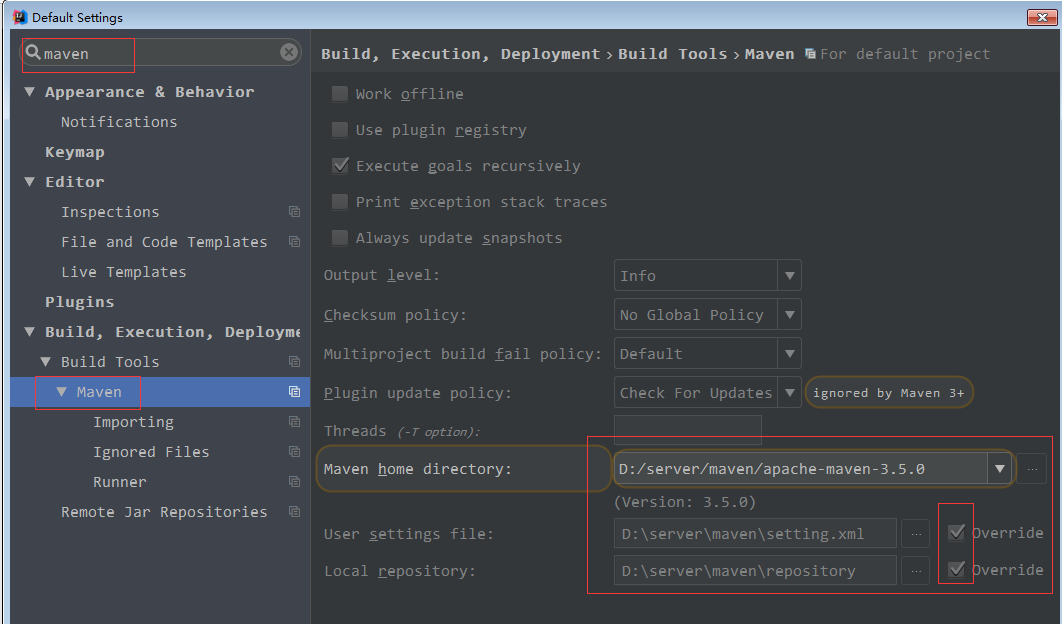
in idea interface click File -> Settings… -> Build, Execution, Deployment -> Build Tools Maven

on the right hand side

Maven home directory select your own real Maven directory;

User Settings file select your own custom setting.xml file (if you have one, choose the one that comes with mavan)

Local repository > >

after the change, save exit setup interface, error no longer!