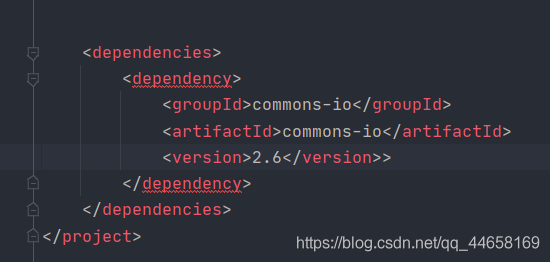
Element ‘dependency’ cannot have character [children], because the type’s content type is element-on
Note when the problem is solved and copied. I have an extra> space and symbol problem. No.
Tag Archives: maven
Application of IntelliJ idea in Maven project pom.xml Add dependency
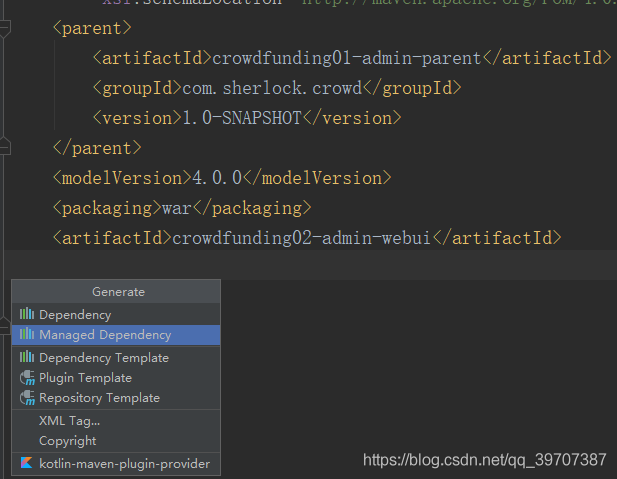
You can quickly add dependencies by using the shortcut Alt + Insert key at the location where you want to add them
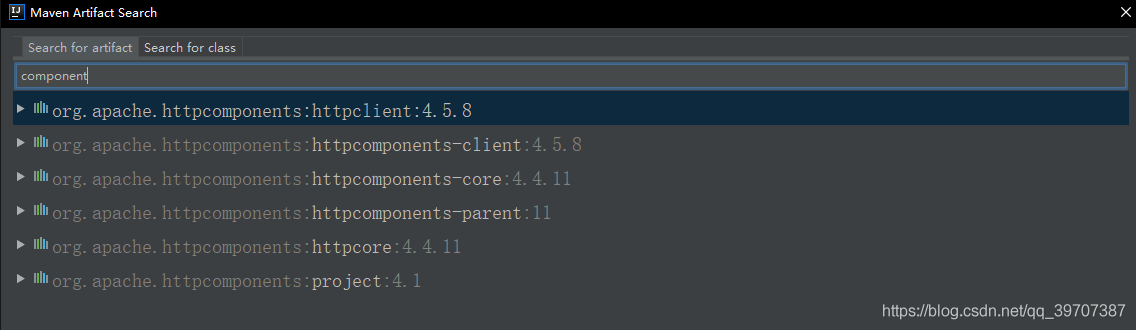
The first feature allows you to search directly for the module name and then add it

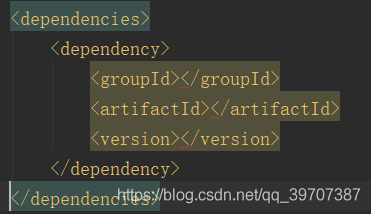
The Dependency Template helps us generate the corresponding tags directly in the XML

We need to complete the information ourselves
3. Idea creates a springboot project, and spring initializer reports an error Error:connect timed out
Error: Connect timed out when creating SpringBoot + Maven project today.
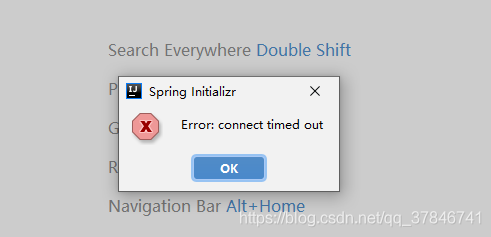
Check the problem of HTTP proxy of IDEA, the solution is as follows:
The first kind of
1. Open the file – Settings
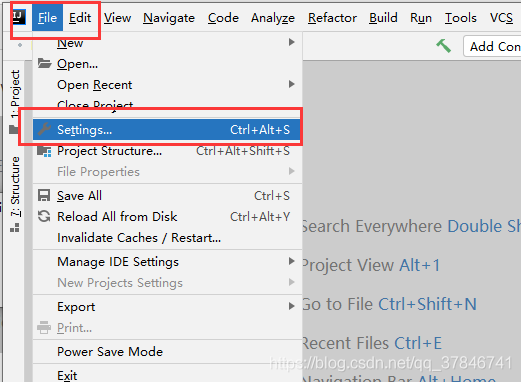
2. Select Appearance& Behavior — System Settings — HTTP Proxy — Check Connection on the right — type https://start.spring.io
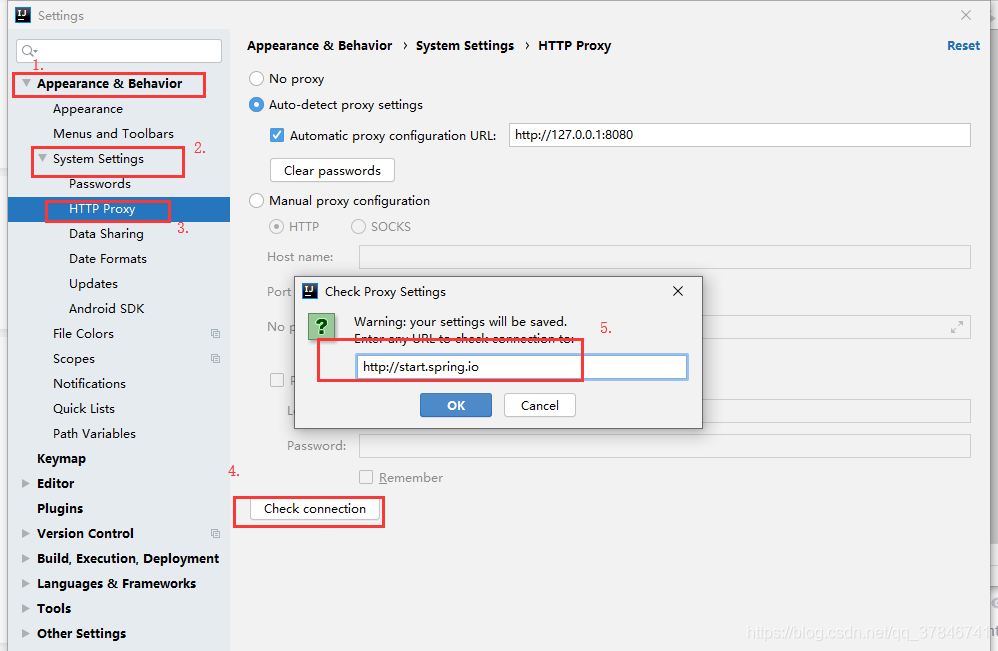
If it does, you can rewrite the build project.
If the connection fails and the following image is shown, you can try method two.
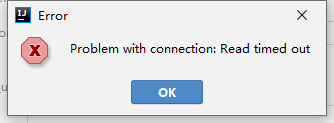
The second,
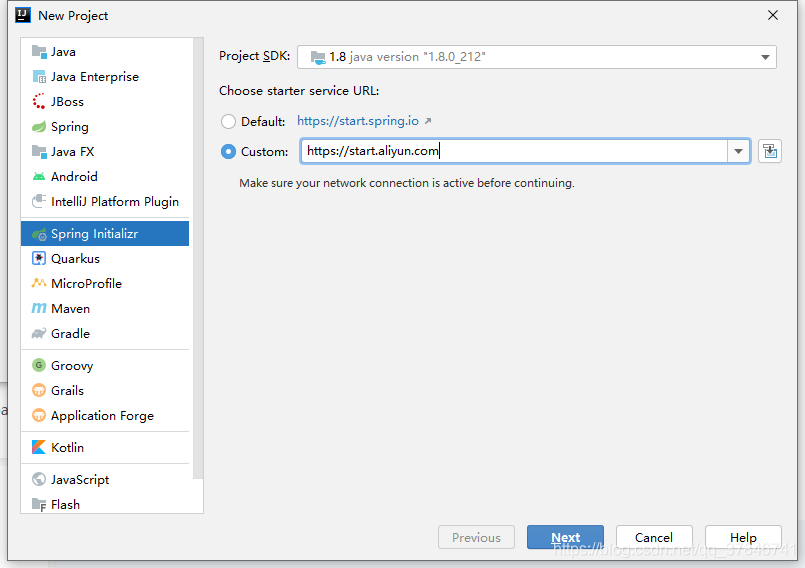
1. When creating a new project, select the source of Ali Cloud under Spring Initializr and enter https://start.aliyun.com under Custom
Create a new project with SpringBoot + Maven
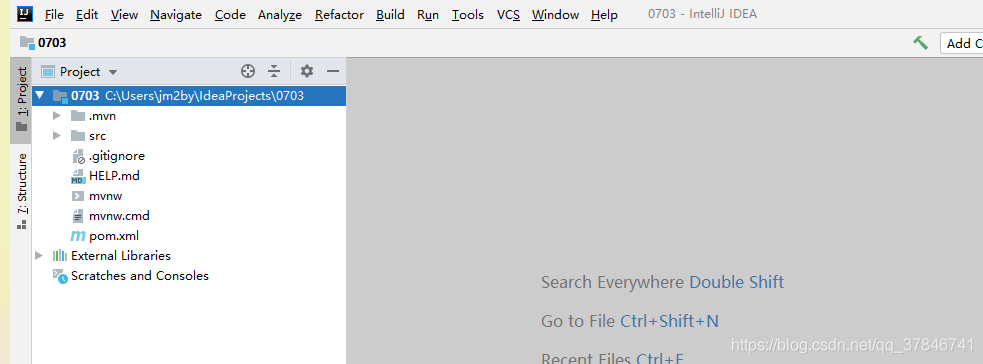
2. Create successfully!
Check the problem of HTTP proxy of IDEA, the solution is as follows:
The first kind of
1. Open the file – Settings
2. Select Appearance& Behavior — System Settings — HTTP Proxy — Check Connection on the right — type https://start.spring.io
If it does, you can rewrite the build project.
If the connection fails and the following image is shown, you can try method two.
The second,
1. When creating a new project, select the source of Ali Cloud under Spring Initializr and enter https://start.aliyun.com under Custom
Create a new project with SpringBoot + Maven
2. Create successfully!
New Maven project– pom.xml report errors
Welcome to blog using the Markdown editor
Sometimes when we create new Maven projects, the pom.xml file likes to report errors (especially on the first line!). . However, our Settings configuration and so on are all fine. You may be confused at this point, but that’s okay. Follow these steps and give it a try. It might solve your problem.
The reason: Eclipse integrated Maven had issues (version issues or site access issues), and the newly installed Maven was not successfully added to the M2e plug-in
The solution is as follows:
Step.1 Go to the official website to download the appropriate version of Maven and store it in the appropriate path (or check the missing JAR file in the report — the corresponding error message will provide the URL to download the missing file — copy it to the appropriate path in the local repository).
Step.2 Open Eclipse Preferences -> Maven-> UserSettings changes the Global Settings and UserSettings to conf/settings.xml in Maven that you just downloaded
Step. 3 the Eclipse preferences – & gt; Maven-> * * * Click on Add to Add the Maven folder you just downloaded, and then check your own version instead of using the built-in one
Step.4 After the above two steps, you have successfully integrated the Maven version you downloaded with Eclipse, and then right-click on the project that reported an error before, and right-click Run As ->; Maven clean, then Run As ->; Maven install
ep.5: project right-click ->; Maven-> The Update Project step takes a bit of time and you can see if the Update has been completed by looking at the bottom right corner of the screen.
Failed to execute goal
To summarize, Maven packaging, a project engineering development tool called Idea14, uses JDK version 1.8
1. You need to close the idea before packaging, otherwise part of the files will not be deleted when MVN is clean, and files will also be lost when MVN is package.
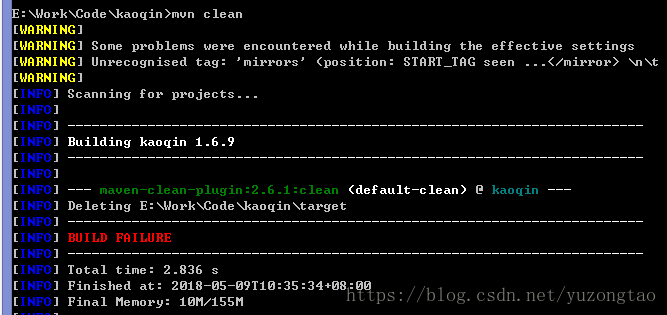
2. MVN package packaging ERROR: [ERROR] Failed to execute goal. Org. Apache maven. Plugins: maven – clean – plugin: 2.6.1: clean (default – the clean) on the project
Solutions:
1. The POM configuration for the Maven plug-in is as follows:
1. You need to close the idea before packaging, otherwise part of the files will not be deleted when MVN is clean, and files will also be lost when MVN is package.
2. MVN package packaging ERROR: [ERROR] Failed to execute goal. Org. Apache maven. Plugins: maven – clean – plugin: 2.6.1: clean (default – the clean) on the project
Solutions:
1. The POM configuration for the Maven plug-in is as follows:
<plugin>
    <groupId>org.apache.maven.plugins</groupId>
    <artifactId>maven-compiler-plugin</artifactId>
    <version>3.1</version>
    <configuration>
        <verbose>true</verbose>
        <fork>true</fork>
        <executable>${JAVA_HOME}/bin/javac</executable>
    </configuration>
</plugin>
${JAVA8_HOME} (${JAVA8_HOME}, ${JAVA8_HOME})
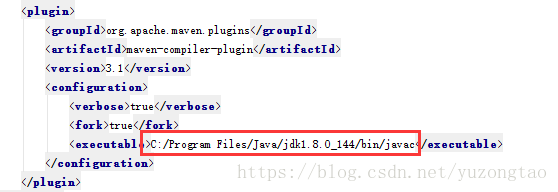
The ${JAVA8_HOME} variable is configured in settings.xml as follows:
<profile>
            <id>custom-compiler</id>
            <properties>
                <JAVA8_HOME>C:\Program Files (x86)\Java\jdk1.8.0_73</JAVA8_HOME>
            </properties>
</profile>
Of course this should be enabled, so the settings.xml file should also have the following configuration:
<activeProfiles>
        <activeProfile>custom-compiler</activeProfile>
</activeProfiles>
Maven has a default repository. M2 repository and a default settings.xml configuration file. This default settings.xml file also adds a JAVA_HOME variable, and the compile is completed. If you are using the MVN package command in the CMD window, you are not using the settings.xml in idea. You are using the settings.xml in E: Tools\ maven \conf. You are using the Settings in E: Tools\ maven \conf. Because there is no default configuration to compile using the 1.8 version of the JDK, the JAVA_HOME could not be found before, resulting in a compilation failure.
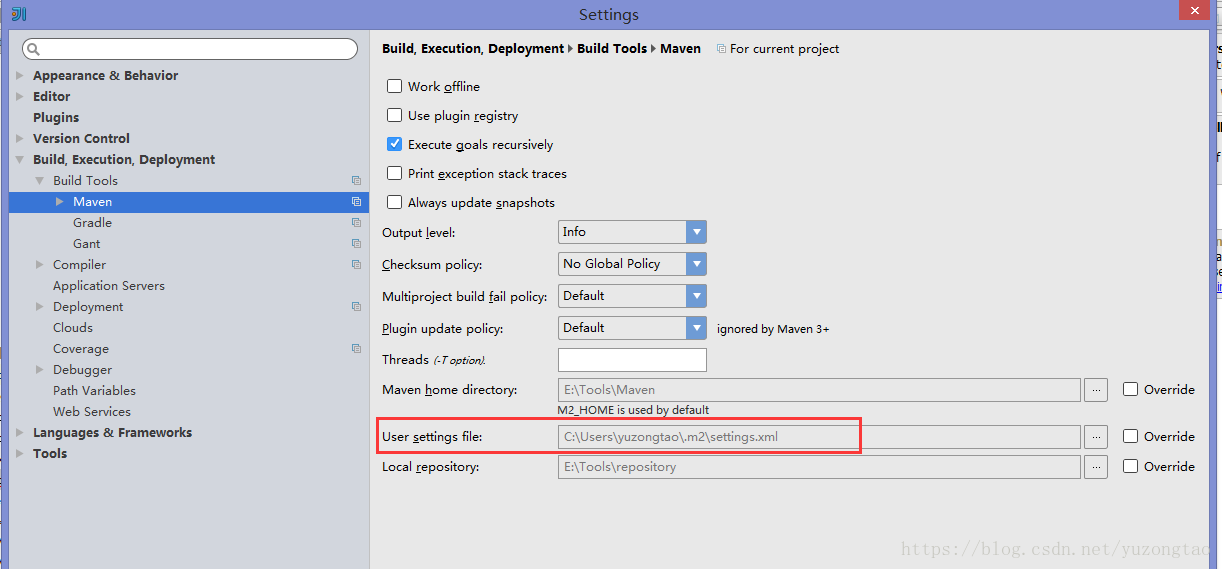
Import Maven project pom.xml File error
Importing Maven project POM file error:
Execution default-resources of goal org.apache.maven.plugins:maven-resources-plugin:2.5:resources failed: Plugin org.apache.maven.plugins:maven-resources-plugin:2.5 or one of its dependencies could not be resolved: Failure to transfer commons-cli:commons-cli:jar:1.0 from http://repo.maven.apache.org/maven2 was cached in the local repository, resolution will not be reattempted until the update interval of central has elapsed or updates are forced. Original error: Could not transfer artifact commons-cli:commons-cli:jar:1.0 from/to central (http://repo.maven.apache.org/maven2): connection timed out to http://repo.maven.apache.org/maven2/commons-cli/commons-cli/1.0/commons-cli-1.0.jar (org.apache.maven.plugins:maven-resources-plugin:2.5:resources:default-resources:process-resources)
code> c>userprofile %\.m2\repository
for/r> in (*. LastUpdated) do del % I
and>ect maven-> Update the project.
About maven Pom.xml Personal solutions to reporting errors!!!
A personal solution for Maven’s pom.xml error!!
When importing someone else’s project or creating a project using Maven from the command line, you may encounter errors in the pom.xml file (as shown below).
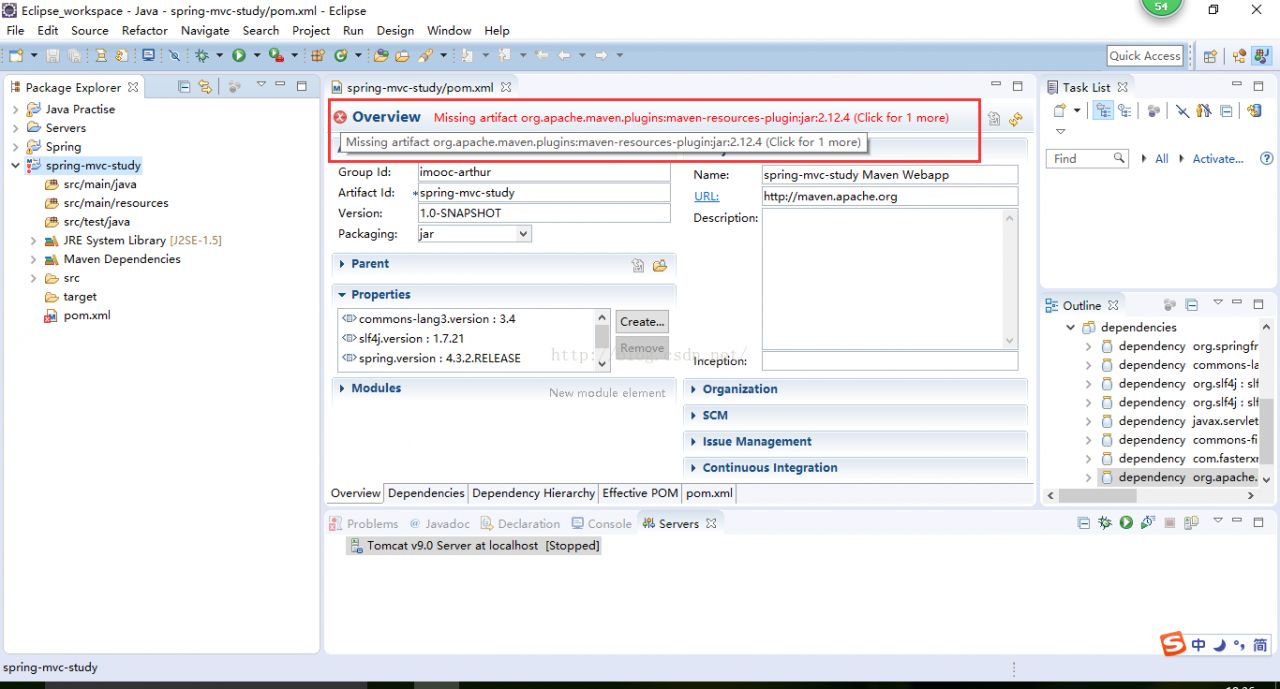
The reason is the lack of a corresponding JAR package. (It may be that the corresponding JAR package failed to download locally when we updated it) we need to update and download the corresponding JAR package by ourselves; Here are the steps:
C:\Users\ Tian bin\.m2\ Repository: C:\Users\ Tian bin\.m2\ Repository
2. Go to the maven-resources-plugin folder with the correct version number (2.12.4 for me) and click on it. C:\Users\ Tian bin\.m2\ Repository \org\ Apache \ Maven \ Plugins \ Maven-Resources-Plugin
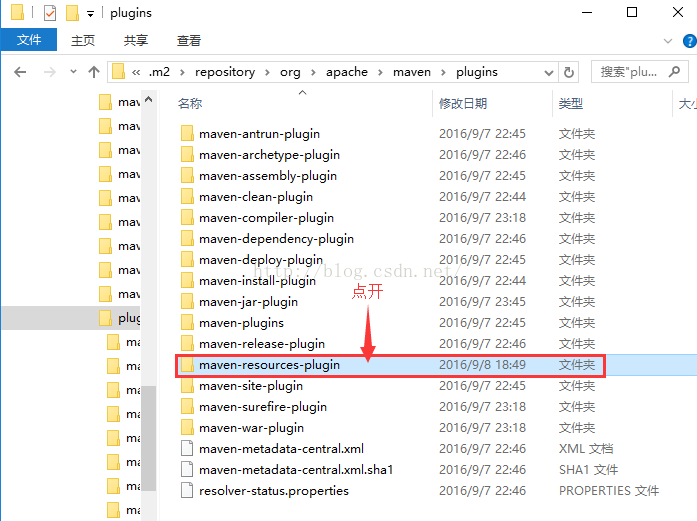

3, Delete all files ending with lastUpdated.
4. Open Eclipse, right click on our project Maven> Update project…
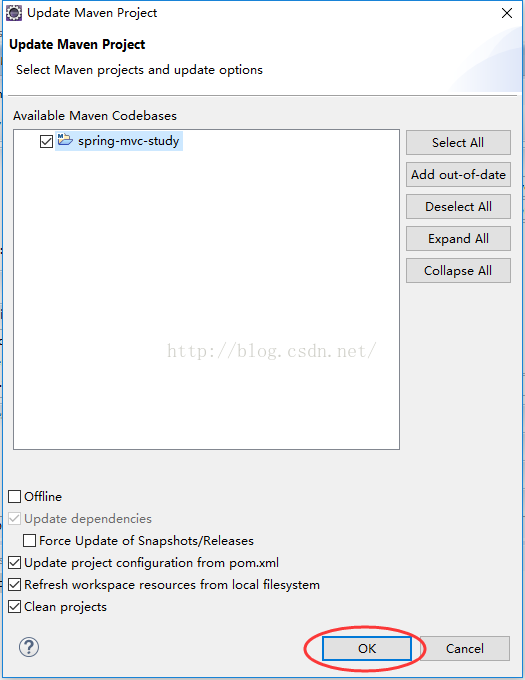
5. Click OK!
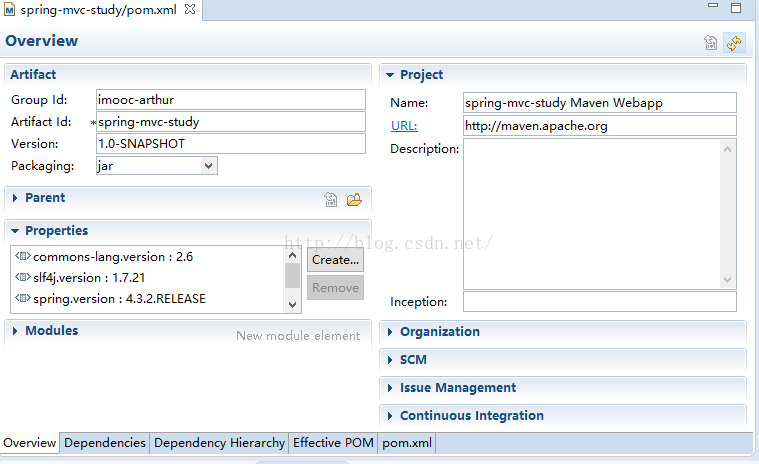
Note: if there are other similar this kind of mistake in the pom, in the same way, according to the error message, you know which jar package, lack is to own Maven download updates to the local path to find the jar location (jar is consistent with the name and the name of the folder), delete all ends in lastUpdated files in the folder, finally open eclipse, right-click on our engineering Maven> Update project… , click OK. That’s it!!
When importing someone else’s project or creating a project using Maven from the command line, you may encounter errors in the pom.xml file (as shown below).
The reason is the lack of a corresponding JAR package. (It may be that the corresponding JAR package failed to download locally when we updated it) we need to update and download the corresponding JAR package by ourselves; Here are the steps:
C:\Users\ Tian bin\.m2\ Repository: C:\Users\ Tian bin\.m2\ Repository
2. Go to the maven-resources-plugin folder with the correct version number (2.12.4 for me) and click on it. C:\Users\ Tian bin\.m2\ Repository \org\ Apache \ Maven \ Plugins \ Maven-Resources-Plugin
3, Delete all files ending with lastUpdated.
4. Open Eclipse, right click on our project Maven> Update project…
5. Click OK!
Note: if there are other similar this kind of mistake in the pom, in the same way, according to the error message, you know which jar package, lack is to own Maven download updates to the local path to find the jar location (jar is consistent with the name and the name of the folder), delete all ends in lastUpdated files in the folder, finally open eclipse, right-click on our engineering Maven> Update project… , click OK. That’s it!!
Error in the project tag in the POM file of Maven project: failure to transfer
Question:
The Maven project was detected from SVN today, and the project label of the POM file after it was imported into ECLISE reported an error. The error content was very long, and the initial content was roughly Failure to Transfer…. + the version of a JAR package +…..
Solution:
Select the error report item, right-click on the item –>; Maven – & gt; Update Project, Force Updateo of Snapshots/Releases:
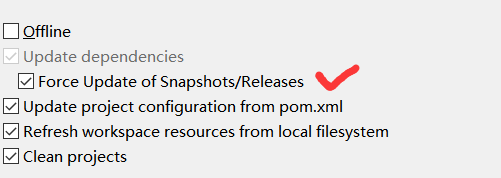
Just wait for the execution to finish, at least that’s how my error was resolved.
The Maven project was detected from SVN today, and the project label of the POM file after it was imported into ECLISE reported an error. The error content was very long, and the initial content was roughly Failure to Transfer…. + the version of a JAR package +…..
Solution:
Select the error report item, right-click on the item –>; Maven – & gt; Update Project, Force Updateo of Snapshots/Releases:
Just wait for the execution to finish, at least that’s how my error was resolved.
Maven project pom.xml The solution of error report in execution of
1. Preferences -> Maven-> Errors/Warnings-> Select Ignore for Plugin execution not covered by lifecycle configuration
In & lt; 2. plugins> Add a
In & lt; 2. plugins> Add a
Maven’s jar package conflict; Maven’s introduction
How to resolve JAR package conflicts in Maven?Because of Maven’s implicit dependency on JARs, it can cause JAR package version conflicts in projects.
Maven comes with two ways:
Path Proximity Principle: Dependency on the path passed to the near priority.
Preference Declare Principle: Dependencies are defined in the POM file. The dependencies declared first prevail.
Manual configuration in two ways:
Method: by excluding rely on exclusion tag
lock version: through dependencyManagement lock version directly.
What is Maven and its life cycle?Maven is a project management tool that manages the entire life cycle of a project and manages the dependent JARs of a project. The life cycle of Maven includes: clean up, compile, test, package, install, and deploy with the following commands: MVN compile Java files into class files and output them to target directory. MVN test runs unit test classes. MVN package deploys include install. MVN deploy include install. And upload the project to the remote repository
Idea Maven project uses package to package and report error (package does not exist)
Scene: I pass File -> Project Structure -> Modules and Libraries have added an external Jar that runs normally in the project, but the following error occurred when packaging with Maven’s package

Solution: Configure the Jar to a pom.xml file and you can package it properly
Steps:
1. Open the Terminal execution (Terminal window at the bottom of the IDEA interface)
Solution: Configure the Jar to a pom.xml file and you can package it properly
Steps:
1. Open the Terminal execution (Terminal window at the bottom of the IDEA interface)
mvn install:install-file -DgroupId=com.external -DartifactId=http-sdk -Dversion=1.2.6-SNAPSHOT -Dpackaging=jar -Dfile=C:\Users\Administrator\Desktop\BOOT-INF\lib\http.jar 2. Add the following dependencies to the pom.xml file
<dependency>
    <groupId>com.souche</groupId>
    <artifactId>msgcenter-sdk</artifactId>
    <version>1.2.6-SNAPSHOT</version>
</dependency>
The -dgrouPID corresponds to the groupid-dartifactid in the POM and the artifactitid-Dversion corresponds to the version-dpackaging import package which is a TYPE of JAR and that’s the jar-DFile where you put the JAR that you downloaded from the POM
Once you run the command, you can see the corresponding JAR in the local Maven repository
And then re-execute
Compile and package MVN Clean Package (install)
Or choose the right side of the IDEA interface, select the Maven status bar and click package packaging
The required configuration in the POM.xml file
<build>
    <plugins>
        <plugin>
            <groupId>org.springframework.boot</groupId>
            <artifactId>spring-boot-maven-plugin</artifactId>
        </plugin>
    </plugins>
</build>
Maven compilation error: package does not exist jar package does not exist
A compilation failure was encountered while using the Maven command MVN package to package. Maven prompted the compilation error: the package does not exist JAR package. After checking, it was the use of non-Maven repository jars in the project, i.e., the use of local jars, which caused Maven to compile without finding jars. The solution is to configure POm.XML to add the path to the local JAR so that Maven can identify and find the local JAR at compile time.
The configuration of the Maven-compiler-plugin in POM.xml is referred to below. The focus is on the configuration of the compilerArguments element. To add a native JAR package, just add a line to the compilerArguments element.
< compilerArguments>
< extdirs> ${project.basedir}/src/main/webapp/WEB-INF/lib< /extdirs>
< /compilerArguments>
The configuration of the Maven-compiler-plugin in POM.xml is referred to below. The focus is on the configuration of the compilerArguments element. To add a native JAR package, just add a line to the compilerArguments element.
< compilerArguments>
< extdirs> ${project.basedir}/src/main/webapp/WEB-INF/lib< /extdirs>
< /compilerArguments>
The pom.xml build configuration is referenced below.
<build>
		<finalName>test</finalName>
		<plugins>
			<plugin>
				<groupId>org.apache.maven.plugins</groupId>
				<artifactId>maven-compiler-plugin</artifactId>
				<configuration>
					<source>1.8</source>
					<target>1.8</target>
					<compilerArguments>
					<extdirs>${project.basedir}/src/main/webapp/WEB-INF/lib</extdirs>
					</compilerArguments>
				</configuration>
			</plugin>
			<plugin>
				<groupId>org.apache.maven.plugins</groupId>
				<artifactId>maven-surefire-plugin</artifactId>
				<configuration>
					<skipTests>true</skipTests>
					<testFailureIgnore>true</testFailureIgnore>
				</configuration>
			</plugin>
		</plugins>
</build>