Tag Archives: maven

Failed to resolve: com.github

Error after running someone else’s Demo:

Failed to resolve: com.github.yangjie10930:EpMedia:v0.8.2

Solutions:
1 in project build.gradle Join in

allprojects {
    repositories {
        jcenter()
        maven { url "https://jitpack.io" }
    }
}

Full version

buildscript {
    repositories {
        jcenter()
    }
    dependencies {
        classpath 'com.android.tools.build:gradle:2.3.3'

        // NOTE: Do not place your application dependencies here; they belong
        // in the individual module build.gradle files
    }
}

allprojects {
    repositories {
        jcenter()
        maven { url "https://jitpack.io" }
    }
}

task clean(type: Delete) {
    delete rootProject.buildDir
}

2 add in module

 compile ('com.github.yangjie10930:EpMedia:v0.8.2'){
        transitive = true
    }

Full version

apply plugin: 'com.android.application'

android {
    compileSdkVersion 25
    buildToolsVersion "25.0.0"
    defaultConfig {
        applicationId "com.joe.epmediademo"
        minSdkVersion 18
        targetSdkVersion 25
        versionCode 1
        versionName "1.0"
        testInstrumentationRunner "android.support.test.runner.AndroidJUnitRunner"
    }
    buildTypes {
        release {
            minifyEnabled false
            proguardFiles getDefaultProguardFile('proguard-android.txt'), 'proguard-rules.pro'
        }
    }


}

dependencies {
    compile fileTree(dir: 'libs', include: ['*.jar'])
    compile 'com.android.support:appcompat-v7:25.1.0'
    compile 'com.android.support:support-v4:25.1.0'
    compile 'com.android.support.constraint:constraint-layout:1.0.2'
    compile ('com.github.yangjie10930:EpMedia:v0.8.2'){
        transitive = true
    }
    testCompile 'junit:junit:4.12'
}
Failed to resolve: failed to resolve

Failed to resolve: failed to resolve*


Background: some time ago, I did a PDF reading function, but when I introduced the remote warehouse dependency package, Android studio always reported errors. Failed to resolve: * well, I don’t need to say much nonsense. I’ll post the process of my solution for the reference of workers.


Premise: delete gradle.properties Then file – & gt; setting – & gt; proxy (search) – & gt; noproxy.
1.
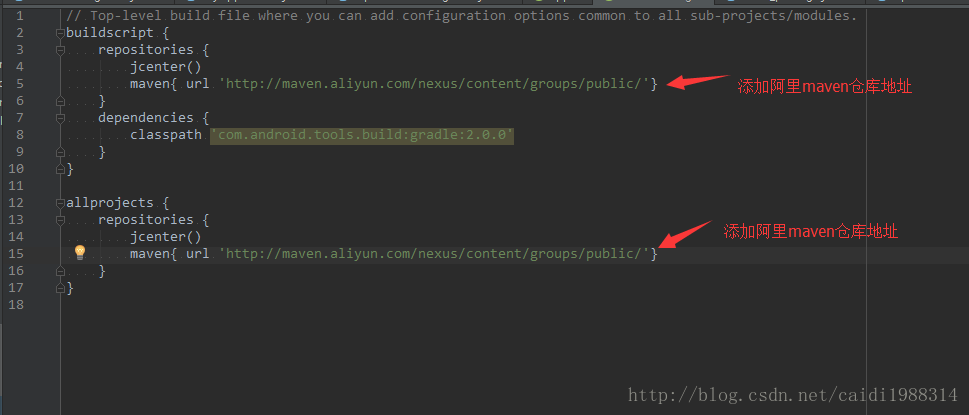
2. Add the address of Alibaba cloud Maven warehouse in Android studio. As shown in the following figure:

3.

org.apache.jasper . jasperexception: unable to compile class for jsp: error resolution

1、 The main reason for this problem is that the version of servlet API does not match the version of Tomcat.

2、 Solutions.
I’m changing the version of Tomcat.
Put the plug-in code below into the pom.xml In the middle.

<!--<build>-->
    <!--<plugins>-->
      <!--<plugin>-->
        <!--<groupId>org.apache.tomcat.maven</groupId>-->
        <!--<artifactId>tomcat7-maven-plugin</artifactId>-->
        <!--<version>2.2</version>-->
        <!--<configuration>-->
          <!--<port>8888</port>-->
        <!--</configuration>-->
      <!--</plugin>-->
    <!--</plugins>-->
  <!--</build>-->

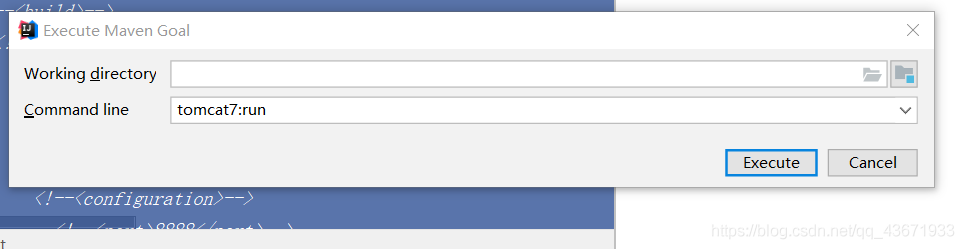
Start with tomcat7: run.

Start with tomcat7.
The problem can be solved.

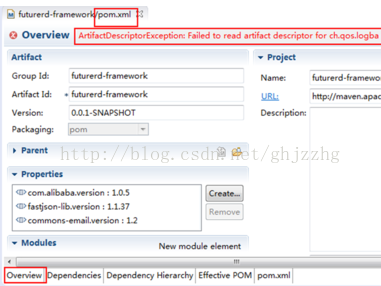
Research on Maven management of Java project pom.xml The jar package error is reported, but the project is running normally

Today, I always make mistakes when building projects. I suspect that there is something wrong with the jar package, so I delete all the jar packages and reload them into the Maven warehouse,

Think very good, but made a mistake! POM file error, how to update all useless, delete jar package reload also can’t.

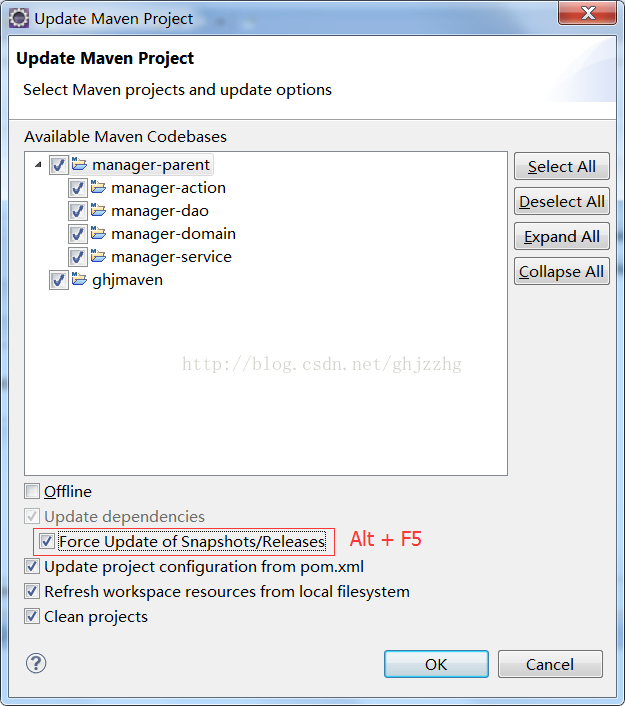
Finally, in the life and death of the occasion, choose the forced refresh, just like, then remember it!

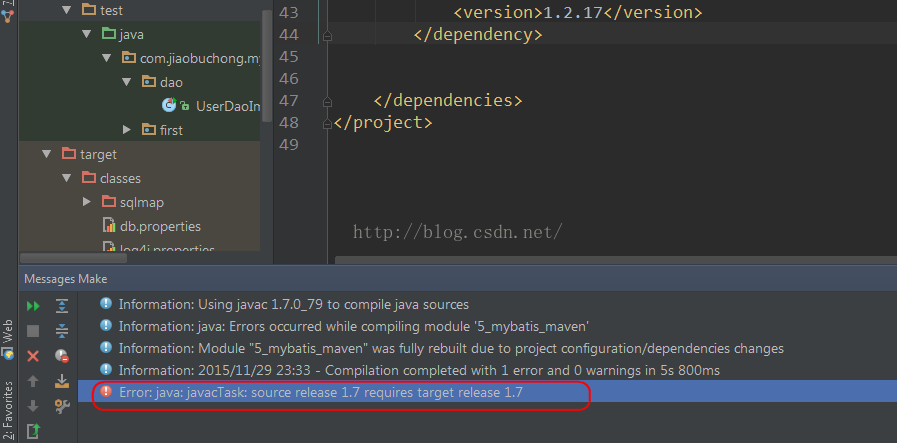
appear Error:java : javacTask: source release 1.7 requires target release 1.7

The following error occurred during compiling java code using idea:

Error:java : javacTask: source release 1.7 requires target release 1.7

Above:

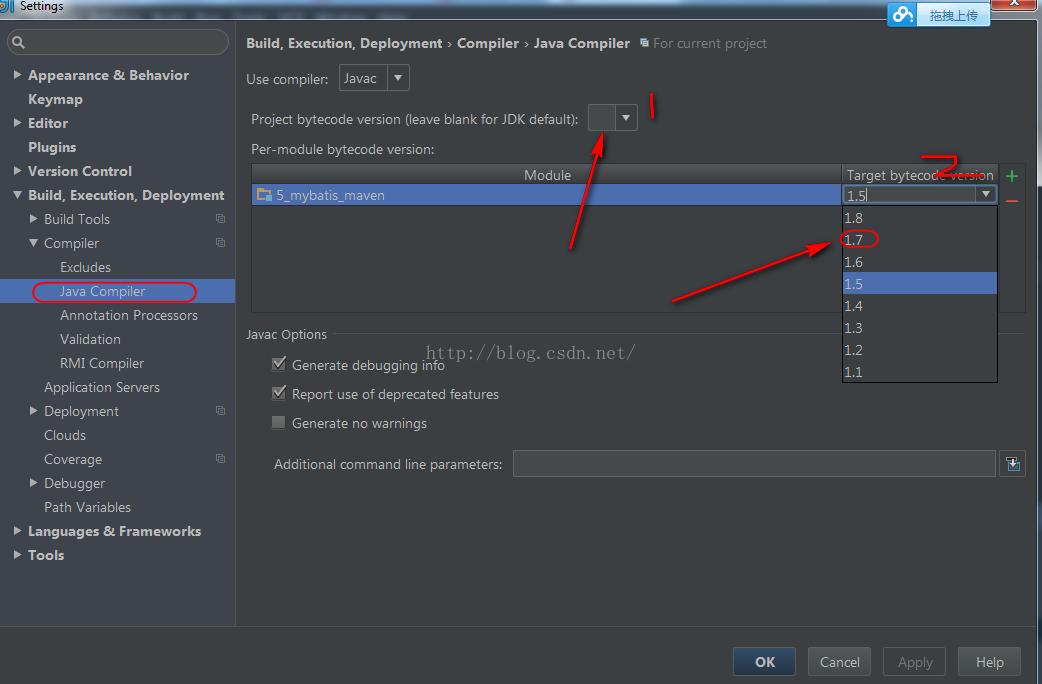
When such a problem occurs, you can set it in settings:

Here, set the compiler version to 1.7. One is to set project, two is to set module.

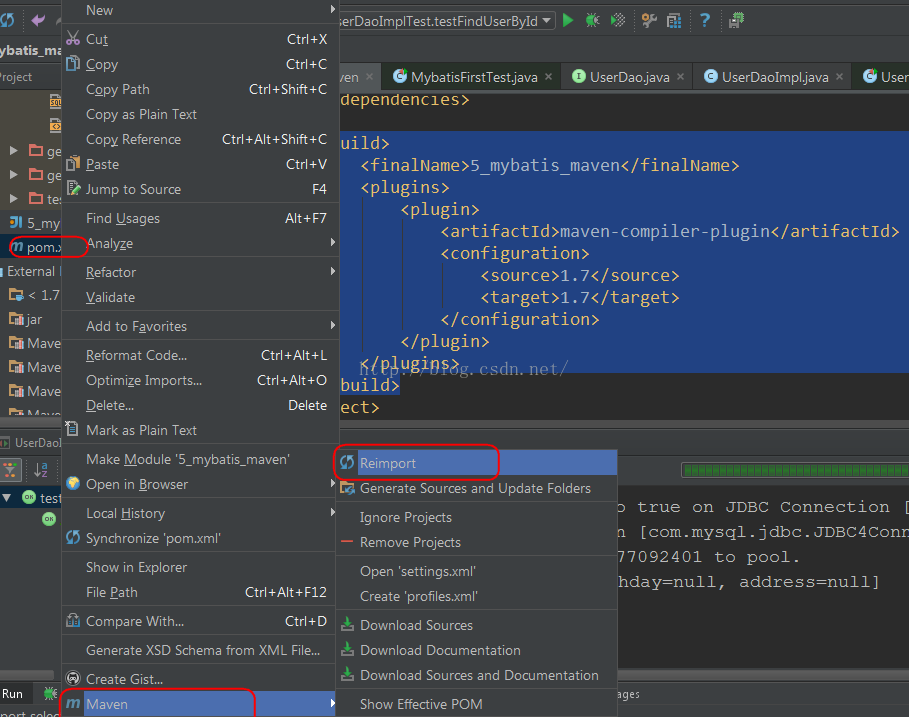
If you build with maven, you can directly specify the compiled version of Java in POM. Add the following code:

    <build>
        <finalName>5_mybatis_maven</finalName>
        <plugins>
            <plugin>
                <artifactId>maven-compiler-plugin</artifactId>
                <configuration>
                    <source>1.7</source>
                    <target>1.7</target>
                </configuration>
            </plugin>
        </plugins>
    </build>

Then select pom.xml Right click reinport to let Maven download the corresponding plug-ins

Now to compile, is not to see the rain in the rainbow!

Reference link:

http://stackoverflow.com/questions/12900373/idea-javac-source-release-1-7-requires-target-release-1-7

Solving failure executing javac, but could not parse the error

The following problems occurred during Maven install:

Failure executing javac, but could not parse the error: 

This kind of problem is generally caused by the configuration problem of JDK or JRE path. Check whether MyEclipse — & gt; preferences — & gt; Java — & gt; installed jres uses the path of self installed JRE.

Or check the configuration of environment variables, refer to http://jingyan.baidu.com/article/f96699bb8b38e0894e3c1bef.html  

After reconfiguring the environment variable path, it is solved because the JDK path is not configured properly.

Bug: unable to download source code in idea, error cannot download sources sources not found for:XXX

Bug Description: idea can’t download the source code, click choose Resource & gt; [select source code package] to confirm and report an error.
Solution: enter the project in the command line interface pom.xml File folder, execute the following command:

mvn dependency:resolve -Dclassifier=sources

Note: do not directly execute the command in terminal in the lower left corner of idea, but in DOS interface.

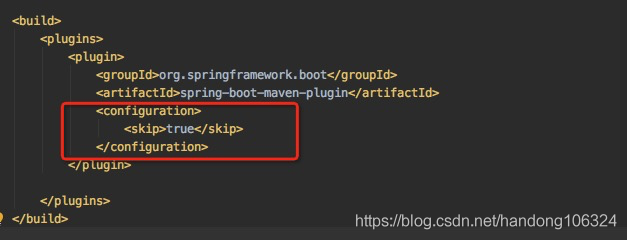
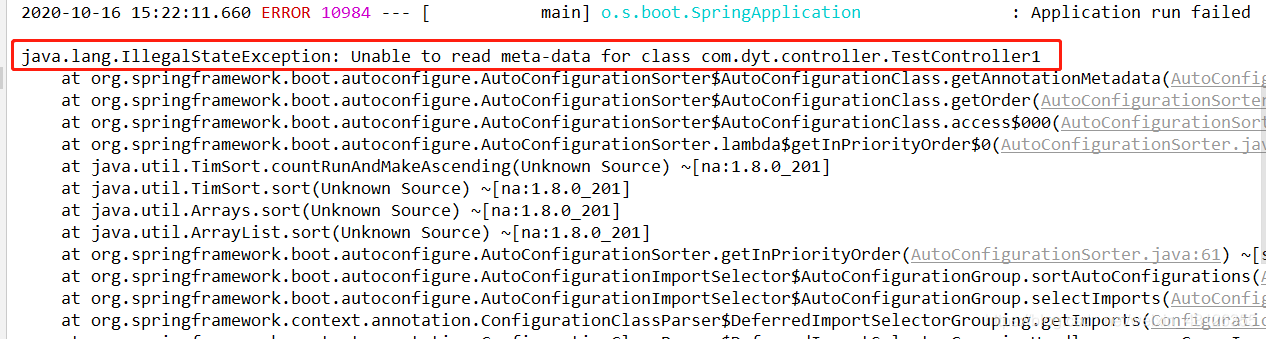
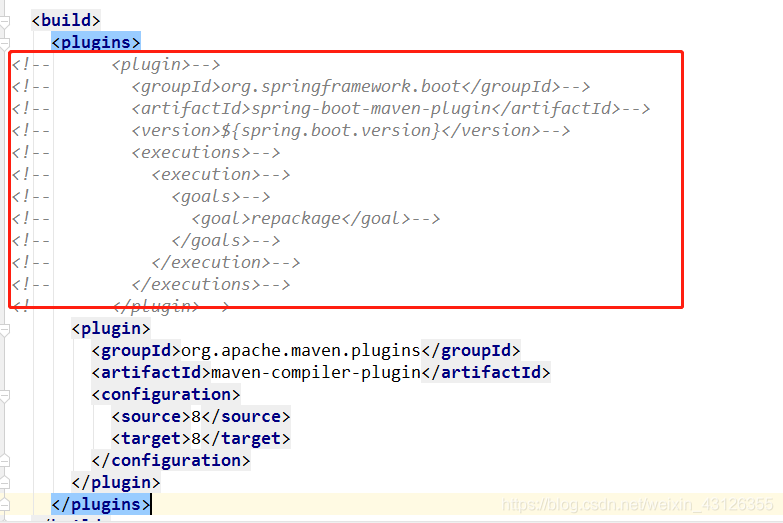
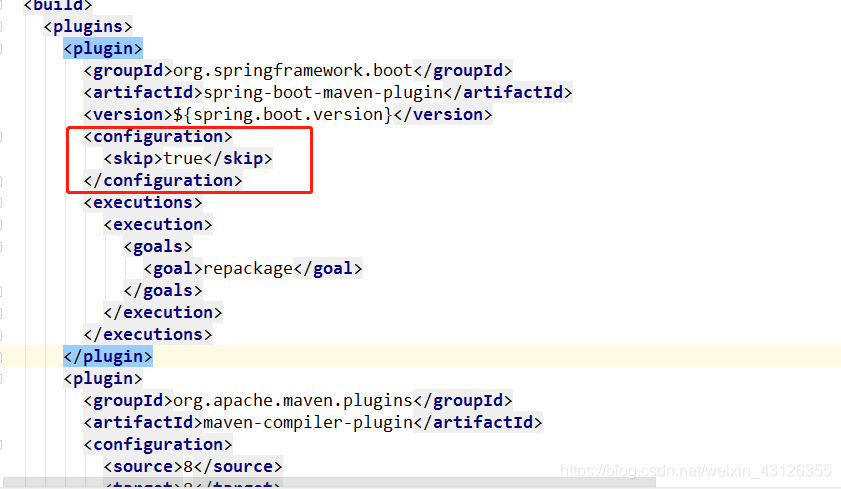
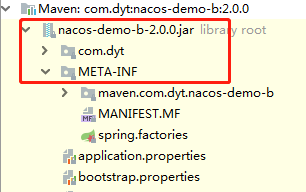
Depending on the custom component jar package, unable to read meta data for class appears after startup


java.lang.IllegalStateException: Unable to read meta-data for class com.dyt.controller.TestController1
	at org.springframework.boot.autoconfigure.AutoConfigurationSorter$AutoConfigurationClass.getAnnotationMetadata(AutoConfigurationSorter.java:233) ~[spring-boot-autoconfigure-2.1.13.RELEASE.jar:2.1.13.RELEASE]
	at org.springframework.boot.autoconfigure.AutoConfigurationSorter$AutoConfigurationClass.getOrder(AutoConfigurationSorter.java:204) ~[spring-boot-autoconfigure-2.1.13.RELEASE.jar:2.1.13.RELEASE]
	at org.springframework.boot.autoconfigure.AutoConfigurationSorter$AutoConfigurationClass.access$000(AutoConfigurationSorter.java:150) ~[spring-boot-autoconfigure-2.1.13.RELEASE.jar:2.1.13.RELEASE]
	at org.springframework.boot.autoconfigure.AutoConfigurationSorter.lambda$getInPriorityOrder$0(AutoConfigurationSorter.java:62) ~[spring-boot-autoconfigure-2.1.13.RELEASE.jar:2.1.13.RELEASE]
	at java.util.TimSort.countRunAndMakeAscending(Unknown Source) ~[na:1.8.0_201]
	at java.util.TimSort.sort(Unknown Source) ~[na:1.8.0_201]
	at java.util.Arrays.sort(Unknown Source) ~[na:1.8.0_201]
	at java.util.ArrayList.sort(Unknown Source) ~[na:1.8.0_201]
	at org.springframework.boot.autoconfigure.AutoConfigurationSorter.getInPriorityOrder(AutoConfigurationSorter.java:61) ~[spring-boot-autoconfigure-2.1.13.RELEASE.jar:2.1.13.RELEASE]
	at org.springframework.boot.autoconfigure.AutoConfigurationImportSelector$AutoConfigurationGroup.sortAutoConfigurations(AutoConfigurationImportSelector.java:430) ~[spring-boot-autoconfigure-2.1.13.RELEASE.jar:2.1.13.RELEASE]
	at org.springframework.boot.autoconfigure.AutoConfigurationImportSelector$AutoConfigurationGroup.selectImports(AutoConfigurationImportSelector.java:415) ~[spring-boot-autoconfigure-2.1.13.RELEASE.jar:2.1.13.RELEASE]
	at org.springframework.context.annotation.ConfigurationClassParser$DeferredImportSelectorGrouping.getImports(ConfigurationClassParser.java:872) ~[spring-context-5.1.14.RELEASE.jar:5.1.14.RELEASE]
	at org.springframework.context.annotation.ConfigurationClassParser$DeferredImportSelectorGroupingHandler.processGroupImports(ConfigurationClassParser.java:798) ~[spring-context-5.1.14.RELEASE.jar:5.1.14.RELEASE]
	at org.springframework.context.annotation.ConfigurationClassParser$DeferredImportSelectorHandler.process(ConfigurationClassParser.java:770) ~[spring-context-5.1.14.RELEASE.jar:5.1.14.RELEASE]
	at org.springframework.context.annotation.ConfigurationClassParser.parse(ConfigurationClassParser.java:185) ~[spring-context-5.1.14.RELEASE.jar:5.1.14.RELEASE]
	at org.springframework.context.annotation.ConfigurationClassPostProcessor.processConfigBeanDefinitions(ConfigurationClassPostProcessor.java:315) ~[spring-context-5.1.14.RELEASE.jar:5.1.14.RELEASE]
	at org.springframework.context.annotation.ConfigurationClassPostProcessor.postProcessBeanDefinitionRegistry(ConfigurationClassPostProcessor.java:232) ~[spring-context-5.1.14.RELEASE.jar:5.1.14.RELEASE]
	at org.springframework.context.support.PostProcessorRegistrationDelegate.invokeBeanDefinitionRegistryPostProcessors(PostProcessorRegistrationDelegate.java:275) ~[spring-context-5.1.14.RELEASE.jar:5.1.14.RELEASE]
	at org.springframework.context.support.PostProcessorRegistrationDelegate.invokeBeanFactoryPostProcessors(PostProcessorRegistrationDelegate.java:95) ~[spring-context-5.1.14.RELEASE.jar:5.1.14.RELEASE]
	at org.springframework.context.support.AbstractApplicationContext.invokeBeanFactoryPostProcessors(AbstractApplicationContext.java:705) ~[spring-context-5.1.14.RELEASE.jar:5.1.14.RELEASE]
	at org.springframework.context.support.AbstractApplicationContext.refresh(AbstractApplicationContext.java:531) ~[spring-context-5.1.14.RELEASE.jar:5.1.14.RELEASE]
	at org.springframework.boot.web.servlet.context.ServletWebServerApplicationContext.refresh(ServletWebServerApplicationContext.java:141) ~[spring-boot-2.1.13.RELEASE.jar:2.1.13.RELEASE]
	at org.springframework.boot.SpringApplication.refresh(SpringApplication.java:744) [spring-boot-2.1.13.RELEASE.jar:2.1.13.RELEASE]
	at org.springframework.boot.SpringApplication.refreshContext(SpringApplication.java:391) [spring-boot-2.1.13.RELEASE.jar:2.1.13.RELEASE]
	at org.springframework.boot.SpringApplication.run(SpringApplication.java:312) [spring-boot-2.1.13.RELEASE.jar:2.1.13.RELEASE]
	at org.springframework.boot.SpringApplication.run(SpringApplication.java:1215) [spring-boot-2.1.13.RELEASE.jar:2.1.13.RELEASE]
	at org.springframework.boot.SpringApplication.run(SpringApplication.java:1204) [spring-boot-2.1.13.RELEASE.jar:2.1.13.RELEASE]
	at com.dyt.MybatisApplication.main(MybatisApplication.java:12) [classes/:na]
Caused by: java.io.FileNotFoundException: class path resource [com/dyt/controller/TestController1.class] cannot be opened because it does not exist
	at org.springframework.core.io.ClassPathResource.getInputStream(ClassPathResource.java:180) ~[spring-core-5.1.14.RELEASE.jar:5.1.14.RELEASE]
	at org.springframework.core.type.classreading.SimpleMetadataReader.<init>(SimpleMetadataReader.java:51) ~[spring-core-5.1.14.RELEASE.jar:5.1.14.RELEASE]
	at org.springframework.core.type.classreading.SimpleMetadataReaderFactory.getMetadataReader(SimpleMetadataReaderFactory.java:103) ~[spring-core-5.1.14.RELEASE.jar:5.1.14.RELEASE]
	at org.springframework.boot.type.classreading.ConcurrentReferenceCachingMetadataReaderFactory.createMetadataReader(ConcurrentReferenceCachingMetadataReaderFactory.java:86) ~[spring-boot-2.1.13.RELEASE.jar:2.1.13.RELEASE]
	at org.springframework.boot.type.classreading.ConcurrentReferenceCachingMetadataReaderFactory.getMetadataReader(ConcurrentReferenceCachingMetadataReaderFactory.java:73) ~[spring-boot-2.1.13.RELEASE.jar:2.1.13.RELEASE]
	at org.springframework.core.type.classreading.SimpleMetadataReaderFactory.getMetadataReader(SimpleMetadataReaderFactory.java:81) ~[spring-core-5.1.14.RELEASE.jar:5.1.14.RELEASE]
	at org.springframework.boot.autoconfigure.AutoConfigurationSorter$AutoConfigurationClass.getAnnotationMetadata(AutoConfigurationSorter.java:229) ~[spring-boot-autoconfigure-2.1.13.RELEASE.jar:2.1.13.RELEASE]
	... 27 common frames omitted

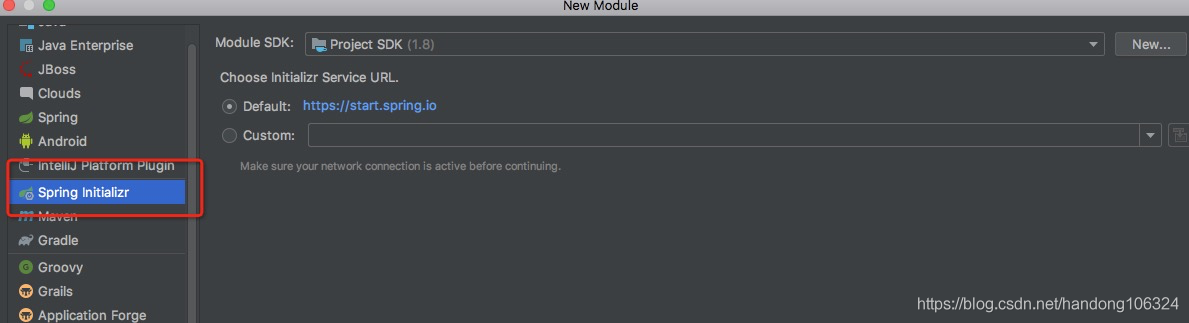
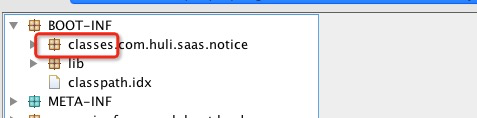
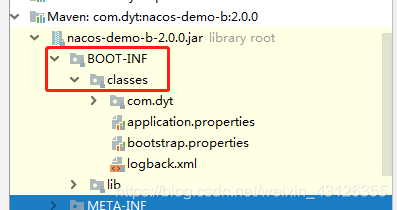
/ meta-inf /spring.factories

br br br /classes


MVN error: @ param not found

The code is fine, it handles the comments (which is why I always advocate that you don’t write the comments). How to do?Add a parameter:
Option 1 (invalid) :

mvn \
    -Xdoclint:none

Complains.
Method 2 (effective) :
Search for maven-javadoc-plugin in pom.xml and change it to something like this:
After 3.0.0:


  <plugin>
    <groupId>org.apache.maven.plugins</groupId>
    <artifactId>maven-javadoc-plugin</artifactId>
    <configuration>
      <doclint>none</doclint>
    </configuration>
  </plugin>

3.0.0 before:

<plugin>
    <groupId>org.apache.maven.plugins</groupId>
    <artifactId>maven-javadoc-plugin</artifactId>
    <configuration>
      <additionalparam>-Xdoclint:none</additionalparam>
    </configuration>
  </plugin>


Failed to execute goal org.apache.maven.plugins:maven-clean-plugin:3.0.0:clean (default-clean) on

Failed to execute goal org, apache maven. Plugins: maven – clean – plugin: 3.0.0: clean (default – the clean) on project springboot1: Failed to clean project: Failed to delete the F: \ springboot1 \ target – & gt;
To see the full stack trace of the errors, re-run Maven with the -e switch.
The cause of this problem is that the CMD command window to start Springboot1 is open under the target file path of the project Springboot1. This causes the package Springboot1 project to fail. To see the full stack trace of the errors, re-run Maven with the -e switch. You need to shut down a Maven and reopen it.
Solution: Close the CMD command window that starts Springboot1. Just pack it up again.

Failed to execute goal org.apache.tomcat.maven:tomcat7-maven-plugin:2.2:run (default-cli) on project

Complete error message

Failed to execute goal org.apache.tomcat.maven:tomcat7-maven-plugin:2.2:run (default-cli) on project jurisdiction_controller: Could not start Tomcat


Start the Maven project wrong, use Tomcat embedded in it
The solution
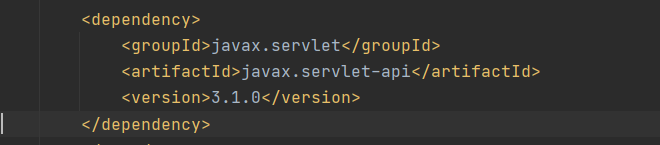
The dependent use of servlets is introduced in the pom.xml file


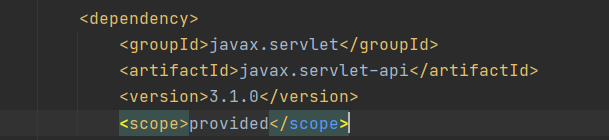
Change after

add scope tags, and the values is provided (only role in the compilation and testing, and at the same time not pass)
The scope label specifies the range of values
compile
The default scope, which means that all Dependencies can be used throughout the lifecycle. Furthermore, these dependencies are passed to the projects on which they depend. Applies to all phases and will be released along with the project
provided
Similar to compile, but indicating that dependency is provided by JDKs or containers, such as Servlet APs and some Java EE APIs. This scope can only be used during compilation and testing and has no transitivity.
runtime
Dependency does not apply at compile time, but does apply at run and test times, such as JDBC drivers, for the run and test phases.
test
Indicates that dependency is applied at test time, not at run time. Used only during testing, to compile and run test code. Will not be released with the project.
system
Similar to Provided, but provided in the system as an external JAR, Maven does not look for it in a repository.