Tag Archives: java

Caused by: org.springframework.beans.factory.beancreationexception: error creating be

Java packaging error:
caused by: org.springframework.beans.factory.beancreationexception: error creating bean with name ‘org.springframework.transaction.annotation.proxytransactionmanagementconfiguration’: initialization of bean failed; Needed exception is org.springframework.beans.factory.nosuchbeandefinitionexception: no bean named ‘org.springframework.context.annotation.configurationclasspostprocessor.importregistry’ available
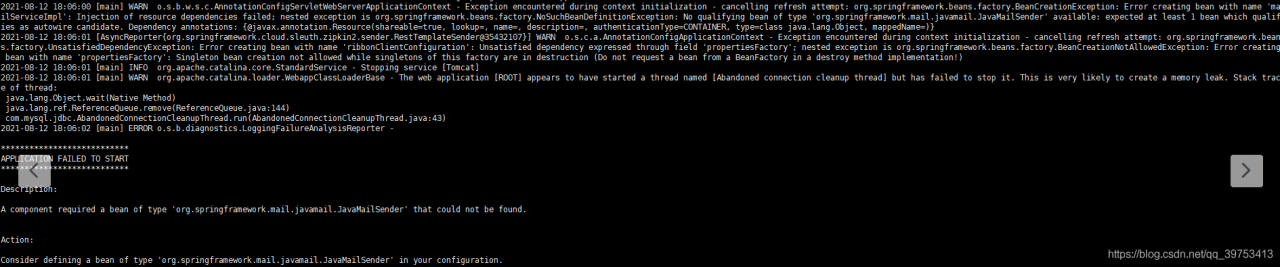
click the picture to see that it is actually an error message from javamailsender. First, check whether the configuration file is configured to send mail

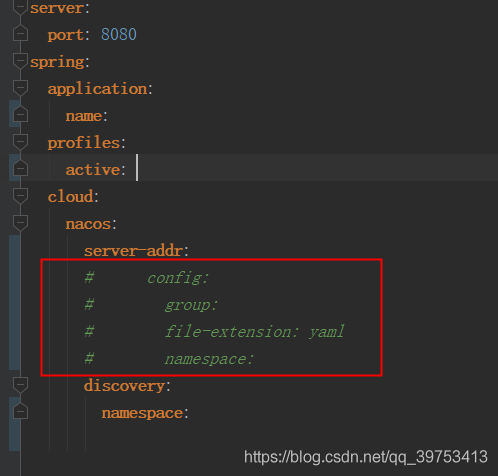
If the project is used with Nacos, check the local configuration file xxx.yml to see if the Nacos configuration is annotated. As shown in the following figure, if the annotation is, you can uncomment it.
Error in intellicode extension of vscode [Solved]

after vscode upgrade, open the java file, and vscode pops up:

Sorry, there was a problem activating IntelliCode support for Java. For more information
Please see the "Language Support for Java" and "VS IntelliCode" output windows

the reason is that the language support for Java by red hat extension version above 0.65 only supports versions above java11, so it will revert to versions below 0.64.1

IDEA reports an error. Error XXX reports an error. The class cannot be found

Scene description

When a relies on B to run a project, the class file in B project cannot be found

The project dependency is intact. There is no problem that the class cannot be found, but an error is reported during operation

Solution:
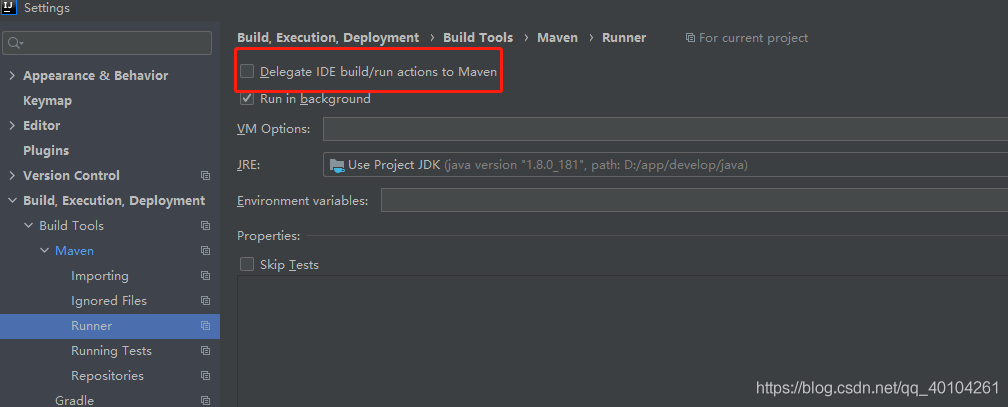
check whether the JDK configured in idea is consistent with the environment, and whether project B is a runnable project. If it is a runnable project, add the following contents to the POMfile (this problem is caused by bloggers)

<plugin>
  <groupId>org.springframework.boot</groupId>
   <artifactId>spring-boot-maven-plugin</artifactId>
   <configuration>
       <mainClass>com.xxx</mainClass>
       <skip>true</skip>
   </configuration>
</plugin>

someone runs successfully after checking the following

If there are other solutions, please leave a message

Solution to null pointer error in array

1. Problem description

Here is the object array

 LocHistory[] history = new LocHistory[list2.size()];

When assigning a value to the history object, the following error is reported

2. Reasons for error reporting

LocHistory[] history = new LocHistory[list2.size()]; Only the size of the array is given, but the instantiated object is not given at the corresponding position. The premise to obtain history [i] is that there is an object under coordinate I.

3. Solutions

Create a new object for each object reference
History [i] = new lochistory();

The specific codes are as follows:

 LocHistory[] history = new LocHistory[list2.size()];
            for (int i = 0; i < list2.size(); i++) {
             history[i] = new LocHistory();
             String PageX = list2.get(i).getPageX();
             String PageY = list2.get(i).getPageY();
                history[i].setPageX(PageX);
                history[i].setPageY(PageY);

An error is reported when the file in hive parquet format is written in the Flink connection

Version: cdh6.3.2
flick version: 1.13.2
CDH hive version: 2.1.1

Error message:

java.lang.NoSuchMethodError: org.apache.parquet.hadoop.ParquetWriter$Builder.<init>(Lorg/apache/parquet/io/OutputFile;)V
	at org.apache.flink.formats.parquet.row.ParquetRowDataBuilder.<init>(ParquetRowDataBuilder.java:55) ~[flink-parquet_2.11-1.13.2.jar:1.13.2]
	at org.apache.flink.formats.parquet.row.ParquetRowDataBuilder$FlinkParquetBuilder.createWriter(ParquetRowDataBuilder.java:124) ~[flink-parquet_2.11-1.13.2.jar:1.13.2]
	at org.apache.flink.formats.parquet.ParquetWriterFactory.create(ParquetWriterFactory.java:56) ~[flink-parquet_2.11-1.13.2.jar:1.13.2]
	at org.apache.flink.table.filesystem.FileSystemTableSink$ProjectionBulkFactory.create(FileSystemTableSink.java:624) ~[flink-table-blink_2.11-1.13.2.jar:1.13.2]
	at org.apache.flink.streaming.api.functions.sink.filesystem.BulkBucketWriter.openNew(BulkBucketWriter.java:75) ~[flink-table-blink_2.11-1.13.2.jar:1.13.2]
	at org.apache.flink.streaming.api.functions.sink.filesystem.OutputStreamBasedPartFileWriter$OutputStreamBasedBucketWriter.openNewInProgressFile(OutputStreamBasedPartFileWriter.java:90) ~[flink-table-blink_2.11-1.13.2.jar:1.13.2]
	at org.apache.flink.streaming.api.functions.sink.filesystem.BulkBucketWriter.openNewInProgressFile(BulkBucketWriter.java:36) ~[flink-table-blink_2.11-1.13.2.jar:1.13.2]
	at org.apache.flink.streaming.api.functions.sink.filesystem.Bucket.rollPartFile(Bucket.java:243) ~[flink-dist_2.11-1.13.2.jar:1.13.2]
	at org.apache.flink.streaming.api.functions.sink.filesystem.Bucket.write(Bucket.java:220) ~[flink-dist_2.11-1.13.2.jar:1.13.2]
	at org.apache.flink.streaming.api.functions.sink.filesystem.Buckets.onElement(Buckets.java:305) ~[flink-dist_2.11-1.13.2.jar:1.13.2]
	at org.apache.flink.streaming.api.functions.sink.filesystem.StreamingFileSinkHelper.onElement(StreamingFileSinkHelper.java:103) ~[flink-dist_2.11-1.13.2.jar:1.13.2]
	at org.apache.flink.table.filesystem.stream.AbstractStreamingWriter.processElement(AbstractStreamingWriter.java:140) ~[flink-table-blink_2.11-1.13.2.jar:1.13.2]
	at org.apache.flink.streaming.runtime.tasks.CopyingChainingOutput.pushToOperator(CopyingChainingOutput.java:71) ~[flink-dist_2.11-1.13.2.jar:1.13.2]
	at org.apache.flink.streaming.runtime.tasks.CopyingChainingOutput.collect(CopyingChainingOutput.java:46) ~[flink-dist_2.11-1.13.2.jar:1.13.2]
	at org.apache.flink.streaming.runtime.tasks.CopyingChainingOutput.collect(CopyingChainingOutput.java:26) ~[flink-dist_2.11-1.13.2.jar:1.13.2]
	at org.apache.flink.streaming.api.operators.CountingOutput.collect(CountingOutput.java:50) ~[flink-dist_2.11-1.13.2.jar:1.13.2]
	at org.apache.flink.streaming.api.operators.CountingOutput.collect(CountingOutput.java:28) ~[flink-dist_2.11-1.13.2.jar:1.13.2]
	at StreamExecCalc$35.processElement(Unknown Source) ~[?:?]
	at org.apache.flink.streaming.runtime.tasks.CopyingChainingOutput.pushToOperator(CopyingChainingOutput.java:71) ~[flink-dist_2.11-1.13.2.jar:1.13.2]
	at org.apache.flink.streaming.runtime.tasks.CopyingChainingOutput.collect(CopyingChainingOutput.java:46) ~[flink-dist_2.11-1.13.2.jar:1.13.2]
	at org.apache.flink.streaming.runtime.tasks.CopyingChainingOutput.collect(CopyingChainingOutput.java:26) ~[flink-dist_2.11-1.13.2.jar:1.13.2]
	at org.apache.flink.streaming.api.operators.CountingOutput.collect(CountingOutput.java:50) ~[flink-dist_2.11-1.13.2.jar:1.13.2]
	at org.apache.flink.streaming.api.operators.CountingOutput.collect(CountingOutput.java:28) ~[flink-dist_2.11-1.13.2.jar:1.13.2]
	at org.apache.flink.table.runtime.operators.source.InputConversionOperator.processElement(InputConversionOperator.java:128) ~[flink-table-blink_2.11-1.13.2.jar:1.13.2]
	at org.apache.flink.streaming.runtime.tasks.CopyingChainingOutput.pushToOperator(CopyingChainingOutput.java:71) ~[flink-dist_2.11-1.13.2.jar:1.13.2]
	at org.apache.flink.streaming.runtime.tasks.CopyingChainingOutput.collect(CopyingChainingOutput.java:46) ~[flink-dist_2.11-1.13.2.jar:1.13.2]
	at org.apache.flink.streaming.runtime.tasks.CopyingChainingOutput.collect(CopyingChainingOutput.java:26) ~[flink-dist_2.11-1.13.2.jar:1.13.2]
	at org.apache.flink.streaming.api.operators.CountingOutput.collect(CountingOutput.java:50) ~[flink-dist_2.11-1.13.2.jar:1.13.2]
	at org.apache.flink.streaming.api.operators.CountingOutput.collect(CountingOutput.java:28) ~[flink-dist_2.11-1.13.2.jar:1.13.2]
	at org.apache.flink.streaming.api.operators.StreamSourceContexts$ManualWatermarkContext.processAndCollectWithTimestamp(StreamSourceContexts.java:322) ~[flink-dist_2.11-1.13.2.jar:1.13.2]
	at org.apache.flink.streaming.api.operators.StreamSourceContexts$WatermarkContext.collectWithTimestamp(StreamSourceContexts.java:426) ~[flink-dist_2.11-1.13.2.jar:1.13.2]
	at org.apache.flink.streaming.connectors.kafka.internals.AbstractFetcher.emitRecordsWithTimestamps(AbstractFetcher.java:365) ~[flink-connector-kafka_2.11-1.13.2.jar:1.13.2]
	at org.apache.flink.streaming.connectors.kafka.internals.KafkaFetcher.partitionConsumerRecordsHandler(KafkaFetcher.java:183) ~[flink-connector-kafka_2.11-1.13.2.jar:1.13.2]
	at org.apache.flink.streaming.connectors.kafka.internals.KafkaFetcher.runFetchLoop(KafkaFetcher.java:142) ~[flink-connector-kafka_2.11-1.13.2.jar:1.13.2]
	at org.apache.flink.streaming.connectors.kafka.FlinkKafkaConsumerBase.run(FlinkKafkaConsumerBase.java:826) ~[flink-connector-kafka_2.11-1.13.2.jar:1.13.2]
	at org.apache.flink.streaming.api.operators.StreamSource.run(StreamSource.java:110) ~[flink-dist_2.11-1.13.2.jar:1.13.2]
	at org.apache.flink.streaming.api.operators.StreamSource.run(StreamSource.java:66) ~[flink-dist_2.11-1.13.2.jar:1.13.2]
	at org.apache.flink.streaming.runtime.tasks.SourceStreamTask$LegacySourceFunctionThread.run(SourceStreamTask.java:269) ~[flink-dist_2.11-1.13.2.jar:1.13.2]
2021-08-15 10:45:37,863 INFO  org.apache.flink.runtime.resourcemanager.slotmanager.DeclarativeSlotManager [] - Clearing resource requirements of job e8f0af4bb984507ec9f69f07fa2df3d5
2021-08-15 10:45:37,865 INFO  org.apache.flink.runtime.executiongraph.failover.flip1.RestartPipelinedRegionFailoverStrategy [] - Calculating tasks to restart to recover the failed task cbc357ccb763df2852fee8c4fc7d55f2_0.
2021-08-15 10:45:37,866 INFO  org.apache.flink.runtime.executiongraph.failover.flip1.RestartPipelinedRegionFailoverStrategy [] - 1 tasks should be restarted to recover the failed task cbc357ccb763df2852fee8c4fc7d55f2_0. 
2021-08-15 10:45:37,867 INFO  org.apache.flink.runtime.executiongraph.ExecutionGraph 

According to the guidelines given on the official website of Flink:
add the Flink parquet dependency package and parquet-hadoop-1.11.1.jar and parquet-common-1.11.1.jar packages. The above error still exists and the specified construction method cannot be found.

reason:

In CDH hive version: the version in parquet-hadoop-bundle.jar is inconsistent with that in Flink parquet.

**

resolvent:

**
1. Because the Flink itself has provided the Flink parquet package and contains the corresponding dependencies, it is only necessary to ensure that the dependencies provided by the Flink are preferentially loaded when the Flink task is executed. Flink parquet can be packaged and distributed with the code
2. Because the package versions are inconsistent, you can consider upgrading the corresponding component version. Note that you can’t simply adjust the version of parquet-hadoop-bundle.jar. After viewing it from Maven warehouse, there are no available packages to use. And: upgrade the version of hive or reduce the version of Flink.

Caused by: java.lang.IllegalStateException: Ambiguou There is already ‘XXXXXXController‘ bean method

**

Errors are reported as follows:

**
Caused by: java.lang.IllegalStateException: Ambiguous mapping. Cannot map ‘com.offcn.seckill.feign.SeckillGoodsFeignn’ method
com.offcn.seckill.feign.SeckillGoodsFeignn#findPage(SeckillGoods, int, Int)
to {post/seckillgoods/search/{page}/{size}}: there is already ‘seckillgoodscontroller’ bean method
reason : there are two or more requestmapping or getmapping with the same name
solution:
1. Check whether there are the same requestmapping URLs in all other classes, If you modify different URLs, you can
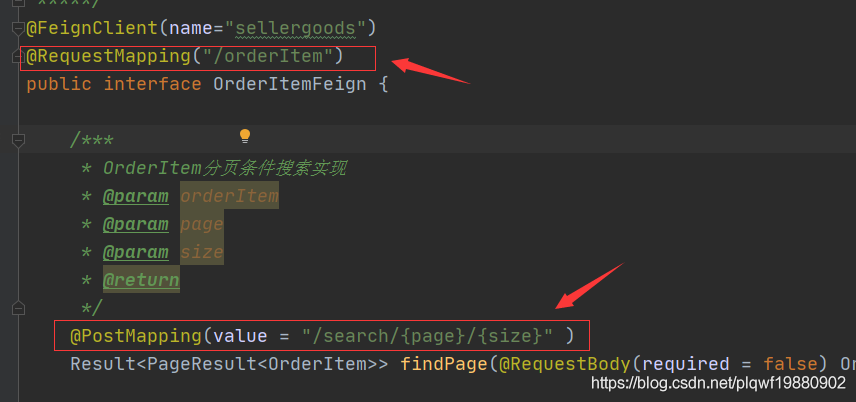
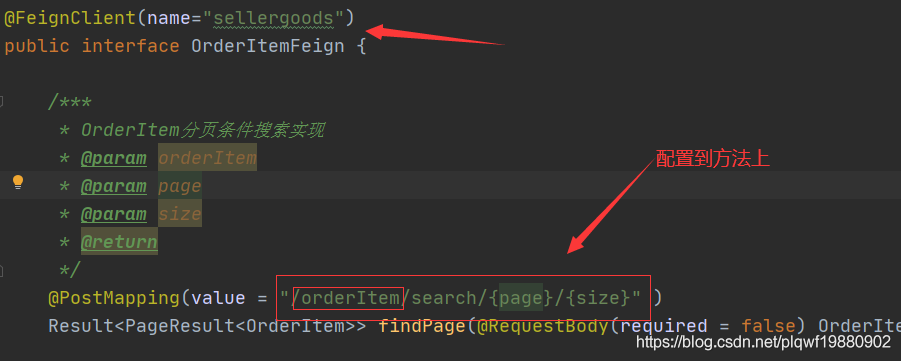
2. In the remote calling interface using feign, the requestmapping on the interface is the same as the requestmapping URL of the called class. For problems, you can configure the requestmpping URL of the interface into the method of this interface, Remove the URL configuration of interface requestmapping
for example:
and replace it with the following:
if your problem is solved, please click praise and comment to support the blogger’s hard work =

[ERROR] [FATAL] InnoDB: Table flags are 0 in the data dictionary but the flags in file ./ibdata

Docker failed to start the container after installing mysql. Check the MySQL container log and find:

[ERROR] [FATAL] InnoDB: Table flags are 0 in the data dictionary but the flags in file ./ibdata1 are 0x4800!

Query all containers

docker ps -a

Delete container

docker rm CONTAINER ID;  #CONTAINER ID is the actual container number

If so, be sure to delete the external mount directory.

Restart mysql. I installed version 5.7 of MySQL

docker run -p 3306:3306 --name mysql \
-v /mydata/mysql/log:/var/log/mysql \
-v /mydata/mysql/data:/var/lib/mysql \
-v /mydata/mysql/conf:/etc/mysql \
-e MYSQL_ROOT_PASSWORD=root \
-d mysql:5.7

Enter the container external mount profile

vim /mydata/mysql/conf/my.conf

Insert the following. Copy the following contents. After entering the file through the previous operation, press keyboard I to enter the insertion state, shift + insert to paste the contents, ESC to exit the insertion mode,: WQ save and exit

[client]
default-character-set=utf8
[mysql]
default-character-set=utf8
[mysqld]
init_connect='SET collation_connection = utf8_unicode_ci'
init_connect='SET NAMES utf8'
character-set-server=utf8
collation-server=utf8_unicode_ci
skip-character-set-client-handshake
skip-name-resolve

Restart MySQL

docker restart mysql

Upload file error analysis standardmultiparthttpservletrequest

controller

/**
 * MultipartFile Automatic encapsulation of uploaded files
 * @param email
 * @param username
 * @param headerImg
 * @param photos
 * @return
 */
@PostMapping("/upload")
public String upload(@RequestParam("email") String email,
                     @RequestParam("username") String username,
                     @RequestPart("headerImg") MultipartFile headerImg,
                     @RequestPart("photos") MultipartFile[] photos) throws IOException {

    log.info("Upload the message:email={},username={},headerImg={},photos={}",
            email,username,headerImg.getSize(),photos.length);

    if(!headerImg.isEmpty()){
        String originalFilename = headerImg.getOriginalFilename();
        headerImg.transferTo(new File("D:\\cache\\"+originalFilename));
    }

    if(photos.length > 0){
        for (MultipartFile photo : photos) {
            if(!photo.isEmpty()){
                String originalFilename = photo.getOriginalFilename();
                photo.transferTo(new File("D:\\cache\\1"+originalFilename));
            }
        }
    }


    return "main";
}

Common errors:

New file (“D: \ cache \ 1” + originalfilename “), there is no duplicate disk file name

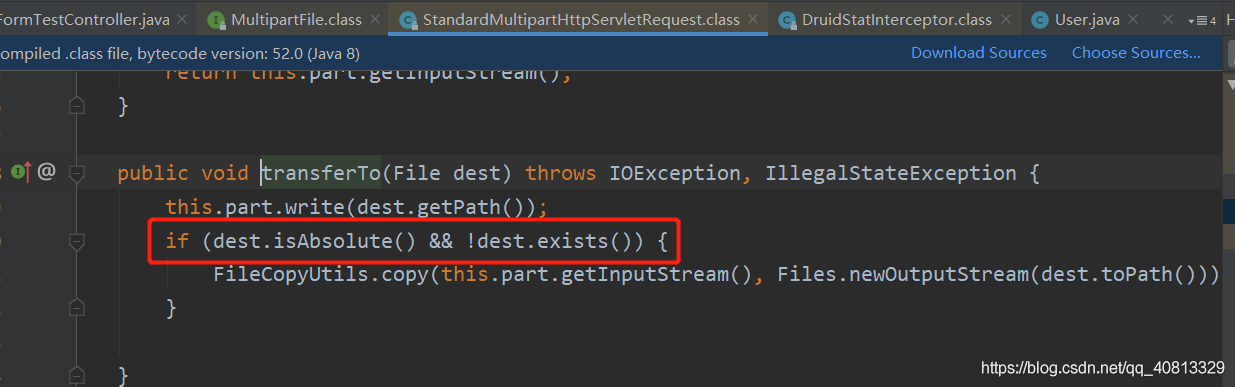
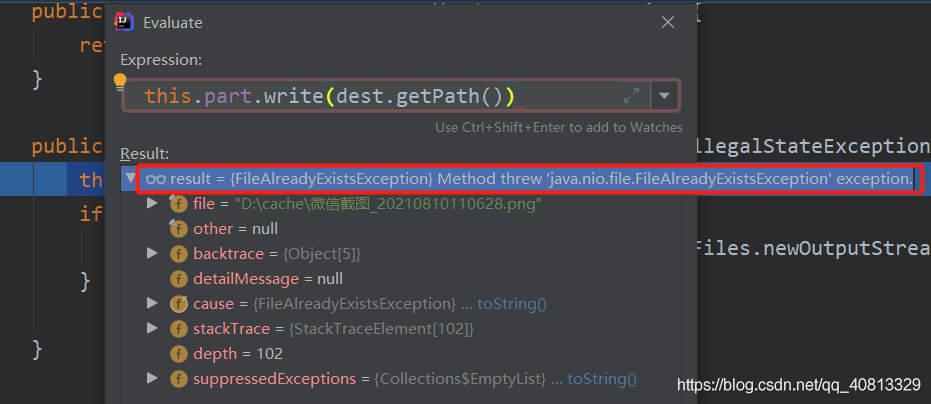
Debug the debug mode and enter the transferto method. It is found that the source code is to judge whether the file exists

debug mode evaluate expression. Open the expression debugging window and see the error

[Solved] IDEA Start Project Error: Abnormal build process termination:Could not create the Java Virtual Machine.

Idea project startup error

Solution to error reporting during idea project startup

Idea project startup error

Abnormal build process termination: 
"C:\Program Files\Java\jdk1.8.0_161\bin\java.exe" -Xmx700m -Djava.awt.headless=true -Djava.endorsed.dirs=\"\" -Dexternal.project.config=C:\Users\wf870\AppData\Local\JetBrains\IntelliJIdea2021.2\external_build_system\sugar.ad7b8821 -Dcompile.parallel=false -Drebuild.on.dependency.change=true -Djdt.compiler.useSingleThread=true -Daether.connector.resumeDownloads=false -Dio.netty.initialSeedUniquifier=3989273803388531595 -Dfile.encoding=GBK -Duser.language=zh -Duser.country=CN -Didea.paths.selector=IntelliJIdea2021.2 "-Didea.home.path=D:\idea\IntelliJ IDEA 2021.2" -Didea.config.path=C:\Users\wf870\AppData\Roaming\JetBrains\IntelliJIdea2021.2 -Didea.plugins.path=C:\Users\wf870\AppData\Roaming\JetBrains\IntelliJIdea2021.2\plugins -Djps.log.dir=C:/Users/wf870/AppData/Local/JetBrains/IntelliJIdea2021.2/log/build-log "-Djps.fallback.jdk.home=D:/idea/IntelliJ IDEA 2021.2/jbr" -Djps.fallback.jdk.version=11.0.11 -Dio.netty.noUnsafe=true -Djava.io.tmpdir=C:/Users/wf870/AppData/Local/JetBrains/IntelliJIdea2021.2/compile-server/sugar_eaae1db7/_temp_ -Djps.backward.ref.index.builder=true -Djps.track.ap.dependencies=false --add-opens=jdk.compiler/com.sun.tools.javac.code=ALL-UNNAMED --add-opens=jdk.compiler/com.sun.tools.javac.comp=ALL-UNNAMED --add-opens=jdk.compiler/com.sun.tools.javac.file=ALL-UNNAMED --add-opens=jdk.compiler/com.sun.tools.javac.main=ALL-UNNAMED --add-opens=jdk.compiler/com.sun.tools.javac.model=ALL-UNNAMED --add-opens=jdk.compiler/com.sun.tools.javac.parser=ALL-UNNAMED --add-opens=jdk.compiler/com.sun.tools.javac.processing=ALL-UNNAMED --add-opens=jdk.compiler/com.sun.tools.javac.tree=ALL-UNNAMED --add-opens=jdk.compiler/com.sun.tools.javac.util=ALL-UNNAMED --add-opens=jdk.compiler/com.sun.tools.javac.jvm=ALL-UNNAMED -Dtmh.instrument.annotations=true -Dtmh.generate.line.numbers=true -Dkotlin.incremental.compilation=true -Dkotlin.incremental.compilation.js=true -Dkotlin.daemon.enabled -Dkotlin.daemon.client.alive.path=\"C:\Users\wf870\AppData\Local\Temp\kotlin-idea-11852903351073037841-is-running\" -classpath "D:/idea/IntelliJ IDEA 2021.2/plugins/java/lib/jps-launcher.jar;C:/Program Files/Java/jdk1.8.0_161/lib/tools.jar" org.jetbrains.jps.cmdline.Launcher "D:/idea/IntelliJ IDEA 2021.2/plugins/java/lib/maven-resolver-transport-http-1.3.3.jar;D:/idea/IntelliJ IDEA 2021.2/lib/util.jar;D:/idea/IntelliJ IDEA 2021.2/lib/platform-api.jar;D:/idea/IntelliJ IDEA 2021.2/plugins/java/lib/jps-builders-6.jar;D:/idea/IntelliJ IDEA 2021.2/lib/forms_rt.jar;D:/idea/IntelliJ IDEA 2021.2/plugins/java/lib/jps-javac-extension-1.jar;D:/idea/IntelliJ IDEA 2021.2/plugins/java/lib/jps-builders.jar;D:/idea/IntelliJ IDEA 2021.2/lib/3rd-party.jar;D:/idea/IntelliJ IDEA 2021.2/plugins/java/lib/maven-resolver-connector-basic-1.3.3.jar;D:/idea/IntelliJ IDEA 2021.2/lib/protobuf-java-3.15.8.jar;D:/idea/IntelliJ IDEA 2021.2/plugins/java/lib/aether-dependency-resolver.jar;D:/idea/IntelliJ IDEA 2021.2/lib/jna.jar;D:/idea/IntelliJ IDEA 2021.2/lib/jna-platform.jar;D:/idea/IntelliJ IDEA 2021.2/plugins/java/lib/maven-resolver-transport-file-1.3.3.jar;D:/idea/IntelliJ IDEA 2021.2/lib/kotlin-stdlib-jdk8.jar;D:/idea/IntelliJ IDEA 2021.2/plugins/java/lib/javac2.jar;D:/idea/IntelliJ IDEA 2021.2/lib/slf4j.jar;D:/idea/IntelliJ IDEA 2021.2/lib/jps-model.jar;D:/idea/IntelliJ IDEA 2021.2/lib/annotations.jar;D:/idea/IntelliJ IDEA 2021.2/lib/idea_rt.jar;D:/idea/IntelliJ IDEA 2021.2/plugins/JavaEE/lib/jasper-v2-rt.jar;D:/idea/IntelliJ IDEA 2021.2/plugins/Kotlin/lib/kotlin-reflect.jar;D:/idea/IntelliJ IDEA 2021.2/plugins/Kotlin/lib/kotlin-plugin.jar;D:/idea/IntelliJ IDEA 2021.2/plugins/ant/lib/ant-jps.jar;D:/idea/IntelliJ IDEA 2021.2/plugins/uiDesigner/lib/jps/java-guiForms-jps.jar;D:/idea/IntelliJ IDEA 2021.2/plugins/eclipse/lib/eclipse-jps.jar;D:/idea/IntelliJ IDEA 2021.2/plugins/eclipse/lib/eclipse-common.jar;D:/idea/IntelliJ IDEA 2021.2/plugins/IntelliLang/lib/java-langInjection-jps.jar;D:/idea/IntelliJ IDEA 2021.2/plugins/Groovy/lib/groovy-jps.jar;D:/idea/IntelliJ IDEA 2021.2/plugins/Groovy/lib/groovy-constants-rt.jar;D:/idea/IntelliJ IDEA 2021.2/plugins/maven/lib/maven-jps.jar;D:/idea/IntelliJ IDEA 2021.2/plugins/gradle-java/lib/gradle-jps.jar;D:/idea/IntelliJ IDEA 2021.2/plugins/devkit/lib/devkit-jps.jar;D:/idea/IntelliJ IDEA 2021.2/plugins/javaFX/lib/javaFX-jps.jar;D:/idea/IntelliJ IDEA 2021.2/plugins/javaFX/lib/javaFX-common.jar;D:/idea/IntelliJ IDEA 2021.2/plugins/JavaEE/lib/javaee-jps.jar;D:/idea/IntelliJ IDEA 2021.2/plugins/webSphereIntegration/lib/jps/javaee-appServers-websphere-jps.jar;D:/idea/IntelliJ IDEA 2021.2/plugins/weblogicIntegration/lib/jps/javaee-appServers-weblogic-jps.jar;D:/idea/IntelliJ IDEA 2021.2/plugins/JPA/lib/jps/javaee-jpa-jps.jar;D:/idea/IntelliJ IDEA 2021.2/plugins/Grails/lib/groovy-grails-jps.jar;D:/idea/IntelliJ IDEA 2021.2/plugins/Grails/lib/groovy-grails-compilerPatch.jar;D:/idea/IntelliJ IDEA 2021.2/plugins/Kotlin/lib/jps/kotlin-jps-plugin.jar;D:/idea/IntelliJ IDEA 2021.2/plugins/Kotlin/lib/kotlin-jps-common.jar;D:/idea/IntelliJ IDEA 2021.2/plugins/Kotlin/lib/kotlin-common.jar" org.jetbrains.jps.cmdline.BuildMain 127.0.0.1 52091 2a22c86a-66f8-4710-a186-028d07a1fe2d C:/Users/wf870/AppData/Local/JetBrains/IntelliJIdea2021.2/compile-server
Error: Could not create the Java Virtual Machine.
Error: A fatal exception has occurred. Program will exit.
Unrecognized option: --add-opens=jdk.compiler/com.sun.tools.javac.code=ALL-UNNAMED

2021.2 idea project startup error:
abnormal build process termination:
error: could not create the Java virtual machine.
error: a fatal exception has occurred. Program will exit.
unrecognized option: — add opens = JDK. Compiler/com. Sun. Tools. Javac. Code = all-unnamed

Idea project startup solution

Many people on the Internet said that the JDK was not installed correctly. At first, they suspected that the JDK was not installed in the default directory, so they reinstalled it and configured the JDK environment. But still report an error. The JDK is re imported in idea again, but it still doesn’t work.

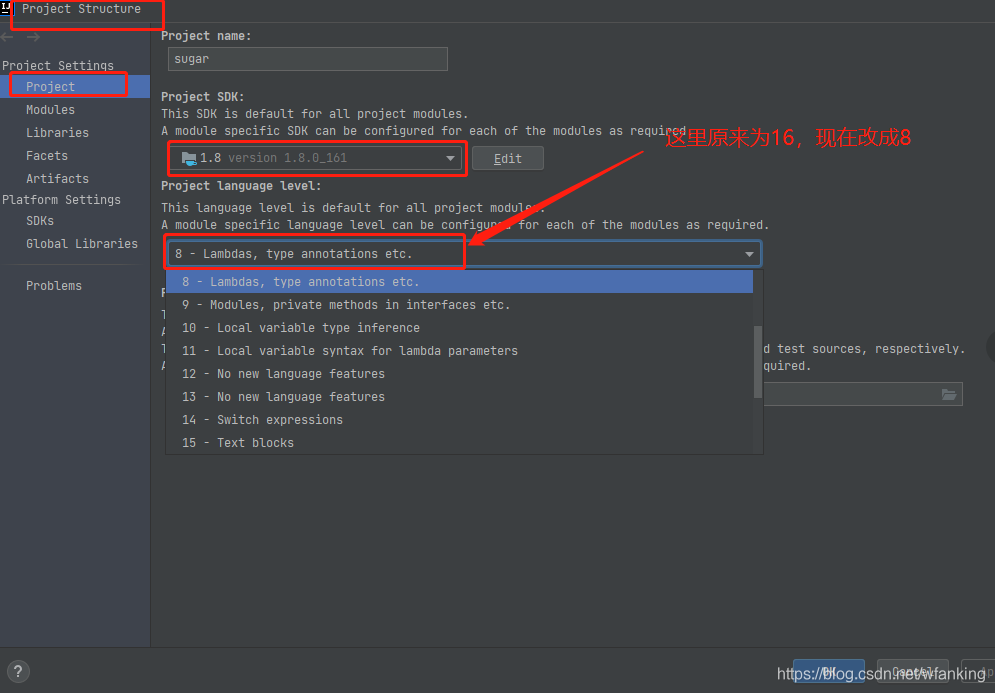
Many methods failed. Finally, it was found that the default project language level was 16 (the idea version used by bloggers was 2021), so it was changed to 8 and the error was reported.

Solve the error of Chinese file uploaded by springboot

Springboot version: 2.3.0.release

Front end use   File upload with unityengine.wwwform

Service error:

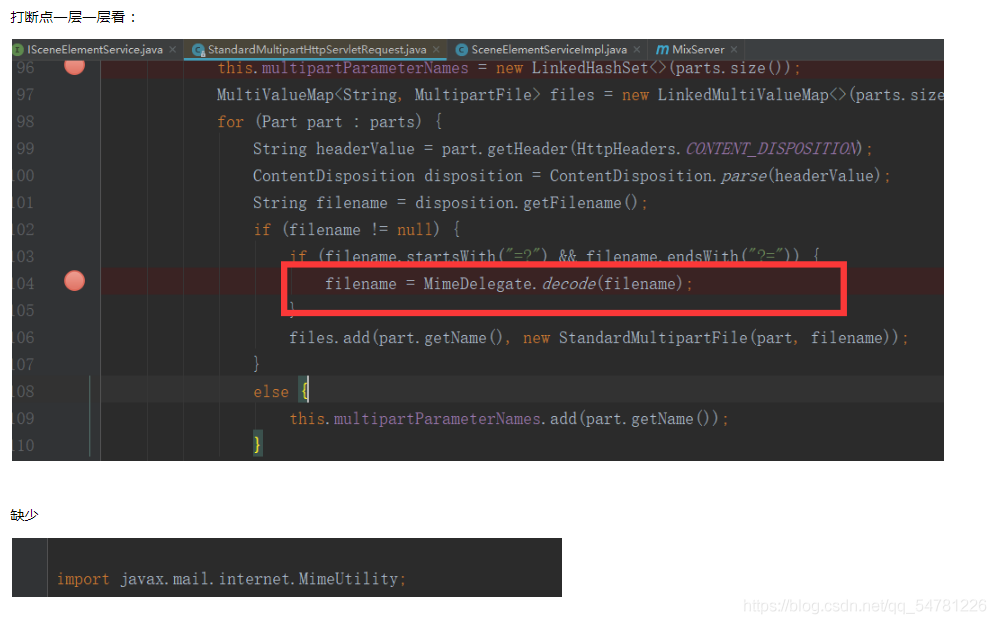
org.springframework.web.multipart.MultipartException: Failed to parse multipart servlet request; nested exception is java.lang.NoClassDefFoundError: javax/mail/internet/MimeUtility

Positioning questions:

POM file import dependency

        <dependency>
            <groupId>javax.mail</groupId>
            <artifactId>mail</artifactId>
            <version>1.4.7</version>
        </dependency>

Re run and solve the problem (* ^ ▽ ^ *)~~

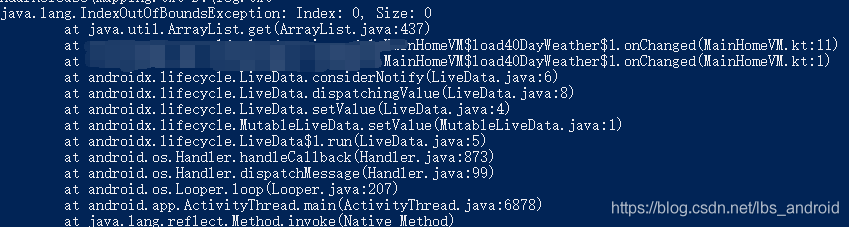
View the error report after Android APK confusion

It is not convenient for APK to view the log after confusion, and the class and method names are shortened
you can view the corresponding class names and method names before and after confusion in the mapping.txt file generated during confusion
you can also use the retract in the SDK \ tools \ Proguard \ bin path to recover the original class name and method name. First copy the error log to a TXT file, such as log.txt. You can then use the command:

Trace mapping file path log file path, such as

retrace D:\mapping.txt D:\log.txt

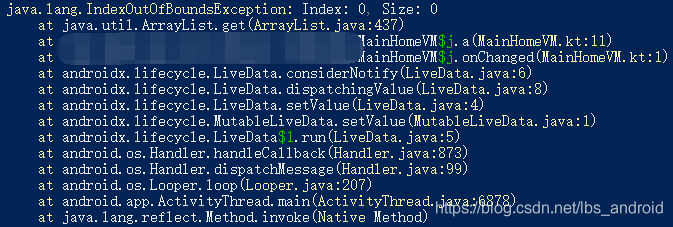
Before treatment

After treatment

Mybatis-plus: How to Execute Native SQL

Define the method to execute in the mapper file

@Repository
public interface ZbArticleCEIResultPerformanceMapper extends BaseMapper<ZbArticleCEIResultPerformance> {

    @Select({"${sql}"})
    @ResultType(ArrayList.class)
    List<ZbArticleCEIResultPerformance> executeQuery(@Param("sql") String sql);

}