Tag Archives: java

Doris streamload task reported an error connection reset [How to Solve]

Background

The spark program scans a hive table (size 3-7g), and then submits the streamload task of HTTP protocol to the Doris cluster. After the Doris cluster is upgraded from 0.13.15 to 0.14.12, the Spark Program suddenly reports an error streamload, and a connection reset occurs

analysis

enable_ http_ server_ V2
this parameter can be viewed by referring to the Fe Chinese configuration. It is used to determine whether to open a new style interface for the Doris interface, but in fact it has more than that. Please continue

New and old versions for Enable_ http_ server_ The default value of V2 parameter is different

In 0.13.15, the default value is false, that is, the default interface is the style of the old version, and the UI is older.

0.14.12 on the contrary, the default value is true, that is, the default interface opens a new style and new UI interface, but there will be problems at the same time
according to the analysis of the source code (palofe. Java), HTTP V2 does not limit the file size uploaded by HTTP, so the default value in springboot will be used to limit it, and the problem of connection reset will appear in the appearance.

Solution:

Method 1: close this parameter and the task can run normally

Method 2: I originally wanted to fix this problem. After looking at the community, I found that a doris-6013 was just merged two days ago, which is exactly the problem. I need to make a patch. However, note that there is a problem with this PR, and the unit is wrong. I need to make a patch together with doris-6070 to fix it.
these two PR mainly add two parameters to httpv2 in the new version of Doris

spring.servlet.multipart.max-file-size=100M
spring.servlet.multipart.max-request-size=100MB
max-file-size is the individual file size
max-request-size is to set the total uploaded data size

If you want to not limit the size of file upload, set both values to – 1. I didn’t test this – 1, but it should work. I will comment on this blog after I test it or confirm with the proposer of PR

Key supplement

After testing, it is found that the above two parameters have no effect. Refer to the community issue-6149
this patch to fix this problem

Doris Error: there is no scanNode Backend [How to Solve]

Background

No. 3.8 on the business development side responded that sparkstreaming lost, scanned the Doris table (query SQL) and reported an error

Caused by: org.apache.spark.SparkException: Job aborted due to stage failure: Task 7 in stage 0.0 failed 4 times, most recent failure: Lost task 7.3 in stage 0.0 (TID 20, hd012.corp.yodao.com, executor 7): com.mysql.jdbc.exceptions.jdbc4.MySQLSyntaxErrorException: errCode = 2, 
detailMessage = there is no scanNode Backend. [126101: in black list(Ocurrs time out with specfied time 10000 MICROSECONDS), 14587381: in black list(Ocurrs time out with specfied time 10000 MICROSECONDS), 213814: in black list(Ocurrs time out with specfied time 10000 MICROSECONDS)]

Error:
detailMessage = there is no scanNode Backend. [126101: in black list(Ocurrs time out with specfied time 10000 MICROSECONDS), 14587381: in black list(Ocurrs time out with specfied time 10000 MICROSECONDS), 213814: in black list(Ocurrs time out with specfied time 10000 MICROSECONDS)]
Source Code Analysis

//Blacklisted objects
private static Map<Long, Pair<Integer, String>> blacklistBackends = Maps.newConcurrentMap();

//The task execution process requires getHost, and the return value is the TNetworkAddress object
public static TNetworkAddress getHost(long backendId,
                                      List<TScanRangeLocation> locations,
                                      ImmutableMap<Long, Backend> backends,
                                      Reference<Long> backendIdRef)

//Get the backend object by backendId in the getHost() method
Backend backend = backends.get(backendId);


// determine if the backend object is available
//return the TNetworkAddress object if it is available
//If it's not available, it iterate through the locations object to find a candidate backend object
//If the backend just unavailable is the same as the candidate backend object id, then continue
//If not, determine whether it is available, available then return to change the candidate be's TNetworkAddress
//If not available, continue to change the next candidate be


if (isAvailable(backend)) {
    backendIdRef.setRef(backendId);
    return new TNetworkAddress(backend.getHost(), backend.getBePort());
}  else {
    for (TScanRangeLocation location : locations) {
        if (location.backend_id == backendId) {
            continue;
        }
        // choose the first alive backend(in analysis stage, the locations are random)
        Backend candidateBackend = backends.get(location.backend_id);
        if (isAvailable(candidateBackend)) {
            backendIdRef.setRef(location.backend_id);
            return new TNetworkAddress(candidateBackend.getHost(), candidateBackend.getBePort());
        }
    }
}

public static boolean isAvailable(Backend backend) {
    return (backend != null && backend.isAlive() && !blacklistBackends.containsKey(backend.getId()));
}


//If a be is not returned until the end, the cause of the exception is returned
// no backend returned
throw new UserException("there is no scanNode Backend. " +
        getBackendErrorMsg(locations.stream().map(l -> l.backend_id).collect(Collectors.toList()),
                backends, locations.size()));


// get the reason why backends can not be chosen.
private static String getBackendErrorMsg(List<Long> backendIds, ImmutableMap<Long, Backend> backends, int limit) {
    List<String> res = Lists.newArrayList();
    for (int i = 0; i < backendIds.size() && i < limit; i++) {
        long beId = backendIds.get(i);
        Backend be = backends.get(beId);
        if (be == null) {
            res.add(beId + ": not exist");
        } else if (!be.isAlive()) {
            res.add(beId + ": not alive");
        } else if (blacklistBackends.containsKey(beId)) {
            Pair<Integer, String> pair = blacklistBackends.get(beId);
            res.add(beId + ": in black list(" + (pair == null ?"unknown" : pair.second) + ")");
        } else {
            res.add(beId + ": unknown");
        }
    }
    return res.toString();
}


//blacklistBackends object's put
public static void addToBlacklist(Long backendID, String reason) {
    if (backendID == null) {
        return;
    }

    blacklistBackends.put(backendID, Pair.create(FeConstants.heartbeat_interval_second + 1, reason));
    LOG.warn("add backend {} to black list. reason: {}", backendID, reason);
}


public static void addToBlacklist(Long backendID, String reason) {
    if (backendID == null) {
        return;
    }

    blacklistBackends.put(backendID, Pair.create(FeConstants.heartbeat_interval_second + 1, reason));
    LOG.warn("add backend {} to black list. reason: {}", backendID, reason);
}

Cause analysis

According to the task error
detailmessage = there is no scannode backend. [126101: in black list (ocurrs time out with specified time 10000 microseconds), 14587381: in black list (ocurrs time out with specified time 10000 microseconds), 213814: in black list (ocurrs time out with specified time 10000 microseconds)]
analysis, be ID is 126101 The reason why nodes 14587381 and 213814 are in the blacklist may be that ocurrs time out with specified time 10000 microseconds
then it is likely that the three bes on March 8 hung up at that time
according to point 7 of the previous experience of community students
it can be inferred that the be hung up because of improper tasks or configurations

Broker or other tasks overwhelm the be service_ broker_ concurrencymax_ bytes_ per_ broker_ scanner
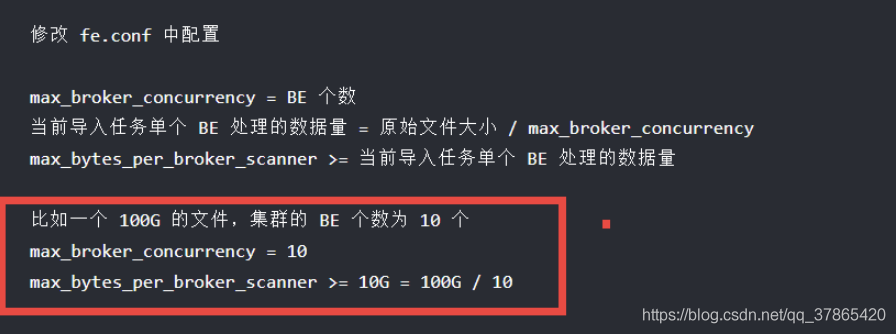
The specific error was reported because the problem occurred on March 8. Today, more than 20 days have passed. During this period, it has experienced Doris cluster expansion, node rearrangement and other operation and maintenance work. Logs and many backups cannot be recovered. It can only be inferred from ocurrs time out with specified time 10000 microseconds that the be may have hung up at that time, Then our services will be mounted on the supervisor, so they will start automatically (the node service is not available before) ‘s Prometheus rules & amp; Alertmanager alarm)
if the same problem occurs again in the future, continue to improve this article

Solutions

Prometheus rules & amp; amp; amp; amp; nbsp; with be node service unavailable ; Alertmanager alarm
adjust the configuration in fe.conf
configure the spark task and broker task during execution
there is no substantive solution for the time being. If the problem reappears, continue to track and supplement solutions
Spring interdependence error: beancurrentyincreationexception unsatisfieddependencyexception

The project will generally start with an error reporting a certain bean loading error with the following key information.
org.springframework.beans.factory.UnsatisfiedDependencyException:Error creating bean with name ‘resUseTimeConfigController’: Unsatisfied dependency expressed through field ‘resUseTimeConfigService’; nested exception is org.springframework.beans.factory.BeanCurrentlyInCreationException: Error creating bean with name ‘resUseTimeConfigServiceImpl’: Bean with name ‘resUseTimeConfigServiceImpl’ has been injected into other beans [resUseTimeConfigSupport] in its raw version as part of a circular reference, but has eventually been wrapped. This means that said other beans do not use the final version of the bean. This is often the result of over-eager type matching – consider using ‘getBeanNamesOfType’ with the ‘allowEagerInit’ flag turned off, for example.

The main reason is that the two beans depend on each other, the simplest solution is to add the @Lazy annotation, and then add the annotation under the @Autowired of the two classes.


//ClassB class is dependent on ClassA

@Autowired     

@Lazy//Annotate     

private ClassA classA; 


//ClassA class is dependent on ClassB

@Autowired     

@Lazy//Annotate    

private ClassB classB; 

Feign Error: Load balancer does not have available server for client:XXX

Feign reports an error: com.netflix.client.clientexception: load balancer does not have available server for client: XXX

The first step is to check whether the name of the service called by feign is correct. Of course, this is a common way. Only when you find that the name is right can you search on the Internet. My problem is that the original call was good. As a result, the versions of springcloud and spring boot were changed to a lower level, but they couldn’t be adjusted. The service name was not changed. So I found that there was a horizontal bar on my service name. Once the horizontal bar was removed, it passed and I was drunk. So I specially wrote an example. It was really the reason for the horizontal bar

com.netflix.client.ClientException: Load balancer does not have available server for client: server-1

Summary: do not add any symbols to the service name. The lower version is incompatible, such as 2.2.6.release hoxton.sr3 I use, and the higher version is OK

[Solved] Invalid Gradle JDK configuration found. Open Gradle Settings Change JDK location

The project was fine before it was opened for a period of time, and then an error was suddenly reported after it was opened. After understanding it, it is found that deleting the gradle.xml file in the. Idea file and then rebuilding it can be generated automatically;

After comparing the previous documents, it is found that a label is missing in the document:

<option name="gradleJvm" value="11" />

The value values of different JDK versions are different, so to be on the safe side, do not modify or add the values inside. Just delete the file and regenerate it;

The idea code pushes to GitHub and reports an error fatal: unable to access

Error:

fatal: unable to access ‘ https://github.com/ …


terms of settlement:

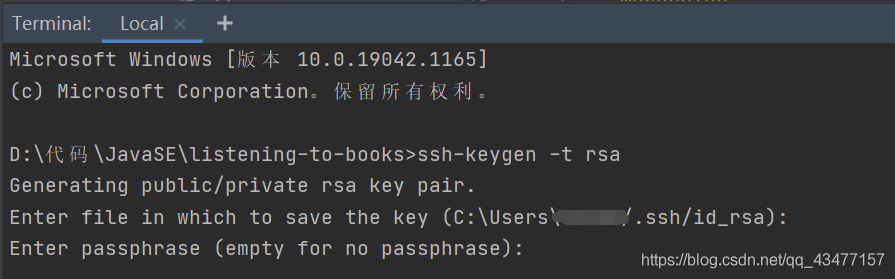
1. Execute SSH keygen – t RSA on the idea terminal and press enter to generate the public key and private key. By default, it is saved in the. SSH directory under the user directory of Disk C
2. Find settings in the GitHub homepage, as shown in the figure below. Create a new SSH
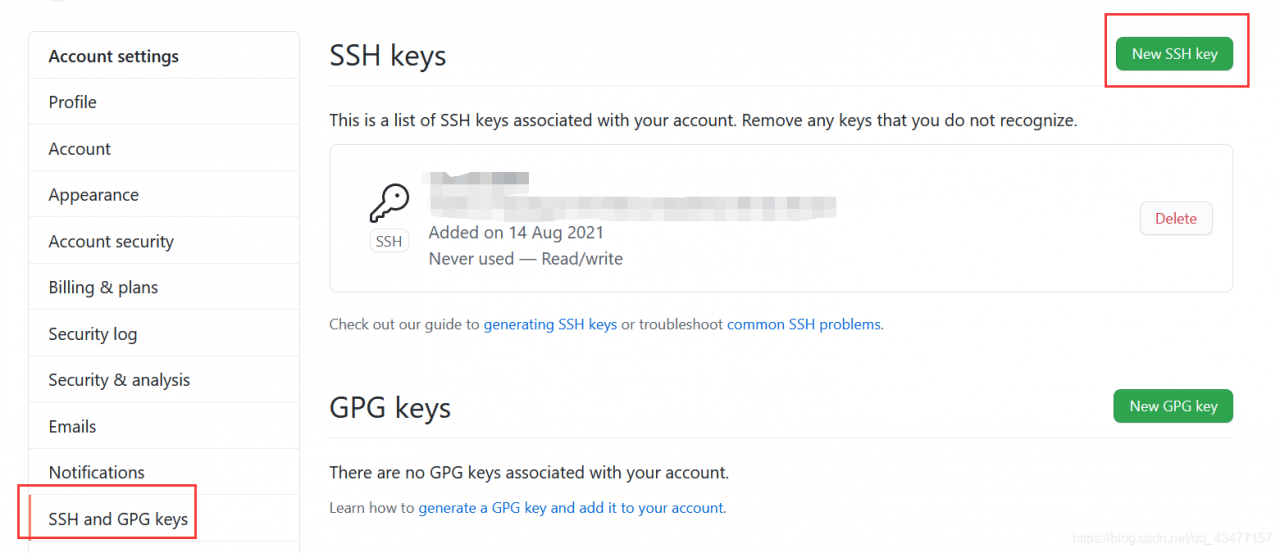
note: when creating a new SSH, fill in the ID_ Contents in rsa.pub
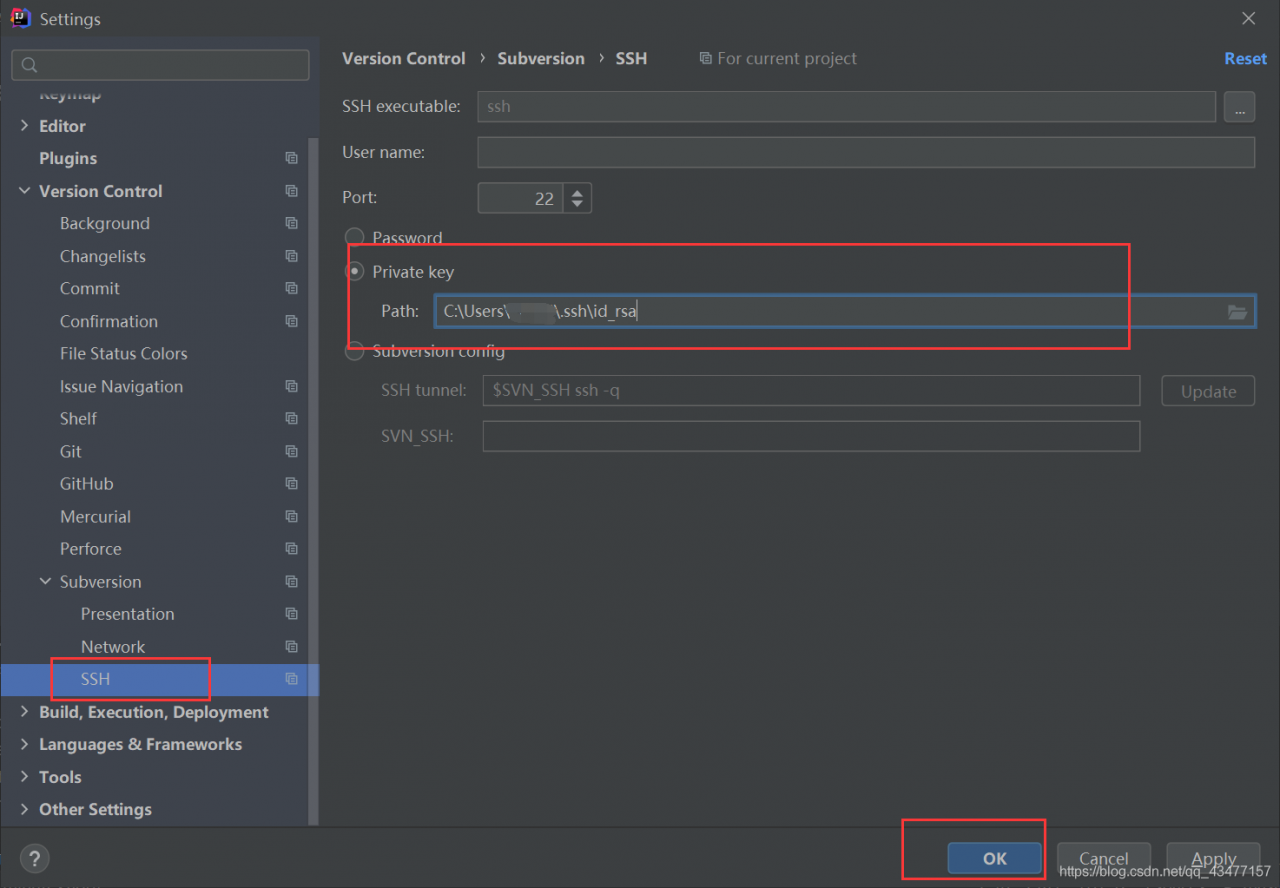
3. Set the private key in idea


Reference link: https://blog.csdn.net/qianlixiaomage/article/details/114681364

Resolve the idea error unable to Ping server at localhost: 1099 exception

Unable to Ping server at localhost: 1099
the solutions mentioned on the Internet are the first two, but mine is the third. I hope small partners can avoid the pit
1. The version of Tomcat and JDK matches
port 2 is occupied
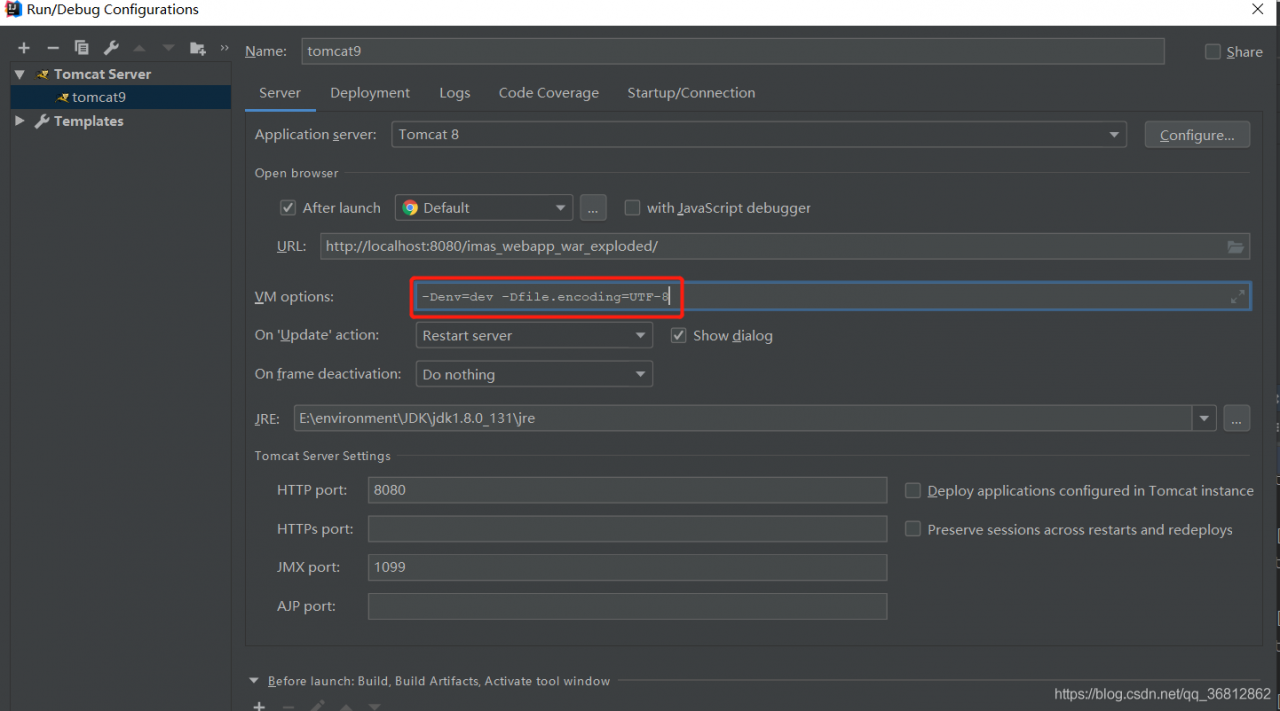
3 check the idea configuration Tomcat. VM options cannot have spaces before and after the equals sign
(if there are spaces before and after the equals sign, there will always be an error.)

Java.lang.ClassNotFoundException: sun.jdbc.odbc.JdbcOdbcDriver [How to Solve]

Java.lang.classnotfoundexception: sun.jdbc.odbc.jdbcodbcdriver error reporting solution

Error report description problem description cause analysis solution operation results

Error reporting description

java.lang.classnotfoundexception: sun.jdbc.odbc.jdbcodbcdriver reports an error


Problem description

when learning the contents of Java database, because the old version of teaching materials are used, and the Java version has been updated and some functions have been deleted, an error message prompted by java.lang.classnotfoundexception: sun.jdbc.odbc.jdbcodbcdriver appears when reading the database: 

try {
            Class.forName("sun.jdbc.odbc.JdbcOdbcDriver");
        } catch (ClassNotFoundException e) {
            System.out.println(e);
        }

Error message: java.lang.classnotfoundexception: sun.jdbc.odbc.jdbcodbcdriver


Cause analysis

since JDK1.8, the JDBC ODBC bridge has been deleted, so the ODBC driver cannot be used </ font>


Solution


    1. Step 1: install the old version of JDK. I install the download link of version 1.7 here: just click the next step for the jdk1.7 installation step. Step 2: change the Java environment


    1. friends using eclipse can refer to this blog:


    1. java.lang.classnotfoundexception: sun.jdbc.odbc.jdbcodbcodbcdriver solution 2.1 I use the integrated development environment of idea, The method is as follows:


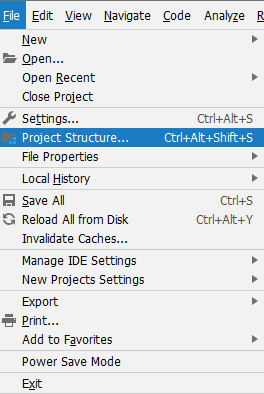
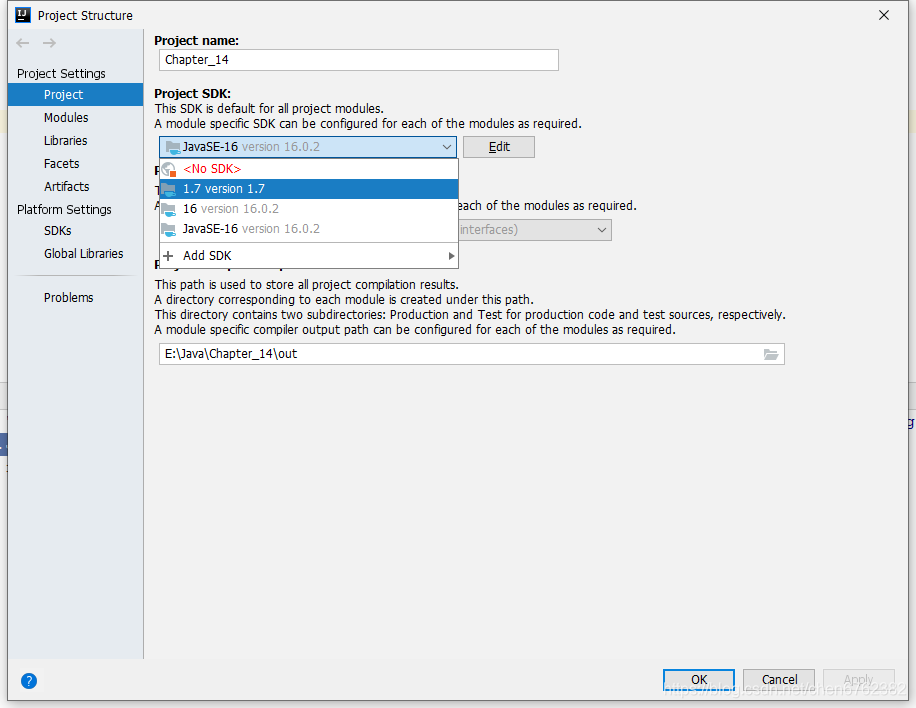
    1. in file – project structure

    1. in project settings, select the JDK version downloaded for you by project SDK (here is 1.7)


    1. and click apply to run


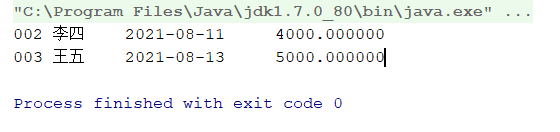
Operation results

run smoothly ^ ^

Dm7 Dameng database dmrman reports an error OS_ pipe2_ conn_ Server open failed solution

An error is reported when executing a command in dmrman (DMAP service background starts normally):

RMAN> BACKUP DATABASE '/dm/dmdbms/data/DAMENG/dm.ini';
BACKUP DATABASE '/dm/dmdbms/data/DAMENG/dm.ini';
checking if the database under system path [/dm/dmdbms/data/DAMENG] is running...[4].
checking if the database under system path [/dm/dmdbms/data/DAMENG] is running...[3].
checking if the database under system path [/dm/dmdbms/data/DAMENG] is running...[2].
checking if the database under system path [/dm/dmdbms/data/DAMENG] is running...[1].
checking if the database under system path [/dm/dmdbms/data/DAMENG] is running...[0].
checking if the database under system path [/dm/dmdbms/data/DAMENG] is running, write dmrman info.
EP[0] max_lsn: 155855
BACKUP DATABASE [DAMENG], execute......
os_pipe2_conn_server open failed, name:[/dm/dm_bak/DM_PIPE_DMAP_LSNR_WR], errno:2
CMD END.CODE:[-7109],DESC:[Pipe connect failure]
[-7109]:Pipe connect failure
RMAN>

resolvent:

Method (1)

Must go to DM_ Execute dmrman in the home/bin directory. Although the environment variable is configured to recognize the dmrman command, an error will be reported during execution. It is speculated that the files relied on during program execution cannot be recognized correctly. Switch to $DM_ Home/bin solves this problem.

[[email protected] bin]$ pwd
/dm/dmdbms/bin
[[email protected] bin]$ ./dmrman
dmrman V7.6.0.95-Build(2018.09.13-97108)ENT 
RMAN> BACKUP DATABASE '/dm/dmdbms/data/DAMENG/dm.ini' FULL BACKUPSET '/dm/dm_bak/db_full_bak_01';
BACKUP DATABASE '/dm/dmdbms/data/DAMENG/dm.ini' FULL BACKUPSET '/dm/dm_bak/db_full_bak_01';
file dm.key not found, use default license!
Global parameter value of RT_HEAP_TARGET is illegal, use min value!
checking if the database under system path [/dm/dmdbms/data/DAMENG] is running...[4].
checking if the database under system path [/dm/dmdbms/data/DAMENG] is running...[3].
checking if the database under system path [/dm/dmdbms/data/DAMENG] is running...[2].
checking if the database under system path [/dm/dmdbms/data/DAMENG] is running...[1].
checking if the database under system path [/dm/dmdbms/data/DAMENG] is running...[0].
checking if the database under system path [/dm/dmdbms/data/DAMENG] is running, write dmrman info.
EP[0] max_lsn: 116978
BACKUP DATABASE [DAMENG], execute......
CMD CHECK LSN......
BACKUP DATABASE [DAMENG], collect dbf......
CMD CHECK ......
DBF BACKUP SUBS......
total 1 packages processed...
total 3 packages processed...
total 4 packages processed...
DBF BACKUP MAIN......
BACKUPSET [/dm/dm_bak/db_full_bak_01] END, CODE [0]......
META GENERATING......
total 5 packages processed...
total 5 packages processed!
CMD END.CODE:[0]
backup successfully!
time used: 7081.941(ms)
RMAN>

Method (2)

An error is reported in the log. The pipeline file already exists. An error is reported after deleting the pipeline file OS_ pipe2_ Server open failed, check whether the data is written without permission, modify the permission, and then report an error. The pipeline connection timed out
use./dmrman use_ AP = 2 restore without pipeline DMAP succeeded.

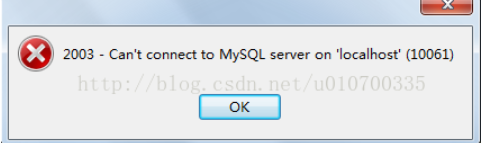
Navicat VMware failed to connect to the database. Possible causes of error 2003

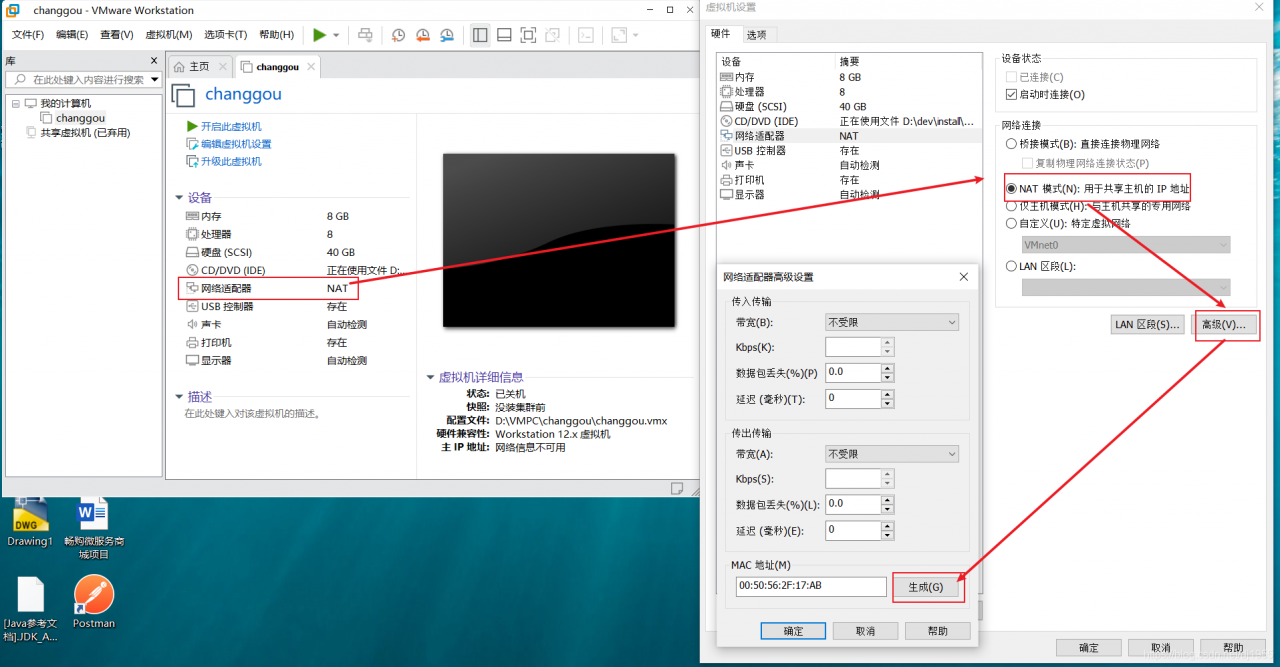
The virtual machine began to work well. After a while, it was found that Navicat suddenly connected and did not report 2003, Firefox could not get on the network, and an error was reported when the code accessed the database; In short, the remote connection failed. It may be because VMware is copied for direct use or after the second boot Click to restore the previous state (there are also copy operations), and the MAC address is the same.

If the small Lord’s method doesn’t work

Check: 1. Whether the firewall is turned off

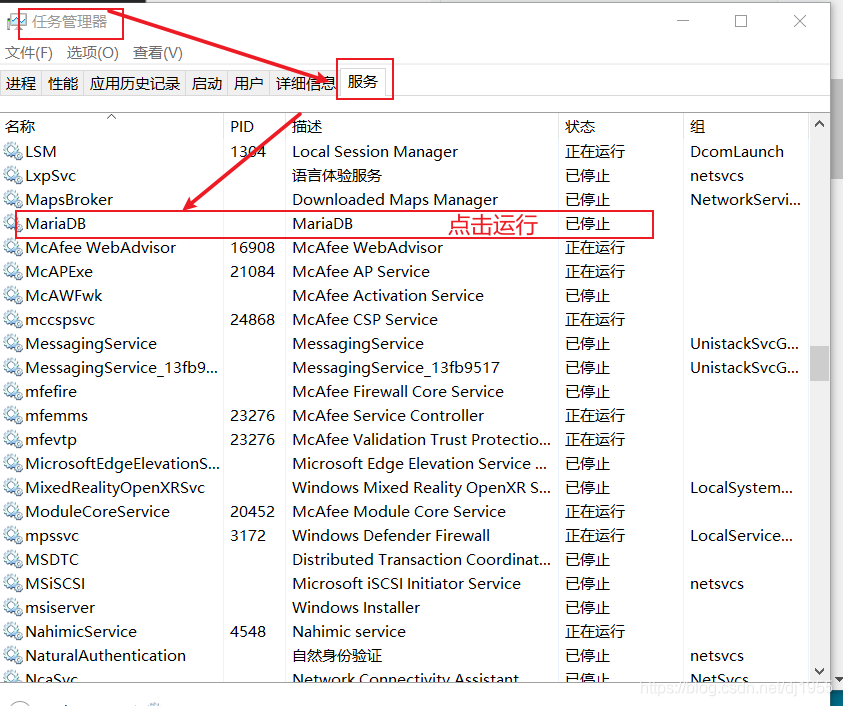
            2. Whether the sql service is running (when MySQL is installed locally)


            3. Set any IP access

Execute under the root path of the database: MySQL – U root – P password

mysql> GRANT ALL PRIVILEGES ON . TO ‘root’@’%’ IDENTIFIED BY ‘123456’ WITH GRANT
OPTION;
experience‘ % in root ‘@’% ‘represents any IP. If you want to specify an IP to access the database. User name: root, login password: 123456, specify unique computer access: ‘root’ @ ‘192.168.211.132’

Refresh configuration: MySQL & gt; flush privileges;     


JetBrains compilation error is due to project language level

This is described in the user manual of JetBrains. Project language level

It has two functions:

    check syntax compatibility when writing code. For example, if it is set to 7, you can’t use the features above jdk1.7 when writing code, no matter what version of JDK you use. Features like functional interfaces cannot be used, and the idea will prompt an error. Compile the source code to the bytecode of the target version. For example, if it is set to 6, the compiled code is JDK6 compatible regardless of whether JDK7 or 8 is used


Communication link failure when connecting Doris

Springboot queries Doris with an error

ERROR [http-nio-10020-exec-12] [http-nio-10020-exec-12raceId] [] [5] @@GlobalExceptionAdvice@@ | server error 
org.springframework.dao.RecoverableDataAccessException: 
### Error querying database.  Cause: com.mysql.jdbc.exceptions.jdbc4.CommunicationsException: Communications link failure

The last packet successfully received from the server was 426 milliseconds ago.  The last packet sent successfully to the server was 0 milliseconds ago.
; Communications link failure

The last packet successfully received from the server was 426 milliseconds ago.  The last packet sent successfully to the server was 0 milliseconds ago.; nested exception is com.mysql.jdbc.exceptions.jdbc4.CommunicationsException: Communications link failure

The last packet successfully received from the server was 426 milliseconds ago.  The last packet sent successfully to the server was 0 milliseconds ago.

An error is reported in the insert into select task scheduled by Doris

ERROR 2013 (HY000) at line 7: Lost connection to MySQL server during query

analysis

It may be that slow queries cause huge pressure on the cluster.
several slow queries reach 120s-400s, which is unbearable for the Doris cluster because of the global query_ The timeout parameter is 60. It is assumed that the task session variable of someone is set to 600s or higher

Let the development offline slow query task and the tuning SQL
slow query task for more than 100 seconds work normally after offline

But after a while, the springboot service alarms. There are mistakes again

Doris parameter

interactive_timeout=3880000

wait_timeout=3880000

Doris Fe service node alarm log

2021-06-03 16:00:08,398 WARN (Connect-Scheduler-Check-Timer-0|79) [ConnectContext.checkTimeout():365] kill wait timeout connection, remote: 1.1.1.1:57399, wait timeout: 3880000
2021-06-03 16:00:08,398 WARN (Connect-Scheduler-Check-Timer-0|79) [ConnectContext.kill():339] kill timeout query, 1.1.1.1.1:57399, kill connection: true

Doris monitoring

It can be seen that the number of connections at 15:44 drops sharply

#Elk log
you can also see that the alarm and error messages of Doris queried by springboot service also start at 15:44
so what operation variables affect the cluster at 15:44?

See waite according to the error report
_ The time is 3880000s, which is 44 days, but the default in the source code is 28800s

interactive_timeout=3880000

wait_timeout=3880000

No one went online, no one cut, and the Cluster Administrator was in my hands. I didn’t change the parameters, but I’m still not sure why the parameters will change. Go to the fe.audit audit audit log to check the operation records. Sure enough,
someone ( insider ) was using the 2020.2.3 version of DataGrid. At 15:44, the set global parameters were modified

interactive_timeout=3880000

wait_timeout=3880000

call back the two parameters to 28800s , and the connections of the cluster are restored immediately
it should be noted here that in the discussion with the community, there is only wait in Doris_ Timeout works, and the other is interactive_ Timeout in order to be compatible with MySQL, it doesn’t work

Question: why wait in Doris_ When the timeout parameter is too large, it will cause a connection error communications link failure
on the contrary, it can return to normal after being reduced. You need to sort out the code and look at the logic

Please check the
connection Doris error communications link failure