When the type of the requested parameter is correct and various configurations are correct, a 400 error will appear, and the console will report an error failed to convert value of type ‘Java. Lang. string’ to required type ‘Java. Lang. Integer’; Nested exception is java.lang.numberformatexception: for input string: “XXX”] a similar error may be that the request path set by your control layer and the path of static resources have the same name,
For example:
the page I visit is/user/index.html
and the requestmapping (“user”) of the control layer
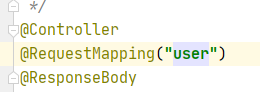
when accessing/user/index.html, the user request of the servlet will be followed, and the parameter type may not be correct, which will be 400.
if the correct estimation directly returns the requested JSON result,
Tag Archives: java
JetBrains compilation error is due to project language level
This is described in the user manual of JetBrains. Project language level
It has two functions:
- check syntax compatibility when writing code. For example, if it is set to 7, you can’t use the features above jdk1.7 when writing code, no matter what version of JDK you use. Features like functional interfaces cannot be used, and the idea will prompt an error. Compile the source code to the bytecode of the target version. For example, if it is set to 6, the compiled code is JDK6 compatible regardless of whether JDK7 or 8 is used

Springboot plus cross domain annotation @crossorigin startup error
The purpose of this article is to record this error (reducing the version can also solve this problem)
@The crossorigin annotation is used to complete cross domain requests.
In previous versions, it was usually written in the following way to indicate that a session can also support cross domain requests. Multiple requests use one session.
@CrossOrigin(allowCredentials = "true", allowedHeaders = "*")
However, in the latest version of 2.5.2 , running the project in this way will report an error. The error information is as follows:
Error starting ApplicationContext. To display the conditions report re-run your application with 'debug' enabled.
2021-08-22 18:18:56.634 ERROR 3840 --- [  restartedMain] o.s.boot.SpringApplication               : Application run failed

org.springframework.beans.factory.BeanCreationException: Error creating bean with name 'requestMappingHandlerMapping' defined in class path resource [org/springframework/boot/autoconfigure/web/servlet/WebMvcAutoConfiguration$EnableWebMvcConfiguration.class]: Invocation of init method failed; nested exception is java.lang.IllegalArgumentException: When allowCredentials is true, allowedOrigins cannot contain the special value "*" since that cannot be set on the "Access-Control-Allow-Origin" response header. To allow credentials to a set of origins, list them explicitly or consider using "allowedOriginPatterns" instead.
	at org.springframework.beans.factory.support.AbstractAutowireCapableBeanFactory.initializeBean(AbstractAutowireCapableBeanFactory.java:1786) ~[spring-beans-5.3.8.jar:5.3.8]
	at org.springframework.beans.factory.support.AbstractAutowireCapableBeanFactory.doCreateBean(AbstractAutowireCapableBeanFactory.java:602) ~[spring-beans-5.3.8.jar:5.3.8]
	at org.springframework.beans.factory.support.AbstractAutowireCapableBeanFactory.createBean(AbstractAutowireCapableBeanFactory.java:524) ~[spring-beans-5.3.8.jar:5.3.8]
	at org.springframework.beans.factory.support.AbstractBeanFactory.lambda$doGetBean$0(AbstractBeanFactory.java:335) ~[spring-beans-5.3.8.jar:5.3.8]
	at org.springframework.beans.factory.support.DefaultSingletonBeanRegistry.getSingleton(DefaultSingletonBeanRegistry.java:234) ~[spring-beans-5.3.8.jar:5.3.8]
	at org.springframework.beans.factory.support.AbstractBeanFactory.doGetBean(AbstractBeanFactory.java:333) ~[spring-beans-5.3.8.jar:5.3.8]
	at org.springframework.beans.factory.support.AbstractBeanFactory.getBean(AbstractBeanFactory.java:208) ~[spring-beans-5.3.8.jar:5.3.8]
	at org.springframework.beans.factory.support.DefaultListableBeanFactory.preInstantiateSingletons(DefaultListableBeanFactory.java:944) ~[spring-beans-5.3.8.jar:5.3.8]
	at org.springframework.context.support.AbstractApplicationContext.finishBeanFactoryInitialization(AbstractApplicationContext.java:918) ~[spring-context-5.3.8.jar:5.3.8]
	at org.springframework.context.support.AbstractApplicationContext.refresh(AbstractApplicationContext.java:583) ~[spring-context-5.3.8.jar:5.3.8]
	at org.springframework.boot.web.servlet.context.ServletWebServerApplicationContext.refresh(ServletWebServerApplicationContext.java:145) ~[spring-boot-2.5.2.jar:2.5.2]
	at org.springframework.boot.SpringApplication.refresh(SpringApplication.java:754) [spring-boot-2.5.2.jar:2.5.2]
	at org.springframework.boot.SpringApplication.refreshContext(SpringApplication.java:434) [spring-boot-2.5.2.jar:2.5.2]
	at org.springframework.boot.SpringApplication.run(SpringApplication.java:338) [spring-boot-2.5.2.jar:2.5.2]
	at org.springframework.boot.SpringApplication.run(SpringApplication.java:1343) [spring-boot-2.5.2.jar:2.5.2]
	at org.springframework.boot.SpringApplication.run(SpringApplication.java:1332) [spring-boot-2.5.2.jar:2.5.2]
	at com.example.shop.ShopApplication.main(ShopApplication.java:12) [classes/:na]
	at sun.reflect.NativeMethodAccessorImpl.invoke0(Native Method) ~[na:1.8.0_251]
	at sun.reflect.NativeMethodAccessorImpl.invoke(NativeMethodAccessorImpl.java:62) ~[na:1.8.0_251]
	at sun.reflect.DelegatingMethodAccessorImpl.invoke(DelegatingMethodAccessorImpl.java:43) ~[na:1.8.0_251]
	at java.lang.reflect.Method.invoke(Method.java:498) ~[na:1.8.0_251]
	at org.springframework.boot.devtools.restart.RestartLauncher.run(RestartLauncher.java:49) [spring-boot-devtools-2.5.2.jar:2.5.2]
Caused by: java.lang.IllegalArgumentException: When allowCredentials is true, allowedOrigins cannot contain the special value "*" since that cannot be set on the "Access-Control-Allow-Origin" response header. To allow credentials to a set of origins, list them explicitly or consider using "allowedOriginPatterns" instead.
	at org.springframework.web.cors.CorsConfiguration.validateAllowCredentials(CorsConfiguration.java:473) ~[spring-web-5.3.8.jar:5.3.8]
	at org.springframework.web.servlet.handler.AbstractHandlerMethodMapping$MappingRegistry.register(AbstractHandlerMethodMapping.java:644) ~[spring-webmvc-5.3.8.jar:5.3.8]
	at org.springframework.web.servlet.handler.AbstractHandlerMethodMapping.registerHandlerMethod(AbstractHandlerMethodMapping.java:328) ~[spring-webmvc-5.3.8.jar:5.3.8]
	at org.springframework.web.servlet.mvc.method.annotation.RequestMappingHandlerMapping.registerHandlerMethod(RequestMappingHandlerMapping.java:395) ~[spring-webmvc-5.3.8.jar:5.3.8]
	at org.springframework.web.servlet.mvc.method.annotation.RequestMappingHandlerMapping.registerHandlerMethod(RequestMappingHandlerMapping.java:76) ~[spring-webmvc-5.3.8.jar:5.3.8]
	at org.springframework.web.servlet.handler.AbstractHandlerMethodMapping.lambda$detectHandlerMethods$2(AbstractHandlerMethodMapping.java:298) ~[spring-webmvc-5.3.8.jar:5.3.8]
	at java.util.LinkedHashMap.forEach(LinkedHashMap.java:684) ~[na:1.8.0_251]
	at org.springframework.web.servlet.handler.AbstractHandlerMethodMapping.detectHandlerMethods(AbstractHandlerMethodMapping.java:296) ~[spring-webmvc-5.3.8.jar:5.3.8]
	at org.springframework.web.servlet.handler.AbstractHandlerMethodMapping.processCandidateBean(AbstractHandlerMethodMapping.java:265) ~[spring-webmvc-5.3.8.jar:5.3.8]
	at org.springframework.web.servlet.handler.AbstractHandlerMethodMapping.initHandlerMethods(AbstractHandlerMethodMapping.java:224) ~[spring-webmvc-5.3.8.jar:5.3.8]
	at org.springframework.web.servlet.handler.AbstractHandlerMethodMapping.afterPropertiesSet(AbstractHandlerMethodMapping.java:212) ~[spring-webmvc-5.3.8.jar:5.3.8]
	at org.springframework.web.servlet.mvc.method.annotation.RequestMappingHandlerMapping.afterPropertiesSet(RequestMappingHandlerMapping.java:206) ~[spring-webmvc-5.3.8.jar:5.3.8]
	at org.springframework.beans.factory.support.AbstractAutowireCapableBeanFactory.invokeInitMethods(AbstractAutowireCapableBeanFactory.java:1845) ~[spring-beans-5.3.8.jar:5.3.8]
	at org.springframework.beans.factory.support.AbstractAutowireCapableBeanFactory.initializeBean(AbstractAutowireCapableBeanFactory.java:1782) ~[spring-beans-5.3.8.jar:5.3.8]
	... 21 common frames omitted
From the error message, we find the most critical sentence:
When allowCredentials is true, allowedOrigins cannot contain the special value "*" since that cannot be set on the "Access-Control-Allow-Origin" response header.
Carefully read the error report. After allowcredentials = “true” is used, the origin cannot be set to * (i.e. the default state).
The solution is also relatively simple. Just add a domain name to the parameters
@CrossOrigin(origins = "http://localhost:63342",allowCredentials = "true", allowedHeaders = "*")
This port number is my front-end running with webstron, and the front-end will run on a local port. My one is 63343
If I use idea, click the browser in the floating window to open the front-end page, and the port number on the pop-up page is the port number of the domain name in the @ crossorigin note.
Some students didn’t report an error after starting, but the session still can’t be accessed across domains. It may be that you didn’t add it in the front page
xhrFields:{withCredentials:true},
The project uses fastjason to report an error
The project uses fastjason to report an error
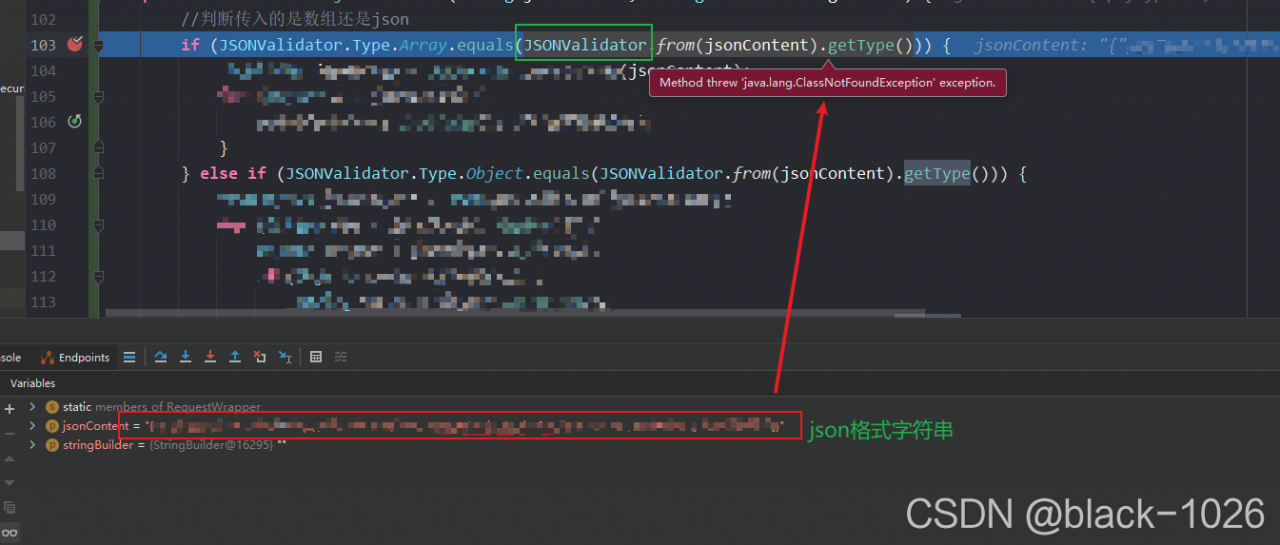
java.lang.ClassNotFoundException: com.alibaba.fastjson.JSONValidator
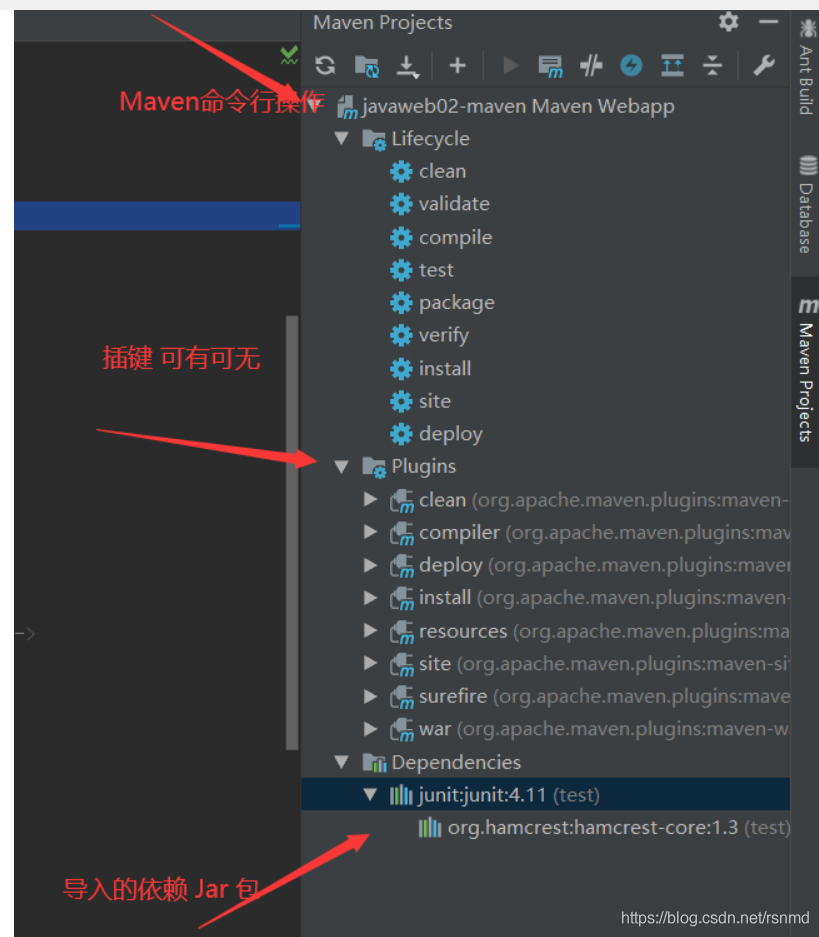
The error shows that the jsonvalidator class cannot be found. Open the Maven interface of idea to find the related dependencies
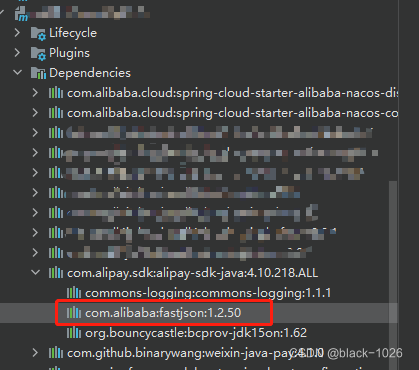
display the dependency of this module Alipay SDK Java. The version of fastjson under this dependency is 1.2.50
Jsonvalidator is a later version
resolvent:
Introduce a new dependency in the POM file under the root directory, using fastjson version 1.2.75
<dependency>
    <groupId>com.alibaba</groupId>
    <artifactId>fastjson</artifactId>
    <version>1.2.75</version>
</dependency>
[comment: httpmessagenotreadableexception: JSON parse error: invalid UTF-8 start byte 0xa0]
In these two days, a simple and small requirement was developed iteratively. The post request received the parameters from the front end and converted the received JSON format into the corresponding POJO. However, the program reported the following exceptions in the process of receiving the request:
org.springframework.http.converter.HttpMessageNotReadableException: JSON parse error: Invalid UTF-8 start byte 0xa0; nested exception is com.fasterxml.jackson.core.JsonParseException: Invalid UTF-8 start byte 0xa0 at [Source: java.io.PushbackInputStream@664c6a7d; line: 1, column: 61]
And because the front-end code has not been tested in the test environment, because it is tested using postman, 500 system abnormal error messages also appear in postman.
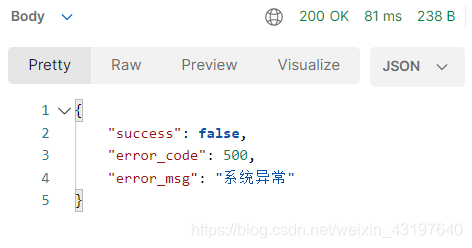
After a long time of searching on the Internet, I tried to set the content type attribute of the request response header, but it didn’t work and still reported an error;
After that, we also carefully checked whether there was a problem in the code, checked the @ requestbody annotation to receive JSON format data and convert it into the corresponding POJO, and the field properties are correct;
Finally, it is found in some blogs that it may also be the reason for Chinese spaces in JSON data, which is inspired.
After checking, use postman tool to select JSON strings with the same format, and the cursor will be displayed together. It is found that individual characters of Queshi do not correspond completely.
Check the corresponding sample
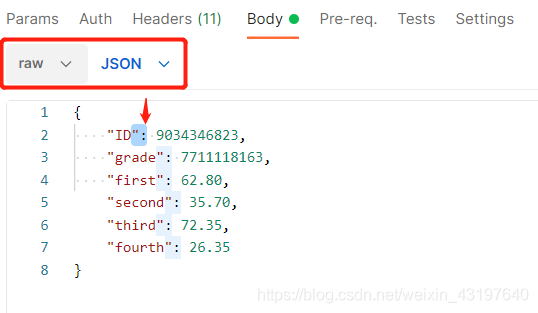
There is no exact correspondence

After modification
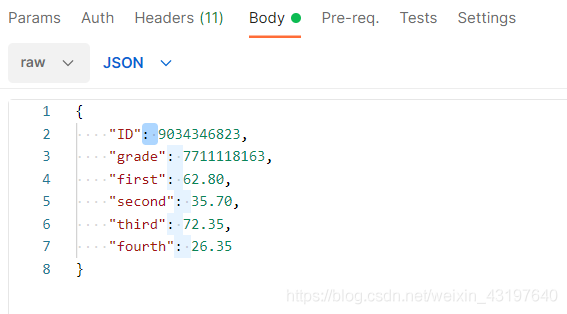
Test, success
In fact, it can also be seen from the error message that it is a JSON parsing error, which roughly means that it is an invalid Chinese byte at the beginning.
Springboot integrates quartz timed task trigger_ State error resolution
Background
For Java projects, quartz is used to schedule tasks, and then a strange problem occurs. When adding job scheduling, it is found that the status of write scheduled tasks directly becomes error, or it becomes error after running once or twice. At that time, I was still wondering how this could happen. It is OK to check the log and send modern codes without errors. Manual execution is OK. Then I found that two services are running the same database
Quartz timing task is configured in the database
Then it is found that a server has a very old version of code, so that the corresponding job class cannot be found at runtime, and then the state directly changes to error. Just turn off the older services. Or the two service codes are consistent
terms of settlement
1. Check which service processes are scheduled in the current database
SQL command: show processlist;
It will display the of all processes accessing the database you specify
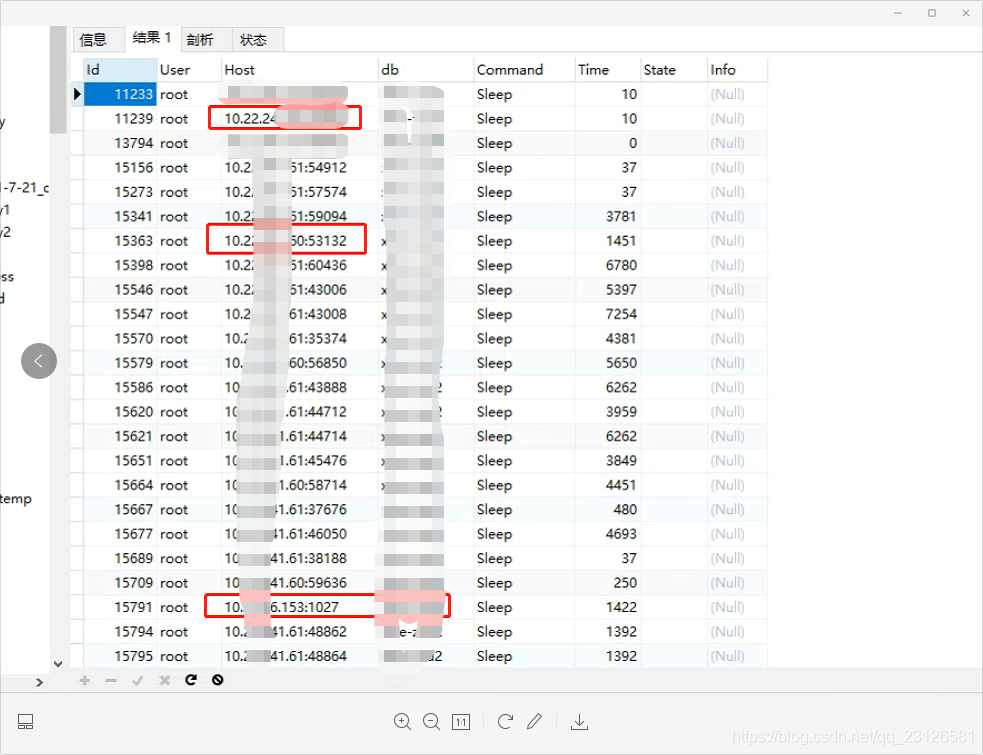
Then find the corresponding server, update the code or stop one of the services
Redis Startup Error: Creating Server TCP listening socket 127.0.0.1:6379: bind: No error
Today, the redis service started in the window and reported an error:
Creating server TCP listening socket 127.0.0.1:6379: bind no error
The reason is that redis did not shut down normally after it was started;
The solution is as follows: enter the following commands in order to connect successfully
redis-cli.exe
shutdown
exit
Redis closes normally, exits, and then re-enter the command to start
redis-server.exe redis.windows.conf
OK!
[Solved] Error resolving template template might not exist or might not be accessible
Resolving error template template may not exist or may not be accessible
-
- there may be a problem with your controller annotation
-
- the difference between controller annotation and restcontroller annotation. Thymeleaf configures the corresponding path in the properties or YML configuration file
-
- about
-
- properties spring.web.resources.static-locations=classpath:/static/, classpath:/templates/ yml
-
	spring:
      thymeleaf:
        # thymeleaf The directory where the page is stored
        prefix: classpath:/templates/
Return path problem
there is no Maven clear in the return path
Syntax error on token “}“, delete this token
Syntax error on token “}”, delete this token
There is no problem with the code in eclipse, but this error is reported. Solution:
There is no problem with the code in eclipse, but this error is reported
resolvent:
- after deleting the ‘}’ reported error, type a ‘}’ again, and then click save. Git will not compare the changes in this method
Error: unreachable statement [How to Solve]
Error: unreachable statement
The cause of this error is just like its name. The compiler will never execute it
the following situations will occur: unreachable statement:
(1) write a statement after the return statement
(2) write a statement after the throw statement
(3) define statements after the break and continue statements
(4) “\ u10100″// legal, equivalent to ‘\ u1010’ and string “0”
(5) the shift operator can be used for long int char short byte
(6) the access control character of a class can be public or nothing
(7) goto is a reserved word but not a keyword. Then is nothing
(8) when a superclass type is cast and assigned to an object of a subclass, there is no exception in compilation, but an exception will occur at run time
for example:
while(i<length&&len>0){
            if(strs[i].contains(com.substring(0,len))){
                continue;
                i++;
            }else{
                len--;
            }
        }
You can see that the position of I++ in this code is after its continue. After the compiler executes here, it will directly carry out the next cycle, and I++ will never execute.
Error:java: Compilation failed: internal java compiler error
Compilation error
Error:java: Compilation failed: internal java compiler error
Solution (two cases):
- setting–> Build,Execution,Deployment–> The build process heap size (Mbytes): 700 is changed to 2000, or 5000 (it is possible that the company’s project needs a lot, so try to make it larger). The JDK version does not correspond. It needs to be in file — & gt; Project structure–> Project check whether the JDK version corresponds to
Error: char cannot be dereferenced [How to Solve]
#Error reported: char cannot be dereferenced
##1. Error code
while(s.charAt(i).equals(" ")){
            i++;
        }
S is a string
## error reason
java: cannot dereference char
char is a basic data type and already a value. Here, the comparison value can be directly used = =.
##Solution 1
but the comparison here is “” (string space)
you can’t directly use the = = symbol
so replace charat() with substring()
substring() returns a string, so you can use equals()
while(s.substring(i,i+1).equals(" ")){
            i++;
        }
So the problem has been solved
##Solution 2
we can also compare it with ” (character space)
you can directly use the equal sign
while(s.charAt(i)==' '){
            i++;
        }