Tag Archives: java

[Solved] Upload Files Error: Request processing failed;nested exception is org.springframework.web.multipart.MultipartExcepti

During a project development, the front-end uploaded a file and reported a bug without permission

Problem description

Request processing failed; nested exception is org.springframework.web.multipart.MultipartException: Failed to parse multipart servlet request; Needed exception is org.apache.commons.fileupload.fileuploadbase $iofileuploadexception: processing of multipart/form data request failed

Error reporting reason

It should be because HTTP remote access does not have permission to access the temporary directory of Tomcat on the server

So we might as well directly set a temporary file upload path instead of using the default path of Tomcat

Solution:

Modify the uploaded temporary file path instead of the default temporary file path of Tomcat

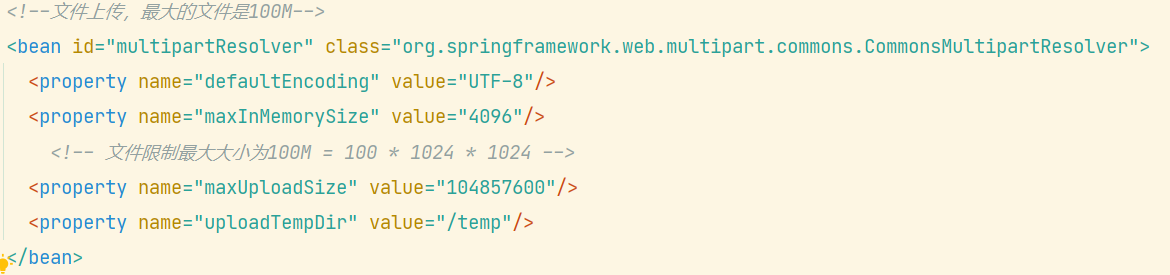
When uploading the configuration file in applicationcontext.xml of spring, add

<property name="uploadTempDir" value="/temp"/>

The content in value is the temporary file directory you want to set

[Solved] SpringBoot Pack Project: Failed to execute goal org.apache.maven.plugins:maven-resources-plugin:3.2.0:resources

Error prompt

Failed to execute goal org.apache.maven.plugins:maven-resources-plugin:3.2.0:resources (default-resources) on project store: Input length = 1 -> [Help 1]

Analysis: there are few corresponding dependencies Maven resources plugin

solution:
add a corresponding dependency:

<build>
    <plugins>
        <plugin>
            <groupId>org.apache.maven.plugins</groupId>
            <artifactId>maven-resources-plugin</artifactId>
            <version>3.1.0</version>
        </plugin>
        <plugin>
            <groupId>org.springframework.boot</groupId>
            <artifactId>spring-boot-maven-plugin</artifactId>
        </plugin>
    </plugins>
</build>

If the problem still exists, pay attention to the Maven resources plugin version. If there is a problem with version 3.2.0, change to version 3.1.0

Failed to convert value of type ‘java.lang.String‘ to required type ‘java.util.Date‘;

Report 400: data type mismatch:

    The type of time passed in the path URL is string

    You can add this annotation in the controller layer to convert string to java.util.date

    @DateTimeFormat(pattern = "yyyy-MM-dd") Date begin
    
       @GetMapping
          public List<Demand> listAll(@RequestParam("begin") @DateTimeFormat(pattern = "yyyy-MM-dd") Date beginTime, @RequestParam("end") @DateTimeFormat(pattern = "yyyy-MM-dd")Date endTime){
              System.out.println("beginTime"+beginTime);
              System.out.println("endTime:"+endTime);
              return demandClient.queryAllDemands(beginTime, endTime);
          }
      

      date begintime in the figure; If the front-end parameter is not begintime but begin, it needs to be defined as begin. in @ requestparam

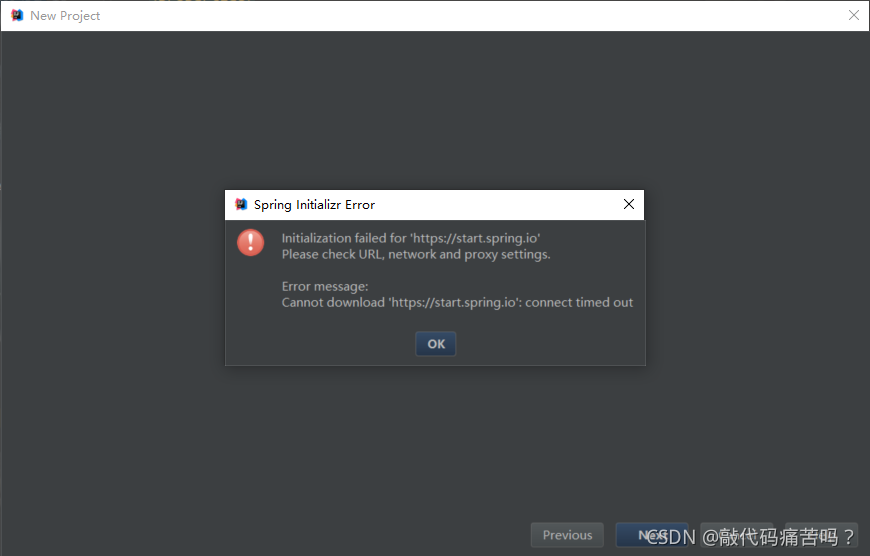
      Initialization failed for ‘https://start.spring.io‘ Please check URL, network and proxy settings.

      Error message:
      initialization failed for‘ https://start.spring.io ’
      Please check URL, network and proxy settings.

      Error message:
      Cannot download ‘ https://start.spring.io ’: connect timed out
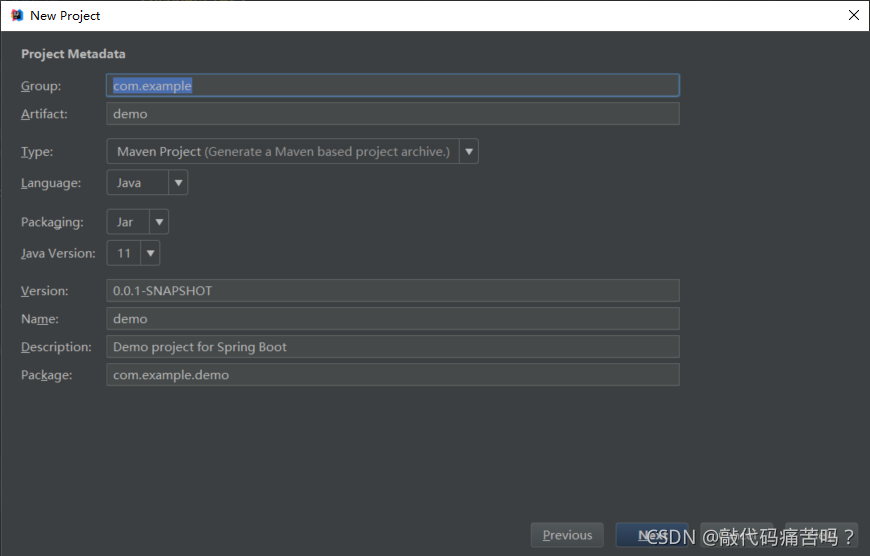
      the following error occurs when creating a new springboot project

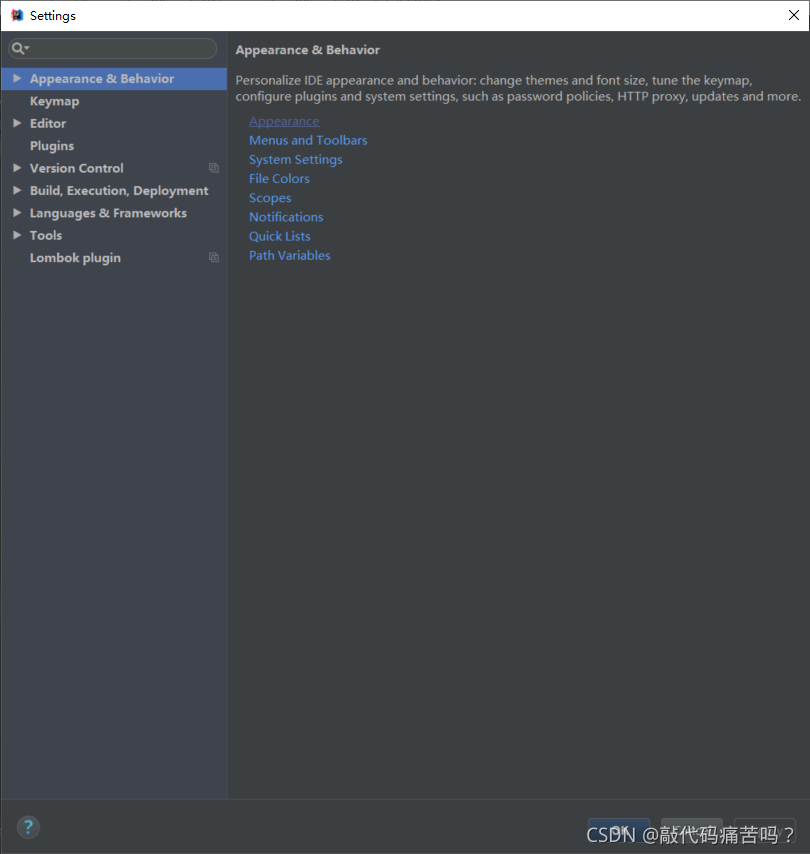
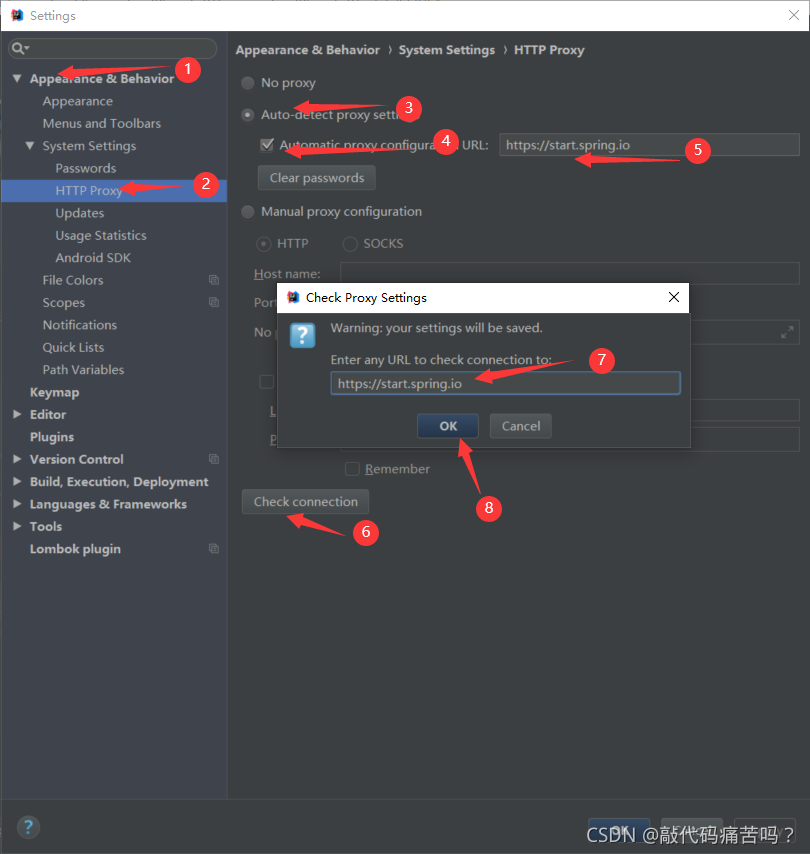
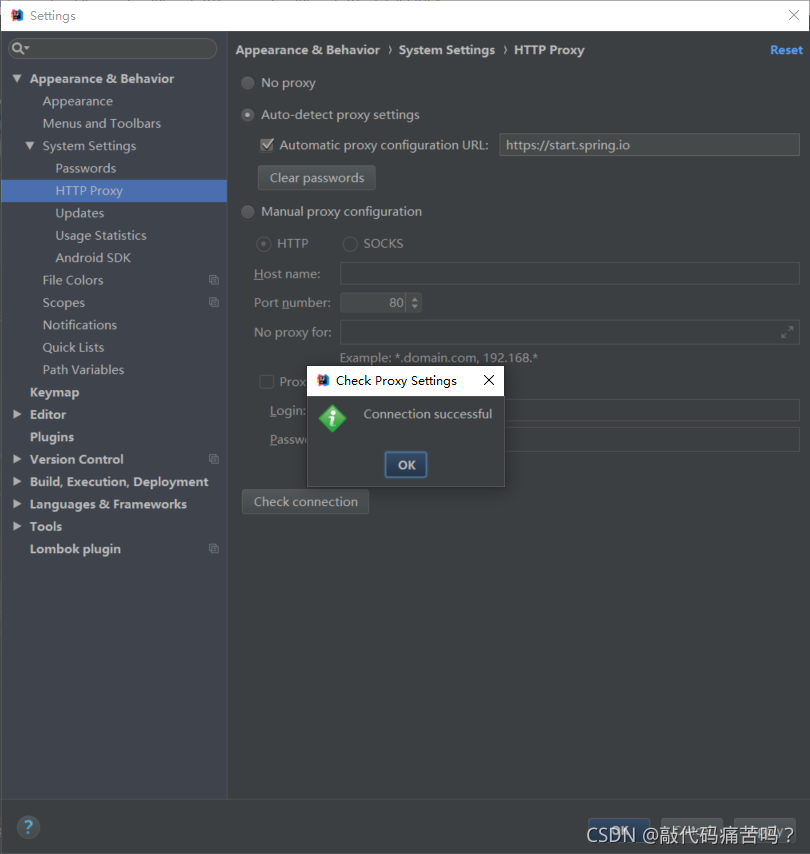
      1. Open file — settings

      2. Search HTTP proxy – & gt; Check automatic proxy configuration URL:
      – & gt; input https://start.spring.io –> Click auto detect proxy settings
      – & gt; input https://start.spring.io –> Click OK

      3. Finally, prompt: successful. It means success. Just recreate it

      finally, it will be created successfully when it is newly created

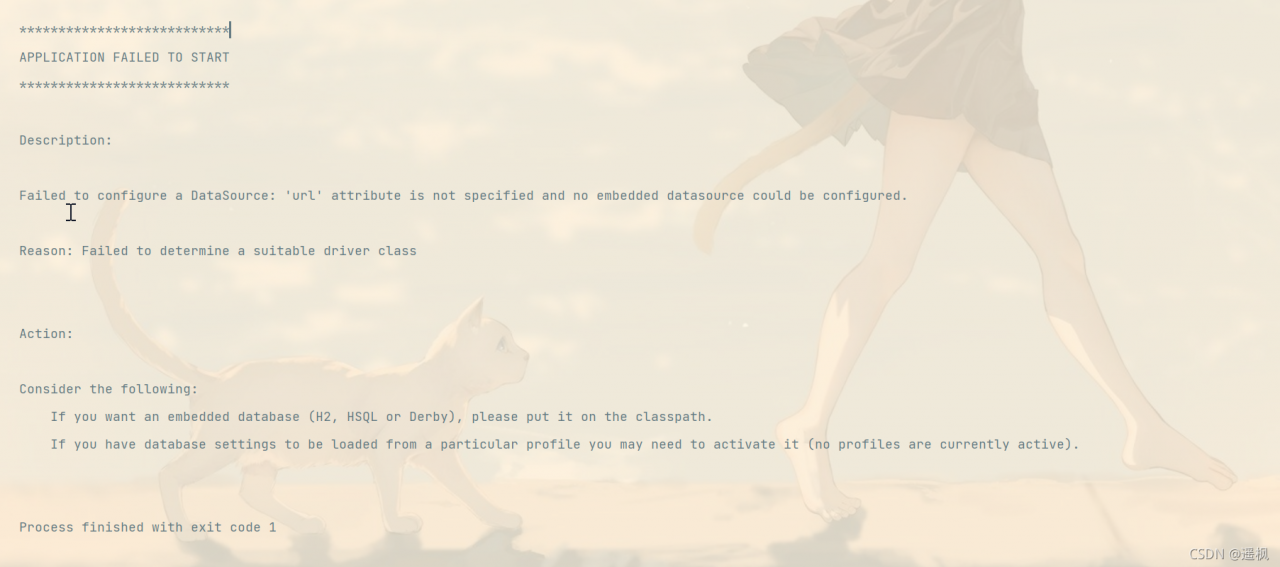
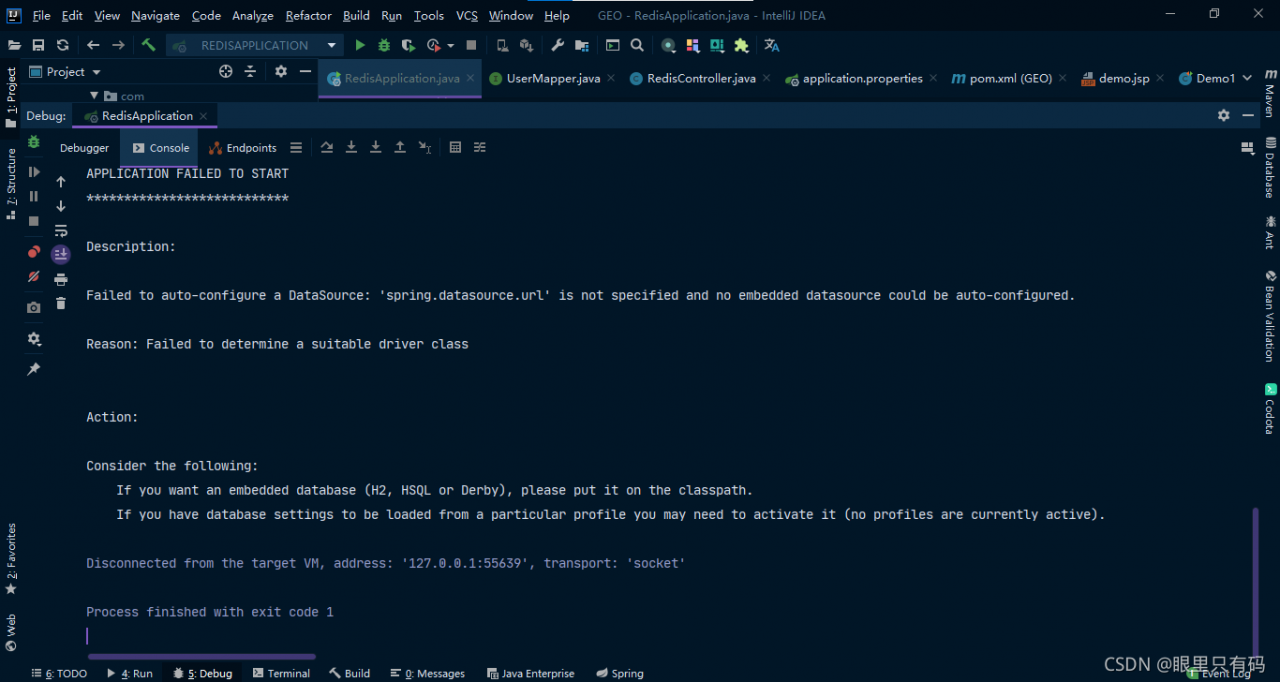
      Failed to configure a DataSource: ‘url‘ attribute is not specified and no embedded datasource could

      Error reason:
      process analysis: you are integrating the springboot project. For me, in maven, bulid is added to prevent resources from being loaded. You can compare whether our contents are the same. I’m a fan of madness

      <build>
          <resources>
              <resource>
                  <directory>src/main/resources/</directory>
                  <includes>
                      <include>**/*.properties</include>
                      <include>**/*.xml</include>
                  </includes>
                  <filtering>true</filtering>
              </resource>
              <resource>
                  <directory>src/main/java</directory>
                  <includes>
                      <include>**/*.properties</include>
                      <include>**/*.xml</include>
                  </includes>
                  <filtering>true</filtering>
              </resource>
          </resources>
      </build>


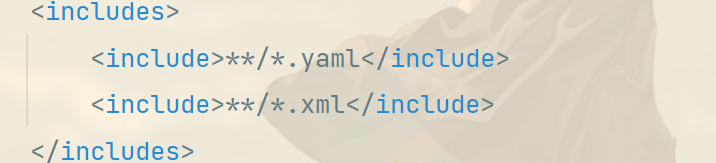
      I use the application.yaml format, but the bulid above is to prevent the xx.properties and xx.xml files from being loaded. The ox’s head is not the horse’s mouth.

      resolvent:

      Method 1: delete directly
      method 2:
      , changed to:

      the first one is recommended. The second one I haven’t seen, but I ran and succeeded.

      Interrupted function call accept failed when idea starts Tomcat

      idea start interrupted function call accept failed or cant write file {0}
      1. Use CMD netstat - ano|findstr port number , and then taskkill - F - PID process port number to kill process
      2. If the port is not found to be occupied in the above steps (this is the case for me), Try to close idea, right-click to run as administrator, and then start again

      How to Solve Flick operate Error: not serialized

      An error is reported related to flick serialization

      Problem solving run code error reporting content solution custom implementation serialization re-execute code

      The problem goes deep into why the error is thrown, why the source of the error needs to be serialized, and why the closure needs to be cleaned up

      Problem-solving

      Run code

      public class JavaSourceEx {
      
          public static void main(String[] args) throws Exception {
      
              StreamExecutionEnvironment env = StreamExecutionEnvironment.getExecutionEnvironment();
      
              // 1)use fromCollection(Collection) to read datas
              //ArrayList<String> list = new ArrayList<>();
              //list.add("hello");list.add("word");list.add("cctv");
              //DataStreamSource<String> stream01 = env.fromCollection(list);
      
              // 2)use fromCollection(Iterator, Class) to read datas
              Iterator<String> it = list.iterator();
              DataStreamSource<String> stream02 = env.fromCollection(it, TypeInformation.of(String.class));
      
              stream02.print().setParallelism(1);
              env.execute();
          }
      }
      

      Error content

      Exception in thread "main" org.apache.flink.api.common.InvalidProgramException: java.util.ArrayList$Itr@a1cdc6d is not serializable. The implementation accesses fields of its enclosing class, which is a common reason for non-serializability. A common solution is to make the function a proper (non-inner) class, or a static inner class.
      	at org.apache.flink.api.java.ClosureCleaner.clean(ClosureCleaner.java:164)
      	at org.apache.flink.api.java.ClosureCleaner.clean(ClosureCleaner.java:132)
      	at org.apache.flink.api.java.ClosureCleaner.clean(ClosureCleaner.java:69)
      	at org.apache.flink.streaming.api.environment.StreamExecutionEnvironment.clean(StreamExecutionEnvironment.java:2053)
      	at org.apache.flink.streaming.api.environment.StreamExecutionEnvironment.addSource(StreamExecutionEnvironment.java:1737)
      	at org.apache.flink.streaming.api.environment.StreamExecutionEnvironment.fromCollection(StreamExecutionEnvironment.java:1147)
      	at Examples.JavaSourceEx.main(JavaSourceEx.java:30)
      Caused by: java.io.NotSerializableException: java.util.ArrayList$Itr
      	at java.io.ObjectOutputStream.writeObject0(ObjectOutputStream.java:1184)
      	at java.io.ObjectOutputStream.writeObject(ObjectOutputStream.java:348)
      	at org.apache.flink.util.InstantiationUtil.serializeObject(InstantiationUtil.java:624)
      	at org.apache.flink.api.java.ClosureCleaner.clean(ClosureCleaner.java:143)
      	... 6 more
      
      Process finished with exit code 1


      Solution

      If reading data from an internal container:
      1) the official flick also provides the following methods: from collection (Collection) , you can replace the method of reading data from the iterator with this method
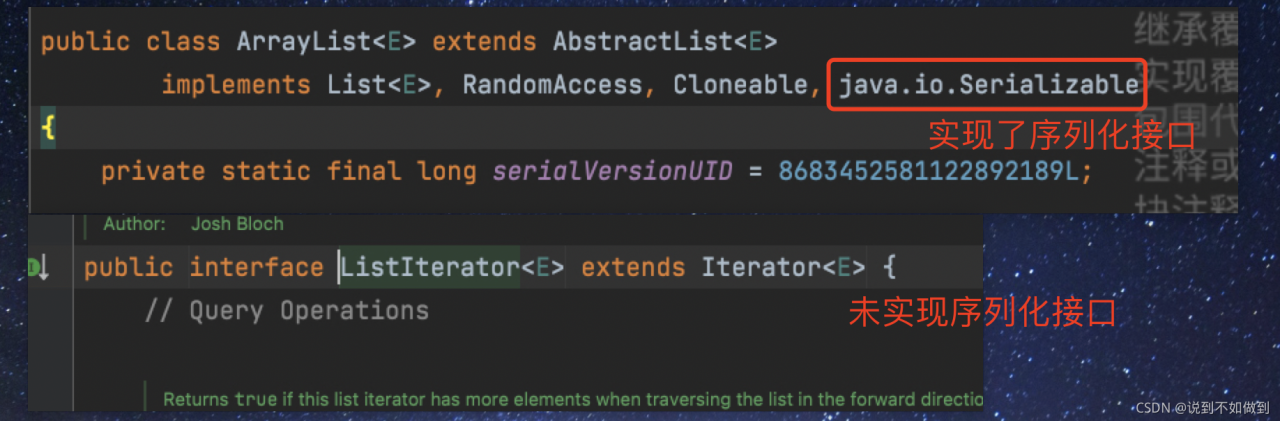
      2) the reason for the error is that the iterator does not implement the serial machine interface. The container has implemented serialization, but the iterator has not been implemented. Therefore, if you want to use it, you need to customize the iterator and implement the serialization interface. This operation is redundant, so it is recommended to solve it according to the first method
      Custom implementation serialization

      package Examples.Utils;
      
      import com.sun.org.apache.xpath.internal.functions.WrongNumberArgsException;
      import com.sun.tools.jdi.EventSetImpl;
      
      import java.io.Serializable;
      import java.util.Arrays;
      import java.util.Iterator;
      
      public class MyListItr<T> implements Serializable{
      
          private static int default_capacity = 10;
          private int size = 0;
          private Object[] elements;
      
          public MyListItr(){
              this.elements = new Object[default_capacity];
          }
          public MyListItr(int capa){
              this.default_capacity = capa;
              this.elements = new Object[default_capacity];
          }
      
          public int size(){
              return this.size;
          }
      
          public T get(int index) throws MyException {
              if(index<0){
                  throw new MyException("Index given cannot be less than 0");
              }
              if(index>=size){
                  throw new MyException("Index given cannot be larger than or equal to the collection size");
              }
              return (T)elements[index];
          }
      
          public T add(T ele){
              if(size == default_capacity){
                  elements = Arrays.copyOf(elements,default_capacity*2);
                  default_capacity *=2;
                  elements[size++] = ele;
              }else{
                  elements[size++] = ele;
              }
              return (T)ele;
          }
      
          public Iterator iterator(){
              return new Itr();
          }
      
          private class Itr implements Iterator<T>, Serializable {
      
              int cursor;
              Itr(){}
              @Override
              public boolean hasNext() {
                  return cursor!=size();
              }
      
              @Override
              public T next() {
                  return (T)elements[cursor++];
              }
      
      
          }
      
          public static void main(String[] args) throws MyException {
              MyListItr<Integer> obj = new MyListItr<>();
              obj.add(1);
              obj.add(2);
              System.out.println(obj.get(0));
              obj.add(3);
              Iterator it = obj.iterator();
              while(it.hasNext()){
                  System.out.println(it.next());
              }
      
          }
      
      }
      
      
      class MyException extends Exception implements Serializable{
          public MyException(String message) {
              super(message);
          }
      }
      

      Re execute the code

      	MyListItr<Integer> myList = new MyListItr<>();
      	myList.add(1);myList.add(2);myList.add(3);
      	Iterator<Integer> it02 = myList.iterator();
      	DataStreamSource<Integer> stream02 = env.fromCollection(it02, TypeInformation.of(Integer.class));
      	stream02.print().setParallelism(1);
      	env.execute();
      

      Can run:

      Problem depth

      Why is this error thrown

      To put it in-depth, Java needs to run on the JVM platform and be interpreted and run by the JVM in the form of bytecode. Because Flink is a distributed computing, the data in map and other operators will be distributed among various network nodes for computing. In addition, after the source code of Flink is compiled into a bytecode file, you can see from the bytecode file of the operator that the read object enters the operator, and all objects entering the operator must be serialized. If there is no serialization, an error is thrown.

      Why serialization

      In distributed computing, such as spark, MapReduce, Flink and other computing prerequisites, the serializability of computing objects needs to be realized. Serialization is to reduce the delay, loss and resource consumption caused by data transmission and exchange in network nodes. Objects that are not serialized will not be distributed in network nodes.

      The error is thrown from the source

      This error is caused by the error when Flink executes closure cleanup logic. The specific logic is in this class: org. Apache. Flink. API. Java. Closurecleaner .

      Why clean up closures

      Many times, anonymous classes or nested subclasses are used for convenience and quickness. When class a needs to be serialized for transmission, it also needs internal subclasses to be serialized. However, some unnecessary classes or unnecessary variable information may be referenced in general nested classes, so it is necessary to clean up Flink to save the cost of serialization.
      [Solved] Hadoop Error: HADOOP_HOME and hadoop.home.dir are unset.

      catalogue

      Solutions to error messages 1. Download apache-hadoop-3.1.0-winutils-master 2. Unzip to the host 3. Add environment variables 4. Restart idea or eclipse

      Error message

      java.lang.RuntimeException: java.io.FileNotFoundException: java.io.FileNotFoundException: HADOOP_HOME and hadoop.home.dir are unset.

      java.lang.RuntimeException: java.io.FileNotFoundException: java.io.FileNotFoundException: HADOOP_HOME and hadoop.home.dir are unset. -see https://wiki.apache.org/hadoop/WindowsProblems
      
      	at org.apache.hadoop.util.Shell.getWinUtilsPath(Shell.java:737)
      	at org.apache.hadoop.util.Shell.getSetPermissionCommand(Shell.java:272)
      	at org.apache.hadoop.util.Shell.getSetPermissionCommand(Shell.java:288)
      	at org.apache.hadoop.fs.RawLocalFileSystem.setPermission(RawLocalFileSystem.java:840)
      	at org.apache.hadoop.fs.RawLocalFileSystem$LocalFSFileOutputStream.<init>(RawLocalFileSystem.java:239)
      	at org.apache.hadoop.fs.RawLocalFileSystem$LocalFSFileOutputStream.<init>(RawLocalFileSystem.java:219)
      	at org.apache.hadoop.fs.RawLocalFileSystem.createOutputStreamWithMode(RawLocalFileSystem.java:318)
      	at org.apache.hadoop.fs.RawLocalFileSystem.create(RawLocalFileSystem.java:307)
      	at org.apache.hadoop.fs.RawLocalFileSystem.create(RawLocalFileSystem.java:338)
      	at org.apache.hadoop.fs.ChecksumFileSystem$ChecksumFSOutputSummer.<init>(ChecksumFileSystem.java:401)
      	at org.apache.hadoop.fs.ChecksumFileSystem.create(ChecksumFileSystem.java:464)
      	at org.apache.hadoop.fs.ChecksumFileSystem.create(ChecksumFileSystem.java:443)
      	at org.apache.hadoop.fs.FileSystem.create(FileSystem.java:1118)
      	at org.apache.hadoop.fs.FileSystem.create(FileSystem.java:1098)
      	at org.apache.hadoop.fs.FileSystem.create(FileSystem.java:987)
      	at org.apache.hadoop.fs.FileUtil.copy(FileUtil.java:414)
      	at org.apache.hadoop.fs.FileUtil.copy(FileUtil.java:387)
      	at org.apache.hadoop.fs.FileUtil.copy(FileUtil.java:337)
      	at org.apache.hadoop.fs.FileSystem.copyToLocalFile(FileSystem.java:2434)
      	at org.apache.hadoop.fs.FileSystem.copyToLocalFile(FileSystem.java:2403)
      	at org.apache.hadoop.fs.FileSystem.copyToLocalFile(FileSystem.java:2379)
      	at cn.itcast.hdfs.HDFSClientTest.getFile2Local(HDFSClientTest.java:71)
      	at java.base/jdk.internal.reflect.NativeMethodAccessorImpl.invoke0(Native Method)
      	at java.base/jdk.internal.reflect.NativeMethodAccessorImpl.invoke(NativeMethodAccessorImpl.java:62)
      	at java.base/jdk.internal.reflect.DelegatingMethodAccessorImpl.invoke(DelegatingMethodAccessorImpl.java:43)
      	at java.base/java.lang.reflect.Method.invoke(Method.java:564)
      	at org.junit.runners.model.FrameworkMethod$1.runReflectiveCall(FrameworkMethod.java:59)
      	at org.junit.internal.runners.model.ReflectiveCallable.run(ReflectiveCallable.java:12)
      	at org.junit.runners.model.FrameworkMethod.invokeExplosively(FrameworkMethod.java:56)
      	at org.junit.internal.runners.statements.InvokeMethod.evaluate(InvokeMethod.java:17)
      	at org.junit.internal.runners.statements.RunBefores.evaluate(RunBefores.java:26)
      	at org.junit.internal.runners.statements.RunAfters.evaluate(RunAfters.java:27)
      	at org.junit.runners.ParentRunner$3.evaluate(ParentRunner.java:306)
      	at org.junit.runners.BlockJUnit4ClassRunner$1.evaluate(BlockJUnit4ClassRunner.java:100)
      	at org.junit.runners.ParentRunner.runLeaf(ParentRunner.java:366)
      	at org.junit.runners.BlockJUnit4ClassRunner.runChild(BlockJUnit4ClassRunner.java:103)
      	at org.junit.runners.BlockJUnit4ClassRunner.runChild(BlockJUnit4ClassRunner.java:63)
      	at org.junit.runners.ParentRunner$4.run(ParentRunner.java:331)
      	at org.junit.runners.ParentRunner$1.schedule(ParentRunner.java:79)
      	at org.junit.runners.ParentRunner.runChildren(ParentRunner.java:329)
      	at org.junit.runners.ParentRunner.access$100(ParentRunner.java:66)
      	at org.junit.runners.ParentRunner$2.evaluate(ParentRunner.java:293)
      	at org.junit.runners.ParentRunner$3.evaluate(ParentRunner.java:306)
      	at org.junit.runners.ParentRunner.run(ParentRunner.java:413)
      	at org.junit.runner.JUnitCore.run(JUnitCore.java:137)
      	at com.intellij.junit4.JUnit4IdeaTestRunner.startRunnerWithArgs(JUnit4IdeaTestRunner.java:68)
      	at com.intellij.rt.junit.IdeaTestRunner$Repeater.startRunnerWithArgs(IdeaTestRunner.java:33)
      	at com.intellij.rt.junit.JUnitStarter.prepareStreamsAndStart(JUnitStarter.java:230)
      	at com.intellij.rt.junit.JUnitStarter.main(JUnitStarter.java:58)
      Caused by: java.io.FileNotFoundException: java.io.FileNotFoundException: HADOOP_HOME and hadoop.home.dir are unset. -see https://wiki.apache.org/hadoop/WindowsProblems
      	at org.apache.hadoop.util.Shell.fileNotFoundException(Shell.java:549)
      	at org.apache.hadoop.util.Shell.getHadoopHomeDir(Shell.java:570)
      	at org.apache.hadoop.util.Shell.getQualifiedBin(Shell.java:593)
      	at org.apache.hadoop.util.Shell.<clinit>(Shell.java:690)
      	at org.apache.hadoop.util.StringUtils.<clinit>(StringUtils.java:78)
      	at org.apache.hadoop.fs.FileSystem$Cache$Key.<init>(FileSystem.java:3482)
      	at org.apache.hadoop.fs.FileSystem$Cache$Key.<init>(FileSystem.java:3477)
      	at org.apache.hadoop.fs.FileSystem$Cache.get(FileSystem.java:3319)
      	at org.apache.hadoop.fs.FileSystem.get(FileSystem.java:479)
      	at org.apache.hadoop.fs.FileSystem.get(FileSystem.java:227)
      	at cn.itcast.hdfs.HDFSClientTest.connect2HDFS(HDFSClientTest.java:31)
      	at java.base/jdk.internal.reflect.NativeMethodAccessorImpl.invoke0(Native Method)
      	at java.base/jdk.internal.reflect.NativeMethodAccessorImpl.invoke(NativeMethodAccessorImpl.java:62)
      	at java.base/jdk.internal.reflect.DelegatingMethodAccessorImpl.invoke(DelegatingMethodAccessorImpl.java:43)
      	at java.base/java.lang.reflect.Method.invoke(Method.java:564)
      	at org.junit.runners.model.FrameworkMethod$1.runReflectiveCall(FrameworkMethod.java:59)
      	at org.junit.internal.runners.model.ReflectiveCallable.run(ReflectiveCallable.java:12)
      	at org.junit.runners.model.FrameworkMethod.invokeExplosively(FrameworkMethod.java:56)
      	at org.junit.internal.runners.statements.RunBefores.invokeMethod(RunBefores.java:33)
      	at org.junit.internal.runners.statements.RunBefores.evaluate(RunBefores.java:24)
      	... 18 more
      Caused by: java.io.FileNotFoundException: HADOOP_HOME and hadoop.home.dir are unset.
      	at org.apache.hadoop.util.Shell.checkHadoopHomeInner(Shell.java:469)
      	at org.apache.hadoop.util.Shell.checkHadoopHome(Shell.java:440)
      	at org.apache.hadoop.util.Shell.<clinit>(Shell.java:517)
      	... 34 more
      

      Soltuion:

      1. Download apache-hadoop-3.1.0-winutils-master

      Apache-hadoop-3.1.0-winutils-master GitHub address.
      other versions can also be found on GitHub. I use this version to solve the problem here.

      2. Unzip to the host

      I unzip it here to the local windows
      unzip it. The apache-hadoop-3.1.0-winutils-master folder contains the bin file

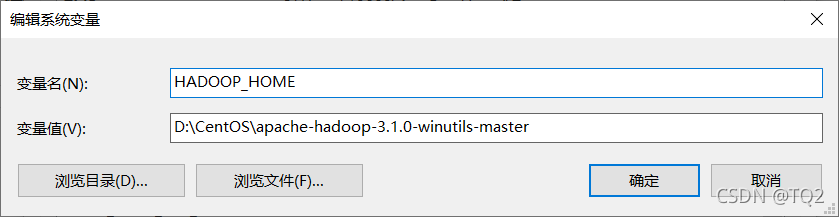
      3. Add environment variables

      Add the path of the parent folder of the bin folder to the environment variable

      4. Restart idea or eclipse

      Problem solving.

      Tomcat cross server upload error 403forbidden [How to Solve]

      HTTP Status [500] – [Internal Server Error]
      Type Exception Report
      
      Message Request processing failed; nested exception is com.sun.jersey.api.client.UniformInterfaceException: PUT http://localhost:9090/loads/2441068f057c4c7fa87e406837bd08f9_ returned a response status of 403 Forbidden
      
      Description The server encountered an unexpected condition that prevented it from fulfilling the request.
      
      Exception
      
      org.springframework.web.util.NestedServletException: Request processing failed; nested exception is com.sun.jersey.api.client.UniformInterfaceException: PUT http://localhost:9090/loads/2441068f057c4c7fa87e406837bd08f9_ returned a response status of 403 Forbidden
      	org.springframework.web.servlet.FrameworkServlet.processRequest(FrameworkServlet.java:986)
      	org.springframework.web.servlet.FrameworkServlet.doPost(FrameworkServlet.java:881)
      	javax.servlet.http.HttpServlet.service(HttpServlet.java:661)
      	org.springframework.web.servlet.FrameworkServlet.service(FrameworkServlet.java:855)
      	javax.servlet.http.HttpServlet.service(HttpServlet.java:742)
      	org.apache.tomcat.websocket.server.WsFilter.doFilter(WsFilter.java:53)
      	org.springframework.web.filter.CharacterEncodingFilter.doFilterInternal(CharacterEncodingFilter.java:200)
      	org.springframework.web.filter.OncePerRequestFilter.doFilter(OncePerRequestFilter.java:107)
      Root Cause
      
      com.sun.jersey.api.client.UniformInterfaceException: PUT http://localhost:9090/loads/2441068f057c4c7fa87e406837bd08f9_ returned a response status of 403 Forbidden

      Reason: the default configuration readonly of Tomcat web.xml is true, which makes it impossible to read and write data to the server across servers

      The solution is: configure in xeb.xml under config in the local folder of Tomcat

      <servlet>
              <servlet-name>default</servlet-name>
              <servlet-class>org.apache.catalina.servlets.DefaultServlet</servlet-class>
              <init-param>
                  <param-name>debug</param-name>
                  <param-value>0</param-value>
              </init-param>
      		
      		 <!--New-->
              <init-param>
                  <param-name>readonly</param-name>
                  <param-value>false</param-value>
              </init-param>
      		
              <init-param>
                  <param-name>listings</param-name>
                  <param-value>false</param-value>
              </init-param>
              <load-on-startup>1</load-on-startup>
          </servlet>

      [Solved] openstack4j Startup Error: java.net.UnknownHostException: controller

      When calling OpenStack using openstack4j connection, an error is reported
      Specific part of the error reported:

      Exception in thread "main" ConnectionException{message=RESTEASY004655: Unable to invoke request, status=0}
          at org.openstack4j.connectors.resteasy.HttpExecutorServiceImpl.invoke(HttpExecutorServiceImpl.java:57)
          at org.openstack4j.connectors.resteasy.HttpExecutorServiceImpl.execute(HttpExecutorServiceImpl.java:31)
          at org.openstack4j.core.transport.internal.HttpExecutor.execute(HttpExecutor.java:51)
          at org.openstack4j.openstack.internal.BaseOpenStackService$Invocation.execute(BaseOpenStackService.java:213)
          at org.openstack4j.openstack.internal.BaseOpenStackService$Invocation.execute(BaseOpenStackService.java:207)
          at
      .............................
      Caused by: java.net.UnknownHostException: controller
          at java.net.Inet6AddressImpl.lookupAllHostAddr(Native Method)
          at java.net.InetAddress$2.lookupAllHostAddr(InetAddress.java:928)
          at java.net.InetAddress.getAddressesFromNameService(InetAddress.java:1323)
          at java.net.InetAddress.getAllByName0(InetAddress.java:1276)
          at java.net.InetAddress.getAllByName(InetAddress.java:1192)
          at java.net.InetAddress.getAllByName(InetAddress.java:1126)

      OpenStack environment: Through the OpenStack environment built on two virtual machines, the hostnames of the two virtual machines are controller, compute. and here the error is reported as unknown host.

      Solution:
      (1) Open windws/system32/driver/etc/hosts under Windows and add the following content

              Virtual Machine IP controller
              Virtual Machine IP compute

      (2) Linux server

             vi  /etc/hosts