Tag Archives: java

[RFID] OctaneSDKJava Eclipse Error: Error occurred during initialization of boot layer

Question details

Errors are reported as follows:

Error occurred during initialization of boot layer
java.lang.module.FindException: Unable to derive module descriptor for C:\Users\tongx\eclipse-workspace\OctaneSDKJava\lib\OctaneSDKJava-1.22.0.30-jar-with-dependencies.jar
Caused by: java.lang.module.InvalidModuleDescriptorException: JDOMAbout$Info.class found in top-level directory (unnamed package not allowed in module)

Attempt method 1 (failed)

In jdk9 and above, modules are introduced. Therefore, if a separate running class is created in the default package, it cannot be compiled. There is no such problem in jdk8; If you still want to run separate classes in the default package, delete module-info.java in the SRC folder.

But my java is version 1.8, and my attempt failed

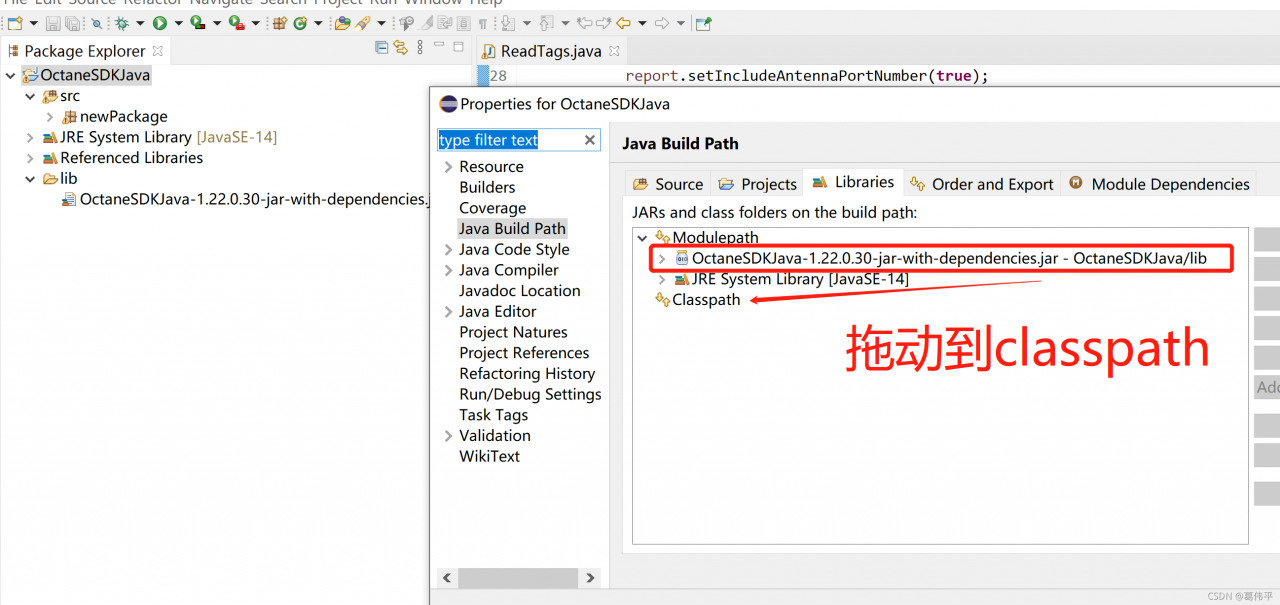
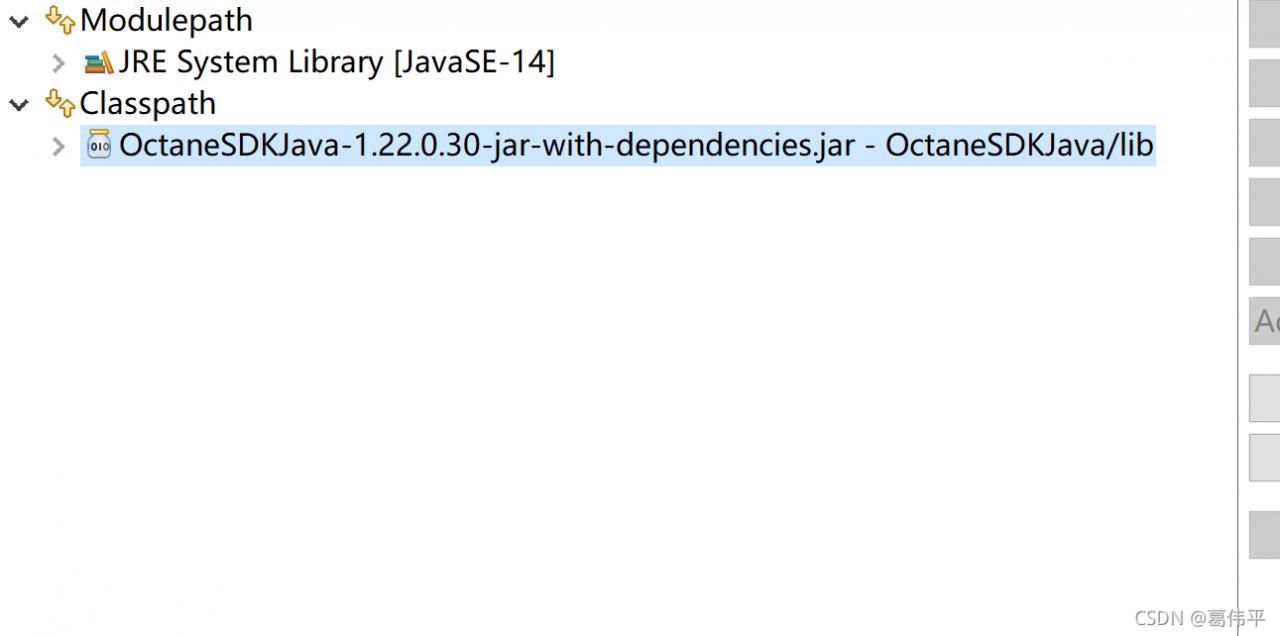
Try method 2 (feasible)

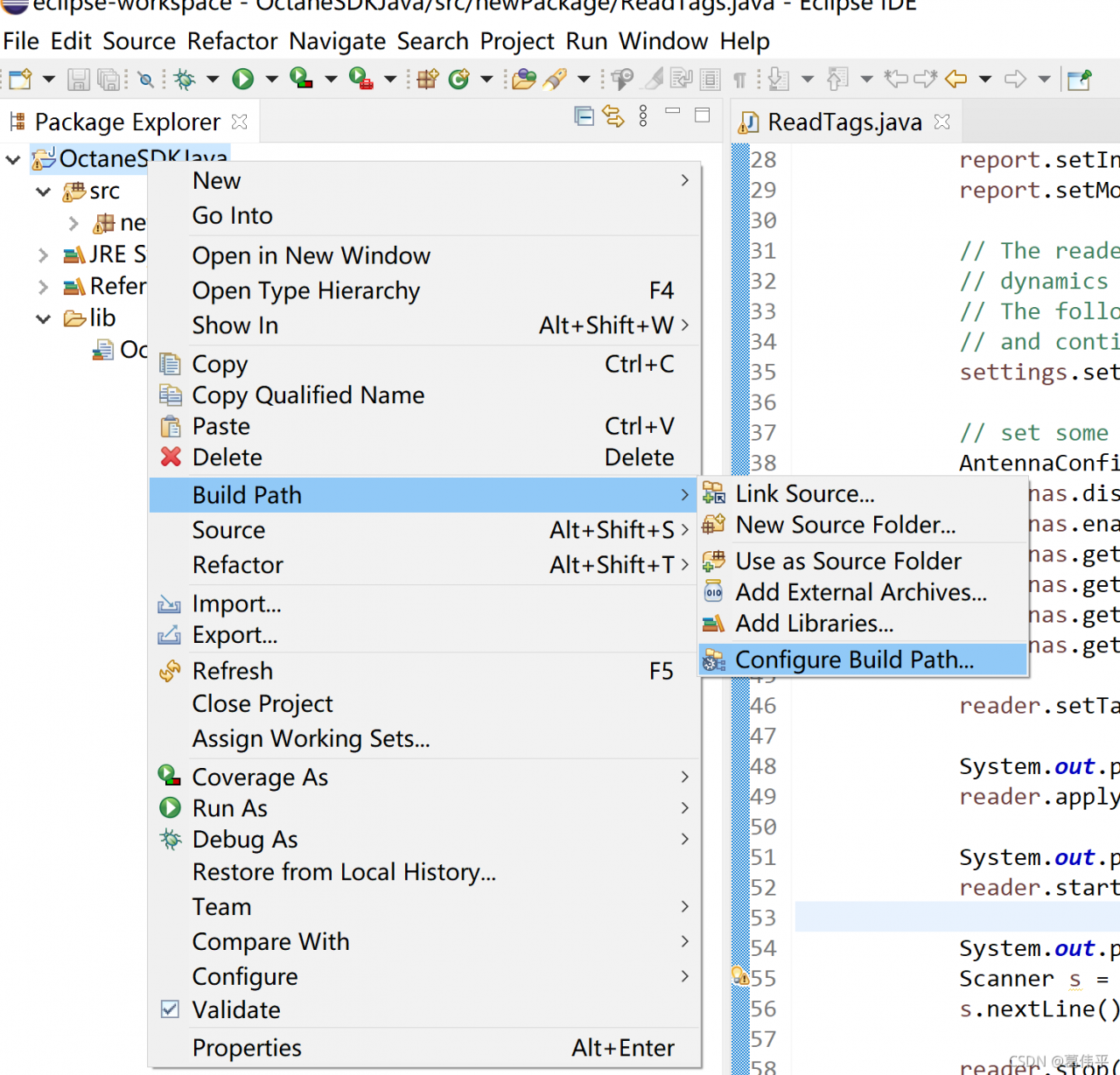
Here, we have adopted the methods of other big men:

end
CORS error has been blocked by CORS policy [How to Solve]

Problem description

The global request is intercepted through the axis of Vue. After adding the identify and token fields to the request header, the back-end zuul gateway is accessed. An error occurs in the browser, resulting in that the background cannot receive the custom header field of HTTP package and cannot authenticate the gateway well
the error is as follows:
access to XMLHttpRequest at‘ http://127.0.0.1:27000/api/v1/index -Infos’ from origin ‘http://’ has been blocked by CORS policy: request header field identification is not allowed by access control allow headers in preflight response.
network and console errors are as follows:

Error analysis

The background is cross-domain. An error occurs when a field is added to the header. In CORS, the options method will be used to initiate a pre-check request (generally, it will be automatically initiated when browsing detects that the request is cross-domain) to detect whether the actual request can be accepted by the server. The access control request method header field in the pre-check request message informs the server of the HTTP method used for the actual request
the access control request headers header field tells the server the custom header field carried by the actual request. The server determines whether to accept the next actual request based on the information obtained from the pre-check request. The access control allow methods header field returned by the server informs the client of all allowed request methods
to sum up, when the browser sends a request header with customization, the browser will first send an options pre-check request to the server to detect whether the server of the request allows customization of cross-domain fields. If yes, continue to execute the request. If not, an error message will be returned to prompt an error.

Solution:

Add the corresponding allow field in the cross domain request header and add your own custom field in the access control allow headers field. The request can be accessed. The interception code in zuul:

@Override
    public Object run() throws ZuulException {
        RequestContext ctx = RequestContext.getCurrentContext();
        HttpServletRequest request = ctx.getRequest();
        HttpServletResponse response = ctx.getResponse();

        response.setHeader("Access-Control-Allow-Origin",request.getHeader("Origin"));
        response.setHeader("Access-Control-Allow-Credentials","true");
        response.setHeader("Access-Control-Allow-Methods","GET, HEAD, POST, PUT, DELETE, OPTIONS, PATCH");
        response.setHeader("Access-Control-Allow-Headers","authorization, content-type,token,identify");
        response.setHeader("Access-Control-Expose-Headers","X-forwared-port, X-forwarded-host");
        response.setHeader("Vary","Origin,Access-Control-Request-Method,Access-Control-Request-Headers");

        if ("OPTIONS".equalsIgnoreCase(request.getMethod())){
            ctx.setSendZuulResponse(false); 
            ctx.setResponseStatusCode(HttpStatus.OK.value());
            ctx.set("isSuccess", true);
            return null;
        }
        ctx.setSendZuulResponse(true); 
        ctx.setResponseStatusCode(HttpStatus.OK.value());
        ctx.set("isSuccess", true);
        return null;
    }

Mapper.xml Error: Error setting non null for parameter #3 with JdbcType null.

Record the problems encountered in learning SSM framework 3
Exception Reporting
Message Request processing failed; nested exception is org.mybatis.spring.MyBatisSystemException: nested exception is org.apache.ibatis.type.TypeException: Could not set parameters for mapping: ParameterMapping{property=‘id’, mode=IN, javaType=class java.lang.Integer, jdbcType=null, numericScale=null, resultMapId=‘null’, jdbcTypeName=‘null’, expression=‘null’}. Cause: org.apache.ibatis.type.TypeException: Error setting non null for parameter #3 with JdbcType null . Try setting a different JdbcType for this parameter or a different configuration property. Cause: java.sql.SQLException: Parameter index out of range (3 > number of parameters, which is 2).
Description The server encountered an unexpected condition that prevented it from completing the request.
The problem occurs mainly in the mapper.xml file and can be due to several reasons.
1. two #’s are written together and will be identified incorrectly (my error)

<update id="updateById" parameterType="main.java.com.dy.domain.News">
        update news
        <set>
            <include refid="News_update"/>
        </set>
        where id=##{id}
    </update>

2. JavaEE comments appear inside/**/

<update id="updateById" parameterType="main.java.com.dy.domain.News">
        update news
        <set> /*  */
            <include refid="News_update"/>
        </set>
        where id=#{id}
    </update>

3. #{id} covered with quotation marks

<update id="updateById" parameterType="main.java.com.dy.domain.News">
        update news
        <set>
            <include refid="News_update"/>
        </set>
        where id='#{id}'
    </update>

All the above detailed errors may lead to errors in the execution of SQL statements, so we should be as careful as possible in the future development process.

Uncaught SyntaxError: Unexpected token o in JSON at position 1 [How to Solve]

JSON.parse(str); Error prompted during method execution;

The solution is very simple. Just pay attention to the format of STR parameter, which must be in the standard JSON string format

var str = '[{"code": "name", "name": "name"},{"code": "name1", "name": "name1"}]';

If the str value is passed through the background, be sure to confirm whether the format is correct

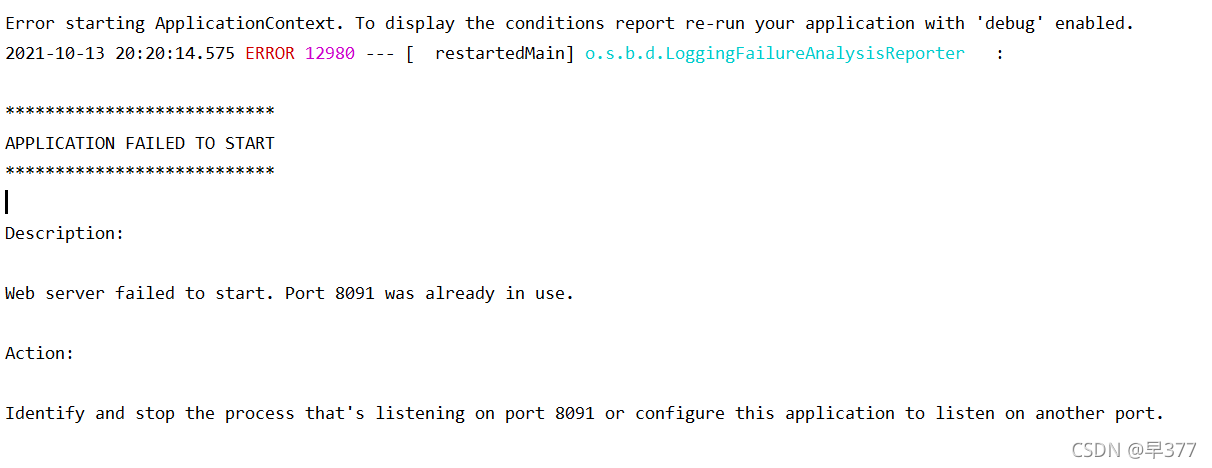
Error starting ApplicationContext. To display the conditions report re-run your application with

This error message may appear when opening Java programs in idea. Generally, it is reminded   Server startup failed. Port XXXX is already in use.

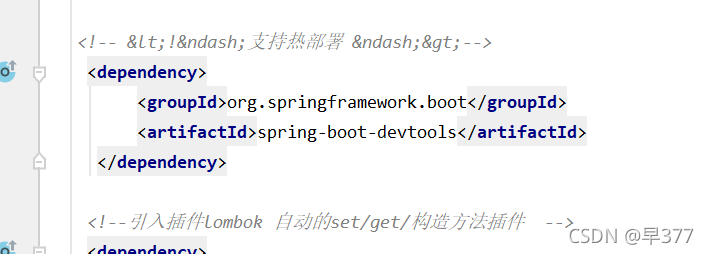
  Go and see your POM file at this time

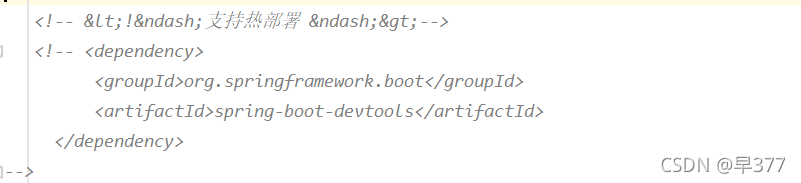
Comment out the dependency of hot deployment!!!!


  OK! Remember to refresh Maven after commenting

Start successful   

Easynvr operation log reports an error. Fatal error: concurrent map read and map write troubleshooting

As we all know, most of our products are compiled in go language. In the case of concurrency, read-only is thread safe, and read-write is thread unsafe.

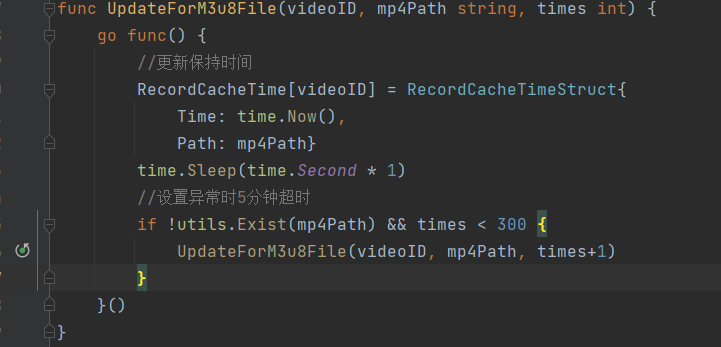
Recently, in the easynvr site of a project, we checked the log and found the error message: fatal error: concurrent map read and map write. The error message shows that there are concurrent map reads and writes, that is, two concurrent functions are used to read and write the map continuously, resulting in race problems.

Find the code and find that concurrent read/write is used in the code:

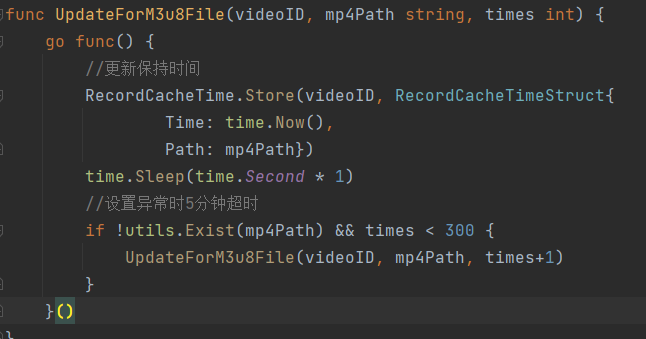
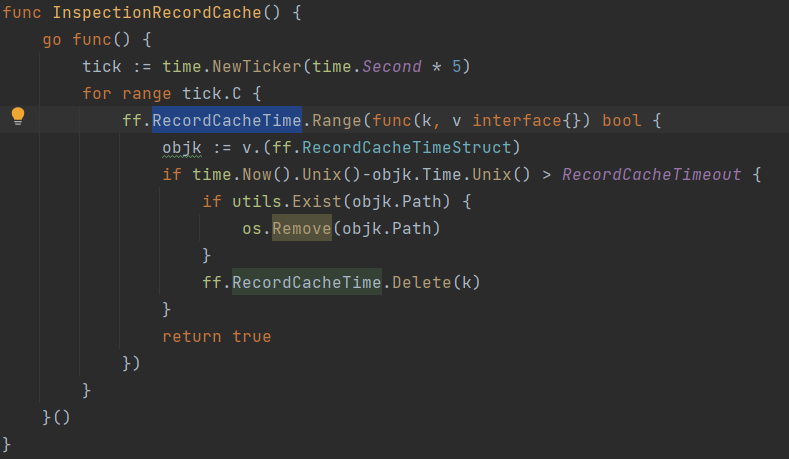
The code needs to be modified here. Below, we replace the built-in map type with the concurrency safe sync.map.

Write reference codes concurrently as follows:

The concurrent read reference code is as follows:

Add: for concurrency problems that are not easy to find, you can use the – race parameter for concurrency detection:

func main() {
	a := 1
	go func() {
		a = 2
	}()
	a = 3
	fmt.Println(a)

	time.Sleep(time.Second * 1)
}

Server check fail, please check server 192.168.11.13 ,port 9848 is available , error ={}

Nacos is started on 192.168.11.13, and the access is normal
the local server is started on 192.168.11.11, and the startup log reports an error
server check fail, please check server 192.168.11.13, port 9848 is available, error = {}

2021-10-09 17:33:16.178 ERROR 21512 --- [           main] c.a.n.c.remote.client.grpc.GrpcClient    : Server check fail, please check server 192.168.11.13 ,port 9848 is available , error ={}

java.util.concurrent.TimeoutException: Waited 3000 milliseconds (plus 731800 nanoseconds delay) for com.alibaba.nacos.shaded.io.grpc.stub.ClientCalls$GrpcFuture@157ec23b[status=PENDING, info=[GrpcFuture{clientCall={delegate={delegate=ClientCallImpl{method=MethodDescriptor{fullMethodName=Request/request, type=UNARY, idempotent=false, safe=false, sampledToLocalTracing=true, requestMarshaller=com.alibaba.nacos.shaded.io.grpc.protobuf.lite.ProtoLiteUtils$MessageMarshaller@60d6fdd4, responseMarshaller=com.alibaba.nacos.shaded.io.grpc.protobuf.lite.ProtoLiteUtils$MessageMarshaller@66f28a1f, schemaDescriptor=com.alibaba.nacos.api.grpc.auto.RequestGrpc$RequestMethodDescriptorSupplier@60a19573}}}}}]]
	at com.alibaba.nacos.shaded.com.google.common.util.concurrent.AbstractFuture.get(AbstractFuture.java:508)
	at com.alibaba.nacos.common.remote.client.grpc.GrpcClient.serverCheck(GrpcClient.java:146)
	at com.alibaba.nacos.common.remote.client.grpc.GrpcClient.connectToServer(GrpcClient.java:268)
	at com.alibaba.nacos.common.remote.client.RpcClient.start(RpcClient.java:395)
	at com.alibaba.nacos.client.config.impl.ClientWorker$ConfigRpcTransportClient.ensureRpcClient(ClientWorker.java:924)
	at com.alibaba.nacos.client.config.impl.ClientWorker$ConfigRpcTransportClient.getOneRunningClient(ClientWorker.java:1087)
	at com.alibaba.nacos.client.config.impl.ClientWorker$ConfigRpcTransportClient.queryConfig(ClientWorker.java:979)
	at com.alibaba.nacos.client.config.impl.ClientWorker.getServerConfig(ClientWorker.java:407)
	at com.alibaba.nacos.client.config.NacosConfigService.getConfigInner(NacosConfigService.java:166)
	at com.alibaba.nacos.client.config.NacosConfigService.getConfig(NacosConfigService.java:94)
	at com.alibaba.cloud.nacos.client.NacosPropertySourceBuilder.loadNacosData(NacosPropertySourceBuilder.java:85)
	at com.alibaba.cloud.nacos.client.NacosPropertySourceBuilder.build(NacosPropertySourceBuilder.java:73)
	at com.alibaba.cloud.nacos.client.NacosPropertySourceLocator.loadNacosPropertySource(NacosPropertySourceLocator.java:199)
	at com.alibaba.cloud.nacos.client.NacosPropertySourceLocator.loadNacosDataIfPresent(NacosPropertySourceLocator.java:186)
	at com.alibaba.cloud.nacos.client.NacosPropertySourceLocator.loadNacosConfiguration(NacosPropertySourceLocator.java:158)
	at com.alibaba.cloud.nacos.client.NacosPropertySourceLocator.loadSharedConfiguration(NacosPropertySourceLocator.java:116)
	at com.alibaba.cloud.nacos.client.NacosPropertySourceLocator.locate(NacosPropertySourceLocator.java:101)
	at org.springframework.cloud.bootstrap.config.PropertySourceLocator.locateCollection(PropertySourceLocator.java:52)
	at org.springframework.cloud.bootstrap.config.PropertySourceLocator.locateCollection(PropertySourceLocator.java:47)
	at org.springframework.cloud.bootstrap.config.PropertySourceBootstrapConfiguration.initialize(PropertySourceBootstrapConfiguration.java:98)
	at org.springframework.boot.SpringApplication.applyInitializers(SpringApplication.java:623)
	at org.springframework.boot.SpringApplication.prepareContext(SpringApplication.java:367)
	at org.springframework.boot.SpringApplication.run(SpringApplication.java:311)
	at org.springframework.boot.builder.SpringApplicationBuilder.run(SpringApplicationBuilder.java:140)
	at org.springblade.core.launch.BladeApplication.run(BladeApplication.java:50)
	at com.ht.bms.custom.CustomApplication.main(CustomApplication.java:31)

Although an error is reported, the service can be started normally. The problem is that when the local server calls other services registered in Nacos, it cannot be called after timeout

But other colleagues started the service on their computer and reported no error.

The problem has been solved:
check whether the Nacos server 8848884998489849 is open to these ports. If the docker is started, the ports need to be exposed.
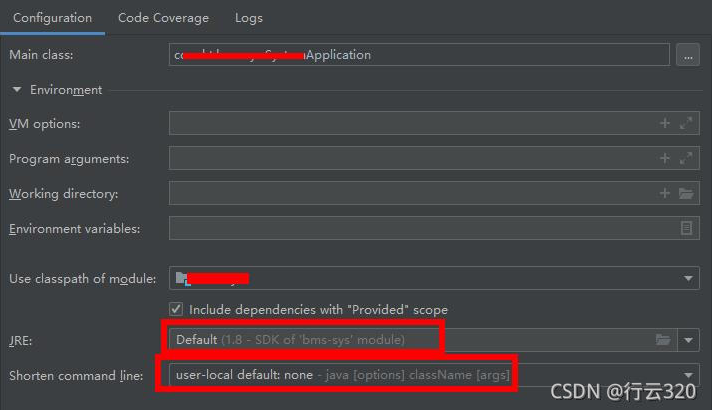
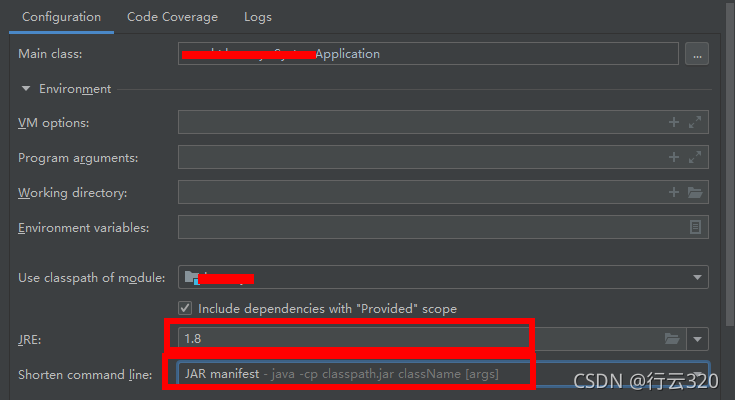
when the ports are exposed and open, there are still problems. I modified the configuration of the idea. The problem is solved:
configuration before modification:

After modification:

the JRE is changed to the JRE installed locally instead of the JRE provided by idea
in addition, the short command line is also modified

The error is not reported when restarting. It is normal, but the configuration is changed back, and the error is still not reported when restarting. It is strange
it may be due to the cache
have a nice work!

How to Solve JAVA Error: error: A JNI error has occureed

Java error reporting

Notebook eslip ide error

error: a JNI error has occurred
solution:

Cause: this problem is caused by the error that the Java class file compiled by the higher version of JDK attempts to run on the lower version of JVM
method 1:
ensure that the versions of JVM (Java command) and JDK (javac command) are consistent. If it is a Windows version, enter the Java – version and javac – version commands on the command line to check whether the versions are consistent
if the versions are the same: see method 2.

If the versions are inconsistent: modify the environment variable classpath,
and then delete and uninstall the unnecessary versions in the system
Restart, delete javac, and regenerate the generated *. Class (* represents the main class name)
method 2:
if they are consistent, but still can not solve the problem, you must not compile directly with javac on the command line, but with compilers such as eclipse and NetBeans. Because many compilers come with javac instead of the compiler in the operating system. If your compiler is eclipse, you need to set the JDK version in the project properties by

-->java compiler --> Enable project specific settings -->
compiler compliance level

Set the compiler compliance level to the same version as the JVM (the version shown in Java – version on the command line).

[Solved] Failed to introspect Class [org.springframework.cloud.netflix.hystrix.HystrixCircuitBreakerConfigura

Caused by: java.lang.IllegalStateException: Failed to introspect Class [org.springframework.cloud.netflix.hystrix.HystrixCircuitBreakerConfiguration] from ClassLoader [jdk.internal.loader.ClassLoaders$AppClassLoader@1f89ab83]

Solution: Introduce hystrix coordinates

<dependency>
    <groupId>org.springframework.cloud</groupId>
    <artifactId>spring-cloud-starter-netflix-hystrix</artifactId>
</dependency>

[Solved] Failed to execute goal org.apache.maven.plugins:maven-dependency-plugin:3.1.1:analyze-only

Question

An exception occurred when compiling an open source project (openlookeng), resulting in compilation failure.

Abnormal content

[ERROR] Failed to execute goal org.apache.maven.plugins:maven-dependency-plugin:3.1.1:analyze-only (default) on project presto-vv: Dependency problems found -> [Help 1]
org.apache.maven.lifecycle.LifecycleExecutionException: Failed to execute goal org.apache.maven.plugins:maven-dependency-plugin:3.1.1:analyze-only (default) on project presto-vv: Dependency problems found
    at org.apache.maven.lifecycle.internal.MojoExecutor.execute (MojoExecutor.java:215)
    at org.apache.maven.lifecycle.internal.MojoExecutor.execute (MojoExecutor.java:156)
    at org.apache.maven.lifecycle.internal.MojoExecutor.execute (MojoExecutor.java:148)
    at org.apache.maven.lifecycle.internal.LifecycleModuleBuilder.buildProject (LifecycleModuleBuilder.java:117)
    at org.apache.maven.lifecycle.internal.LifecycleModuleBuilder.buildProject (LifecycleModuleBuilder.java:81)
    at org.apache.maven.lifecycle.internal.builder.singlethreaded.SingleThreadedBuilder.build (SingleThreadedBuilder.java:56)
    at org.apache.maven.lifecycle.internal.LifecycleStarter.execute (LifecycleStarter.java:128)
    at org.apache.maven.DefaultMaven.doExecute (DefaultMaven.java:305)
    at org.apache.maven.DefaultMaven.doExecute (DefaultMaven.java:192)
    at org.apache.maven.DefaultMaven.execute (DefaultMaven.java:105)
    at org.apache.maven.cli.MavenCli.execute (MavenCli.java:957)
    at org.apache.maven.cli.MavenCli.doMain (MavenCli.java:289)
    at org.apache.maven.cli.MavenCli.main (MavenCli.java:193)
    at sun.reflect.NativeMethodAccessorImpl.invoke0 (Native Method)
    at sun.reflect.NativeMethodAccessorImpl.invoke (NativeMethodAccessorImpl.java:62)
    at sun.reflect.DelegatingMethodAccessorImpl.invoke (DelegatingMethodAccessorImpl.java:43)
    at java.lang.reflect.Method.invoke (Method.java:498)
    at org.codehaus.plexus.classworlds.launcher.Launcher.launchEnhanced (Launcher.java:282)
    at org.codehaus.plexus.classworlds.launcher.Launcher.launch (Launcher.java:225)
    at org.codehaus.plexus.classworlds.launcher.Launcher.mainWithExitCode (Launcher.java:406)
    at org.codehaus.plexus.classworlds.launcher.Launcher.main (Launcher.java:347)
Caused by: org.apache.maven.plugin.MojoExecutionException: Dependency problems found
    at org.apache.maven.plugins.dependency.analyze.AbstractAnalyzeMojo.execute (AbstractAnalyzeMojo.java:253)
    at org.apache.maven.plugin.DefaultBuildPluginManager.executeMojo (DefaultBuildPluginManager.java:137)
    at org.apache.maven.lifecycle.internal.MojoExecutor.execute (MojoExecutor.java:210)
    at org.apache.maven.lifecycle.internal.MojoExecutor.execute (MojoExecutor.java:156)
    at org.apache.maven.lifecycle.internal.MojoExecutor.execute (MojoExecutor.java:148)
    at org.apache.maven.lifecycle.internal.LifecycleModuleBuilder.buildProject (LifecycleModuleBuilder.java:117)
    at org.apache.maven.lifecycle.internal.LifecycleModuleBuilder.buildProject (LifecycleModuleBuilder.java:81)
    at org.apache.maven.lifecycle.internal.builder.singlethreaded.SingleThreadedBuilder.build (SingleThreadedBuilder.java:56)
    at org.apache.maven.lifecycle.internal.LifecycleStarter.execute (LifecycleStarter.java:128)
    at org.apache.maven.DefaultMaven.doExecute (DefaultMaven.java:305)
    at org.apache.maven.DefaultMaven.doExecute (DefaultMaven.java:192)
    at org.apache.maven.DefaultMaven.execute (DefaultMaven.java:105)
    at org.apache.maven.cli.MavenCli.execute (MavenCli.java:957)
    at org.apache.maven.cli.MavenCli.doMain (MavenCli.java:289)
    at org.apache.maven.cli.MavenCli.main (MavenCli.java:193)
    at sun.reflect.NativeMethodAccessorImpl.invoke0 (Native Method)
    at sun.reflect.NativeMethodAccessorImpl.invoke (NativeMethodAccessorImpl.java:62)
    at sun.reflect.DelegatingMethodAccessorImpl.invoke (DelegatingMethodAccessorImpl.java:43)
    at java.lang.reflect.Method.invoke (Method.java:498)
    at org.codehaus.plexus.classworlds.launcher.Launcher.launchEnhanced (Launcher.java:282)
    at org.codehaus.plexus.classworlds.launcher.Launcher.launch (Launcher.java:225)
    at org.codehaus.plexus.classworlds.launcher.Launcher.mainWithExitCode (Launcher.java:406)
    at org.codehaus.plexus.classworlds.launcher.Launcher.main (Launcher.java:347)
[ERROR]
[ERROR] Re-run Maven using the -X switch to enable full debug logging.
[ERROR]
[ERROR] For more information about the errors and possible solutions, please read the following articles:
[ERROR] [Help 1] http://cwiki.apache.org/confluence/display/MAVEN/MojoExecutionException

Causes and Solutions

This is because Maven’s dependency check plug-in is enabled. When checking the plug-in, it is found that some dependencies are not used or used but not defined. As follows:

[INFO] --- maven-dependency-plugin:3.1.1:analyze-only (default) @ presto-vv ---
[WARNING] Used undeclared dependencies found:
[WARNING]    org.apache.pulsar:pulsar-client-api:jar:2.8.0:compile
[WARNING]    org.apache.pulsar:pulsar-metadata:jar:2.8.0:compile
[WARNING]    commons-configuration:commons-configuration:jar:1.10:compile
[WARNING]    org.apache.bookkeeper:bookkeeper-common:jar:4.14.1:compile
[WARNING]    org.slf4j:slf4j-api:jar:1.7.29:compile
[WARNING]    javax.ws.rs:javax.ws.rs-api:jar:2.1:compile
[WARNING]    org.apache.commons:commons-lang3:jar:3.11:compile
[WARNING]    org.jctools:jctools-core:jar:2.1.2:compile
[WARNING]    org.apache.bookkeeper:bookkeeper-server:jar:4.14.1:compile
[WARNING]    org.apache.pulsar:pulsar-client-admin-api:jar:2.8.0:compile
[WARNING]    org.apache.pulsar:pulsar-common:jar:2.8.0:compile
[WARNING]    org.apache.avro:avro:jar:1.9.2:compile
[WARNING]    io.netty:netty-buffer:jar:4.1.63.Final:compile
[WARNING]    org.apache.bookkeeper.stats:bookkeeper-stats-api:jar:4.14.1:compile
[WARNING] Unused declared dependencies found:
[WARNING]    org.projectlombok:lombok:jar:RELEASE:compile

If you do not need to strictly check invalid dependencies, you can set parameters to not check. Please refer to
Maven dependency plugin -> analyze-only

The parameter to be added to skip this check: skip, which is explained as follows:
skip plugin execution complete.
default value is: false.
user property is: mdep.analyze.skip

BeanDefinitionStoreException: Failed to read candidate component class probably due to a new Java

While learning about annotations in the Spring Framework, I had this problem on my first test and couldn’t figure it out
Finally I found out that there is a mismatch between JDK and Spring version, my Spring framework version is 5.2.6 and it only supports up to JDK15 and mine is JDK16, which causes the problem
Spring Framework 5.3.x: JDK 8-17 (expected)Spring Framework 5.2.x: JDK 8-15 (expected)Spring Framework 5.1.x: JDK 8-12Spring Framework 5.0.x: JDK 8-10Spring Framework 4.3.x: JDK 6-8
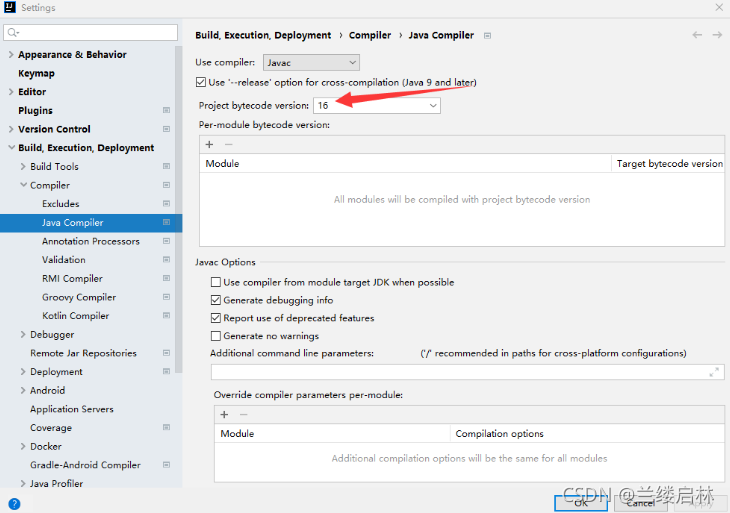
I was going to download another JDK8, but suddenly I found that in File-Setting-Build, Execution... - I was able to adjust Project bytecode version from 16 to 15 in the Java Compiler and the problem was solved.

Error: org.springframework.beans.factory.BeanDefinitionStoreException: Failed to read candidate component class: file [D:\java\spring5_demo3\out\production\spring5_demo3\com\spring5\service\UserService.class]; nested exception is org.springframework.core.NestedIOException: ASM ClassReader failed to parse class file – probably due to a new Java class file version that isn’t supported yet: file [D:\java\spring5_demo3\out\production\spring5_demo3\com\spring5\service\UserService.class]; nested exception is java.lang.IllegalArgumentException: Unsupported class file major version 60