ah Cannot open: No such file or directory


Tag Archives: java
Solve the problem of request method ‘get’ not supported
First of all, the error is most likely caused by the incorrect way the request was made. SpringBoot has three common request methods: @requestmapping, @getmapping, and @postmapping.
**
**
- @RequestMapping: This is a general annotation that does not specify a request, so it can accept a series of requests such as POST, GET, PUT, HEAD, etc. @GetMapping: This is the request for GET, the browser default request for this type of request, is short for @RequestMapping(method= requestMethod.get) @PostMapping: This is the request for POST, which is short for @RequestMapping(method= RequestMethod.post)
* *
again turn head to see this error, literally does not support a get request, see your own annotations to project, it was the wrong
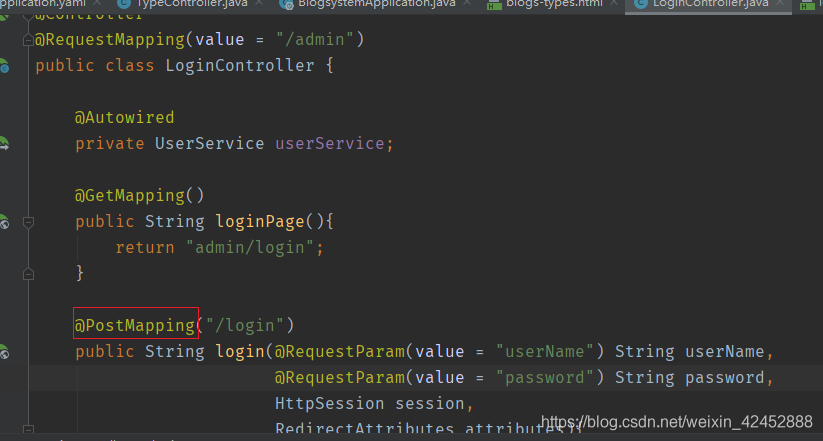
I am a visit by enter the URL address bar, the default is the get method, the annotation to @ RequestMapping is ok, the error is solved.
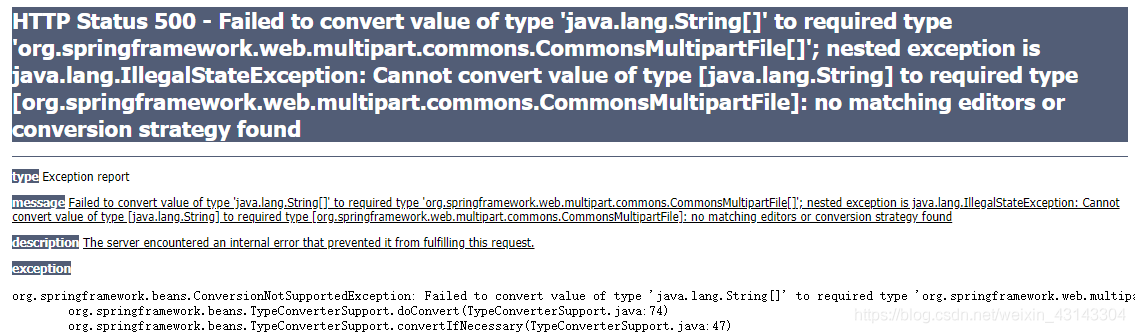
Image file upload error org.springframework.beans .ConversionNotSupportedException
Project Scenario:
prompt:
oject scene: when the administrator adds the product in the e-commerce project, he will upload the picture file for the product.
Problem description:
 >
>
ah <>>
Running bat file, a flash problem
Since the Web application of the project team is almost done now, JMeter is needed to carry out corresponding stress tests on it. But something strange happened. After matching the environment variables according to the instructions, I clicked on the jmeter.bat file and got a flash of results. Then find various reasons, and finally a successful solution.
In fact, the reason for the problem is very simple, that is, there is a problem with the CMD encoding, which leads to the inability to read the BAT file, thus appearing the phenomenon of flash. Jmeter. bat can be successfully executed by changing the CMD code to GBK through CHCP 936.
From the individual to the general view, if you find a software configuration is fine, but the CMD execution of the corresponding command is not getting any results, then there is a very good chance that there is a CMD coding problem, so you can use it as a breakthrough problem.
In fact, the reason for the problem is very simple, that is, there is a problem with the CMD encoding, which leads to the inability to read the BAT file, thus appearing the phenomenon of flash. Jmeter. bat can be successfully executed by changing the CMD code to GBK through CHCP 936.
From the individual to the general view, if you find a software configuration is fine, but the CMD execution of the corresponding command is not getting any results, then there is a very good chance that there is a CMD coding problem, so you can use it as a breakthrough problem.
An example of drawing rotating cube with OpenGL
In the last section, we learned how to use OpenGL to draw 2D graphics. Now let’s learn how to use OpenGL to draw 3D graphics. Let’s really feel the power of OpenGL
In the last video we drew a rotating triangle and square, today we’re going to use OpenGL to draw a rotating cube.
Drawing cubes is basically the same as drawing triangles and squares. The key is to build the coordinates of cubes. When building these vertex coordinates, to rotate the object around its own axis, the object’s center coordinates must always be (0.0f, 0.0f, 0.0f) and drawn in counterclockwise order.
Without further ado, here is an example:
Start by creating an OpenGLView class that inherits GLSurfaceView
public class OpenGLView extends GLSurfaceView{ private GLReader glReader; public OpenGLView(Context context) { super(context); // TODO Auto-generated constructor stub glReader=new GLReader(); setRenderer(glReader); }}
Next is our Activity class:
public class SimpleOpenGLActivity extends Activity { /** Called when the activity is first created. */ @Override public void onCreate(Bundle savedInstanceState) { super.onCreate(savedInstanceState); OpenGLView view=new OpenGLView(this); setContentView(view); }}
Finally, our core class, the GlReader class for rendering 3D graphics, implements the Renderer interface:
package cn.com.karl.opengl; import java.nio.ByteBuffer; import java.nio.ByteOrder; import java.nio.FloatBuffer; import java.nio.IntBuffer; import javax.microedition.khronos.egl.EGLConfig; import javax.microedition.khronos.opengles.GL10; import javax.microedition.khronos.opengles.GL11; import android.opengl.GLSurfaceView.Renderer; import android.opengl.GLU; Public class GLReader implements the Renderer {float box [] = new float [] {//FRONT – 0.5 f to 0.5 f to 0.5 f to 0.5 f to 0.5 f to 0.5 f to 0.5 f to 0.5 f to 0.5 f to 0.5 f to 0.5 f to 0.5 f,// BACK to 0.5 f to 0.5 f to 0.5 f to 0.5 f to 0.5 f, 0.5 f, f, 0.5-0.5 f to 0.5 f to 0.5 f to 0.5 f to 0.5 f,// LEFT – 0.5 f to 0.5 f to 0.5 f to 0.5 f to 0.5 f to 0.5 f to 0.5 f to 0.5 f to 0.5 f to 0.5 f to 0.5 f to 0.5 f,// RIGHT f 0.5, – 0.5 f to 0.5 f, f 0.5, 0.5 f to 0.5 f, 0.5 f to 0.5 f, 0.5 0.5 f, f, f 0.5, 0.5, f// TOP – 0.5 f, 0.5 f, f, 0.5 0.5 f, f 0.5, 0.5 f to 0.5 f, 0.5 f to 0.5 f, f 0.5, 0.5 f to 0.5 f,// BOTTOM – 0.5 f, 0.5 f, f, 0.5-0.5, f – 0.5 f to 0.5 f, 0.5 f to 0.5 f, f 0.5, 0.5, f – 0.5 f to 0.5 f,}; FloatBuffer cubeBuff; Float xrot = 0.0 f; Float yrot = 0.0 f;/* * * to convert a float array is stored in the byte array buffer * @ param arr * @ return */public FloatBuffer makeFloatBuffer (float [] arr) {ByteBuffer bb = ByteBuffer. AllocateDirect (arr. Length * 4); B.order (byteOrder.nativeOrder ()); b.order(); // Set ByteOrder, where byteOrder.nativeOrder () is to get the native ByteOrder FloatBuffer fb = bb.asFloatBuffer(); // Convert to float fb.put(arr); // Add data fb.position(0); Return fb; return fb; } public GLReader(){ cubeBuff = makeFloatBuffer(box); }//// conversion float array all drawing operations are carried out in this method the public void onDrawFrame GL10 (gl) {//TODO Auto – generated method stub gl. GlClear (GL10. GL_COLOR_BUFFER_BIT | GL10. GL_DEPTH_BUFFER_BIT); // Clear the screen and depth cache gl.glMatrixMode(gl10.gl_ModelView); // Switch to the model observation matrix gl.glLodIdentity (); // Reset the current model observation matrix Glu. GluLookAt (GL, 0, 0, 3, 0, 0, 0, 0, 0, 1, 0); // Set the viewpoint and model center position gl.glTexPointer (3, gl10.gl_float, 0, cubeBuff); // Set vertex data gl. glenableClientState (gl10.gl_vertex_array); gl.glRotatef(xrot, 1, 0, 0);// around the (0, 0) and (0, 1). The x axis rotation gl glRotatef (yrot, 0, 1, 0). GlColor4f (1.0f, 0, 0, 1.0f); glColor4f(1.0f, 0, 0, 1.0f); // Set color, red gl.glDraWarRays (gl10.gl_triangle_strip, 0, 4); // draw square FRONT gl.glColor4f(1.0f, 1.0f, 0, 1.0f); gl.glDrawArrays(GL10.GL_TRIANGLE_STRIP, 4, 4); Gl. GlColor4f (0, 1.0 f, 0, 1.0 f); gl.glDrawArrays(GL10.GL_TRIANGLE_STRIP, 8, 4); Gl. GlColor4f (0, 1.0 f, f 1.0, 1.0 f); gl.glDrawArrays(GL10.GL_TRIANGLE_STRIP, 12, 4); Gl. GlColor4f (0, 0, 1.0 f, 1.0 f); gl.glDrawArrays(GL10.GL_TRIANGLE_STRIP, 16, 4); Gl. GlColor4f (1.0 f, f, 1.0 1.0 f, 1.0 f); gl.glDrawArrays(GL10.GL_TRIANGLE_STRIP, 20, 4); Xrot + = 1.0 f; Yrot + = 0.5 f; } public void onSurfaceChanged(GL10 gl, int width, int height) {// TODO auto-generated method stub // set the scene size of OpenGL. GlViewport (0, 0, width, height); gl.glMatrixMode(GL10.GL_PROJECTION); // Set the projection matrix gl.glLodIdentity (); Glu.gluPerspective (gl, 45.0f, ((float) width)/height, 0.1f, 10f); Public void onSurfaceCreated(gl10gl, eGLConfig config) {// TODO Auto-generated method stub gl.glclearColor (0.0f, 0.0f, 0.0f, 1.0f); // Set the background color to R, G, B, A gl.glEnable(gl10.gl_depth_test); // Enable depth cache gl.glEnable(gl10.gl_cull_face); // Enable backside clipping gl.glclearDepthf (1.0f); // Set the depth cache value gl.glDepthFunc(gl10.gl_lequal); GL_LEQUAL (gl.glclearDepthf (1.0f)); gl.glshaDemodel (gl10.gl_smooth); gl.glclearDepthf (1.0f); gl.glclearDepthf (1.0f);// set the shadow model GL_SMOOTH}}
the upper portion of the more important is to do the comments, so here don’t do too much explanation, finally see how some after the operation effect.

In the last video we drew a rotating triangle and square, today we’re going to use OpenGL to draw a rotating cube.
Drawing cubes is basically the same as drawing triangles and squares. The key is to build the coordinates of cubes. When building these vertex coordinates, to rotate the object around its own axis, the object’s center coordinates must always be (0.0f, 0.0f, 0.0f) and drawn in counterclockwise order.
Without further ado, here is an example:
Start by creating an OpenGLView class that inherits GLSurfaceView
public class OpenGLView extends GLSurfaceView{ private GLReader glReader; public OpenGLView(Context context) { super(context); // TODO Auto-generated constructor stub glReader=new GLReader(); setRenderer(glReader); }}
Next is our Activity class:
public class SimpleOpenGLActivity extends Activity { /** Called when the activity is first created. */ @Override public void onCreate(Bundle savedInstanceState) { super.onCreate(savedInstanceState); OpenGLView view=new OpenGLView(this); setContentView(view); }}
Finally, our core class, the GlReader class for rendering 3D graphics, implements the Renderer interface:
package cn.com.karl.opengl; import java.nio.ByteBuffer; import java.nio.ByteOrder; import java.nio.FloatBuffer; import java.nio.IntBuffer; import javax.microedition.khronos.egl.EGLConfig; import javax.microedition.khronos.opengles.GL10; import javax.microedition.khronos.opengles.GL11; import android.opengl.GLSurfaceView.Renderer; import android.opengl.GLU; Public class GLReader implements the Renderer {float box [] = new float [] {//FRONT – 0.5 f to 0.5 f to 0.5 f to 0.5 f to 0.5 f to 0.5 f to 0.5 f to 0.5 f to 0.5 f to 0.5 f to 0.5 f to 0.5 f,// BACK to 0.5 f to 0.5 f to 0.5 f to 0.5 f to 0.5 f, 0.5 f, f, 0.5-0.5 f to 0.5 f to 0.5 f to 0.5 f to 0.5 f,// LEFT – 0.5 f to 0.5 f to 0.5 f to 0.5 f to 0.5 f to 0.5 f to 0.5 f to 0.5 f to 0.5 f to 0.5 f to 0.5 f to 0.5 f,// RIGHT f 0.5, – 0.5 f to 0.5 f, f 0.5, 0.5 f to 0.5 f, 0.5 f to 0.5 f, 0.5 0.5 f, f, f 0.5, 0.5, f// TOP – 0.5 f, 0.5 f, f, 0.5 0.5 f, f 0.5, 0.5 f to 0.5 f, 0.5 f to 0.5 f, f 0.5, 0.5 f to 0.5 f,// BOTTOM – 0.5 f, 0.5 f, f, 0.5-0.5, f – 0.5 f to 0.5 f, 0.5 f to 0.5 f, f 0.5, 0.5, f – 0.5 f to 0.5 f,}; FloatBuffer cubeBuff; Float xrot = 0.0 f; Float yrot = 0.0 f;/* * * to convert a float array is stored in the byte array buffer * @ param arr * @ return */public FloatBuffer makeFloatBuffer (float [] arr) {ByteBuffer bb = ByteBuffer. AllocateDirect (arr. Length * 4); B.order (byteOrder.nativeOrder ()); b.order(); // Set ByteOrder, where byteOrder.nativeOrder () is to get the native ByteOrder FloatBuffer fb = bb.asFloatBuffer(); // Convert to float fb.put(arr); // Add data fb.position(0); Return fb; return fb; } public GLReader(){ cubeBuff = makeFloatBuffer(box); }//// conversion float array all drawing operations are carried out in this method the public void onDrawFrame GL10 (gl) {//TODO Auto – generated method stub gl. GlClear (GL10. GL_COLOR_BUFFER_BIT | GL10. GL_DEPTH_BUFFER_BIT); // Clear the screen and depth cache gl.glMatrixMode(gl10.gl_ModelView); // Switch to the model observation matrix gl.glLodIdentity (); // Reset the current model observation matrix Glu. GluLookAt (GL, 0, 0, 3, 0, 0, 0, 0, 0, 1, 0); // Set the viewpoint and model center position gl.glTexPointer (3, gl10.gl_float, 0, cubeBuff); // Set vertex data gl. glenableClientState (gl10.gl_vertex_array); gl.glRotatef(xrot, 1, 0, 0);// around the (0, 0) and (0, 1). The x axis rotation gl glRotatef (yrot, 0, 1, 0). GlColor4f (1.0f, 0, 0, 1.0f); glColor4f(1.0f, 0, 0, 1.0f); // Set color, red gl.glDraWarRays (gl10.gl_triangle_strip, 0, 4); // draw square FRONT gl.glColor4f(1.0f, 1.0f, 0, 1.0f); gl.glDrawArrays(GL10.GL_TRIANGLE_STRIP, 4, 4); Gl. GlColor4f (0, 1.0 f, 0, 1.0 f); gl.glDrawArrays(GL10.GL_TRIANGLE_STRIP, 8, 4); Gl. GlColor4f (0, 1.0 f, f 1.0, 1.0 f); gl.glDrawArrays(GL10.GL_TRIANGLE_STRIP, 12, 4); Gl. GlColor4f (0, 0, 1.0 f, 1.0 f); gl.glDrawArrays(GL10.GL_TRIANGLE_STRIP, 16, 4); Gl. GlColor4f (1.0 f, f, 1.0 1.0 f, 1.0 f); gl.glDrawArrays(GL10.GL_TRIANGLE_STRIP, 20, 4); Xrot + = 1.0 f; Yrot + = 0.5 f; } public void onSurfaceChanged(GL10 gl, int width, int height) {// TODO auto-generated method stub // set the scene size of OpenGL. GlViewport (0, 0, width, height); gl.glMatrixMode(GL10.GL_PROJECTION); // Set the projection matrix gl.glLodIdentity (); Glu.gluPerspective (gl, 45.0f, ((float) width)/height, 0.1f, 10f); Public void onSurfaceCreated(gl10gl, eGLConfig config) {// TODO Auto-generated method stub gl.glclearColor (0.0f, 0.0f, 0.0f, 1.0f); // Set the background color to R, G, B, A gl.glEnable(gl10.gl_depth_test); // Enable depth cache gl.glEnable(gl10.gl_cull_face); // Enable backside clipping gl.glclearDepthf (1.0f); // Set the depth cache value gl.glDepthFunc(gl10.gl_lequal); GL_LEQUAL (gl.glclearDepthf (1.0f)); gl.glshaDemodel (gl10.gl_smooth); gl.glclearDepthf (1.0f); gl.glclearDepthf (1.0f);// set the shadow model GL_SMOOTH}}
the upper portion of the more important is to do the comments, so here don’t do too much explanation, finally see how some after the operation effect.
Some small problems in using vs2017
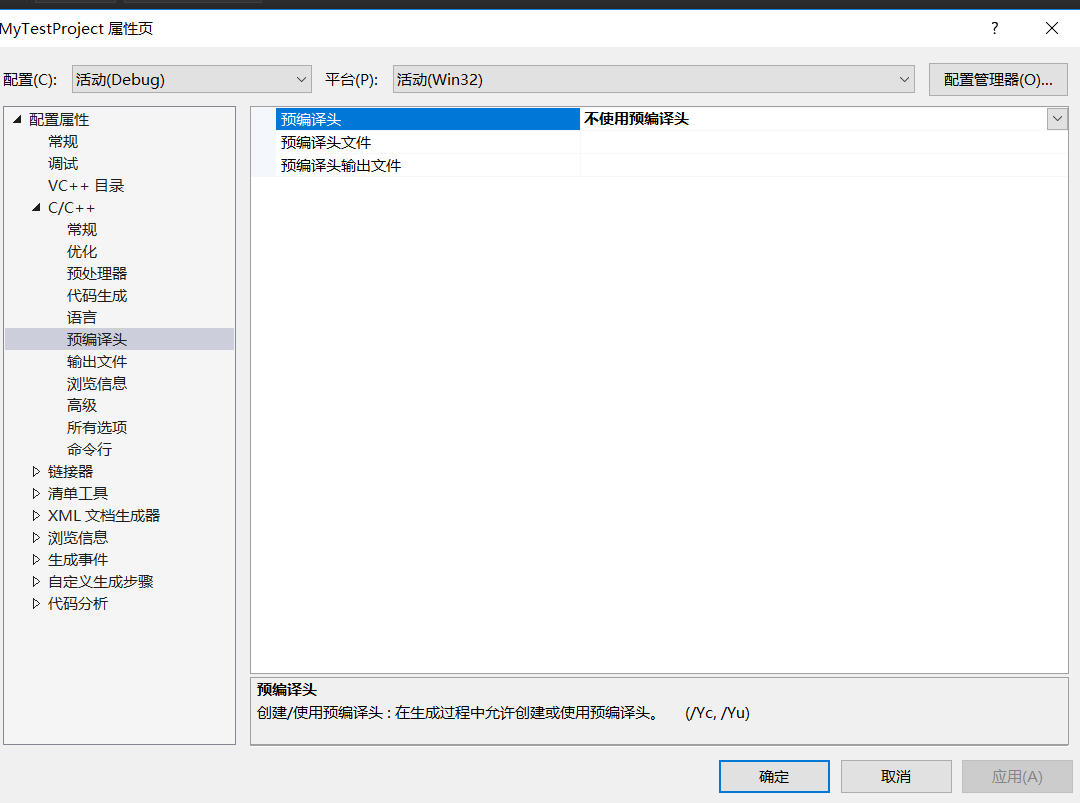
Remove the precompiled header
H, stdafx.h, stdafx.h, stdafx.h, stdafx.h, stdafx.h, stdafx.h, stdafx.h, stdafx.h, stdafx.h As a newbie, I didn’t need these precompiled headers for a while, so I wanted to get rid of them.
Right-click item ->; Property – & gt; C/C++-> Precompiled headers, as shown below, and then select not to use precompiled headers.
Set the C++ standard
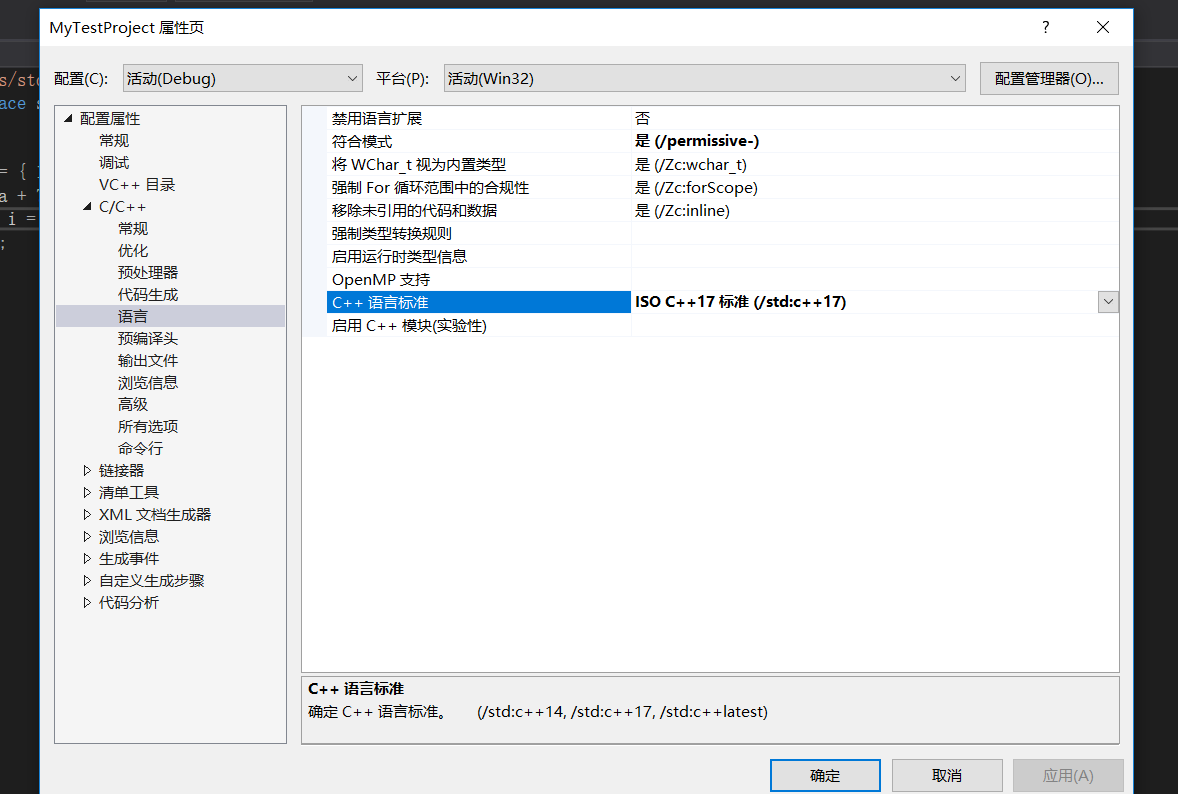
When writing C++ in VS2017, you want to set the C++ standard. Set it to C++14 or C++17.
Right-click item ->; Property – & gt; C/C++-> Language, as shown in the figure below, in the C++ language standard to select the desired C++ version.
3. Use lt; bits/stdc++.h> The header file
#include< #include< bits/stdc++.h> I’m too lazy to start a file. Then, found that VS2017 using this header file will report error prompts can not be found, so the Internet to find a way.
Since VS2017 is not available, we will add it ourselves, find the VS2017 installation directory, and then find the include file, my file path is this:
C:\Program Files (x86)\Microsoft Visual Studio\2017\Community\VC\Tools\MSVC\14.16.27023\ Include
Then create your own bits folder, then go to the bits folder, create the file stdc++. H, and add the following:
// 17.4.1.2 Headers

// C
#ifndef _GLIBCXX_NO_ASSERT
#include <cassert>
#endif
#include <cctype>
#include <cerrno>
#include <cfloat>
#include <ciso646>
#include <climits>
#include <clocale>
#include <cmath>
#include <csetjmp>
#include <csignal>
#include <cstdarg>
#include <cstddef>
#include <cstdio>
#include <cstdlib>
#include <cstring>
#include <ctime>

#if __cplusplus >= 201103L
#include <ccomplex>
#include <cfenv>
#include <cinttypes>
#include <cstdalign>
#include <cstdbool>
#include <cstdint>
#include <ctgmath>
#include <cwchar>
#include <cwctype>
#endif

// C++
#include <algorithm>
#include <bitset>
#include <complex>
#include <deque>
#include <exception>
#include <fstream>
#include <functional>
#include <iomanip>
#include <ios>
#include <iosfwd>
#include <iostream>
#include <istream>
#include <iterator>
#include <limits>
#include <list>
#include <locale>
#include <map>
#include <memory>
#include <new>
#include <numeric>
#include <ostream>
#include <queue>
#include <set>
#include <sstream>
#include <stack>
#include <stdexcept>
#include <streambuf>
#include <string>
#include <typeinfo>
#include <utility>
#include <valarray>
#include <vector>

#if __cplusplus >= 201103L
#include <array>
#include <atomic>
#include <chrono>
#include <condition_variable>
#include <forward_list>
#include <future>
#include <initializer_list>
#include <mutex>
#include <random>
#include <ratio>
#include <regex>
#include <scoped_allocator>
#include <system_error>
#include <thread>
#include <tuple>
#include <typeindex>
#include <type_traits>
#include <unordered_map>
#include <unordered_set>
#endif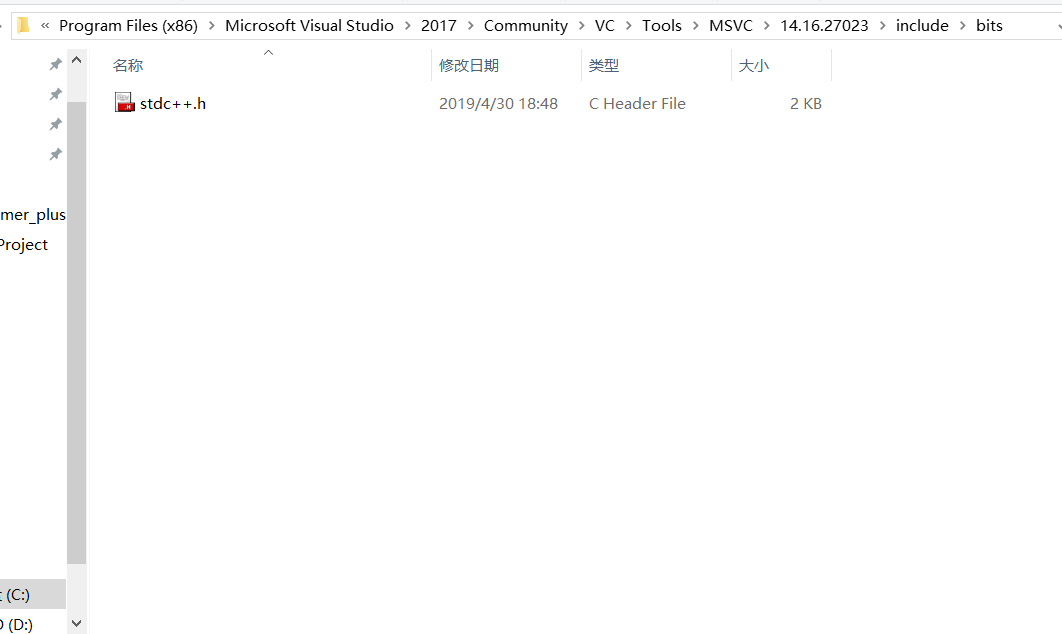
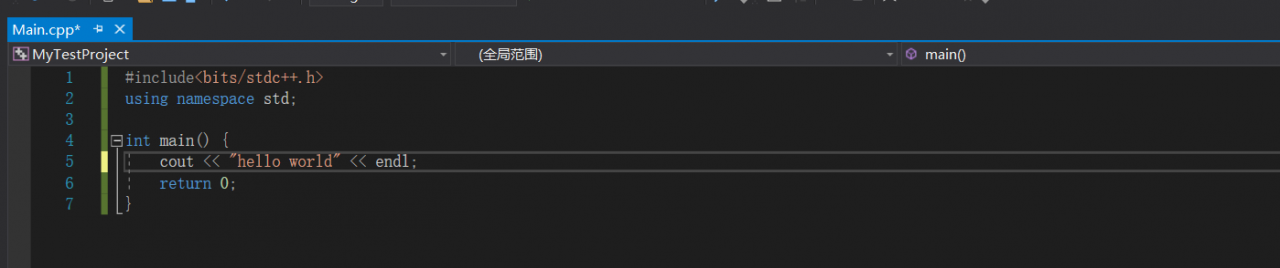
Once the addition is complete, we will be able to use the #include< as normal. bits/stdc++.h> .
Reproduced in: https://www.cnblogs.com/fu3638/p/10801251.html
Do you want to get fired? Let’s take a look at the programmer’s resignation tips
Dream eraser, a funny Internet advanced nerd.
The article directories
Write in front 1. Proficient in using rm command 2. Write in reading and writing database operation 3. Do not write comments, do not encapsulate code 4. Forcibly merge code on git 5. No technical resignation tips (thumb up over 200, send to get your boss quit tips O(∩_∩)O
Writing in the front
As the saying goes, write less code, leave less.
Travel the Internet recently, found some tips to leave the job, after reading, the heart was deeply moved
But after careful tasting, found that we programmers are not applicable.
Such as:
- leadership clip dishes you turn the table, we programmers generally not leadership at a table; Leaders open the door you get on the car, our programmers are sitting on duty, generally not on a business trip, business trip generally also leadership drive; Leader K song you cut song, oh ~ KTV singing, I generally hide in the corner; The leader toasts you not to drink,…… ; Leaders listen to your self-drawn,…… ; Leaders drink water you brake,… .
They are clever schemes, but they are not easy for us programmers to learn. Then I learned the following six tips.
“Career Tips”
- > When the Leader says “I’ve been working hard”, you will reply “Don’t be idle and get me a glass of water”, showing your recognition of the Leader’s care. Leader WeChat calls you, you reply “?” “Or” Yes?, simple and efficient. When the Leader asks you why the progress is so slow, you will reply, “Come if you can”, to show your affirmation of his working ability. You are working, and the Leader pretends to be in front of you. Straight back, “Are you teaching me to do something?” “, through humorous language, rhetorical question sentence pattern, play a role in relieving embarrassment. The Leader assigns you a JIRA task and you reply, “That’s it?” , indicates that the requirements are simple and the work can be fully competent. When the Leader asks you to go to the office, you reply, “Don’t you have legs?” “In recognition of his long legs. The Leader sends you a bunch of tasks and says “oh” first. Say more, the job is the same job, just give a response. A coworker asks you, “I notice you’re not doing anything lately?” “, you directly reply “mind your shit”, indicating that the Leader has a clear division of labor and praises the perfect system of the company.
Well, the general skills have been learned, the next formal entry programmer resignation skills reveal secrets.
1. Proficient in using RM command
What is the rm command?Knowledge is not particularly difficult, if you want to learn, can be in the test environment to try rm - rf/ or rm - rf/* command.
Note that after running this command, it is best to copy the file a few times after executing it
There's probably nothing the gods can do to keep you from getting fired
If this exit tip doesn't satisfy you, try it in a production environment
Challenge yourself. Give you the authority of the administrator and you will dominate the company
However, after learning this skill, in addition to being able to receive a resignation medal
Maybe you'll get a tip for going to jail
Here buy one get one free for everyone, how much is a gift eraser.

2. Reading and writing database operations are written in the for loop
This exit tip is even more powerful, and it's hard to find out without a Code Review
Read and write database operations, written in the for loop
What subquery, association query, left join, right join, all without
You look up one table, then iterate over the results, and then look up another table
Just be direct
What about multi-table queries?One table, one level loop.
The database link is opened and closed at each level of the loop
select *lect *
Think of the technical director's helpless face when the server's memory and CPU exploded while reading tens of thousands of data
Is not very cool ~
This is a great exit tip. I hope you enjoy it
What?Sounds like you're complaining, don't you think it's enough?it doesn't matter
In the attached to you a, to delete the delete , don't write the where condition, see.

3. Never write comments, never encapsulate code
Don't listen to the technical director, write notes, write documentation, he is to slow down your development efficiency
Then how do we aim at this kind of unreasonable request, and analyze from it to leave a skill
Do the opposite
Never write a comment, let alone a development document, is wasting your valuable time
And the name of the variable, the name of the function, just a, b, c, e, f, g
In addition to simplicity, it comes with encryption
That way you can devote your limited time to development
After all, when you write code, only you and God know what logic is. Maybe in a couple of days, only God knows what logic is.
Second, do not encapsulate the code, from the top to the bottom of the written, program execution, is the most efficient
One function writes a day, one function writes a file
A file to write tens of thousands of lines of code
Then at the end of the code file, write neatly 20 curly braces, that sense of accomplishment must be huge
Don't know what curly braces are?Here's a reference case
					}
				}
			}
		}
	}
}

4. Git forces merging of code
The tips above can't satisfy you, so you'll love this one, and it's a technical flow
After Git commits the code, what?Have a conflict?
Who dares to modify the same file with me
Forced to merge him
masteranch branch
I'm sure I won't get a resignation letter once or twice
Need to repeat the operation N times, will be able to welcome the resignation notice
What?N times, still can't get the resignation achievement
After merging someone else's branch, make fun of the guy being merged
Make him feel inferior, and then get angry
Let him beat you, then the technical director, must think you are being bullied, and give you a parting award
This is a resignation achievement on its own merits

5. Quietly modify database fields without warning, or change the interface to return data
The trick is to slay the dragon, and when the testing process is found to be faulty, the opportunity arises
Quietly fix one of your own bugs, while silently triggering another
For example, you can modify a field in a table in the database
Then release a patch pack in the name of a system update BUG
The online environment may suddenly crash because it is difficult to see because of the database fields being modified
The more times the system crashes, the better off you'll be
You can also modify the interface data format for the mobile phone, adjust the name of the parameter
In short, fix bugs carefully and write code carefully
Don't let the technical director get the slightest hint that you want to leave
Quietly, he got his resignation letter

666. No skills to quit tips (thumb up over 200, send to your boss quit tips O(∩_∩)O)
What?The above technical level is too high, you technical dishes, can't learn?
No problem, Eraser has carefully prepared you with three easy-to-follow, no-tech quitting tips
There's no barrier to getting started with these skills, so just list the titles
- anonymously teased the company, inadvertently revealed their ID for the meeting screen projection, set automatic QQ reminder, let friends crazy teasing the boss, open the large screen oncoming mode when the technical director demonstrates the project, quietly connected to the projector with Bluetooth, you know the follow-up...
For more tips, please sharethe comments section
reading
- 100 cases Python crawler tutorial, fantastic crawler tutorial, subscribe now Python crawler small class, wonderful 9 speak
Today is the 100th day of continuous writing 610
If you have ideas or techniques you'd like to share, feel free to leave them in the comments section.
If you want to build a close relationship with the blogger, follow the blogger, or follow the public account
non-undergraduate programmerto see how a non-undergraduate programmer grows.
blogger ID:eam eraser,>e you thumb up, comment, favorites
Problems in the second day of Android learning
The blogger uses Android Studio, installs the APK into the emulator, runs the first time, uninstalls, and then runs the second time to re-issue the question:
Error type 3
Error: Activity class {com.example.xx.chap2_2/com.example.xx.chap2.FirstActivity} does not exis

Analysis of the problem, I don’t know (to be answered later). Obviously, the uninstallation on the simulator has been finished, the blogger guessed that it should be the simulator problem, there is no such problem when installing the blogger on the real machine.
Modify the package name ApplicationID in the app’s build.gradle and rerun it.
Reproduced in: https://www.cnblogs.com/listentothecloud20150215/p/10053915.html
How to solve the problem that lightningchart is completely black
LightningChart.net is fully GPU-accelerated and optimized for displaying massive amounts of data in real time — over 1 billion data points. LightningChart includes a wide range of 2D, Advanced 3D, Polar, Smith, 3D Pake/Doughnut, Geographic Maps and GIS charts as well as volume mapping capabilities for science, engineering, medicine, aviation, trade, energy and other fields.
LightningChart.net is now available for online order, SignalTools, 12 Months, WPF version for RMB3499 from RMB4105. Buy it now! Buy now> >
Click to download the latest trial version of LightningChart.NET
Question: With the WinForms program of LightningChart, for some reason I overwrite CreateParams in the Form class and put the LightingChart in the custom panel. Then the LightningChart will turn all black. Am I doing something wrong?The attached file demo project only overrides CreateParams and will show a black screen at startup and then go to the correct content, but in my program, it will always be black.
Start the
After normal startup for
Black
Lightning map all black
overwrites createParams code
protected override CreateParams CreateParams
{
    get
    {
        CreateParams cp = base.CreateParams;
        cp.ExStyle |= 0x02000000;
        return cp;
    }
}
We tried to reproduce this problem with the test items you shared, but were unable to produce a situation where the chart was completely black.
project has two forms, ReadData and Form1. Both can be added using CreateParams.
ReadData is black first and then displays the chart.
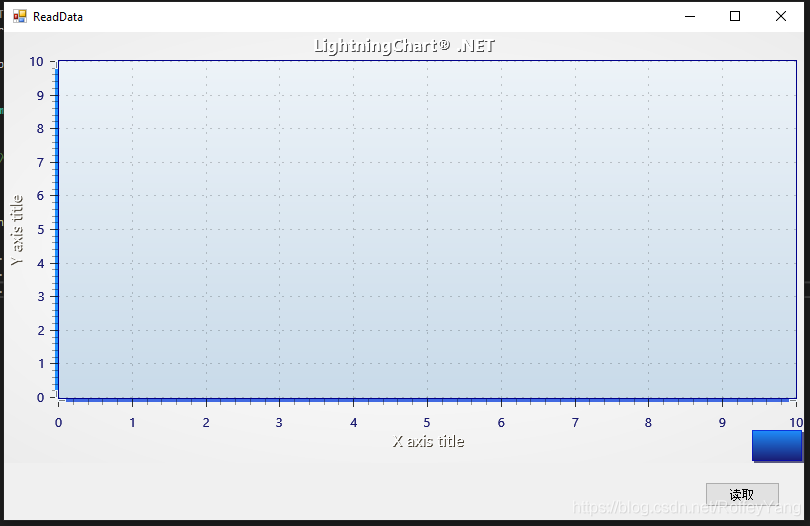
Form1 is first transparent and then displays the chart.
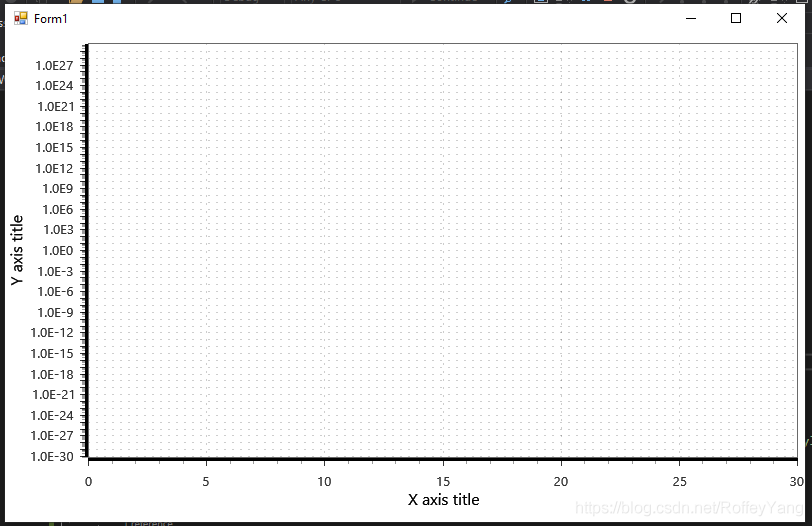
Did the problem occur in the test project on your computer?If so, will the chart display properly if you ignore createParams?This will indicate whether the reason is actually CreateParams.
The only known thing about a completely black chart is that it lacks some reference. In the test project, they seem to be correct, but just in case you can test adding arction.directXFiles.dll, directXInit.dll and arction.mathcore.dll.
As mentioned earlier, an all-black chart may appear if some references are missing. A complete reference list is provided in Chapter 29.1 of our user manual. All of these files are not necessarily needed at development time, for example, if DirectX-Files are already found somewhere on the computer. Referencing all listed parts solves the black chart problem.
However, if rendering DeviceType SoftwareD11 works, but Hardwared11 or Hardware D9 does not, then there may be a problem with the drivers themselves because they may be faulty or outdated. Therefore, it helps to update the driver to the latest version.
In general, you can listen to a ChartMessage-event immediately after building a LightningChart and call the checkEngineResult () – method in it to catch RenderingEngine errors. Such as:
private void _chart_ChartMessage(ChartMessageInfo info)
{
info.ToString(); //= log message
if (info.MessageType == MessageType.RenderDeviceCreateFailed || info.MessageType == MessageType.MemoryAllocationError)
{
CheckEngineResult();
}
}
private void CheckEngineResult()
{
var results = _chart.GetLastEngineInitResults();
foreach (var engineInitResult in results)
{
string sLog = string.Format("Engine {0}. Success:{1}", engineInitResult.DeviceType, engineInitResult.Success);
foreach (var exception in engineInitResult.Exceptions)
{
sLog = string.Format("{0}\n Exception: {1}", sLog, exception.Message);
}
System.Diagnostics.Debug.WriteLine(sLog);
}
}
We did some more research on this issue and may have recreated it. When using CreateParams, does the following happen in the application?
After launching the application, WinForms controls such as buttons will be drawn, but the diagram will remain black (left image below). After a short time, the diagram is drawn (the image below is on the right).
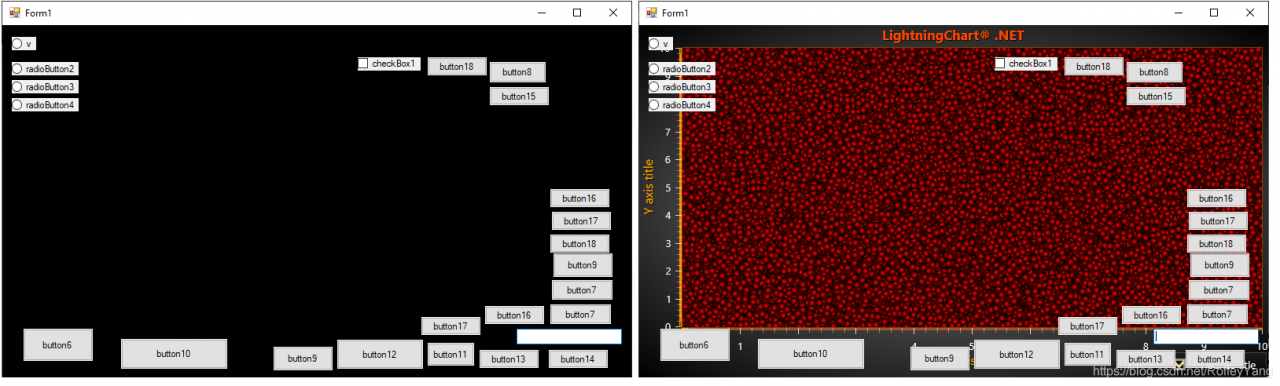
What is the diagram behavior you are trying to accomplish?Should you draw both controls and charts?In this case, you will most likely have to defer the drawing of the control in some way. This can be done by rewriting the OnPaint method or by using SuspendLayout and Resumelayout. One solution, however, is to hide the control until the diagram is drawn. In other words, set the Visible property of all controls to false by default, and then set it to true in the Paint event of the diagram. The sample code below shows all the buttons only after the diagram is drawn.
_chart.Paint += _chart_Paint;
private void _chart_Paint(object sender, PaintEventArgs e)
{
    _chart.Paint -= _chart_Paint; // Do this only once.
    foreach (var b in this.Controls.OfType<Button>())
    {
        b.Visible = true;
    }
}
If you have any questions, please contact customer service for more information.
Solve the problem of Chinese garbled code of actibpm plug-in in idea
Transfer: https://blog.csdn.net/weixin_46544994/article/details/106392705
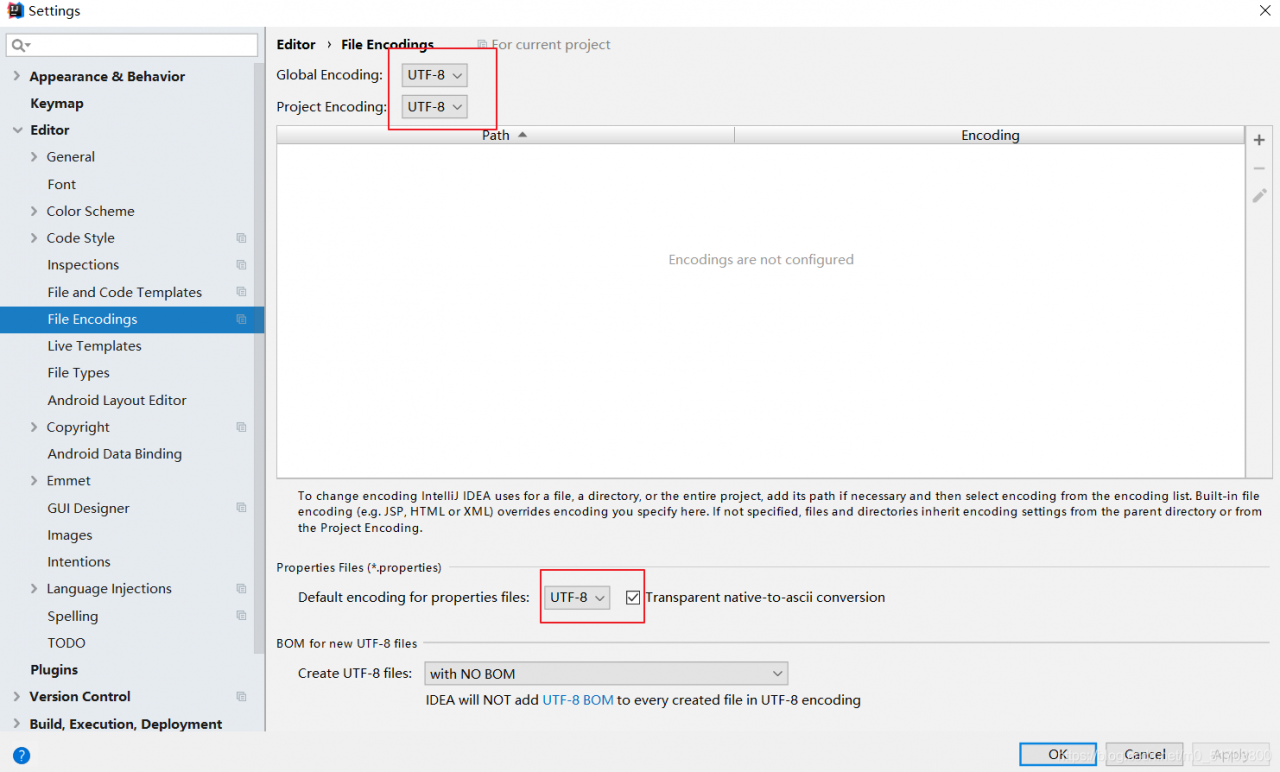
Change the IDEA editor code to utf8File->; Settings-> Editor-> File Encodings, all changed to UTF-8
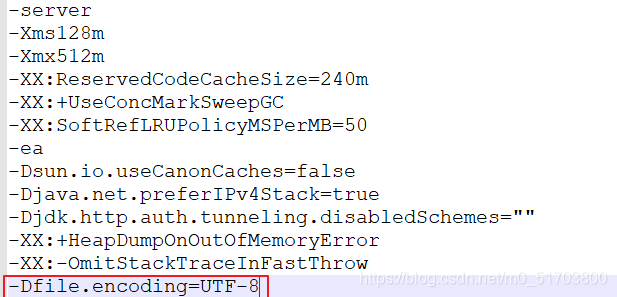
Idea64.exe. vmoptions and idea64.exe.vmoptions. Open and edit the two files and add the following code at the end of the text respectively
-Dfile.encoding=UTF-8
IDEA path Help->; 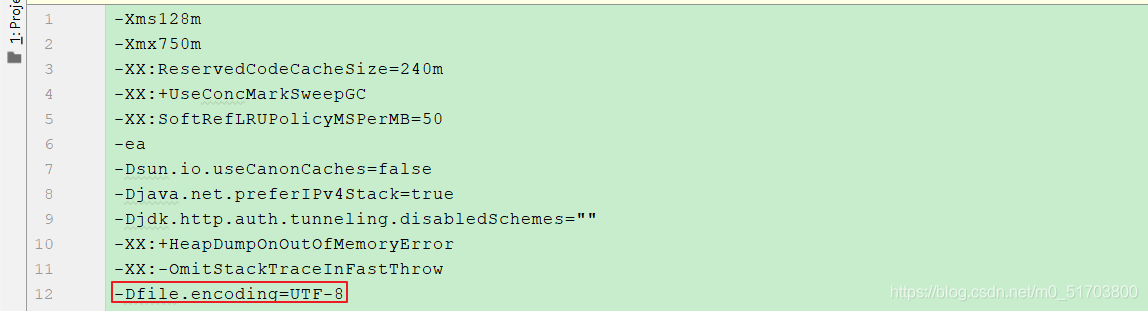
ea path Help->; Edit Custom VM Options
Solutions to errors in XML files
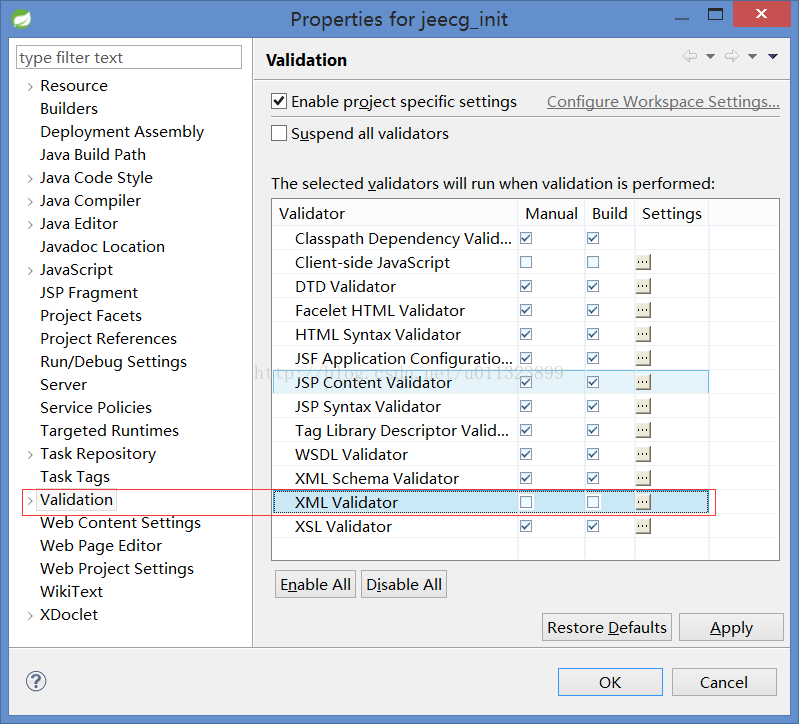
XML files in a project often report errors for no reason, but it does not affect the running of the program, which is really intolerable to people like me, so I searched online, I can turn off the validation of XML, and it will not report errors again. The operation is as follows: Window — Preferences — Validation, as shown in the figure
![]()
PS: Also, if you have similar validation errors for other types of files, you can remove the validation for the corresponding file type. At the same time, in order to improve the startup and compilation speed of the project, you can remove the validation of some files appropriately.
PS: Also, if you have similar validation errors for other types of files, you can remove the validation for the corresponding file type. At the same time, in order to improve the startup and compilation speed of the project, you can remove the validation of some files appropriately.
Solve the problem of MySQL database report 1055 error
MySql> SELECT * FROM ‘ONLY_FULL_GROUP_BY’ WHERE sql_mode = ‘ONLY_FULL_GROUP_BY’
MySql> delete the ONLY_FULL_GROUP_BY item from my.ini; delete the ONLY_FULL_GROUP_BY item from my.cnf
2. If there is no SQL_MODE item in the configuration item, use SQL statement to modify it
Find out sql_mode value
MySql> delete the ONLY_FULL_GROUP_BY item from my.ini; delete the ONLY_FULL_GROUP_BY item from my.cnf
2. If there is no SQL_MODE item in the configuration item, use SQL statement to modify it
Find out sql_mode value
select @@sql_modeRemove the only_full_group_by item from the value found and add the other items to the my.ini configuration file
sql-mode=STRICT_TRANS_TABLES,NO_AUTO_CREATE_USER,NO_ENGINE_SUBSTITUTIONConfiguration items in my.ini:

3. Do not modify any configuration files, but add any_value() to fields that do not need to be grouped
SELECT any_value(id),value FROM role group by value;