[Solved] ElasticSearch startup error: bootstrap checks failed

Modify the elasticsearch.yml configuration file to allow external network access.

vim config/elasticsearch.yml
# add

network.host: 0.0.0.0

Start failed, check did not pass, report error

[2018-05-18T17:44:59,658][INFO ][o.e.b.BootstrapChecks    ] [gFOuNlS] bound or publishing to a non-loopback address, enforcing bootstrap checks
ERROR: [2] bootstrap checks failed
[1]: max file descriptors [4096] for elasticsearch process is too low, increase to at least [65536]

[2]: max virtual memory areas vm.max_map_count [65530] is too low, increase to at least [262144]


[1]: max file descriptors [65535] for elasticsearch process is too low, increase to at least [65536]

Edit /etc/security/limits.conf and add the following content;
* soft nofile 65536
* hard nofile 65536 After
this file is modified, you need to log in to the user again to take effect


[2]: max virtual memory areas vm.max_map_count [65530] is too low, increase to at least [262144]

Edit /etc/sysctl.conf and add the following content:
vm.max_map_count=655360
After saving, execute:

sysctl -p

Restart, success.


bin/elasticsearch 
[Solved] Failed to invoke @ExceptionHandler method is reported after adding @ControllerAdvice

first of all. Using ControllerAdvice alone does not work properly. Need to cooperate with @EnableWebMvc.

@ControllerAdvice

@EnableWebMvc

pulbic class ExceptionControllerAdvice{

  @ExceptionHandler(NotFoundException.class)

  @ResponseBody

  public Map<String,Object> notFoundExc(NotFoundException exc,HttpServletRequest req){

  …….

  }

}

An error is reported during the startup of exception handling.

Error message:

Jul 04, 2016 11:00:11 AM org.springframework.web.servlet.mvc.method.annotation.ExceptionHandlerExceptionResolver doResolveHandlerMethodException

Warning: Failed to invoke @ExceptionHandler method: public java.util.Map<java.lang.String, java.lang.Object> com.dooioo.modelException.ExceptionControllerAdvice.notFoundError(com.dooioo.modelException.NotFoundException,javax.servlet.http.HttpServletRequest,javax.servlet.http.HttpServletResponse)

org.springframework.web.HttpMediaTypeNotAcceptableException: Could not find acceptable representation

at org.springframework.web.servlet.mvc.method.annotation.AbstractMessageConverterMethodProcessor.writeWithMessageConverters(AbstractMessageConverterMethodProcessor.java:134)

at org.springframework.web.servlet.mvc.method.annotation.AbstractMessageConverterMethodProcessor.writeWithMessageConverters(AbstractMessageConverterMethodProcessor.java:101)

at ……….. (omitted…)

The messageconverter processor has been configured in xx-servlet.xml.

 <bean id=“dyMessageConverter” class=“com.dooioo.web.converter.DyMappingJacksonHttpMessageConverter”/>

 <bean class=“org.springframework.web.servlet.mvc.annotation.AnnotationMethodHandlerAdapter”>

        <!– Processing function for spring binding –>

        <property name=“webBindingInitializer”>

            <bean class=“com.dooioo.init.DefaultBindingInitializer”/>

        </property>

        <property name=“messageConverters”>

            <list>

                <bean class=“org.springframework.http.converter.ByteArrayHttpMessageConverter”/>

                <ref bean=“dyMessageConverter”/>

            </list>

        </property>

        <property name=“requireSession” value=“false”/>

        <property name=“order” value=“0”/>

    </bean>

Going through the information online to no avail.

Finally, it is found that there is a relationship with the order in the xml. <mvc:annotation-driven />.

org.springframework.web.servlet.mvc.annotation.AnnotationMethodHandlerAdapter  adapter must be declared before <mvc:annotation-driven />, otherwise the conversion of parameter types cannot be processed normally 

This problem is solved.

Resolve Chromedriver’s original error: chrome not reachable

The error message is as follows:

error: Chromedriver: Chromedriver exited unexpectedly with code null, signal SIG
TERM
info: Chromedriver: Changed state to 'stopped'
warn: Chromedriver for context WEBVIEW_com.tencent.mm:tools stopped unexpectedly

warn: Chromedriver quit unexpectedly, but it wasn't the active context, ignoring

error: Chromedriver: Error: An error occurred (Original error: chrome not reacha
became
  (Driver info: chromedriver=2.18.343845 (73dd713ba7fbfb73cbb514e62641d8c96a9468
2a),platform=Windows NT 6.1 x86_64))
    at JWProxy.command$ (lib/proxy.js:133:15)
    but tryCatch (500: \ Program Files \ epochs \ node_modules \ appium \ node_modules \ appium
-chromedriver\node_modules\appium-jsonwp-proxy\node_modules\babel-runtime\regene
rator\runtime.js:67:40)
    at GeneratorFunctionPrototype.invoke [as _invoke] (D:\Program Files\Appium\n
ode_modules \ appium \ node_modules \ appium -chromedriver \ node_modules \ appium-jsonwp- p
roxy\node_modules\babel-runtime\regenerator\runtime.js:315:22)
    at GeneratorFunctionPrototype.prototype.(anonymous function) [as next] (D:\P
ROGRA Files \ epochs \ node_modules \ appium \ node_modules \ appium - chromedriver \ node_mo
dules \ appium -jsonwp-Proxy \ node_modules \ Isabel-runtime \ regenerator \ runtime.js: 100 :
 21 )
    at GeneratorFunctionPrototype.invoke (D:\Program Files\Appium\node_modules\a
ppium \ node_modules \ appium -chromedriver \ node_modules \ appium-jsonwp- Proxy \ node_mod
ules\babel-runtime\regenerator\runtime.js:136:37)
    at bound (domain.js:287:14)
    at GeneratorFunctionPrototype.runBound (domain.js:300:12)
    at run (500: \ Program Files \ epochs \ node_modules \ appium \ node_modules \ appium - genious
medriver\node_modules\appium-jsonwp-proxy\node_modules\babel-runtime\node_module
s\core-js\library\modules\es6.promise.js:89:39)
    at 500: \ Program Files \ epochs \ node_modules \ appium \ node_modules \ appium - chromedri
spring \ node_modules \ appium -jsonwp-Proxy \ node_modules \ babel- the runtime \ node_modules \ heart
the -JS \ Library \ modules \ es6.promise.js: 100 : 28 
    at Flush (500: \ Program Files \ epochs \ node_modules \ appium \ node_modules \ appium - ch
romedriver \ node_modules \ appium -jsonwp-Proxy \ node_modules \ babel- the runtime \ node_modu
les\core-js\library\modules\$.microtask.js:17:13)
    at nextTickCallbackWith0Args (node.js:420:9)
    at process._tickDomainCallback (node.js:390:13)
 { [Error: An error occurred (Original error: chrome not reachable
  (Driver info: chromedriver=2.18.343845 (73dd713ba7fbfb73cbb514e62641d8c96a9468
2a),platform=Windows NT 6.1 x86_64))]
  status: 100,
  value: { message: 'chrome not reachable\n  (Driver info: chromedriver=2.18.343
845 (73dd713ba7fbfb73cbb514e62641d8c96a94682a),platform=Windows NT 6.1 x86_64)'
},
  httpCode: 200 }


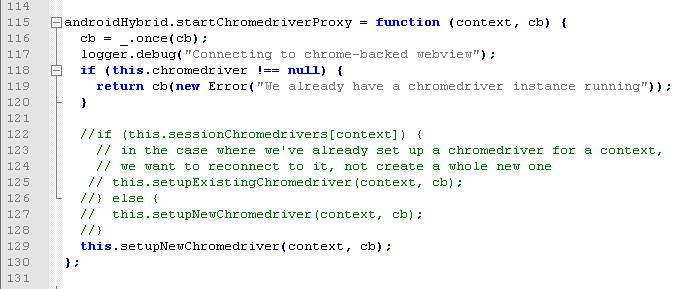
Solution: Modify the files in the Appium installation directory, for example:

500: \ Program Files \ epochs \ node_modules \ appium \ lib \ devices \ Android \ android-hybrid.js

Find the androidHybrid.startChromedriverProxy function and comment out the relevant content.


problem causes:

When Appium switches to the Html page for the first time, it will generate a new Chromedriver; when it switches to Html for the second time, it will use the existing Chromedriver. But in fact, every time we open an Activity in our application, a WebChromeClient is generally recreated, so here we change it to generate a new Chromedriver anyway.

[Solved] Error reported: org.springframework.validation.BeanPropertyBindingResult

Error content: org.springframework.validation.BeanPropertyBindingResult: 1 errors Field error in object’price’ on field’endTime’: rejected value [2018-07-31]; codes [typeMismatch.price.endTime,typeMismatch.endTime,typeMismatch. java.util.Date,typeMismatch]; arguments [org.springframework.context.support.DefaultMessageSourceResolvable: codes [price.endTime,endTime]; arguments []; default message [endTime]]; default message [Failed to convert property value of type’java.lang.String’ to required type’java.util.Date’ for property’endTime’; nested exception is org.springframework.core.convert.ConversionFailedException: Failed to convert from type [java.lang.String] to type [@javax.persistence.Column java.util.Date] for value ‘2018-07-31’; nested exception is java.lang.IllegalArgumentException:Parse attempt failed for value [2018-07-31]]


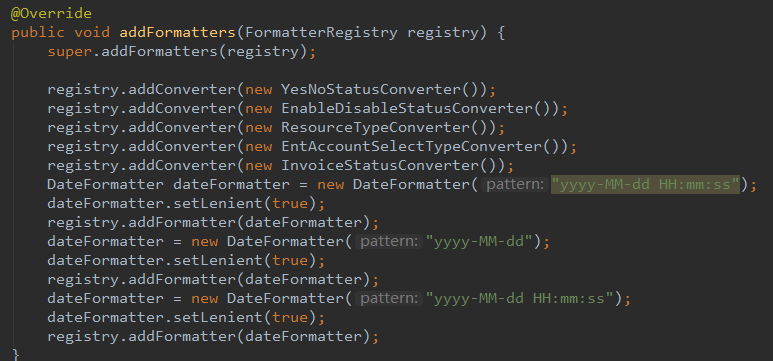
When SpringMvc is configured, the accepted period is formatted as yyyy-MM-dd HH:mm:ss by default. And because the date plug-in used is in the format of year, month, and day. Therefore, there is a problem of Spring conversion Date conversion failure.

There is a problem here, I hope I know what’s going on in the future? During this period, I set breakpoints in the configuration, but only the breakpoints entered when the project was started, but did not enter the breakpoints when calling the interface later. There is a guess here. In Spring, the configuration is initialized only when the project is started, and then it does not enter the method of initializing the configuration when it is called.


The way to solve the problem: Since it is the process of mapping, Spring cannot be converted to Date, and it is related to the overall configuration. I don’t want to change the general configuration, so I use HttpServletRequest to get the parameters directly. There will be no problems. The accepted parameter is directly Spring, which needs to be converted to Date by itself

[Solved] Weblogic startup error: java.lang.NoClassDefFoundError

Weblogic startup error: java.lang.NoClassDefFoundError 


#### <2015-6-17 PM 03 when 30 of 5 47 seconds CST> <Error> <HTTP> <HDQSDOCMTAPP4> <zonyappserver> <[ACTIVE] ExecuteThread: ’15’ for queue: ‘weblogic.kernel.Default ( self-tuning)’> <<WLS Kernel>> <> <> <1434526247927> <BEA-101163> <Could not load user defined listener: org.springframework.web.context.request.RequestContextListener

java.lang.NoClassDefFoundError: org/apache/commons/logging/LogFactory

at org.springframework.web.context.request.RequestContextListener.<init>(RequestContextListener.java:55)

at sun.reflect.NativeConstructorAccessorImpl.newInstance0(Native Method)

at sun.reflect.NativeConstructorAccessorImpl.newInstance(NativeConstructorAccessorImpl.java:39)

at sun.reflect.DelegatingConstructorAccessorImpl.newInstance(DelegatingConstructorAccessorImpl.java:27)

at java.lang.reflect.Constructor.newInstance(Constructor.java:513)

at java.lang.Class.newInstance0(Class.java:357)

at java.lang.Class.newInstance(Class.java:310)


Does anyone know what’s going on?

The jar package loaded when WebLogic starts is as follows:

java.class.path = D:\zonyapps\applibs\commons-logging.jar;D:\zonyapps\applibs\log4j-1.2.8.jar;D:\zonyapps\applibs\activation.jar;D:\zonyapps\ applibs\antlr-2.7.6.jar;D:\zonyapps\applibs\aspectjrt.jar;D:\zonyapps\applibs\aspectjweaver.jar;D:\zonyapps\applibs\axis.jar;D:\zonyapps\applibs\ cglib-nodep-2.1_3.jar;D:\zonyapps\applibs\commons-collections-3.1.jar;D:\zonyapps\applibs\commons-discovery.jar;D:\zonyapps\applibs\commons-io-1.3. 2.jar;D:\zonyapps\applibs\dom4j-1.6.1.jar;D:\zonyapps\applibs\ejb3-persistence.jar;D:\zonyapps\applibs\hibernate-annotations.jar;D:\zonyapps\ applibs\hibernate-commons-annotations.jar;D:\zonyapps\applibs\hibernate3.jar;D:\zonyapps\applibs\javassist-3.9.0.GA.jar;D:\zonyapps\applibs\jaxrpc.jar;D :\zonyapps\applibs\jdom-1.0.jar;D:\zonyapps\applibs\jta-1.1.jar;D:\zonyapps\applibs\proxool-0.9.1.jar;D:\zonyapps\applibs\proxool-cglib.jar;D:\zonyapps\applibs\saaj.jar;D:\zonyapps\applibs\slf4j-api-1.5.8.jar;D:\zonyapps\applibs\slf4j-nop- 1.5.8.jar;D:\zonyapps\applibs\spring.jar;D:\zonyapps\applibs\sqljdbc4.jar;D:\zonyapps\applibs\standard.jar;D:\zonyapps\applibs\wsdl4j.jar; D:\zonyapps\applibs\adobe-assembler-client.jar;D:\zonyapps\applibs\adobe-generatepdf-client.jar;D:\zonyapps\applibs\adobe-livecycle-client.jar;D:\zonyapps\ applibs\adobe-usermanager-client.jar;D:\Oracle\MIDDLE~1\patch_wls1211\profiles\default\sys_manifest_classpath\weblogic_patch.jar;D:\Java\JDK16~1.0_4\lib\tools.jar;D:\ Oracle\MIDDLE~1\WLSERV~1.1\server\lib\weblogic_sp.jar;D:\Oracle\MIDDLE~1\WLSERV~1.1\server\lib\weblogic.jar;D:\Oracle\MIDDLE~1\modules\ features\weblogic.server.modules_12.1.1.0.jar;D:\Oracle\MIDDLE~1\WLSERV~1.1\server\lib\webservices.jar;D:\Oracle\MIDDLE~1\modules\ORGAPA~1.1/lib/ant-all.jar;D:\Oracle\MIDDLE~1\modules\NETSFA~1.0_1/lib/ant-contrib.jar;;


The operating system is Windows , use Windows service mode to start


Solution reference:

1. Check whether the jar package is normal and is it damaged?

The jar package is damaged, and weblogic cannot read the contents of the jar package. Unzip and compress the jar package to solve the problem.

2. See if the weblogic startup jdk and the project compiled jdk are unified?

It is said that the loaded package cannot be recognized by jvm . For example, if you use IBM ‘s JDK for development this will happen when you deploy packages compiled by sun jdk

3. See if the jar of the project conflicts with the jar package that comes with weblogic

There is a saying that weblogic may come with some jars , and the project also has some jar packages. The versions of these jar packages may be inconsistent. For example, the version of the project is higher than the version of weblogic. Generally, weblogic will only load the jar once . Will control the version, so the jar of the project is loaded first

[Solved] Linux installation pillow error: ValueError: jpeg is required unless explicitly disabled using –disable-jpeg, aborting

linux installation pillow error:

ValueError: jpeg is required unless explicitly disabled using –disable-jpeg, aborting

After searching, I found the following two solutions:

One:

sudo yum install python-devel
sudo yum install zlib-devel
sudo yum install libjpeg-turbo-devel

two:

sudo apt-get install libtiff5-dev libjpeg8-dev zlib1g-dev libfreetype6-dev liblcms2-dev libwebp-dev tcl8.6-dev tk8.6-dev python-tk

The first one I use, the following one may not support the linux version I use, just keep it as a spare. After execution, run pip install pillow again.


Official website solution: https://pillow.readthedocs.io/en/3.0.0/installation.html#linux-installation

Linux Installation

Note

Most major Linux distributions, including Fedora, Debian/Ubuntu and ArchLinux include Pillow in packages that previously contained PIL e.g. python-imaging. Please consider using native operating system packages first to avoid installation problems and/or missing library support later.

We do not provide binaries for Linux. If you didn’t build Python from source, make sure you have Python’s development libraries installed. In Debian or Ubuntu:

$ sudo apt-get install python-dev python-setuptools

Or for Python 3:

$ sudo apt-get install python3-dev python3-setuptools

In Fedora, the command is:

$ sudo yum install python-devel

Prerequisites are installed on Ubuntu 12.04 LTS or Raspian Wheezy 7.0 with:

$ sudo apt-get install libtiff4-dev libjpeg8-dev zlib1g-dev \
    libfreetype6-dev liblcms2-dev libwebp-dev tcl8.5-dev tk8.5-dev python-tk

Prerequisites are installed on Ubuntu 14.04 LTS with:

$ sudo apt-get install libtiff5-dev libjpeg8-dev zlib1g-dev \
    libfreetype6-dev liblcms2-dev libwebp-dev tcl8.6-dev tk8.6-dev python-tk

Prerequisites are installed on Fedora 20 with:

$ sudo yum install libtiff-devel libjpeg-devel libzip-devel freetype-devel \
    lcms2-devel libwebp-devel tcl-devel tk-devel


ValueError:–enable-zlib requested but zlib not found, aborting.

Run pip install pillow==3.1.1 under Ubuntu 14.04 and report an error, ValueError: –enable-zlib requested but zlib not found, aborting.

$ sudo apt-get build-dep python-imaging

$ sudo apt-get install libjpeg8 libjpeg62-dev libfreetype6 libfreetype6-dev

$ pip install Pillow==3.1.1

[Solved] Could not find a version that satisfies the requirement onnx (from onnx-graphsurgeon0.2.6)

Could not find a version that satisfies the requirement onnx (from onnx-graphsurgeon0.2.6) (from versions: )
No matching distribution found for onnx (from onnx-graphsurgeon
0.2.6)
nvidia The official documentation gives the command sudo pip3 install onnx_graphsurgeon-0.2.6-py2.py3-none-any.whl
After many attempts it showed the above error. Finally I found out it was a permission problem. Changed the command to pip install onnx_graphsurgeon-0.2.6-py2.py3-none-any.whl and it installed

[Solved] VUE-pdf Plugin use error: To install them, you can run: npm install –save core-js/modules/es

1.How to use

How to use Vue pdf   Pdf preview using Vue PDF plug-in

2. Cause of error

To install them, you can run: NPM install — save core JS/modules/es.object.to-string.js core JS/modules/es.string.iterator.js core JS/modules/web.dom-collections.iterator.js pdfjs dist/Es5/build/pdf.js worker loader! pdfjs-dist/es5/build/pdf.worker.js pdfjs-dist/es5/web/pdf_ viewer

Vue PDF encapsulates pdf.js. The reason for the error is that the upgrade of pdf.js package version is not compatible with Vue PDF version.

3.How to solve it

You can specify the version of PDF.JS

Run the following command:

npm install [email protected]

[Solved] Caused by: java.sql.SQLException: Access denied for user ‘root‘@‘hadoop102‘ (using password: YES)

Initialize hive metabase   When schematool – initschema – dbtype MySQL – verb is used, the following error occurs:

org.apache.hadoop.hive.metastore.HiveMetaException: Failed to get schema version.
Underlying cause: java.sql.SQLException : Access denied for user ‘root’@’hadoop102’ (using password: YES)     SQL Error code: 1045


Cause analysis:

“Access denied” means that hive is refused to connect to MySQL database, and there is a problem in account permission or password configuration to connect to MySQL database.

When configuring the Metastore to MySQL, configure the hive-site.xml. It is found that the password connecting to the MySQL database in the figure below is forgotten to be modified when pasting the configuration;

After correction, initialize hive metadata and execute the following command:

 schematool -initSchema -dbType mysql -verbose

Initialization complete.

This error report is due to my carelessness, which may not be universal. It is only used to remind you to check these two configurations!

MySql Install Error: Can‘t connect to local MySQL server through socket ‘/tmp/mysql.sock‘

@[TOC] (error 2002 (HY000): can’t connect to local MySQL server through socket ‘/ TMP/MySQL. Socket’)

System overview

CentOS 7 + MySql-community-release-el6-5.noarch。

Install MySQL process

First, download the RPM installation package as follows:
WGet – P/usr/software/ http://repo.mysql.com/mysql-community-release-el-5.noarch.rpm
Then, run the following command to install the yum source:
RPM – IVH mysql-community-release-el-5. Noarch. RPM
after the yum source is installed, you can view it as follows:
ll/etc/yum. Repos. D/
if the yum source is installed correctly, It should be displayed:
total dosage 48
– rw-r – r–. 1 root 1664 November 23 2020 CentOS base. Repo
– rw-r – r–. 1 root 1309 November 23 2020 CentOS cr. repo
– rw-r – r–. 1 root 649 November 23 2020 CentOS debuginfo. Repo
– rw-r – r–. 1 root 314 November 23 2020 CentOS FastTrack. Repo
– rw-r – r–. 1 root 630 November 23 2020 Cen TOS media. Repo
– rw-r – r–. 1 root 1331 November 23 2020 CentOS sources. Repo
– rw-r – r–. 1 root 8515 November 23 2020 CentOS vault. Repo
– rw-r – r–. 1 root 616 November 23 2020 centos-x86_ Next, run the following command to install MySQL:
Yum – y install MySQL
at the end of the process, Run the following command to start MySQL service and report an error:
Service mysqld start
at this time, the error content is as shown in the question. After checking the above installation process with the following command, the packages to be installed are:
RPM – QA | grep MySQL
the packages to be seen at this time are as follows:
mysql-community-release-el6-5. Noarch
mysql-community-common-5.6.51-2. El6.x86_ 64
mysql-community-client-5.6.51-2.el6.x86_ 64
mysql-community-libs-5.6.51-2.el6.x86_ 64
you can see that there is no MySQL Server package in the above package. So next, install MySQL server with the following command:
Yum – y install MySQL server
after the above command is executed successfully, start MySQL service:
Service mysqld start
and then run:
MySQL – uroot to enter MySQL server.