Linux use ls to view the file color is all white solution, and Linux file color introduction

1. The color of the file is white

method 1 :

1. Modify the ~ /. Bashrc file and add the following

alias ls='ls --color=auto'

2. Source to make the configuration changes take effect

source ~/.bashrc

method 2 :

1. Directly under the command line, give LS -- color = auto an alias LS

alias ls='ls --color=auto'

be careful:

In this way, every time you open a new terminal, you have to execute it again. It’s better to configure it in the ~ /. Bashrc file!

2 introduction of file color in Linux

1. Ls has more than three output colors, including the following,

White : denotes common file Blue : denotes directory Green : denotes executable file Red : denotes compressed file light blue : linked file red flashing : denotes a problem with the linked file yellow : denotes e> Device files gray : indicates other files

2. This is the default color agreed by Linux system. You can also modify it according to your own preference. In the environment variable $ls_ Just modify it on colors , and change it in ~ /. Bashrc
if you want to save it permanently

echo $LS_COLORS
rs=0:di=01;34:ln=01;36:mh=00:pi=40;33:so=01;35:do=01;35:bd=40;33;01:cd=40;33;01:or=40;31;01:su=37;41:sg=30;43:ca=30;41:tw=30;42:ow=34;42:st=37;44:ex=01;32:*.tar=01;31:*.tgz=01;31:*.arj=01;31:*.taz=01;31:*.lzh=01;31:*.lzma=01;31:*.tlz=01;31:*.txz=01;31:*.zip=01;31:*.z=01;31:*.Z=01;31:*.dz=01;31:*.gz=01;31:*.lz=01;31:*.xz=01;31:*.bz2=01;31:*.bz=01;31:*.tbz=01;31:*.tbz2=01;31:*.tz=01;31:*.deb=01;31:*.rpm=01;31:*.jar=01;31:*.rar=01;31:*.ace=01;31:*.zoo=01;31:*.cpio=01;31:*.7z=01;31:*.rz=01;31:*.jpg=01;35:*.jpeg=01;35:*.gif=01;35:*.bmp=01;35:*.pbm=01;35:*.pgm=01;35:*.ppm=01;35:*.tga=01;35:*.xbm=01;35:*.xpm=01;35:*.tif=01;35:*.tiff=01;35:*.png=01;35:*.svg=01;35:*.svgz=01;35:*.mng=01;35:*.pcx=01;35:*.mov=01;35:*.mpg=01;35:*.mpeg=01;35:*.m2v=01;35:*.mkv=01;35:*.ogm=01;35:*.mp4=01;35:*.m4v=01;35:*.mp4v=01;35:*.vob=01;35:*.qt=01;35:*.nuv=01;35:*.wmv=01;35:*.asf=01;35:*.rm=01;35:*.rmvb=01;35:*.flc=01;35:*.avi=01;35:*.fli=01;35:*.flv=01;35:*.gl=01;35:*.dl=01;35:*.xcf=01;35:*.xwd=01;35:*.yuv=01;35:*.cgm=01;35:*.emf=01;35:*.axv=01;35:*.anx=01;35:*.ogv=01;35:*.ogx=01;35:*.aac=00;36:*.au=00;36:*.flac=00;36:*.mid=00;36:*.midi=00;36:*.mka=00;36:*.mp3=00;36:*.mpc=00;36:*.ogg=00;36:*.ra=00;36:*.wav=00;36:*.axa=00;36:*.oga=00;36:*.spx=00;36:*.xspf=00;36:

Among them, before the semicolon is the background color of words , after the semicolon is the color of words

3 change the color of the user name

reference resources: https://blog.csdn.net/u013832707/article/details/53995085
Opencv opencvsharpexternal compilation and recording process

1-35013;- VS2019-36733;- OpenCvSharpExterior-283044;-

2’38468;’21547;’ 24405s;

D:\VS2019\opencvsharp-4.4.0.20200916\opencv files\opencv440 win x64\include\3rdparty\ippicv\ippicv win\icv\include

D:\VS2019\opencvsharp-4.4.0.20200916\\\opencv files\opencv440 wine x64\include

3-38745;- 24577;- 24211;- 38468;-

liblibliblibliblibliblibliblibliblibliblibliblibliblibliblibliblibliblibliblibliblibliblibliblibliblibliblibliblibliblibliblibliblibliblibliblibliblibliblibliblibliblibliblibliblibliblibliblibliblibliblibliblibliblibliblibliblibliblibliblibliblibliblibliblibliblibliblibliblibliblibliblibliblibliblibliblibliblibliblibliblibliblibliblibliblibliblibliblibliblibliblibliblibliblibliblibliblibliblibliblibliblibliblibliblibliblibliblibliblibliblibliblibliblibliblibliblibliblibliblibliblibliblibliblibliblibliblibliblibliblibliblibliblibliblibliblibliblibliblibliblibliblibliblibliblibliblibliblibliblibzlibd.lib
opencv aruco440d.lib
opencv bgsegm440d.lib
opencv bioinspired440d.lib
opencv calib3d440d.lib
The opening of the opening of the opening of the opening of the opening of the opening of the opening of the opening of the opening of the opening of the opening of the opening of the opening of the opening of the opening of the opening of the opening of the opening of the opening of the opening of the opening of the opening of the opening of the opening of the opening of the opening of the opening of the opening of the opening of the opening of the opening of the opening of the opening of the opening of the opening of the opening lib
opencv fuzzy440d.lib
opencv hfs440d.lib
opencv highgui440d.lib
opencv imgcodecs440d.lib
opencv imgproc440d.lib
open the line to descridescridescridescridescridescridescridescridescridescridescridescridescridescridescridescridescridescridescridescridescridescridescridescridescridescridescridescridescridescridescridescridescridescridescridescridescridescriopen open open open open open open open open open open open open open open open open open open open open open open open open open open open open open open open open open open open open open open open open open open open open open open open open open open open open open open open open open open open open open open open open open open open open open open open up photo4440d.libopen open open open open open open open open open open open open open open open open open open open open open open open open open open open open open open open open open open open open open open open open open open open open open open open open open open open open open open open open open open open open open open open open open open open open open open open open open open open open open 40d.lib
opencv quality 440d.lib
opencv reg440d.lib
opencv rgbd440d.lib
opencv saliency440d.lib
The opening of the opening of the structural opening of the superstsuperstsuperstsuperstsuperstsuperstsuperstsuperstsuperstsuperstsuperstsuperstsuperstsuperstsuperstsuperstsuperstsuperstsuperstsuperstsuperstsuperstsuperstsuperstsuperstsuperstsuperstsuperstsuperstsuperstsuperstsuperstsuperstsuperstsuperstsuperstsuperstsuperstsuperstsuperstsuperstsuperstsuperstsuperstsuperstsuperstsuperstsuperstsuperstsuperstsuperstsuperstsuperstsuperstsuperstsuperstsuperstsuperstsuperstsuperstsuperstsuperstsuperstsuperstsuperstsuperstsuperstsuperstsuperstsuperstsuperstsuperstsuperstsuperstsuperstsuperstsuperstsuperstsuperstsuperstsuperstsuperstsuperstsuperstsuperstsuperstsuperstsuperstsuperstsuperstsuperstsuperstsuperstsuperstsuperstsuperstsuperstsuperstsuperstsuperstsuperstsuperstsuperstsuperstsuperstsuperstsuperstsuperstsuperstsuperstsuperstsuperstremaremaremaremaremaremaremaremaremaremaremaremaremaremaremaremaremaremaremaremaremaremaremaremaremaremaremaremaremaremaremaremaremaremaremaremaremaremaremaremaremaremaremaremaremaremaremaremaremaremaremaremaremaremaremaremaremaremaremaremaremaremaremaremaremaremaremaremaremaremaremaremaremaremaremaremarema
opencv ts440d.lib
opencv video440d.lib
opencv videoio440d.lib
opencv videostab440d.lib
opencv xfeatures2d440d.lib
opencv ximgproc440d.lib
opencv xobjdetect440d.lib
opencv xphoto440d.lib

OpenCV 357933387454524577;24211s;

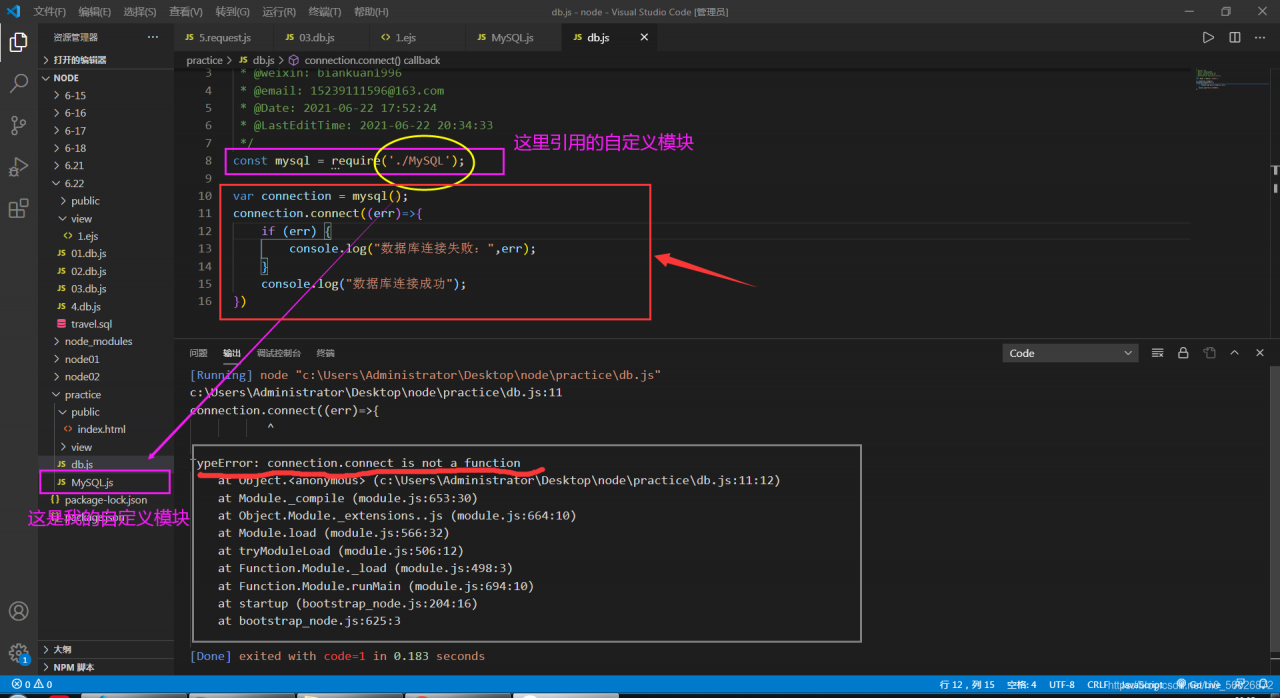
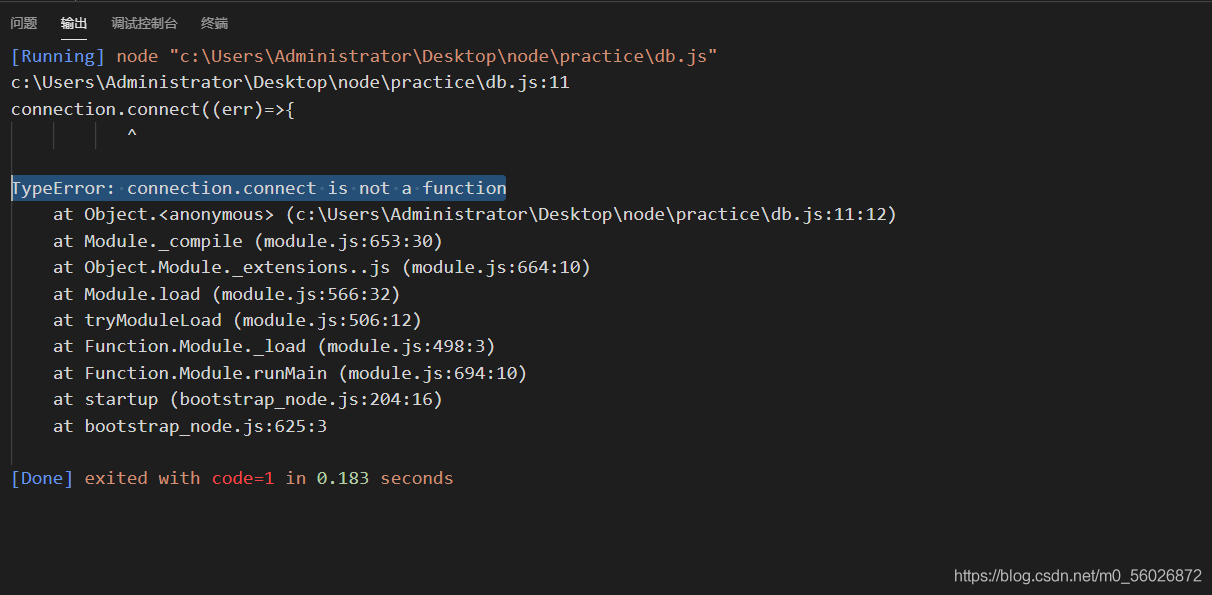
TypeError: connection.connect is not a function

Today, when I wrote node.js to operate the database, I encountered a typeerror: connection.connect is not a function when setting up the database connection. The following is the bug prompt, as shown in the figure

when I found this error, I immediately went to connection.connect, but I didn’t find anything wrong,
For this reason, I made a special effort to find the previous code and compare it. The following is the thinking at that time

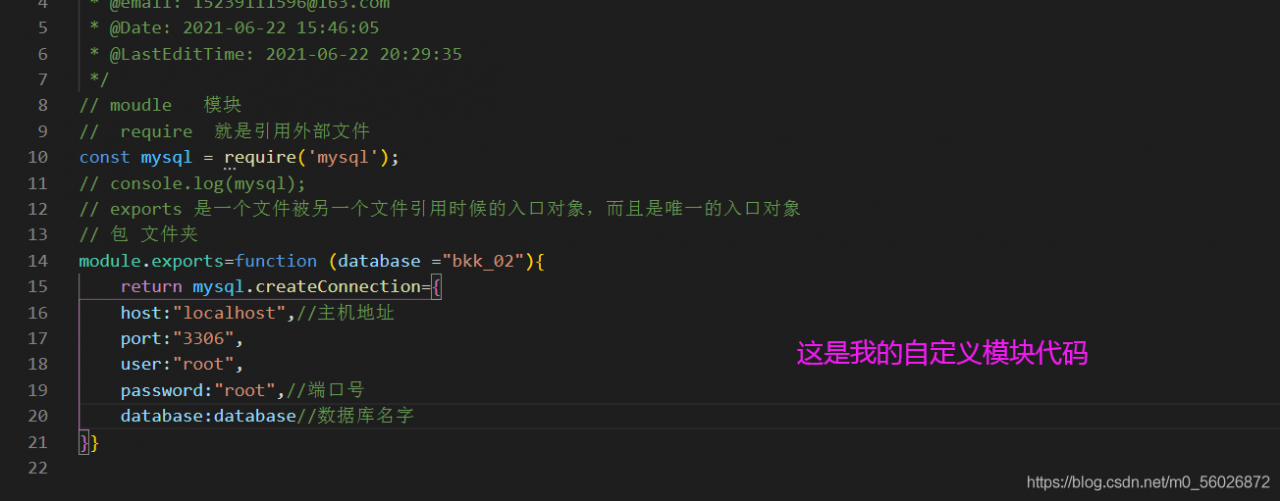
later, I asked my friend to check the custom module
PS: after staring at it for more than ten minutes, I didn’t find the error. At this moment, I felt like a mentally retarded person

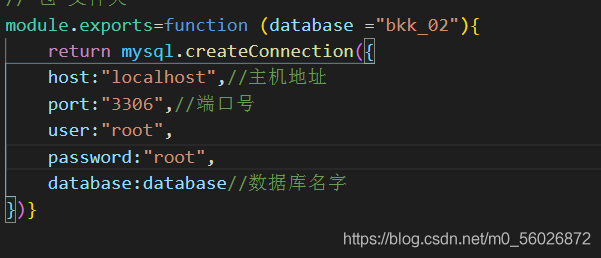
later, I had to check one by one, I found that my mistake was to write the return value of the function as an object….. Verification complete….. Retarded stone hammer…..

Change it to the following way

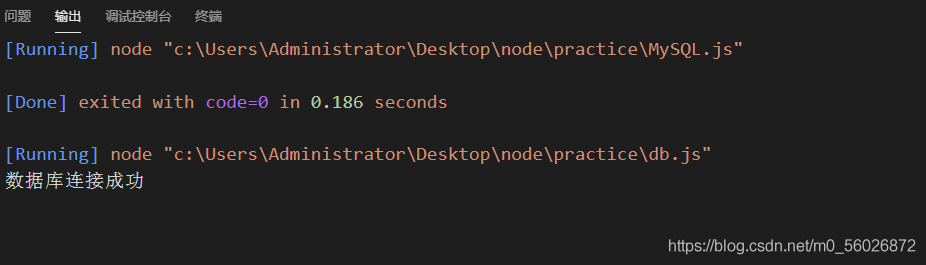
rerun

Quickly convert map to ordered array

    take out the key of map and put it into a slice s to sort and traverse, V: = range s, take the value: map [v] from the map and put it in the array in turn 0

    var err error
    msgs = make([]*configModel.SysMailMsg, len(cacheMap))
    keys := make([]int, len(cacheMap))
    
    i := 0
    for k, _ := range cacheMap {
       if keys[i], err = strconv.Atoi(k); err != nil {
          return nil, err
       }
       i++
    }
    sort.Ints(keys)
    mi := 0
    for _, v := range keys {
       var tmp configModel.SysMailMsg
       json.UnmarshalFromString(cacheMap[strconv.Itoa(v)], &tmp)
       msgs[mi] = &tmp
       mi++
    }

Error in installing torch vision or pilot on Linux or Jetson nano: the headers or library files could not be found for JPEG

1 error analysis

When I install torch vision on Jetson nano, I report an error (torch vision depends on the pilot Library): the headers or library files could not be found for JPEG, , and the error reason is that pilot needs JPEG dependency in the process of installing from source code

writing src/Pillow.egg-info/PKG-INFO
writing dependency_links to src/Pillow.egg-info/dependency_links.txt
writing top-level names to src/Pillow.egg-info/top_level.txt
reading manifest file 'src/Pillow.egg-info/SOURCES.txt'
reading manifest template 'MANIFEST.in'
warning: no files found matching '*.c'
warning: no files found matching '*.h'
warning: no files found matching '*.sh'
warning: no previously-included files found matching '.appveyor.yml'
warning: no previously-included files found matching '.coveragerc'
warning: no previously-included files found matching '.editorconfig'
warning: no previously-included files found matching '.readthedocs.yml'
warning: no previously-included files found matching 'codecov.yml'
warning: no previously-included files matching '.git*' found anywhere in distribution
warning: no previously-included files matching '*.pyc' found anywhere in distribution
warning: no previously-included files matching '*.so' found anywhere in distribution
no previously-included directories found matching '.ci'
writing manifest file 'src/Pillow.egg-info/SOURCES.txt'
running build_ext


The headers or library files could not be found for jpeg,
a required dependency when compiling Pillow from source.

2 error resolution

To install pilot, you need to rely on the source code: JPEG JPEG

sudo apt-get install libjpeg-dev zlib1g-dev

The @ Autowired annotation in springboot is invalid in ordinary classes. How to solve and use the null pointer exception java.lang.nullpointerexception

Code directly

1. To create a serviceutils tool class, annotate it with @ Autowired

package com.deao.app.socket.netty.server.service.impl;

import com.deao.app.socket.netty.server.service.MessageService;
import com.deao.app.socket.netty.server.service.SocketGasExamArrangeManageService;
import org.springframework.beans.factory.annotation.Autowired;
import org.springframework.stereotype.Component;

import javax.annotation.PostConstruct;

@Component
public class ServiceUtils {
    @Autowired
    public SocketGasExamArrangeManageService socketGasExamArrangeManageService;
    @Autowired
    public MessageService messageService;
    public static ServiceUtils serviceUtils;

    @PostConstruct
    public void init() {
        serviceUtils = this;
    }

}

Used elsewhere

    public static void main(String[] args) {
        serviceUtils.socketGasExamArrangeManageService.selectGasExamArrangeManageByStudentId(studentId);
        serviceUtils.messageService.message(null, request, account, null, true);
    }


Error handling after mybatis custom paging plug-in

error message

Exception in thread "main" org.apache.ibatis.exceptions.PersistenceException: 
### Error opening session.  Cause: org.apache.ibatis.plugin.PluginException: Could not find method on interface org.apache.ibatis.executor.statement.StatementHandler named prepare. Cause: java.lang.NoSuchMethodException: org.apache.ibatis.executor.statement.StatementHandler.prepare(java.sql.Connection)
### Cause: org.apache.ibatis.plugin.PluginException: Could not find method on interface org.apache.ibatis.executor.statement.StatementHandler named prepare. Cause: java.lang.NoSuchMethodException: org.apache.ibatis.executor.statement.StatementHandler.prepare(java.sql.Connection)
at org.apache.ibatis.exceptions.ExceptionFactory.wrapException(ExceptionFactory.java:30)
at org.apache.ibatis.session.defaults.DefaultSqlSessionFactory.openSessionFromDataSource(DefaultSqlSessionFactory.java:100)

In fact, carefully read the error prompts, trace to the source code to see the reason, because the use of a relatively new or the latest mybatis   Jar package, and my interceptor code is written in an old way. In the new mybatis jar package, the prepare method in statementhandler has two parameters, as follows: statement   prepare(Connection   connection,   Integer   Transaction timeout), but there is only one parameter in my interceptor code, so I can’t get it. The solution is to add an integer. Class parameter to the rules of pagination interceptor. As follows:

@Intercepts({@Signature(type=StatementHandler.class,method="prepare",args={Connection.class, Integer.class })})


When executing shell script, $’r ‘: command not found appears

This kind of problem often occurs when using different systems or machines to write or modify scripts. The inconsistency of newline characters leads to this problem

Solution:
remove training sed -i 's/\r$//' filename

Explanation:
Option -i is for in-place editing, we delete the trailing \r directly in the input file. Thus be careful to type the pattern correctly.

scalac: Token not found: C:\Users\User\AppData\Local\JetBrains\IntelliJIdea2020.3\compile-server\to

Record an error in idea Scala project:

Error message:

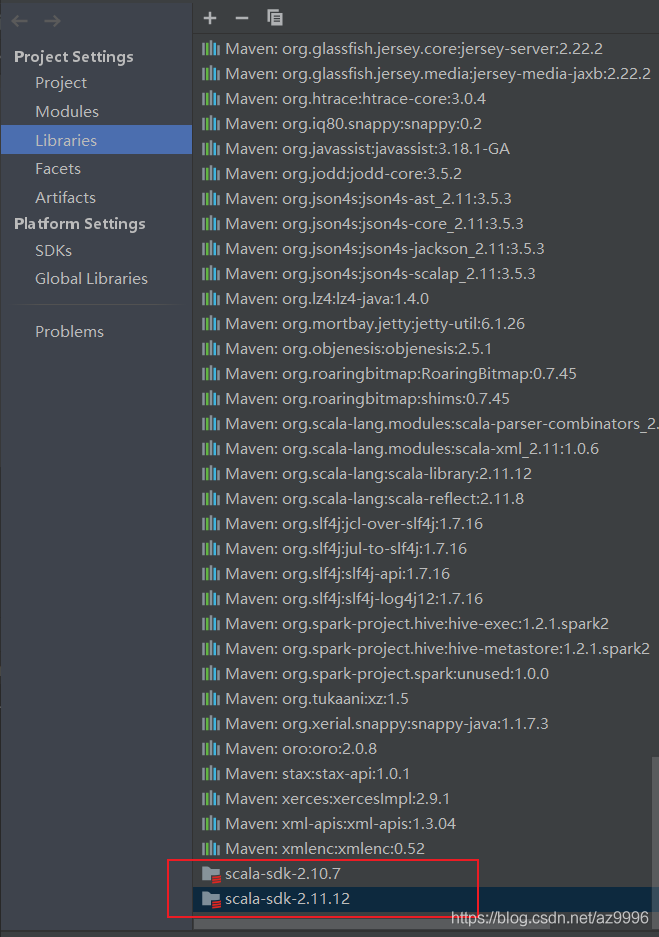
scalac: Token not found: C:\Users\User\AppData\Local\JetBrains\IntelliJIdea2020.3\compile-server\to

resolvent:

After deleting the scala SDK in Libraries under project structure, close idea, re open it, check the version of scala in pom.xml file, and re import the scala SDK

seaborn.load_ Data set error urlerror: < urlopen error [winerror 10060] the connection attempt failed because the connecting party did not reply correctly after a period of time or the connected host did not respond

In case of urlerror: & lt; Urlopen error [winerror 10060] the connection attempt failed because the connecting party did not reply correctly after a period of time or the connected host did not respond& gt; Before this problem, you may encounter this error: urllib. Error. Urlerror: & lt; urlopen error [Errno 11004] getaddrinfo failed>, The solutions are as follows:

 
one   urllib.error.URLError: < urlopen error [Errno 11004] getaddrinfo failed>

Method 1: modify the DNS address https://blog.csdn.net/qq_ 43474959/article/details/107902588

Method 2: if you still can’t get it, you can directly download the data set to the Seaborn data file directory. Generally, the address of Seaborn data is in the C: (users) directory, and the download address of Seaborn data set is: https://codechina.csdn.net/mirrors/mwaskom/seaborn-data?utm_ source=csdn_ github_ accelerator

 
2. URLError: < Urlopen error [winerror 10060] the connection attempt failed because the connecting party did not reply correctly after a period of time or the connected host did not respond& gt;

After solving the first problem, continue to run. You may encounter new errors. The solutions are as follows:

Step 1: make sure that the downloaded data set is stored in the Seaborn data folder. Note that this folder is generated automatically and should be brought with the Seaborn library when it is installed. The general path is C: (users) \ \ (user name) \ \ Seaborn data

Step 2: check the storage format of the downloaded library. My initial file format was. Data, which led to an error. It is recommended to change the suffix to. CSV, and then run it again